



参考文章:http://www.devx.com/dotnet/Article/17829/0/page/1#codeitemarea
XML文档:
<?xml version="1.0" encoding="utf-8"?>
<addressbook>
<contacts id="Contacts">
<contact id="Alex">
<email id="popmail"> someone@some_pop_mail.net
</email>
<country>United Kingdom</country>
</contact>
<contact id="Rebekah">
<email id="webmail"> someone@some_web_mail.net
</email>
<city>Papakura</city>
<country>New Zealand</country>
</contact>
<contact id="Justin">
<email id="webmail"> someone_else@some_web_mail.com
</email>
<city>Muriwai</city>
<country>New Zealand</country>
</contact>
</contacts>
</addressbook>
1. 为TreeView控件提供分级数据源的方法
通过递归的方式去分级显示xml文档中的节点
private void populateTreeControl(System.Xml.XmlNode document, System.Windows.Forms.TreeNodeCollection nodes)
{
foreach (System.Xml.XmlNode node in document.ChildNodes)
{
string text = (node.Value != null ? node.Value : (node.Attributes != null && node.Attributes.Count > 0) ? node.Attributes[0].Value : node.Name);
TreeNode new_child = new TreeNode(text);
nodes.Add(new_child);
populateTreeControl(node, new_child.Nodes); //这里的node是xml根结点的孩子,new_child.Nodes为刚才treeview添加的第一层结点
}
}
private void Form1_Load(object sender, EventArgs e)
{
XmlDocument xd = new XmlDocument();
xd.Load("e:\\test.xml");
XmlNode xmlRootNode = xd.DocumentElement; //root
populateTreeControl(xmlRootNode, this.treeView1.Nodes);
}
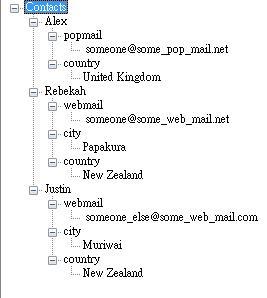
显示结果如下:
XML文档:
<?xml version="1.0" encoding="utf-8"?>
<addressbook>
<contacts id="Contacts">
<contact id="Alex">
<email id="popmail"> someone@some_pop_mail.net
</email>
<country>United Kingdom</country>
</contact>
<contact id="Rebekah">
<email id="webmail"> someone@some_web_mail.net
</email>
<city>Papakura</city>
<country>New Zealand</country>
</contact>
<contact id="Justin">
<email id="webmail"> someone_else@some_web_mail.com
</email>
<city>Muriwai</city>
<country>New Zealand</country>
</contact>
</contacts>
</addressbook>
1. 为TreeView控件提供分级数据源的方法
通过递归的方式去分级显示xml文档中的节点
private void populateTreeControl(System.Xml.XmlNode document, System.Windows.Forms.TreeNodeCollection nodes)
{
foreach (System.Xml.XmlNode node in document.ChildNodes)
{
string text = (node.Value != null ? node.Value : (node.Attributes != null && node.Attributes.Count > 0) ? node.Attributes[0].Value : node.Name);
TreeNode new_child = new TreeNode(text);
nodes.Add(new_child);
populateTreeControl(node, new_child.Nodes); //这里的node是xml根结点的孩子,new_child.Nodes为刚才treeview添加的第一层结点
}
}
private void Form1_Load(object sender, EventArgs e)
{
XmlDocument xd = new XmlDocument();
xd.Load("e:\\test.xml");
XmlNode xmlRootNode = xd.DocumentElement; //root
populateTreeControl(xmlRootNode, this.treeView1.Nodes);
}
显示结果如下:
2. 过滤一些xml数据,在treeview中显示
private void populateTreeControl(System.Xml.XmlNode document, System.Windows.Forms.TreeNodeCollection nodes)
{
foreach (System.Xml.XmlNode node in document.ChildNodes)
{
XmlNode expr = node.SelectSingleNode(xpath_filter);
if (expr != null)
{
TreeNode new_child = new TreeNode(expr.Value);
nodes.Add(new_child);
populateTreeControl(node, new_child.Nodes);
}
}
}
过滤条件:private string xpath_filter = "@id[parent::contacts or parent::contact]"; 或者 private string xpath_filter = "@attribute::id[not(parent::email or parent::city or parent::country)]"
3. 拖拽那部分完全看晕了,到现在没明白什么意思,主要不明白对treeview结点的拖拽和对xml文件的变化有什么一致吗。决定到写程序的时候根据实际情况再说。
4. 添加删除那部分比较好写,以前已经写过。
private void populateTreeControl(System.Xml.XmlNode document, System.Windows.Forms.TreeNodeCollection nodes)
{
foreach (System.Xml.XmlNode node in document.ChildNodes)
{
XmlNode expr = node.SelectSingleNode(xpath_filter);
{
TreeNode new_child = new TreeNode(expr.Value
nodes.Add(new_child);
populateTreeControl(node, new_child.Nodes);
}
}
}
过滤条件:private string xpath_filter = "@id[parent::contacts or parent::contact]"; 或者 private string xpath_filter = "@attribute::id[not(parent::email or parent::city or parent::country)]"
3. 拖拽那部分完全看晕了,到现在没明白什么意思,主要不明白对treeview结点的拖拽和对xml文件的变化有什么一致吗。决定到写程序的时候根据实际情况再说。
4. 添加删除那部分比较好写,以前已经写过。

 浙公网安备 33010602011771号