
netmiko运维网络设备
netmiko自动化配置网络设备
一、环境搭建
1.1 安装Python
Linux下自带python环境,但是Linux自带的python一般是比较老的版本,我们可以通过命令来查看Linux中python的版本
[root@localhost ~]# python --version
Python 2.7.5
建议大家在保留python2的基础上安装一个python3,因为python2和python3还是有一些区别的,同时安装python2和python3的环境,以便不时之需或者对比学习。
链接:https://www.python.org/downloads/source/
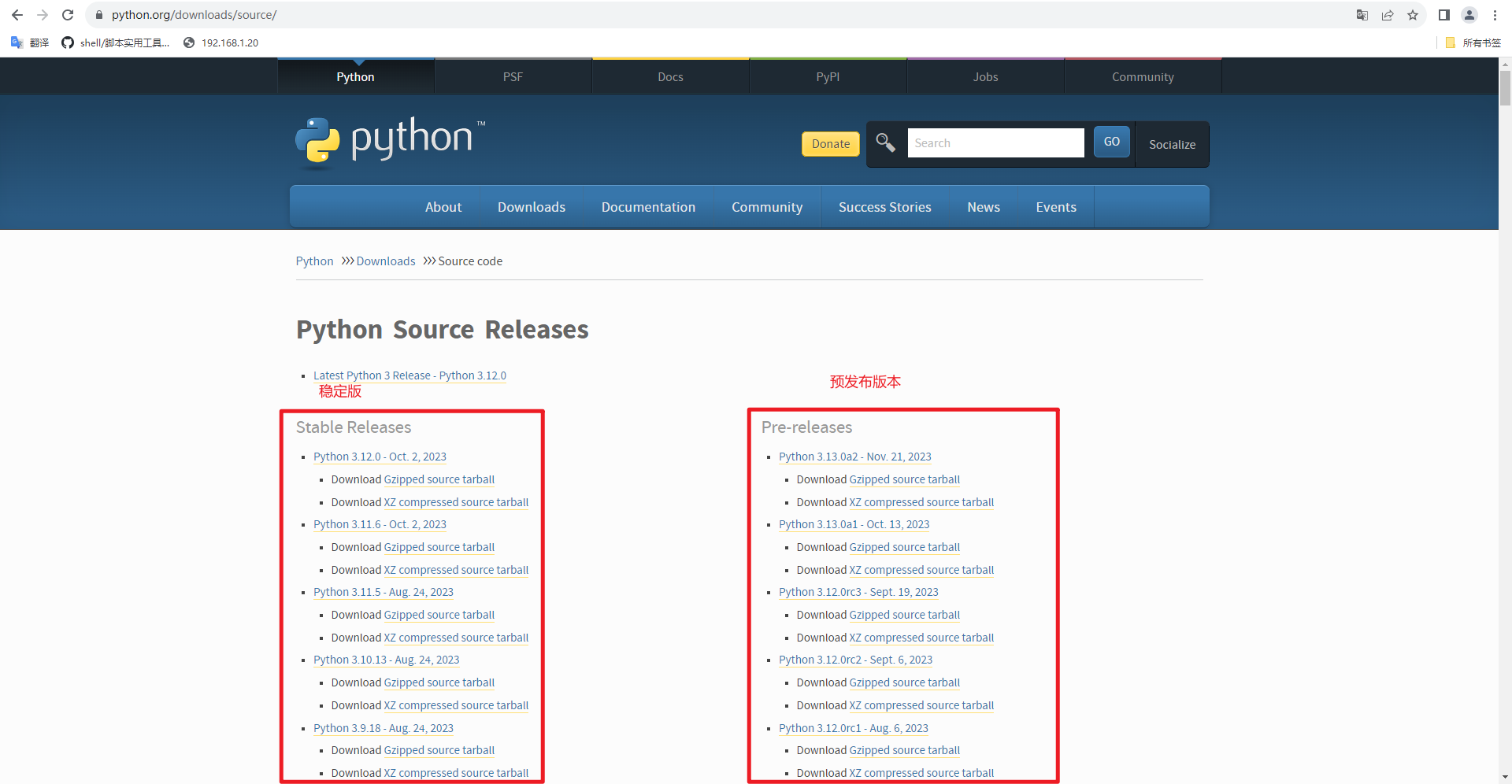
1.2 安装python3
3.1首先解压源码包
tar -zxvf Python-3.10.13.tgz
3.2安装依赖包
yum -y install zlib-devel bzip2-devel openssl-devel ncurses-devel sqlite-devel readline-devel tk-devel gcc make libffi-devel
3.3进入解压路径执行编译三部曲
cd Python-3.10.13
./configure --prefix=安装路径
make
make install
1.3 安装依赖模块netmiko
[root@backup backup]# pip3 install --trusted-host mirrors.huaweicloud.com -i https://mirrors.huaweicloud.com/repository/pypi/simple netmiko
[root@backup backup]# pip freeze | grep netmiko  #查看是否安装成功,如果是windows就是pip freeze | findstr netmiko
二、VRP配置自动存档
2.1 环境准备
配置脚本以及备份存档路径
[root@backup ~]# mkdir -p /backup/{script,data}
2.2 备份设备列表
准备号需要备份的设备,将设备ssh登录的ip、用户名、密码罗列准备再设备列表当中。
[root@backup ~]# cd /backup/script/
[root@backup script]# cat devices.txt
IP地址    用户名    密码
192.168.10.1    user1    passwd1
192.168.20.1    user2    passwd2
192.168.30.1    user3    passwd3
192.168.40.1    user4    passwd4
2.3 编写备份脚本
编写备份脚本,脚本会自动登录设备执行display current-configuration查看设备配置,添加到备份温江当中。
[root@backup script]# cat HuaWeiVRP_backup.py
#!/usr/bin/env python3
# -*- coding: utf-8 -*-

import os
import argparse
import time
from datetime import datetime
from netmiko import ConnectHandler

def load_devices_from_txt(file_path):
    """
    从文本文件中读取设备信息(字段以空格或 Tab 分隔):
       IP地址    用户名    密码
    空行及以 "#" 开头的行会被自动跳过。
    """
    devices = []
    try:
        with open(file_path, "r", encoding="utf-8") as f:
            for line in f:
                line = line.strip()
                if not line or line.startswith("#"):
                    continue
                parts = line.split()
                if len(parts) != 3:
                    print(f"格式错误,跳过该行:{line}")
                    continue
                device = {
                    "device_type": "huawei",  # 默认设备类型为华为
                    "ip": parts[0].strip(),
                    "username": parts[1].strip(),
                    "password": parts[2].strip()
                }
                devices.append(device)
    except Exception as e:
        print(f"加载设备列表文件失败:{e}")
    return devices

def backup_configuration(dev, backup_path):
    """
    针对单台华为设备进行配置备份:
      1. 连接设备;
      2. 执行 "display current-configuration" 命令获取配置;
      3. 将配置保存到备份目录中,生成的文件名格式为:[IP]_backup_[时间戳].txt
    """
    try:
        print(f"正在连接到设备 {dev['ip']} ...")
        net_connect = ConnectHandler(**dev,  conn_timeout=20)
    except Exception as e:
        print(f"连接 {dev['ip']} 失败: {e}")
        return

    config_command = "display current-configuration"
    try:
        print(f"[{dev['ip']}] 正在执行命令:{config_command}")
        config_output = net_connect.send_command(config_command)
    except Exception as e:
        print(f"[{dev['ip']}] 获取配置失败: {e}")
        net_connect.disconnect()
        return

    timestamp = datetime.now().strftime("%Y%m%d_%H%M%S")
    filename = os.path.join(backup_path, f"{dev['ip']}_backup_{timestamp}.txt")
    try:
        with open(filename, "w", encoding="utf-8") as f:
            f.write(config_output)
        print(f"[{dev['ip']}] 配置备份已保存到:{filename}")
    except Exception as e:
        print(f"[{dev['ip']}] 保存备份文件失败: {e}")

    net_connect.disconnect()
    print(f"[{dev['ip']}] 设备连接已关闭。\n")

def cleanup_old_backups(backup_path, retention_days=7):
    """
    清理备份目录内超过 retention_days 天的备份文件
    """
    now = time.time()
    retention_seconds = retention_days * 24 * 3600
    try:
        for fname in os.listdir(backup_path):
            file_path = os.path.join(backup_path, fname)
            if os.path.isfile(file_path):
                file_mtime = os.path.getmtime(file_path)
                if (now - file_mtime) > retention_seconds:
                    os.remove(file_path)
                    print(f"删除超过 {retention_days} 天的备份文件:{file_path}")
    except Exception as e:
        print(f"清理备份文件时出错:{e}")

def main():
    parser = argparse.ArgumentParser(
        description="备份华为设备配置(设备文件格式:IP 用户名 密码),每天执行一次,并保留最近7天的数据"
    )
    parser.add_argument("--backup-path", default="backup", help="备份文件存放目录(默认为 backup)")
    parser.add_argument("--devices-file", default="devices.txt", help="设备信息文本文件路径(默认为 devices.txt)")
    parser.add_argument("--retention-days", type=int, default=7, help="保留备份的天数(默认为 7 天)")
    args = parser.parse_args()

    # 确保备份目录存在
    if not os.path.exists(args.backup_path):
        os.makedirs(args.backup_path)
        print(f"创建备份目录:{args.backup_path}")

    devices = load_devices_from_txt(args.devices_file)
    if not devices:
        print("未加载到任何设备信息,请检查设备文件格式。")
        return

    for dev in devices:
        backup_configuration(dev, args.backup_path)

    cleanup_old_backups(args.backup_path, args.retention_days)

if __name__ == "__main__":
    main()
执行测试
注意运行之前修改devices.txt当中的设备登录信息。
[root@backup script]# python3 /backup/script/HuaWeiVRP_backup.py --backup-path /backup/data/ --devices-file /backup/script/devices.txt

2.4 结合crontab实现每天存档
加入定时任务每天2点执行:
[root@backup data]# chmod +x /backup/script/HuaWeiVRP_backup.py
[root@backup data]# whereis python3
python3: /usr/local/bin/python3.9 /usr/local/bin/python3.9-config /usr/local/bin/python3 /usr/local/lib/python3.9
[root@backup script]# crontab -l
0 2 * * * /usr/local/bin/python3 /backup/script/HuaWeiVRP_backup.py --backup-path /backup/data/ --retention-days 30 --devices-file /backup/script/devices.txt >> /backup/script/backup.log 2>&1
注:--retention-days 30 是存档30天的意思。
ok!!!
这里把备份cisio的脚本也给出,同样的使用方法。
[root@kvm script]# cat cisio_backup.py
#!/usr/bin/env python3
# -*- coding: utf-8 -*-

import os
import argparse
import time
from datetime import datetime
from netmiko import ConnectHandler

def load_devices(file_path):
    """
    从文本文件中加载设备信息,每一行的格式为:
       IP地址    用户名    密码
    空行或以 "#" 开头的行会被跳过。
    """
    devices = []
    try:
        with open(file_path, "r", encoding="utf-8") as f:
            for line in f:
                line = line.strip()
                if not line or line.startswith("#"):
                    continue
                parts = line.split()
                if len(parts) != 3:
                    print(f"格式错误,跳过该行:{line}")
                    continue
                device = {
                    "device_type": "cisco_ios",
                    "ip": parts[0].strip(),
                    "username": parts[1].strip(),
                    "password": parts[2].strip()
                }
                devices.append(device)
    except Exception as e:
        print(f"加载设备文件失败:{e}")
    return devices

def backup_device(dev, backup_path):
    """
    针对单台 Cisco 设备进行配置备份:
      1. 连接设备;
      2. 执行 "show running-config" 命令获取配置;
      3. 将配置保存到备份目录,文件名格式为:[IP]_backup_[时间戳].txt
    """
    try:
        print(f"正在连接到设备 {dev['ip']} ...")
        net_connect = ConnectHandler(**dev, conn_timeout=20)
    except Exception as e:
        print(f"连接 {dev['ip']} 失败: {e}")
        return

    config_command = "show running-config"
    try:
        print(f"[{dev['ip']}] 正在执行命令:{config_command}")
        config_output = net_connect.send_command(config_command)
    except Exception as e:
        print(f"[{dev['ip']}] 获取配置失败: {e}")
        net_connect.disconnect()
        return

    timestamp = datetime.now().strftime("%Y%m%d_%H%M%S")
    filename = os.path.join(backup_path, f"{dev['ip']}_backup_{timestamp}.txt")
    try:
        with open(filename, "w", encoding="utf-8") as f:
            f.write(config_output)
        print(f"[{dev['ip']}] 配置备份已保存到:{filename}")
    except Exception as e:
        print(f"[{dev['ip']}] 保存备份文件失败: {e}")

    net_connect.disconnect()
    print(f"[{dev['ip']}] 设备连接已关闭。\n")

def cleanup_backups(backup_path, retention_days):
    """
    清理备份目录中超过指定保留天数的备份文件
    """
    now = time.time()
    retention_seconds = retention_days * 24 * 3600
    try:
        for fname in os.listdir(backup_path):
            file_path = os.path.join(backup_path, fname)
            if os.path.isfile(file_path):
                file_mtime = os.path.getmtime(file_path)
                if (now - file_mtime) > retention_seconds:
                    os.remove(file_path)
                    print(f"删除超过 {retention_days} 天的备份文件:{file_path}")
    except Exception as e:
        print(f"清理备份文件时出错:{e}")

def main():
    parser = argparse.ArgumentParser(
        description="备份 Cisco 设备配置,每天执行一次,并保留指定天数的备份文件"
    )
    parser.add_argument("--backup-path", default="backup", help="备份文件存放目录(默认为 backup)")
    parser.add_argument("--devices-file", default="devices.txt", help="设备信息文件路径(默认为 devices.txt)")
    parser.add_argument("--retention-days", type=int, default=7, help="保留备份的天数(默认为 7 天)")
    args = parser.parse_args()

    if not os.path.exists(args.backup_path):
        os.makedirs(args.backup_path)
        print(f"创建备份目录:{args.backup-path}")

    devices = load_devices(args.devices_file)
    if not devices:
        print("未加载到任何设备信息,请检查设备文件格式。")
        return

    for dev in devices:
        backup_device(dev, args.backup_path)

    cleanup_backups(args.backup_path, args.retention_days)

if __name__ == "__main__":
    main()

 浙公网安备 33010602011771号