PHP-GD库开发手记
创建带有alpha通道的背景
$png = imagecreatetruecolor(800, 600);imagesavealpha($png, true);$trans_colour = imagecolorallocatealpha($png, 0, 0, 0, 127);imagefill($png, 0, 0, $trans_colour);
输出图像
根据不同的图片格式,选择不同的函数
header("Content-type: image/png");imagepng($img);imagedestroy($img);
画中文字体
用ttftext函数即可,如果不是UTF8的编码,记得用iconv函数转码一次
imagettftext ( $img, 20, 0, 0, 20, imagecolorallocate ( $img, 255, 255, 255 ),'g:/msyhbd.ttf', '啊啊啊啊啊啊啊啊啊啊啊啊啊');
获取长宽
imagesx($tx);imagesy($tx);
等比例缩放图片,也可以用于裁切
$tx=imagecreatefromjpeg("G:/test.jpg" );$scaletx=imagecreatetruecolor(450, 450);//意思表示将tx图片的从0,0坐标长sx,宽sy的区域,重新采样改变大小复制到stx的0,0坐标,长宽为450的区域。imagecopyresampled($scaletx, $tx, 0, 0, 0, 0, 450, 450, imagesx($tx), imagesy($tx));
private function resizeImage($src, $dest, $thumbWidth){ini_set('memory_limit', '2048M');if (!file_exists($src)) {return;}$image = imagecreatefrompng($src);$srcWidth = imagesx($image); // 原始宽高$srcHeight = imagesy($image);$thumbHeight = ($srcHeight / $srcWidth) * $thumbWidth; // 处理后的高imagesavealpha($image, true);//这里很重要;$new = imagecreatetruecolor($thumbWidth, $thumbHeight);imagealphablending($new, false);//这里很重要,意思是不合并颜色,直接用$img图像颜色替换,包括透明色;imagesavealpha($new, true);//这里很重要,意思是不要丢了$thumb图像的透明色;imagecopyresampled($new, $image, 0, 0, 0, 0, $thumbWidth, $thumbHeight, $srcWidth, $srcHeight);imagepng($new, $dest);imagedestroy($new);}
实例代码
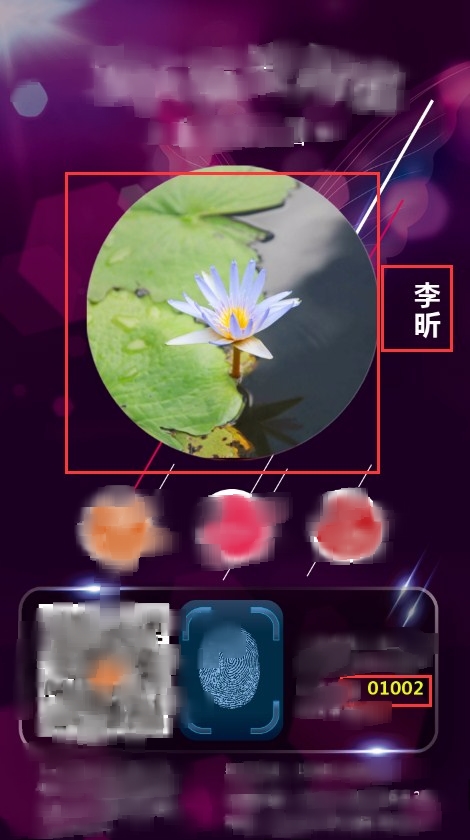
$img = imagecreatetruecolor ( 720, 1280 );imagesavealpha ( $img, true );//保留通道,不然不透明$trans_colour = imagecolorallocatealpha ( $img, 33, 0, 0, 33 );imagefill ( $img, 0, 0, $trans_colour );$tx = imagecreatefromjpeg ( "G:/Lotus.jpg" );// 设置头像居中$width = 450;$height = 450;$w = imagesx ( $tx );$h = imagesy ( $tx );// 原图尺寸小于缩略图尺寸则不进行缩略if ($w > $width || $h > $height) {// 计算缩放比例,选择优先让小的边放大到指定等比宽度,大的边随意,为了充满屏幕$scale = max ( $width / $w, $height / $h );$width = $w * $scale;$height = $h * $scale;}//缩放$scaletx = imagecreatetruecolor ( $width, $height );imagecopyresampled ( $scaletx, $tx, 0, 0, 0, 0, $width, $height, $w, $h );// 计算居中位置$cx = (720 - $width) / 2;$cy = (1280 - $height) / 2 - 170;//覆盖imagecopy ( $img, $scaletx, $cx, $cy, 0, 0, $width, $height );$bg = imagecreatefrompng ( "G:/test.png" );imagesavealpha ( $bg, true );imagecopy ( $img, $bg, 0, 0, 0, 0, imagesx ( $bg ), imagesy ( $bg ) );// 写名字$name = '李昕';$name_len = mb_strlen ( $name, 'utf8' );// 计算名字长度$name_y =510-(45*$name_len/2);//居中for($i = 0; $i < $name_len; $i ++) {imagettftext ( $img, 30, 0, 630, $name_y, imagecolorallocate ( $img, 255, 255, 255 ), 'msyhbd.ttf', mb_substr ( $name, $i, 1,'utf-8' ));$name_y += 45;}//写编号$vcode='01002';imagettftext ( $img, 20, 0, 560, 1050, imagecolorallocate ( $img, 232, 255, 0 ), 'msyhbd.ttf', $vcode);header ( "content-type: image/jpg" );imagejpeg ( $img, null, 100 );
我不怕千万人阻挡,只怕自己投降。

 浙公网安备 33010602011771号