
java多线程进阶JUC
java多线程进阶JUC
JUC指的就是java.util.concurrent这个包,用于多线程开发
ReentrantLock:用来替代Synchronized
同一个时间只能有一个线程访问临界区,无论读写
用来替代synchroized关键字,使用方法
- 创建一个ReentrantLock变量
reentrantLock - 然后在需要同步的代码段上下加上
reentrantLock.lock()和reentrantLock.unlock()
package kehao.thread.juc.lock;
/*
* 用来代替synchronized
* */

import java.lang.reflect.Array;
import java.util.ArrayList;
import java.util.concurrent.locks.Lock;
import java.util.concurrent.locks.ReentrantLock;

public class ReentrantLockTest{
    private int count = 0;
    private final Lock lock = new ReentrantLock();

    public void funWithoutSync(){
        for (int i = 0; i < 10000; i++) {
            count = count + 1;
            count = count - 1;
        }
    }

    public void funSynchronized(){
        synchronized (this) {
            for (int i = 0; i < 10000; i++) {
                count = count + 1;
                count = count - 1;
            }
        }
    }

    public void funReentrantLock(){
        lock.lock();
        for (int i = 0; i < 10000; i++) {
            count = count + 1;
            count = count - 1;
        }
        lock.unlock();
    }


    public int getCount(){
        return count;
    }

    public void setCount(int count){
        this.count = count;
    }

    public static void main(String[] args) throws InterruptedException {
        ReentrantLockTest reentrantLockTest = new ReentrantLockTest();

        //不适用同步
        reentrantLockTest.setCount(0);
        ArrayList<Thread> threads = new ArrayList<>();
        for (int i = 0; i < 5; i++) {
            Thread thread = new Thread(()->{
                reentrantLockTest.funWithoutSync();
            });
            threads.add(thread);
            thread.start();
        }
        for (Thread t:threads) {
            t.join();
        }
        System.out.println("without synchronzied  --->"+reentrantLockTest.getCount());

        //使用synchronized关键字同步
        reentrantLockTest.setCount(0);
        threads.clear();
        for (int i = 0; i < 5; i++) {
            Thread thread = new Thread(()->{
                reentrantLockTest.funSynchronized();
            });
            threads.add(thread);
            thread.start();
        }
        for (Thread t:threads) {
            t.join();
        }
        System.out.println("synchronized   --->"+reentrantLockTest.getCount());

        //使用ReentrantLock进行同步
        reentrantLockTest.setCount(0);
        threads.clear();
        for (int i = 0; i < 5; i++) {
            Thread thread = new Thread(()->{
                reentrantLockTest.funReentrantLock();
            });
            threads.add(thread);
            thread.start();
        }
        for (Thread t:threads) {
            t.join();
        }
        System.out.println("ReentrantLock   --->"+reentrantLockTest.getCount());

    }
}
运行结果:
without synchronzied --->1
synchronized --->0
ReentrantLock --->0
Condition关键字:用来替代wait()和notify()函数
在使用ReentrantLock的时候因为没有synchroized包裹住的锁对象,无法调用wait和notify函数,所以需要用Condition来替代
而且Condition相较于原生的wait和notify函数有天生的优势,是通过阻塞队列实现,而非与系统进行交互,性能更加好
每一个Condition对象相当于是一个阻塞队列,所以就可以针对具体的阻塞队列进行唤醒线程,而避免使用notifyAll(),因为使用notifyAll(),唤醒了该锁对象的所有线程,并不一定是所需要的线程,而且被唤醒的多个线程不一定都能得到锁对象从而进入临界区,所以需要通过循环来不断的判断,一个线程可能会休眠唤醒休眠唤醒多次,才能获得锁对象,导致效率低下
在编码的时候不同类型的线程可以在阻塞的时候放入不同的阻塞队列更易于管理
Condition.await()相当于是添加到阻塞队列
Condition.signal()相当于是阻塞队列第一个元素出队
package kehao.thread.juc.lock;

import java.util.concurrent.locks.Condition;
import java.util.concurrent.locks.Lock;
import java.util.concurrent.locks.ReentrantLock;

class Patient implements Runnable {
    //生病 生病后唤醒医生给病人治病

    public void ill() {
        Hospital.lock.lock();
        Hospital.patientNumber++;
        System.out.println("get cold  --->" + Hospital.patientNumber);
        Hospital.treatCondition.signal();
        Hospital.lock.unlock();
    }

    @Override
    public void run() {
        ill();
    }
}

class Doctor implements Runnable {
    //治疗 如果没有病人就等待 如果有就被唤醒 给人治病
    public void treat() {
        Hospital.lock.lock();
        if (Hospital.patientNumber <= 0) {
            try {
                Hospital.treatCondition.await();
            } catch (InterruptedException e) {
                e.printStackTrace();
            }
        }
        Hospital.patientNumber--;
        System.out.println("drink more hot water  --->" + Hospital.patientNumber);
        Hospital.lock.unlock();
    }

    @Override
    public void run() {
        treat();
    }
}

class Hospital {
    public static int patientNumber = 0;
    public static final Lock lock = new ReentrantLock();
    public static final Condition illCondition = lock.newCondition();//病人阻塞队列
    public static final Condition treatCondition = lock.newCondition();//医生阻塞队列
}


public class ConditionTest {
    public static void main(String[] args) {
        Patient patient = new Patient();
        Doctor doctor = new Doctor();

        for (int i = 0; i < 10; i++) {
            new Thread(doctor).start();
        }

        for (int i = 0; i < 10; i++) {
            new Thread(patient).start();
        }
    }
}
运行结果:
get cold --->1
drink more hot water --->0
get cold --->1
get cold --->2
get cold --->3
drink more hot water --->2
drink more hot water --->1
get cold --->2
get cold --->3
drink more hot water --->2
get cold --->3
drink more hot water --->2
get cold --->3
get cold --->4
drink more hot water --->3
drink more hot water --->2
get cold --->3
drink more hot water --->2
drink more hot water --->1
drink more hot water --->0
ReadWriteLock
可以同时读,但读和写,写和写不能并行,提高了效率
使用方法:
- 获得ReadWriteLock
- 获得readLock
- 获得writeLock
- 在需要写的地方加写锁
- 在需要读的时候加读锁
public class ReadWriteLockTest {
    private final ReadWriteLock readWriteLock = new ReentrantReadWriteLock();
    private final Lock readLock = readWriteLock.readLock();//
    private final Lock writeLock = readWriteLock.writeLock();
    private int count = 0;

    public void add(){
        writeLock.lock();//加写锁
        count = count +1;
        writeLock.unlock();//解写锁
    }

    private int getCount(){
        readLock.lock();//加读锁
        int returnCount = count;
        readLock.unlock();//解读锁
        return returnCount;
    }
}
那么问题来了,既然希望读能够并发,为什么对于读还需要加锁呢?
这是为了让读和写不能并行,如果读不加锁,写的时候就不会在检测时候检测到没有读锁,从而获取完写锁直接就进行修改,导致了读和写同时进入临界区
StampedLock
StampedLock和ReadWriteLock相比,改进之处在于:读的过程中也允许获取写锁后写入!这样一来,我们读的数据就可能不一致,所以,需要一点额外的代码来判断读的过程中是否有写入,这种读锁是一种乐观锁。
//摘自廖雪峰老师Java课程的代码
public class Point {
    private final StampedLock stampedLock = new StampedLock();

    private double x;
    private double y;

    public void move(double deltaX, double deltaY) {
        long stamp = stampedLock.writeLock(); // 获取写锁
        try {
            x += deltaX;
            y += deltaY;
        } finally {
            stampedLock.unlockWrite(stamp); // 释放写锁
        }
    }

    public double distanceFromOrigin() {
        long stamp = stampedLock.tryOptimisticRead(); // 获得一个乐观读锁
        // 注意下面两行代码不是原子操作
        // 假设x,y = (100,200)
        double currentX = x;
        // 此处已读取到x=100,但x,y可能被写线程修改为(300,400)
        double currentY = y;
        // 此处已读取到y,如果没有写入,读取是正确的(100,200)
        // 如果有写入,读取是错误的(100,400)
        if (!stampedLock.validate(stamp)) { // 检查乐观读锁后是否有其他写锁发生
            stamp = stampedLock.readLock(); // 获取一个悲观读锁
            try {
                currentX = x;
                currentY = y;
            } finally {
                stampedLock.unlockRead(stamp); // 释放悲观读锁
            }
        }
        return Math.sqrt(currentX * currentX + currentY * currentY);
    }
}
JDK线程池
不用线程池的时候,使用线程是创建Thread线程对象,然后启动线程
而在使用线程池的时候,不需要获得某一个具体用来的执行的Thread对象,而是直接将Runable对象(或者Callable对象)交给ExecutorService,它会自动获取线程,来完成相应的任务,即使用方法如下:
- 使用Executors对象创建ExecutorService对象
- ExecutorService对象调用submit提交Runnable或者Callable任务
ExecutorService只是接口,Java标准库提供的几个常用实现类有:
ExecutorService的实现类 |
描述 |
|---|---|
| FixedThreadPool | 线程数固定的线程池 |
| CachedThreadPool | 线程数根据任务动态调整的线程池 |
| SingleThreadExecutor | 仅单线程执行的线程池 |
需要注意的是:线程池在程序结束的时候要关闭,否则程序自己不会结束
关闭线程池的方法下面几个:
| 方法名 | 描述 |
|---|---|
shutdown() |
关闭线程池的时候,它会等待正在执行的任务先完成,然后再关闭 |
shutdownNow() |
立刻停止正在执行的任务 |
awaitTermination() |
等待指定的时间让线程池关闭。 |
FixedThreadPool
ExecutorService es = Executors.newFixedThreadPool(4);
for (int i = 0; i < 10; i++) {
    es.submit(()->{
        System.out.println(Thread.currentThread().getName());
    });
}
运行结果
pool-1-thread-1
pool-1-thread-4
pool-1-thread-3
pool-1-thread-4
pool-1-thread-2
pool-1-thread-1
pool-1-thread-2
pool-1-thread-1
pool-1-thread-2
pool-1-thread-3
CachedThreadPool
ExecutorService es = Executors.newCachedThreadPool();
for (int i = 0; i < 10; i++) {
    es.submit(()->{
        System.out.println(Thread.currentThread().getName());
    });
}
运行结果:
pool-1-thread-1
pool-1-thread-5
pool-1-thread-4
pool-1-thread-3
pool-1-thread-2
pool-1-thread-8
pool-1-thread-7
pool-1-thread-6
pool-1-thread-9
pool-1-thread-5
如果想要设定线程池的大小范围,则
int min = 4;
int max = 10;
ExecutorService es = new ThreadPoolExecutor(min, max,60L, TimeUnit.SECONDS, new SynchronousQueue<Runnable>());
ScheduledThreadPool
用于定期反复执行,比如动画一秒钟24次,那么每1/24秒就要执行一次切换画面的任务
使用方法:
-
创建ScheduledExecutorService对象
-
提交任务
提交任务的函数有下面三个
-
public ScheduledFuture<?> schedule(Runnable command,long delay, TimeUnit unit)定时执行任务,只执行一次
Runnable command : 要执行的线程的内容
long delay : 延迟的时间
TimeUnit unit : 时间单位
-
public ScheduledFuture<?> scheduleAtFixedRate(Runnable command,long initialDelay,long period,TimeUnit unit)任务以固定的间隔执行
Runnable command : 要执行的线程的内容
long initialDelay : 第一次延迟的时间
long period : 间隔时间
TimeUnit unit : 时间单位
-
public ScheduledFuture<?> scheduleWithFixedDelay(Runnable command,long initialDelay,long delay,TimeUnit unit)任务间以固定的间隔执行
Runnable command :要执行的线程的内容
long initialDelay :第一次延迟的时间
long delay :间隔时间
TimeUnit unit :时间单位
-
FixedRate和FixedDelay的区别:
FixedRate是指任务总是以固定时间间隔触发,不管任务执行多长时间
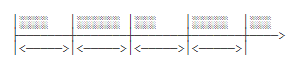
FixedDelay是指,上一次任务执行完毕后,等待固定的时间间隔,再执行下一次任务:

有返回值的线程
Future
Future<V>接口表示一个未来可能会返回的结果,它定义的方法有:
get():获取结果(可能会等待)get(long timeout, TimeUnit unit):获取结果,但只等待指定的时间;cancel(boolean mayInterruptIfRunning):取消当前任务;isDone():判断任务是否已完成。
ExecutorService.submit()方法如果传入Callable对象,那么就可以返回一个Future对象,再调用一个get()方法就可以得到相应的结果,单说get()方法会导致阻塞,所以如果不想阻塞,只能通过isDone()去判断
ExecutorService es = Executors.newFixedThreadPool(5);
Future<String> futureString = es.submit(() -> {
    Thread.sleep(3000);
    return "hello";
});
System.out.println(futureString.get());//会阻塞到相应的线程执行完毕
es.shutdown();
CompletableFuture
它就是用来解决Future方法的要么阻塞,要么轮询判断的问题
因为是为了对这个线程的结果进行处理,原先的方式都是判断是否有结果了,或者直接等待到结果返回
这样效率非常的低
CompletableFuture的解决方案是直接给一个回调函数,线程执行完了让它自己去调用,而不需要主线程去处理了
//设置线程任务
CompletableFuture<String> scf = CompletableFuture.supplyAsync(() -> {
    return "hello";
});
//设置成功返回的结果
scf.thenAccept((result)->{
    System.out.println(result);
});
//设置异常的情况的处理
scf.exceptionally((e)->{
    e.printStackTrace();
    return null;
});
运行结果:
hello
CompletableFuture还支持同一个线程串行操作
使用thenApplyAsync函数,传入回调函数,回调函数的参数是之前的任务返回的结果
CompletableFuture<String> scf = CompletableFuture.supplyAsync(() -> {
    return "hello";
});
scf = scf.thenApplyAsync((str)->{
    return str+" CompletableFuture";
});
//设置成功返回的结果
scf.thenAccept((result)->{
    System.out.println(result);
});
//设置异常的情况的处理
scf.exceptionally((e)->{
    e.printStackTrace();
    return null;
});
运行结果
hello CompletableFuture
但是,如果这段代码
scf = scf.thenApplyAsync((str)->{
    return str+" CompletableFuture";
});
不给scf重新赋值,结果依然是hello
也就是
CompletableFuture<String> scf = CompletableFuture.supplyAsync(() -> {
    return "hello";
});
scf.thenApplyAsync((str)->{
    return str+" CompletableFuture";
});
//设置成功返回的结果
scf.thenAccept((result)->{
    System.out.println(result);
});
//设置异常的情况的处理
scf.exceptionally((e)->{
    e.printStackTrace();
    return null;
});
运行结果:
hello
这是因为
scf.thenApplyAsync((str)->{
    return str+" CompletableFuture";
});
这个函数的返回结果是另外一个对象,thenAccept是给原先的那个对象设置的,所以新的对象执行完相关的函数之后是没有回调函数的
CompletableFuture还支持多个线程并行操作
使用anyOf函数,将多个CompletableFuture对象合成一个
可以实现“任意个CompletableFuture只要一个成功”
//设置线程任务
CompletableFuture<String> scfHello = CompletableFuture.supplyAsync(() -> {
    try {
        Thread.sleep(1000);
    } catch (InterruptedException e) {
        e.printStackTrace();
    }
    return "hello";
});
CompletableFuture<String> scfHi = CompletableFuture.supplyAsync(() -> {
    return "hi";
});
CompletableFuture<Object> scf = CompletableFuture.anyOf(scfHello, scfHi);
scf = scf.thenApplyAsync((str)->{
    return str+" CompletableFuture";
});
//设置成功返回的结果
scf.thenAccept((result)->{
    System.out.println(result);
});
//设置异常的情况的处理
scf.exceptionally((e)->{
    e.printStackTrace();
    return null;
});
运行结果:
hi CompletableFuture
还可以使用allOf()实现“所有CompletableFuture都必须成功”
Fork/Join线程池
它的作用是把一个大任务拆成多个小任务并行执行
就比如归并排序算法,相当于把一个数组的排序,变成两个小的数组排序,再归并
只是以前学数据结构去实现这个算法的时候,但是却没有对每个小部分进行多线程执行罢了
而此处就是把这种大任务变成小任务的事情,对于每个小任务,进行多线程处理提高效率罢了
定义方法
- 定义一个类继承
RecursiveTask<?> - 重写
protected <?> compute(),用于将大问题化为小问题
class Sum extends RecursiveTask<Long>{

    private long[] array;
    private int start;
    private int end;

    public Sum(long[] array, int start, int end) {
        this.array = array;
        this.start = start;
        this.end = end;
    }

    //用于将大问题化为小问题
    @Override
    protected Long compute() {
        //问题足够小的时候
        if(end - start < 10){
            long sum = 0;
            for (int i = start; i < end; i++) {
                sum+=array[i];
            }
            return sum;
        }else {//大问题化为小问题
            int middle = (start+end)/2;
            Sum left = new Sum(this.array, start, middle);
            Sum right = new Sum(this.array, middle, end);
            invokeAll(left,right);
            Long leftSum = left.join();
            Long rightSum = right.join();
            return leftSum+rightSum;
        }
    }
}
使用方法:
public class ForkJoinTest {
    public static void main(String[] args) {
        long[] array = new long[2000];
        for (int i = 0; i < 2000; i++) {
            array[i] = 2;
        }

        //创建对象
        Sum sumTask = new Sum(array, 0, array.length);
        //执行任务,并得到结果
        Long result = ForkJoinPool.commonPool().invoke(sumTask);
        System.out.println(result);

    }
}
ThreadLocal
相当于是一个Map<Thread,Object>
他的作用就是给当前的线程绑定一个对象
//一个javabean
class User{
    private String name;
    private String phone;

    public String getName() {
        return name;
    }

    public void setName(String name) {
        this.name = name;
    }

    public String getPhone() {
        return phone;
    }

    public void setPhone(String phone) {
        this.phone = phone;
    }

    public User(String name, String phone) {
        this.name = name;
        this.phone = phone;
    }

    public User() {
    }

    @Override
    public String toString() {
        return "User{" +
                "name='" + name + '\'' +
                ", phone='" + phone + '\'' +
                '}';
    }
}

//main和新的线程访问的是同一个ThreadLocal对象
public class ThreadLocalTest {
    static ThreadLocal<User> userThreadLocal = new ThreadLocal<>();//初始化userThread
    public static void main(String[] args) {
        new Thread(()->{
            User xiaoming = new User("小明", "123456");
            userThreadLocal.set(xiaoming);//设置变量
            speak();
            userThreadLocal.remove();
        }).start();
        System.out.println(Thread.currentThread().getName()+"--->"+userThreadLocal.get());//获取
    }

    private static void speak(){
        System.out.println(Thread.currentThread().getName()+"--->"+userThreadLocal.get());//获取
    }
}
运行结果:
main--->null
Thread-0--->User
只有添加了变量的线程才能获得,没有添加的只能获得Null
main和新的线程访问的是同一个ThreadLocal对象
public class ThreadLocalTest {
static ThreadLocal
public static void main(String[] args) {
new Thread(()->{
User xiaoming = new User("小明", "123456");
userThreadLocal.set(xiaoming);//设置变量
speak();
userThreadLocal.remove();
}).start();
System.out.println(Thread.currentThread().getName()+"--->"+userThreadLocal.get());//获取
}
private static void speak(){
System.out.println(Thread.currentThread().getName()+"--->"+userThreadLocal.get());//获取
}
}
运行结果:

>main--->null
>Thread-0--->User{name='小明', phone='123456'}

只有添加了变量的线程才能获得,没有添加的只能获得Null

`ThreadLocal.remove()`用于删除添加到线程的变量,因为如果采用线程池,会复用线程,如果不去掉对象,可能会被获得

 浙公网安备 33010602011771号