
Windows Process Count
In order to get the count of "Word" process, you can refer to the steps as follow.
First, you need to use "System.Runtime.InteropServices", then add .dll "Microsoft.Office.Interop.Word" from "NuGet". The specific operation is as follows:
Click "Manage NuGet Packages..." and type "Microsoft.Office.Interop.Word" in the search bar and download it.

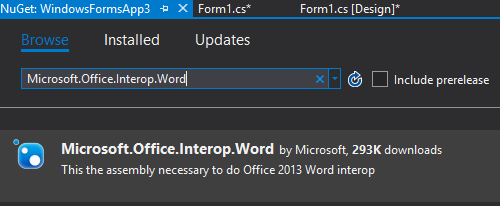
Then, You can use the following code to implement it.
int count = 0;
try
{
    Microsoft.Office.Interop.Word.Application winObj = (Microsoft.Office.Interop.Word.Application)Marshal.GetActiveObject("Word.Application");
    foreach (var item in winObj.Documents) // or winObj.Documents.Count
    {
        count++;
    }
}
catch (System.Runtime.InteropServices.COMException)
{
    count = 0;
}
textBox1.Text = count.ToString();
You can implement how to get count of all processes by using the following code.
Process[] pros = Process.GetProcesses();
int count = 0;
foreach (Process pro in pros)
{
    count++;
}
textBox1.Text = count.ToString();
把圈子变小,把语言变干净,把成绩往上提,把故事往心里收,现在想要的以后你都会有。

 浙公网安备 33010602011771号