简单ajax和springboot
一、引入依赖
  <dependency>
            <groupId>com.google.code.gson</groupId>
            <artifactId>gson</artifactId>
            <version>2.8.2</version>
        </dependency>
二、html
<head>
    <meta charset="UTF-8">
    <title>Title</title>
    <script src="http://apps.bdimg.com/libs/jquery/2.1.4/jquery.min.js"></script>

    <link rel="stylesheet" href="http://cdn.bootcss.com/bootstrap/3.3.0/css/bootstrap.min.css">

    <script>

        $(document).ready(function(){
            $("#btn1").click(function(){
                test1();
            });

            $("#btn2").click(function(){
                $.test2();
            });
        });

        function test1(){
//alert("Text1: " + $("#test").text());
            $.ajax({
                url:'findAll',
                type:'get',
                dataType:'json',
                success:function(data){
                    $("#tabletest").find('tr').remove();
                    tr='<td>id</td><td>姓名</td><td>密码</td><td>年龄</td>'
                    $("#tabletest").append('<tr>'+tr+'</tr>')
                  //方法中传入的参数data为后台获取的数据
                    for(i in data) //data指的是数组,i为数组的索引
                    {
                        var tr;
                        tr='<td>'+data[i].userId+'</td>'+'<td>'+data[i].userName +'</td>'+'<td>'+data[i].userPwd +'</td>'+'<td>'+data[i].userAge +'</td>'
                        $("#tabletest").append('<tr>'+tr+'</tr>')
                    }
                }
            });
        }

        $.test2 = function() {
//alert("Text2: " + $("#id").val());
            $.ajax({
                url:'userInfo',
                type:'get',
                dataType:'json', //返回数据类型
//data:{id:parseInt($("#id").val())},
//data:{"id":1},
                contentType: 'application/json', // 请求传递的参数格式
                data:{"id":$("#id").val()}, // 请求传递的参数
                success:function(data){
//alert("success");
                    $("#tabletest").find('tr').remove();
                    tr='<td>id</td><td>姓名</td><td>密码</td><td>年龄</td>'
                    $("#tabletest").append('<tr>'+tr+'</tr>')
//方法中传入的参数data为后台获取的数据
                    var tr;
                    tr='<td>'+data.userId+'</td>'+'<td>'+data.userName +'</td>'+'<td>'+data.userPwd +'</td>'+'<td>'+data.userAge +'</td>'
                    $("#tabletest").append('<tr>'+tr+'</tr>')
                },
                error:function(XMLHttpRequest, textStatus, errorThrown){
                    alert("没有查询到数据!");
                    $("#tabletest").find('tr').remove();
                }
            });
        }

    </script>

    <style type="text/css">
        .center{
            margin: auto;
            text-align:center;
            font-size: 24px;
            width: 60%;
            background: lightblue;
        }
    </style>
</head>
<body>

<div class="center">
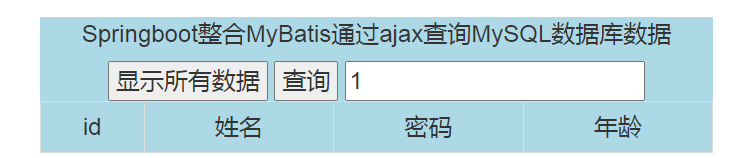
    <p id="test">Springboot整合MyBatis通过ajax查询MySQL数据库数据</b></p>
    <button id="btn1">显示所有数据</button>
    <button id="btn2">查询</button>
    <input id="id" name="id" type="text" placeholder="请输入id值"/>
    <br>
    <table class="table table-bordered" id='tabletest'>
    </table>
</div>

</body>
三、controller
 @ResponseBody
    @RequestMapping("findAll")
    public String findAll(Model model){
     List<UserTable> list=service.findAll();

     model.addAttribute("list",list);
        Gson gson = new Gson();
        return  gson.toJson(list);

    }
@ResponseBody
    @RequestMapping("userInfo")
    public String findById(int id,Model model){
        UserTable user = service.findById(id);
        Gson gson = new Gson();
        model.addAttribute("user",user);
        return gson.toJson(user);


    }

 浙公网安备 33010602011771号