


Spring Boot入门,整合Pagehelper分页插件
1.在pom文件中引入Pagehelper分页插件
<dependency>
            <groupId>com.github.pagehelper</groupId>
            <artifactId>pagehelper-spring-boot-starter</artifactId>
            <version>1.3.0</version>
        </dependency>
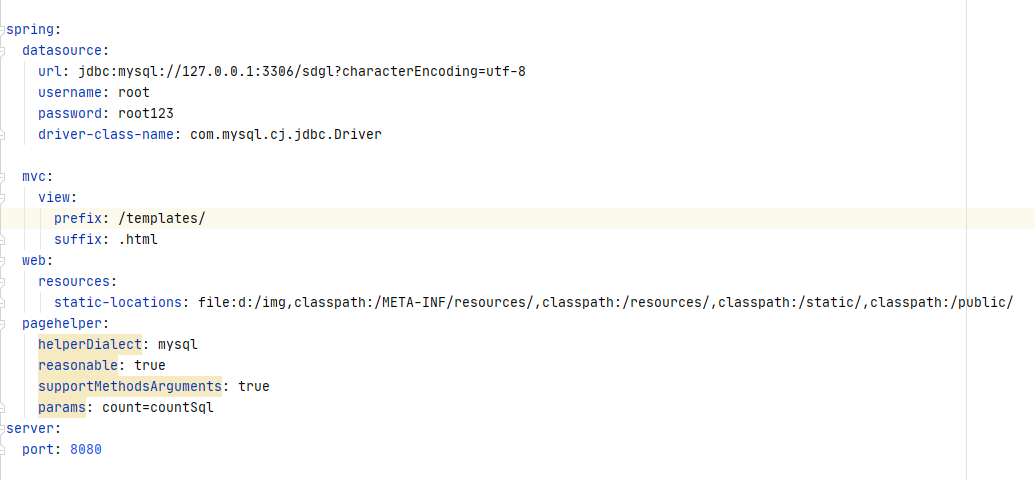
2.配置分页插件
pagehelper:
    helperDialect: mysql
    reasonable: true
    supportMethodsArguments: true
    params: count=countSql
3.controller代码
@RequestMapping("findAll")
        public String findAll(Model model,@RequestParam(defaultValue = "1",value ="pageNum" ) Integer pageNum){
        PageHelper.startPage(pageNum,5);
        List<ImgTable> list=service.findAll();
        PageInfo<ImgTable> pageInfo = new PageInfo<ImgTable>(list);
        model.addAttribute("pageInfo",pageInfo);
        return "list";
    }
其中:PageHelper.startPage(int PageNum,int PageSize):用来设置页面的位置和展示的数据条目数,我们设置每页展示5条数据。PageInfo用来封装页面信息,返回给前台界面。PageInfo中的一些我们需要用到的参数如下表:
PageInfo.list 结果集
PageInfo.pageNum 当前页码
PageInfo.pageSize 当前页面显示的数据条目
PageInfo.pages 总页数
PageInfo.total 数据的总条目数
PageInfo.prePage 上一页
PageInfo.nextPage 下一页
PageInfo.isFirstPage 是否为第一页
PageInfo.isLastPage 是否为最后一页
PageInfo.hasPreviousPage 是否有上一页
PageHelper.hasNextPage 是否有下一页
4.list页面代码
<!DOCTYPE html>
<html lang="en" xmlns:th="http://www.w3.org/1999/xhtml">
<head>
    <meta charset="UTF-8">
    <title>Title</title>
</head>
<body>
   <div align="center">
      <table border="1">
         <tr>
             <th>id</th>
             <th>商品名称</th>
             <th>价格</th>
             <th>图片</th>
         </tr>
          <tr th:each="product:${pageInfo.list}">
              <td th:text="${product.imgId}"></td>
              <td th:text="${product.imgName}"></td>
              <td th:text="${product.imgPrice}"></td>
              <td><img th:src="${product.imgImg}"></td>

          </tr>
      </table>
       <p>当前 <span th:text="${pageInfo.pageNum}"></span> 页,总 <span th:text="${pageInfo.pages}"></span> 页,共 <span th:text="${pageInfo.total}"></span> 条记录</p>
       <a th:href="@{findAll}">首页</a>
       <a th:href="@{findAll(pageNum=${pageInfo.hasPreviousPage}?${pageInfo.prePage}:1)}">上一页</a>
       <a th:href="@{findAll(pageNum=${pageInfo.hasNextPage}?${pageInfo.nextPage}:${pageInfo.pages})}">下一页</a>
       <a th:href="@{findAll(pageNum=${pageInfo.pages})}">尾页</a>


   </div>
</body>
</html>

 浙公网安备 33010602011771号