
22.Flume监控、自定义组件、面试题
一、Flume监控之Ganglia
1.1 前言
Ganglia是UC Berkeley发起的一个开源监视项目,设计用于测量数以千计的节点。每台计算机都运行一个收集和发送度量数据(如处理器速度、内存使用量等)的名为gmond的守护进程。它将从操作系统和指定主机中收集。接收所有度量数据的主机可以显示这些数据并且可以将这些数据的精简表单传递到层次结构中。正因为有这种层次结构模式,才使得Ganglia可以实现良好的扩展。gmond带来的系统负载非常少,这使得它成为在集群中各台计算机上运行的一段代码,而不会影响用户性能。
Ganglia由gmond、gmetad和gweb三部分组成。
gmond(Ganglia Monitoring Daemon):一种轻量级服务,安装在每台需要收集指标数据的节点主机上。使用gmond,你可以很容易收集很多系统指标数据,如CPU、内存、磁盘、网络和活跃进程的数据等。
gmetad(Ganglia Meta Daemon):整合所有信息,并将其以RRD格式存储至磁盘的服务。
gweb(Ganglia Web):Ganglia可视化工具,gweb是一种利用浏览器显示gmetad所存储数据的PHP前端。在Web界面中以图表方式展现集群的运行状态下收集的多种不同指标数据
1.2 Ganglia的安装与部署
- 安装
httpd服务与php
[root@hadoop101 ~]# yum -y install httpd php
- 默认源找不到安装包,所以要安装
epel源
[root@hadoop101 ~]# yum -y install epel-release
- 安装
ganglia-gmetad、ganglia-web、ganglia-gmond
[root@hadoop101 ~]# yum -y install ganglia-gmetad
[root@hadoop101 ~]# yum -y install ganglia-web
[root@hadoop101 ~]# yum -y install ganglia-gmond
- 修改配置文件
/etc/httpd/conf.d/ganglia.conf
[root@hadoop101 ~]# vi /etc/httpd/conf.d/ganglia.conf
# Ganglia monitoring system php web frontend
Alias /ganglia /usr/share/ganglia
<Location /ganglia>
  #Order deny,allow
  #Deny from all
  #Allow from all
  #Allow from 127.0.0.1
  #Allow from ::1
  # Allow from.example.com
  Require all granted
</Location>
- 修改配置文件
/etc/ganglia/gmetad.conf
[root@hadoop101 ~]# vim /etc/ganglia/gmetad.conf
修改为:data_source "hadoop101" 192.168.182.101
- 修改配置文件
/etc/ganglia/gmond.conf
cluster {
  name = "hadoop101"
  owner = "unspecified"
  latlong = "unspecified"
  url = "unspecified"
}
udp_send_channel {
  #bind_hostname = yes # Highly recommended, soon to be default.
                       # This option tells gmond to use a source address
                       # that resolves to the machine's hostname.  Without
                       # this, the metrics may appear to come from any
                       # interface and the DNS names associated with
                       # those IPs will be used to create the RRDs.
  # mcast_join = 239.2.11.71
  host = 192.168.182.101
  port = 8649
  ttl = 1
}
udp_recv_channel {
  # mcast_join = 239.2.11.71
  port = 8649
  bind = 192.168.182.101
  retry_bind = true
  # Size of the UDP buffer. If you are handling lots of metrics you really
  # should bump it up to e.g. 10MB or even higher.
  # buffer = 10485760
}
- 修改配置文件
/etc/selinux/config
[root@hadoop101 ~]# vim /etc/selinux/config
修改:SELINUX=disabled后重启
- 启动
ganglia
[root@hadoop101 ~]# systemctl start httpd
[root@hadoop101 ~]# systemctl start gmetad
[root@hadoop101 ~]# systemctl start gmond
- 打开网页浏览
ganglia页面:http://192.168.182.101/ganglia
注:如果完成以上操作依然出现权限不足错误,请修改/var/lib/ganglia目录的权限:
[root@hadoop101 ~]# udo chmod -R 777 /var/lib/ganglia
1.3 操作Flume测试监控
- 修改
/opt/module/flume/conf目录下的flume-env.sh配置:
JAVA_OPTS="-Dflume.monitoring.type=ganglia
-Dflume.monitoring.hosts=192.168.182.101:8649
-Xms100m
-Xmx200m"
- 启动
Flume任务
[root@hadoop100 flume]$ bin/flume-ng agent \
--conf conf/ \
--name a1 \
--conf-file job/flume-netcat-logger.conf \
-Dflume.root.logger==INFO,console \
-Dflume.monitoring.type=ganglia \
-Dflume.monitoring.hosts=192.168.1.101:8649
- 发送数据观察
ganglia监测图
[root@hadoop100 flume]$ nc localhost 44444
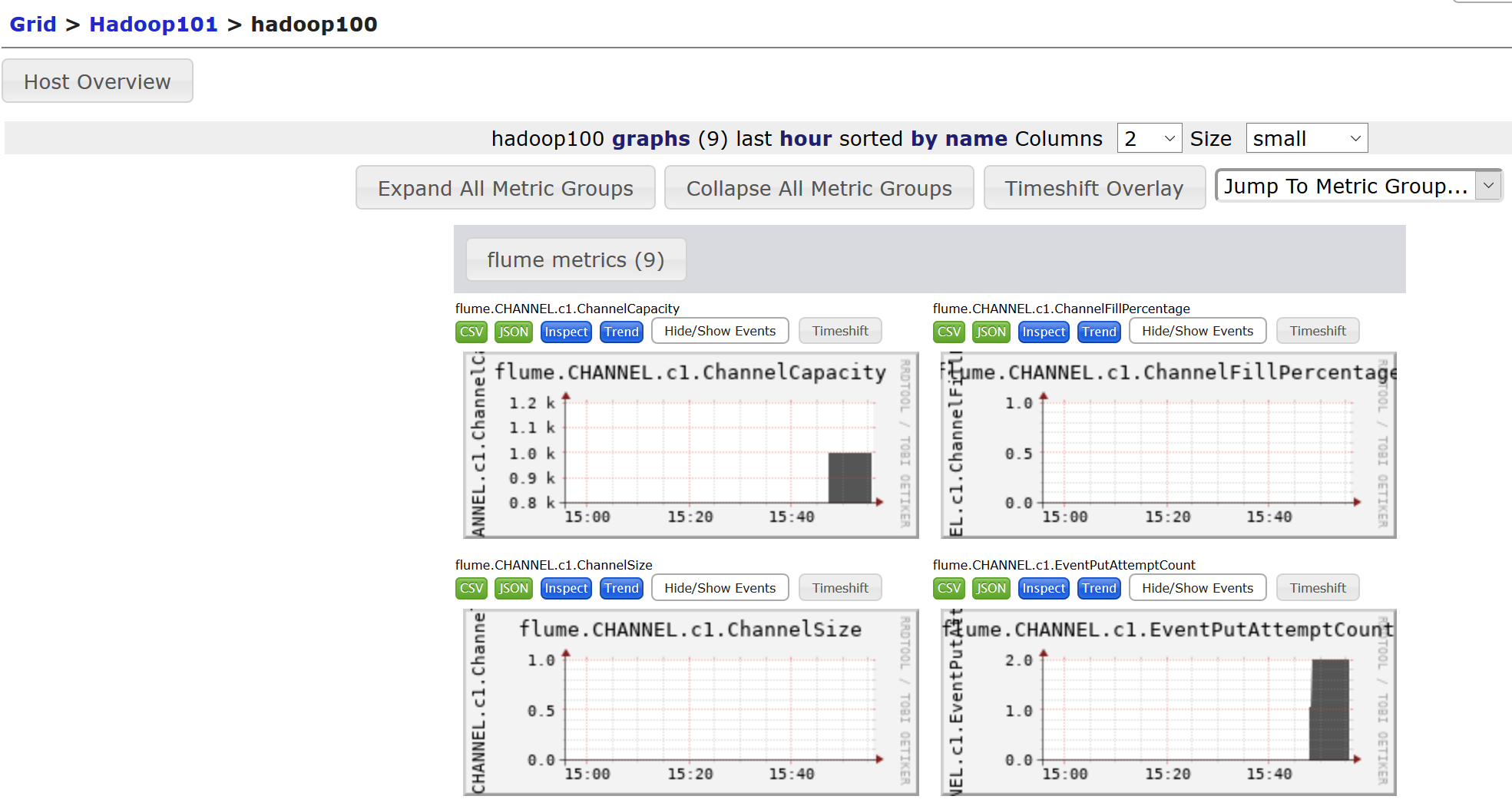
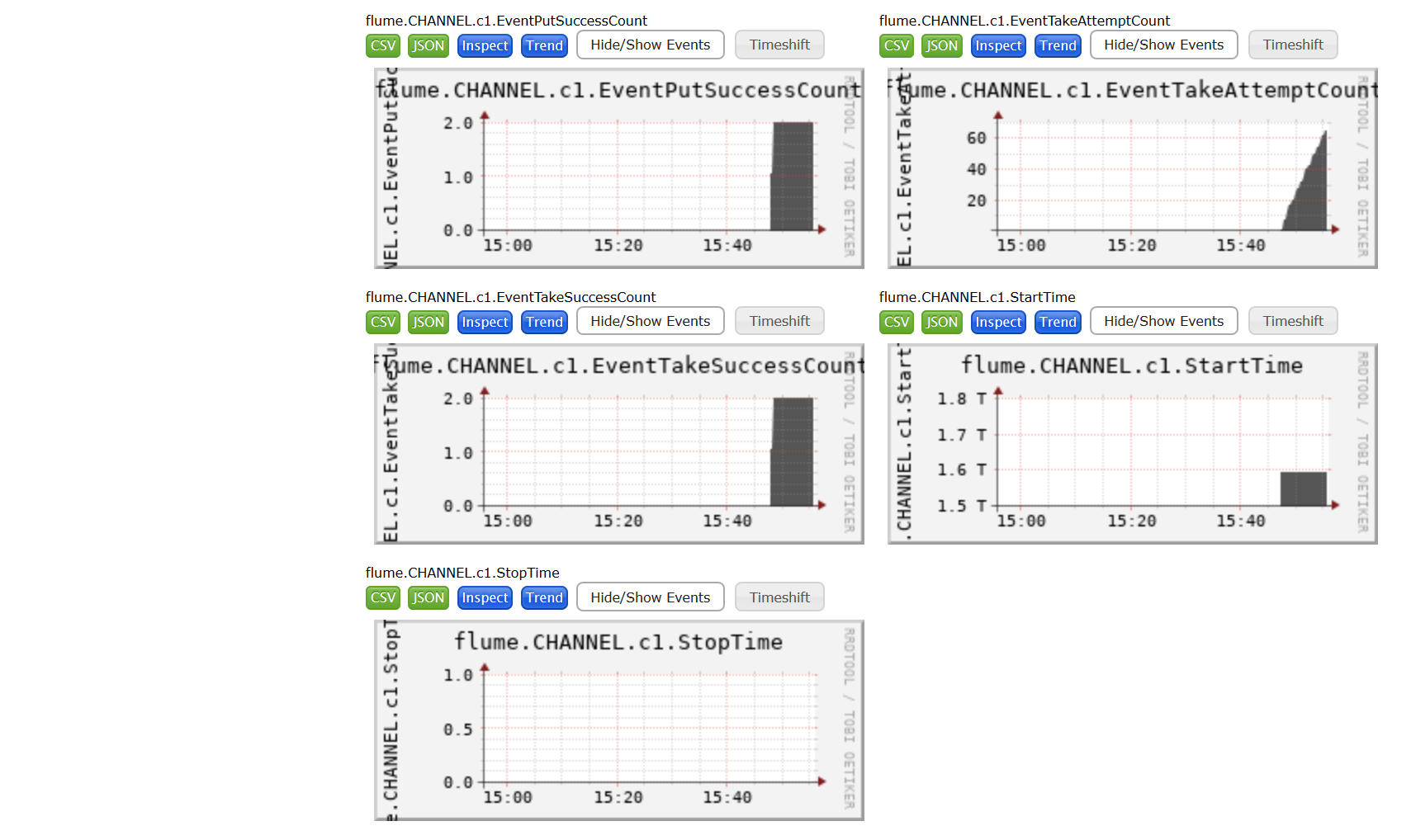
图例说明:
| 字段(图表名称) | 字段含义 |
|---|---|
| EventPutAttemptCount | source尝试写入channel的事件总数量 |
| EventPutSuccessCount | 成功写入channel且提交的事件总数量 |
| EventTakeAttemptCount | sink尝试从channel拉取事件的总数量。这不意味着每次事件都被返回,因为sink拉取的时候channel可能没有任何数据。 |
| EventTakeSuccessCount | sink成功读取的事件的总数量 |
| StartTime | channel启动的时间(毫秒) |
| StopTime | channel停止的时间(毫秒) |
| ChannelSize | 目前channel中事件的总数量 |
| ChannelFillPercentage | channel占用百分比 |
| ChannelCapacity | channel的容量 |
二、自定义Source
2.1 介绍
Source是负责接收数据到Flume Agent的组件。Source组件可以处理各种类型、各种格式的日志数据,包括avro、thrift、exec、jms、spooling directory、netcat、sequence generator、syslog、http、legacy。
官方提供的source类型已经很多,但是有时候并不能满足实际开发当中的需求,此时我们就需要根据实际需求自定义某些source。官方也提供了自定义source需要继承AbstractSource类并实现Configurable和PollableSource接口。
2.2 编码
需求: 使用flume接收数据,并给每条数据添加后缀,输出到控制台。前缀可从flume配置文件中配置。
引入依赖:
<dependency>
	<groupId>org.apache.flume</groupId>
	<artifactId>flume-ng-core</artifactId>
	<version>1.7.0</version>
</dependency>
编码:
public class MySource extends AbstractSource implements Configurable,
	PollableSource {
    /**
     * 定义需要从配置中读取的字段
     */
    //两条数据之间的间隔
    private Long delay;
    private String field;

	/**
	* 接收数据,将数据封装成一个个的Event,写入Channel。
	*/
    @Override
    public Status process() throws EventDeliveryException {
        try {
            Map<String, String> header = new HashMap<>();
            SimpleEvent event = new SimpleEvent();
            for (int i = 0; i < 5; i++) {
                event.setHeaders(header);
                event.setBody((field + i).getBytes());
                getChannelProcessor().processEvent(event);
                Thread.sleep(delay);
            }
        } catch (Exception e) {
            return Status.BACKOFF;
        }

        return Status.READY;
    }

    @Override
    public long getBackOffSleepIncrement() {
        return 0;
    }

    @Override
    public long getMaxBackOffSleepInterval() {
        return 0;
    }

	/**
	*读取配置文件(xx.conf)中的配置信息
	*/
    @Override
    public void configure(Context context) {
        delay = context.getLong("delay", 2000l);
        field = context.getString("field", "Custom Source");
    }
}
2.3 测试
打包: 将写好的代码打包,并放到flume的lib目录下。
配置文件
# Name the components on this agent
a1.sources = r1
a1.sinks = k1
a1.channels = c1

# Describe/configure the source
a1.sources.r1.type = com.hucheng.flume.MySource
a1.sources.r1.delay = 1000
#a1.sources.r1.field = hello

# Describe the sink
a1.sinks.k1.type = logger

# Use a channel which buffers events in memory
a1.channels.c1.type = memory
a1.channels.c1.capacity = 1000
a1.channels.c1.transactionCapacity = 100

# Bind the source and sink to the channel
a1.sources.r1.channels = c1
a1.sinks.k1.channel = c1
开启任务:
[root@hadoop100 flume]$ bin/flume-ng agent -c conf/ -f job/mysource.conf
 -n a1 -Dflume.root.logger=INFO,console

三、自定义Sink
2.1 介绍
Sink不断地轮询Channel中的事件且批量地移除它们,并将这些事件批量写入到存储或索引系统、或者被发送到另一个Flume Agent。
Sink是完全事务性的。在从Channel批量删除数据之前,每个Sink用Channel启动一个事务。批量事件一旦成功写出到存储系统或下一个Flume Agent,Sink就利用Channel提交事务。事务一旦被提交,该Channel从自己的内部缓冲区删除事件。
Sink组件目的地包括hdfs、logger、avro、thrift、ipc、file、null、HBase、solr、自定义。官方提供的Sink类型已经很多,但是有时候并不能满足实际开发当中的需求,此时我们就需要根据实际需求自定义某些Sink,官方也提供了自定义Sink的接口需要继承AbstractSink类并实现Configurable接口。
2.2 编码
需求: 使用flume接收数据,并给每条数据添加后缀,输出到控制台。前缀可从flume配置文件中配置。
public class MySink extends AbstractSink implements Configurable {

    //创建Logger对象
    private static final Logger LOG =
            LoggerFactory.getLogger(AbstractSink.class);

    private String prefix;
    private String suffix;

    @Override
    public Status process() throws EventDeliveryException {
        //声明返回值状态信息
        Status status;

        //获取当前Sink绑定的Channel
        Channel channel = getChannel();
        //获取事务
        Transaction transaction = channel.getTransaction();
        //声明事件
        Event event;
        //开启事务
        transaction.begin();

        //读取Channel中的事件,直到读取到事件结束循环
        while (true) {
            event = channel.take();
            if (event != null) {
                break;
            }
        }
        try {
            //处理事件(打印)
            LOG.info(prefix + new String(event.getBody()) + suffix);
            //事务提交
            transaction.commit();
            status = Status.READY;
        } catch (Exception e) {
            //遇到异常,事务回滚
            transaction.rollback();
            status = Status.BACKOFF;
        } finally {
            transaction.close();
        }
        return status;
    }

    @Override
    public void configure(Context context) {
        //读取配置文件内容,有默认值
        prefix = context.getString("prefix", "hello:");

        //读取配置文件内容,无默认值
        suffix = context.getString("suffix");
    }
}
2.3 测试
打包: 将写好的代码打包,并放到flume的lib目录下。
配置文件
# Name the components on this agent
a1.sources = r1
a1.sinks = k1
a1.channels = c1

# Describe/configure the source
a1.sources.r1.type = netcat
a1.sources.r1.bind = localhost
a1.sources.r1.port = 44444

# Describe the sink
a1.sinks.k1.type = com.hucheng.flume.MySink
#a1.sinks.k1.prefix = hello:
a1.sinks.k1.suffix = :hello

# Use a channel which buffers events in memory
a1.channels.c1.type = memory
a1.channels.c1.capacity = 1000
a1.channels.c1.transactionCapacity = 100

# Bind the source and sink to the channel
a1.sources.r1.channels = c1
a1.sinks.k1.channel = c1
开启任务:
[root@hadoop100 flume]# bin/flume-ng agent -c conf/ -f job/mysink.conf -n a1
 -Dflume.root.logger=INFO,console
[root@hadoop100 ~]# nc localhost 44444
hello
四、企业真实面试题
4.1 你是如何实现Flume数据传输的监控的
使用第三方框架Ganglia实时监控Flume。
4.2 Flume的Source,Sink,Channel的作用?你们Source是什么类型?
①作用
Source组件是专门用来收集数据的,可以处理各种类型、各种格式的日志数据,包括avro、thrift、exec、jms、spooling directory、netcat、sequence generator、syslog、http、legacyChannel组件对采集到的数据进行缓存,可以存放在Memory或File中。Sink组件是用于把数据发送到目的地的组件,目的地包括Hdfs、Logger、avro、thrift、ipc、file、Hbase、solr、自定义。
②我公司采用的Source类型为:
- 监控后台日志:
exec - 监控后台产生日志的端口:
netcat、Exec、spooldir
4.3 Flume的Channel Selectors
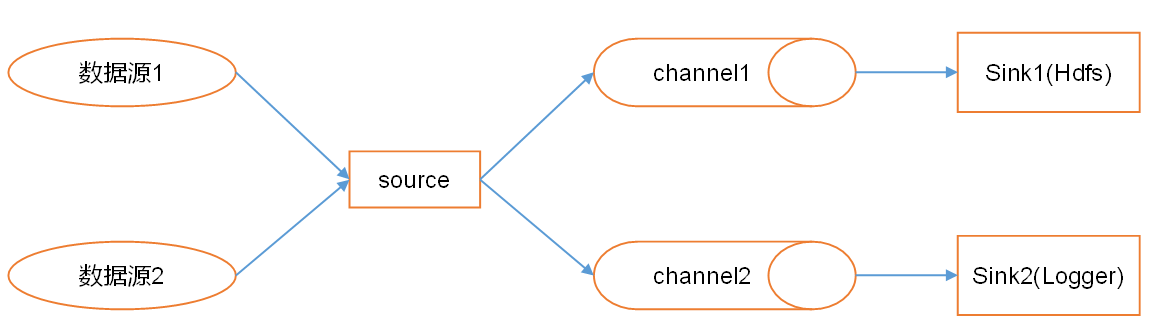
Channel Selectors可以让不同的项目日志通过不同的ChanneI到不同的Sink中去。Channel Selectors有两种类型:Replicating Channel Selector (default)和Multiplex ing Channel Selector。
这两种Selector的区别是:Replicating会将source过来的events发往所有channel,而Multiplexing可以选择该发往哪些Channel。
4.4 Flume参数调优
①Source
增加Source个数(使用Tair Dir Source时可增加FileGroups个数)可以增大Source的读取数据的能力。例如:当某一个目录产生的文件过多时需要将这个文件目录拆分成多个文件目录,同时配置好多个Source以保证Source有足够的能力获取到新产生的数据。
batchSize参数决定Source一次批量运输到Channel的event条数,适当调大这个参数可以提高Source搬运Event到Channel时的性能。
②Channel
type选择memory时Channel的性能最好,但是如果Flume进程意外挂掉可能会丢失数据。type选择file时Channel的容错性更好,但是性能上会比memory channel差。
使用file Channel时dataDirs配置多个不同盘下的目录可以提高性能。
Capacity参数决定Channel可容纳最大的event条数。transactionCapacity参数决定每次Source往channel里面写的最大event条数和每次Sink从channel里面读的最大event条数。transactionCapacity需要大于Source和Sink的batchSize参数。
③Sink
增加Sink的个数可以增加Sink消费event的能力。Sink也不是越多越好够用就行,过多的Sink会占用系统资源,造成系统资源不必要的浪费。
batchSize参数决定Sink一次批量从Channel读取的event条数,适当调大这个参数可以提高Sink从Channel搬出event的性能。
4.5 Flume的事务机制
Flume的事务机制(类似数据库的事务机制):Flume使用两个独立的事务分别负责从Soucrce到Channel,以及从Channel到Sink的事件传递。比如spooling directory source为文件的每一行创建一个事件,一旦事务中所有的事件全部传递到Channel且提交成功,那么Soucrce就将该文件标记为完成。同理,事务以类似的方式处理从Channel到Sink的传递过程,如果因为某种原因使得事件无法记录,那么事务将会回滚。且所有的事件都会保持到Channel中,等待重新传递。
4.6 Flume采集数据会丢失吗?
不会,Channel存储可以存储在File中,数据传输自身有事务。

 浙公网安备 33010602011771号