客车网上售票系统(分解五)
1、今日完成任务:
(1)改签分解功能1:点击改签根据当前订单的出发地和目的地查询车票信息并显示(发车日期可以改动,出发地和目的地是固定不能变得)
(2)改签分解功能2:选好需要改动的车票点击查询页面的改签,跳转到详情页面分别显示需要改签前的车票信息和需要改签后的车票信息
(3)改签分解功能3:点击提交订单,显示当前订单的详细信息并提醒用户抓紧时间支付
(4)改签分解功能4:点击立即改签即改签成功并跳转回我的订单页面
2、核心源码:
(1)改签功能前台页面效果

(1)改签分解功能1前台效果图
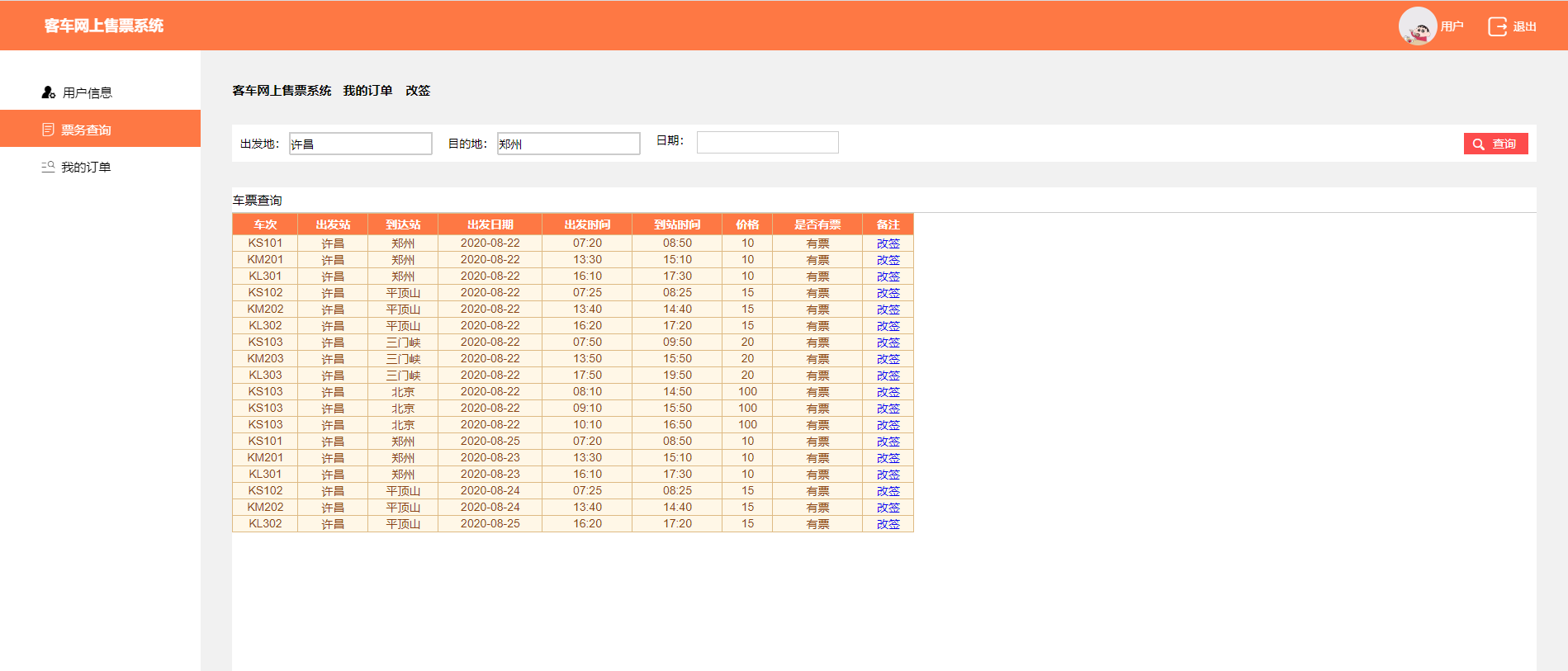
(2)改签分解功能1前台代码
<!DOCTYPE html>
<html>
<head>
<meta charset="utf-8" />
<meta name="viewport" content="width=device-width,initial-scale=1.0,maximum-scale=1.0,user-scalable=0">
<meta http-equiv="X-UA-Compatible" content="ie=edge" />
<link href="../css/reset.css" rel="stylesheet" />
<link href="../css/iconfont.css" rel="stylesheet" />
<link href="../css/aa.css" rel="stylesheet" />
<script src="../js/jquery-1.9.1.min.js"></script>
<script src="../js/f.js"></script>
<script src="../js/laydate/laydate.js"></script>
<script>
//执行一个laydate实例
laydate.render({
elem: '#test1' //指定元素
});
</script>
<style type="text/css">
.icon-weibiaoti1:before {
content: "\e695";
}
.icon-xinxiliulan:before {
content: "\e614";
}
#test1{clear:both;border:1px solid #ccc;height:25px;position:relative; left:50px;bottom:20px;}
.InputDiv{border:none;}
#txtCfd,#txtMdd{border:1px solid #ccc;height:25px;}
#btnSelect{color:#fff;}
.auto-style1 {
background: #fff;
margin-left: 40px;
}
.headboxtext{
height:30px;
line-height:30px;
}
#GridView1{
text-align:center;
}
</style>
<title>产车票改签</title>
</head>
<body>
<form id="form1" runat="server">
<div class="PublicHead clearfix">
<div class="leftBox clearfix">
<!--<div class="companyLogo">
<img src="images/logo.jpg" />
</div>-->
<!--<i class="iconfont icon-caidan"></i>-->
<div class="companyText">
客车网上售票系统
</div>
</div>
<div class="RightBox clearfix">
<div class="UserPhotoBox">
<div class="UserPic">
<img src="../Images/user.jpg"/>
</div>
<div class="UserName">
用户
</div>
</div>
<a href="Login.aspx">
<div class="dropOutBox">
<i class="iconfont icon-app_icons--">
</i>
<span>退出</span>
</div>
</a>
</div>
</div>
<div class="PublicDownWhole clearfix">
<!--左侧-->
<div class="leftBox">
<ul>
<a href="UpdatePersonalInfo.aspx"> <li class=""><i class="iconfont icon-yonghuguanli"></i><span>用户信息</span></li></a>
<a href="SelectTicket.aspx">
<li class="Select"><i class="iconfont icon-tubiao_dingdan"></i><span>票务查询</span></li>
</a>
<a href="MyOrder.aspx">
<li><i class="iconfont icon-fenlei"></i><span>我的订单</span></li>
</a>
</ul>
</div>
<!--右侧-->
<div class="RightBox">
<div class="PublicContentBox">
<!--公用指向页面名字-->
<div class="PublicPointToAgeText">
<span class="span1">客车网上售票系统 </span> <span class="span2">我的订单</span> <span class="span2">改签</span>
</div>
<!--查询-->
<div class="InquireBox clearfix">
<div class="InquireleftBox">
<div class="Text">出发地:</div>
<div class="InputDiv"> <asp:TextBox ID="txtCfd" runat="server" ReadOnly="true"></asp:TextBox></div>
</div>
<div class="InquireleftBox">
<div class="Text">目的地:</div>
<div class="InputDiv"> <asp:TextBox ID="txtMdd" runat="server" ReadOnly="true"></asp:TextBox></div>
</div>
<div class="InquireleftBox" >
<div class="layui-inline">
<label class="layui-form-label">日期:</label>
<div class="layui-input-inline">
<asp:textBox runat="server" class="layui-input" id="test1"></asp:textBox>
</div>
</div>
</div>
<div class="PublicBtnIcon Color1Btn fr">
<i class="iconfont icon-icon-chaxun"></i>
<%--<span>查询</span>--%>
<asp:Button ID="btnSelect" runat="server" Text="查询" style="width: 38px" OnClick="btnSelect_Click" />
</div>
</div>
<!--表修改-->
<div class="auto-style1" style="margin-left:0px; height:700px;">
<div class="headbox">
<div class="headboxtext">
<%--<span class="span1">车票查询</span>--%>
<asp:Label ID="lblSelect" runat="server" Text="车票查询"></asp:Label>
</div>
</div>
<!--查询到的表格-->
<asp:GridView ID="GridView1" runat="server" AutoGenerateColumns="False" BackColor="#DEBA84" BorderColor="#DEBA84" BorderStyle="None" BorderWidth="1px" CellPadding="3" CellSpacing="2" Height="293px" Width="826px" Font-Size="Medium" PageSize="5" DataKeyNames="Cid">
<Columns>
<asp:BoundField DataField="Tname" HeaderText="车次" />
<asp:BoundField DataField="Begin_sta" HeaderText="出发站" />
<asp:BoundField DataField="End_sta" HeaderText="到达站" />
<asp:BoundField DataField="Start_date" HeaderText="出发日期" />
<asp:BoundField DataField="Start_time" HeaderText="出发时间" />
<asp:BoundField DataField="End_time" HeaderText="到站时间" />
<asp:BoundField DataField="Price" HeaderText="价格" />
<asp:TemplateField HeaderText="是否有票">
<ItemTemplate>
<asp:Label ID="Label1" runat="server" Text='<%#(int)Eval("Seatnum")>0?"有票":"无" %>'></asp:Label>
</ItemTemplate>
</asp:TemplateField>
<asp:TemplateField HeaderText="备注">
<ItemTemplate>
<asp:LinkButton ID="LinkButton2" runat="server" PostBackUrl='<%# Eval("Cid", "~/Member/GQInfo.aspx?cid={0}") %>'>改签</asp:LinkButton>
</ItemTemplate>
</asp:TemplateField>
</Columns>
<FooterStyle BackColor="#F7DFB5" ForeColor="#8C4510" />
<HeaderStyle BackColor="#fe7844" Font-Bold="True" ForeColor="White" />
<PagerStyle ForeColor="#8C4510" HorizontalAlign="Center" />
<RowStyle BackColor="#FFF7E7" ForeColor="#8C4510" />
<SelectedRowStyle BackColor="#738A9C" Font-Bold="True" ForeColor="White" />
<SortedAscendingCellStyle BackColor="#FFF1D4" />
<SortedAscendingHeaderStyle BackColor="#B95C30" />
<SortedDescendingCellStyle BackColor="#F1E5CE" />
<SortedDescendingHeaderStyle BackColor="#93451F" />
</asp:GridView>
</div>
</div>
</div>
</div>
</form>
</body>
</html>
(3)改签分解功能1后台台代码
1.点击改签按钮跳转页面
/// <summary>
        /// 改签
        /// </summary>
        /// <param name="sender"></param>
        /// <param name="e"></param>
        protected void GridView1_RowUpdating(object sender, GridViewUpdateEventArgs e)
        {
            int oid = Convert.ToInt32(this.GridView1.DataKeys[e.RowIndex].Value);
            //跳转到查询车票页面车票页面
            Response.Redirect("GQ.aspx?oid="+oid);
        }
2.根据传递的oid信息查询出出发地和目的地并显示出所有满足条件的车票信息
  public partial class GQ : System.Web.UI.Page
    {
        OrderinfoManager bll = new OrderinfoManager();
        CarinfoManager carBll = new CarinfoManager();
        protected void Page_Load(object sender, EventArgs e)
        {
            if (!IsPostBack)
            {
                //绑定控件
                int oid = Convert.ToInt32(Request.QueryString["oid"]);
                //根据oid查询信息并绑定在文本框中
                DataSet ds = bll.SelectByOid(oid);
                this.txtCfd.Text = ds.Tables[0].Rows[0]["Begin_sta"].ToString();
                this.txtMdd.Text= ds.Tables[0].Rows[0]["End_sta"].ToString();
                Session["oid"] = oid;
                this.GridView1.DataSource = carBll.GetData();
                this.GridView1.DataBind();
            }
        }
3.根据用户输入的查询日期进行查询
        /// <summary>
        /// 查询
        /// </summary>
        /// <param name="sender"></param>
        /// <param name="e"></param>
        protected void btnSelect_Click(object sender, EventArgs e)
        {
            //从前台获取数据
            //出发地
            string cfd = this.txtCfd.Text;
            //目的地
            string mdd = this.txtMdd.Text;
            string date = DateTime.MinValue.ToString();
            if (this.test1.Text != "")
            {
                //出发日期
                date = this.test1.Text;
            }

            this.GridView1.DataSource = carBll.GetDataByInfo(cfd, mdd, date);
            this.GridView1.DataBind();
        }
    }
DAL层:
 public DataSet SelectByOid(int oid)
        {
            string sql = $"select *from Orderinfo inner join Carinfo on Orderinfo.Cid=Carinfo.Cid where Oid={oid}";
            DataSet ds = dbHelper.GetData(sql);
            return ds;
        }
   public DataSet GetDataByInfo(string beginSta,string endSta,string date)
        {
            string sql = $"select * from Traininfo inner join Carinfo on Traininfo.Tid=Carinfo.Tid where Cmark=0 and 1=1 ";
            if (beginSta!="")
            {
                sql += $"and Begin_sta ='{beginSta}'";
            }
            if (endSta!="")
            {
                sql += $"and End_sta='{endSta}'";
            }
            if (date!=DateTime.MinValue.ToString())
            {
                sql += $"and Start_date='{date}'";
            }
            DataSet ds = dbHelper.GetData(sql);
            return ds;
        }
(1)改签分解功能2前台页面效果图

(2)改签分解功能2前台页面代码
<!DOCTYPE html>
<html>
<head>
<meta charset="utf-8" />
<meta name="viewport" content="width=device-width,initial-scale=1.0,maximum-scale=1.0,user-scalable=0">
<meta http-equiv="X-UA-Compatible" content="ie=edge" />
<link href="../css/reset.css" rel="stylesheet" />
<link href="../css/iconfont.css" rel="stylesheet" />
<link href="../css/aa.css" rel="stylesheet" />
<script src="../js/jquery-1.9.1.min.js"></script>
<script src="../js/f.js"></script>
<script src="../js/laydate/laydate.js"></script>
<script>
//执行一个laydate实例
laydate.render({
elem: '#test1' //指定元素
});
</script>
<style type="text/css">
.icon-weibiaoti1:before {
content: "\e695";
}
.icon-xinxiliulan:before {
content: "\e614";
}
#test1 {
clear: both;
border: 1px solid #ccc;
height: 25px;
position: relative;
left: 50px;
bottom: 20px;
}
.InputDiv {
border: none;
}
#txtCfd, #txtMdd {
border: 1px solid #ccc;
height: 25px;
}
#btnSelect {
color: #fff;
}
.auto-style1 {
background: #fff;
margin-left: 40px;
}
.headboxtext {
height: 30px;
line-height: 30px;
}
#GridView1 {
text-align: center;
}
table {
width: 800px;
border-collapse: collapse;
text-align: center;
}
table tr td {
border: 1px solid #000;
}
.auto-style2 {
width: 812px;
height: 134px;
}
.auto-style3 {
width: 810px;
height: 80px;
}
#ts{
border:1px solid #000;
}
#ts tr td{
border:none;
}
.auto-style4 {
height: 35px;
}
#btnSubmit{
color: #fff;
background-color:#fd4c4c;
height:30px;
width:100px;
margin-left:710px;
margin-top:50px;
}
#lbl{
color:#ff0000;
font-weight:bolder;
font-size:25px;
}
#btnGQ{
color: #fff;
background-color:#fd4c4c;
height:30px;
width:100px;
margin-left:710px;
}
</style>
<title>车票改签</title>
</head>
<body>
<form id="form1" runat="server">
<div class="PublicHead clearfix">
<div class="leftBox clearfix">
<!--<div class="companyLogo">
<img src="images/logo.jpg" />
</div>-->
<!--<i class="iconfont icon-caidan"></i>-->
<div class="companyText">
客车网上售票系统
</div>
</div>
<div class="RightBox clearfix">
<div class="UserPhotoBox">
<div class="UserPic">
<img src="../Images/user.jpg" />
</div>
<div class="UserName">
用户
</div>
</div>
<a href="Login.aspx">
<div class="dropOutBox">
<i class="iconfont icon-app_icons--"></i>
<span>退出</span>
</div>
</a>
</div>
</div>
<div class="PublicDownWhole clearfix">
<!--左侧-->
<div class="leftBox">
<ul>
<a href="UpdatePersonalInfo.aspx"> <li class=""><i class="iconfont icon-yonghuguanli"></i><span>用户信息</span></li></a>
<a href="SelectTicket.aspx">
<li class="Select"><i class="iconfont icon-tubiao_dingdan"></i><span>票务查询</span></li>
</a>
<a href="MyOrder.aspx">
<li><i class="iconfont icon-fenlei"></i><span>我的订单</span></li>
</a>
</ul>
</div>
<!--右侧-->
<div class="RightBox">
<div class="PublicContentBox">
<!--公用指向页面名字-->
<div class="PublicPointToAgeText">
<span class="span1">客车网上售票系统 </span> <span class="span2">我的订单</span> <span class="span2">改签</span>
</div>
<!--表修改-->
<div class="auto-style1" style="margin-left: 0px; height: 700px;">
<div class="headbox">
<div class="headboxtext">
<%--<span class="span1">车票查询</span>--%>
<asp:Label ID="lblSelect" runat="server" Text="车票改签"></asp:Label>
</div>
</div>
<!--查询到的表格-->
<div style="width:810px;margin-left:10px; ">
<%-- <div style="height:80px; color:#ff0000;font-weight:bolder; text-align:center; line-height:80px; font-size:20px;display:none;" id="divShow">
席位已锁定,改签交易尚未完成请在45分钟之内完成网上支付
</div>--%>
<div>
<asp:Label ID="lbl" runat="server" Text=" " ></asp:Label>
</div>
<table class="auto-style3" id="ts">
<tr style="background-color: #fe7844; height: 30px; color: #fff; text-align: left;">
<td colspan="5"> 列车信息(以下余票信息仅供参考)</td>
</tr>
<tr style="font-weight:bolder;">
<td class="auto-style4">
<asp:Label ID="GlblData" runat="server" Text="Label"></asp:Label>
</td>
<td class="auto-style4">
<asp:Label ID="GlblCc" runat="server" Text="Label"></asp:Label>
<td class="auto-style4">
</td>
<td class="auto-style4">
<asp:Label ID="GlblZD" runat="server" Text="Label"></asp:Label>
</td>
<td class="auto-style4">
<asp:Label ID="GlblPrice" runat="server" Text="Label"></asp:Label>
</td>
</tr>
</table>
<div style="text-align:right;">
<asp:Label ID="lblChajia" runat="server" Text=""></asp:Label>
</div>
<br />
<div id="yuan">
<table class="auto-style2">
<tr style="background-color: #fe7844; height: 30px; color: #fff; text-align: left;">
<td colspan="11"> 改签原票信息</td>
</tr>
<tr>
<td>序号</td>
<td>姓名</td>
<td>证件类型</td>
<td>证件号</td>
<td>发车日期</td>
<td>出发地</td>
<td>目的地</td>
<td>票种</td>
<td>车次</td>
<td>座位号</td>
<td>票价</td>
</tr>
<tr>
<td>1</td>
<td>
<asp:Label ID="lblName" runat="server" Text="Label"></asp:Label>
</td>
<td>
<asp:Label ID="lblType" runat="server" Text="二代身份证"></asp:Label>
</td>
<td>
<asp:Label ID="lblCard" runat="server" Text="Label"></asp:Label>
</td>
<td>
<asp:Label ID="lblBeginData" runat="server" Text="Label"></asp:Label>
</td>
<td>
<asp:Label ID="lblBeginSta" runat="server" Text="Label"></asp:Label>
<br />
<asp:Label ID="lblBeginTime" runat="server" Text="Label"></asp:Label>
</td>
<td>
<asp:Label ID="lblEndSta" runat="server" Text="Label"></asp:Label>
<br />
<asp:Label ID="lblEndTime" runat="server" Text="Label"></asp:Label>
</td>
<td>
<asp:Label ID="lblTicketType" runat="server" Text="成人票"></asp:Label>
</td>
<td>
<asp:Label ID="lblCc" runat="server" Text="Label"></asp:Label>
</td>
<td>
<asp:Label ID="lblSeatnum" runat="server" Text="Label"></asp:Label>
</td>
<td>
<asp:Label ID="lblPrice" runat="server" Text="Label"></asp:Label>
</td>
</tr>
</table>
</div>
<asp:Button ID="btnSubmit" runat="server" Text="提交订单" OnClick="btnSubmit_Click" />
<asp:Button ID="btnGQ" runat="server" Text="立即改签" Visible="false" OnClick="btnGQ_Click"/>
</div>
</div>
</div>
</div>
</div>
</form>
</body>
</html>
(3)改签分解功能2后台代码
 protected void Page_Load(object sender, EventArgs e)
        {
            if (!IsPostBack)
            {
                //原车票信息
                int oid = Convert.ToInt32(Session["oid"]);
                DataSet ds = bll.SelectByOid(oid);
                string beginSta = ds.Tables[0].Rows[0]["Begin_sta"].ToString();
                string endSta = ds.Tables[0].Rows[0]["End_sta"].ToString();
                string startDate = ds.Tables[0].Rows[0]["Start_date"].ToString();
                string startTime = ds.Tables[0].Rows[0]["Start_time"].ToString();
                string endTime = ds.Tables[0].Rows[0]["End_time"].ToString();
                string name = ds.Tables[0].Rows[0]["Name"].ToString();
                double price = Convert.ToDouble(ds.Tables[0].Rows[0]["Price"]);
                string card = ds.Tables[0].Rows[0]["card"].ToString();
                int Seatnum = Convert.ToInt32(ds.Tables[0].Rows[0]["Seatnum"]);
                int tid = Convert.ToInt32(ds.Tables[0].Rows[0]["Tid"]);
                this.lblName.Text = name;
                this.lblCard.Text = card;
                this.lblBeginData.Text = startDate;
                this.lblBeginSta.Text = beginSta;
                this.lblBeginTime.Text = startTime + "开";
                this.lblEndSta.Text = endSta;
                this.lblEndTime.Text = endTime + "到";
                this.lblSeatnum.Text = Seatnum.ToString();
                this.lblPrice.Text = price.ToString();
                DataSet ds2 = tBll.SelectByTid(tid);
                this.lblCc.Text = ds2.Tables[0].Rows[0]["Tname"].ToString();
                //改签信息
                int cid = Convert.ToInt32(Request.QueryString["cid"]);
                DataSet ds3 = carBll.SelectCarTrainInfoByCid(cid);
                string date = Convert.ToDateTime(ds3.Tables[0].Rows[0]["Start_date"]).ToShortDateString();
                string[] Day = new string[] { "星期日", "星期一", "星期二", "星期三", "星期四", "星期五", "星期六" };
                string xingqi = Day[Convert.ToInt32(Convert.ToDateTime(ds3.Tables[0].Rows[0]["Start_date"]).DayOfWeek.ToString("d"))].ToString();
                string cc = ds3.Tables[0].Rows[0]["Tname"].ToString();
                string GbeginSta = ds3.Tables[0].Rows[0]["Begin_sta"].ToString();
                string GendSta = ds3.Tables[0].Rows[0]["End_sta"].ToString();
                string GstartTime = ds3.Tables[0].Rows[0]["Start_time"].ToString();
                string GendTime = ds3.Tables[0].Rows[0]["End_time"].ToString();
                double Gprice = Convert.ToDouble(ds3.Tables[0].Rows[0]["Price"]);
                this.GlblData.Text = date + "(" + xingqi + ")";
                this.GlblCc.Text = cc + "次";
                this.GlblZD.Text = GbeginSta + "站(" + GstartTime + "开) -- " + GendSta + "站(" + GendTime + "到)";
                this.GlblPrice.Text = Gprice.ToString();
            }

        }
DAL层:
 public DataSet SelectByOid(int oid)
        {
            string sql = $"select *from Orderinfo inner join Carinfo on Orderinfo.Cid=Carinfo.Cid where Oid={oid}";
            DataSet ds = dbHelper.GetData(sql);
            return ds;
        }
 public DataSet SelectCarTrainInfoByCid(int cid)
        {
            string sql = $"select * from Traininfo inner join Carinfo on Traininfo.Tid=Carinfo.Tid where Cid={cid}";
            DataSet ds = dbHelper.GetData(sql);
            return ds;
        }
(1)改签分解功能3前台页面效果图
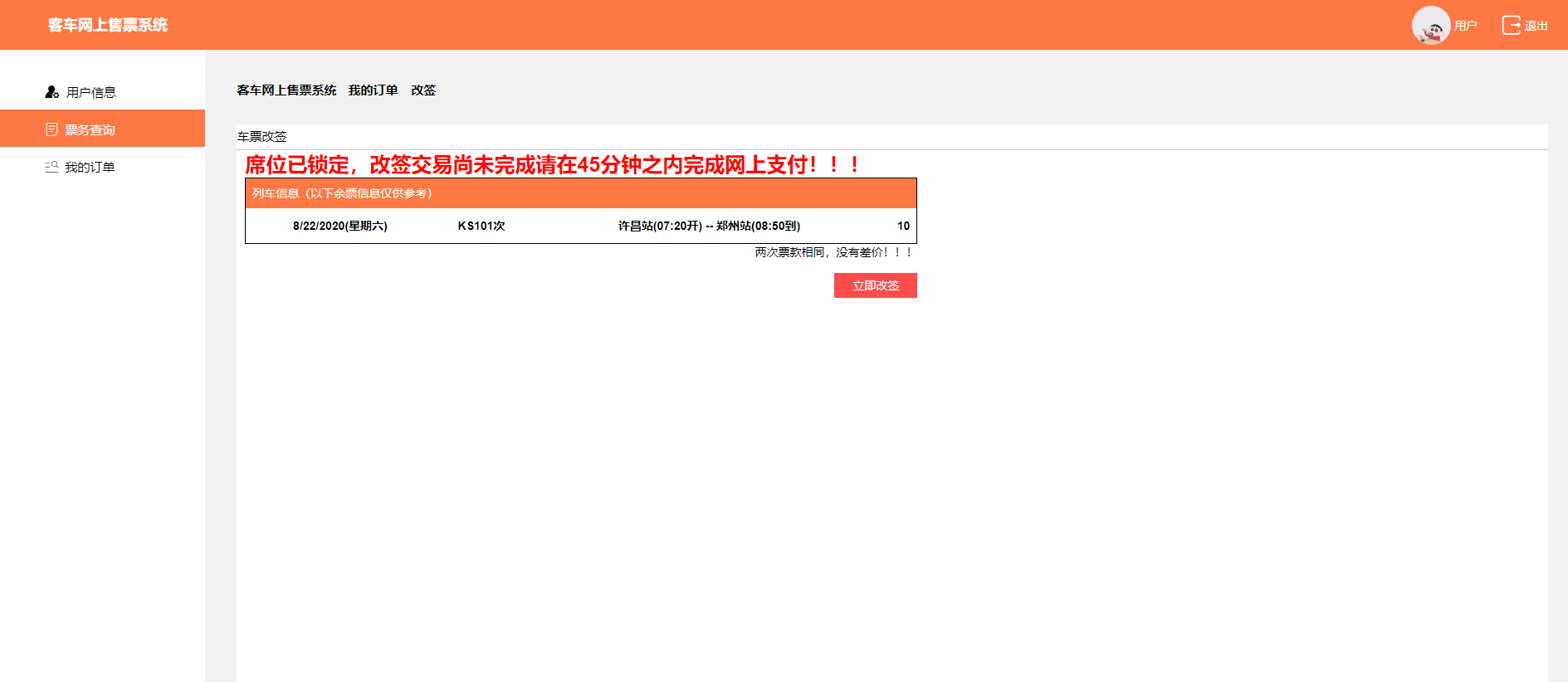
(2)改签分解功能3后台页面代码
   /// <summary>
        /// 提交订单
        /// </summary>
        /// <param name="sender"></param>
        /// <param name="e"></param>
        protected void btnSubmit_Click(object sender, EventArgs e)
        {
            string s = "<style>#yuan{display:none;}</style>";
            Response.Write(s);
            this.lbl.Text = "席位已锁定,改签交易尚未完成请在45分钟之内完成网上支付!!!";
            this.btnGQ.Visible = true;
            this.btnSubmit.Visible = false;
            //判断差价
            int oid = Convert.ToInt32(Session["oid"]);
            int cid = Convert.ToInt32(Request.QueryString["cid"]);
            DataSet ds = bll.SelectByOid(oid);
            DataSet ds3 = carBll.SelectCarTrainInfoByCid(cid);
            double price = Convert.ToDouble(ds.Tables[0].Rows[0]["Price"]);
            double Gprice = Convert.ToDouble(ds3.Tables[0].Rows[0]["Price"]);
            double chajia = price - Gprice;
            if (chajia > 0)
            {
                this.lblChajia.Text = "退还票款差额:" + chajia + "元";
            }
            else if (chajia < 0)
            {
                this.lblChajia.Text = "需要补票款差额:" + chajia + "元";
            }
            else
            {
                this.lblChajia.Text = "两次票款相同,没有差价!!!";
            }

        }
(1)改签分解功能4前台页面效果图

(2) 改签分解功能4前台页面代码
 /// <summary>
        /// 改签
        /// </summary>
        /// <param name="sender"></param>
        /// <param name="e"></param>
        protected void btnGQ_Click(object sender, EventArgs e)
        {
            int oid = Convert.ToInt32(Session["oid"]);
            int cid = Convert.ToInt32(Request.QueryString["cid"]);
            DataSet ds = bll.SelectByOid(oid);
            int tid = Convert.ToInt32(ds.Tables[0].Rows[0]["Tid"]);
            int Seatnum = Convert.ToInt32(tBll.SelectByTid(tid).Tables[0].Rows[0]["Seatnum"]);
            DataSet ds3 = carBll.SelectCarTrainInfoByCid(cid);
            string date = Convert.ToDateTime(ds3.Tables[0].Rows[0]["Start_date"]).ToShortDateString();
            double Gprice = Convert.ToDouble(ds3.Tables[0].Rows[0]["Price"]);
            //当前座位数=总座位数-当前列车的订单数
            int num = Seatnum - bll.SelectCount(date, cid);
            bool boo = bll.GaiQian(cid, Gprice, Seatnum, oid);
            if (boo)
            {
                //改签成功
                Response.Write("<script>alert('改签成功!')</script>");
                bool mark = true;
                Response.Redirect("MyOrder.aspx?m=" + mark);
            }
            else
            {
                Response.Write("<script>alert('改签失败!')</script>");
            }
        }
DAL层:
  public bool GaiQian(int cid,double price,int seatNum,int oid)
        {
            string sql = $"update Orderinfo set Cid={cid},State=1,Odate=getdate(),Seatnum={seatNum} where Oid={oid}";
            int num = dbHelper.ExecuteNonQuery(sql);
            if (num != 0)
            {
                return true;
            }
            else
            {
                return false;
            }
        }
3、遇到的问题:
(1)改签功能需要考虑的东西比较多,容易漏写功能
(2)很多想实现的效果因为能力有限没办法实现,需要前端技术
4、解决的方法:
(1)网上搜索12306改签流程实现
(2)技术能力方面需要利用这个暑假做提升

 浙公网安备 33010602011771号