
如何去优化项目中的字体包的体积以及加载速率
在一个react项目遇到一个关于字体比较大,导致页面加载缓慢或者页面加载好长时间后,字体才变为自定义的字体
如果不加优化打包出的体积:
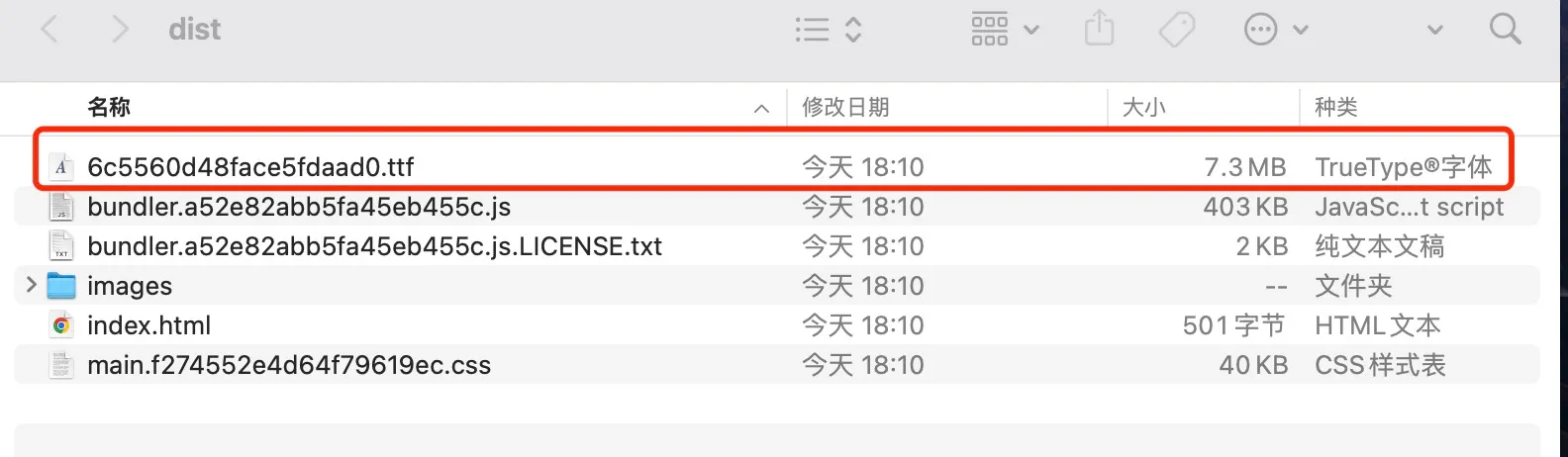
这个文件体积达到了7M, 每次进入页面要加载好久才能转换成自定义的字体,那么如何去优化这个问题呢?
说说解决方法:
使用fontmin-webpack, webpack-font-preload-plugin , 两个webpack插件。
webpack-font-preload-plugin插件:
是可以让字体文件预加载,在打包后html中加入
<link rel="preload" href="6c5560d48face5fdaad0.ttf" as="font" crossorigin>
preload 属性可以让这个字体文件预先加载,具体你可以看看官网配置,我这里就不一一阐述了,你也可以在resolve里面自己配置打包,然后手动在html文件中加入link标签,我这里直接使用插件。
- 使用
fontmin-webpack插件:
这个插件就是可以只打包你所用到的字符,这样大大的减少了字体包的体积
//webpack
const FontminWebpackPlugin = require('fontmin-webpack');
module.exports = {
plugins: [
		new FontminWebpackPlugin({
		glyphs: /[\u4e00-\u9fa5]|[a-zA-Z0-9]/, // 保留中文、英文和数字字符
		subset: true,                         // 启用字体子集化
		formats: ['woff2'],                   // 仅生成 woff2 格式
		compress: true,                       // 启用字体压缩
		log: true,                            // 输出优化日志
		}),
],
};
但是项目中我使用的是react-i18next 支持中英文切换,这如何去配置呢,总不能一个一个列举吧,没办法只能写脚本,上脚本:
因为react-i18next 配置的语言都是在一个json文件中,那么就好办了!
function getGlyphsFromTranslations() {
  const translations = [
    path.resolve(__dirname, 'src/i18n', 'en.json'), // 英文翻译文件
    path.resolve(__dirname, 'src/i18n', 'zh.json'), // 中文翻译文件
  ];
  const glyphs = new Set();
  translations.forEach((filePath) => {
    const content = JSON.parse(fs.readFileSync(filePath, 'utf8'));
    const extractText = (obj) => {
      Object.values(obj).forEach((value) => {
        if (typeof value === 'string') {
          [...value].forEach((char) => glyphs.add(char)); // 添加字符到集合
        } else if (typeof value === 'object') {
          extractText(value); // 递归处理嵌套对象
        }
      });
    };
    extractText(content);
  });

  // 将 Set 转换为字符串
  return [...glyphs].join('');
}
里面可以进行set去重,然后全部的webpack 配置如下:
function getGlyphsFromTranslations() {
  const translations = [
    path.resolve(__dirname, 'src/i18n', 'en.json'), // 英文翻译文件
    path.resolve(__dirname, 'src/i18n', 'zh.json'), // 中文翻译文件
  ];
  const glyphs = new Set();
  translations.forEach((filePath) => {
    const content = JSON.parse(fs.readFileSync(filePath, 'utf8'));
    const extractText = (obj) => {
      Object.values(obj).forEach((value) => {
        if (typeof value === 'string') {
          [...value].forEach((char) => glyphs.add(char)); // 添加字符到集合
        } else if (typeof value === 'object') {
          extractText(value); // 递归处理嵌套对象
        }
      });
    };
    extractText(content);
  });

  // 将 Set 转换为字符串
  return [...glyphs].join('');
}

module.exports = {
...
plugins: [
	 new FontminPlugin({
      glyphs: getGlyphsFromTranslations(), // 保留中文、英文和数字字符
      subset: true,                         // 启用字体子集化
      compress: true,                       // 启用字体压缩
      log: true,
    }),

     new FontPreloadPlugin({
      loadType: "preload",
      crossorigin: true,
      extensions: ["woff", "ttf", "eot"],
      index: "index.html",
      insertBefore: "head > link:nth-child(1)",
      replaceCallback: ({ indexSource, linksAsString }) => {
        let new_str = linksAsString.replace("auto", "");
        return indexSource.replace("<head>", `<head>
          ${new_str}`);
      },

    }),
]
}
打完包之后:
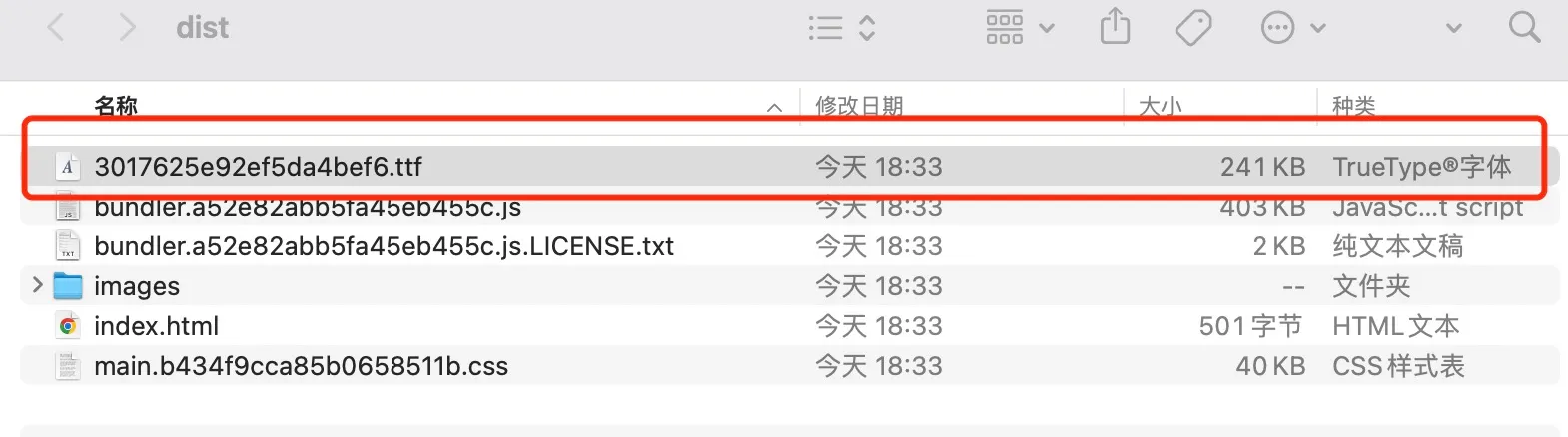
页面进来加载快多了,并且进来就是自定义的字体。

 浙公网安备 33010602011771号