



1. Video resolution
- QCIF, CIF, VGA, PAL,HD
2. Architecture - MCU system
- central, powerful server necessary: multipoint control Unit(MCU)
- every client has to transmit 1 stream and has to receive between 1 and up to n-1 streams
3. structure of a MCU

4. cascading MCUs:
- up to approximately 20 participants can be supported per MCU
- Further scalability is reached via cascading of MCUs
5. Architectures - peer to peer
- no server necessary
- every participant/peer has to transmit and receive n-1 streams
6. Architectures - multicast architecture
- only suitable for 1:n communication scenarios
- virtual network: multicast backbone(MBone)
- Tunnel between multicast routers
- Protocol encapsulation -> IP packets transferred via the tunnel are sent to multicast routers and contain a packet addressed to IP multicast addresses
- ranges of packets is defined by TTL counter
7. Comparison of architecures
- MCU(client/server)
- Central distribution of audio, video, and data
- Reduced load on client side but huge load on server side(MCU)
- Renders mixing of audio and video possible
- supports transcoding
- MCU introduces additional delay
- Up to 20 participants per MCU
- Peer-to-Peer
- Every participant directly transmits to every other participant -> huge network load
- No infrastructure components necessary(MCU or multicast router)
- Does not scale well due to load on client side -> approximately 4-6 participants
- mutlticast
- scales well -> 100 participants possible
- infrastructure components are necessary and have to be managed -> not available in every network
8. H.323 Overview
- H.323 is a recommendation for video conferencing from the international telegraph Union Telecommunication Standardization Sector
- First version has been published in 1996
- Supported by huge amount of video conferencing systems
- Goal: Interoperability between video conferencing systems from different manufactures
- Supports various IDs:
- Tel. No. - +49-351-123478734
- H.323 ID - conferenceroom 222
- H.323 URL ID - h323:user2@h323.b.de
- e-mail -user2@b.de
- IP address - 123.33.24.34
- Had a huge impact on development of the real-time transport protocol which is used for sending and receiving audio/video data
9.H.323 components
- Terminals:
1. Telephone.video telephone, IVR - Server (Interactive Voice Response), video conference software
- MCU - for multi point conferences: MC -multipoint Controller - for signalling; MP- multipoint processor for multimedia processing
- Gateway - gate into other zones and networks : MGC- media gateway - for signalling; MG - media gateway - for multimedia processing(virtual participants)
- Gatekeeper - access control and mapping of address
10. H.323 example
1. calling party -> ARQ -> Gatekeeper(access control and mapping of addresses)
2. GateKeeper -> ACF -> Calling Party
3. Calling party -> setup -> called party
4. called party -> call processing -> calling party
5. called party -> ARQ -> GateKeeper
6.Gatekeeper -> ACF -> called party
7.Called party -> alerting -> calling party
8. Called party -> connect -> calling party
9.H.265 messages
10.RTP
alternatively ,setup, connect and H.265 messages can also be routed via the gatekeeper
routing via several gate keeper is also possible
11. H.323 -> SIP
H.323 is mainly replaced by SIP
12. Video Streaming
download vs streaming : time consuming, space consuming since streaming can help play directly (up to 10s of buffering necessary)
streaming client ---setup, play, pause, fast-forward, backward ---streaming server
--- media packets
- continuous sequences of media data
- transport via TCP/IP or UDP/IP
- buffering on client side for appr. 1-10s
- continuous output to user while media data is received
13. Applications
14. On-demand vs live streaming
On-demand: uses persistently available data as source; fast-forward/rewind possible/usually only one receiver
client -> request server -> media database
<- stream
live streaming: direct transmission of currently received media; No fast-forward; in case of local storage, rewind and pause functionality is available; Usually, several receivers in parallel -> usage of multicast approaches
15. Progressive download
1. User selects hyperlink -> metadata file is requested -> coding method and link to media file is received
2. Content type is identified -> appropriate local player is started -> metadata file is handed over to player
3. HTTP Get request is sent by media player to Web Server -> file is transimitted within response
+ simple approach which can be applied without additional infrastructure / protocols
- download speed is not synchronized with playback speed -> too much data may be downloaded
- negotiation of quality of service parameters is not supported
- no random seeking, no live streaming
16. streaming :
1. 2-server-architecture -> web server manages the websites, streaming server provides video stream(server applications may be run on the same hardware)
2. renders application of protocols optimized for streaming between media player and streaming server possible
3. standardized protocol: real-time streaming protocol defined in RFC 2326

17. RTSP - real -time streaming procotol
establishes and controls either a single or several time- synchronized streams of continuous media such as audio and video. RTSP acts as a network remote control for multimedia servers.
- signaling and control of multimedia data streams
- independent from transport or multimedia data
- supported operations: play, pause, resume, reset, record, fast-forward, rewind
Text-based simular to HTTP 1.1
central difference to HTTP 1.1: stateful server, data is transferred separately, URIs:
"rtsp:" "//" host[":"port][abs_path]
- Requests
- Classical client/server protocol
- client initiates session and controls transmission
- server awaits requests and carrier them out
- Most important requests

- Responses
- Server response to request as with HTTP with status code
- Status code categories:
1xx for information only, 2xx success,3xx redirect, 4xx client error, 5xx server error

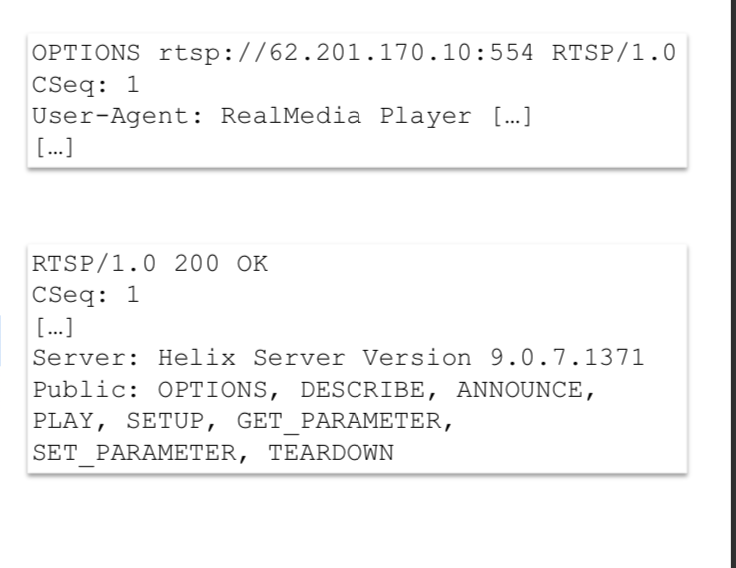
- Options:
- Request to server; which RTSP method is supported
- CSeq: Sequence number for request-response-pair to correct request; assignment of response to correct request
- Response: Listing of supported methods
- Describe:
1. request description
2. Session: session number(valid for all follow-up requests)
3. Accept : required description format : sdp
4. except

- setup :
- determine transport :
- client specifies several variants
- server selects one variant
- in the example:
- transport done via real data transport which is similar to rtp
- transport done via TCP via the connection used by RTSP
- Separate / new connection may be used

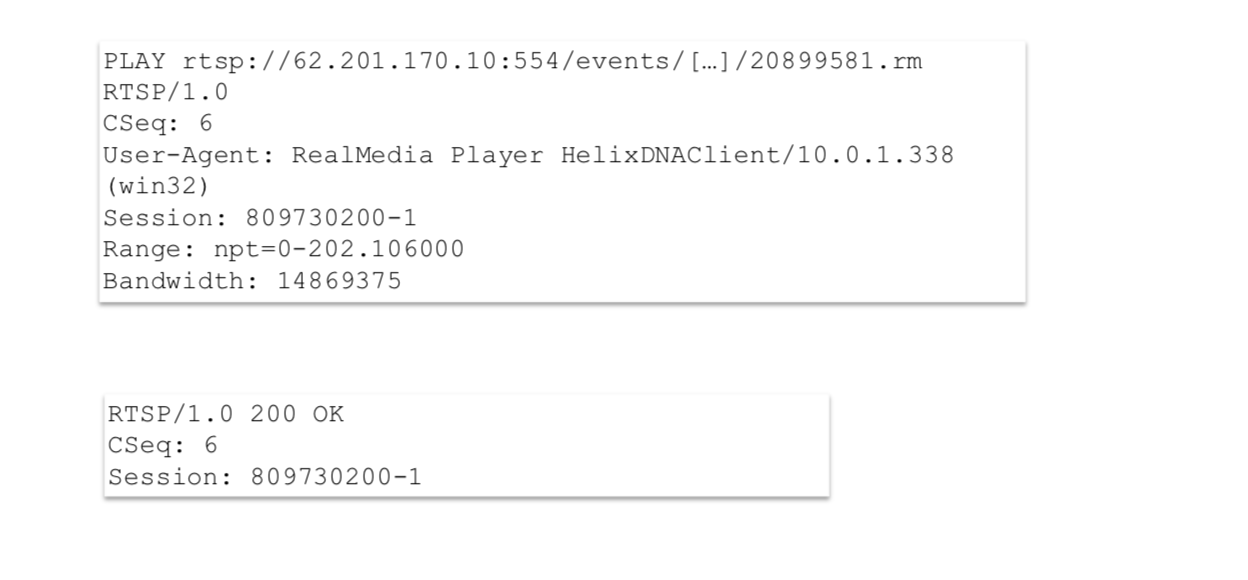
- play:
- play can be sent anytime and is as well used to jump to different positions of the stream
- using the header field "range", the playback scope is requested
- break done by "PAUSE"
- media seesion

- teardown:
- stream transfer is canceled
- all resources are released
- replay requires setup and play again

- adaptive streaming:
- progressive download: cost-effective, builds on existing HTTP infrastructure, NAT and firewall-friendly, no live streaming.
- real streaming: particular streaming servers required, aligns itself on changing transmission quality(RTP/RTCP),problems with NAT and firewalling
- Adaptive streaming
- http-based/splitting up in chunks
- HTTP live streaming

- HTTP live stream :
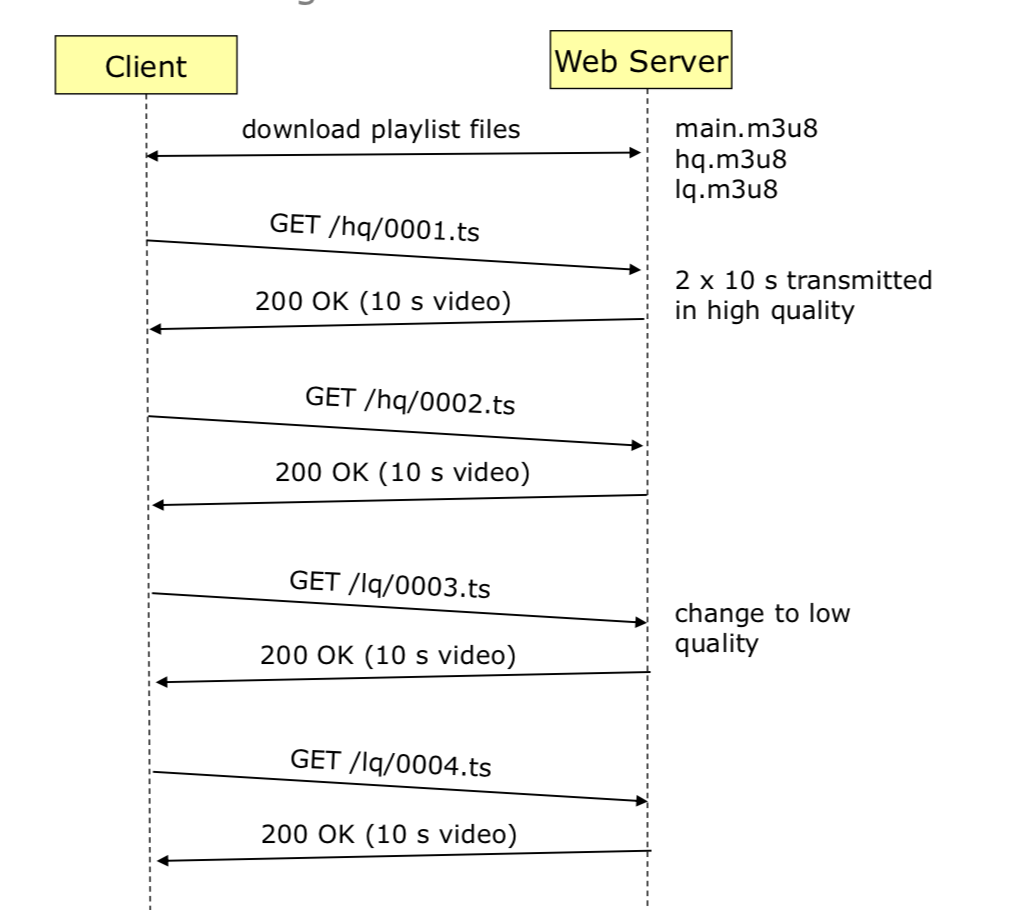
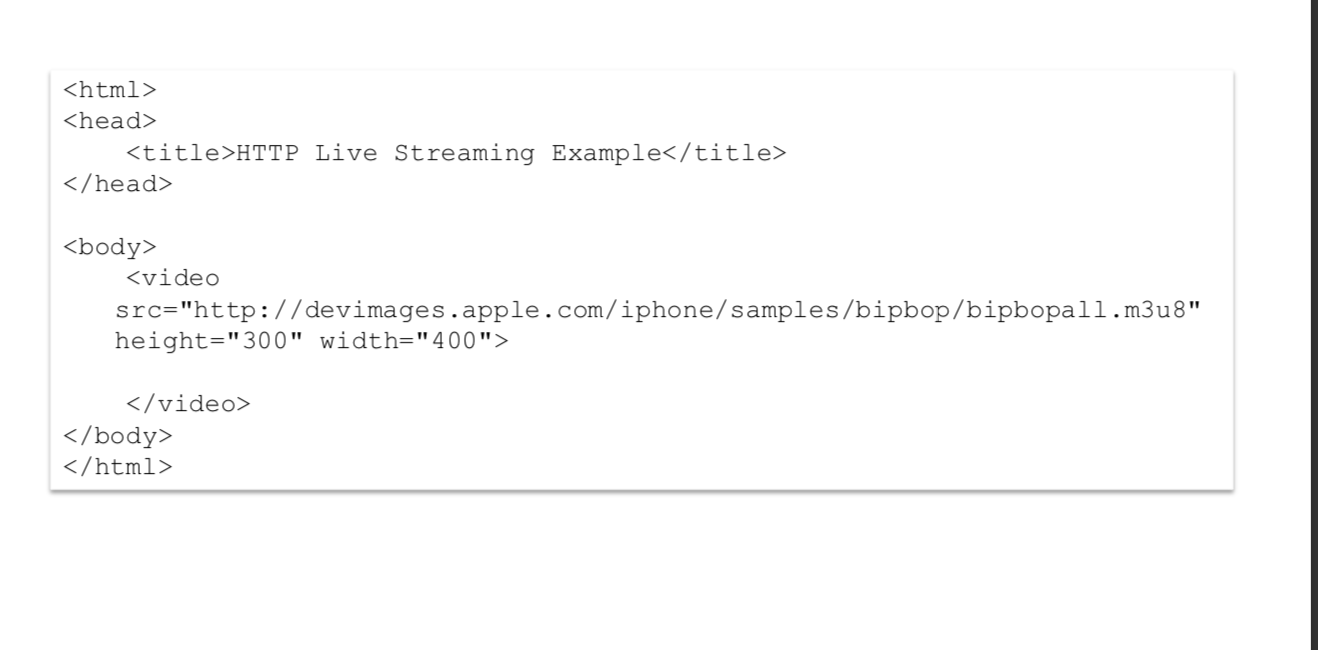
- embedding of the main playlist in HTML



 浙公网安备 33010602011771号