
Extjs editor 设置默认值
一、前言
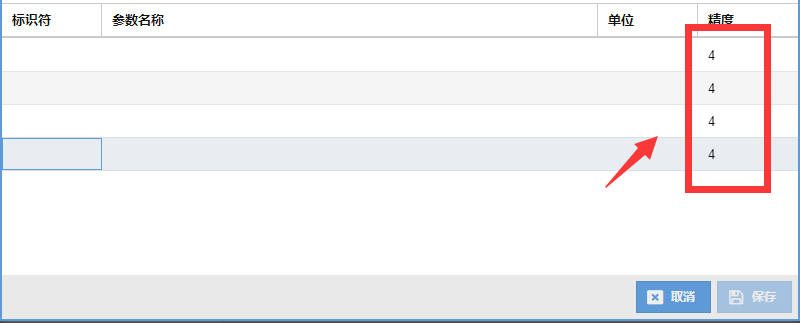
Ext js 给 editor 设置默认值用 value 无效,在 Model 中添加 defaultValue 即可。
二、实例
view:
Ext.define('xxxx.view.ParamGrid', {
    extend: 'Ext.form.field.GridField',
    xtype: 'paramgrid',

    store: {
        type: 'esms.paramtemplatestore'
    },

    initComponent: function () {
        this.columns = [{
            xtype: 'numbercolumn',
            header: '精度',
            format: '0',
            dataIndex: 'precision',
            hideEditorInValueMode: true,
            editor: {
                xtype: 'numberfield',
                allowBlank: false
            }
        }];

        this.callParent(arguments);
    }
});
Store:
Ext.define('xxxx.store.ParamTemplateStore', {
    extend: 'Ext.data.Store',
    alias: 'store.paramtemplatestore',
    model: 'xxx.model.ParamTemplateDto',
    proxy: {
        type: 'memory',
        reader: {
            type: 'json'
        }
    },
    autoLoad: false,
    remoteSort: false,
    remoteFilter: false,
    remoteGroup: false
});
Model:
Ext.define('xxxx.model.ParamTemplateDto', {
    extend: 'xxxx.common.model.BaseModel',

    fields: [
        { name: 'precision', type: 'number' ,defaultValue: 4},
    ],
    validators: {
        precision: [
            { type: 'presence', allowEmpty: false }
        ]
    }
});
截图:
作者:幸福摩天轮
------------------------------------------------
愿今日之努力日后想起还能浅浅一笑,不愿今日之颓废用长长一生去悔恨!
如果觉得这篇文章对你有小小的帮助的话,记得在右下角点个“推荐”哦,博主在此感谢!

 浙公网安备 33010602011771号