


网络信息提取与编程手册答案
实训任务一 Requests库获取网络数据信息
1、亚马逊和京东商品页面数据信息获取
//用爬取网页的通用代码框架完成(亚马逊)
import requests
r=requests.get('https://www.amazon.com/')
r.encoding=r.apparent_encoding
print(r.text)
//用爬取网页的通用代码框架完成(京东)
import requests
url = 'https://www.jd.com/'
headers = {"User-Agent": "XXX"}
cookies = {"XXX":"XXX"}
r = requests.get(url, headers=headers, cookies=cookies)
r.encoding = r.apparent_encoding
print(r.text)
2、360/百度搜索关键字提交
//用爬取网页的通用代码框架完成(360)
import requests
r=requests.get('https://www.so.com/s',params={'q':'刘国立'})
r.encoding=r.apparent_encoding
print(len(r.text))
//用爬取网页的通用代码框架完成(百度)
import requests
d={'wd':'刘国立'}
r=requests.get('https://www.baidu.com/s',params=d)
r.encoding=r.apparent_encoding
print(len(r.text))
3、网络图片的爬取和存储(With...as 和 Try...finally)
import requests
import os
url='https://imagepphcloud.thepaper.cn/pph/image/320/898/587.jpg'
p2='e://guoli/'
p3=p2+url.split('/')[-1]+'.jpg'
try:
    if not os.path.exists(p2):
        os.mkdir(p2)
    if not os.path.exists(p3):
        r=requests.get(url)
        r.encoding=r.apparent_encoding
        a=r.content
        with open(p3,'wb')as f:
            f.write(a)
            f.close()
            print("文件保存成功")
    else:
        print('文件已经存在!')
except:
    print("爬取失败")
实训任务二 Beautiful Soup库获取网络数据信息
1、Python网页小测(http://python123.io/ws/demo.html)
import requests
r=requests.get('http://python123.io/ws/demo.html')
a=r.text
print(a)
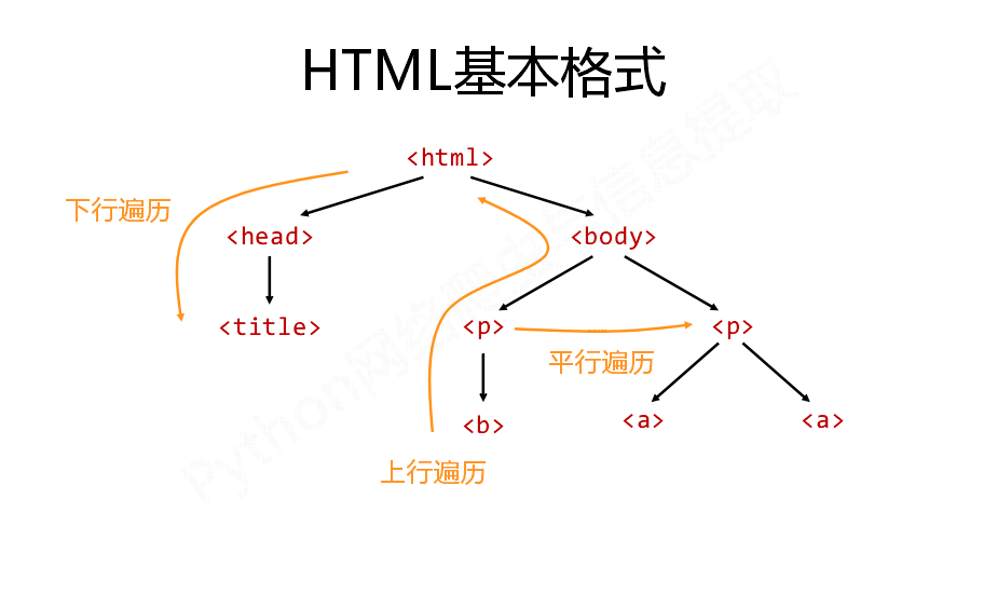
2、基于bs4库的HTML内容遍历(上行、下行、平行)
//上行遍历
import requests
r=requests.get('http://python123.io/ws/demo.html')
a=r.text
from bs4 import BeautifulSoup
b=BeautifulSoup(a,'html.parser')
for i in b.a.parents:
    if i is None:
        print(i)
    else:
        print(i.name)
//下行遍历
import requests
r=requests.get('http://python123.io/ws/demo.html')
a=r.text
from bs4 import BeautifulSoup
b=BeautifulSoup(a,'html.parser')
for i in b.body.children:
    print(i)
for i in b.body.descendants:
    print(i)
//平行遍历
import requests
r=requests.get('http://python123.io/ws/demo.html')
a=r.text
from bs4 import BeautifulSoup
b=BeautifulSoup(a,'html.parser')
for i in b.a.next_siblings:          //遍历后序节点
#for i in b.a.previous_siblings:      //遍历前序节点
    if i.name !=None:
        print(i)
3、 bs4库的prettify()方法(格式输出)
import requests
r=requests.get('http://python123.io/ws/demo.html')
a=r.text
from bs4 import BeautifulSoup
b=BeautifulSoup(a,'html.parser')
print(b.prettify())
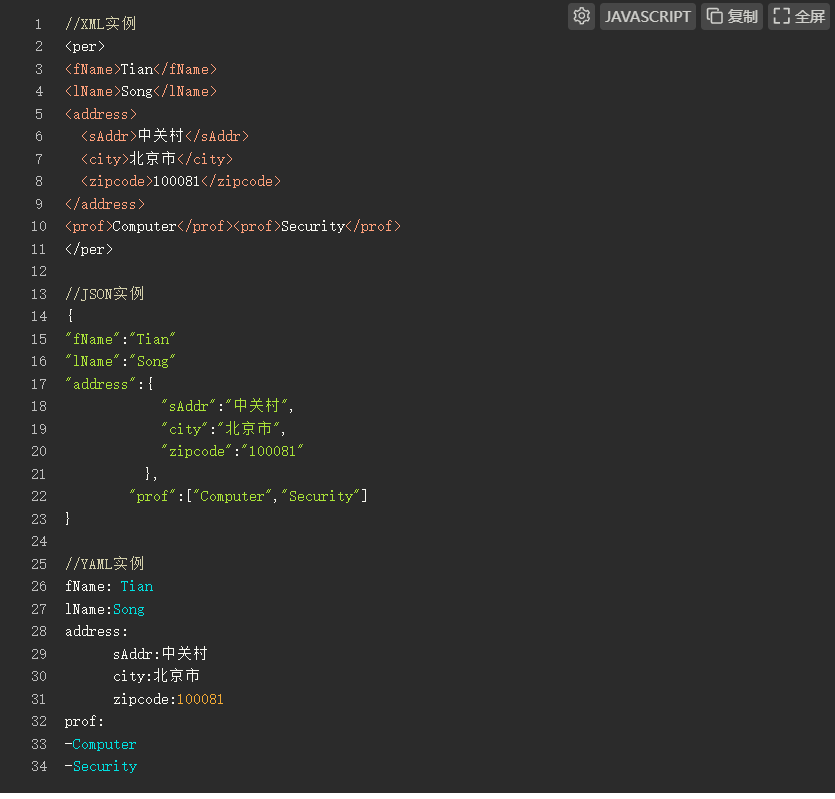
4、信息标记与提取(XML、JSON、YAML)
//XML实例
<per>
<fName>Tian</fName>
<lName>Song</lName>
<address>
  <sAddr>中关村</sAddr>
  <city>北京市</city>
  <zipcode>100081</zipcode>
</address>
<prof>Computer</prof><prof>Security</prof>
</per>

//JSON实例
{
"fName":"Tian"
"lName":"Song"
"address":{
            "sAddr":"中关村",
            "city":"北京市",
            "zipcode":"100081"
          },
        "prof":["Computer","Security"]
}

//YAML实例
fName: Tian
lName:Song
address:
      sAddr:中关村
      city:北京市
      zipcode:100081
prof:
-Computer
-Security
实训任务三 使用正则表达式获取网页数据
1、初识正则表达式(操作符、语法、表达式)
//正则表达式使用
正则表达式是用来简洁表达一组字符串的表达式,如:
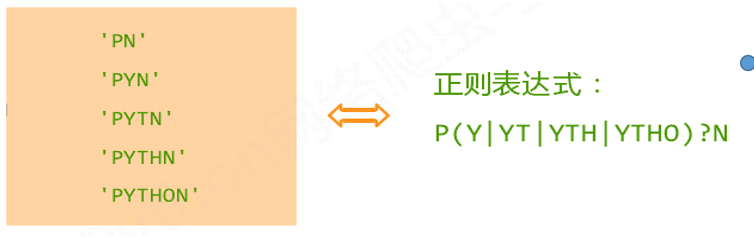
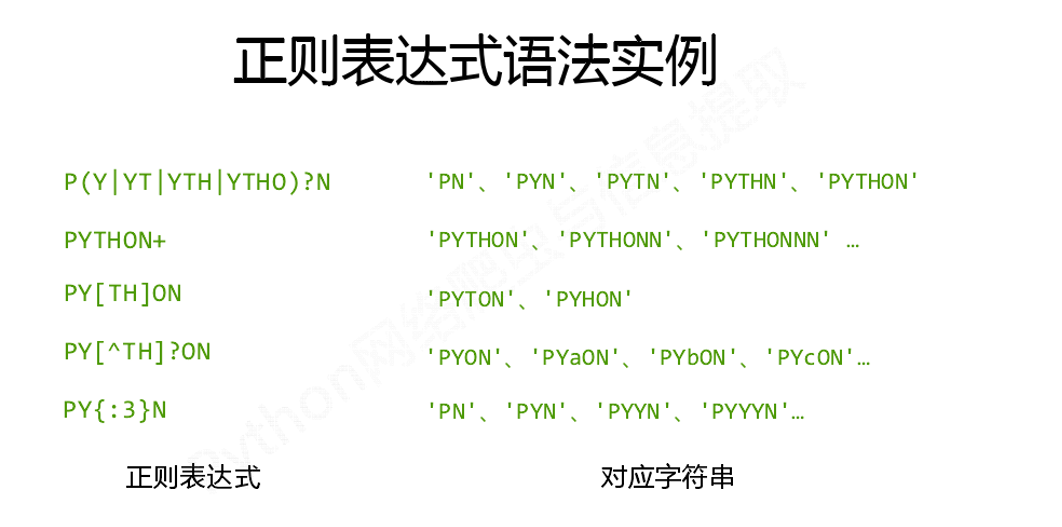
//正则表达式语法实例
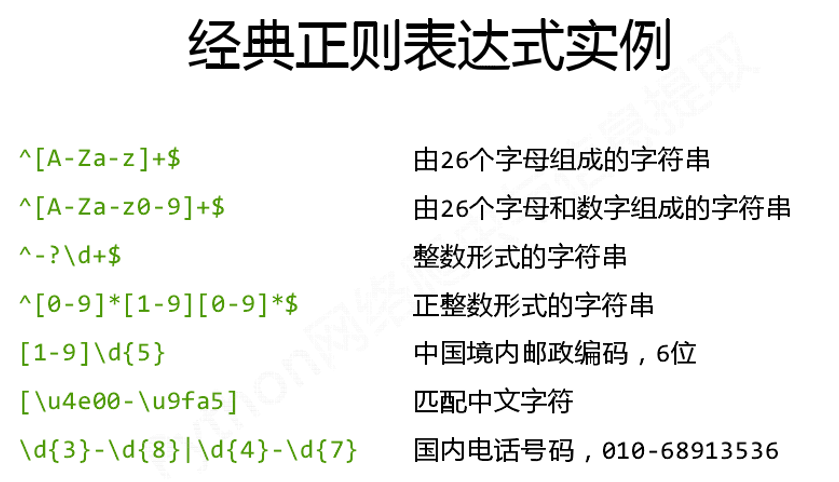
//经典正则表达式实例
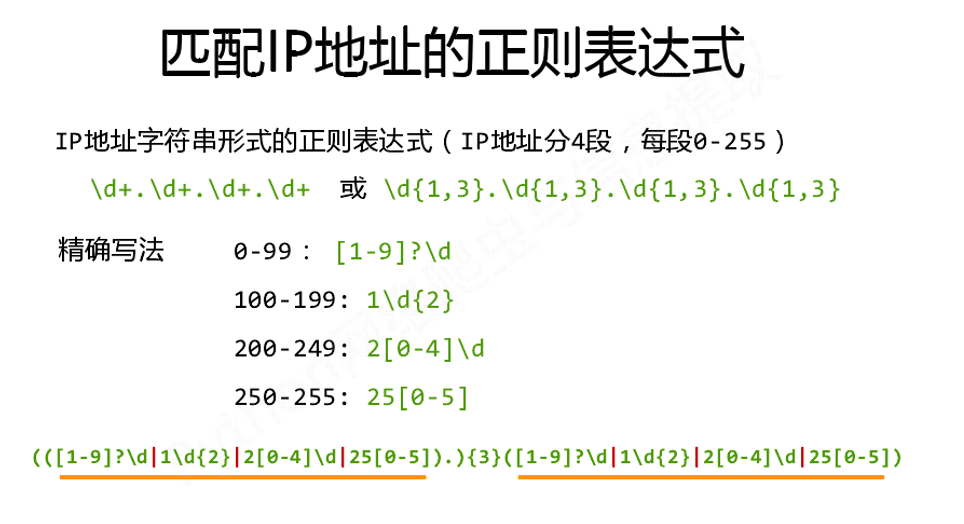
//正则表达式匹配IP地址
2、Re库主要函数实例
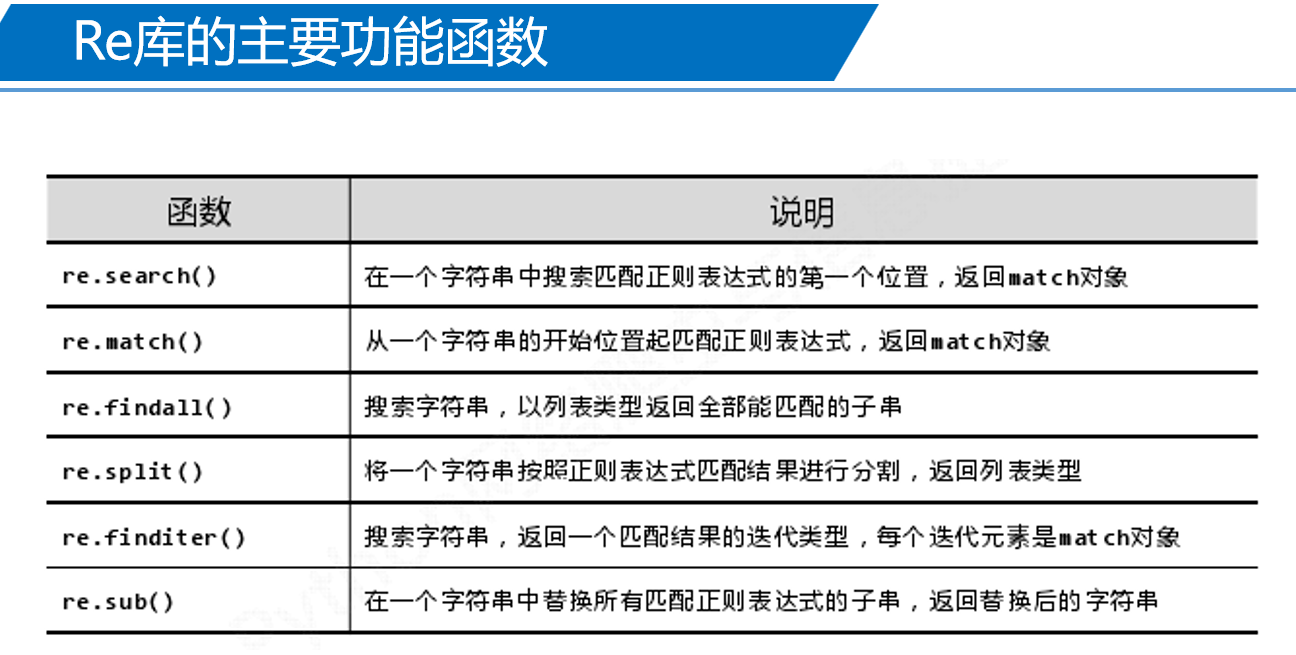
如:

3、Re库的Match对象实例
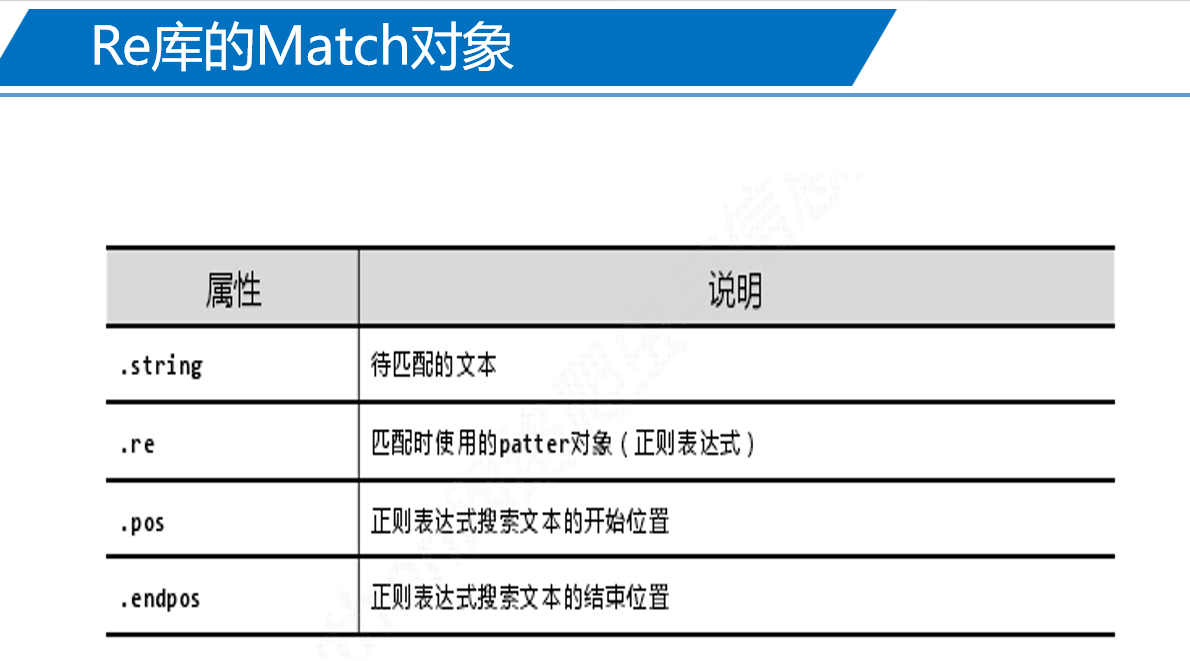
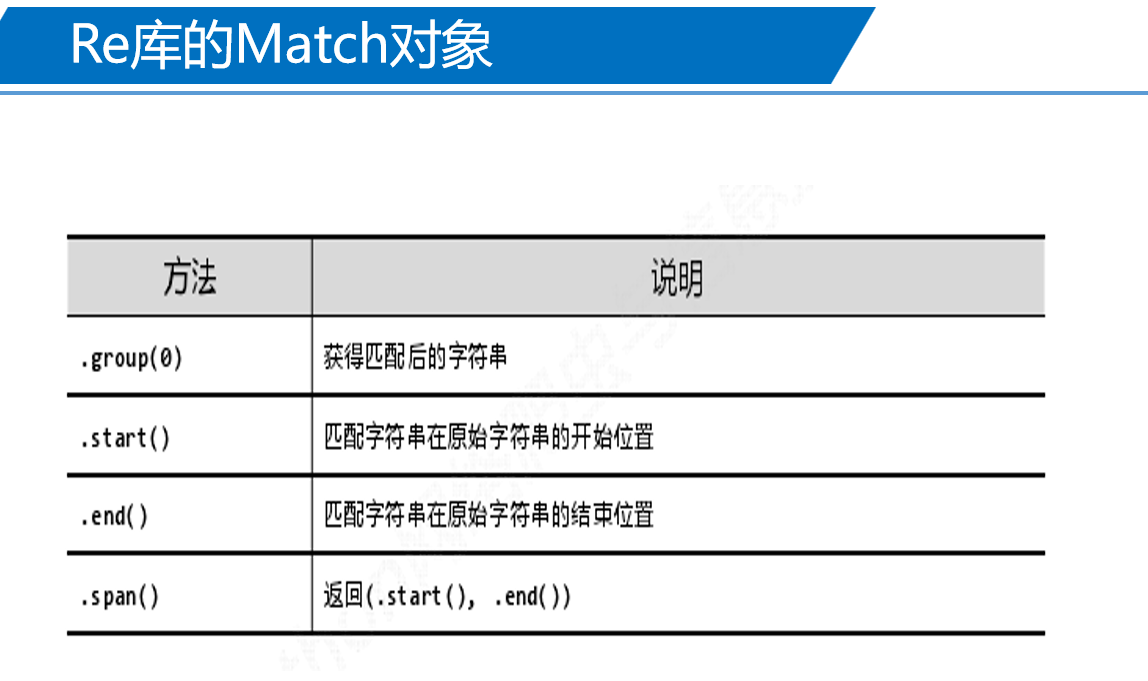
如:
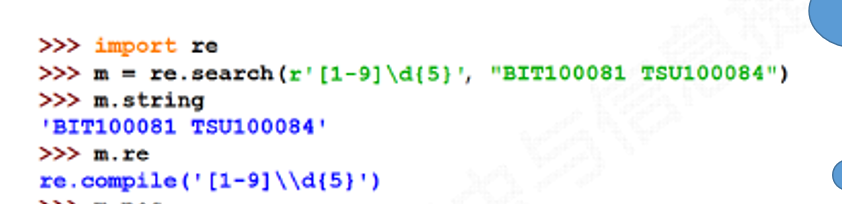
作业任务一 Requests库获取网络数据信息
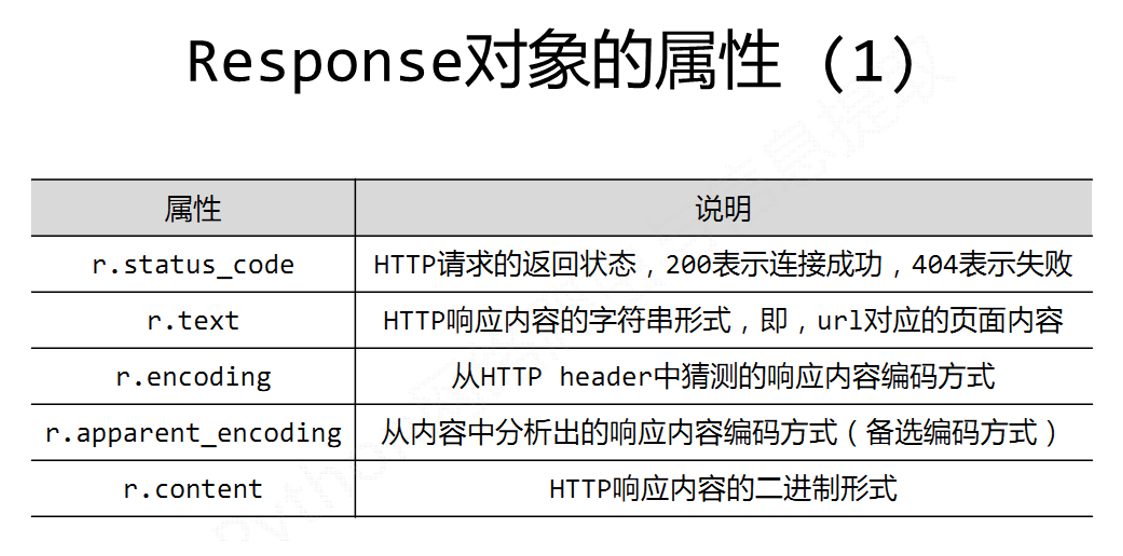
- Response对象的属性有哪些?并举例说明?
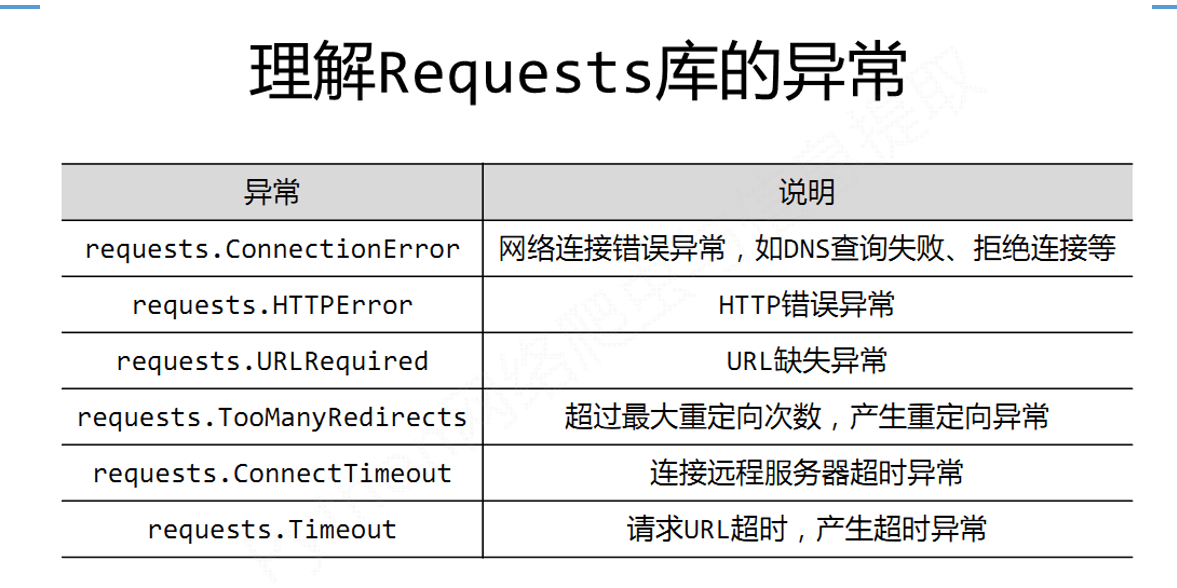
- Requests库的异常有哪些?
- 爬取网页的通用代码框架?
1、Response对象的属性
2、Requests库的异常
3、爬取网页的通用代码框架
import requests
try:
  r=requests.get('https://www.baidu.com/')
  r.encoding=r.apparent_encoding
  print(r.text)
except:
    print("产生异常")
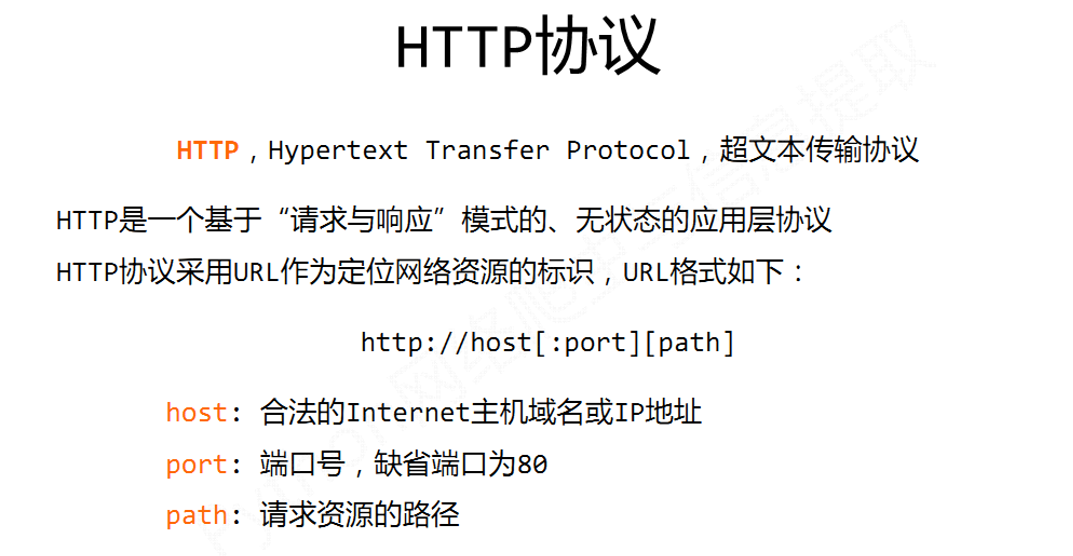
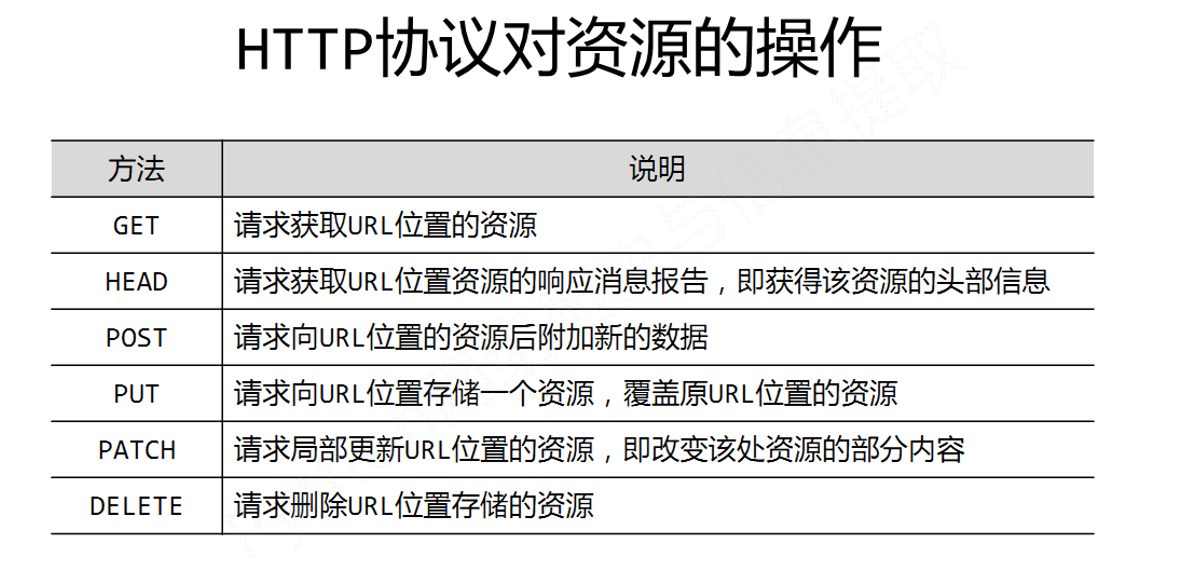
1、HTTP协议是?英文?举例说明?对资源的操作有哪些?
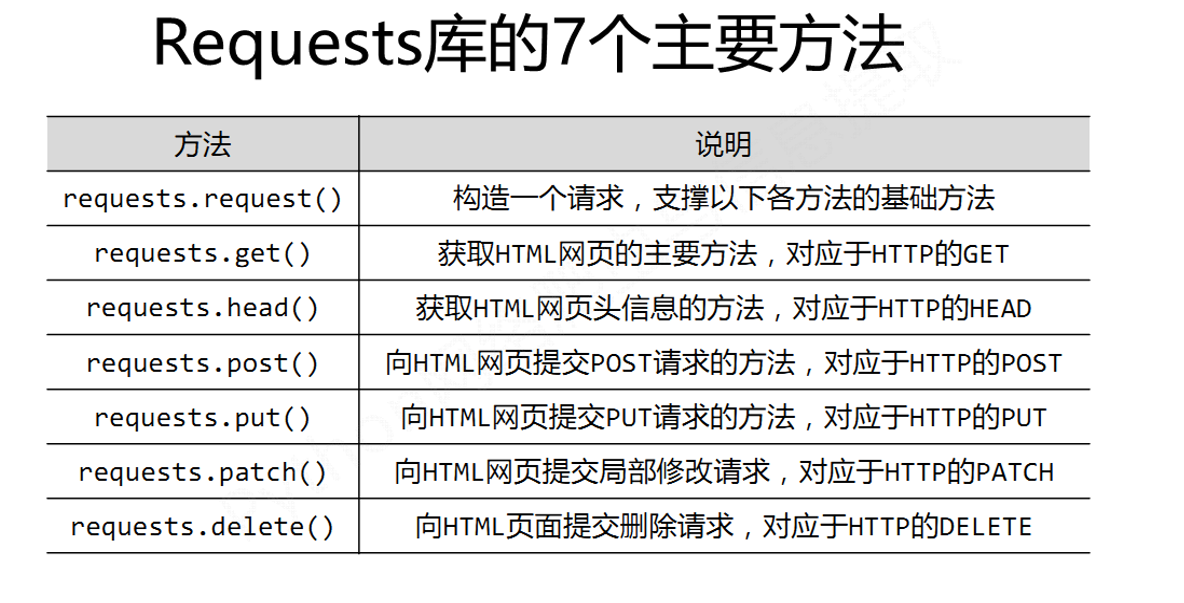
1、Requests库的7个主要方法解析?
作业任务二 Beautiful Soup库获取网络数据信息
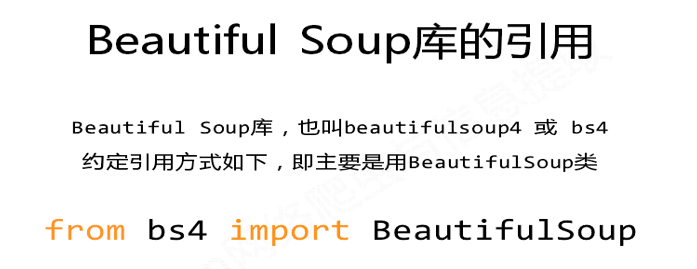
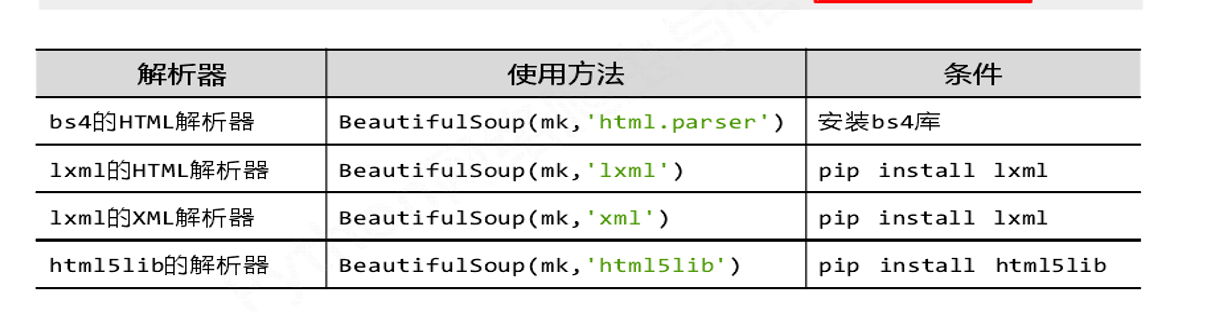
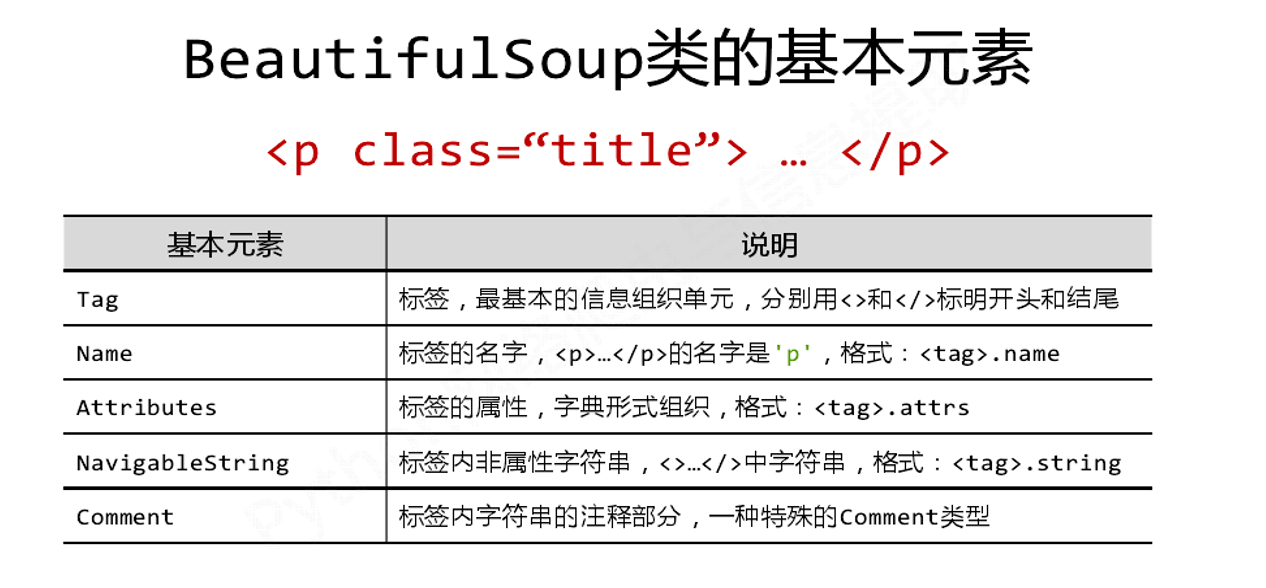
- Beautiful Soup如何引用?类的基本元素?类如何使用?解析器有哪些?
![]()
![]()
![]()
![]()
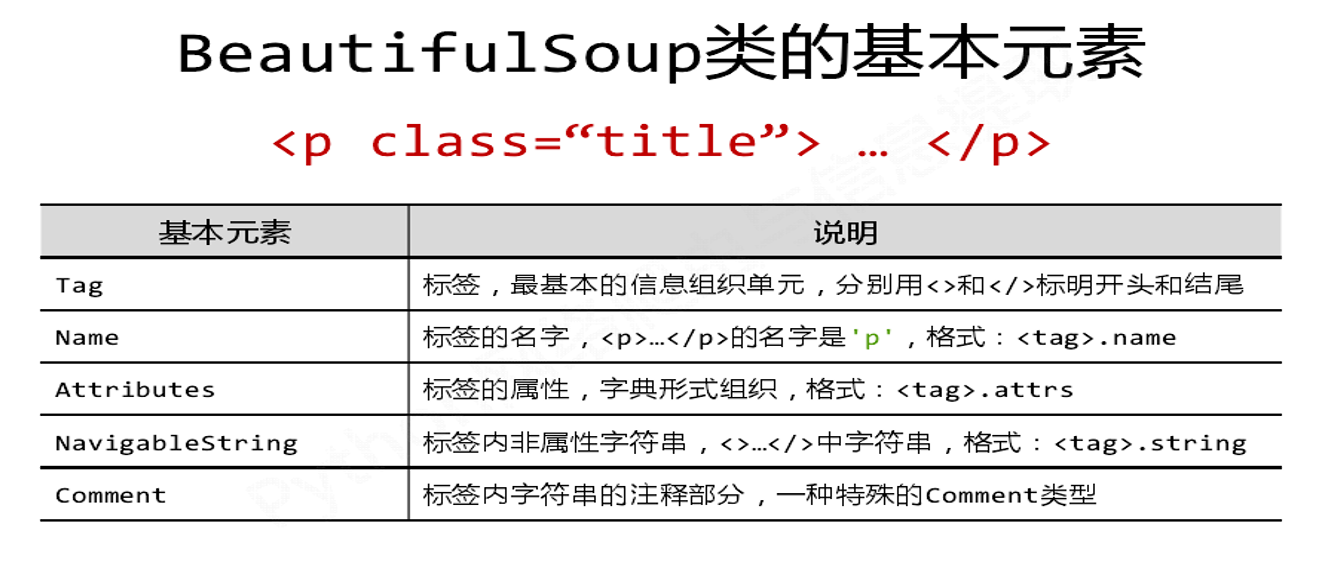

1.标签(Tag)的基本元素有哪些?举例说明
2.图示标签树的下行、上行、平行遍历(画图)
1
2
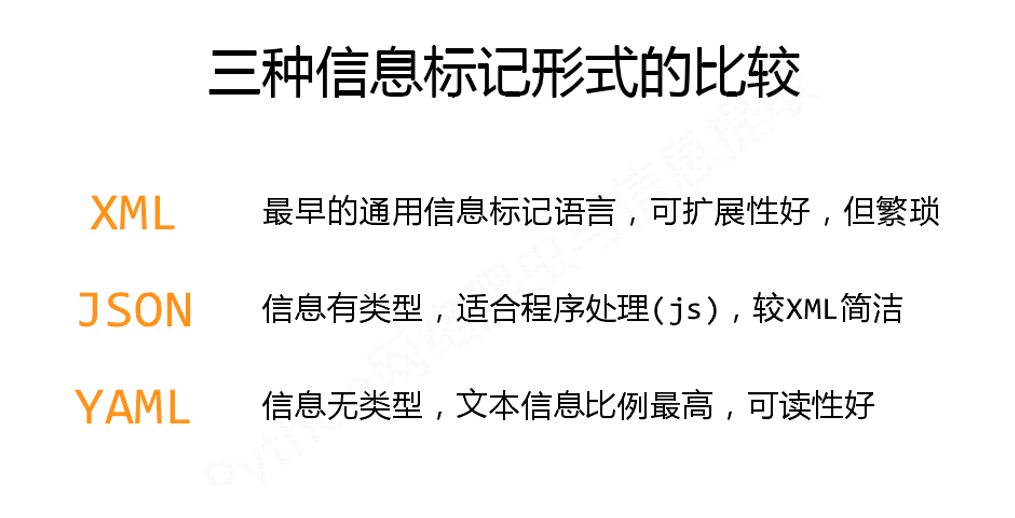
1、举例信息标记XML、JSON和YAML三种形式?并进行比较说明。
作业任务三 使用正则表达式获取网页数据
1、正则表达式常用符号说明(举例)
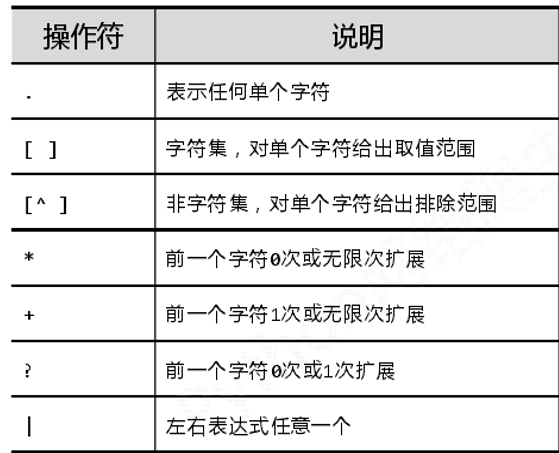
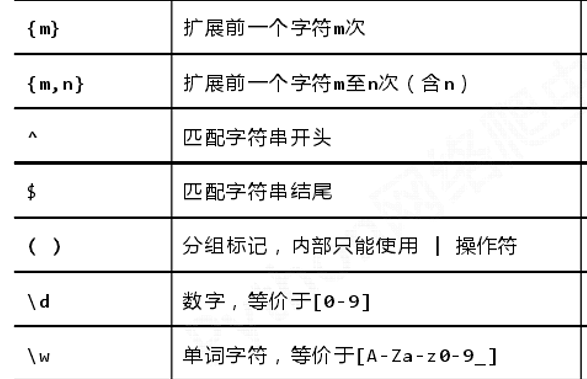
举例:
import re
a=re.findall('[1-9]\d{5}','chengde367000bengjing10051shanghai200088')
print(a)

#[1-9]\d{5} 匹配一个由 6 位数字组成的字符串且第一位数字不是 0。

 浙公网安备 33010602011771号