
python: Treeview Control binding data using tkinter and ttkbootstrap GUI
pip install matplotlib
pip install numpy
pip install statsmodels
"""
StudentUI.py
读文件类
date 2023-06-24
edit: Geovin Du,geovindu, 涂聚文
ide:  PyCharm 2023.1 python 11

"""

import datetime
import sys
import os
from tkinter import ttk
from tkinter import *
from tkinter.ttk import *
from ttkbootstrap import Style  # pip install ttkbootstrap
import random
import Model.StudentListInfo

class StudentUi(object):

    global tree
    def __del__(self):
        self.name="geovindu"

    def delete():
        global tree
        tree.delete(tree.selection())

    def main():

        geovindu = list()
        geovindu.append(Model.StudentListInfo.StudentList(1, '王二', '002', datetime.datetime(2008, 2, 14, 0, 0)))
        geovindu.append(Model.StudentListInfo.StudentList(2, '涂年生', '003', datetime.datetime(2008, 2, 14, 0, 0)))
        geovindu.append(Model.StudentListInfo.StudentList(3, '涂聚文', '004', datetime.datetime(2008, 2, 14, 0, 0)))
        geovindu.append(Model.StudentListInfo.StudentList(4, '赵三', '001', datetime.datetime(2008, 2, 14, 0, 0)))
        geovindu.append(Model.StudentListInfo.StudentList(5, '李四', '005', datetime.datetime(2008, 2, 14, 0, 0)))

        style=Style(theme='darkly') #定义窗口样式
        window=style.master
        window.title("学生管理")
        # win = Tk()
        screenWidth = window.winfo_screenwidth()
        screenHeight = window.winfo_screenheight()
        width=100
        height=600
        x=int((screenWidth-width)/2)
        y=int((screenHeight-height)/2)
        window.geometry('{}x{}+{}+{}'.format(width,height,x,y))
        #Treeview 控件
        tree=ttk.Treeview(master=window,style='success.Treeview',height=25,show='headings')
        tree.pack()
        #定义列
        tree['columns']=("StudentId","StudentName","StudentNO","StudentBirthday")
        #设置列属性,列不显示
        tree.column("StudentId",width=150,minwidth=100,anchor=S)
        tree.column("StudentName", width=150, minwidth=100, anchor=S)
        tree.column("StudentNO", width=150, minwidth=100, anchor=S)
        tree.column("StudentBirthday", width=150, minwidth=100, anchor=S)
        #设置表头
        tree.heading("StudentId",text="序号")
        tree.heading("StudentName", text="姓名")
        tree.heading("StudentNO", text="学号")
        tree.heading("StudentBirthday", text="出生日期")
        #treeView控件绑定数据
        i=1
        for Model.StudentListInfo.StudentList in geovindu:
            tree.insert("",i,text="2",values=(Model.StudentListInfo.StudentList.getStudentId(),Model.StudentListInfo.StudentList.getStudentName(),Model.StudentListInfo.StudentList.getStudentNO(),Model.StudentListInfo.StudentList.getStudentBirthday()))
            i+=1
        #删除按钮
        ttk.Button(window,text="del",style='success,TButton',command=StudentUi.delete).pack(side='left',padx=5,pady=10)
        window.mainloop()
"""
StudentUI.py
读文件类
date 2023-06-24
edit: Geovin Du,geovindu, 涂聚文
ide:  PyCharm 2023.1 python 11

"""

import datetime
import sys
import os
from tkinter import ttk
from tkinter import *
from tkinter.ttk import *
from ttkbootstrap import Style  # pip install ttkbootstrap
import random
import Model.StudentListInfo
import BLL.StudentListBLL

class StudentUi(object):

    global tree
    stubll = BLL.StudentListBLL.StudentBll()

    def __init__(self):
        self.name="geovindu"

    def __del__(self):
        print(f"{self.name}")

    def delete(cls):
        #global tree
        curItem = cls.tree.focus()
        val=cls.tree.item(curItem)['values'][0]  #id
        print(val)
        print(cls.tree.selection())
        cls.tree.delete(cls.tree.selection())
        cls.stubll.delSql(val)  #需要删除关联的数据才可以删除

        #cls.stubll.delSql()

    def treeview_sort_column(cls,tv, col, reverse):
        """
        Treeview、列名、排列方式
        :param tv: Treeview 控件
        :param col:  列名
        :param reverse:
        :return:
        """
        l = [(tv.set(k, col), k) for k in tv.get_children('')]
        # print(tv.get_children(''))
        l.sort(reverse=reverse)  # 排序方式
        # rearrange items in sorted positions
        for index, (val, k) in enumerate(l):  # 根据排序后索引移动
            tv.move(k, '', index)
            # print(k)
        tv.heading(col, command=lambda: cls.treeview_sort_column(
            tv, col, not reverse))  # 重写标题,使之成为再点倒序的标题

    def main(cls):
        """
        窗体绑定数据
        :return:
        """
        #stubll = BLL.StudentListBLL.StudentBll()
        geovindu =cls.stubll.selectSqlOrder("StudentNO asc") # list()

        style=Style(theme='darkly') #定义窗口样式
        window=style.master
        window.title("学生管理")
        # win = Tk()
        screenWidth = window.winfo_screenwidth()
        screenHeight = window.winfo_screenheight()
        width=800
        height=600
        x=int((screenWidth-width)/2)
        y=int((screenHeight-height)/2)
        window.geometry('{}x{}+{}+{}'.format(width,height,x,y))
        #Treeview 控件
        cls.tree=ttk.Treeview(master=window,style='success.Treeview',height=25,show='headings')
        cls.tree.pack()
        #定义列
        cls.tree['columns']=("StudentId","StudentName","StudentNO","StudentBirthday","Age")
        #设置列属性,列不显示
        cls.tree.column("StudentId",width=150,minwidth=100,anchor=S)
        cls.tree.column("StudentName", width=150, minwidth=100, anchor=S)
        cls.tree.column("StudentNO", width=150, minwidth=100, anchor=S)
        cls.tree.column("StudentBirthday", width=150, minwidth=100, anchor=S)
        cls.tree.column("Age", width=150, minwidth=100, anchor=S)
        #设置表头
        cls.tree.heading("StudentId",text="序号")
        cls.tree.heading("StudentName", text="姓名")
        cls.tree.heading("StudentNO", text="学号")
        cls.tree.heading("StudentBirthday", text="出生日期")
        cls.tree.heading("Age", text="年龄")

        #删除按钮
        #ttk.Button(window,text="删除",style='success,TButton',command=cls.delete).pack(side='left',padx=5,pady=10)

        #Button(window, text='添加', bg='yellow', width=20).pack(side=LEFT)
        #Button(window, text='删除', bg='pink', width=20, command=cls.delete).pack(side=LEFT)

        #treeView控件绑定数据
        i=1
        for Model.StudentListInfo.StudentList in geovindu:
            cls.tree.insert("",i,text="2",values=(Model.StudentListInfo.StudentList.getStudentId(),Model.StudentListInfo.StudentList.getStudentName(),Model.StudentListInfo.StudentList.getStudentNO(),Model.StudentListInfo.StudentList.getStudentBirthday(),Model.StudentListInfo.StudentList.getAge()))
            i+=1


        columnnames=("序号","姓名","学号","出生日期","年龄")
        print(cls.tree["columns"])
        duindex=0
        # 控件treeview点击标题排序
        for col in cls.tree["columns"]:  # 给所有标题加cls.tree["columns"]
            cls.tree.heading(
                col,
                text=columnnames[duindex],  #中文名称
                command=lambda _col=col: cls.treeview_sort_column(
                    cls.tree, _col, False
                ),
            )
            duindex+=1

        vbar = ttk.Scrollbar(window, orient="vertical", command=cls.tree.yview)
        cls.tree.configure(yscrollcommand=vbar.set)
        cls.tree.grid(row=1, column=0, sticky="news")
        vbar.grid(row=1, column=1, sticky="ns")


        window.mainloop()
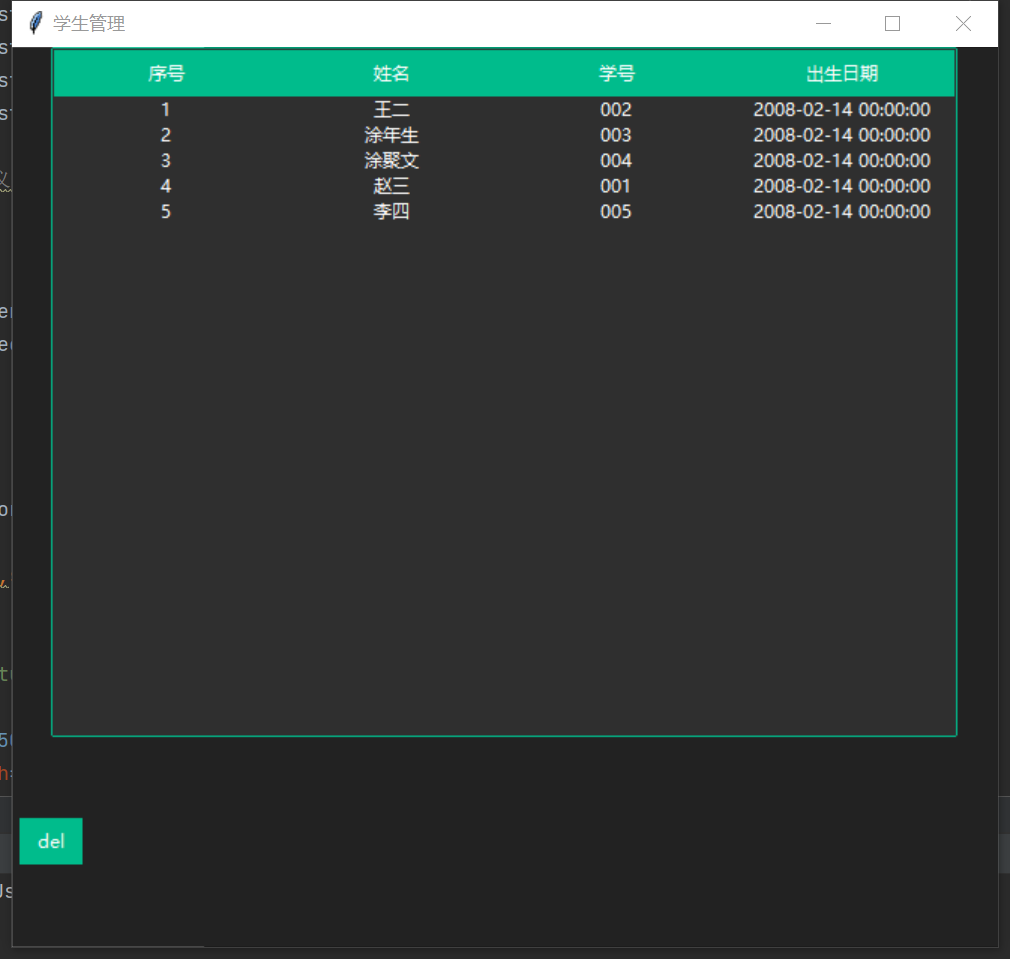
输出:
哲学管理(学)人生, 文学艺术生活, 自动(计算机学)物理(学)工作, 生物(学)化学逆境, 历史(学)测绘(学)时间, 经济(学)数学金钱(理财), 心理(学)医学情绪, 诗词美容情感, 美学建筑(学)家园, 解构建构(分析)整合学习, 智商情商(IQ、EQ)运筹(学)生存.---Geovin Du(涂聚文)

 浙公网安备 33010602011771号