

13. EXPLAIN
Explain
- explain是解释SQL语句的执行计划,即显示该SQL语句怎么执行的
- 使用 explain 的时候,也可以使用 desc
- 5.6 版本支持DML语句进行explain解释
- 5.6 版本开始支持 JSON格式 的输出
EXPLAIN查看的是执行计划,做SQL解析,不会去真的执行;且到5.7以后子查询也不会去执行。
- 参数FORMAT
- 使用 FORMART=JSON 不仅仅是为了格式化输出效果,还有其他有用的显示信息
- 且当5.6版本后,使用 MySQL Workbench ,可以使用 visual Explain 方式显示详细的图示信息。
root@mysqldb 14:26:  [gavin]> explain format=json select * from test_index_2 where b >1 and b < 3\G
*************************** 1. row ***************************
EXPLAIN: {
  "query_block": {
    "select_id": 1,
    "cost_info": {
      "query_cost": "0.85"    -- 总成本
    },
    "table": {
      "table_name": "test_index_2",
      "access_type": "ALL",
      "rows_examined_per_scan": 6,
      "rows_produced_per_join": 1,
      "filtered": "16.67",
      "cost_info": {
        "read_cost": "0.75",
        "eval_cost": "0.10",
        "prefix_cost": "0.85",
        "data_read_per_join": "16"
      },
      "used_columns": [
        "a",
        "b",
        "c"
      ],
      "attached_condition": "((`gavin`.`test_index_2`.`b` > 1) and (`gavin`.`test_index_2`.`b` < 3))"
    }
  }
}
1 row in set, 1 warning (0.00 sec)
Explain输出介绍
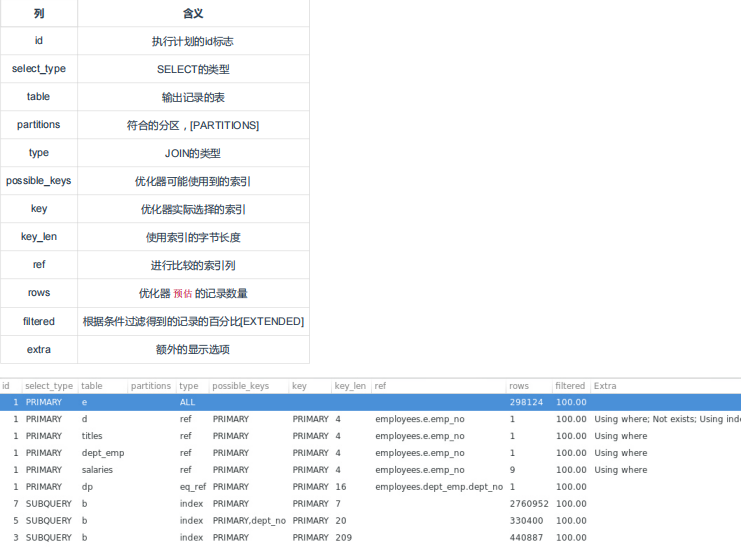
id
从上往下理解 ,不一定 id 序号大的先执行
可以简单的理解为 id 相等的从上往下看,id 不相等的从下往上看。但是在某些场合也 不一定适用
select_type
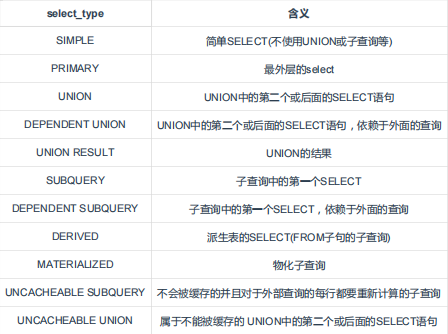
-
- MATERIALIZED
- 产生中间临时表(实体)
- 临时表自动创建索引并和其他表进行关联,提高性能
- 和子查询的区别是,优化器将可以进行 MATERIALIZED 的语句自动改写成 join ,并自动创建索引
- MATERIALIZED
table
-
- 通常是用户操作的用户表
- <unionM, N> UNION得到的结果表
- 排生表,由id=N的语句产生
- 由子查询物化产生的表,由id=N的语句产生
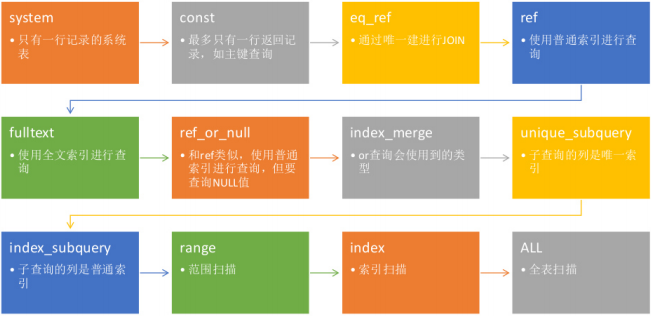
type
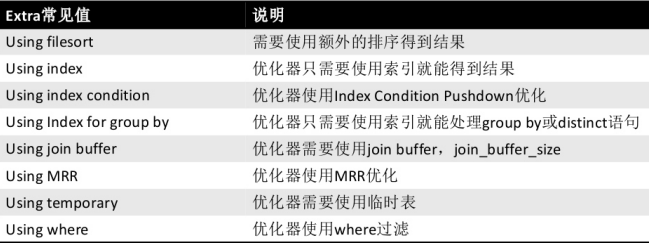
extra(https://blog.csdn.net/luxiaoruo/article/details/106637231)
准备
创建一张表,并创建一个自增主键索引和一个组合索引
root@mysqldb 14:37:  [gavin]> CREATE TABLE index_opt_test (
    ->   id int(11) NOT NULL AUTO_INCREMENT,
    ->   name varchar(11) DEFAULT NULL,
    ->   title varchar(11) DEFAULT NULL,
    ->   age int(11) DEFAULT NULL,
    ->   sex varchar(11) DEFAULT NULL,
    ->   content varchar(500) DEFAULT NULL,
    ->   PRIMARY KEY (id),
    ->   KEY idx_cb (name,title,age)
    -> ) ENGINE=InnoDB;
Query OK, 0 rows affected, 2 warnings (0.01 sec)- Using filesort:可以使用复合索引将filesort进行优化。提高性能
- Using index:比如使用覆盖索引
- Using where: 使用where过滤条件
- Using Index Condition:索引下推
索引下推又叫索引条件下推(Index Condition Pushdown,简称ICP),ICP默认是开启的,使用ICP可以减少存储引擎访问基础表的次数和Server访问存储引擎的次数。
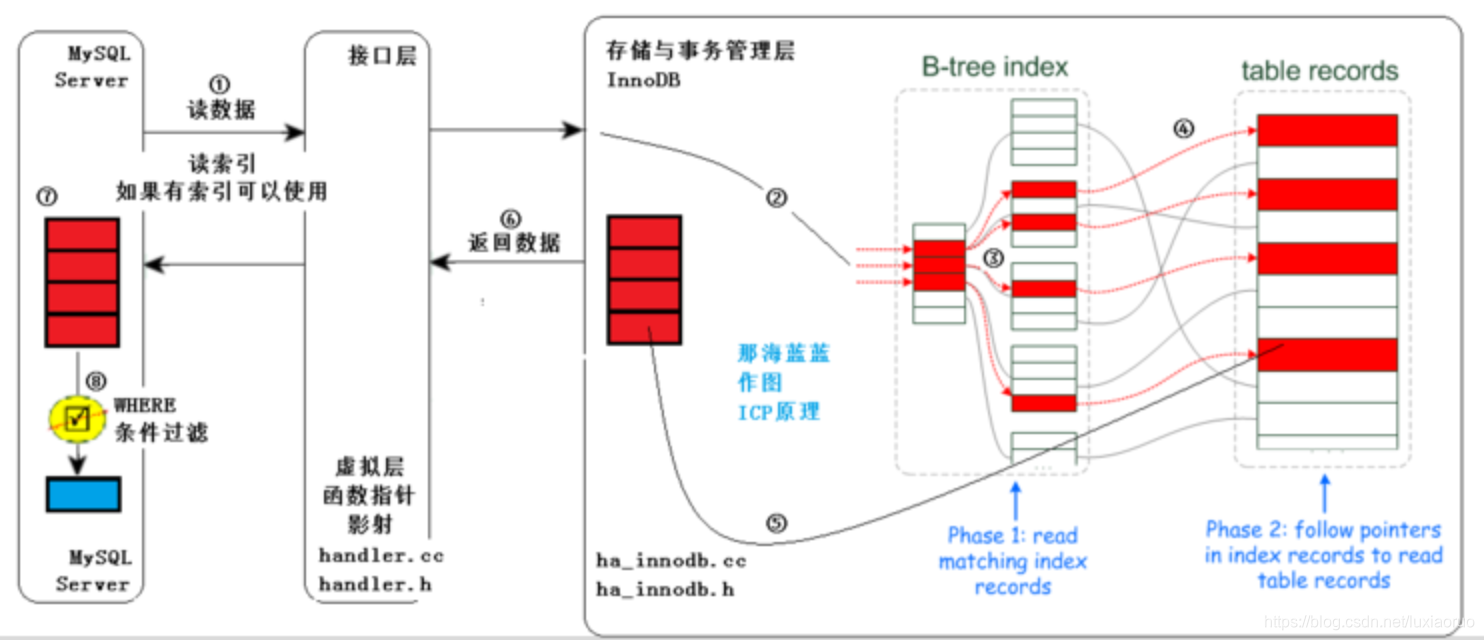
ICP没有启用:Server层会根据索引的断桥原则将命中的索引字段推送到引擎层获取数据,并把匹配到的数据全部返回到Server层,由Server层再根据剩余的where条件进行过滤,即使where条件中有组合索引的其他未命中的字段,也会保留在Server层做筛选,然后返回给Client
select id, name, sex from index_opt_test where name='cc' and title like '%7' and sex='male';执行过程:
Server层把name推到引擎层
-
- 引擎层根据name去idx_cb的索引树中按照name = 'cc' 找到主键
- 回表去捞数据将所有返回给Server层
- 直到匹配到一个name != 'cc' 的索引才结束扫描idx_cb索引树
- Server层再根据title、sex筛选出最终的数据
- 最后返回给客户端
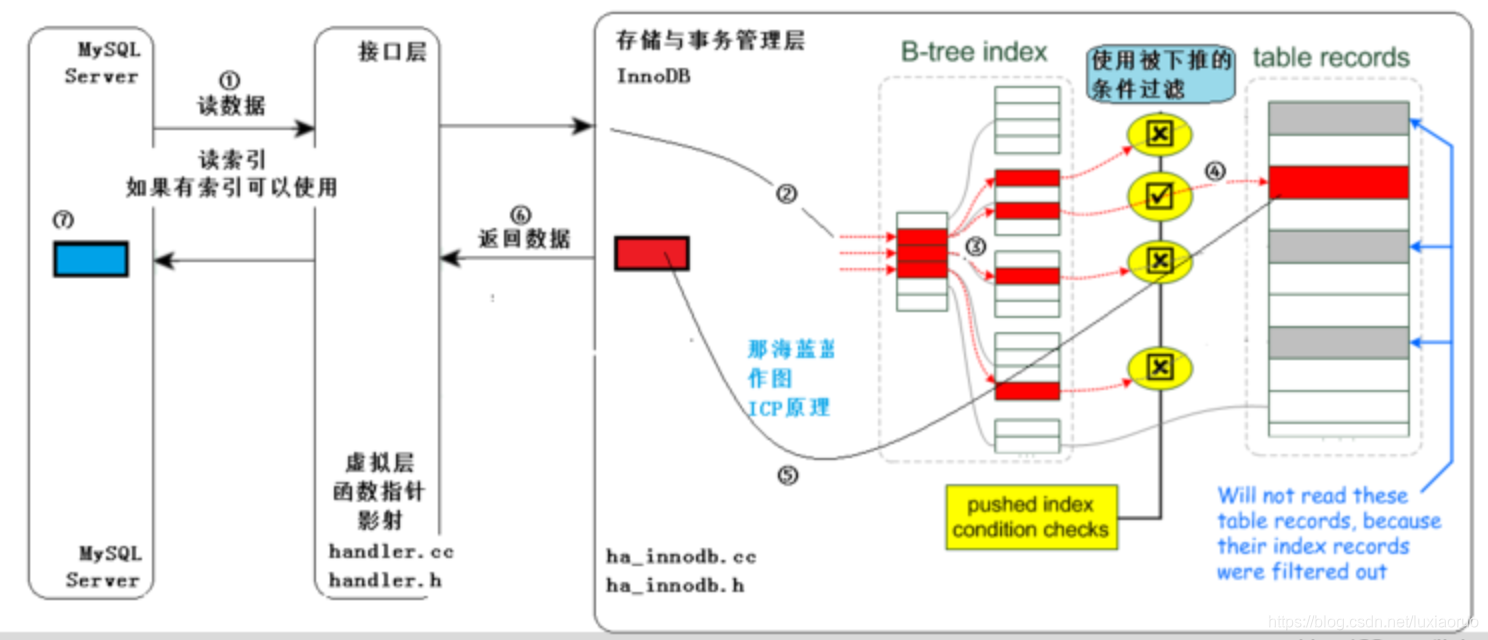
ICP启用:Server层会将where条件中在组合索引中的字段全部推送到引擎层,引擎层根据断桥原则匹配出索引数据,然后将其他索引字段带入再进行一次筛选,然后拿最终匹配的主键关键字回表查询出数据后返回给Server层,Server层再根据剩余的where条件做一次筛选,然后返回给Client
select id, name, sex from index_opt_test where name='cc' and title like '%7' and sex='male';
执行过程:
Server把name和title都推到引擎层
-
- 引擎层根据name去idx_cb中查询name和title
- 再由title筛选出匹配的主键
- 回表去捞数据返回给Server层
- 直到匹配到一个name != 'cc' 的索引才结束扫描idx_cb索引树
- Server层再根据sex筛选出最终的数据
- 再返回给客户端
-
- 索引下推适用条件
-
-
- ICP 用于访问方法是 range/ref/eq_ref/ref_or_null,且需要访问表的完整行记录。
- ICP适用于 InnoDB 和 MyISAM 的表,包括分区的表。
- 对于 InnoDB 表,ICP只适用于二级索引。ICP 的目标是减少访问表的完整行的读数量从而减少 I/O 操作。对于 InnoDB 的聚簇索引,完整的记录已经读进 InnoDB 的缓存,使用 ICP 不能减少 I/O 。
- ICP 不支持建立在虚拟列上的二级索引(InnoDB 支持在虚拟列上建立二级索引)。
- 引用子查询、存储函数的条件没法下推,Triggered conditions 也没法下推。
-
所以ICP 适用的一个隐含前提是二级索引必须是组合索引、且在使用索引进行扫描时只能采用最左前缀匹配原则。组合索引后面的列出现在 where 条件里,因此可以先过滤索引元组、从而减少回表读的数量。
-
- 查看索引下推参数

-
- 关闭索引下推执行SQL
root@mysqldb 14:17:  [gavin]> SET optimizer_switch = 'index_condition_pushdown=off';
Query OK, 0 rows affected (0.00 sec)

root@mysqldb 14:19:  [gavin]> explain select id, name, sex from index_opt_test where name='cc' and sex='male' and title like '%7';
+----+-------------+----------------+------------+------+---------------+--------+---------+-------+------+----------+-------------+
| id | select_type | table          | partitions | type | possible_keys | key    | key_len | ref   | rows | filtered | Extra       |
+----+-------------+----------------+------------+------+---------------+--------+---------+-------+------+----------+-------------+
|  1 | SIMPLE      | index_opt_test | NULL       | ref  | idx_cb        | idx_cb | 47      | const |    1 |   100.00 | Using where |
+----+-------------+----------------+------------+------+---------------+--------+---------+-------+------+----------+-------------+
1 row in set, 1 warning (0.00 sec)-
- 开启索引下推执行SQL
root@mysqldb 14:21:  [gavin]> SET optimizer_switch = 'index_condition_pushdown=on';
Query OK, 0 rows affected (0.00 sec)

root@mysqldb 14:21:  [gavin]> explain select id, name, sex from index_opt_test where name='cc' and sex='male' and title like '%7';
+----+-------------+----------------+------------+------+---------------+--------+---------+-------+------+----------+------------------------------------+
| id | select_type | table          | partitions | type | possible_keys | key    | key_len | ref   | rows | filtered | Extra                              |
+----+-------------+----------------+------------+------+---------------+--------+---------+-------+------+----------+------------------------------------+
|  1 | SIMPLE      | index_opt_test | NULL       | ref  | idx_cb        | idx_cb | 47      | const |    1 |   100.00 | Using index condition; Using where |
+----+-------------+----------------+------------+------+---------------+--------+---------+-------+------+----------+------------------------------------+
1 row in set, 1 warning (0.00 sec)
 浙公网安备 33010602011771号