字体压缩工具
字蛛(font-spider), 一个智能 WebFont 压缩工具!
使用方法:
1.打开命令行工具,安装node.js;
2.使用node.js中的npm安装font-spider,命令行语句为:npm install font-spider -g
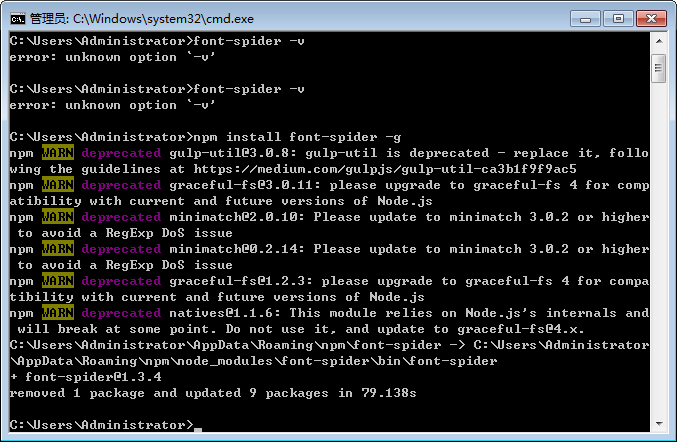
3.查看是否安装成功:font-spider -V

4.css
/*声明 WebFont*/
@font-face {
  font-family: 'source';
  src: url('../font/字体名称.eot');
  src:
    url('../font/字体名称.eot?#font-spider') format('embedded-opentype'),
    url('../font/字体名称.woff2') format('woff2'),
    url('../font/字体名称.woff') format('woff'),
    url('../font/字体名称.ttf') format('truetype'),
    url('../font/字体名称.svg') format('svg');
  font-weight: normal;
  font-style: normal;
}

/*使用指定字体*/
.home h1, .demo > .test {
    font-family: 'source';
}
*注意:@font-face 中的 src 定义的 .ttf 文件必须存在,其余的格式将由工具自动生成
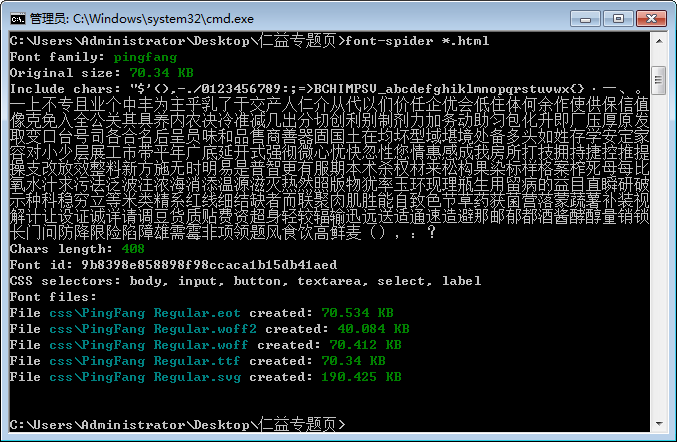
5.在所在项目文件夹下shift+右键,打开命令行工具,输入font-spider *.html
成功之后在项目文件中就会重新生成压缩后的文件了。
在项目完成后再使用压缩工具

 浙公网安备 33010602011771号