
Git基本操作流程
控制逻辑流程
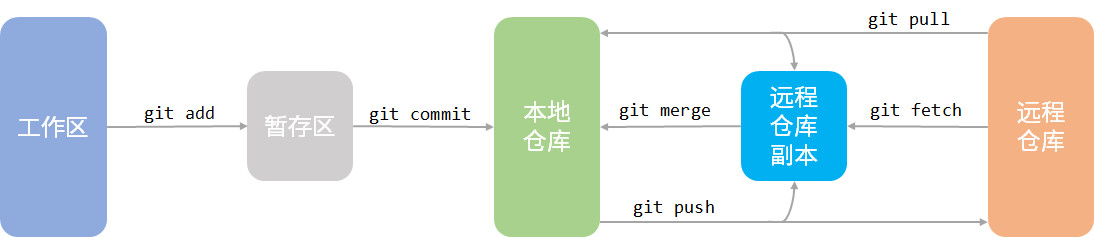
本地操作
初始化项目
git init [<projectName>]
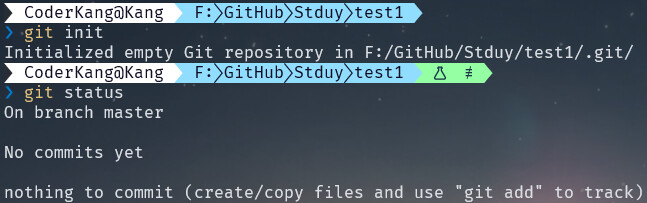
若项目已存在,直接进入项目目录执行命令git init,当然,前提是已安装 Git。若项目不存在,则运行git init <projectName>,此命令会在当前目录下新建一个项目projectName并项目根目录中新建名为.git的目录,Windows用户可能需要通过相关设置才可以查看到此目录。需要注意的是,.git并不是版本控制的工作区,而是 git 的版本仓库,这一目录下存放了很多东西,例如其中最重要的就是称为stage(或者叫index)的暂存区,还有 Git 为我们自动创建的第一个分支master,以及指向master的一个指针叫HEAD。
修改项目
在 Git 中一个非常重要的概念就是修改,与传统版本控制系统控制元文件不同,Git 引入以修改为控制元的控制结构。就如上图中git status返回的内容“create/copy files...”,这就是一种修改,在 Git 中增加或删除都算作修改。现在作出修改:
vim README.md  # 新建并编辑文件
# 写入任意内容保存退出
此时查看 Git 状态,已经检测到工作空间中修改(新增)了一个README.md文件,并且迫不及待提示使用git add完成后续流程操作。
❯ git status
On branch master

No commits yet

Untracked files:
  (use "git add <file>..." to include in what will be committed)
        README.md

nothing added to commit but untracked files present (use "git add" to track)
加入暂存区
git add的作用就是将工作区中的修改添加至暂存区
根据提示使用git add README.md。
❯ git add README.md

❯ git status
On branch master

No commits yet

Changes to be committed:
  (use "git rm --cached <file>..." to unstage)
        new file:   README.md
退出暂存区
有来就有回,根据上面的提示“use "git rm --cached ..." to unstage”可知,使用git rm可以将修改退出暂存区,不用担心,这并不会删除工作区的源文件。status 返回为未添加状态。
❯ git rm --cache .\README.md
rm 'README.md'

❯ git status
On branch master

No commits yet

Untracked files:
  (use "git add <file>..." to include in what will be committed)
        README.md

nothing added to commit but untracked files present (use "git add" to track)
提交修改
使用
git commit提交已加入暂存区的修改
commit 命令会将暂存区中内容加入版本仓库中,并且可以附加修改信息标题。git add是git commit的前提,这也就是为什么说git commit提交的是已加入暂存区的修改。
❯ git commit -m "📑第一次上传"
[master (root-commit) 4553d51] 📑第一次上传
 1 file changed, 1 insertion(+)
 create mode 100644 README.md

❯ git log
commit 4553d51c389bae5da3e77d71fe53326a0f48e330 (HEAD -> master)
Author: CoderKang <example@kang.com>
Date:   Mon Sep 12 14:06:47 2022 +0800

    📑第一次上传
通过git log可知,提交后会生成一个commitId,这个 id 是结合
- The source tree of the commit (which unravels to all the subtrees and blobs)
- The parent commit sha1
- The author info
- The committer info (right, those are different!)
- The commit message
并使用SHA1算法自动生成的。
撤销修改
❯ cat .\README.md
# This is a README file.
> Git is greate!
F**K SVN!
正如所见,我们在工作区写入了一些不好的内容,现在需要撤销这些修改。当然,这些修改可能存在好几种状态,需要区别处理。
-
! add && ! commit
这种当然是最理想的状态,可能只是工作中刚发的牢骚体现在了键盘上。此时只需要手动删除最后一行内容就可以了,另外 Git 提供的
checkout可以使这个文件回到最近一次git commit或git add时的状态,或者使用restore废弃工作区中的修改。此时再查看文件内容:git checkout -- README.mdgit restore README.md❯ cat .\README.md # This is a README file. > Git is greate! -
add && ! commit
可能是因为中午没有休息,头脑昏昏沉沉,一不小心将修改的内容添加到了暂存区。
❯ git add README.md

❯ git status
On branch master
Changes to be committed:
  (use "git restore --staged <file>..." to unstage)
        modified:   README.md
问题不大,在状态返回内容中 Git 已经给出了解决方法,“git restore --staged
...”。使用后又回到了未添加到暂存区状态,即第一种状态 ! add && ! commit。❯ git restore --staged .\README.md ❯ git status On branch master Changes not staged for commit: (use "git add <file>..." to update what will be committed) (use "git restore <file>..." to discard changes in working directory) modified: README.md no changes added to commit (use "git add" and/or "git commit -a") -
add && commit
可能加上昨晚熬夜加班,还是未发现 Bad Content,并且 commit 提交了。
❯ git log
commit dd5cb08fda1a4ab65bf1a90338f00537f9299f98 (HEAD -> master)
Author: CoderKang <example@kang.com>
Date:   Mon Sep 12 15:17:28 2022 +0800

    📑Bad Content

commit 27294ac7f19b14054ba7dfba700133f4cd7884d2
Author: CoderKang <example@kang.com>
Date:   Mon Sep 12 14:56:31 2022 +0800

    📑添加内容

commit 4553d51c389bae5da3e77d71fe53326a0f48e330
Author: CoderKang <example@kang.com>
Date:   Mon Sep 12 14:06:47 2022 +0800

    📑第一次上传
依旧不慌,使用
reset命令进行版本仓库内容的回退,让 Bad Content 回到暂存区,此时就回到刚刚介绍的情况add && ! commit。❯ git reset HEAD^ .\README.md Unstaged changes after reset: M README.md ❯ git status On branch master Changes to be committed: (use "git restore --staged <file>..." to unstage) modified: README.md Changes not staged for commit: (use "git add <file>..." to update what will be committed) (use "git restore <file>..." to discard changes in working directory) modified: README.md -
add && commit && push
此种情况看似很可怕,但是依旧可以使用
reset方法解决,不多赘述。
远程仓库
实际中最常见的场景是使用内网/外网版本仓库来进行开发,这里以 Github 为例

 浙公网安备 33010602011771号