
博客园自定义主题推荐及配置分享

简介
曾经还是 OIer 时对网页一点不懂,于是胡乱在博客园配置了一下,现在看起来有点不太符合我的预期,再加上几年的学习,稍微对网页有了一点点了解,于是打算再次配置一下,本文记录一下配置的过程。
本文包括主流博客园主题推荐,SMemory 主题的配置与微调,我个人的博客园主题配置分享等。
主题推荐
首先先推荐一下热度比较高的主题,方便各位做出选择。
SMemory 主题
首先是由 BNDong 大佬开发的基于博客园 SimpleMemory 主题的扩展美化插件。
目前仍然由 wangyang0210 大佬在维护。
主题的 仓库地址,文档地址,最新文档地址。
SMemory 主题整体风格简介,突出内容本身,但是也可以通过配置加入一些动效等内容。
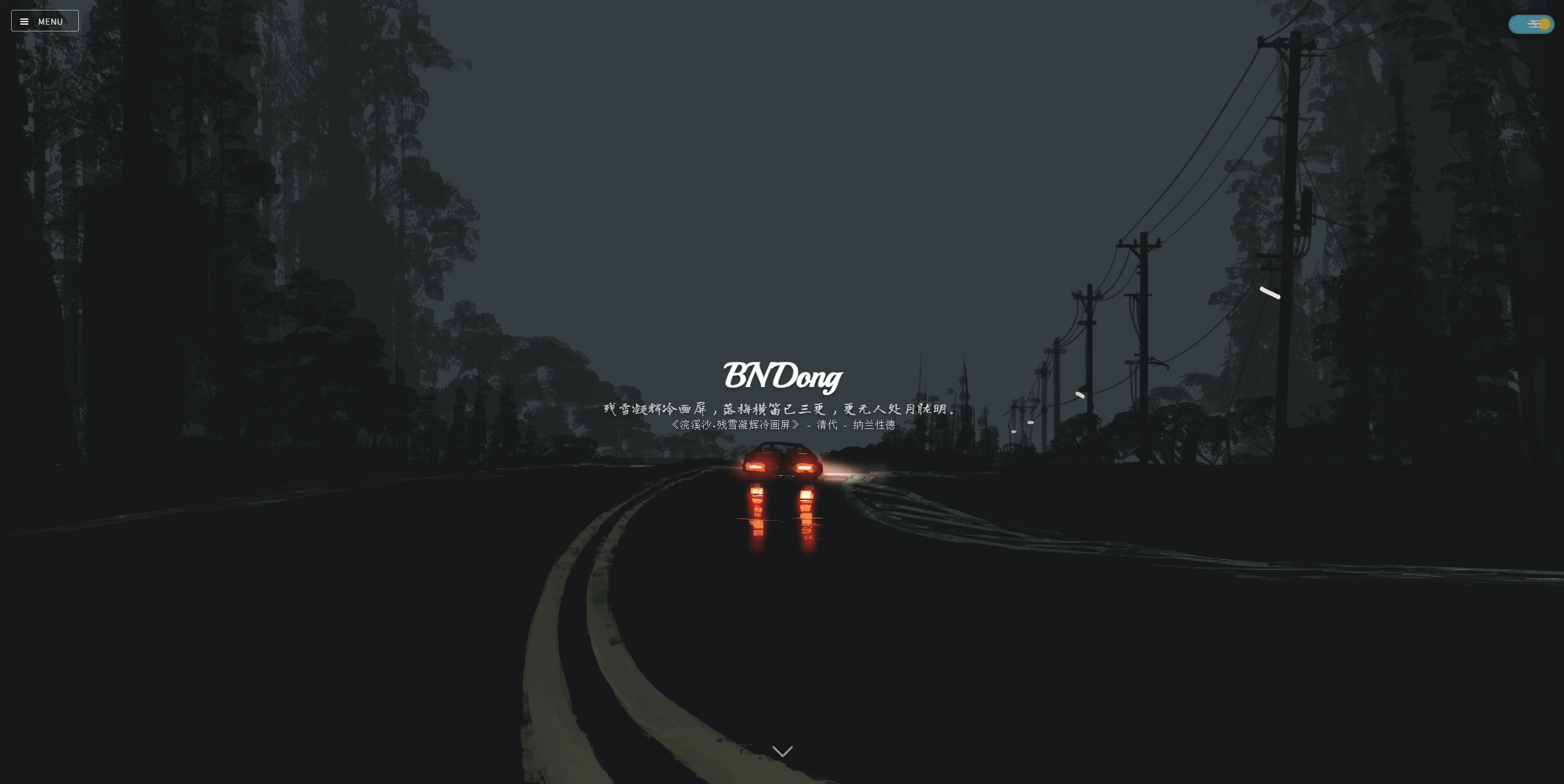
博客首页封面
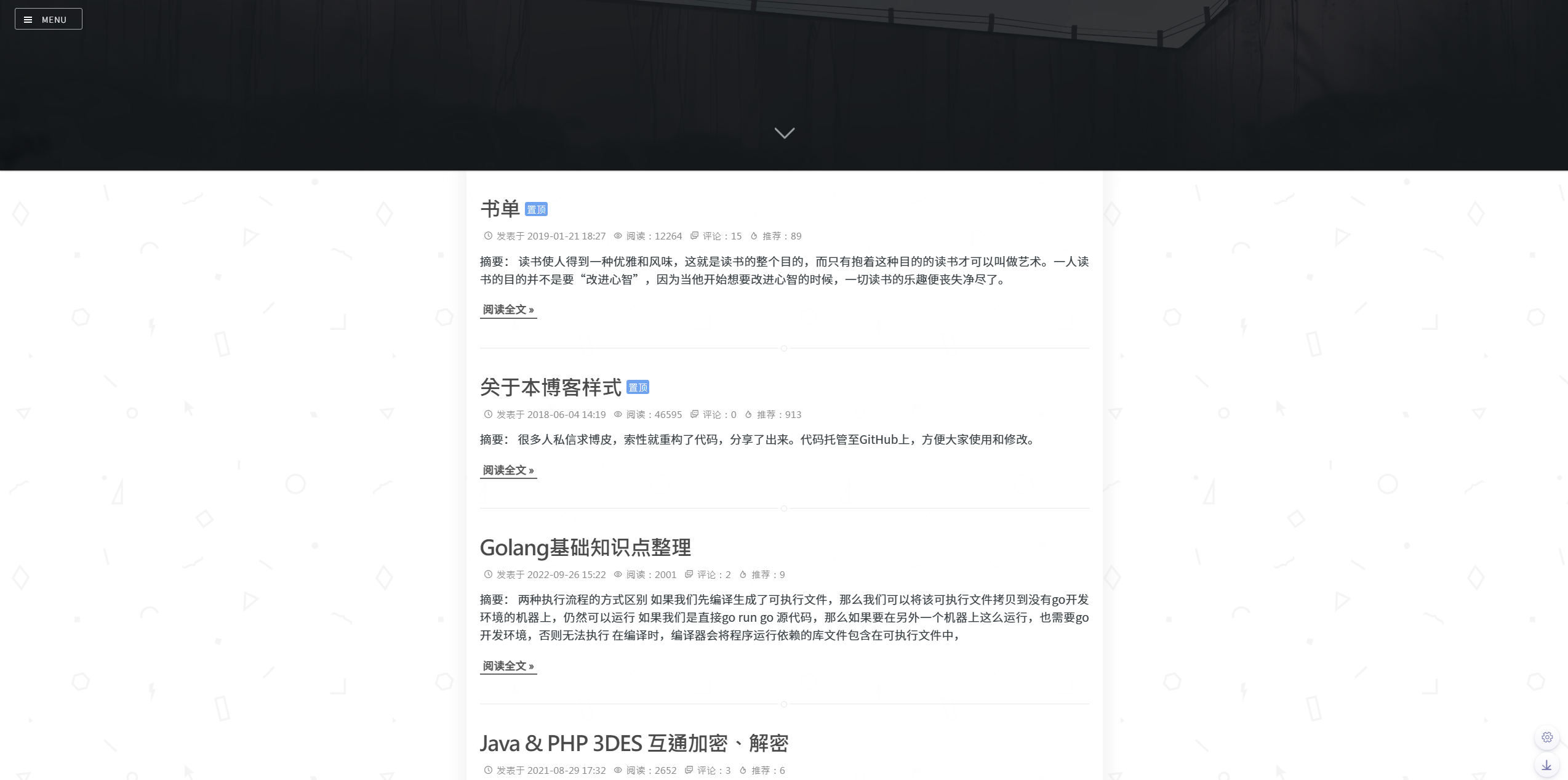
博客首页
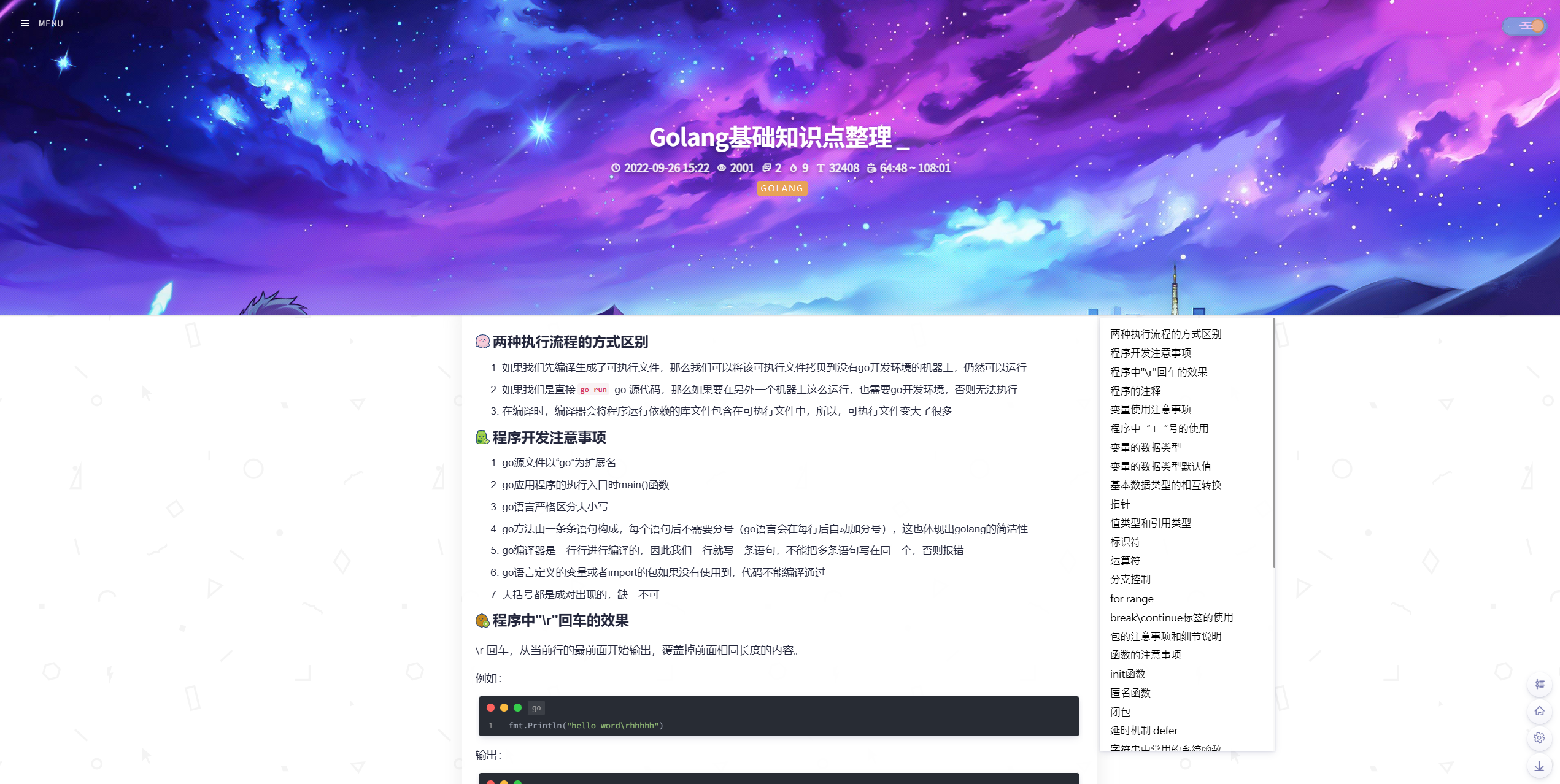
博客文章页
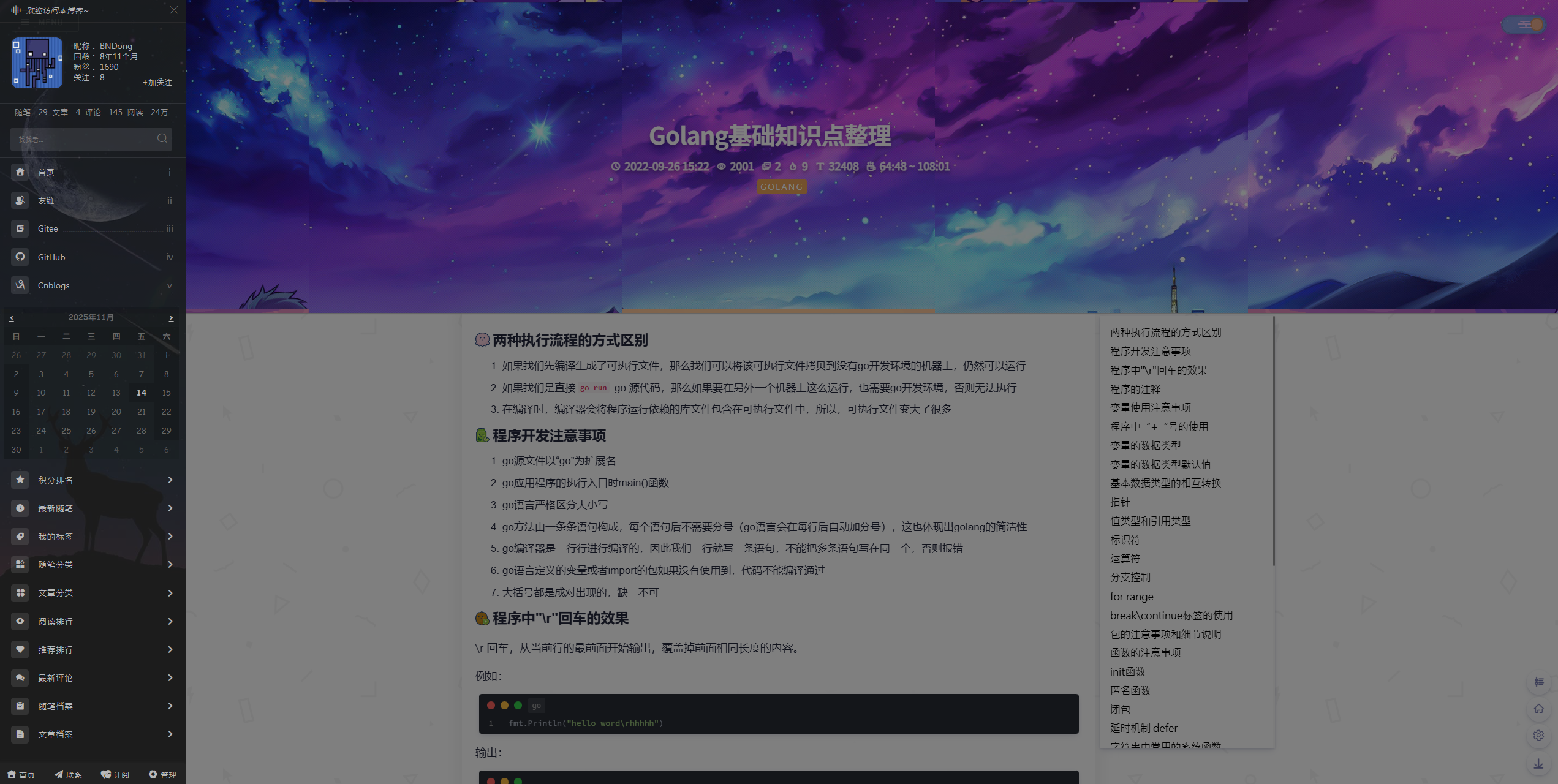
博客侧边栏
EaseBe-Cnblogs 主题
wangyang0210 大佬除了维护 SMemory 外,基于 SMemory 二次开发了新的主题 EasyBe,丰富了 SMemory 中的功能。不过该主题是给有自己博客网站的朋友使用的,如果只是在博客园配置该主题的话,需要使用博客园版本的,因为原本名称没有明显的标识,这里先将其称为 EaseBe-Cnblogs。
主题的 仓库地址,文档地址。
整体效果和 SMemory 差不多,在细节上略有差别,功能整体更加丰富,这里就不再展示了,如果配置好了 SMemory 可以比较容易迁移到这个主题。
基于 Tona 的博客园皮肤
Tona 是由 guangzan 大佬开发并维护的博客园皮肤开发框架,目前仍在更新。
基于该框架有多个皮肤,由于使用同一套配置参数,因此可以很方便的皮肤间切换。
详情可查看官方网站 Tona,这里列出几个其中比较火的两个主题。
框架的 仓库地址,文档地址。
补充:该主题之前名称为 Awescnb,就在我写完之后没几天马上就改为 Tona 了,可以从文档地址看出来。
Reacg 主题
Reacg 是一个整体偏向二次元风格的主题。
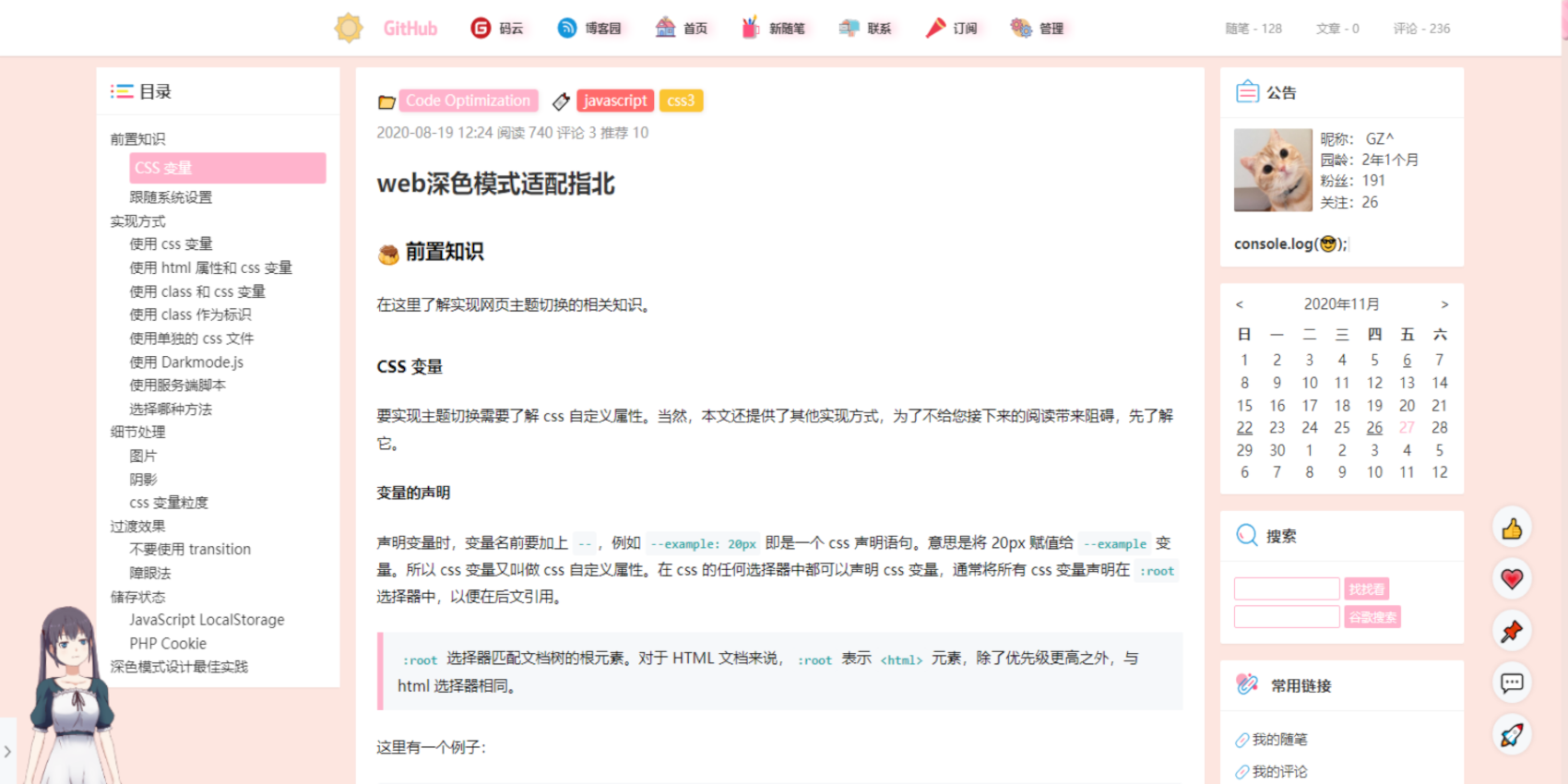
Geek 主题
Geek 是一个整体偏向极客风格的主题。
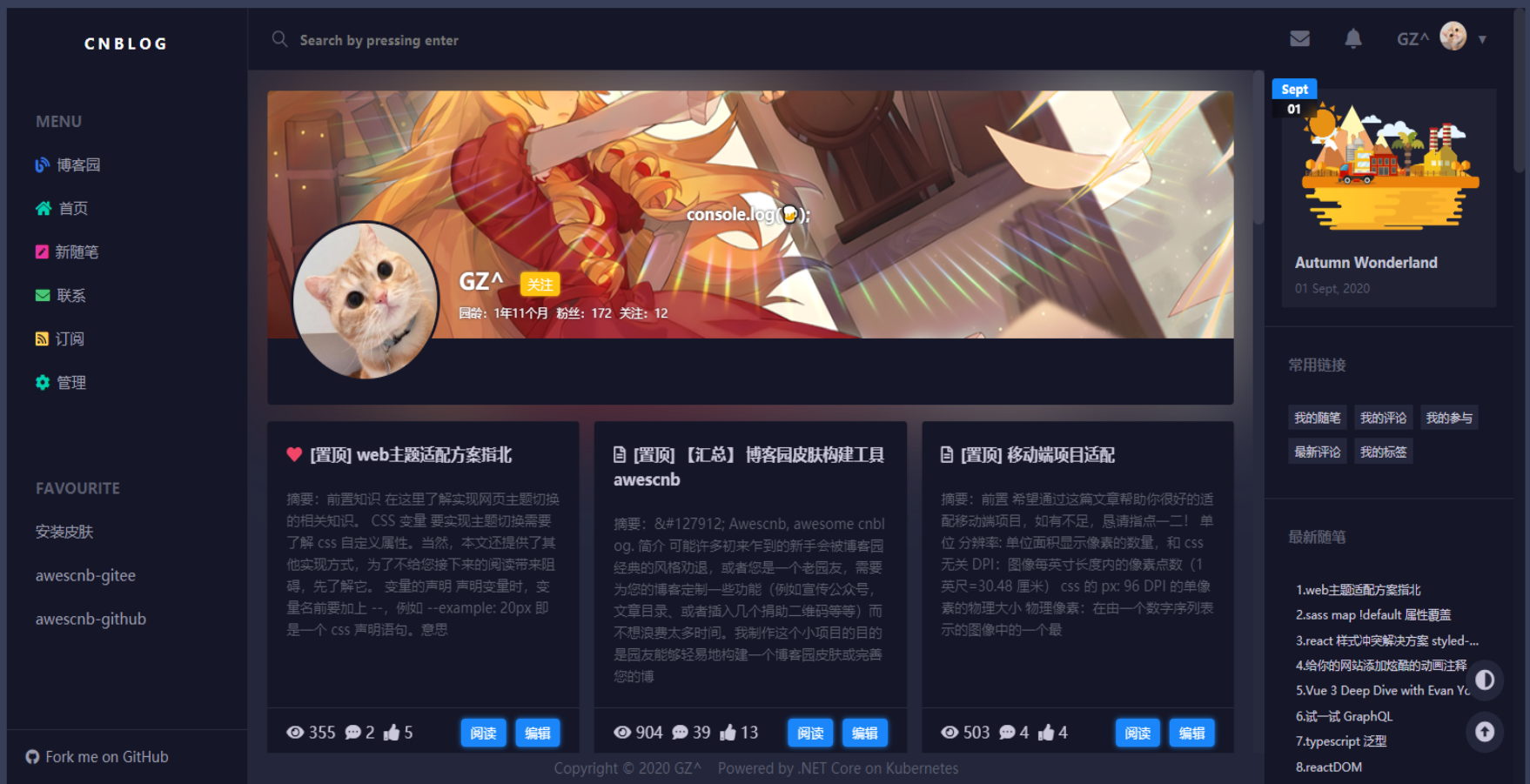
Silence 主题
Silence 主题由 esofar 大佬开发。
主题的 仓库地址,文档地址。
Silence 主题主打简介风,突出内容主体。
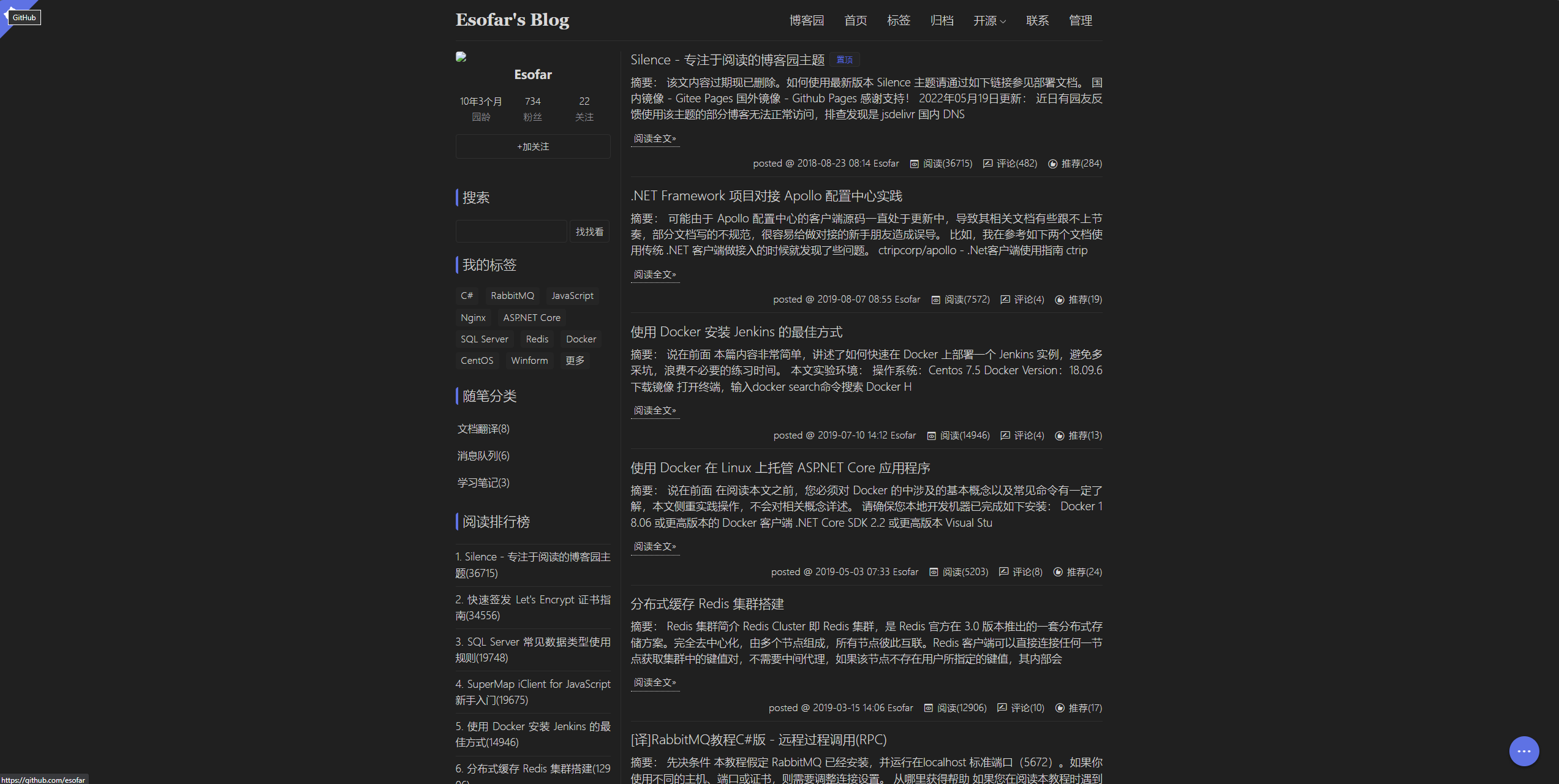
博客首页
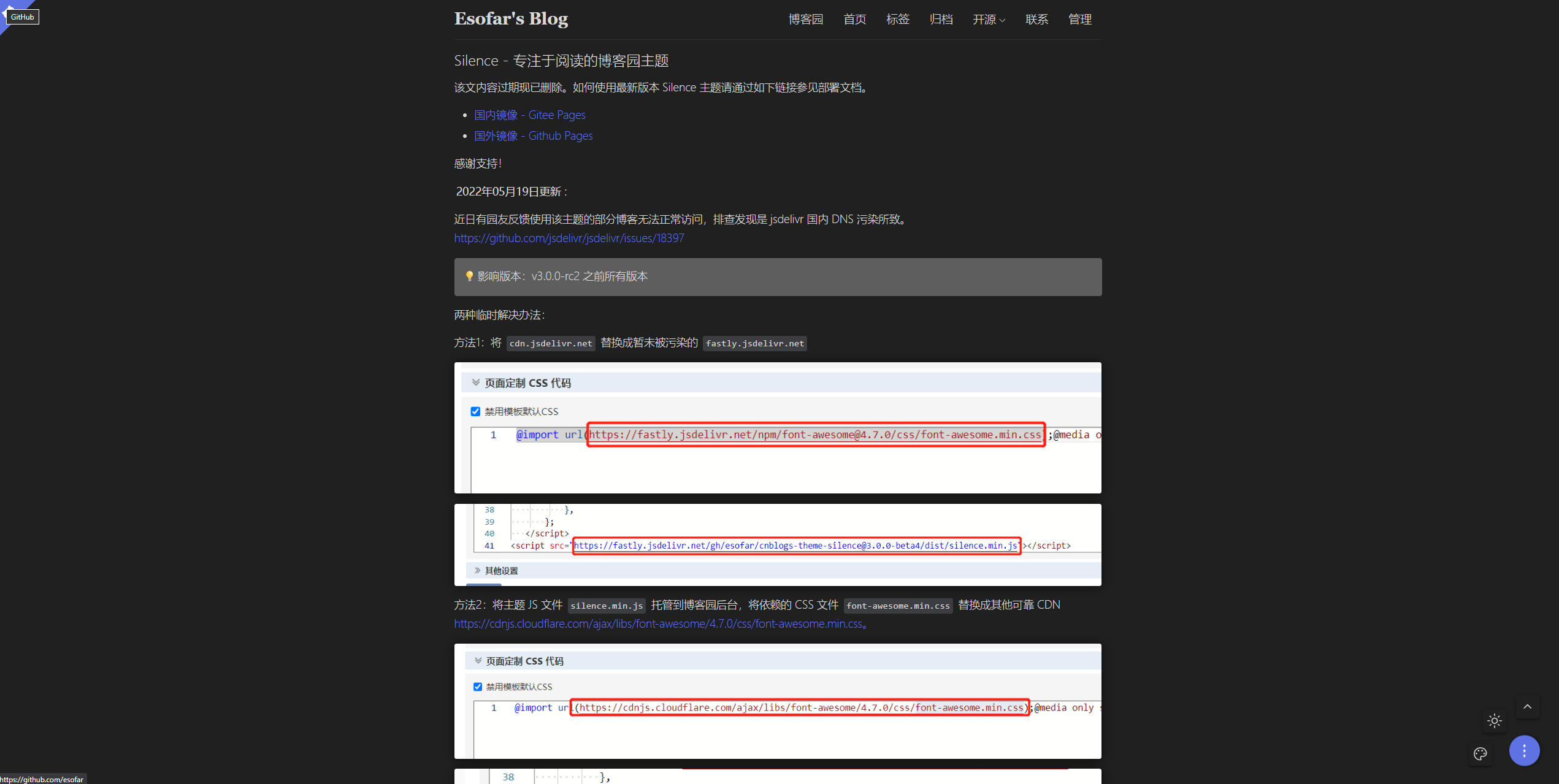
博客文章页
其他主题
还有一些其他主题样式很美观,功能也很丰富,这里就不一一介绍了,各位可以看一下样式图,感兴趣可以点击链接自行了解。
cute-cnblogs 主题
主题的 仓库地址。

Sakura 主题
主题的 仓库地址。

SMemory 的配置
具体配置流程请参考 官方文档,本人不再赘述。
SMemory 配置分享
完成基础配置之后,可以根据参考文档中的 配置项 进行调整,此处分享一下我个人的基础配置。
<script type="text/javascript">
  // SimpleMemory v2.1.7 配置项,详情可参考官方文档:https://bndong.github.io/Cnblogs-Theme-SimpleMemory/v2.1/dist/reference/configs.html
  // 该文档可能没有完全覆盖最新版本的内容,最新的文档请参考:https://github.com/BNDong/Cnblogs-Theme-SimpleMemory/blob/v2/docs/v2.1/docs/src/reference/configs.md
  // 配置项中涉及图标的内容请参考官方文档:https://bndong.github.io/Cnblogs-Theme-SimpleMemory/v2.1/dist/reference/fonticon.html
  window.cnblogsConfig = {
    info: { // 基础信息
      name: 'Daniel-zyc', // 用户昵称,类型:String,默认值:{默认抓取博客园用户名}
      avatar: 'https://pic.cnblogs.com/avatar/2234473/20251112155509.png', // 用户头像 URL 地址,类型:Url,默认值:''
      startDate: '2020-12-03', // 您的入园时间,年-月-日,类型:Date,默认值:2021-01-01
      // 入园时间查看方法:鼠标停留园龄时间上,会显示入园时间
      blogIcon: 'https://pic.cnblogs.com/avatar/2234473/20251112155509.png', // 网站标签页图标,类型:Url,默认值:''
    },
    sidebar: { // 侧边栏
      navList: [ // 菜单导航(位于日历上方的位置),类型:Array[Array[String, Url, String]],默认值:[]
        // 列表数据:['导航名称', '链接', 'icon']
        ['首页', 'https://www.cnblogs.com/daniel-zyc/', 'icon-home'],
        // ['我的博客2', 'https://www.cnblogs.com/daniel-zyc/', 'icon-github'],
      ],
      customList: { // 自定义菜单栏,位于日历下方的位置),类型:Object,默认值:{}
        // "title1": { // 菜单栏标题
        //   "data": [ // 菜单栏数据,类型:Array[Array[String, Url]]
        //     // 列表数据:['名称', '链接']
        //     ['我的博客1', 'https://www.cnblogs.com/daniel-zyc/'],
        //     ['我的博客2', 'https://www.cnblogs.com/daniel-zyc/'],
        //   ],
        //   "icon": "icon-brush_fill" // 配置图标,类型:String
        // },
      },
      infoBackground: 'https://cdn.jsdelivr.net/gh/Daniel-zyc/Danz-image-host-01@img/wallpaper/V/2025/58615824_p0_1080_1920_2025-11-11_224104.jpg', // 侧边栏背景图片,类型:Url,默认值:''
      titleMsg: '欢迎访问 Daniel-zyc 的博客', // 侧边栏标题,类型:String,默认值:'欢迎访问本博客~'
      submenu: { // 侧边栏是否展开,默认配置为均不展开,类型:Object,默认值:{}
        pointsRank: false, // 积分排行
        latestPosts: false, // 最新随笔
        myTags: false, // 我的标签
        postsClassify: false, // 随笔分类
        articleClassify: false, // 文章分类
        readRank: false, // 阅读排行
        recommendRank: false, // 推荐排行
        postsArchive: false, // 帖子档案
        articleArchive: false, // 文章档案
        customList: false, // 自定义列表
        latestComment: false, // 最新评论
      },
    },
    banner: { // 横幅设置
      home: { // 主页横幅
        background: [ // 主页横幅图片,类型:Array[Url],默认值:[]
          'https://images.cnblogs.com/cnblogs_com/blogs/650600/galleries/2485795/o_251130050353_51711470_p0_1920_1080_01.jpg',
          'https://images.cnblogs.com/cnblogs_com/blogs/650600/galleries/2485795/o_251130052149_58615824_p0_2560_1440_01.jpg',
        ],
        // 主页 Banner 标语,类型:String or Array[String],默认值:''
        // 如果为空,则自动获取一句;如果为 String,则固定展示该文本;如果为 Array,则从数组随机选择一条文本
        // title: '',
        // title: [
        //   '非淡泊无以明志,非宁静无以致远',
        //   '天行健,君子以自强不息;地势坤,君子以厚德载物',
        //   '长风破浪会有时,直挂云帆济沧海'
        // ],
        titleSource: 'one', // 主页 Banner 标语获取源,类型:String,默认值:'jinrishici'
        /** 所有可配置项
         * jinrishici:每次刷新随机获取一句古诗词。
         * one:每日获取一句话
        */
      },
      article: { // 文章页
        background: [ // 文章页 Banner 图片,类型:Array[Url],默认值:[]
          'https://images.cnblogs.com/cnblogs_com/blogs/650600/galleries/2485795/o_251130060202_63438521_p0_3840_960_01.jpg',
          'https://images.cnblogs.com/cnblogs_com/blogs/650600/galleries/2485795/o_251130060224_64227357_p0_3840_960_01.jpg',
        ],
      },
    },
    // 加载界面基于开源项目 spring-loaders 实现
    // 配置项的具体含义以及更多加载效果请参考官方仓库:https://github.com/claudiocalautti/spring-loaders
    // 官方提供的 Demo 网站:https://tympanus.net/Tutorials/SpringLoaders/index.html
    loading: { // Loading 界面设置,类型:Object
      rebound: {
        tension: 14, // 默认:16
        friction: 10 // 默认:5
      },
      spinner: {
        radius: 120, // 默认:90
        sides: 5, // 默认:3
        depth: 8, // 默认:4
        colors: {
          background: '#00272C', // 默认:'#f0f0f0'
          stroke: null, // 默认:'#272633'
          base: null, // 默认: null
          child: '#02C39A' // 默认:'#272633'
        },
        alwaysForward: true, // 默认:true
        restAt: null, // 默认:0.5
        renderBase: false // 默认:false
      }
    },
    // 字体图标扩展库使用方法请参考官方文档:https://bndong.github.io/Cnblogs-Theme-SimpleMemory/v2.1/dist/reference/fonticon.html
    fontIconExtend: '', // 字体图标库扩展,类型:Url,默认值:''
    progressBar: { // 顶部进度条,类型:Object
      color: '#77b6ff', // 默认:'#77b6ff'
      height: '3px', // 默认:'2px'
      duration: 0.4, // 默认:0.2
    },
    title: { // 页面标签
      onblur: '(ಥ_ಥ) 不要忘记我哦', // 失去焦点标签文字,类型:String,默认值:''
      onblurTime: -1, // 失去焦点变化延时(毫秒),-1为不变化文字,类型:Number,默认值:500
      focus: '\\(*´∇`*)ノ 欢迎欢迎!', // 获取焦点标签文字,类型:String,默认值:'(*´∇`*) 欢迎回来!'
      focusTime: 750, // 获取焦点变化延时(毫秒),-1为不变化文字,类型:Number,默认值:1000
    },
    footer: { // 页脚
      style: 2, // 页脚样式,类型:Number,默认值:2,所有可配置项:1 or 2
      text: { // 页脚标语
        left: '非淡泊无以明志', // 页脚标语左侧文字,类型:String,默认值:''
        right: '非宁静无以致远', // 页脚标语右侧文字,类型:String,默认值:''
        iconFont: { // 页脚标语中间图标,类型:Object,默认值:{}
          // icon:  "icon-xl",
          // color: "red",
          // fontSize: "16px"
        }
      },
      // 音乐播放器详细配置项请参考官方文档:https://bndong.github.io/Cnblogs-Theme-SimpleMemory/v2.1/dist/reference/configs.html#aplayer-%E9%9F%B3%E4%B9%90%E6%92%AD%E6%94%BE%E5%99%A8-388
      aplayer: { // 音乐播放器,类型:Object
        enable: false, // 默认值:false
      },
    },
    links: { // 友情链接
      footer: [ // 页脚友链, 类型:Array[Array[String, Url]],默认值:[]
        // 列表数据:['名称', '链接']
        ["博客主题仓库", 'https://bndong.github.io/Cnblogs-Theme-SimpleMemory/v2.1/dist/'],
      ],
      // 友链页详细配置请参考官方文档:https://bndong.github.io/Cnblogs-Theme-SimpleMemory/v2.1/dist/reference/links.html
      page: [ // 友链页,类型:Array,默认值:[]
        // {
        //   name: 'BNDong', // 昵称
        //   introduction: 'IT技术类博客', // 简介
        //   avatar: 'https://blog.dbnuo.com/images/avatar.gif', // 头像
        //   url: 'https://blog.dbnuo.com' // 友链地址
        // },
      ],
    },
    rtMenu: { // 右下角菜单
      qrCode: 'https://cdn.jsdelivr.net/gh/Daniel-zyc/Danz-image-host-01@img/personal/wechat_OA_code_2025-11-12_160143.jpg', // 二维码,类型:Url,默认值:''
      reward: { // 赞赏收款码,类型:Object
        alipay: '', // 默认值:''
        wechatpay: 'https://cdn.jsdelivr.net/gh/Daniel-zyc/Danz-image-host-01@img/personal/wechat_reward_code_2025-11-12_154347.png' // 默认值:''
      },
      downScrollDom: '#articleSuffix', // 跳至底部位置定义,类型:String,默认值:''
    },
    switchDayNight: { // 日/夜间模式,类型:Object
      enable: true, // 是否开启日/夜间模式切换按钮,默认值:true
      nightMode: true, // 强制夜间模式,默认值:false
      auto: { // 自动切换相关配置
        enable: true, // 开启自动切换,默认值:false
        dayHour: 7,     // 日间模式开始时间(24小时制),默认值:5
        nightHour: 19   // 夜间模式开始时间(24小时制),默认值:19
      }
    },
    animate: { // 动效,会消耗 GPU,可能造成页面卡顿,所有动效默认关闭
      homeBannerTitle: { // 主页 banner 上 name 的动效,类型:Object
        enable: true // 默认值:false
      },
      homeBanner: { // 主页 Banner 动效,类型:Object
        enable: true, // 默认值:false
        options: {
          radius: 20, // 默认值:15
          density: 0.08, // 默认值:0.2
          color: 'rgba(255,255,255, .2)', // 颜色设置,'random' 为随机颜色,默认值:'rgba(255,255,255, .2)'
          clearOffset: 0.2 // 默认值:0.3
        }
      },
      articleTitle: { // 文章页标题动效,类型:Object
        enable: true // 默认值:false
      },
      articleBanner: { // 文章页 Banner 动效,类型:Object
        enable: true // 默认值:false
      },
      background: { // 背景动效,类型:Object
        enable: true, // 默认值:false
        options: {
          colorSaturation: '100%', // 默认值:'60%'
          colorBrightness: '50%', // 默认值:'50%'
          colorAlpha: 0.5, // 默认值:0.5
          colorCycleSpeed: 5, // 默认值:5
          verticalPosition: 'random', // 默认值:'random'
          horizontalSpeed: 150, // 默认值:200
          ribbonCount: 3, // 默认值:3
          strokeSize: 0, // 默认值:0
          parallaxAmount: 0, // 图形随鼠标滚动时的数值偏移系数,小于 0 则向下滚动图形向上,大于 0 相反,0 保持不动,默认值:-0.2
          animateSections: true // 默认值:true
        }
      },
      bannerImages: { // Banner 背景图自动切换,类型:Object
        enable: true, // 默认值:false
        options: {
          itemNum: 5, // 图片拆分成几列,默认值:5
          current: -1, // 初始图片的下标,如果为负数则为随机,默认值:0
          sort: 1, // 1 代表每次向下加载一个图片,-1 代表每次向上加载一个图片,默认值:1
          time: 16000 // 每次切换间隔时间,单位:毫秒,默认值:30000
        }
      },
      backgroundMouse: { // 背景图案动效,类型:Object
        enable: false // 默认值:false
      },
      mouse: { // 跟随鼠标动效,类型:Object
        enable: false, // 默认值:false
        options: {
          size: 8, // 中心圆点的大小(px),默认值:8
          sizeF: 36 // 外部边框的大小(px),默认值:36
        }
      },
      season: { // 花瓣飘落动效,类型:Object
        enable: false, // 默认值:false
        options: {
          // 默认为一个花瓣图片,建议使用 base64 转码后的透明背景图片
          // img: '', // 默认值为 base64 转码后的花瓣图片,内容太长请查看文档
          size: 40 // 默认值:40
        }
      },
      avatar: { // 头像旋转动效,类型:Object
        enable: true // 默认值:false
      },
      typing: { // 评论框打字动效,类型:Object
        enable: true, // 默认值:false
        options: {
          colorful: true, // 是否多彩,默认值:true
          shake: true, // 是否震动,默认值:false
        }
      },
    },
    code: { // 代码相关配置
      type: 'hljs', // 代码渲染类型,类型:String,默认值:''
      /** 所有可配置项
       * cnblogs: 使用博客园默认代码高亮样式。
       * hljs: 使用 Highlighting 插件渲染代码高亮样式。
       */
      options: { // 代码配置
        hljs: { // Highlighting 插件样式配置,类型:Object,当 code.type 为 'hljs' 时生效
          theme: 'atom-one-dark', // 代码高亮主题,类型:String,默认值:'atom-one-dark-reasonable'
          /** 所有可配置项
           * default、a11y-dark、a11y-light、agate、an-old-hope、androidstudio、arduino-light、arta、ascetic
           * atelier-cave-dark、atelier-cave-light、atelier-dune-dark、atelier-dune-light、atelier-estuary-dark
           * atelier-estuary-light、atelier-forest-dark、atelier-forest-light、atelier-heath-dark、atelier-heath-light
           * atelier-lakeside-dark、atelier-lakeside-light、atelier-plateau-dark、atelier-plateau-light
           * atelier-savanna-dark、atelier-savanna-light、atelier-seaside-dark、atelier-seaside-light
           * atelier-sulphurpool-dark、atelier-sulphurpool-light、atom-one-dark-reasonable、atom-one-dark、atom-one-light
           * brown-paper、codepen-embed、color-brewer、darcula、dark、darkula、docco、dracula、far、foundation
           * github-gist、github、gml、googlecode、grayscale、gruvbox-dark、gruvbox-light、hopscotch
           * hybrid、idea、ir-black、isbl-editor-dark、isbl-editor-light、kimbie.dark、kimbie.light、lightfair
           * magula、mono-blue、monokai-sublime、monokai、nord、obsidian、ocean、paraiso-dark、paraiso-light、pojoaque
           * purebasic、qtcreator_dark、qtcreator_light、railscasts、rainbow、routeros、school-book
           * shades-of-purple、solarized-dark、solarized-light、sunburst、tomorrow-night-blue、tomorrow-night-bright
           * tomorrow-night-eighties、tomorrow-night、tomorrow、vs、vs2015、xcode、xt256、zenburn
          */
          languages: [], // 语言识别范围,不配置默认不限制,类型:Array[String],默认值:[]
        },
        maxHeight: '70vh', // 代码框高度限制,类型:String,默认值:''
        line: true, // 代码行号渲染,类型:Boolean,默认值:false
        macStyle: true, // Mac 风格代码框,类型:Boolean,默认值:true
        fontSize: 14, // 代码字体大小(单位 px),类型:Number,默认值:14
      },
    },
    articleDirectory: { // 文章目录
        position: 'right', // 文章目录定位,类型:String,默认值:'right',所有可配置项:'right' or 'left'
        minBodyWeight: 1000, // 文章目录隐藏宽度,类型:Number,默认值:900
        autoWidthScroll: true, // 文章目录横向滚动条,类型:Boolean,默认值:false
        number: true, // 文章目录前是否显示标号,类型:Boolean,默认值:false
    },
    articleComment: { // 文章评论
        background: { // 文章评论背景,类型:Object
          enable: true, // 默认值:false
          options: {
            // 默认值:'rgba(0, 0, 0, 0) url("images/comment_bg_day.png") no-repeat scroll 100% 31% / 35% padding-box border-box'
            // 此处图片使用一张北京图填充整个评论区,同时上层有一个蒙版保证字可以看清
            day: 'linear-gradient(rgba(245, 245, 245, 0.85), rgba(245, 245, 245, 0.85)), url("https://cdn.jsdelivr.net/gh/Daniel-zyc/Danz-image-host-01@img/wallpaper/H/2025/58615824_p0_3840_960_2025-11-13_225455.jpg") center center / cover no-repeat scroll padding-box border-box',
            // 默认值:'rgba(0, 0, 0, 0) url("images/comment_bg_dark.png") no-repeat scroll 100% 31% / 35% padding-box border-box'
            night: 'linear-gradient(rgba(10, 10, 10, 0.85), rgba(10, 10, 10, 0.85)), url("https://cdn.jsdelivr.net/gh/Daniel-zyc/Danz-image-host-01@img/wallpaper/H/2025/58615824_p0_3840_960_2025-11-13_225455.jpg") center center / cover no-repeat scroll padding-box border-box',
          },
        },
    },
    articleContent: { // 文章内容
      prefixIcon: { // 文章标题前图标,类型:Object
        enable: true,
        options: {
          // 具体图标配置方式请参考官方文档:https://bndong.github.io/Cnblogs-Theme-SimpleMemory/v2.1/dist/reference/fonticon.html
          link: 'https://at.alicdn.com/t/c/font_3628204_t6n3fw8b1zn.js',
          iconfontArr: [
            'hebaodan','bingtanghulu','kesong','qianceng','fengmi','feiyuguantou','shengjian','youtiao','yuzijiang','zhutongfan','doujiang','sanmingzhi',
            'paofu','shanbei','dangaojuan','futejia','huangyou','xiangchang','banji','danta','qingning','lajiao','shizi','mojituo','pijiu','putaojiu',
            'kouxiangtang','xiangcaobingqilin','jiaozi','tilamisu','huoguo','hongshu','bingkuai','mianhuatang','paobing','meishikafei','mantou','qishui',
            'ganlan','jiroujuan','guodong','baozi','pingguo','chengzi','qingjiao','jidan','xihongshi','mangguo','baocai','niunai','mianbao','huluobu','zhangyu',
            'pangxie','longxia','yangcong','rou','jitui','huage','xianyu','mogu','qiezi','xilanhua','ningmeng','liulian','banli','sanwenyu','tudou','xigua','nangua',
            'huolongguo','fantuan','zhusun','shuiluobu','shanzhu','lanmei','shiliu','yezi','tiangua','mihoutao','boluo','kaixinguo','hetao','xiaweiyiguo','huasheng',
            'bigenguo','kuihuazi','songzi','xiguazi','badanmu','yaoguo','danhuangsu','dangao','binggan','buding','tangguo','qiaokeli','hongzao','candou','putaogan',
            'manyuemei','taozi','xiangjiao','caomei','niuyouguo','hamigua','chelizi','li','bale','kafei1','shutiao','zhenzhunaicha','xuegao','nailao','kele','tiantong',
            'hanbao','xiezishousi','baomihua','regou','makalong','tianfuluo','juzi','baixiangguo','putao','shaomai','yumi','pipa','yangtao','youzi','lianwu','wuhuaguo',
            'paomian','wandou','huanggua','suantou','tiantianquan','shupian','huafubing','bangbangtang','shousi','lizhi','doufu','mocha','boluomi','zhouzi','bingsha',
            'suannai','pisa','haixing','haizhe','tongluoshao','nuomici','kuangquanshui','roujiamo','cha','zhangyuxiaowanzi','chengzhi','yuancaitou','baicai'
          ],
        }
      }
    },
    articleSuffix: { // 文章末尾信息部分
      imgUrl: '', // 左侧图片,不配置默认使用用户头像,类型:Url,默认值:''
      aboutHtml: '曾经是一位 OIer,如今带着代码世界的严谨,在知识领域持续精进', // 关于博主,类型:String,默认值:''
      copyrightHtml: '', // 版权声明,不配置使用默认,类型:String,默认值:''
      supportHtml: ' 如果您觉得文章对您有帮助,可以点击文章下方<strong><span style="color: #ff0000; font-size: 12pt;">【推荐该文】</span></strong>或者<strong><span style="color: #ff0000; font-size: 12pt;">【收藏本文】</span></strong>', // 声援博主,不配置使用默认,,默认值:
      copyInfo: { // 文章复制携带版权信息,类型:Object
        enable: false, // 是否开启,默认值:false
        length: 100, // 选中多少文字后触发,默认值:100
        copyright: '', // 版权信息,不配置则默认为 copyrightHtml,默认值:''
      }
    },
    memorialDays: [ // 国家公祭日和自定义缅怀的日期,类型:Array[MM-DD],默认值:[]
      // '09-18'
    ],
    consoleList: [ // 控制台输出,类型:Array[Array[String, Url]],默认值:[]
      ['Daniel-zyc CNBlogs', 'https://www.cnblogs.com/daniel-zyc'],
    ],
  }
</script>

<!-- 插件文件引入 -->
<script src="https://cdn.jsdelivr.net/gh/BNDong/Cnblogs-Theme-SimpleMemory@v2.1.7/dist/simpleMemory.js" defer></script>
<!-- 也可以使用下面的地址进行加载,CDN 使用哪家,大家自己权衡 -->
<!--<script src="https://jsd.cdn.zzko.cn/gh/BNDong/Cnblogs-Theme-SimpleMemory@v2.1.7/dist/simpleMemory.js" defer></script>-->
SMemory 主题微调
这部分内容为我对该主题的一点微调,通过修改 CSS 和 js 代码实现。
为了方便配置,CSS 文件只需要在末尾加新内容即可,不需要修改原有内容。
文末有完整的侧边栏 HTML 代码和 CSS 代码种新加入的内容。
评论区背景微调
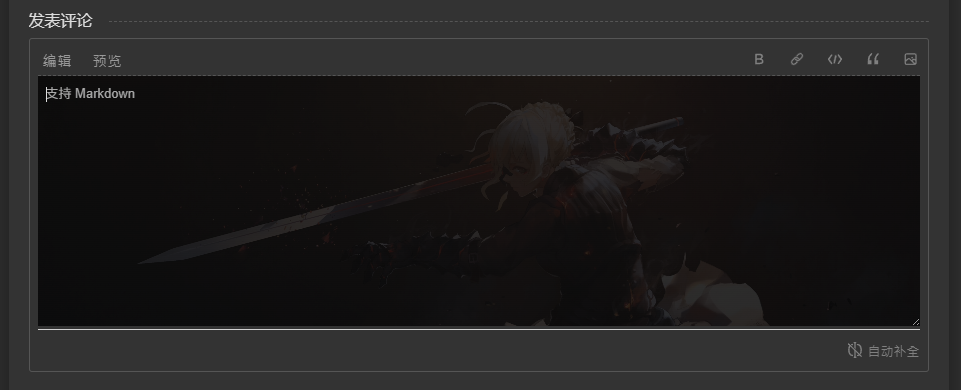
评论区使用完全填充的背景图后,原有的 padding 需要调整,不然文字左右侧会紧贴图片边线。
在 CSS 末尾加入以下代码:
#tbCommentBody {
  width: 100% !important;
  padding: 8px !important;
}
评论区背景图从文章背景图随机
之后在 window.cnblogsConfig 后面,立刻加入以下代码:
if (window.cnblogsConfig.banner.article.background.length > 0) {
  let imgs = window.cnblogsConfig.banner.article.background;
  let index = Math.floor(Math.random() * imgs.length);
  window.cnblogsConfig.articleComment.background.options.day = `linear-gradient(rgba(245, 245, 245, 0.85), rgba(245, 245, 245, 0.85)), url("${imgs[index]}") center center / cover no-repeat scroll padding-box border-box`;
  window.cnblogsConfig.articleComment.background.options.night = `linear-gradient(rgba(10, 10, 10, 0.85), rgba(10, 10, 10, 0.85)), url("${imgs[index]}") center center / cover no-repeat scroll padding-box border-box`;
}
首页每日博客背景图
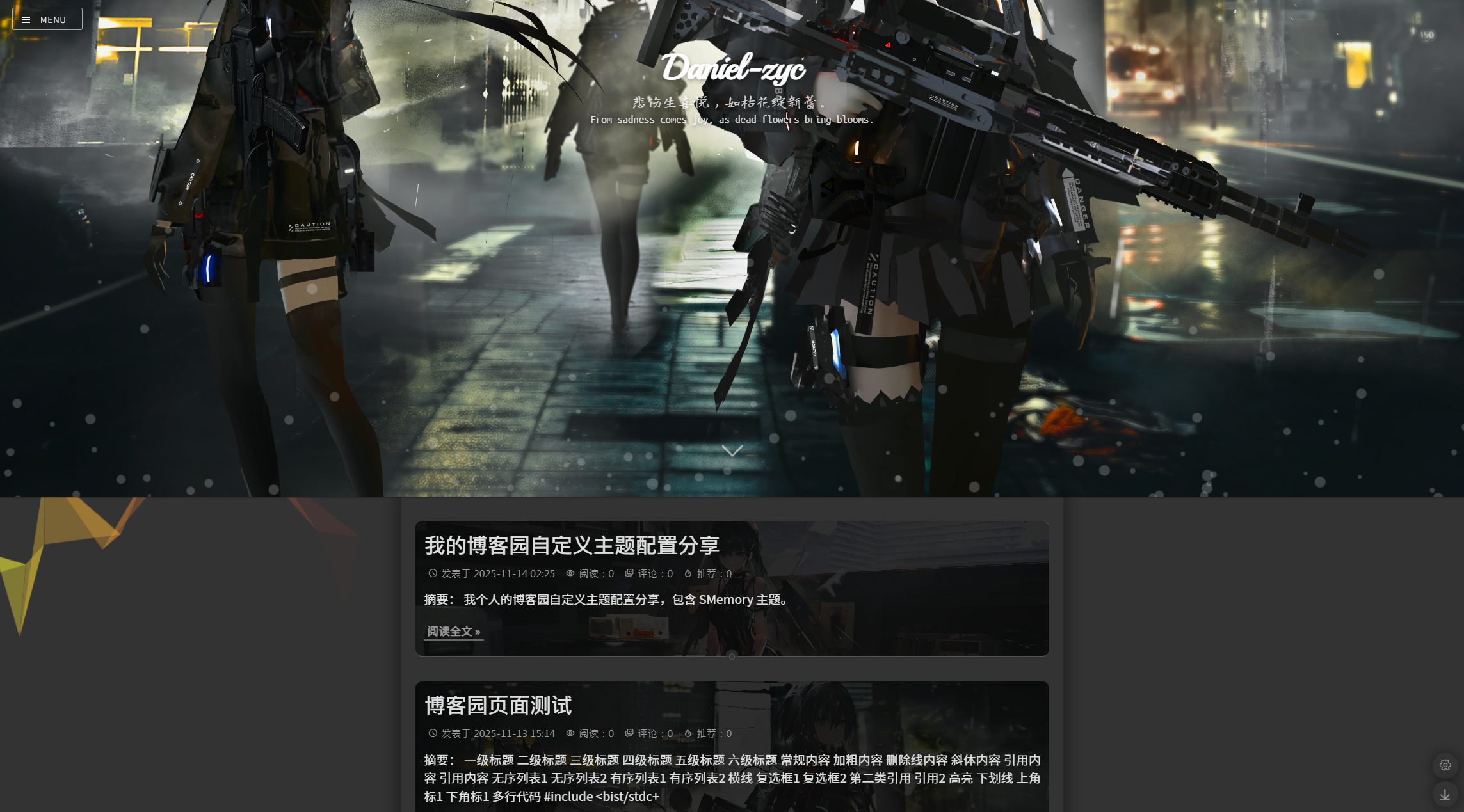
推荐将配置项中的 nightMode 设置为 true,目前无法自动获取第一次渲染时的日/夜模式,因此强制夜间模式开启后,可以确保第一次渲染时是夜间模式,进而匹配背景图的蒙版为深色蒙版。
该调整使用文章页的背景图与首页的背景图,作为首页每日博客的背景图;
会自动根据当日博客数量选择,如果为 == 1 条,则选择较为细长的文章页背景图,如果为 > 1 条,会选择首页背景图。
将以下代码粘贴到配置项代码后面。
<script>
  let $dayElements; // $("#home #main .forFlow .day");
  let postCounts; // $dayElements 中每日 post 的数量
  let picIndexs; // 各个 day 的背景图下标信息
  let thinImgList; // 细长情况下 (==1),使用 article 的 banner 背景图
  let normalImgList; // 常规情况下 (>1),使用 home 的 banner 背景图

  function initBanner(_) {
    $dayElements = $("#home #main .forFlow .day");
    postCounts = new Array($dayElements.length);
    picIndexs = new Array($dayElements.length);
    thinImgList = _.__config.banner.article.background;
    normalImgList = _.__config.banner.home.background;

    // 随机一个开始下标
    randomStart = _.__tools.randomNum(Math.max(normalImgList.length, thinImgList.length, 1));

    normalIndex = randomStart;
    thinIndex = randomStart;
    $dayElements.each(function(index) {
      postCounts[index] = $(this).find('.postTitle').length;

      picIndex = [0, -1];
      if ((postCounts[index] == 1 || postCounts[index] > 1 && normalImgList.length == 0) && thinImgList.length > 0) {
        picIndex = [1, thinIndex % thinImgList.length];
        thinIndex += 1;
      }
      if ((postCounts[index] > 1 || postCounts[index] == 1 && thinImgList.length == 0) && normalImgList.length > 0) {
        picIndex = [2, normalIndex % normalImgList.length];
        normalIndex += 1;
      }
      picIndexs[index] = picIndex;

      $(this).css({
        "background-position": "center center",
        "background-size": "cover",
        "background-repeat": "no-repeat",
        "background-attachment": "scroll",
        "background-origin": "padding-box",
        "background-clip": "border-box",
        "background-color": "transparent"
      });

      if (picIndexs[index][0] == 1) {
        $(this).css({
          "background-image": `linear-gradient(rgba(10, 10, 10, 0.85), rgba(10, 10, 10, 0.85)), url("${thinImgList[picIndexs[index][1]]}")`
        });
      }

      if (picIndexs[index][0] == 2) {
        $(this).css({
          "background-image": `linear-gradient(rgba(10, 10, 10, 0.85), rgba(10, 10, 10, 0.85)), url("${normalImgList[picIndexs[index][1]]}")`
        });
      }
    });
  }

  function refreshBanner(_, type) {
    $dayElements.each(function(index) {
      let backgroundMask = 'linear-gradient(rgba(10, 10, 10, 0.85), rgba(10, 10, 10, 0.85))';
      if (type == 'day')
        backgroundMask = 'linear-gradient(rgba(245, 245, 245, 0.75), rgba(245, 245, 245, 0.75))';

      if (picIndexs[index][0] == 1) {
        $(this).css({
          "background-image": `${backgroundMask}, url("${thinImgList[picIndexs[index][1]]}")`
        });
      }

      if (picIndexs[index][0] == 2) {
        $(this).css({
          "background-image": `${backgroundMask}, url("${normalImgList[picIndexs[index][1]]}")`
        });
      }
    });
  }

  window.cnblogsConfig.hooks = {
    beforeLoading: (_) => {
      initBanner(_);
    },
    afterLoading: (_) => {
    },
    dayNightControl: (_, type) => {
      refreshBanner(_, type);
    }
  }
</script>
之后需要向 CSS 末尾加入以下内容,增加一点内边距和边框圆弧提升美观度。
.day {
  padding: 12px !important;
  border-radius: 10px !important;
}
移除夜间模式的蒙版
在夜间模式下,大部分内容会被覆盖上一层蒙版,如果不希望启用该功能,可以在 CSS 末尾加入以下代码。
#EntryTag,
#btn_comment_submit,
#cnblogs_post_body img,
#div_digg,
#green_channel,
.feedbackItem pre,
.main-header,
code-box {
  filter: none !important;
}
标题字体大小修改
如觉得字体大小不是很合适,可以在 CSS 末尾加入以下代码可以修改标题的字体大小。
#cnblogs_post_body h1 {
  font-size: 32px !important;
}

#cnblogs_post_body h2 {
  font-size: 28px !important;
}

#cnblogs_post_body h3 {
  font-size: 24px !important;
}

#cnblogs_post_body h4 {
  font-size: 20px !important;
}

#cnblogs_post_body h5 {
  font-size: 16px !important;
}
代码字体修改
在 CSS 中加入以下代码可修改代码的字体,将自己最喜欢的字体写到第一个。
.cnblogs_code, .cnblogs_code pre, .cnblogs_code span, pre {
  font-family: Consolas, Source Code Pro, Menlo, Monaco, Courier New, monospace !important;
}
行内代码字体大小修改
在 CSS 中加入以下代码可修改行内代码的字体大小,原先的字号稍微小了一点。
之后将行内代码粗细改为正常,原先为加粗,因为觉得前景和背景颜色的区别已经可以很明显分辨出来,不需要再加粗了。
#home code:not([class]),
span.cnblogs_code {
  font-size: 14px;
  font-weight: normal;
}
滚动条样式修改
将滚动条的宽度固定,避免在鼠标放在上面时画面大小改变造成画面抖动。
在 CSS 末尾加入以下代码:
::-webkit-scrollbar {
  height: 6px !important;
  width: 6px !important;
}

::-webkit-scrollbar:hover {
  height: 6px !important;
  width: 6px !important;
}

::-webkit-scrollbar-track {
  width: 6px !important;
}
其中 width 影响纵向滚动条的宽度,height 影响横向滚动条的高度。
首页与文章页 banner 蒙版
首页与文章页前有白色文字,为了凸显该文字,在背景图片前加入一个半透明蒙版。
在 CSS 末尾加入以下代码:
.vertical {
  background-color: rgba(0, 0, 0, 0.2);
}
个人信息侧边栏设置多背景
将原先的 window.cnblogsConfig.sidebar.infoBackground 由特定图片变为多个图中随机挑选一个作为背景。
首先在 window.cnblogsConfig.banner 下添加 menu.background 配置多个图片。
window.cnblogsConfig = {
  banner: {
    menu: { // 侧边栏
        background: [ // // 侧边栏背景图片,会覆盖之前的 infoBackground,类型:Array[Url],默认值:[]
          'https://cdn.jsdelivr.net/gh/Daniel-zyc/Danz-image-host-01@img/wallpaper/V/2025/58615824_p0_1080_1920_2025-11-11_224104.jpg',
          'https://cdn.jsdelivr.net/gh/Daniel-zyc/Danz-image-host-01@img/wallpaper/V/2025/73954101_p0_1440_2560_2025-11-12_001503.jpg',
        ]
      }
  }
}
之后在 window.cnblogsConfig 后面,立刻加入以下代码:
if (window.cnblogsConfig.banner.menu.background.length > 0) {
  let imgs = window.cnblogsConfig.banner.menu.background;
  let index = Math.floor(Math.random() * imgs.length);
  window.cnblogsConfig.sidebar.infoBackground = imgs[index];
}
给主页和文章添加背景
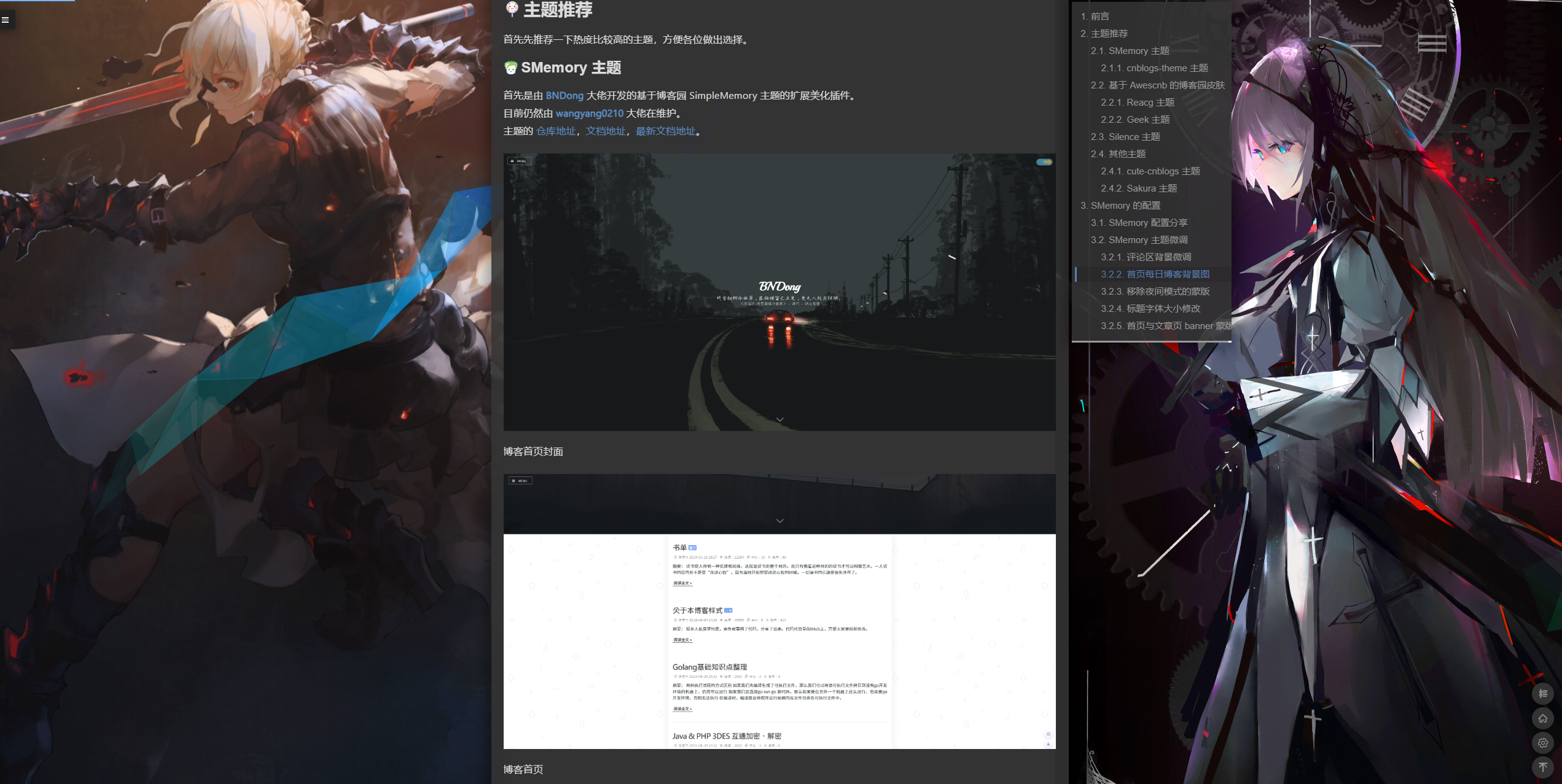
当屏幕横向宽度 >1200px 时,向主内容左右两侧加入背景图片,否则只在中央加入一张背景图片。
需要先配置 个人信息侧边栏设置多背景。
首先定义以下函数,之后在 beforeLoading 中调用该函数。
function initMainBackground(_) {
  let imgs = window.cnblogsConfig.banner.menu.background;
  if (imgs.length <= 0) return;

  $('body').prepend(`
    <div class="bg-side" id="bg-left"></div>
    <div class="bg-side" id="bg-right"></div>
    <div class="bg-center" id="bg-center"></div>
  `);

  index1 = _.__tools.randomNum(imgs.length) - 1;
  if(imgs.length > 1) {
    index2 = index1 + _.__tools.randomNum(imgs.length - 1);
    index2 %= imgs.length;
  } else {
    index2 = index1;
  }

  $('#bg-left').css({
    "background-image": `url("${imgs[index1]}")`
  });

  $('#bg-right').css({
    "background-image": `url("${imgs[index2]}")`
  });

  $('#bg-center').css({
    "background-image": `url("${imgs[index1]}")`
  });
}

window.cnblogsConfig.hooks = {
  beforeLoading: (_) => {
    initMainBackground(_);
  },
}
最后在 CSS 代码末尾添加对应的样式即可,如下:
.bg-side,
.bg-center {
  position: fixed;
  top: 0;
  height: 100vh;
  background-size: cover;
  background-position: center center;
  pointer-events: none;
  z-index: -2;
}

.bg-side {
  width: calc((100vw - 940px) / 2);
}

.bg-center {
  width: 100vw;
}

#bg-left {
  left: 0;
}

#bg-right {
  right: 0;
}

@media screen and (max-width: 1200px) {
  .bg-side {
    display: none;
  }
  .bg-center {
    display: block;
  }
}

@media screen and (min-width: 1200px) {
  .bg-side {
    display: block;
  }
  .bg-center {
    display: none;
  }
}
给主页和文章背景添加额外效果
给刚刚加入的背景添加一个渐变的动画,这样在加载进页面时,两侧的图片不会显示,随滚动逐渐显示,不会太突兀。
定义如下变量和函数,之后在 afterLoading 中调用该函数。
let $heightElement; // 渐变滚动的参考高度元素
let preRatio = 0; // 上一次的滚动占封面图的比例

function linkMainBackgroundAnimation(_) {
  $heightElement = $(window); // 这种情况使用窗口高度作为参考
  // $heightElement = $('#home #main #sideBar #main-header .vertical'); // 这种情况使用 banner 图作为参考

  _.__event.scroll.handle.push(() => {
    let scrollY = window.scrollY;
    let height = $heightElement.height();

    if (scrollY >= height) scrollY = height;

    let ratio = Math.floor(100 * scrollY / height);

    if (ratio != preRatio) {
      $('.bg-side, .bg-center').css({
        "opacity": `${ratio / 100}`,
      });
    }

    preRatio = ratio;
  });
}

window.cnblogsConfig.hooks = {
  afterLoading: (_) => {
    linkMainBackgroundAnimation(_);
  },
}
最后在 CSS 末尾加入以下代码,让初始时为透明的。
.bg-side,
.bg-center {
  opacity: 0;
}
设置相册页相关样式
主题本身没有给查看相册页图片时的界面设置太多样式,这里进行一下设置,如下:
.galleryTitle,
.gallery .thumbTitle {
  font-size: 24px;
  font-weight: bold;
  line-height: 1.5;
  margin: 10px 0;
}

.gallery .thumbDescription {
  font-size: 16px
}

.gallery .divPhoto {
  border: none;
  display: flex;
  justify-content: center;
  align-items: center;
}
EasyBe-Cnblogs 的配置
具体配置流程请参考 官方文档,本人不再赘述。
如果文档中提供的 CDN 无法获取可以换成 jsdeivr,如下:
<script src="https://cdn.jsdelivr.net/gh/wangyang0210/cnblogs-theme@{VERSION}/dist/simple-memory.js" defer></script>
EasyBe-Cnblogs 的配置分享
完成基础配置之后,可以根据参考文档中的 配置项 进行调整。
目前该主题存在一些问题导致自定义 hooks 和自定义 loading 无法使用,等大佬修复后会进行配置分享。
参考链接
SMemory 主题仓库地址
SMemory 主题文档地址
EasyBe-Cnblogs 主题仓库地址
EasyBe-Cnblogs 主题文档地址
Tona 框架仓库地址
Tona 框架文档地址
Silence 主题仓库地址
Silence 主题文档地址
cute-cnblogs 主题仓库地址
Sakura 主题仓库地址
参考配置
SMemory 主题最终配置
侧边栏处 HTML 代码:
侧边栏 HTML
<script type="text/javascript">
  // SimpleMemory v2.1.7 配置项,详情可参考官方文档:https://bndong.github.io/Cnblogs-Theme-SimpleMemory/v2.1/dist/reference/configs.html
  // 该文档可能没有完全覆盖最新版本的内容,最新的文档请参考:https://github.com/BNDong/Cnblogs-Theme-SimpleMemory/blob/v2/docs/v2.1/docs/src/reference/configs.md
  // 配置项中涉及图标的内容请参考官方文档:https://bndong.github.io/Cnblogs-Theme-SimpleMemory/v2.1/dist/reference/fonticon.html
  window.cnblogsConfig = {
    info: { // 基础信息
      name: 'Daniel-zyc', // 用户昵称,类型:String,默认值:{默认抓取博客园用户名}
      avatar: 'https://pic.cnblogs.com/avatar/2234473/20251112155509.png', // 用户头像 URL 地址,类型:Url,默认值:''
      startDate: '2020-12-03', // 您的入园时间,年-月-日,类型:Date,默认值:2021-01-01
      // 入园时间查看方法:鼠标停留园龄时间上,会显示入园时间
      blogIcon: 'https://pic.cnblogs.com/avatar/2234473/20251112155509.png', // 网站标签页图标,类型:Url,默认值:''
    },
    sidebar: { // 侧边栏
      navList: [ // 菜单导航(位于日历上方的位置),类型:Array[Array[String, Url, String]],默认值:[]
        // 列表数据:['导航名称', '链接', 'icon']
        ['首页', 'https://www.cnblogs.com/daniel-zyc/', 'icon-home'],
        // ['我的博客2', 'https://www.cnblogs.com/daniel-zyc/', 'icon-github'],
      ],
      customList: { // 自定义菜单栏,位于日历下方的位置),类型:Object,默认值:{}
        // "title1": { // 菜单栏标题
        //   "data": [ // 菜单栏数据,类型:Array[Array[String, Url]]
        //     // 列表数据:['名称', '链接']
        //     ['我的博客1', 'https://www.cnblogs.com/daniel-zyc/'],
        //     ['我的博客2', 'https://www.cnblogs.com/daniel-zyc/'],
        //     ['我的博客3', 'https://www.cnblogs.com/daniel-zyc/'],
        //     ['我的博客4', 'https://www.cnblogs.com/daniel-zyc/'],
        //     ['我的博客5', 'https://www.cnblogs.com/daniel-zyc/'],
        //   ],
        //   "icon": "icon-brush_fill" // 配置图标,类型:String
        // },
      },
      infoBackground: 'https://images.cnblogs.com/cnblogs_com/blogs/650600/galleries/2485795/o_251130054525_73954101_p0_1440_2560_02.jpg', // 侧边栏背景图片,类型:Url,默认值:''
      titleMsg: '欢迎访问 Daniel-zyc 的博客', // 侧边栏标题,类型:String,默认值:'欢迎访问本博客~'
      submenu: { // 侧边栏是否展开,默认配置为均不展开,类型:Object,默认值:{}
        pointsRank: false, // 积分排行
        latestPosts: false, // 最新随笔
        myTags: false, // 我的标签
        postsClassify: false, // 随笔分类
        articleClassify: false, // 文章分类
        readRank: false, // 阅读排行
        recommendRank: false, // 推荐排行
        postsArchive: false, // 帖子档案
        articleArchive: false, // 文章档案
        customList: false, // 自定义列表
        latestComment: false, // 最新评论
      },
    },
    banner: { // 横幅设置
      home: { // 主页横幅
        background: [ // 主页横幅图片,类型:Array[Url],默认值:[]
          'https://images.cnblogs.com/cnblogs_com/blogs/650600/galleries/2485795/o_251130050353_51711470_p0_1920_1080_01.jpg',
          'https://images.cnblogs.com/cnblogs_com/blogs/650600/galleries/2485795/o_251130052149_58615824_p0_2560_1440_01.jpg',
          'https://images.cnblogs.com/cnblogs_com/blogs/650600/galleries/2485795/o_251130052731_59561306_p0_2560_1440_01.jpg',
          'https://images.cnblogs.com/cnblogs_com/blogs/650600/galleries/2485795/o_251130052811_63438521_p0_1920_1080_02.jpg',
          'https://images.cnblogs.com/cnblogs_com/blogs/650600/galleries/2485795/o_251130053049_64227357_p0_2560_1440_01.jpg',
          'https://images.cnblogs.com/cnblogs_com/blogs/650600/galleries/2485795/o_251130053106_68476577_p0_1920_1080_01.jpg',
          'https://images.cnblogs.com/cnblogs_com/blogs/650600/galleries/2485795/o_251130053125_78215654_p0_3840_2160_01.jpg',
          'https://images.cnblogs.com/cnblogs_com/blogs/650600/galleries/2485795/o_251130053429_80695485_p0_2560_1440_01.jpg',
          'https://images.cnblogs.com/cnblogs_com/blogs/650600/galleries/2485795/o_251130053502_82399753_p0_3840_2160_01.jpg',
          'https://images.cnblogs.com/cnblogs_com/blogs/650600/galleries/2485795/o_251130053655_86003043_p0_2560_1440_01.jpg',
          'https://images.cnblogs.com/cnblogs_com/blogs/650600/galleries/2485795/o_251130075337_135100174_p0_2560_1440_01.jpg',
          'https://images.cnblogs.com/cnblogs_com/blogs/650600/galleries/2485795/o_251130075734_137574860_p0_2560_1440_01.jpg',
          'https://images.cnblogs.com/cnblogs_com/blogs/650600/galleries/2485795/o_251130081905_79223051_p0_3840_2160_01.jpg',
        ],
        // 主页 Banner 标语,类型:String or Array[String],默认值:''
        // 如果为空,则自动获取一句;如果为 String,则固定展示该文本;如果为 Array,则从数组随机选择一条文本
        // title: '',
        // title: [
        //   '非淡泊无以明志,非宁静无以致远',
        //   '天行健,君子以自强不息;地势坤,君子以厚德载物',
        //   '长风破浪会有时,直挂云帆济沧海'
        // ],
        titleSource: 'one', // 主页 Banner 标语获取源,类型:String,默认值:'jinrishici'
        /** 所有可配置项
         * jinrishici:每次刷新随机获取一句古诗词。
         * one:每日获取一句话
        */
      },
      article: { // 文章页
        background: [ // 文章页 Banner 图片,类型:Array[Url],默认值:[]
          'https://images.cnblogs.com/cnblogs_com/blogs/650600/galleries/2485795/o_251130060202_63438521_p0_3840_960_01.jpg',
          'https://images.cnblogs.com/cnblogs_com/blogs/650600/galleries/2485795/o_251130060224_64227357_p0_3840_960_01.jpg',
          'https://images.cnblogs.com/cnblogs_com/blogs/650600/galleries/2485795/o_251130060237_68476577_p0_3840_960_01.jpg',
          'https://images.cnblogs.com/cnblogs_com/blogs/650600/galleries/2485795/o_251130060253_78215654_p0_3840_960_01.jpg',
          'https://images.cnblogs.com/cnblogs_com/blogs/650600/galleries/2485795/o_251130060302_80695485_p0_3840_960_01.jpgg',
          'https://images.cnblogs.com/cnblogs_com/blogs/650600/galleries/2485795/o_251130060322_82399753_p0_3840_960_01.jpg',
          'https://images.cnblogs.com/cnblogs_com/blogs/650600/galleries/2485795/o_251130084127_58615824_p0_3840_960_01.jpg',
        ],
      },
      menu: { // 侧边栏
        background: [ // 侧边栏背景图片,会覆盖之前的 infoBackground,类型:Array[Url],默认值:[]
          'https://images.cnblogs.com/cnblogs_com/blogs/650600/galleries/2485795/o_251130054525_73954101_p0_1440_2560_02.jpg',
          'https://images.cnblogs.com/cnblogs_com/blogs/650600/galleries/2485795/o_251130055032_72215512_p0_1440_2560_01.jpg',
          'https://images.cnblogs.com/cnblogs_com/blogs/650600/galleries/2485795/o_251130055106_80695485_p0_1440_2560_01.jpg',
          'https://images.cnblogs.com/cnblogs_com/blogs/650600/galleries/2485795/o_251130055914_66287024_p0_2160_3840_01.jpg',
          'https://images.cnblogs.com/cnblogs_com/blogs/650600/galleries/2485795/o_251130160935_117016957_p0_1440_2560_01.jpg',
          'https://images.cnblogs.com/cnblogs_com/blogs/650600/galleries/2485795/o_251130160950_123556511_p0_1440_2560_02.jpg',
          'https://images.cnblogs.com/cnblogs_com/blogs/650600/galleries/2485795/o_251130161007_134753190_p0_1440_2560_01.jpg',
          // 'https://cdn.jsdelivr.net/gh/Daniel-zyc/Danz-image-host-01@img/wallpaper/V/2025/82399753_p0_2160_3840_2025-11-14_223313.jpg',
          // 'https://cdn.jsdelivr.net/gh/Daniel-zyc/Danz-image-host-01@img/wallpaper/V/2025/58615824_p0_1080_1920_2025-11-11_224104.jpg',
        ]
      }
    },
    // 加载界面基于开源项目 spring-loaders 实现
    // 配置项的具体含义以及更多加载效果请参考官方仓库:https://github.com/claudiocalautti/spring-loaders
    // 官方提供的 Demo 网站:https://tympanus.net/Tutorials/SpringLoaders/index.html
    loading: { // Loading 界面设置,类型:Object
      rebound: {
        tension: 14, // 默认:16
        friction: 10 // 默认:5
      },
      spinner: {
        radius: 120, // 默认:90
        sides: 5, // 默认:3
        depth: 8, // 默认:4
        colors: {
          background: '#00272C', // 默认:'#f0f0f0'
          stroke: null, // 默认:'#272633'
          base: null, // 默认: null
          child: '#02C39A' // 默认:'#272633'
        },
        alwaysForward: true, // 默认:true
        restAt: null, // 默认:0.5
        renderBase: false // 默认:false
      }
    },
    // 字体图标扩展库使用方法请参考官方文档:https://bndong.github.io/Cnblogs-Theme-SimpleMemory/v2.1/dist/reference/fonticon.html
    fontIconExtend: '', // 字体图标库扩展,类型:Url,默认值:''
    progressBar: { // 顶部进度条,类型:Object
      color: '#77b6ff', // 默认:'#77b6ff'
      height: '3px', // 默认:'2px'
      duration: 0.4, // 默认:0.2
    },
    title: { // 页面标签
      onblur: '(ಥ_ಥ) 不要忘记我哦', // 失去焦点标签文字,类型:String,默认值:''
      onblurTime: -1, // 失去焦点变化延时(毫秒),-1为不变化文字,类型:Number,默认值:500
      focus: '\\(*´∇`*)ノ 欢迎欢迎!', // 获取焦点标签文字,类型:String,默认值:'(*´∇`*) 欢迎回来!'
      focusTime: 750, // 获取焦点变化延时(毫秒),-1为不变化文字,类型:Number,默认值:1000
    },
    footer: { // 页脚
      style: 2, // 页脚样式,类型:Number,默认值:2,所有可配置项:1 or 2
      text: { // 页脚标语
        left: '非淡泊无以明志', // 页脚标语左侧文字,类型:String,默认值:''
        right: '非宁静无以致远', // 页脚标语右侧文字,类型:String,默认值:''
        iconFont: { // 页脚标语中间图标,类型:Object,默认值:{}
          // icon:  "icon-xl",
          // color: "red",
          // fontSize: "16px"
        }
      },
      // 音乐播放器详细配置项请参考官方文档:https://bndong.github.io/Cnblogs-Theme-SimpleMemory/v2.1/dist/reference/configs.html#aplayer-%E9%9F%B3%E4%B9%90%E6%92%AD%E6%94%BE%E5%99%A8-388
      aplayer: { // 音乐播放器,类型:Object
        enable: false, // 默认值:false
      },
    },
    links: { // 友情链接
      footer: [ // 页脚友链, 类型:Array[Array[String, Url]],默认值:[]
        // 列表数据:['名称', '链接']
        ["博客主题仓库", 'https://bndong.github.io/Cnblogs-Theme-SimpleMemory/v2.1/dist/'],
      ],
      // 友链页详细配置请参考官方文档:https://bndong.github.io/Cnblogs-Theme-SimpleMemory/v2.1/dist/reference/links.html
      page: [ // 友链页,类型:Array,默认值:[]
        // {
        //   name: 'BNDong', // 昵称
        //   introduction: 'IT技术类博客', // 简介
        //   avatar: 'https://blog.dbnuo.com/images/avatar.gif', // 头像
        //   url: 'https://blog.dbnuo.com' // 友链地址
        // },
      ],
    },
    rtMenu: { // 右下角菜单
      qrCode: 'https://fastly.jsdelivr.net/gh/Daniel-zyc/Danz-image-host-01@img/personal/wechat_OA_code_2025-11-12_160143.jpg', // 二维码,类型:Url,默认值:''
      reward: { // 赞赏收款码,类型:Object
        alipay: '', // 默认值:''
        wechatpay: 'https://fastly.jsdelivr.net/gh/Daniel-zyc/Danz-image-host-01@img/personal/wechat_reward_code_2025-11-12_154347.png' // 默认值:''
      },
      downScrollDom: '#articleSuffix', // 跳至底部位置定义,类型:String,默认值:''
    },
    switchDayNight: { // 日/夜间模式,类型:Object
      enable: true, // 是否开启日/夜间模式切换按钮,默认值:true
      nightMode: true, // 强制夜间模式,默认值:false
      auto: { // 自动切换相关配置
        enable: true, // 开启自动切换,默认值:false
        dayHour: 7,     // 日间模式开始时间(24小时制),默认值:5
        nightHour: 19   // 夜间模式开始时间(24小时制),默认值:19
      }
    },
    animate: { // 动效,会消耗 GPU,可能造成页面卡顿,所有动效默认关闭
      homeBannerTitle: { // 主页 banner 上 name 的动效,类型:Object
        enable: true // 默认值:false
      },
      homeBanner: { // 主页 Banner 动效,类型:Object
        enable: true, // 默认值:false
        options: {
          radius: 20, // 默认值:15
          density: 0.08, // 默认值:0.2
          color: 'rgba(255,255,255, .2)', // 颜色设置,'random' 为随机颜色,默认值:'rgba(255,255,255, .2)'
          clearOffset: 0.2 // 默认值:0.3
        }
      },
      articleTitle: { // 文章页标题动效,类型:Object
        enable: true // 默认值:false
      },
      articleBanner: { // 文章页 Banner 动效,类型:Object
        enable: true // 默认值:false
      },
      background: { // 背景动效,类型:Object
        enable: true, // 默认值:false
        options: {
          colorSaturation: '100%', // 默认值:'60%'
          colorBrightness: '50%', // 默认值:'50%'
          colorAlpha: 0.5, // 默认值:0.5
          colorCycleSpeed: 5, // 默认值:5
          verticalPosition: 'random', // 默认值:'random'
          horizontalSpeed: 150, // 默认值:200
          ribbonCount: 3, // 默认值:3
          strokeSize: 0, // 默认值:0
          parallaxAmount: 0, // 图形随鼠标滚动时的数值偏移系数,小于 0 则向下滚动图形向上,大于 0 相反,0 保持不动,默认值:-0.2
          animateSections: true // 默认值:true
        }
      },
      bannerImages: { // Banner 背景图自动切换,类型:Object
        enable: true, // 默认值:false
        options: {
          itemNum: 5, // 图片拆分成几列,默认值:5
          current: -1, // 初始图片的下标,如果为负数则为随机,默认值:0
          sort: 1, // 1 代表每次向下加载一个图片,-1 代表每次向上加载一个图片,默认值:1
          time: 16000 // 每次切换间隔时间,单位:毫秒,默认值:30000
        }
      },
      backgroundMouse: { // 背景图案动效,类型:Object
        enable: false // 默认值:false
      },
      mouse: { // 跟随鼠标动效,类型:Object
        enable: false, // 默认值:false
        options: {
          size: 8, // 中心圆点的大小(px),默认值:8
          sizeF: 36 // 外部边框的大小(px),默认值:36
        }
      },
      season: { // 花瓣飘落动效,类型:Object
        enable: false, // 默认值:false
        options: {
          // 默认为一个花瓣图片,建议使用 base64 转码后的透明背景图片
          // img: '', // 默认值为 base64 转码后的花瓣图片,内容太长请查看文档
          size: 40 // 默认值:40
        }
      },
      avatar: { // 头像旋转动效,类型:Object
        enable: true // 默认值:false
      },
      typing: { // 评论框打字动效,类型:Object
        enable: true, // 默认值:false
        options: {
          colorful: true, // 是否多彩,默认值:true
          shake: true, // 是否震动,默认值:false
        }
      },
    },
    code: { // 代码相关配置
      type: 'hljs', // 代码渲染类型,类型:String,默认值:''
      /** 所有可配置项
       * cnblogs: 使用博客园默认代码高亮样式。
       * hljs: 使用 Highlighting 插件渲染代码高亮样式。
       */
      options: { // 代码配置
        hljs: { // Highlighting 插件样式配置,类型:Object,当 code.type 为 'hljs' 时生效
          theme: 'atom-one-dark', // 代码高亮主题,类型:String,默认值:'atom-one-dark-reasonable'
          /** 所有可配置项
           * default、a11y-dark、a11y-light、agate、an-old-hope、androidstudio、arduino-light、arta、ascetic
           * atelier-cave-dark、atelier-cave-light、atelier-dune-dark、atelier-dune-light、atelier-estuary-dark
           * atelier-estuary-light、atelier-forest-dark、atelier-forest-light、atelier-heath-dark、atelier-heath-light
           * atelier-lakeside-dark、atelier-lakeside-light、atelier-plateau-dark、atelier-plateau-light
           * atelier-savanna-dark、atelier-savanna-light、atelier-seaside-dark、atelier-seaside-light
           * atelier-sulphurpool-dark、atelier-sulphurpool-light、atom-one-dark-reasonable、atom-one-dark、atom-one-light
           * brown-paper、codepen-embed、color-brewer、darcula、dark、darkula、docco、dracula、far、foundation
           * github-gist、github、gml、googlecode、grayscale、gruvbox-dark、gruvbox-light、hopscotch
           * hybrid、idea、ir-black、isbl-editor-dark、isbl-editor-light、kimbie.dark、kimbie.light、lightfair
           * magula、mono-blue、monokai-sublime、monokai、nord、obsidian、ocean、paraiso-dark、paraiso-light、pojoaque
           * purebasic、qtcreator_dark、qtcreator_light、railscasts、rainbow、routeros、school-book
           * shades-of-purple、solarized-dark、solarized-light、sunburst、tomorrow-night-blue、tomorrow-night-bright
           * tomorrow-night-eighties、tomorrow-night、tomorrow、vs、vs2015、xcode、xt256、zenburn
          */
          languages: [], // 语言识别范围,不配置默认不限制,类型:Array[String],默认值:[]
        },
        maxHeight: '70vh', // 代码框高度限制,类型:String,默认值:''
        line: true, // 代码行号渲染,类型:Boolean,默认值:false
        macStyle: true, // Mac 风格代码框,类型:Boolean,默认值:true
        fontSize: 14, // 代码字体大小(单位 px),类型:Number,默认值:14
      },
    },
    articleDirectory: { // 文章目录
        position: 'right', // 文章目录定位,类型:String,默认值:'right',所有可配置项:'right' or 'left'
        minBodyWeight: 1000, // 文章目录隐藏宽度,类型:Number,默认值:900
        autoWidthScroll: true, // 文章目录横向滚动条,类型:Boolean,默认值:false
        number: true, // 文章目录前是否显示标号,类型:Boolean,默认值:false
    },
    articleComment: { // 文章评论
        background: { // 文章评论背景,类型:Object
          enable: true, // 默认值:false
          options: {
            // 默认值:'rgba(0, 0, 0, 0) url("images/comment_bg_day.png") no-repeat scroll 100% 31% / 35% padding-box border-box'
            // 此处图片使用一张北京图填充整个评论区,同时上层有一个蒙版保证字可以看清
            day: 'linear-gradient(rgba(245, 245, 245, 0.85), rgba(245, 245, 245, 0.85)), url("https://cdn.jsdelivr.net/gh/Daniel-zyc/Danz-image-host-01@img/wallpaper/H/2025/58615824_p0_3840_960_2025-11-13_225455.jpg") center center / cover no-repeat scroll padding-box border-box',
            // 默认值:'rgba(0, 0, 0, 0) url("images/comment_bg_dark.png") no-repeat scroll 100% 31% / 35% padding-box border-box'
            night: 'linear-gradient(rgba(10, 10, 10, 0.85), rgba(10, 10, 10, 0.85)), url("https://cdn.jsdelivr.net/gh/Daniel-zyc/Danz-image-host-01@img/wallpaper/H/2025/58615824_p0_3840_960_2025-11-13_225455.jpg") center center / cover no-repeat scroll padding-box border-box',
          },
        },
    },
    articleContent: { // 文章内容
      prefixIcon: { // 文章标题前图标,类型:Object
        enable: true,
        options: {
          // 具体图标配置方式请参考官方文档:https://bndong.github.io/Cnblogs-Theme-SimpleMemory/v2.1/dist/reference/fonticon.html
          link: 'https://at.alicdn.com/t/c/font_3628204_t6n3fw8b1zn.js',
          iconfontArr: [
            'hebaodan','bingtanghulu','kesong','qianceng','fengmi','feiyuguantou','shengjian','youtiao','yuzijiang','zhutongfan','doujiang','sanmingzhi',
            'paofu','shanbei','dangaojuan','futejia','huangyou','xiangchang','banji','danta','qingning','lajiao','shizi','mojituo','pijiu','putaojiu',
            'kouxiangtang','xiangcaobingqilin','jiaozi','tilamisu','huoguo','hongshu','bingkuai','mianhuatang','paobing','meishikafei','mantou','qishui',
            'ganlan','jiroujuan','guodong','baozi','pingguo','chengzi','qingjiao','jidan','xihongshi','mangguo','baocai','niunai','mianbao','huluobu','zhangyu',
            'pangxie','longxia','yangcong','rou','jitui','huage','xianyu','mogu','qiezi','xilanhua','ningmeng','liulian','banli','sanwenyu','tudou','xigua','nangua',
            'huolongguo','fantuan','zhusun','shuiluobu','shanzhu','lanmei','shiliu','yezi','tiangua','mihoutao','boluo','kaixinguo','hetao','xiaweiyiguo','huasheng',
            'bigenguo','kuihuazi','songzi','xiguazi','badanmu','yaoguo','danhuangsu','dangao','binggan','buding','tangguo','qiaokeli','hongzao','candou','putaogan',
            'manyuemei','taozi','xiangjiao','caomei','niuyouguo','hamigua','chelizi','li','bale','kafei1','shutiao','zhenzhunaicha','xuegao','nailao','kele','tiantong',
            'hanbao','xiezishousi','baomihua','regou','makalong','tianfuluo','juzi','baixiangguo','putao','shaomai','yumi','pipa','yangtao','youzi','lianwu','wuhuaguo',
            'paomian','wandou','huanggua','suantou','tiantianquan','shupian','huafubing','bangbangtang','shousi','lizhi','doufu','mocha','boluomi','zhouzi','bingsha',
            'suannai','pisa','haixing','haizhe','tongluoshao','nuomici','kuangquanshui','roujiamo','cha','zhangyuxiaowanzi','chengzhi','yuancaitou','baicai'
          ],
        }
      }
    },
    articleSuffix: { // 文章末尾信息部分
      imgUrl: '', // 左侧图片,不配置默认使用用户头像,类型:Url,默认值:''
      aboutHtml: '曾经是一位 OIer,如今带着代码世界的严谨,在知识领域持续精进', // 关于博主,类型:String,默认值:''
      copyrightHtml: '', // 版权声明,不配置使用默认,类型:String,默认值:''
      supportHtml: ' 如果您觉得文章对您有帮助,可以点击文章下方<strong><span style="color: #ff0000; font-size: 12pt;">【推荐该文】</span></strong>或者<strong><span style="color: #ff0000; font-size: 12pt;">【收藏本文】</span></strong>', // 声援博主,不配置使用默认,,默认值:
      copyInfo: { // 文章复制携带版权信息,类型:Object
        enable: false, // 是否开启,默认值:false
        length: 100, // 选中多少文字后触发,默认值:100
        copyright: '', // 版权信息,不配置则默认为 copyrightHtml,默认值:''
      }
    },
    memorialDays: [ // 国家公祭日和自定义缅怀的日期,类型:Array[MM-DD],默认值:[]
      // '09-18'
    ],
    consoleList: [ // 控制台输出,类型:Array[Array[String, Url]],默认值:[]
      ['Daniel-zyc CNBlogs', 'https://www.cnblogs.com/daniel-zyc'],
    ],
  }

  if (window.cnblogsConfig.banner.menu.background.length > 0) {
    let imgs = window.cnblogsConfig.banner.menu.background;
    let index = Math.floor(Math.random() * imgs.length);
    window.cnblogsConfig.sidebar.infoBackground = imgs[index];
  }
</script>

<script>
  let $dayElements; // $("#home #main .forFlow .day");
  let postCounts; // $dayElements 中每日 post 的数量
  let picIndexs; // 各个 day 的背景图下标信息
  let thinImgList; // 细长情况下 (==1),使用 article 的 banner 背景图
  let normalImgList; // 常规情况下 (>1),使用 home 的 banner 背景图
  let $heightElement; // 渐变滚动的参考高度元素
  let preRatio = 0; // 上一次的滚动占封面图的比例

  function initBanner(_) {
    $dayElements = $("#home #main .forFlow .day");
    postCounts = new Array($dayElements.length);
    picIndexs = new Array($dayElements.length);
    thinImgList = _.__config.banner.article.background;
    normalImgList = _.__config.banner.home.background;

    // 随机一个开始下标
    randomStart = _.__tools.randomNum(Math.max(normalImgList.length, thinImgList.length, 1));

    normalIndex = randomStart;
    thinIndex = randomStart;
    $dayElements.each(function(index) {
      postCounts[index] = $(this).find('.postTitle').length;

      picIndex = [0, -1];
      if ((postCounts[index] == 1 || postCounts[index] > 1 && normalImgList.length == 0) && thinImgList.length > 0) {
        picIndex = [1, thinIndex % thinImgList.length];
        thinIndex += 1;
      }
      if ((postCounts[index] > 1 || postCounts[index] == 1 && thinImgList.length == 0) && normalImgList.length > 0) {
        picIndex = [2, normalIndex % normalImgList.length];
        normalIndex += 1;
      }
      picIndexs[index] = picIndex;

      $(this).css({
        "background-position": "center center",
        "background-size": "cover",
        "background-repeat": "no-repeat",
        "background-attachment": "scroll",
        "background-origin": "padding-box",
        "background-clip": "border-box",
        "background-color": "transparent"
      });

      if (picIndexs[index][0] == 1) {
        $(this).css({
          "background-image": `linear-gradient(rgba(10, 10, 10, 0.85), rgba(10, 10, 10, 0.85)), url("${thinImgList[picIndexs[index][1]]}")`
        });
      }

      if (picIndexs[index][0] == 2) {
        $(this).css({
          "background-image": `linear-gradient(rgba(10, 10, 10, 0.85), rgba(10, 10, 10, 0.85)), url("${normalImgList[picIndexs[index][1]]}")`
        });
      }
    });
  }

  function refreshBanner(_, type) {
    $dayElements.each(function(index) {
      let backgroundMask = 'linear-gradient(rgba(10, 10, 10, 0.85), rgba(10, 10, 10, 0.85))';
      if (type == 'day')
        backgroundMask = 'linear-gradient(rgba(245, 245, 245, 0.75), rgba(245, 245, 245, 0.75))';

      if (picIndexs[index][0] == 1) {
        $(this).css({
          "background-image": `${backgroundMask}, url("${thinImgList[picIndexs[index][1]]}")`
        });
      }

      if (picIndexs[index][0] == 2) {
        $(this).css({
          "background-image": `${backgroundMask}, url("${normalImgList[picIndexs[index][1]]}")`
        });
      }
    });
  }

  function initMainBackground(_) {
    let imgs = window.cnblogsConfig.banner.menu.background;
    if (imgs.length <= 0) return;

    $('body').prepend(`
      <div class="bg-side" id="bg-left"></div>
      <div class="bg-side" id="bg-right"></div>
      <div class="bg-center" id="bg-center"></div>
    `);

    index1 = _.__tools.randomNum(imgs.length) - 1;
    if(imgs.length > 1) {
      index2 = index1 + _.__tools.randomNum(imgs.length - 1);
      index2 %= imgs.length;
    } else {
      index2 = index1;
    }

    $('#bg-left').css({
      "background-image": `url("${imgs[index1]}")`,
    });

    $('#bg-right').css({
      "background-image": `url("${imgs[index2]}")`
    });

    $('#bg-center').css({
      "background-image": `url("${imgs[index1]}")`
    });
  }

  function linkMainBackgroundAnimation(_) {
    $heightElement = $(window); // 这种情况使用窗口高度作为参考
    // $heightElement = $('#home #main #sideBar #main-header .vertical'); // 这种情况使用 banner 图作为参考

    _.__event.scroll.handle.push(() => {
      let scrollY = window.scrollY;
      let height = $heightElement.height();

      if (scrollY >= height) scrollY = height;

      let ratio = Math.floor(100 * scrollY / height);

      if (ratio != preRatio) {
        $('.bg-side, .bg-center').css({
          "opacity": `${ratio / 100}`,
        });
      }

      preRatio = ratio;
    });
  }

  window.cnblogsConfig.hooks = {
    beforeLoading: (_) => {
      initBanner(_);
      initMainBackground(_);
    },
    afterLoading: (_) => {
      linkMainBackgroundAnimation(_);
    },
    dayNightControl: (_, type) => {
      refreshBanner(_, type);
    },
  }
</script>

<script>

</script>

<!-- 插件文件引入 -->
<script src="https://fastly.jsdelivr.net/gh/BNDong/Cnblogs-Theme-SimpleMemory@v2.1.7/dist/simpleMemory.js" defer></script>
<!-- 也可以使用下面的地址进行加载,CDN 使用哪家,大家自己权衡 -->
<!-- <script src="https://jsd.cdn.zzko.cn/gh/BNDong/Cnblogs-Theme-SimpleMemory@v2.1.7/dist/simpleMemory.js" defer></script> -->
页面定制 CSS 在主题原有基础上新加入的内容:
页面定制 CSS 额外代码
#tbCommentBody {
  width: 100% !important;
  padding: 8px !important;
}

.day {
  padding: 12px !important;
  border-radius: 10px !important;
}

#EntryTag,
#btn_comment_submit,
#cnblogs_post_body img,
#div_digg,
#green_channel,
.feedbackItem pre,
.main-header,
code-box {
  filter: none !important;
}

#cnblogs_post_body h1 {
  font-size: 32px !important;
}

#cnblogs_post_body h2 {
  font-size: 28px !important;
}

#cnblogs_post_body h3 {
  font-size: 24px !important;
}

#cnblogs_post_body h4 {
  font-size: 20px !important;
}

#cnblogs_post_body h5 {
  font-size: 16px !important;
}

.cnblogs_code, .cnblogs_code pre, .cnblogs_code span, pre {
  font-family: Consolas, Source Code Pro, Menlo, Monaco, Courier New, monospace !important;
}

#home code:not([class]),
span.cnblogs_code {
  font-size: 14px;
  font-weight: normal !important;
}

::-webkit-scrollbar {
  height: 6px !important;
  width: 6px !important;
}

::-webkit-scrollbar:hover {
  height: 6px !important;
  width: 6px !important;
}

::-webkit-scrollbar-track {
  width: 6px !important;
}

.vertical {
  background-color: rgba(0, 0, 0, 0.2);
}

.bg-side,
.bg-center {
  position: fixed;
  top: 0;
  height: 100vh;
  background-size: cover;
  background-position: center center;
  pointer-events: none;
  z-index: -2;
}

.bg-side {
  width: calc((100vw - 940px) / 2);
}

.bg-center {
  width: 100vw;
}

#bg-left {
  left: 0;
}

#bg-right {
  right: 0;
}

@media screen and (max-width: 1200px) {
  .bg-side {
    display: none;
  }
  .bg-center {
    display: block;
  }
}

@media screen and (min-width: 1200px) {
  .bg-side {
    display: block;
  }
  .bg-center {
    display: none;
  }
}

.bg-side,
.bg-center {
  opacity: 0;
}

.galleryTitle,
.gallery .thumbTitle {
  font-size: 24px;
  font-weight: bold;
  line-height: 1.5;
  margin: 10px 0;
}

.gallery .thumbDescription {
  font-size: 16px
}

.gallery .divPhoto {
  border: none;
  display: flex;
  justify-content: center;
  align-items: center;
}
本文来自博客园,作者:Daniel-zyc,转载请注明原文链接:https://www.cnblogs.com/daniel-zyc/p/19220063。

 浙公网安备 33010602011771号