

matplotlib画图,中文乱码问题
原始代码:
import matplotlib.pyplot as plt

squares = [1, 4, 9, 16, 25]
fig, ax = plt.subplots()
ax.plot(squares, linewidth=3)
# 设置图表标题并给坐标轴加上标签
ax.set_title("平方数", fontsize=24)
ax.set_xlabel("值", fontsize=14)
ax.set_ylabel("值的平方", fontsize=14)
# 设置刻度标志的大小
ax.tick_params(axis='both', labelsize=14)

plt.show()
画图结果:
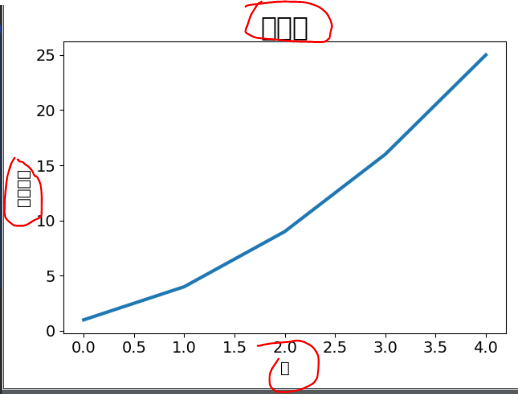
可以看到我们的中文都是乱码。
乱码原因:matplotlib缺少中文配置导致的。
解决方案:在plt前边配置中文字体,具体如下:
# 解决中文乱码问题
plt.rcParams['font.sans-serif'] = ['SimHei']
squares = [1, 4, 9, 16, 25]
fig, ax = plt.subplots()
ax.plot(squares, linewidth=3)
# 设置图表标题并给坐标轴加上标签
ax.set_title("平方数", fontsize=24)
ax.set_xlabel("值", fontsize=14)
ax.set_ylabel("值的平方", fontsize=14)
# 设置刻度标志的大小
ax.tick_params(axis='both', labelsize=14)

plt.show()


 浙公网安备 33010602011771号