


练习|Django-单表
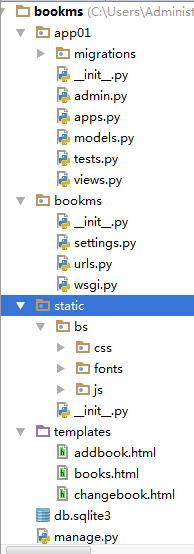
结构目录
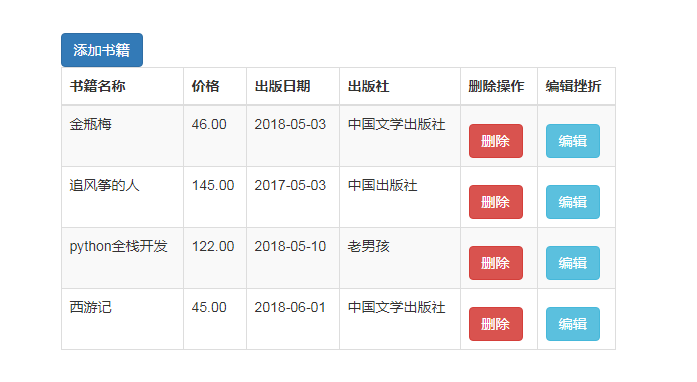
页面展示:
1创建Django,创建app01
在modules.py添加

class Book(models.Model):
     id=models.AutoField(primary_key=True)
     title=models.CharField(max_length=32)
     #state=models.BooleanField()
     pub_date=models.DateField()
     price=models.DecimalField(max_digits=8,decimal_places=2)
     publish=models.CharField(max_length=32)
2在settings里边添加app01
INSTALLED_APPS = [
    'django.contrib.admin',
    'django.contrib.auth',
    'django.contrib.contenttypes',
    'django.contrib.sessions',
    'django.contrib.messages',
    'django.contrib.staticfiles',
    "app01",
]
3在Terminal里边输入
C:\Users\Administrator\PycharmProjects\bookms>python manage.py makemigrations
Migrations for 'app01':
  app01\migrations\0001_initial.py
    - Create model Book

C:\Users\Administrator\PycharmProjects\bookms>python manage.py migrate
Operations to perform:
  Apply all migrations: admin, app01, auth, contenttypes, sessions
Running migrations:
  Applying contenttypes.0001_initial... OK
  Applying auth.0001_initial... OK
  Applying admin.0001_initial... OK
  Applying admin.0002_logentry_remove_auto_add... OK
  Applying app01.0001_initial... OK
  Applying contenttypes.0002_remove_content_type_name... OK
  Applying auth.0002_alter_permission_name_max_length... OK
  Applying auth.0003_alter_user_email_max_length... OK
  Applying auth.0004_alter_user_username_opts... OK
  Applying auth.0005_alter_user_last_login_null... OK
  Applying auth.0006_require_contenttypes_0002... OK
  Applying auth.0007_alter_validators_add_error_messages... OK
  Applying auth.0008_alter_user_username_max_length... OK
  Applying auth.0009_alter_user_last_name_max_length... OK
  Applying sessions.0001_initial... OK
4在urls.py中添加
from app01 import views

urlpatterns = [
    path('admin/', admin.site.urls),
    path('addbook/', views.addbook),
]
在views.py中加视图函数
def addbook(request):

    return render(request, addbook.html)
urls.py
from django.contrib import admin
from django.urls import path, re_path

from app01 import views

urlpatterns = [
    path('admin/', admin.site.urls),
    path('addbook/', views.addbook),
    path('books/', views.books),
    re_path(r"books/(\d+)/delete", views.delbook), #delbook(request,2) (\d+)是去捕获这个值;这个路径是给a标签写的,一点击就跳转了删除了
    re_path(r"books/(\d+)/change", views.changebook)
]
views.py
from django.shortcuts import render, HttpResponse, redirect

# Create your views here.
from app01.models import Book  #把这张表导入进来;

def addbook(request):
    if request.method == "POST":  #把数据全取出来
        title = request.POST.get("title")
        price = request.POST.get("price")
        date = request.POST.get("date")
        publish = request.POST.get("publish")

        book_obj = Book.objects.create(title=title, price=price, pub_date=date, publish=publish) #添加,左边是Book表的字段,右边是值
        return redirect("/books/")
    return render(request, "addbook.html")

def books(request):
    book_list = Book.objects.all() #拿出所有书籍,一个queryset对象 #[obj1, obj2,,,]
    return render(request, "books.html", locals()) #传给模板直接让它渲染就可以了

def delbook(request, id):
    Book.objects.filter(id=id).delete()
    return redirect("/books/")  #重定向

def changebook(request, id):
    book_obj = Book.objects.filter(id=id).first() #先获得那个编辑对象。无论get还是post请求都要获取

    if request.method=="POST":
        title = request.POST.get("title")
        price = request.POST.get("price")
        date = request.POST.get("date")
        publish = request.POST.get("publish")
        Book.objects.filter(id=id).update(title=title, price=price, pub_date=date, publish=publish)
        return redirect("/books/")


    return render(request, "changebook.html", {"book_obj":book_obj})
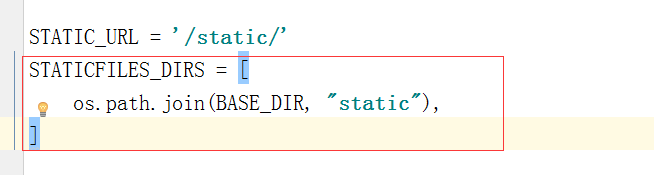
在settings里边配置:
addbook.html(添加页面)
引入bootstrap-3.3.7.2拿这个文件只需要拿dist就可以了,起名叫bs
<!DOCTYPE html>
<html lang="en">
<head>
    <meta charset="UTF-8">
    <title>Title</title>
    <link rel="stylesheet" href="/static/bs/css/bootstrap.css">

    <style>
        .container{
            margin-top:100px;
        }
        .btn{
            margin-top: 10px;
        }
    </style>
</head>
<body>
<h3>添加书籍</h3>
<div class="container">
    <div class="row">
        <div class="col-md-6 col-md-offset-3">

            <form action="" method="post">
                {% csrf_token %}  <!--为了通过防跨域请求验证-->
                <div>
                    <label for="">书籍名称</label>
                    <input type="text" class="form-control" name="title"> <!--有form-control就有样式了-->
                </div>
                <div>
                    <label for="">价格</label>
                    <input type="text" class="form-control" name="price">
                </div>
                <div>
                    <label for="">出版日期</label>
                    <input type="date" class="form-control" name="date">
                </div>
                <div>
                    <label for="">出版社</label>
                    <input type="text" class="form-control" name="publish">
                </div>
                <input type="submit" class="btn btn-success pull-right" >
            </form>
        </div>
    </div>
</div>
</body>
</html>
books.html(查看页面)
<!DOCTYPE html>
<html lang="en">
<head>
    <meta charset="UTF-8">
    <title>Title</title>
    <link rel="stylesheet" href="/static/bs/css/bootstrap.css">

    <style>
        .container{
            margin-top:100px;
        }
        .btn{
            margin-top: 10px;
        }
    </style>
</head>
<body>
<h3>查询书籍</h3>
<div class="container">
    <div class="row">
        <div class="col-md-6 col-md-offset-3">
            <a href="/addbook/" class="btn btn-primary">添加书籍</a>
            <table class="table table-striped table-bordered">
                <thead>
                    <tr>
                        <th>书籍名称</th>
                        <th>价格</th>
                        <th>出版日期</th>
                        <th>出版社</th>
                        <th>删除操作</th>
                        <th>编辑挫折</th>
                    </tr>
                </thead>
                <tbody>
                    {% for book in book_list %}  //每循环一次就创建一个tr标签
                        <tr>
                            <td>{{ book.title }}</td>
                            <td>{{ book.price }}</td>
                            <td>{{ book.pub_date|date:'Y-m-d' }}</td>
                            <td>{{ book.publish }}</td>
                            <td><a href="/books/{{ book.pk }}/delete" class="btn btn-danger">删除</a></td> //只要.pk不管主键叫id还是nid都可以拿到那个主键
                            <td><a href="/books/{{ book.pk }}/change" class="btn btn-info">编辑</a></td>
                        </tr>
                    {% endfor %}
                </tbody>
            </table>
        </div>
    </div>
</div>
</body>
</html>
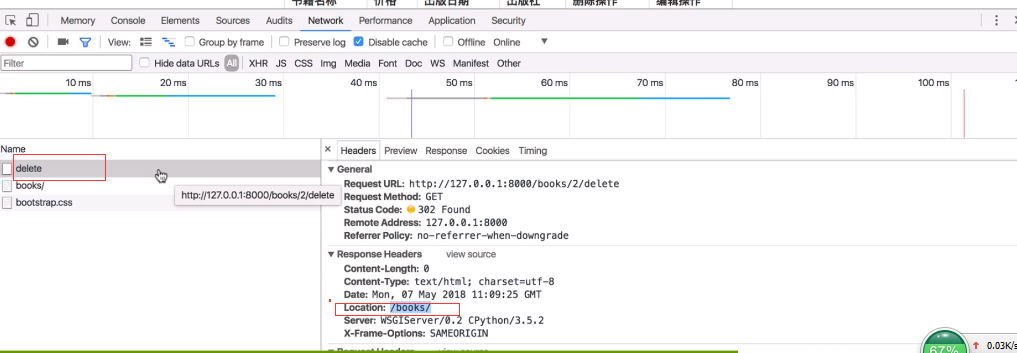
跟URL匹配成功之后就可以走delbook那个视图函数了
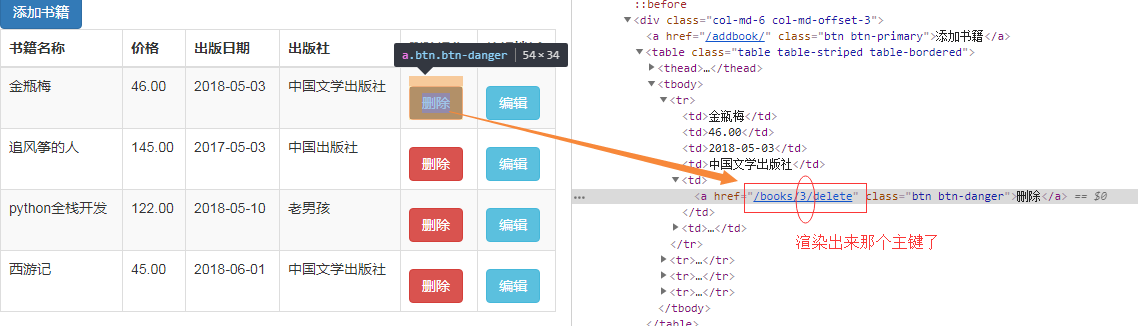
第一次发请求把这个数据从数据库里边删除了,接着告诉浏览器你再发一次请求 浏览器就又发了一次请求给books返回当前页面,当前books那个视图函数。它响应的是重定向。
changebook.html(编辑页面)
a标签默认是get请求,一点提交就是post请求了
<!DOCTYPE html>
<html lang="en">
<head>
    <meta charset="UTF-8">
    <title>Title</title>
    <link rel="stylesheet" href="/static/bs/css/bootstrap.css">

    <style>
        .container{
            margin-top:100px;
        }
        .btn{
            margin-top: 10px;
        }
    </style>
</head>
<body>
<h3>编辑书籍</h3>
<div class="container">
    <div class="row">
        <div class="col-md-6 col-md-offset-3">

            <form action="" method="post">
                {% csrf_token %}  <!--为了通过防跨域请求验证-->
                <div>
                    <label for="">书籍名称</label>
                    <input type="text" class="form-control" name="title" value="{{ book_obj.title }}"> <!--有form-control就有样式了-->
                </div>                                                         //value放编辑默认对象
                <div>
                    <label for="">价格</label>
                    <input type="text" class="form-control" name="price" value="{{ book_obj.price }}">
                </div>
                <div>
                     <label for="">出版日期</label>
                     <input type="date" class="form-control" name="date" value="{{ book_obj.pub_date|date:'Y-m-d'}}">
                </div>
                <div>
                     <label for="">出版社</label>
                     <input type="text" class="form-control" name="publish" value="{{ book_obj.publish }}">
                </div>
                <input type="submit" class="btn btn-success pull-right" >
            </form>
        </div>
    </div>
</div>
</body>
</html>

 浙公网安备 33010602011771号