
Naive组件-基础模态框带表单正则校验;父传子/子传父
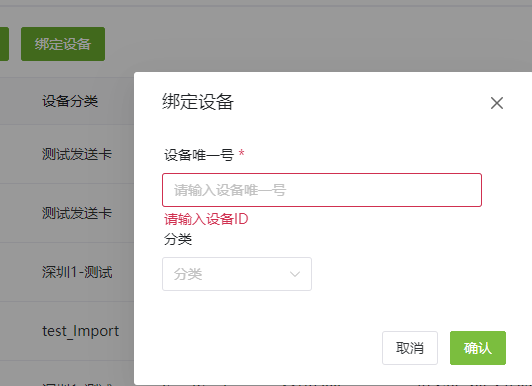
按钮触发模态框的组件
<template>
  <n-button type="primary" @click="onClick">
    <template #icon>
    <!-- <n-icon>
    <PlusOutlined />
    </n-icon> -->
    </template>
    {{ $t('AddDevice') }}
</n-button>

  <n-modal v-model:show="showModalRef" preset="dialog" :style="{ width: '400px' }">
  <template #header>
  <div>{{ $t('AddDevice') }}</div>
  </template>
  <div>
  <DeviceForm
    :submitLoaidng="submitLoaidng"
    @validate:success="validateSuccess"
ref="deviceFormRef"
  />
  </div>
  <template #action>
  <div>
  <n-space>
  <n-button @click="onNegativeClick"> {{ $t('cancel') }}</n-button>
  <n-button
:loading="submitLoaidng"
class="submit-btn"
:type="'primary'"
@click="handleValidateClick"
  >
  {{ $t('Confirm') }}
</n-button>
  </n-space>
  </div>
  </template>
  </n-modal>
  </template>
<script setup lang="ts">
  // import { NButton, NIcon } from 'naive-ui';
  import { NButton } from 'naive-ui';
  // import { PlusOutlined } from '@vicons/antd';
  import { DeviceForm } from './index';
  import { ref } from 'vue';
  import { useMessage } from 'naive-ui';
  import { bindDevice, BindDeviceRequest } from '@/api/company/deviceOrganization';
  import { i18n } from '@/i18n';
  const $t = i18n.global.t;

  const submitLoaidng = ref(false);
  const showModalRef = ref(false);
  const message = useMessage();

  // 子传父
  const emit = defineEmits(['add-success', 'add-fail']);

  function onClick() {
    showModalRef.value = true;
  }

  function onNegativeClick() {
    showModalRef.value = false;
  }

  // 子组件的引用
  const deviceFormRef = ref<InstanceType<typeof DeviceForm>>();
  async function handleValidateClick() {
    if (deviceFormRef.value) {
      // 调用子组件暴露出来的函数
      deviceFormRef.value.handleValidateClick();
    }
  }

  // 被子组件触发 执行该函数
  async function validateSuccess(formData: BindDeviceRequest) {
    try {
      const res = await bindDevice(formData, {
        loadingState: submitLoaidng,
      });
      if (res.success) {
        // 触发父组件 父组件执行对应程序  (通常执行 刷新父组件列表的操作)
        emit('add-success');
        message.success($t('addDeviceSuccess'));
        showModalRef.value = false;
      }
    } catch (error) {
      const _error = (error as Error).message;
      _error.length > 0 && message.error(_error);
      emit('add-fail');
    }
  }
</script>
上述模态框中的子组件 表单组件
<template>
  <n-form ref="formRef" :label-width="500" :model="formData" :rules="rules">
    <!-- <n-form-item :label="$t('device name')" path="deviceName">
      <n-input v-model:value="formData.deviceName" :placeholder="$t('PleaseInputDeviceName')" />
    </n-form-item> -->
    <n-form-item :label="$t('device unique number')" path="deviceId">
      <n-input
        :style="{ width: '320px' }"
        v-model:value="formData.deviceId"
        :placeholder="$t('enter device id')"
      />
    </n-form-item>
    <n-form-item :label="$t('category')" path="category">
      <n-cascader
        :style="{ width: '150px' }"
        :show-path="false"
        v-model:value="formData.groupId"
        :placeholder="$t('category')"
        :options="[groupOptions]"
        :clearable="true"
        size="medium"
      />
    </n-form-item>
  </n-form>
</template>
<script lang="ts" setup>
  import { ref, reactive, unref } from 'vue';
  import { FormInst, NInput } from 'naive-ui';
  import { isObject } from '@/utils/is';
  import conditionalQuery from '@/views/companyManage/component/queryHook';
  import { i18n } from '@/i18n';
  const $t = i18n.global.t;
  let groupOptions: any = ref({});
  export interface DeviceFormData {
    // deviceName?: string;
    deviceId: string;
    groupId?: string | null;
  }

  // 获取级联选择组件的内容
  conditionalQuery()
    .getCorpGroupList()
    .then((res) => {
      groupOptions.value = { ...res };
    });

  const props = defineProps<{
    /**
     * 提交等待
     */
    submitLoaidng: boolean;
  }>();


  // return isObject(form); 是为了确保传递给父组件的表单数据是一个对象类型。如果 form 不是一个对象,那么这个函数将返回 false,并且不会触发相应的事件
  const emit = defineEmits({
    'validate:success': function (form: DeviceFormData) {
      return isObject(form);
    },
    'validate:fail': function (form: DeviceFormData) {
      return isObject(form);
    },
  });


  // 给父组件调用的函数
  function handleValidateClick() {
    //  表单校验
    formRef.value?.validate(async (error) => {
      if (!error) {
        // 校验通过 触发父组件执行相应代码
        emit('validate:success', formData);
      } else {
        emit('validate:fail', formData);
      }
    });
  }


  // 暴露函数 给父组件调用
  defineExpose({ handleValidateClick });

  const formRef = ref<FormInst | null>();
  var formData = reactive<DeviceFormData>(
    {
      // deviceName: '',
      deviceId: '',
      groupId: null,
    }
  );

  // 表单校验
  const rules = reactive({
    deviceId: [
      {
        required: true,
        message: $t('PleaseInputDeviceID'),
        trigger: 'blur',
      },
    ],
  });
</script>

 浙公网安备 33010602011771号