



-
Daemonset
DaemonSet控制器能够确保k8s集群所有的节点都运行一个相同的pod副本,当向k8s集群中增加node节点时,这个node节点也会自动创建一个pod副本,当node节点从集群移除,这些pod也会自动删除;删除Daemonset也会删除它们创建的pod;
[root@anyu967master1 daemonset]# cat daemonset.yaml appVersion: apps/v1 kind: DaemonSet metadata: name: fluentd-elasticsearch namespace: kube-system labels: k8s-app: fluentd-logging spec: selector: matchLabels: name: fluentd-elasticsearch template: metadata: labels: name: fluentd-elasticsearch spec: tolerations: - key: node-role.kubernetes.io/control-plane effect: NoSchedule containers: - name: fluentd-elasticsearch image: xianchao/fluentd:v2.5.1 imagePullPolicy: IfNotPresent resources: requests: cpu: 100m memory: 200Mi limits: cpu: 100m memory: 200Mi volumeMounts: - name: varlog mountPath: /var/log - name: varlibdockercontainers mountPath: /var/lib/docker/containers volumes: - name: varlog hostPath: path: /var/log - name: varlibdockercontainers hostPath: path: /var/lib/docker/containers -
Configmap
Configmap是k8s的一个配置管理组件,可以将配置以key-value的形式传递,通常用来保存不需要加密的配置信息,加密信息则需用到Secret;
[root@anyu967master1 daemonset]# kubectl create configmap --help Create a config map based on a file, directory, or specified literal value. Aliases: configmap, cm Examples: # Create a new config map named my-config based on folder bar kubectl create configmap my-config --from-file=path/to/bar # Create a new config map named my-config with specified keys instead of file basenames on disk kubectl create configmap my-config --from-file=key1=/path/to/bar/file1.txt --from-file=key2=/path/to/bar/file2.txt # Create a new config map named my-config with key1=config1 and key2=config2 kubectl create configmap my-config --from-literal=key1=config1 --from-literal=key2=config2 # Create a new config map named my-config from the key=value pairs in the file kubectl create configmap my-config --from-file=path/to/bar # Create a new config map named my-config from an env file kubectl create configmap my-config --from-env-file=path/to/foo.env --from-env-file=path/to/bar.env Usage: kubectl create configmap NAME [--from-file=[key=]source] [--from-literal=key1=value1] [--dry-run=server|client|none] [options] [root@anyu967master1 daemonset]# cat configmap.yaml apiVersion: v1 kind: ConfigMap metadata: name: mysql labels: app: mysql data: master.cnf: | [mysqld] log-bin log_bin_trust_function_creators=1 lower_case_table_names=1 slave.cnf: | [mysqld] super-read-only log_bin_trust_function_creators=1 -
Secret
Secret解决了密码、token、秘钥等敏感数据的配置问题,而不需要把这些敏感数据暴露到镜像或者Pod Spec中。Secret可以以Volume或者环境变量的方式使用。
要使用secret,:pod需要引用secret。Pod可以用两种方式使用secret:作为volume中的文件被挂载到pod中的一个或者多个容器里,或者当kubelet为pod拉取镜像时使用。
[root@anyu967master1 yaml]# kubectl create secret generic mysql-password --from-literal=password=1qaz@WSX [root@anyu967master1 yaml]# kubectl get secret [root@anyu967master1 yaml]# kubectl describe secret mysql-password -
Ingress
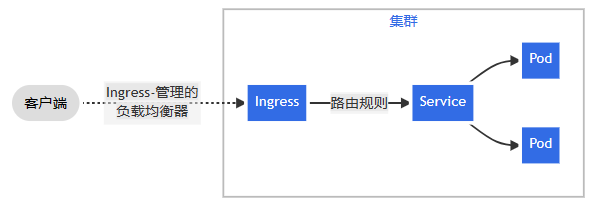
实际上Ingress也是Kubernetes API的标准资源类型之一,它其实就是一组基于DNS名称(host)或URL路径把请求转发到指定的Service资源的规则。用于将集群外部的请求流量转发到集群内部完成的服
务发布。我们需要明白的是,Ingress资源自身不能进行“流量穿透”,仅仅是一组规则的集合,这些集合规侧还需要其他功能的辅助,比如监听某套接字,然后根据这些规则的匹配进行路由转发,这些能够为Ingress资源监听套接字并将流量转发的组件就是Ingress Controller。Ingress Controller可以理解为控制器,它通过不断的跟Kubernetes API交互,实时获取后端Service、Pod的变化,比如新增、删除等,结合Ingress定义的规侧生成配置,然后动态更新上边的
Nginx或者trafik负载均衡器,并刷新使配置生效,来达到服务自动发现的作用。Ingress则是定义规则,通过它定义某个域名的请求过来之后转发到集群中指定的Service。它可以通过Yaml文件定义,可以给一个或多个Service定义一个或多个Ingress规则。![image]()
本文来自博客园,作者:anyu967,转载请注明原文链接:https://www.cnblogs.com/anyu967/articles/17343294.html

 浙公网安备 33010602011771号