
react基础
一、组件
1、函数定义
function Welcome(props) {
  return <h1>Hello, {props.name}</h1>;
}
2、类定义
class Welcome extends React.Component {
    render() {
        return <h1>Hello, {this.props.name}</h1>;
    }
}
组件名称必须以大写字母开头,小写字母表示DOM标签
组件返回值只能有一个根元素,多个组件必须用一个div或者Fragment来包裹
二、props
props 只读
state 可变
props 是父组件与子组件交互的唯一方式
defaultProps 为props定义默认值,在组件中声明static静态属性
propTypes 类型检查,在组件中声明static静态属性
只在开发模式下进行检查,当你给属性传递了无效值时,JavsScript 控制台将会打印警告
PropTypes.array // 声明属性为数组
PropTypes.bool // 声明属性为boolean
PropTypes.func // 声明属性为函数
PropTypes.number // 声明属性为数字
PropTypes.object // 声明属性为对象
PropTypes.string // 声明属性为字符串
PropTypes.symbol

PropTypes.array.isRequired // 声明属性为数组,且属性父组件没有提供时,会打印警告信息
PropTypes.instanceOf(array) // 声明属性为某个类的实例
PropTypes.arrayOf(PropTypes.number)  // 一个指定元素类型的数组
PropTypes.objectOf(PropTypes.number) // 一个指定类型的对象
三、事件
React事件绑定属性的命名采用驼峰式写法,而不是小写。并且是一个函数,而不是一个字符串。
注意:类的方法默认不会绑定this
绑定this到方法
1)@bind
class LoggingButton extends React.Component {
  @bind
  handleClick() {
    console.log('this is:', this);
  }

  render() {
    return (
      <button onClick={this.handleClick}>
        Click me
      </button>
    );
  }
}
2)属性初始化器
class LoggingButton extends React.Component {
  handleClick = () => {
    console.log('this is:', this);
  }

  render() {
    return (
      <button onClick={this.handleClick}>
        Click me
      </button>
    );
  }
}
3)回调函数中使用箭头函数(不建议使用)
这个语法每次LoggingButton渲染的时候创建一个不同的回调函数,大多数情况下没有问题,然后如果回调函数作为属性值传入低阶组件,这些组件可能会进行额外的重新渲染
class LoggingButton extends React.Component {
  handleClick() {
    console.log('this is:', this);
  }

  render() {
    return (
      <button onClick={(e) => this.handleClick(e)}>
        Click me
      </button>
    );
  }
}
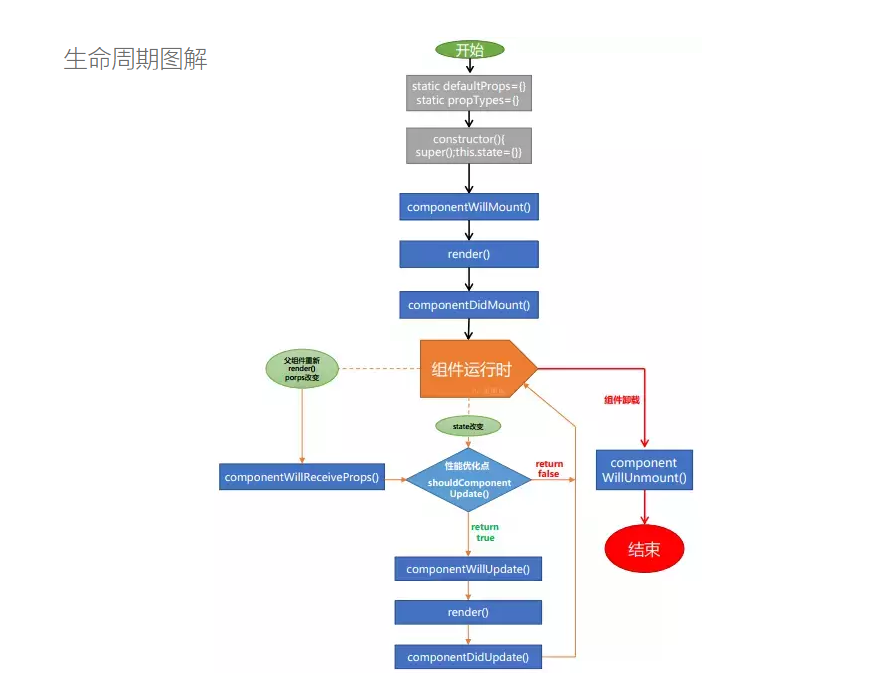
三、生命周期

 浙公网安备 33010602011771号