



kafka eagle
kafka eagle 监控工具
了解:
-
可以管理监控kafka集群
-
面板可视化
-
管理Kafka主题(包含查看、删除、创建等)、消费者组合消费者实例监控、消息阻塞告警、Kafka集群健康状态查看等
-
告警功能,同时支持邮件、微信、钉钉告警通知
下载流程
前提 maven、jdk、kafka、zk环境 jdk最好8以上
编译好的包
wget http://pkgs-linux.cvimer.com/kafka-eagle.zip
解压压缩包
unzip kafka-eagle.zip
切换目录到target下
cd kafka-eagle/kafka-eagle-web/target
创建一个目录
mkdir -p test
复制文件到test下
cp kafka-eagle-web-2.0.1-bin.tar.gz test/
tar xf kafka-eagle-web-2.0.1-bin.tar.gz
cd kafka-eagle-web-2.0.1
需要配置 环境变量 etc profile文件
export KE_HOME=安装路径/test/kafka-eagle-web-2.0.1
export PATH=$PATH:$KE_HOME/bin
配置后需要让配置文件生效
执行:source /etc/profile
切换到kafka-eagle-web-2.0.1 目录 展示文件下文件 环境变量就是该目录的路径
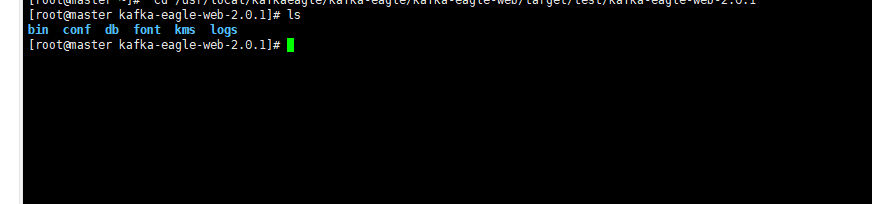
修改conf 下的。system-config.properties 配置文件
配置 kafka 集群对应的zk
zk线程数
数据库的连接信息
######################################
# multi zookeeper & kafka cluster list
# 配置多个Kafka集群所对应的Zookeeper
######################################
kafka.eagle.zk.cluster.alias=cluster1
cluster1.zk.list=localhost:10.10.11.200:2181,10.10.11.201:2181,10.10.11.202:2181/myKafka


######################################
# zookeeper enable acl
######################################
cluster1.zk.acl.enable=false
cluster1.zk.acl.schema=digest
cluster1.zk.acl.username=test
cluster1.zk.acl.password=test123

######################################
# broker size online list
######################################
cluster1.kafka.eagle.broker.size=20

######################################
# zk client thread limit
# 设置Zookeeper线程数
######################################
kafka.zk.limit.size=25

######################################
# kafka eagle webui port
# kafka eagle 访问端口
######################################
kafka.eagle.webui.port=8048

######################################
# kafka offset storage
######################################
cluster1.kafka.eagle.offset.storage=kafka
cluster2.kafka.eagle.offset.storage=zk

######################################
# kafka metrics, 15 days by default
# 是否启动监控图表,默认是不启动的
######################################
kafka.eagle.metrics.charts=true
kafka.eagle.metrics.retain=15


######################################
# kafka sql topic records max
######################################
kafka.eagle.sql.topic.records.max=5000
kafka.eagle.sql.fix.error=true

######################################
# delete kafka topic token
# 超级管理员删除主题的Token
######################################
kafka.eagle.topic.token=keadmin


######################################
# alarm email configure
######################################
kafka.eagle.mail.enable=false
kafka.eagle.mail.sa=xiaoqh1212
kafka.eagle.mail.username=xiaoqh1212@163.com
kafka.eagle.mail.password=qi12.12.
kafka.eagle.mail.server.host=smtp.163.com
kafka.eagle.mail.server.port=25


######################################
# kafka sasl authenticate
######################################
cluster1.kafka.eagle.sasl.enable=false
cluster1.kafka.eagle.sasl.protocol=SASL_PLAINTEXT
cluster1.kafka.eagle.sasl.mechanism=SCRAM-SHA-256
cluster1.kafka.eagle.sasl.jaas.config=org.apache.kafka.common.security.scram.ScramLoginModule required username="kafka" password="kafka-eagle";
cluster1.kafka.eagle.sasl.client.id=
cluster1.kafka.eagle.sasl.cgroup.enable=false
cluster1.kafka.eagle.sasl.cgroup.topics=

cluster2.kafka.eagle.sasl.enable=false
cluster2.kafka.eagle.sasl.protocol=SASL_PLAINTEXT
cluster2.kafka.eagle.sasl.mechanism=PLAIN
cluster2.kafka.eagle.sasl.jaas.config=org.apache.kafka.common.security.plain.PlainLoginModule required username="kafka" password="kafka-eagle";
cluster2.kafka.eagle.sasl.client.id=
cluster2.kafka.eagle.sasl.cgroup.enable=false
cluster2.kafka.eagle.sasl.cgroup.topics=

######################################
# kafka ssl authenticate
######################################
cluster3.kafka.eagle.ssl.enable=false
cluster3.kafka.eagle.ssl.protocol=SSL
cluster3.kafka.eagle.ssl.truststore.location=
cluster3.kafka.eagle.ssl.truststore.password=
cluster3.kafka.eagle.ssl.keystore.location=
cluster3.kafka.eagle.ssl.keystore.password=
cluster3.kafka.eagle.ssl.key.password=
cluster3.kafka.eagle.ssl.cgroup.enable=false
cluster3.kafka.eagle.ssl.cgroup.topics=

######################################
# kafka sqlite jdbc driver address
######################################
#kafka.eagle.driver=org.sqlite.JDBC
#kafka.eagle.url=jdbc:sqlite:/hadoop/kafka-eagle/db/ke.db
#kafka.eagle.username=root
#kafka.eagle.password=www.kafka-eagle.org

######################################
# 在使用Kafka SQL查询主题时,如果遇到错误,
# 可以尝试开启这个属性,默认情况下,不开启
######################################
kafka.eagle.sql.fix.error=false


######################################
# kafka mysql jdbc driver address
######################################
kafka.eagle.driver=com.mysql.jdbc.Driver
kafka.eagle.url=jdbc:mysql://10.10.11.200:2032/fsdap_admin?useUnicode=true&characterEncoding=UTF-8&zeroDateTimeBehavior=convertToNull
kafka.eagle.username=root
kafka.eagle.password=zhiganroot
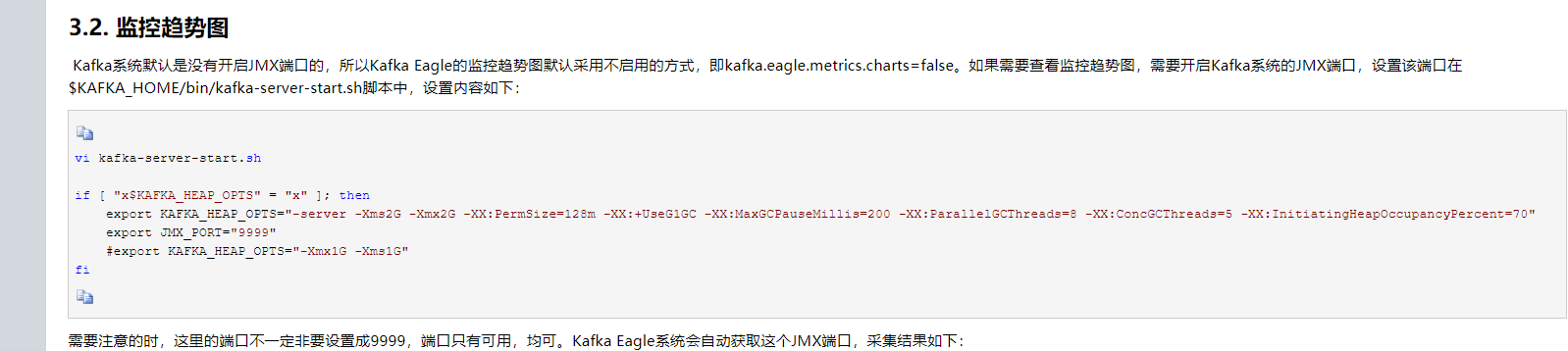
需要在kafka 配置文件 kafka-server-start中 将JMX_PORT 节点开启
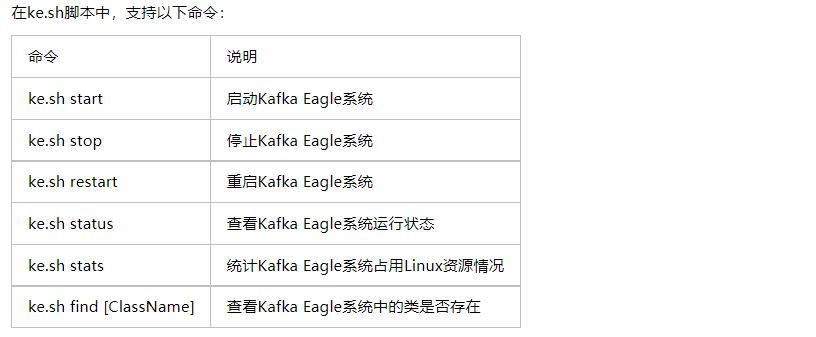
kafka 部署成功后可用命令

 浙公网安备 33010602011771号