


Vue3-选项式API
状态选项
| 功能 | 作用 | 类比打比方 |
|---|---|---|
data |
定义本地数据(组合式用 ref) |
自己家里的存折 |
props |
接收父组件传值 | 父母给的生活费 |
computed |
计算属性,自动依赖更新 | 动态工资单,工资随业绩变 |
methods |
定义函数逻辑(组合式直接写) | 工具箱里的工具 |
watch |
监听数据变化 | 监控摄像头,数据变动就提醒 |
emits |
定义并触发向父组件的事件 | 打电话通知家长 |
expose |
子组件主动暴露接口给父组件 | 对外开放的“公开功能按钮” |
父组件
<template>
  <MyChild ref="childRef" msg="父传子数据" @customEvent="handleCustomEvent" />
  <button @click="callChild">父组件调用子组件方法</button>
</template>

<script setup>
import { ref } from 'vue'
import MyChild from './MyChild.vue'

const childRef = ref(null)

function handleCustomEvent(val) {
  console.log('收到子组件消息:', val)
}

function callChild() {
  childRef.value?.increment()
}
</script>
子组件
<template>
  <div>
    <h3>姓名:{{ fullName }}</h3>
    <p>年龄:{{ age }}</p>
    <button @click="increment">增长年龄</button>

    <p>父组件传来:{{ msg }}</p>
    <button @click="sendToParent">通知父组件</button>
  </div>
</template>

<script setup>
// 1. props:接收父组件传值
const props = defineProps({
  msg: {
    type: String,
    default: ''
  }
})

// 2. emits:定义向父组件触发的事件
const emit = defineEmits(['customEvent'])

// 3. data:组合式API下用ref模拟data
import { ref, computed, watch, expose } from 'vue'
const age = ref(18)
const firstName = ref('秋')
const lastName = ref('先生')

// 4. computed:计算属性
const fullName = computed(() => `${firstName.value}${lastName.value}`)

// 5. methods:组合式下直接写函数
function increment() {
  age.value++
}

function sendToParent() {
  emit('customEvent', '子组件的消息')
}

// 6. watch:监听响应式数据
watch(age, (newVal, oldVal) => {
  console.log(`年龄变化:${oldVal} → ${newVal}`)
})

// 7. expose:向父组件暴露子组件方法
expose({
  increment
})
</script>
渲染选项
| 名称 | 作用 | 类比打比方 |
|---|---|---|
template |
模板区域,编译为渲染函数 | HTML 布局图纸 |
render |
手写渲染函数,替代 template |
直接用 JavaScript 造 DOM 结构 |
compilerOptions |
控制模板编译规则 | 施工队的特殊工作说明书 |
slots |
插槽,父组件传递内容的机制 | 租房,房东给你预留的空白区域 |
父组件
<template>
  <CustomCard>
    <template #header>
      <h3>我是头部插槽</h3>
    </template>

    <p>我是默认插槽内容</p>

    <template #footer>
      <small>底部信息</small>
    </template>
  </CustomCard>
</template>

<script setup>
import CustomCard from './CustomCard.vue'
</script>
子组件 CustomCard.vue(template 写法)
<template>
  <div class="card">
    <header>
      <slot name="header">默认头部</slot>
    </header>

    <main>
      <slot />
    </main>

    <footer>
      <slot name="footer">默认底部</slot>
    </footer>
  </div>
</template>
手写 render 写法(替代 template)
<script setup>
import { h, useSlots } from 'vue'

const slots = useSlots()

defineExpose({
  test() {
    console.log('暴露给父组件的函数')
  }
})

const render = () => {
  return h('div', { class: 'card' }, [
    h('header', slots.header ? slots.header() : '默认头部'),
    h('main', slots.default ? slots.default() : '默认内容'),
    h('footer', slots.footer ? slots.footer() : '默认底部')
  ])
}
</script>
compilerOptions
在 vue.config.js 或 vite.config.js 里:
export default {
  compilerOptions: {
    // 自定义模板标签识别
    isCustomElement: tag => tag.startsWith('x-')
  }
}
配置告诉 Vue:
遇到 x-button、x-panel这种标签,别当普通组件检查,直接原样保留,适合 Web 组件、跨框架场景。
生命周期选项
<template>
  <div>
    <h3>Vue3 生命周期演示</h3>
    <p>计数:{{ count }}</p>
    <button @click="count++">点击+1</button>
  </div>
</template>

<script>
export default {
  name: 'LifeCycleDemo',

  data() {
    return {
      count: 0
    }
  },

  // ------------------- 创建阶段 -------------------
  beforeCreate() {
    console.log('beforeCreate:数据、props、methods 都还没初始化')
  },

  created() {
    console.log('created:数据、props、methods 已经初始化完毕')
  },

  // ------------------- 挂载阶段 -------------------
  beforeMount() {
    console.log('beforeMount:模板已经编译,但还没渲染到页面')
  },

  mounted() {
    console.log('mounted:组件已挂载到 DOM,真实可见')
  },

  // ------------------- 更新阶段 -------------------
  beforeUpdate() {
    console.log('beforeUpdate:响应式数据变了,DOM 更新前')
  },

  updated() {
    console.log('updated:DOM 已经更新完毕')
  },

  // ------------------- 卸载阶段 -------------------
  beforeUnmount() {
    console.log('beforeUnmount:组件即将被卸载')
  },

  unmounted() {
    console.log('unmounted:组件已完全销毁')
  },

  // ------------------- 其他钩子 -------------------
  errorCaptured(err, vm, info) {
    console.log('errorCaptured:捕获到子组件错误', err, info)
    return false // 阻止错误继续向上传播
  },

  renderTracked(e) {
    console.log('renderTracked:追踪到依赖', e)
  },

  renderTriggered(e) {
    console.log('renderTriggered:响应式依赖变了导致重新渲染', e)
  },

  activated() {
    console.log('activated:<KeepAlive> 缓存组件激活')
  },

  deactivated() {
    console.log('deactivated:<KeepAlive> 缓存组件失活')
  },

  serverPrefetch() {
    console.log('serverPrefetch:SSR 场景数据预拉取')
  }
}
</script>
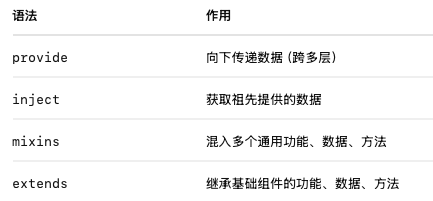
组合选项
//公共 mixin:mixin.js
export default {
  data() {
    return {
      mixinMsg: '我是 mixin 里的数据'
    }
  },
  methods: {
    mixinMethod() {
      console.log('mixinMethod 被调用')
    }
  }
}


//公共基类:BaseComponent.js
export default {
  data() {
    return {
      baseMsg: '我是 extends 继承的基类数据'
    }
  },
  methods: {
    baseMethod() {
      console.log('baseMethod 被调用')
    }
  }
}


//父组件:Parent.vue
<template>
  <div>
    <h3>父组件</h3>
    <p>父组件数据:{{ msg }}</p>
    <ChildComponent />
  </div>
</template>
<script>
import ChildComponent from './ChildComponent.vue'
export default {
  components: { ChildComponent },
  data() {
    return {
      msg: '这是父组件传下来的数据'
    }
  },
  //向下传递数据(跨多层)
  provide() {
    return {
      sharedMsg: this.msg
    }
  }
}
</script>


//子组件:ChildComponent.vue
<template>
  <div>
    <h4>子组件</h4>
    <p>inject 的数据:{{ sharedMsg }}</p>
    <p>mixin 数据:{{ mixinMsg }}</p>
    <p>extends 数据:{{ baseMsg }}</p>
    <button @click="testAll">调用所有方法</button>
  </div>
</template>

<script>
import mixin from './mixin'
import BaseComponent from './BaseComponent'

export default {
  //临时混入多个通用功能、数据、方法
  mixins: [mixin],
  //继承基础组件的功能、数据、方法
  extends: BaseComponent,
  //获取祖先提供的数据
  inject: ['sharedMsg'],
  methods: {
    testAll() {
      //使用
      this.mixinMethod()
      this.baseMethod()
    }
  }
}
</script>
其他选项
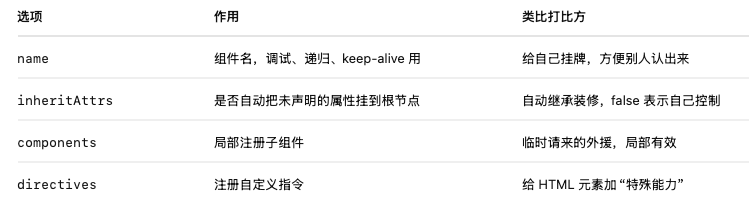
//1. 子组件 MyInput.vue
<template>
  <div>
    <p>自定义输入框:</p>
    <input v-bind="attrs" v-my-focus />
  </div>
</template>
<script>
export default {
  name: 'MyInput', // 组件名,便于调试和递归调用
  inheritAttrs: false, // 阻止未声明的属性自动挂载到根节点,但是元素使用了v-bind="attrs"手动把这些属性绑定到 <input> 上
  directives: {
    // 自定义指令:自动获取焦点
    myFocus: {
      mounted(el) {
        el.focus()
      }
    }
  },
  computed: {
    // 通过 $attrs 手动控制透传属性
    attrs() {
      return this.$attrs
    }
  }
}
</script>


//2. 父组件 App.vue
<template>
  <div>
    <h3>父组件</h3>
    //父组件给 <MyInput> 传入 placeholder 和 class
    <MyInput placeholder="请输入内容" class="custom-class" />
  </div>
</template>
<script>
import MyInput from './MyInput.vue'
export default {
  name: 'App',
  components: {
    MyInput // 局部注册子组件
  }
}
</script>
组件实例
| 属性/方法 | 作用 | 类比打比方 |
|---|---|---|
this.$data |
组件内部所有响应式数据 | 自己家里的账本 |
this.$props |
父组件传递的所有 props | 父母给的生活费 |
this.$el |
组件根 DOM 元素 | 自己的房子门口 |
this.$options |
组件所有选项配置对象 | 出生档案,包含所有定义 |
this.$parent |
父组件实例 | 父母对象 |
this.$root |
根组件实例 | 整个 Vue 应用的大管家 |
this.$slots |
父组件传入的插槽内容 | 留给你的装修空间 |
this.$refs |
通过 ref 获取的 DOM 或组件实例 |
门牌号查找的结果 |
this.$attrs |
未被 props 接收的属性集合 | 杂七杂八外部传来的信息 |
this.$watch() |
手动监听数据变化 | 监控摄像头 |
this.$emit() |
触发自定义事件,通知父组件 | 打电话告诉家长 |
this.$forceUpdate() |
强制刷新视图(不建议滥用) | 手动刷新屏幕 |
this.$nextTick() |
DOM 更新完成后执行回调 | 等装修完再检查 |
//父组件 App.vue
<template>
  <div>
    <h3>父组件</h3>
    <ChildComponent ref="childRef" msg="父传子数据">
      <template #default>
        <p>这是插槽内容</p>
      </template>
    </ChildComponent>
    <button @click="testChild">父组件调用子组件</button>
  </div>
</template>

<script>
import ChildComponent from './ChildComponent.vue'

export default {
  components: { ChildComponent },
  methods: {
    testChild() {
      console.log('父组件 this.$refs.childRef:', this.$refs.childRef)
      this.$refs.childRef.testExposeMethod()
    }
  }
}
</script>


//子组件 ChildComponent.vue
<template>
  <div ref="box">
    <h4>子组件</h4>
    <p>msg:{{ msg }}</p>
    <slot />
    <button @click="updateData">更新数据</button>
  </div>
</template>

<script>
export default {
  name: 'ChildComponent',

  props: {
    msg: String
  },

  data() {
    return {
      count: 0
    }
  },

  mounted() {
    console.log('--- 组件实例属性演示 ---')

    console.log('$data:', this.$data)
    console.log('$props:', this.$props)
    console.log('$el:', this.$el)
    console.log('$options:', this.$options)
    console.log('$parent:', this.$parent)
    console.log('$root:', this.$root)
    console.log('$slots:', this.$slots)
    console.log('$refs:', this.$refs)
    console.log('$attrs:', this.$attrs)

    // $watch 示例
    this.$watch('count', (newVal, oldVal) => {
      console.log(`count 变化:${oldVal} -> ${newVal}`)
    })

    // $emit 示例
    this.$emit('customEvent', '子组件触发的事件')

    // $nextTick 示例
    this.count = 100
    this.$nextTick(() => {
      console.log('DOM 已经更新完毕')
    })
  },

  methods: {
    updateData() {
      this.count++
      this.$forceUpdate()
    },
    testExposeMethod() {
      console.log('子组件暴露的方法被父组件调用了')
    }
  }
}
</script>
如果这篇文章对你有用,可以关注本人微信公众号获取更多ヽ(^ω^)ノ ~


 浙公网安备 33010602011771号