using System;
using System.IO;
using System.Net;
using System.Threading.Tasks;

namespace Gentle.PrintInspectManLib
{
    // 开始服务(重构版)
    public class ServerHelper
    {
        private static readonly log4net.ILog log4 = log4net.LogManager.GetLogger(System.Reflection.MethodBase.GetCurrentMethod().DeclaringType);
        private readonly HttpListener httpListener = new HttpListener();

        public void Setup(string address, int port)
        {
            httpListener.AuthenticationSchemes = AuthenticationSchemes.Anonymous;
            string prefix = string.Format("http://{0}:{1}/", address, port);
            httpListener.Prefixes.Add(prefix);
            log4.Info($"HttpServer {prefix}");

            Task.Run(() =>
            {
                try
                {
                    httpListener.Start();
                    Receive();
                }
                catch (Exception ex)
                {
                    log4.Error("Failed to start HttpListener: " + ex);
                    // 根据需要:可以抛出异常或通过事件/回调通知上层
                }
            });
        }

        private void Receive()
        {
            try
            {
                httpListener.BeginGetContext(new AsyncCallback(EndReceive), null);
            }
            catch (Exception ex)
            {
                log4.Error("BeginGetContext error: " + ex);
            }
        }

        void EndReceive(IAsyncResult ar)
        {
            HttpListenerContext context = null;
            try
            {
                context = httpListener.EndGetContext(ar);
            }
            catch (ObjectDisposedException)
            {
                // Listener 已被关闭,安全返回
                return;
            }
            catch (Exception ex)
            {
                log4.Error("EndGetContext error: " + ex);
                // 继续监听下一个请求
                Receive();
                return;
            }

            // 继续接收下一个请求(非阻塞)
            Receive();

            // 异步处理当前请求(使用局部对象,避免并发覆盖)
            _ = HandleContextAsync(context);
        }

        private async Task HandleContextAsync(HttpListenerContext context)
        {
            var request = context.Request;
            var response = context.Response;
            var requestHelper = new RequestHelper(request);
            var responseHelper = new ResponseHelper(response);

            try
            {
                // 获取资源。如果返回 null,表示未找到资源
                var resource = requestHelper.GetResource();
                if (resource == null || resource.Stream == null)
                {
                    log4.Warn("Resource not found.");
                    try
                    {
                        response.StatusCode = 404;
                        response.StatusDescription = "Not Found";
                        response.ContentType = "text/plain; charset=utf-8";
                        using (var writer = new StreamWriter(response.OutputStream, System.Text.Encoding.UTF8))
                        {
                            writer.Write("File not found.");
                        }
                        response.Close();
                    }
                    catch (Exception ex)
                    {
                        log4.Error("Error writing 404 response: " + ex);
                    }
                    return;
                }

                // 推断 Content-Type(基于文件名)
                string contentType = ResponseHelper.GetContentType(resource.FileName);
                await responseHelper.WriteToClientAsync(resource.Stream, contentType).ConfigureAwait(false);
            }
            catch (Exception ex)
            {
                log4.Error("Unhandled exception while handling request: " + ex);
                try
                {
                    response.StatusCode = 500;
                    response.StatusDescription = "Internal Server Error";
                    response.ContentType = "text/plain; charset=utf-8";
                    using (var writer = new StreamWriter(response.OutputStream, System.Text.Encoding.UTF8))
                    {
                        writer.Write("Internal Server Error");
                    }
                    response.Close();
                }
                catch { /* 忽略二次错误 */ }
            }
        }
    }
}
using System;
using System.IO;
using System.Net;

namespace Gentle.PrintInspectManLib
{
    // 解析请求(重构版)
    public class RequestHelper
    {
        private static readonly log4net.ILog log4 = log4net.LogManager.GetLogger(System.Reflection.MethodBase.GetCurrentMethod().DeclaringType);
        private readonly HttpListenerRequest request;

        public RequestHelper(HttpListenerRequest request)
        {
            this.request = request ?? throw new ArgumentNullException(nameof(request));
        }

        public Stream RequestStream { get; private set; }

        public void ExtracHeader()
        {
            RequestStream = request.InputStream;
        }

        // 资源封装:包含打开的流与文件名(fileName 可能用于 Content-Type 推断)
        public class Resource
        {
            public FileStream Stream { get; set; }
            public string FileName { get; set; }
        }

        // 获取资源(同步),若未找到则返回 null
        // 注意:返回的 FileStream 由调用者负责关闭(ResponseHelper 会在写完后关闭)
        public Resource GetResource()
        {
            // 原有逻辑:使用根路径 + MES\ContinueDefectInfo.txt
            // 这里保留相同的路径逻辑,但改用只读并允许共享
            try
            {
                string filePath = Path.GetPathRoot(ManModel.WorkDirectory) + @"MES\ContinueDefectInfo.txt";
                if (!File.Exists(filePath))
                {
                    log4.WarnFormat("Resource not found: {0}", filePath);
                    return null;
                }

                // 以只读方式打开,并允许其他进程读/写(防止锁定写入端)
                FileStream fs = new FileStream(filePath, FileMode.Open, FileAccess.Read, FileShare.ReadWrite);
                return new Resource
                {
                    Stream = fs,
                    FileName = Path.GetFileName(filePath)
                };
            }
            catch (Exception ex)
            {
                log4.ErrorFormat("Error opening resource: {0}, Exception: {1}", ex.Message, ex);
                return null;
            }
        }

        public void ResponseQuerys()
        {
            var querys = request.QueryString;
            foreach (string key in querys.AllKeys)
            {
                VarityQuerys(key, querys[key]);
            }
        }

        private void VarityQuerys(string key, string value)
        {
            switch (key)
            {
                case "txt": txtInfo(value); break;
                default: Defaults(value); break;
            }
        }
        private void txtInfo(string id) { }
        private void Defaults(string id) { }
    }
}
using System;
using System.Collections.Generic;
using System.IO;
using System.Net;
using System.Text;
using System.Threading.Tasks;
namespace Gentle.PrintInspectManLib
{
// 回应请求(重构版)
public class ResponseHelper
{
private static readonly log4net.ILog log4 = log4net.LogManager.GetLogger(System.Reflection.MethodBase.GetCurrentMethod().DeclaringType);
private readonly HttpListenerResponse response;
public ResponseHelper(HttpListenerResponse response)
{
this.response = response ?? throw new ArgumentNullException(nameof(response));
OutputStream = response.OutputStream;
}
public Stream OutputStream { get; private set; }
// 异步将 FileStream 写入到 response 输出流,负责关闭流与 response
public async Task WriteToClientAsync(FileStream fs, string contentType = null)
{
if (fs == null)
{
try
{
response.StatusCode = 404;
response.StatusDescription = "Not Found";
response.ContentType = "text/plain; charset=utf-8";
using (var writer = new StreamWriter(response.OutputStream, Encoding.UTF8))
{
writer.Write("File not found.");
}
response.Close();
}
catch (Exception ex)
{
log4.Error("Error writing 404 response: " + ex);
}
return;
}
try
{
if (fs.Length == 0)
{
// 文件存在但为空:204 No Content(不带响应体)
response.StatusCode = 204;
response.StatusDescription = "No Content";
response.ContentType = string.IsNullOrEmpty(contentType) ? "application/octet-stream" : contentType;
response.ContentLength64 = 0;
response.Close();
return;
}
// 设置响应头
response.StatusCode = 200;
response.StatusDescription = "OK";
response.ContentType = string.IsNullOrEmpty(contentType) ? "application/octet-stream" : contentType;
try { response.ContentLength64 = fs.Length; } catch { /* 在某些情形下无法设置,忽略 */ }
// 将文件内容异步拷贝到输出流
fs.Position = 0;
await fs.CopyToAsync(response.OutputStream).ConfigureAwait(false);
await response.OutputStream.FlushAsync().ConfigureAwait(false);
}
catch (Exception ex)
{
log4.Error("Internal Server Error while sending file: " + ex);
try
{
response.StatusCode = 500;
response.StatusDescription = "Internal Server Error";
response.ContentType = "text/plain; charset=utf-8";
using (var writer = new StreamWriter(response.OutputStream, Encoding.UTF8))
{
writer.Write("An error occurred while processing your request: " + ex.Message);
}
}
catch { /* 忽略写错误 */ }
}
finally
{
// 关闭文件流并结束响应
try { fs?.Close(); } catch { }
try { response.Close(); } catch { }
}
}
// 简单的 Content-Type 推断(可扩展)
public static string GetContentType(string fileName)
{
if (string.IsNullOrEmpty(fileName)) return "application/octet-stream";
string ext = Path.GetExtension(fileName).ToLowerInvariant();
if (string.IsNullOrEmpty(ext)) return "application/octet-stream";
// 常见类型映射
var map = new Dictionary<string, string>(StringComparer.OrdinalIgnoreCase)
{
{ ".txt", "text/plain; charset=utf-8" },
{ ".html", "text/html; charset=utf-8" },
{ ".htm", "text/html; charset=utf-8" },
{ ".json", "application/json; charset=utf-8" },
{ ".xml", "application/xml; charset=utf-8" },
{ ".csv", "text/csv; charset=utf-8" },
{ ".png", "image/png" },
{ ".jpg", "image/jpeg" },
{ ".jpeg", "image/jpeg" },
{ ".gif", "image/gif" },
{ ".pdf", "application/pdf" },
{ ".zip", "application/zip" },
{ ".bin", "application/octet-stream" }
};
if (map.TryGetValue(ext, out var ct)) return ct;
return "application/octet-stream";
}
}
}
- 把核心处理流程改为:ServerHelper 接收请求 -> 为每个请求创建局部的 RequestHelper 和 ResponseHelper -> RequestHelper 打开资源(只读、允许共享)并返回资源信息 -> ServerHelper 根据返回的资源决定返回 404 / 204 / 200 -> ResponseHelper 以异步流拷贝方式把文件发送给客户端并负责关闭文件流与结束响应。
- 并发安全:不再使用类级字段存放当前请求的 RequestHelper/ResponseHelper,而是在每个请求处理路径中使用局部变量,避免并发覆盖。
- 流式传输:用 FileStream + CopyToAsync 代替 ReadToEnd/StreamReader,支持二进制与大文件并避免一次性把整个文件读入内存。
- 文件打开方式:在 RequestHelper 中以 FileAccess.Read、FileShare.ReadWrite 打开文件,减少与其他进程(写入进程)的冲突。
- 状态码与响应语义修正:明确 404(未找到)、204(存在但空内容)、200(成功)、500(服务器错误)并在每个分支调用 response.Close()。
- Content-Type 推断:在 ResponseHelper 中加入简单映射函数 GetContentType(可根据文件名扩展或替换为系统 MIME 映射)。
- 错误处理:在关键位置添加 try/catch 并写日志,避免监听线程因未捕获异常终止;同时在捕获异常后尽量向客户端返回 500 并关闭响应。
- 清理了旧的 BeginRead/EndRead 注释/回调模式,使用现代 async/await 实现更易维护的流式传输。
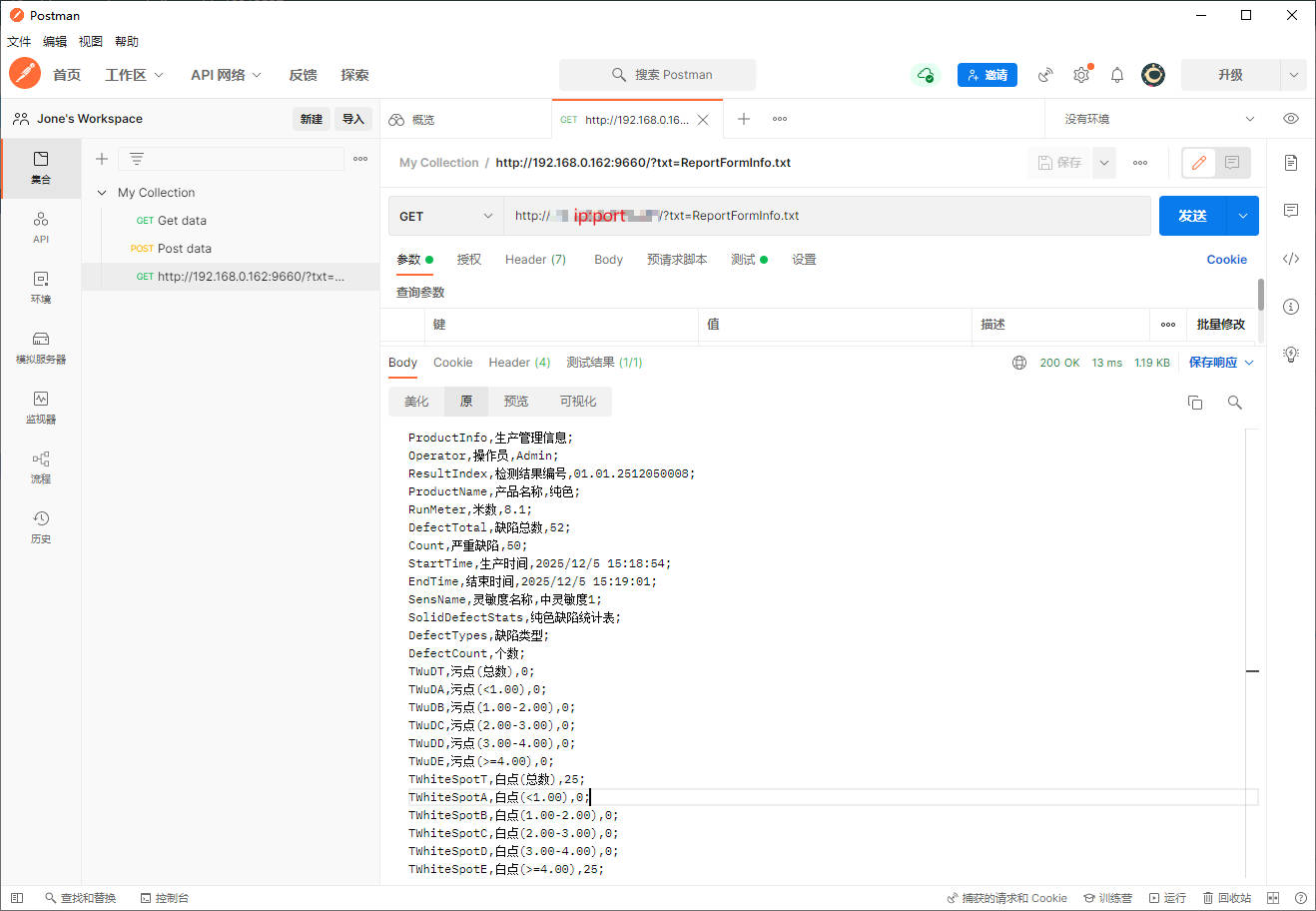
- Postman测试结果如下



 浙公网安备 33010602011771号