
我在request篇和response都有提到,觉得会忘记,所以从新整理一下
request细节四----->通过request控制编码问题
第一种方式是通过设置------>request.setCharacterEncoding("UTF-8")和URLEncoder.encode(username, "UTF-8");//只有post生效
第二种方式是通过设置------>(post,get通用的情况)
String username=new String(request.getParameter("username").getBytes("iso8859-1"),"UTF-8");//反向查找,get/post都可以
protected void doGet(HttpServletRequest request, HttpServletResponse response) throws ServletException, IOException {
//        request.setCharacterEncoding("UTF-8");//只有post生效
        String username=new String(request.getParameter("username").getBytes("iso8859-1"),"UTF-8");
        //反向查找,get/post都可以
        //URLEncoder.encode(username, "UTF-8");
        System.out.println(username);
    }
在浏览器头设置好如下
<meta charset="UTF-8">
图片是原理:

第三种方式是通过设置------>在uri里带参数的情况,可以在tomcat server.xml里配置

第四种方式是通过设置------>(post,get通用的情况)
首先servlet里配置:

然后:server.xml里配置:

以上是request编码解决办法,然后来讲下response中乱码解决:
HttpServletResponse细节一-------》码表的对应设置
原理图:
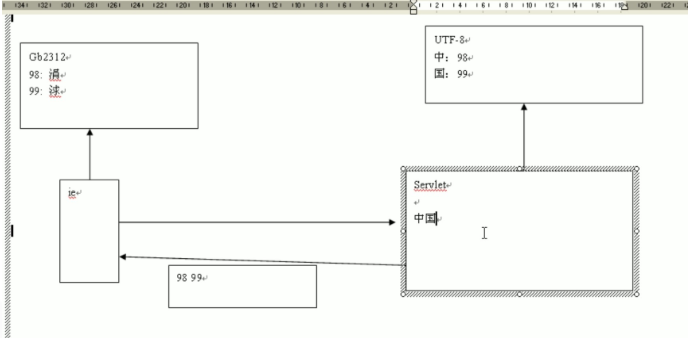
浏览器读出涓球理由:浏览器默认国标码表读,不是utf-8
字节流解决办法--->控制浏览器查找UTF-8码表
 private void test2(HttpServletResponse response) throws IOException, UnsupportedEncodingException {
        //用html技术中的meta标签模拟http响应头,来控制浏览器的行为
        String data="中国";
        OutputStream out=response.getOutputStream();

        out.write("<meta http-equiv='content-type' content='text/html;charset=UTF-8'>".getBytes());
        out.write(data.getBytes("UTF-8"));
    }

    private void test1(HttpServletResponse response) throws IOException, UnsupportedEncodingException {
        //以什么编码发就用什么编码读
        response.setHeader("Content-type","text/html;charset=UTF-8");
        String data="中国";
        OutputStream out=response.getOutputStream();
        out.write(data.getBytes("UTF-8"));
    }
字符流发生问题:

protected void doGet(HttpServletRequest request, HttpServletResponse response) throws ServletException, IOException {

    String data="中国";
    PrintWriter out=response.getWriter();
    out.write(data);
}
先把中国写入respone,因为respone是外国人发明的,查找的是iso8859这个码表,查找不到所以显示??

字符流解决办法--->改变所查码表和浏览器所读取时查询码表
    protected void doGet(HttpServletRequest request, HttpServletResponse response) throws ServletException, IOException {
//        response.setCharacterEncoding("UTF-8");//控制写入response时所查询的码表
//        response.setHeader("content-type", "text/html;charset=UTF-8");//控制浏览器输出时时所查询的码表
        response.setContentType("text/html;charset=UTF-8");//这句话可以代替上两句话
        String data="中国";
        PrintWriter out=response.getWriter();
        out.write(data);//writer流只能写字符串!
    }
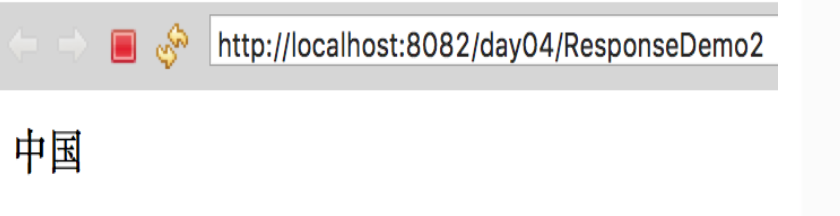
成功:
既往不恋,未来不迎,当下不杂

 浙公网安备 33010602011771号