
【JavaWeb】Spring MVC
W3C资源:https://www.w3cschool.cn/wkspring/dcu91icn.html
0.MVC
model-controler-view
Dao-Controller-Service
0.1在JavaWeb如何实现
用户在JSP页面点击、输入信息,传入servlet里,servlet get方法得到处理,然后使用model的处理方法,得到需要返回的数据,再通过servlet传入到jsp
model是JavaBean形式。
0.2 SpringMVC相比之前的实现方式有何好处?
用Controller做中间层的处理
1.Spring MVC 介绍
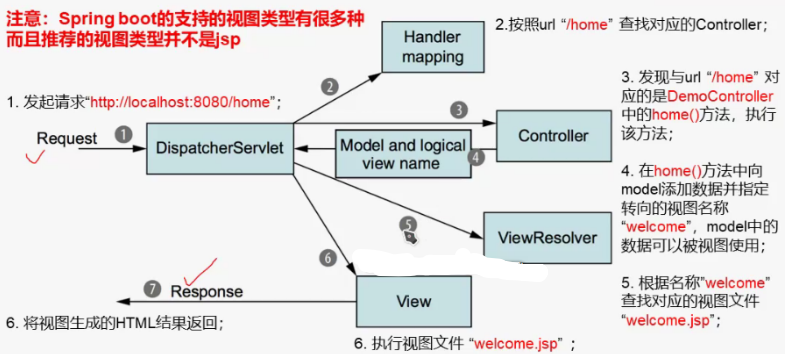
1.1 处理流程
1.2 Spring工程结构
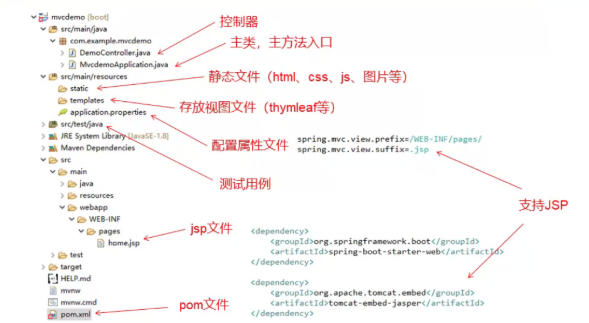
1.3 写web工程需要配置的依赖
pom.xml
配置依赖,会自动从官网下载
<dependency>
			<groupId>org.springframework.boot</groupId>
			<artifactId>spring-boot-starter-web</artifactId>
		</dependency>

		<!-- https://mvnrepository.com/artifact/org.apache.tomcat/tomcat-jasper -->
		<dependency>
			<groupId>org.apache.tomcat</groupId>
			<artifactId>tomcat-jasper</artifactId>
			<version>9.0.31</version>
		</dependency>
                <dependency>
			<groupId>org.springframework.boot</groupId>//设置为热启动
			<artifactId>spring-boot-devtools</artifactId>
		</dependency>
1.4 model相关的注解
Bean的创建和获取
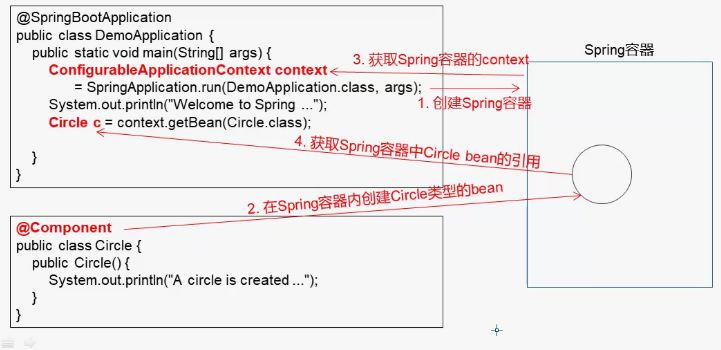
@Component
把普通pojo实例化到spring容器中
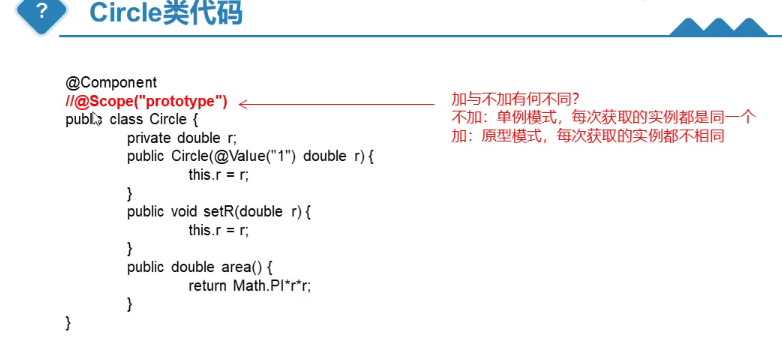
@prototype
加上这句则每次从容器中取到的都不一样
@Autowired
Autowired是自动链接
这个注解就是spring可以自动帮你把bean里面引用的对象的setter/getter方法省略,它会自动帮你set/get。
2. 基础单例,使用thymleaf
2.0 pom.xml
	<dependencies>
		<dependency>
			<groupId>org.springframework.boot</groupId>
			<artifactId>spring-boot-starter-web</artifactId>
		</dependency>

	<dependency>
			<groupId>org.springframework.boot</groupId>
			<artifactId>spring-boot-starter-thymeleaf</artifactId>
		</dependency>

		<dependency>
			<groupId>org.springframework.boot</groupId>
			<artifactId>spring-boot-devtools</artifactId>
		</dependency>


		<!-- https://mvnrepository.com/artifact/org.apache.tomcat/tomcat-jasper -->
	<!--
		<dependency>
			<groupId>org.apache.tomcat</groupId>
			<artifactId>tomcat-jasper</artifactId>
			<version>9.0.31</version>
		</dependency>

-->
主方法入口
package edu.example.hello;

import org.springframework.boot.SpringApplication;
import org.springframework.boot.autoconfigure.SpringBootApplication;

@SpringBootApplication
public class HelloApp {
   public static void main(String[] args) {
	   SpringApplication.run(HelloApp.class, args);
   }
}
2.1 创建学生类
package edu.example.hello;

import org.springframework.stereotype.Component;

@Component
public class Student {

 private String no;
 private String name;
 private int age;


public String getNo() {
	return no;
}
public void setNo(String no) {
	this.no = no;
}
public String getName() {
	return name;
}
public void setName(String name) {
	this.name = name;
}
public int getAge() {
	return age;
}
public void setAge(int age) {
	this.age = age;
}

}
2.2 home.html
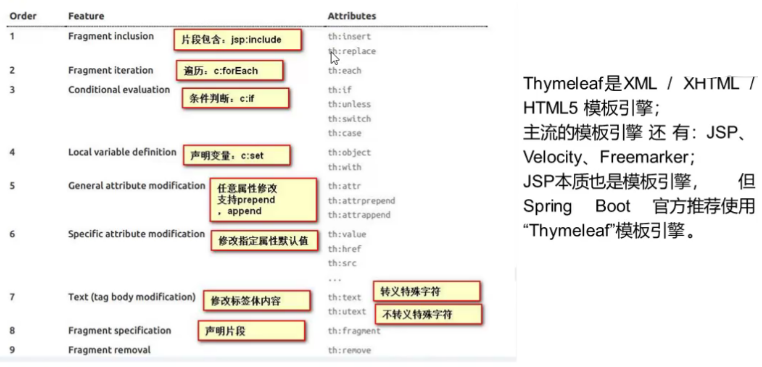
2.2.0 Thymleaf语法
2.2.1 text
<!DOCTYPE html>
<html xmlns:th="http://www.thymeleaf.org">
<!-- 唯一标号 -->
<head>
<meta charset="UTF-8">
<title>Welcome</title>
</head>
<body>
<h2 th:text="YOU">Hello World!</h2>
</body>
</html>
此时只显示"YOU"而不显示“Hello World”
<!DOCTYPE html>
<html xmlns:th="http://www.thymeleaf.org">
<!-- 唯一标号 -->
<head>
<meta charset="UTF-8">
<title>Welcome</title>
</head>
<body>
<h2 th:text="${msg}">Hello World!</h2>
<h2 th:text="${student.name}"></h2>
</body>
</html>
2.3 Controller
package edu.example.hello;

import org.springframework.beans.factory.annotation.Autowired;
import org.springframework.stereotype.Controller;
import org.springframework.ui.Model;
import org.springframework.web.bind.annotation.RequestMapping;

@Controller
public class HelloController {
	@Autowired
	private Student student;

@RequestMapping("/")
	   public String home(Model model) {
	        student.setNo("99");
	        student.setName("Li Ming");
	           System.out.println("hello Controller...");
		  model.addAttribute("msg","Welcome!THYmeLeaf!");
		  model.addAttribute("student",student);
		  return "home";
	   }
3. 批量实例
3.1 StudentFactory类
package edu.example.hello;

import java.util.ArrayList;
import java.util.List;

import org.springframework.stereotype.Component;
@Component
public class StudentFactory {
    public List<Student>getStudents(){
    	List<Student>list=new ArrayList<Student>();
    	for (int i=0;i<3;i++) {
    		Student student=new Student();
    		student.setNo("1720110"+(i+1));
    		student.setName("People"+(i+1));
    		list.add(student);
    	}
    	return list;
    }
}
3.2 Controller
package edu.example.hello;

import javax.servlet.http.HttpSession;

import org.springframework.beans.factory.annotation.Autowired;
import org.springframework.stereotype.Controller;
import org.springframework.ui.Model;
import org.springframework.web.bind.annotation.GetMapping;
import org.springframework.web.bind.annotation.PostMapping;
import org.springframework.web.bind.annotation.RequestMapping;

@Controller
public class HelloController {
	@Autowired
//	private Student student;
       private StudentFactory sf;
	@GetMapping("/")
	public String home(Model model) {
		System.out.println("hello.get...");

		model.addAttribute("list",sf.getStudents());
		return "home";
	}
	@PostMapping("/")
	public String home(Model model, String no) {
		System.out.println("hello.post...");
		model.addAttribute("list", sf.findBy(no));
		return "home";

	}
}
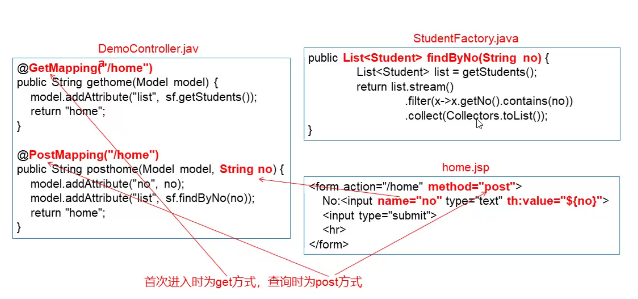
get:不管访问多少次,拿到的结果都是一样的
post:可能得到不同的结果
3.3 页面
<!DOCTYPE html>
<html xmlns:th="http://www.thymeleaf.org">
<!-- 唯一标号 -->
<head>
<meta charset="UTF-8">
<title>Welcome</title>
</head>
<body>
<h2 th:text="${msg}">Hello World!</h2>
<h2 th:text="${list[1].name}"></h2>
<ol >
<!-- 定义一个变量名 -->
<li th:each="st:${list}"th:text="${st.name}"></li>
注意循环的foreach如果放在上面ol内,则序号都为1,要关注真正循环的地方
<table border="1">
<tr><td>ID</td><td>Name</td></tr>

   <tr th:each="st:${list}"><td th:text="${st.no}"></td><td th:text="${st.name}"></td></tr>

    <form action="" method="post">
	no:<input type="text" name="no"/>
	<input type="submit">
</form>

 浙公网安备 33010602011771号