
在ASP.NET Core中发送EventSource消息给前端页面
EventSource 是一个用于服务器推送事件(Server-Sent Events, SSE)的接口,它允许服务器推送实时更新到浏览器。与 WebSocket 不同,SSE 是单向的(服务器到客户端),适用于更新频率不高的实时通知、消息推送等场景。
下面我们使用一个ASP.NET Core MVC(ASP.NET Core MVC 8.0)项目,来展示如何在ASP.NET Core中定义EventSource的接口。
首先我们在ASP.NET Core的Program.cs文件中,开启了AllowSynchronousIO = true的配置,原因如下面代码中的注释所述:
using Microsoft.AspNetCore.Server.Kestrel.Core;

namespace AspNetCoreEventSource
{
    public class Program
    {
        public static void Main(string[] args)
        {
            var builder = WebApplication.CreateBuilder(args);

            // Add services to the container.
            builder.Services.AddControllersWithViews();

            // 因为在HomeController的EventSource方法中,使用了StreamWriter.Write同步方法向Response.Body中写入数据,所以要在ASP.NET Core中开启AllowSynchronousIO = true配置,否则会抛出异常:
            // System.InvalidOperationException: Synchronous operations are disallowed. Call WriteAsync or set AllowSynchronousIO to true instead.
            builder.Services.Configure<KestrelServerOptions>(x => x.AllowSynchronousIO = true)
            .Configure<IISServerOptions>(x => x.AllowSynchronousIO = true);

            var app = builder.Build();

            // Configure the HTTP request pipeline.
            if (!app.Environment.IsDevelopment())
            {
                app.UseExceptionHandler("/Home/Error");
            }
            app.UseStaticFiles();

            app.UseRouting();

            app.UseAuthorization();

            app.MapControllerRoute(
                name: "default",
                pattern: "{controller=Home}/{action=Index}/{id?}");

            app.Run();
        }
    }
}
然后,我们在HomeController中定义了一个EventSource接口,来向前端发送EventSource的数据:
using Microsoft.AspNetCore.Mvc;
using System.Text;

namespace AspNetCoreEventSource.Controllers
{
    public class HomeController : Controller
    {
        private readonly ILogger<HomeController> _logger;

        public HomeController(ILogger<HomeController> logger)
        {
            _logger = logger;
        }

        public IActionResult Index()
        {
            return View();
        }

        /// <summary>
        /// EventSource服务端接口
        /// 默认情况下,前端页面JavaScript原生的EventSource类只支持HTTP Get方式的接口,如果要使用HTTP Post方式的接口来发送HTTP Body,前端要使用第三方框架(例如:Fetch Event Source)
        /// </summary>
        /// <returns></returns>
        [HttpGet]
        public async Task EventSource()
        {
            Response.ContentType = "text/event-stream";
            Response.Headers.Append("Pragma", "no-cache");

            using (StreamWriter sw = new StreamWriter(Response.Body, Encoding.UTF8))
            {
                for (int i = 0; i < 10; i++)
                {
                    // 必须是"data:数据\n\n"这种格式
                    sw.Write("data:" + "这是消息 " + (i + 1).ToString() + "\n\n");
                    sw.Flush();

                    await Task.Delay(1000);
                }

                // 前端接收到数据等于:[stream-end]代表结束
                sw.WriteLine("data:[stream-end]\n\n");
            }
        }
    }
}
如上面代码中的注释所述,默认情况下,前端页面JavaScript原生的EventSource类只支持HTTP Get方式的接口,如果要使用HTTP Post方式的接口来发送HTTP Body,前端要使用第三方框架(例如:Fetch Event Source)
最后,我们给HomeController的Index方法,定义一个MVC的视图页面Index.cshtml,来使用JavaScript原生的EventSource类调用HomeController的EventSource接口,然后将收到的消息都显示在页面上:
@{
    Layout = null;
}

<!DOCTYPE html>

<html>
<head>
    <meta name="viewport" content="width=device-width" />
    <title>Index</title>
    <script>
        function ReceiveEvent() {
            const source = new EventSource('@Url.Action("EventSource")');

            source.onmessage = function (event) {
                if (event.data != '[stream-end]') {
                    if (event.data) {
                        document.getElementById('content').innerHTML += event.data + '<br/>';
                    }
                    else {
                        document.getElementById('content').innerHTML += '<br/>';
                    }
                }
                else {
                    source.close();
                    console.log('请求结束');
                }
            }
        }
    </script>
</head>
<body>
    <div>
        <button id="btnSend" onclick="ReceiveEvent()" >发送消息</button>
    </div>
    <div id="content" style="width:800px;height:600px;overflow:scroll;">

    </div>
</body>
</html>
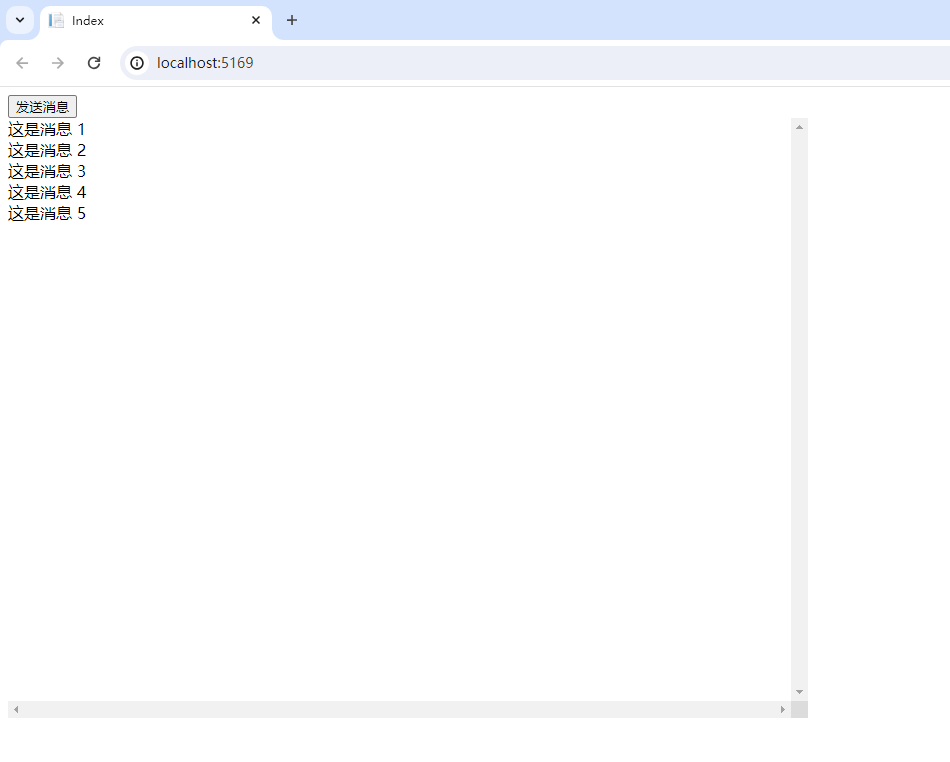
运行ASP.NET Core项目,点击页面上的”发送消息“按钮,就可以通过EventSource来收到服务端接口发过来的每条消息:
参考文献:

 浙公网安备 33010602011771号