

中间件
中间件是一个函数,嵌入在HTTP 的请求和响应之间。它可以获得 Echo#Context 对象用来进行一些特殊的操作, 比如记录每个请求或者统计请求数。
Action的处理在所有的中间件运行完成之后。
中间件类型
Root Level (Before router)
Echo#Pre() 用于注册一个在路由执行之前运行的中间件,可以用来修改请求的一些属性。比如在请求路径结尾添加或者删除一个’/‘来使之能与路由匹配。
下面的这几个内建中间件应该被注册在这一级别:
- AddTrailingSlash
- RemoveTrailingSlash
- MethodOverride
注意: 由于在这个级别路由还没有执行,所以这个级别的中间件不能调用任何 echo.Context 的 API。
Root Level (After router)
大部分时间将用到 Echo#Use() 在这个级别注册中间件。 这个级别的中间件运行在路由处理完请求之后,可以调用所有的 echo.Context API。
下面的这几个内建中间件应该被注册在这一级别:
- BodyLimit
- Logger
- Gzip
- Recover
- BasicAuth
- JWTAuth
- Secure
- CORS
- Static
Group Level
当在路由中创建一个组的时候,可以为这个组注册一个中间件。例如,给 admin 这个组注册一个 BasicAuth 中间件。
用法
e := echo.New()
admin := e.Group("/admin", middleware.BasicAuth())
也可以在创建组之后用 admin.Use()注册该中间件。
Route Level
当你创建了一个新的路由,可以选择性的给这个路由注册一个中间件。
用法
e := echo.New()
e.GET("/", <Handler>, <Middleware...>)
BasicAuth (基本认证) 中间件
BasicAuth 中间件提供了 HTTP 的基本认证方式。
- 对于有效的请求则继续执行后面的处理。
- 对于无效的请求,返回”401 - Unauthorized”响应。
用法
e.Use(middleware.BasicAuth(func(username, password string, c echo.Context) (bool, error) {
	if username == "joe" && password == "secret" {
		return true, nil
	}
	return false, nil
}))
demo
现在用一个小demo来演示BasicAuth的用法
package main

import (
	"github.com/labstack/echo"
	"github.com/labstack/echo/middleware"
	"net/http"
)

func main() {
	e := echo.New()
	e.Use(middleware.BasicAuth(func(username string, password string, context echo.Context) (b bool, e error) {
		if username == "eric" && password == "123" {
			return true, nil
		}
		return false, nil
	}))
	e.GET("/", func(c echo.Context) error {
		return c.String(http.StatusOK, "OK")
	})
	e.Logger.Fatal(e.Start(":8000"))
}
这时在访问所有的路由之前会跳出一个对话框填写用户名跟密码
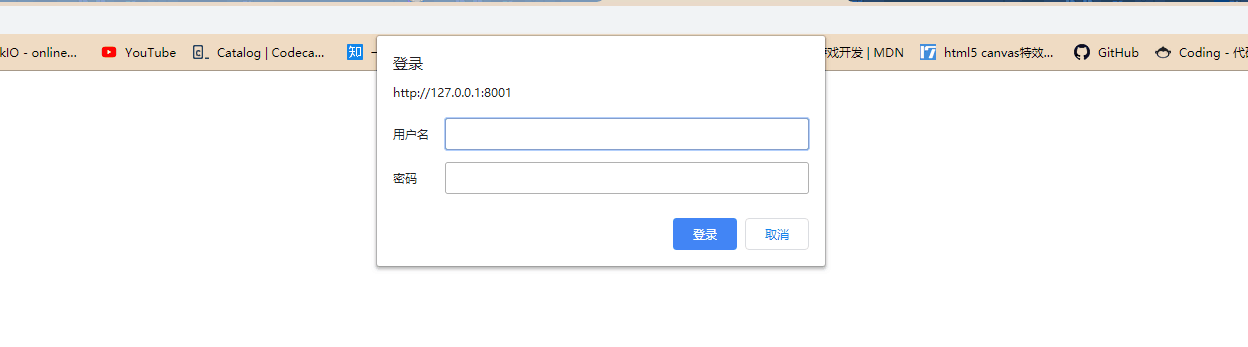
填写eric跟123即可进入
自定义配置
用法
e.Use(middleware.BasicAuthWithConfig(middleware.BasicAuthConfig{}))
配置
BasicAuthConfig struct {
  // Skipper 定义了一个跳过中间间的函数
  Skipper Skipper

  // Validator 是一个用来验证 BasicAuth 是否合法的函数
  // Validator 是必须的.
  Validator BasicAuthValidator

  // Realm 是一个用来定义 BasicAuth 的 Realm 属性的字符串
  // 默认是 "Restricted"
  Realm string
}
默认的Skipper是一个返回值为false的函数

BodyLimit(请求体限制) 中间件
BodyLimit 中间件用于设置允许的请求体的最大长度,如果请求体的大小超过了该值,则返回”413 - Request Entity Too Large”响应。 这个限制的判断取决于请求头的 Content-Length 和实际读取到的请求体内容两方面,尽可能的保证安全。
限制可以指定 4x 或者 4xB,x是”K, M, G, T, P”中的一个,前面的数字不一定是4可以是任意大小的数字
用法
e := echo.New()
e.Use(middleware.BodyLimit("2M"))
CORS(访问控制) 中间件
CORS 中间件实现了 CORS 的标准。CORS 提供给 web 服务器跨站的访问控制,使得跨站的数据传输更安全。
使用
e.Use(middleware.CORS())
自定义配置
使用
e := echo.New()
e.Use(middleware.CORSWithConfig(middleware.CORSConfig{
  AllowOrigins: []string{"https://labstack.com", "https://labstack.net"},
  AllowHeaders: []string{echo.HeaderOrigin, echo.HeaderContentType, echo.HeaderAccept},
}))
配置
// CORSConfig defines the config for CORS middleware.
CORSConfig struct {
  // Skipper defines a function to skip middleware.
  Skipper Skipper

  // AllowOrigin defines a list of origins that may access the resource.
  // Optional. Default value []string{"*"}.
  AllowOrigins []string `json:"allow_origins"`

  // AllowMethods defines a list methods allowed when accessing the resource.
  // This is used in response to a preflight request.
  // Optional. Default value DefaultCORSConfig.AllowMethods.
  AllowMethods []string `json:"allow_methods"`

  // AllowHeaders defines a list of request headers that can be used when
  // making the actual request. This in response to a preflight request.
  // Optional. Default value []string{}.
  AllowHeaders []string `json:"allow_headers"`

  // AllowCredentials indicates whether or not the response to the request
  // can be exposed when the credentials flag is true. When used as part of
  // a response to a preflight request, this indicates whether or not the
  // actual request can be made using credentials.
  // Optional. Default value false.
  AllowCredentials bool `json:"allow_credentials"`

  // ExposeHeaders defines a whitelist headers that clients are allowed to
  // access.
  // Optional. Default value []string{}.
  ExposeHeaders []string `json:"expose_headers"`

  // MaxAge indicates how long (in seconds) the results of a preflight request
  // can be cached.
  // Optional. Default value 0.
  MaxAge int `json:"max_age"`
}
默认配置
DefaultCORSConfig = CORSConfig{
  Skipper:      defaultSkipper,
  AllowOrigins: []string{"*"},
  AllowMethods: []string{echo.GET, echo.HEAD, echo.PUT, echo.PATCH, echo.POST, echo.DELETE},
}
CSRF Middleware(跨站请求伪造)
CSRF(Cross-site request forgery 跨站请求伪造,也被称为“One Click Attack”或者Session Riding,通常缩写为CSRF或者XSRF,是一种挟制用户在当前已登录的Web应用程序上执行非本意的操作的攻击方法。 跟跨网站脚本(XSS)相比,XSS 利用的是用户对指定网站的信任,CSRF 利用的是网站对用户网页浏览器的信任。
使用
e.Use(middleware.CSRF())
自定义配置
使用
e := echo.New()
e.Use(middleware.CSRFWithConfig(middleware.CSRFConfig{
  TokenLookup: "header:X-XSRF-TOKEN",
}))
上面例子将使用X-XSRF-TOKEN 请求头取出 CSRF 的 token 值。
获取 CSRF Token
服务器端
服务器端可以使用 ContextKey从 Echo#Context 拿到 CSRF token 然后通过模版传给客户端。
客户端
客户端可以通过 CSRF cookie 拿到 token 值。
配置
// CSRFConfig defines the config for CSRF middleware.
CSRFConfig struct {
  // Skipper defines a function to skip middleware.
  Skipper Skipper

  // TokenLength is the length of the generated token.
  TokenLength uint8 `json:"token_length"`
  // Optional. Default value 32.

  // TokenLookup is a string in the form of "<source>:<key>" that is used
  // to extract token from the request.
  // Optional. Default value "header:X-CSRF-Token".
  // Possible values:
  // - "header:<name>"
  // - "form:<name>"
  // - "query:<name>"
  TokenLookup string `json:"token_lookup"`

  // Context key to store generated CSRF token into context.
  // Optional. Default value "csrf".
  ContextKey string `json:"context_key"`

  // Name of the CSRF cookie. This cookie will store CSRF token.
  // Optional. Default value "csrf".
  CookieName string `json:"cookie_name"`

  // Domain of the CSRF cookie.
  // Optional. Default value none.
  CookieDomain string `json:"cookie_domain"`

  // Path of the CSRF cookie.
  // Optional. Default value none.
  CookiePath string `json:"cookie_path"`

  // Max age (in seconds) of the CSRF cookie.
  // Optional. Default value 86400 (24hr).
  CookieMaxAge int `json:"cookie_max_age"`

  // Indicates if CSRF cookie is secure.
  // Optional. Default value false.
  CookieSecure bool `json:"cookie_secure"`

  // Indicates if CSRF cookie is HTTP only.
  // Optional. Default value false.
  CookieHTTPOnly bool `json:"cookie_http_only"`
}
默认配置
DefaultCSRFConfig = CSRFConfig{
  Skipper:      defaultSkipper,
  TokenLength:  32,
  TokenLookup:  "header:" + echo.HeaderXCSRFToken,
  ContextKey:   "csrf",
  CookieName:   "_csrf",
  CookieMaxAge: 86400,
}
Logger(日志) 中间件
Logger 中间件记录了每一个请求的信息。
用法
e.Use(middleware.Logger())
输出样例
{"time":"2017-01-12T08:58:07.372015644-08:00","remote_ip":"::1","host":"localhost:1323","method":"GET","uri":"/","status":200, "latency":14743,"latency_human":"14.743µs","bytes_in":0,"bytes_out":2}
自定义配置
用法
e.Use(middleware.LoggerWithConfig(middleware.LoggerConfig{
  Format: "method=${method}, uri=${uri}, status=${status}\n",
}))
输出样例
method=GET, uri=/, status=200
配置
LoggerConfig struct {
  // Skipper 定义了一个跳过中间件的函数.
  Skipper Skipper

  // 日志的格式可以使用下面的标签定义。:
  //
  // - time_unix
  // - time_unix_nano
  // - time_rfc3339
  // - time_rfc3339_nano
  // - id (Request ID - Not implemented)
  // - remote_ip
  // - uri
  // - host
  // - method
  // - path
  // - referer
  // - user_agent
  // - status
  // - latency (In microseconds)
  // - latency_human (Human readable)
  // - bytes_in (Bytes received)
  // - bytes_out (Bytes sent)
  // - header:<name>
  // - query:<name>
  // - form:<name>
  //
  // 例如 "${remote_ip} ${status}"
  //
  // 可选。默认值是 DefaultLoggerConfig.Format.
  Format string `json:"format"`

  // Output 是记录日志的位置。
  // 可选。默认值是 os.Stdout.
  Output io.Writer
}
默认配置
DefaultLoggerConfig = LoggerConfig{
  Skipper: defaultSkipper,
  Format: `{"time":"${time_rfc3339_nano}","remote_ip":"${remote_ip}","host":"${host}",` +
    `"method":"${method}","uri":"${uri}","status":${status}, "latency":${latency},` +
    `"latency_human":"${latency_human}","bytes_in":${bytes_in},` +
    `"bytes_out":${bytes_out}}` + "\n",
  Output: os.Stdout
}
Redirect 中间件
HTTPS 重定向
HTTPS 重定向中间件将 http 请求重定向到 https。例如,http://laily.net 将被重定向到 https://laily.net。
使用
e := echo.New()
e.Pre(middleware.HTTPSRedirect())
HTTPS WWW 重定向
HTTPS WWW 重定向将 http 请求重定向到带 www 的https 请求。例如,http://laily.net 将被重定向到 https://www.laily.net。
使用
e := echo.New()
e.Pre(middleware.HTTPSWWWRedirect())
HTTPS NonWWW 重定向
HTTPS NonWWW 将 http 请求重定向到不带 www 的 https 请求。例如,http://www.laily.net 将被重定向到 https://laily.net。
使用
e := echo.New()
e.Pre(middleware.HTTPSNonWWWRedirect())
WWW 重定向
将不带 www 的请求重定向到带 www 的请求。
例如,http://laily.net 重定向到 http://www.laily.net
使用
e := echo.New()
e.Pre(middleware.WWWRedirect())
NonWWW 重定向
将带 www 的请求重定向到不带 www 的请求。
例如,http://www.laily.net 重定向到 http://laily.net
使用
e := echo.New()
e.Pre(middleware.NonWWWRedirect())
Secure 中间件
Secure 中间件用于阻止跨站脚本攻击(XSS),内容嗅探,点击劫持,不安全链接等其他代码注入攻击。
使用
e.Use(middleware.Secure())
自定义配置
用法
e := echo.New()
e.Use(middleware.SecureWithConfig(middleware.SecureConfig{
	XSSProtection:         "",
	ContentTypeNosniff:    "",
	XFrameOptions:         "",
	HSTSMaxAge:            3600,
	ContentSecurityPolicy: "default-src 'self'",
}))
传递空的 XSSProtection, ContentTypeNosniff, XFrameOptions 或 ContentSecurityPolicy 来禁用这项保护。
配置
SecureConfig struct {
  // Skipper 定义了一个跳过该中间件的函数。
  Skipper Skipper

  // XSSProtection 通过设置`X-XSS-Protection`头
  // 来提供XSS攻击的防护。
  // 可选。默认值 "1; mode=block"。
  XSSProtection string `json:"xss_protection"`

  // ContentTypeNosniff 通过设置`X-Content-Type-Options`头
  // 来防止内容嗅探。
  // 可选。默认值 "nosniff"。
  ContentTypeNosniff string `json:"content_type_nosniff"`

  // XFrameOptions 被用来指示是否允许浏览器在<fram>,<iframe>或者<object>中渲染页面。
  // 网站可以通过这样来避免点击劫持,保证网站的内容不会被其他站点嵌入。
  // 可选。默认值 "SAMEORIGIN".
  // 可使用的值:
  // `SAMEORIGIN` - 页面只能在同域名的页面下被渲染。
  // `DENY` - 页面不允许在 frame 中显示。
  // `ALLOW-FROM uri` - 页面只能在指定域名的 frame 中显示。
  XFrameOptions string `json:"x_frame_options"`

  // HSTSMaxAge 设置 `Strict-Transport-Security` 头来指示浏览器需要记住这个网站只能通过HTTPS来访问的时间(单位秒)。
  // 这样可以减少遭受中间人攻击(HITM)的几率。
  // 可选。默认值 0。
  HSTSMaxAge int `json:"hsts_max_age"`

  // HSTSExcludeSubdomains 不会在`Strict Transport Security`中设置`includeSubdomains`标签。
  // 即从安全规则中排除所有子域名。
  // header, excluding all subdomains from security policy. It has no effect
  // 只有在HSTSMaxAge 被设置为非0值时该参数才有效。
  // 可选。默认值 false。
  HSTSExcludeSubdomains bool `json:"hsts_exclude_subdomains"`

  // ContentSecurityPolicy 用来设置 `Content-Security-Policy` 头。
  // `Content-Security-Policy` 用来定义页面可以加载哪些资源,减少XSS等通过运行不安全代码的注入攻击。
  // 可选。默认值 "".
  ContentSecurityPolicy string `json:"content_security_policy"`
}
默认配置
DefaultSecureConfig = SecureConfig{
  Skipper:            defaultSkipper,
  XSSProtection:      "1; mode=block",
  ContentTypeNosniff: "nosniff",
  XFrameOptions:      "SAMEORIGIN",
}
Trailing Slash 中间件
添加尾部斜杠
在请求的 uri 后加上反斜杠
使用
e := echo.New()
e.Pre(middleware.AddTrailingSlash())
去除尾部斜杠
在请求的 uri 后去除反斜杠
用法
e := echo.New()
e.Pre(middleware.RemoveTrailingSlash())
自定义中间件
定义
firstMiddle.go
package firstMiddle

import (
	"fmt"
	"github.com/labstack/echo"
)

type Config struct {
	Skipper bool
	Reaml string
}

var (
	DefaultConfig =Config{
		Skipper: true,
		Reaml: "first",
	}
)

func FirstMiddle(conf Config) echo.MiddlewareFunc {
	// 默认配置
	if conf.Reaml == "" {
		conf.Reaml = DefaultConfig.Reaml
	}

	return func(next echo.HandlerFunc) echo.HandlerFunc {
		return func(c echo.Context) error {
			request :=c.Request()
			method := request.Method
			fmt.Println("=======" + method + "========")
			if conf.Reaml == "first" {
				return next(c)     // 执行next(c)会往下执行
			} else {
				return nil    // 不会往下执行
			}
		}
	}
}
注册
e.Pre(firstMiddle.FirstMiddle(firstMiddle.Config{
    Reaml: "hahaha",
}))

 浙公网安备 33010602011771号