
Maven 教程
依赖管理
1. 依赖引入
通过 dependencies 标签我们即可导入所需要的工程依赖。
<dependencies>
    <dependency>
        <groupId>mysql</groupId>
        <artifactId>mysql-connector-java</artifactId>
        <version>8.0.27</version>
        <scope>runtime</scope>
    </dependency>
</dependencies>
2. 间接依赖
当项目需要引用到其它依赖时,只需指定所依赖的工程的基本信息即可,剩下的一切都交给 Maven 处理。即便是所要依赖的工程依赖了其它工程,我们也只需引入项目所直接的依赖的工程。
如下图示例中 Dependency-A 引用了 Dependency-B ,而 Dependency-B 又依赖于 Dependency-C ,在传统项目中若在 Dependency-A 中引用 Dependency-B 则需要同时手动添加 Dependency-B 与 Dependency-C 所对应的 JAR 包,但在 Maven 中我们只需要引入 Dependency-B 即可, Mavne 会自动将子模块所依赖的包导入。
3. 依赖排除
在引用多个模块时可能会发生版本兼容冲突问题,通过 excludes 标签即可实现依赖排除。
如下我们在工程中引入了 demo-a 依赖,但其又引用 dependency-b 依赖,如想要在当前工程中移除 dependency-b 依赖,此时即可通过 excludes 标签将 dependency-b 排除依赖。
<dependencies>
    <dependency>
        <groupId>xyz.ibudai</groupId>
        <artifactId>demo-a</artifactId>
        <version>1.0.0</version>
        <excludes>
            <exclude>
                <groupId>xyz.ibudai</groupId>
                <artifactId>dependency-b</artifactId>
                <version>1.0.0</version>
            </exclude>
        </excludes>
    </dependency>
</dependencies>
除了手动通过 excludes 标签排除依赖,被引模块也可以在导入依赖时通过 optional 标签禁用依赖传递。
上述示例中若在 demo-a 工程中引入 dependency-b 依赖时添加 optional 标签,那么其它工程在引入 demo-a 依赖时将不会将 dependency-b 作为间接依赖导入。
<dependencies>
    <dependency>
        <groupId>xyz.ibudai</groupId>
        <artifactId>demo-b</artifactId>
        <version>1.0.0</version>
        <optional>true</optional>
    </dependency>
</dependencies>
4.变量配置
当项目中引入了大量依赖,为了方便管理通常将引入依赖的版本通过变量进行统一配置,从而实现更直观的依赖管理。
通过 properties 标签即可自定义变量配置,然后使用 ${} 引用变量。
<properties>
    <mysql.version>8.0.30</mysql.version>
    <junit.version>4.13.2</junit.version>
</properties>

<dependencies>
    <dependency>
        <groupId>mysql</groupId>
        <artifactId>mysql-connector-java</artifactId>
        <!-- 使用 "${}" 引用上述自定义变量 -->
        <version>${mysql.version}</version>
    </dependency>
    <dependency>
        <groupId>junit</groupId>
        <artifactId>junit</artifactId>
        <version>${junit.version}</version>
    </dependency>
</dependencies>
模块配置
1. 模块管理
当我们项目包含多个子项目时,通过 modules 标签即可实现模块管理。
<!-- maven-demo pom.xml -->
<modules>
    <module>module-1</module>
    <module>module-2</module>
</modules>
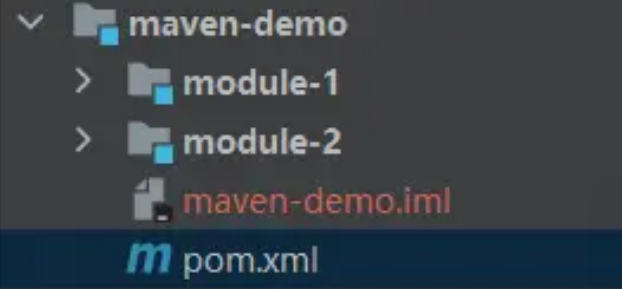
如下在 maven-demo 中又包含了 module-1 和 module-2 两个工程。
2. 模块继承
通过 parent 即可标记当前模块的父模块,且子模块将会继承父模块中的所有依赖配置。子模块若没有指定的 groupId 和 version 默认继承父模块中的配置。
其中 relativePath 用于指定父模块的 POM 文件目录,省略时默认值为 ../pom.xml 即当前目录的上一级中,若仍未找到则会在本地仓库中寻找。
<!-- module-1 pom.xml -->
<parent>
    <groupId>xyz.ibudai</groupId>
    <artifactId>maven-demo</artifactId>
    <version>1.0-SNAPSHOT</version>
    <relativePath>../pom.xml</relativePath>
</parent>

<artifactId>module-1</artifactId>
统一管理
1. 依赖管理
当一共项目包含多个模块,且多个模块引用了相同依赖时显然重复引用是不太合适的,而通过 dependencyManagement 即可很好的解决依赖共用的问题。
将项目依赖统一定义在父模块的 dependencyManagement 标签中,子模块只需继承父模块并在 dependencies 引入所需的依赖,便可自动读取父模块 dependencyManagement 所指定的版本。
dependencyManagement 既不会在当前模块引入依赖,也不会给其子模块引入依赖,但其可以被继承的,只有在子模块下同样声明了该依赖,才会引入到模块中,子模块中只需在依赖中引入 groupId 与 artifactId 即可, 也可以指定版本则会进行覆盖。
模块示例
接下来以下图中的模块层级关系进行举例:
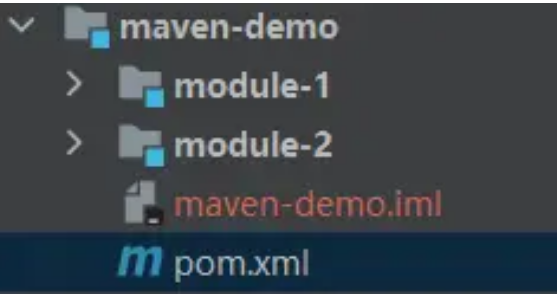
maven-demo
在 maven-demo 的 dependencyManagement 定义 mysql 和 junit 两个依赖。
<dependencyManagement>
    <dependencies>
        <dependency>
            <groupId>mysql</groupId>
            <artifactId>mysql-connector-java</artifactId>
            <version>8.0.30</version>
        </dependency>
        <dependency>
            <groupId>junit</groupId>
            <artifactId>junit</artifactId>
            <version>4.13.2</version>
        </dependency>
    </dependencies>
</dependencyManagement>
module-1
在 module-1 中继承 maven-demo 工程,引入 mysql,无需指定版本,将会自动读取父模块中 dependencyManagement 中所指定的版本。当然你也可以选择指定版本,则将会进行覆盖,但并不建议这么操作,将提高项目维护难度。
module-1 的 pom 文件内容如下:
<parent>
    <groupId>xyz.ibudai</groupId>
    <artifactId>maven-demo</artifactId>
    <version>1.0-SNAPSHOT</version>
</parent>

<dependencies>
    <dependency>
        <groupId>mysql</groupId>
        <artifactId>mysql-connector-java</artifactId>
    </dependency>
</dependencies>
module-2
在 module-2 配置同 module-1,通过 dependencyManagement 我们即实现了项目依赖版本的统一管理。
<parent>
    <groupId>xyz.ibudai</groupId>
    <artifactId>maven-demo</artifactId>
    <version>1.0-SNAPSHOT</version>
</parent>

<dependencies>
    <dependency>
        <groupId>junit</groupId>
        <artifactId>junit</artifactId>
    </dependency>
</dependencies>
. 依赖导入
上面介绍了如何通过 dependencyManagement 实现全局的依赖版本管理,但如果工程中的两个子模块都需要配置相同的 dependencyManagement 配置时,当然你可以选择通过继承父模块来实现,也可以用笨办法直接复制粘贴一份。
在上述的 maven-demo 创建同级模块 maven-demo1 ,如果要实现 maven-demo 中配置的 dependencyManagement 则在其 dependencyManagement 配置中导入 maven-demo 并将 scope 设置为 import,并将 type 设置为 pom。
通过导入即可实现更轻量化的模块信息继承,具体配置内容如下:
<dependencyManagement>
    <dependencies>
        <dependency>
            <groupId>xyz.ibudai</groupId>
            <artifactId>maven-demo</artifactId>
            <version>1.0.0-SNAPSHOT</version>
            <!-- 导入目标模块的 dependencyManagement -->
            <!-- 依赖范围为 import -->
            <scope>import</scope>
            <!-- 类型一般为 pom -->
            <type>pom</type>
        </dependency>
    </dependencies>
</dependencyManagement>
 浙公网安备 33010602011771号