
如何将PyTorch模型转换到Open Neural Network Exchange(ONNX)(一)
1. 深度学习模型部署的难点
- 深度学习模型基于PyTorch/TensorFlow等框架部署,这些依赖环境不适合在移动设备或开发板中安装;
- 深度学习模型一般比较庞大,需要强大的算力支持,在移动设备上进行推理时,需要优化模型效率,以达到实时运行的目的
以上两个难点使得深度学习模型难以在移动端设备或开发板上直接运行,为了能够消除不同深度学习框架的差异,以减少优化模型效率的工作量,自然而然想到能否将不同框架、不同格式之间的模型转换成符合预定义标准的中间格式,将中间表示输入到对应硬件平台的推理引擎上,达到优化推理效率的目的,ONNX(Open Neural Network Exchange)就是一种主流的中间格式:
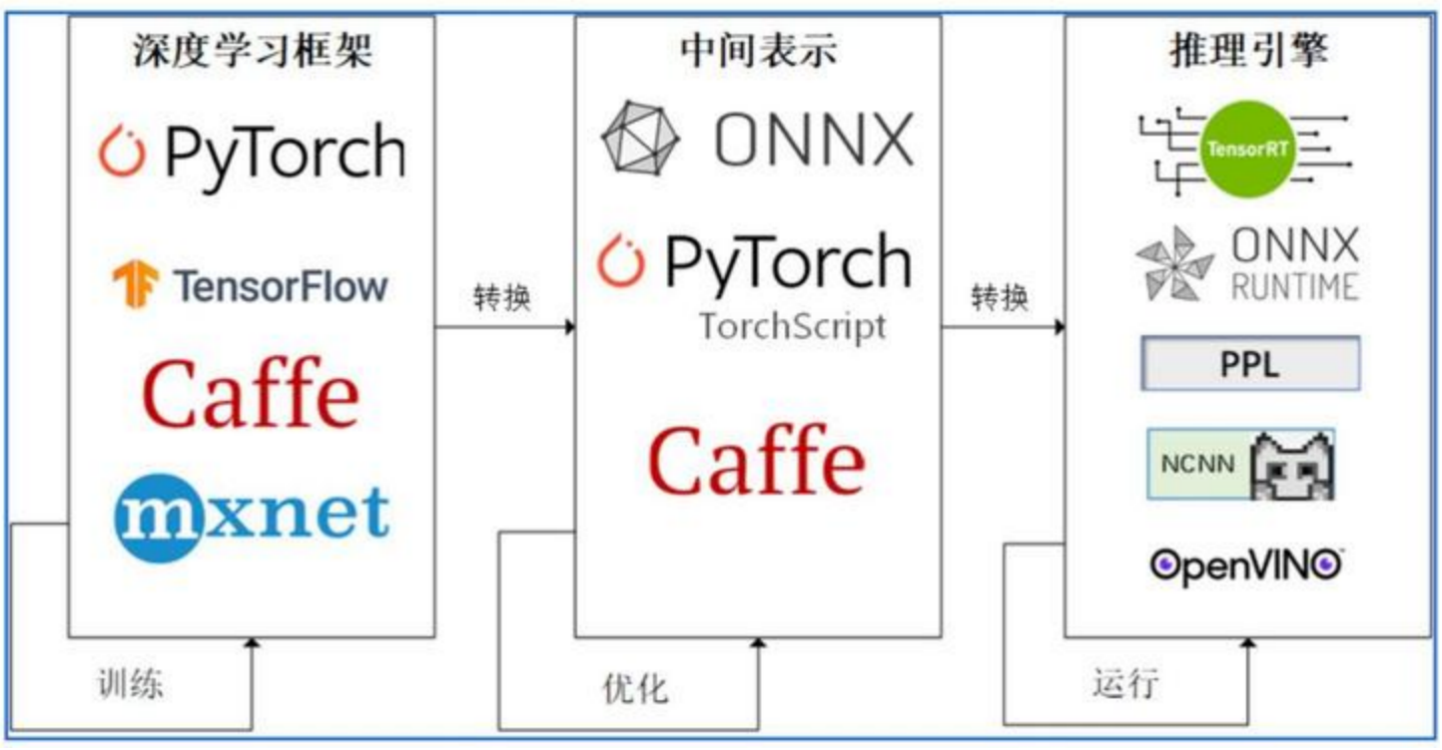
本文将介绍如何将一个PyTorch模型转换成ONNX格式,并使用Python第三方包onnxruntime对转换后的ONNX模型进行推理。
2. 从PyTorch到ONNX
-
首先使用PyTorch定义一个简单的线性模型如下:
import torch import torch.nn as nn class LinearModel(nn.Module): def __init__(self, ndim): super(LinearModel, self).__init__() self.ndim = ndim self.weights = nn.Parameter(torch.randn(ndim, 1, dtype=torch.float32)) self.bias = nn.Parameter(torch.randn(1, dtype=torch.float32)) self.relu = nn.ReLU(inplace=True) def forward(self, x): y = x @ self.weights + self.bias y = self.relu(y) return y -
将PyTorch模型保存到本地:
# 输入维度 in_dim = 13 # 初始化模型 lm = LinearModel(in_dim) # 1.1 保存模型 pt_model_path = './models/linearModel.pt' torch.save(lm, pt_model_path) -
使用PyTorch API将PyTorch格式的模型转换到ONNX格式:
batch_size = 64			# 批次大小
# 随机生成输入数据
x = torch.randn(batch_size, in_dim, dtype=torch.float32)

torch_model = torch.load(pt_model_path, map_location=torch.device('cpu'))
torch_model_output = torch_model(x)

torch.onnx.export(torch_model, x, './models/linearModel.onnx', opset_version=11,
                  input_names=['input'], output_names=['output'])
torch.onnx.export的前三个必选参数分别指:要转换的原始模型(此处为pytorch格式的线性模型)、模型的一个随机输入、保存的onnx格式模型的路径,
input_names和output_names分别为输入和输出名,后续推理要使用。
此处为什么要传入输入x呢?这是因为PyTorch将模型转换成ONNX格式时,默认情况下保存的是模型的静态图(调用torch.jit.trace),需要使用输入x执行一次计算,追踪计算流程,并将其保存到ONNX格式。
可以使用netron查看ONNX格式的模型:

-
使用
onnx包检查转换的ONNX模型是否正确:import onnx onnx_model = onnx.load(onnx_model_path) # 使用onnx自带的API检查模型是否正确转换 try: onnx.checker.check_model(onnx_model) except Exception: print("Model incorrect") else: print("Model correct") -
使用
onnxruntime进行推理import onnxruntime as ort linear_model_session = ort.InferenceSession(onnx_model_path) ort_output = linear_model_session.run(['output'], { 'input': x.numpy() }) import numpy as np # 检查PyTorch模型的输出和ONNX模型的输出是否一致 np.allclose(torch_model_output.detach().numpy(), np.array(ort_output))
3. 小结
本文介绍了PyTorch模型转换到ONNX格式的一般流程,关于如何实现动态batchsize等内容将在后续文章中阐述。本文的代码和运行环境可以参见代码(密码:123456)

 浙公网安备 33010602011771号