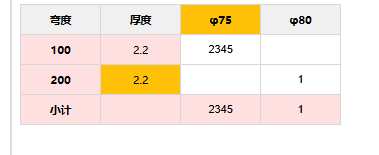
跨行合并表格
- 示例图

-
第一列会出现跨行合并
-
父组件代码
pgxAxis = [] pgyAxis = [] verticalSpans = [] // 处理纵向合并(行合并) processVerticalMerge() { if (this.pgyAxis.length === 0) { return; } const spans = new Array(this.pgyAxis.length).fill(0); let currentValue = this.pgyAxis[0]; let count = 1; spans[0] = 1; // 从第二个元素开始遍历 for (let i = 1; i < this.pgyAxis.length; i++) { if (this.pgyAxis[i] === currentValue) { count++; spans[i] = 0; // 被合并的单元格 } else { // 设置上一组的合并数量 spans[i - count] = count; // 开始新的一组 currentValue = this.pgyAxis[i]; count = 1; spans[i] = 1; } } // 设置最后一组的合并数量 spans[this.pgyAxis.length - count] = count; this.verticalSpans = spans; }
-
子组件代码
<template> <div class="coordinate-table h-100" @paste="(e) => handleTablePaste(e)" @mousedown="handleTableMouseDown"> <!--拖拽起始事件 --> <table v-if="tableData.length > 0" ref="dataTable"> <thead> <tr> <th v-for="(x, idx) in xAxis" :key="idx" :style="CellStyle" :class="{'yellow-bg': true, 'sticky-box': idx === xAxis.length -1, 'fix-top-left' : idx ===0,'yellow-actived': activeCell.colIdx === (idx -2 )}" class="yellow-bg fix-top"> {{ x }} </th> </tr> </thead> <tbody> <tr v-for="(row, rowIdx) in tableData" :key="rowIdx"> <!-- Y轴单元格(居中显示,宽度固定) --> <td class="y-axis-cell fix-left" :style="CellStyle" v-if="verticalSpans[rowIdx] > 0" :rowspan="verticalSpans[rowIdx]" :class="{'yellow-bg': true,}"> {{ yAxis[rowIdx] }} </td> <td :class="{'yellow-actived': activeCell.rowIdx === rowIdx, 'y-cell': true}" :style="CellStyle"> {{ pgHAxis[rowIdx] }} </td> <!-- 数据单元格:添加选中高亮class --> <td v-for="(cell, colIdx) in row" :key="colIdx" :style="CellStyle" @click="setActiveCell(rowIdx, colIdx)" :class="{'selected-cell': isCellSelected(rowIdx, colIdx)}"> <input type="number" v-limit-decimal @input="onChangeItemValue(colIdx)" class="content-input" :disabled="!cell.bUpdate" @click.stop="setActiveCell(rowIdx, colIdx)" v-model="cell.value" :data-row="rowIdx" :data-col="colIdx" @keydown="handleKeydown($event, rowIdx, colIdx)" /> </td> </tr> </tbody> </table> </div> </template> <script lang="ts"> import { Component, Vue, Prop, Model, Watch } from "vue-property-decorator"; import _ from "lodash"; @Component({ name: "CoordinateTable", components: {} }) export default class extends Vue { @Prop({ type: Array, default: [] }) xAxis: string[]; // 横坐标 @Prop({ type: Array, default: [] }) yAxis: string[]; // 纵坐标 @Prop({ type: Array, default: [] }) pgHAxis: string[]; // 纵坐标(第二列) @Prop({ type: Array, default: [] }) verticalSpans: string[]; // 纵向合并(行合并) @Model("change") value; tableData = null; // :复制功能 - 记录选中区域(Excel式拖拽选中) selectedRange = { startRow: -1, // 拖拽起始行 startCol: -1, // 拖拽起始列 endRow: -1, // 拖拽结束行 endCol: -1, // 拖拽结束列 isDragging: false, // 是否正在拖拽 hasValidSelection: false, // 是否有有效选中区域 }; // 记录当前激活的单元格(粘贴起始位置/键盘移动/复制起始位置) activeCell = { rowIdx: -1, // 激活行索引 colIdx: -3, // 激活列索引 }; // 表格DOM引用(用于滚动) $refs: { dataTable: HTMLTableElement; }; @Watch("value", { immediate: true }) onChangeValue(value) { this.tableData = value; this.getFistTotal(); } getFistTotal() { const targetTable = this.tableData; if (!targetTable?.length) { return; } targetTable.forEach(el => { el.forEach((item, tmpIndex) => { if (item.value) { this.onChangeItemValue(tmpIndex); } }); }); } // :判断单元格是否在选中区域内(用于高亮显示) isCellSelected(rowIdx: number, colIdx: number): boolean { // 禁用单元格直接返回false,不参与选中高亮 if (!this.tableData[rowIdx]?.[colIdx]?.bUpdate) { return false; } const { startRow, startCol, endRow, endCol, hasValidSelection } = this.selectedRange; // 无有效选中范围时返回false if (!hasValidSelection || startRow === -1 || startCol === -1) { return false; } // 计算实际选中范围(确保start <= end,兼容反向拖拽) const minRow = Math.min(startRow, endRow); const maxRow = Math.max(startRow, endRow); const minCol = Math.min(startCol, endCol); const maxCol = Math.max(startCol, endCol); // 判断当前单元格是否在选中范围内 return ( rowIdx >= minRow && rowIdx <= maxRow && colIdx >= minCol && colIdx <= maxCol ); } // 记录当前激活的单元格(点击单元格时触发)- 优化:同步选中范围 setActiveCell(rowIdx: number, colIdx: number) { // 禁用单元格不激活 if (!this.tableData[rowIdx]?.[colIdx]?.bUpdate) { return; } this.activeCell = { rowIdx, colIdx }; // 点击单个单元格时,设置选中范围为当前单元格 this.selectedRange.startRow = rowIdx; this.selectedRange.startCol = colIdx; this.selectedRange.endRow = rowIdx; this.selectedRange.endCol = colIdx; this.selectedRange.hasValidSelection = false; // 单个单元格不算有效选中 } // ===================== 拖拽选中核心逻辑 ===================== // 表格鼠标按下:开始拖拽选中 handleTableMouseDown(e: MouseEvent) { // 只处理左键拖拽 if (e.button !== 0) { return; } // 找到点击的单元格(排除Y轴单元格和第二列pgHAxis) const cell = (e.target as HTMLElement).closest( "td:not(.y-axis-cell):nth-child(n+3)" ); if (!cell) { // 点击空白处清除选中 this.clearSelection(); return; } // 获取单元格的行号列号(从input的data属性读取) const input = cell.querySelector(".content-input") as HTMLInputElement; if (!input || input.disabled) { // 点击禁用单元格清除选中 this.clearSelection(); return; } const startRow = Number(input.dataset.row); const startCol = Number(input.dataset.col); // 再次检查起始单元格是否可编辑(双重保险) if (!this.tableData[startRow]?.[startCol]?.bUpdate) { this.clearSelection(); return; } // 初始化选中范围 this.selectedRange = { startRow, startCol, endRow: startRow, endCol: startCol, isDragging: true, hasValidSelection: false, }; // 激活当前单元格 this.setActiveCell(startRow, startCol); // 绑定全局鼠标事件(确保拖拽超出表格也能响应) document.addEventListener("mousemove", this.handleMouseMove); document.addEventListener("mouseup", this.handleMouseUp); } // 鼠标移动:更新选中范围(实时跟随鼠标) handleMouseMove(e: MouseEvent) { if (!this.selectedRange.isDragging) { return; } // 找到鼠标当前悬浮的单元格(排除Y轴单元格和第二列pgHAxis) const cell = (e.target as HTMLElement).closest( "td:not(.y-axis-cell):nth-child(n+3)" ); if (!cell) { return; } const input = cell.querySelector(".content-input") as HTMLInputElement; if (!input || input.disabled) { // 悬浮到禁用单元格时,不更新选中范围 return; } // 更新结束行列 const endRow = Number(input.dataset.row); const endCol = Number(input.dataset.col); // 检查结束单元格是否可编辑 if (!this.tableData[endRow]?.[endCol]?.bUpdate) { return; } this.selectedRange.endRow = endRow; this.selectedRange.endCol = endCol; // 标记为有效选中区域(范围大于1个单元格) this.selectedRange.hasValidSelection = this.selectedRange.startRow !== endRow || this.selectedRange.startCol !== endCol; } // 鼠标松开:结束拖拽选中(保留选中范围) handleMouseUp() { this.selectedRange.isDragging = false; // 解绑全局事件,避免内存泄漏 document.removeEventListener("mousemove", this.handleMouseMove); document.removeEventListener("mouseup", this.handleMouseUp); } // 清除选中状态 clearSelection() { this.selectedRange = { startRow: -1, startCol: -1, endRow: -1, endCol: -1, isDragging: false, hasValidSelection: false, }; } // ===================== 删除选中区域内容 ===================== // 删除选中区域内容 deleteSelectedCells() { const { startRow, startCol, endRow, endCol, hasValidSelection } = this.selectedRange; if (!hasValidSelection || startRow === -1 || startCol === -1) { return; } // 计算实际选中范围 const minRow = Math.min(startRow, endRow); const maxRow = Math.max(startRow, endRow); const minCol = Math.min(startCol, endCol); const maxCol = Math.max(startCol, endCol); // 记录受影响的列(用于更新小计) const affectedCols = new Set<number>(); // 遍历选中区域,只删除可编辑单元格内容 for (let row = minRow; row <= maxRow; row++) { for (let col = minCol; col <= maxCol; col++) { const cell = this.tableData[row]?.[col]; if (cell?.bUpdate) { this.$set(cell, "value", null); affectedCols.add(col); } } } // 更新小计 this.calcAffectedColsSubtotal(affectedCols); // 清除选中状态 this.clearSelection(); } // 处理表格复制(选中区域/单个单元格) handleTableCopy() { const { startRow, startCol, endRow, endCol, hasValidSelection } = this.selectedRange; const { rowIdx: activeRow, colIdx: activeCol } = this.activeCell; // 优先使用选中范围,无选中范围则使用激活单元格 let targetStartRow = startRow, targetStartCol = startCol; let targetEndRow = endRow, targetEndCol = endCol; // 无有效选中范围时,默认选中当前激活单元格 if (!hasValidSelection || startRow === -1 || startCol === -1) { if (activeRow === -1 || activeCol === -1) { this.$message.error("请先选中要复制的单元格"); return; } targetStartRow = targetEndRow = activeRow; targetStartCol = targetEndCol = activeCol; } // 规范选中范围(确保start <= end) const sRow = Math.min(targetStartRow, targetEndRow); const eRow = Math.max(targetStartRow, targetEndRow); const sCol = Math.min(targetStartCol, targetEndCol); const eCol = Math.max(targetStartCol, targetEndCol); // 校验表格数据有效性 if ( !this.tableData || !this.tableData.length || !this.tableData[0]?.length ) { this.$message.error("表格无数据可复制"); return; } // 校验复制范围有效性 if (sRow >= this.tableData.length || eRow >= this.tableData.length) { this.$message.error("复制范围超出表格行数"); return; } if (sCol >= this.tableData[0].length || eCol >= this.tableData[0].length) { this.$message.error("复制范围超出表格列数"); return; } // 构建复制内容(Excel格式:列用\t分隔,行用\n分隔) let copyText = ""; for (let i = sRow; i <= eRow; i++) { const rowData = this.tableData[i]; const rowContent = []; for (let j = sCol; j <= eCol; j++) { // 兼容禁用单元格、空值,避免出现undefined const cellValue = rowData[j]?.value ?? ""; rowContent.push(cellValue.toString()); } copyText += rowContent.join("\t") + "\n"; } if (!copyText.trim()) { this.$message.error("无有效内容可复制"); return false; } // 写入剪贴板 this.setClipboard(copyText); // 复制成功提示(区分单个/多个单元格) if (sRow === eRow && sCol === eCol) { // this.$message.success("单个单元格复制成功"); } else { this.$message.success( `选中区域(${eRow - sRow + 1}行${eCol - sCol + 1}列)复制成功` ); } } // 写入剪贴板工具方法(兼容现代/旧浏览器) setClipboard(content) { // 现代浏览器 if (navigator?.clipboard) { navigator.clipboard.writeText(content).catch(err => { const error = err as Error; // 处理权限拒绝错误 if (error?.name === "NotAllowedError") { this.$message.error( "剪贴板权限被拒绝,请在浏览器设置中允许剪贴板访问" ); } else { this.$message.error(error?.message || "复制失败,请手动选中内容复制"); } }); } else { // 兼容旧浏览器(IE11等) const textarea = document.createElement("textarea"); textarea.value = content; textarea.style.position = "fixed"; textarea.style.top = "-999px"; textarea.style.left = "-999px"; document.body.appendChild(textarea); textarea.select(); try { const success = document.execCommand("copy"); if (!success) { this.$message.error("execCommand 复制失败"); } } catch (err) { this.$message.error("复制失败,请手动选中内容复制"); } finally { document.body.removeChild(textarea); } } } // 快捷键支持(Ctrl+C) mounted() { window.addEventListener("keydown", this.handleCopyShortcut); } beforeDestroy() { // 解绑全局事件,避免内存泄漏 window.removeEventListener("keydown", this.handleCopyShortcut); this.selectedRange.isDragging = false; document.removeEventListener("mousemove", this.handleMouseMove); document.removeEventListener("mouseup", this.handleMouseUp); } // 处理Ctrl+C快捷键(避免与输入框复制冲突) handleCopyShortcut(e: KeyboardEvent) { const target = e.target as HTMLElement; // 排除输入框聚焦时的全局删除(保留输入框自身删除功能) const isInputFocused = target.tagName === "INPUT" || target.tagName === "TEXTAREA"; // Ctrl+C 或 Cmd+C(Mac) if ((e.ctrlKey || e.metaKey) && e.key.toLowerCase() === "c") { // 阻止浏览器默认复制行为,执行自定义复制逻辑 e.preventDefault(); e.stopPropagation(); this.handleTableCopy(); } // Delete 或 Backspace 删除选中区域(非输入框聚焦时) if ( [8, 46].includes(e.keyCode) && this.selectedRange.hasValidSelection && !isInputFocused ) { e.preventDefault(); e.stopPropagation(); this.deleteSelectedCells(); } } // ===================== 原有功能保留 ===================== // 辅助函数:判断是否为数字(含小数、负数) isNumber(str: string): boolean { return /^-?\d+(\.\d+)?$/.test(str.trim()); } // 处理表格粘贴事件 handleTablePaste(e: ClipboardEvent) { e.preventDefault(); // 阻止默认粘贴行为(避免直接粘贴到输入框) // 1. 获取粘贴板内容 const clipboardData = e.clipboardData || (window as any).clipboardData; if (!clipboardData) { return; } const pastedText = clipboardData.getData("text"); if (!pastedText.trim()) { return; } // 2. 解析粘贴内容为二维数组(Excel格式:\t分隔列,\n分隔行) const pastedRows = pastedText .split(/\r?\n/) // 兼容 Windows(\r\n) 和 Mac(\n) 换行 .filter(row => row.trim() !== "") // 过滤空行 .map(row => row.split("\t").map(cell => cell.trim())); // 按制表符分割列,去除单元格首尾空格 // 3. 获取当前激活的起始位置和目标表格数据 const { rowIdx: startRow, colIdx: startCol } = this.activeCell; const targetTable = this.tableData; if (!targetTable?.length) { return; } // 记录粘贴涉及的列范围(用于后续计算小计) const affectedCols = new Set<number>(); // 格式化数值为正整数或x.5的方法(禁止负数) const formatToValidValue = (value: string): number | null => { if (!value) { return null; } // 清除所有非数字和小数点的字符(直接过滤负号) let cleaned = value.replace(/[^0-9.]/g, ""); if (!cleaned) { return null; } // 处理小数点 const dotIndex = cleaned.indexOf("."); if (dotIndex !== -1) { // 只保留一个小数点 cleaned = cleaned.slice(0, dotIndex + 1) + cleaned.slice(dotIndex + 1).replace(/\./g, ""); const integerPart = cleaned.slice(0, dotIndex) || "0"; const decimalPart = cleaned.slice(dotIndex + 1); // 小数部分只能是5且长度为1 if (decimalPart) { const validDecimal = decimalPart.charAt(0) === "5" ? "5" : ""; cleaned = `${integerPart}${validDecimal ? "." + validDecimal : ""}`; } // 去除末尾的小数点 if (cleaned.endsWith(".")) { cleaned = cleaned.slice(0, -1); } } // 处理纯整数(去除前导零) if (cleaned.indexOf(".") === -1) { cleaned = cleaned.replace(/^0+(?=\d)/, "") || "0"; } // 转换为正数 return cleaned ? Number(cleaned) : null; }; // 4. 循环赋值到表格(从起始单元格开始,超出范围忽略) pastedRows.forEach((pastedRow, rowOffset) => { const currentRow = startRow + rowOffset; // 超出表格行数,停止当前行粘贴 if (currentRow >= targetTable.length) { return; } const targetRow = targetTable[currentRow]; if (!targetRow) { return; } pastedRow.forEach((pastedValue, colOffset) => { const currentCol = startCol + colOffset; // 超出当前行的列数,忽略该单元格 if (currentCol >= targetRow.length) { return; } const targetCell = targetRow[currentCol]; // 单元格不存在或禁用(bUpdate: false),忽略 if (!targetCell || !targetCell.bUpdate) { return; } // 记录涉及的列(用于计算小计) affectedCols.add(currentCol); // 5. 处理数值格式(只保留正整数或x.5) const finalValue = formatToValidValue(pastedValue); // 6. 响应式更新单元格值 this.$set(targetCell, "value", finalValue); }); }); // 7. 粘贴完成后,自动计算涉及列的小计 this.calcAffectedColsSubtotal(affectedCols); // 8. 触发自定义事件,通知父组件数据变化 this.$emit("table-pasted", { startRow, startCol, pastedRows, updatedData: _.cloneDeep(this.tableData), }); } // 计算粘贴涉及列的小计 calcAffectedColsSubtotal(affectedCols: Set<number>) { const colList = Array.from(affectedCols); if (colList.length === 0) { return; } // 对每个涉及的列,调用原有小计计算方法 colList.forEach(colIdx => { this.onChangeItemValue(colIdx); }); } // 输入值变化时计算小计 onChangeItemValue(colIdx) { const tmpIndex = this.yAxis.indexOf("小计"); if (tmpIndex === -1) { return; } const list = this.tableData.filter((_, index) => index !== tmpIndex); const newList = list.map(item => item.filter((_, elIndex) => elIndex === colIdx) ); const result = _.flatMap(newList); const total = result.reduce( (sum, item) => sum + Number(item.value || 0), // 兼容空值 0 ); this.tableData[tmpIndex][colIdx].value = total || ""; } // 键盘箭头移动焦点核心功能 handleKeydown(e: KeyboardEvent, rowIdx: number, colIdx: number) { // 处理删除键(单个单元格) if ([8, 46].includes(e.keyCode)) { e.preventDefault(); // 如果有选中区域,优先删除选中区域 if (this.selectedRange.hasValidSelection) { this.deleteSelectedCells(); } else { // 否则删除当前单元格内容 if (this.tableData[rowIdx]?.[colIdx]?.bUpdate) { this.$set(this.tableData[rowIdx][colIdx], "value", null); this.onChangeItemValue(colIdx); } } return; } const rowCount = this.tableData?.length || 0; const colCount = this.tableData[0]?.length || 0; // 阻止箭头键默认行为(数字输入框增减 + 页面滚动) if ([37, 38, 39, 40, 13].includes(e.keyCode)) { e.preventDefault(); e.stopPropagation(); } let newRowIdx = rowIdx; let newColIdx = colIdx; // 根据箭头键计算目标单元格索引 switch (e.keyCode) { case 37: // 左箭头 newColIdx = colIdx > 0 ? colIdx - 1 : colIdx; // 第一列无法左移 break; case 38: // 上箭头 newRowIdx = rowIdx > 0 ? rowIdx - 1 : rowIdx; // 第一行无法上移 break; case 39: // 右箭头 newColIdx = colIdx < colCount - 1 ? colIdx + 1 : colIdx; // 最后一列无法右移 break; case 40: // 下箭头 newRowIdx = rowIdx < rowCount - 1 ? rowIdx + 1 : rowIdx; // 最后一行无法下移 break; case 13: // 回车往下一个单元格 newRowIdx = rowIdx < rowCount - 1 ? rowIdx + 1 : rowIdx; // 最后一行无法下移 break; default: return; // 非箭头键不处理 } // 目标单元格变化时,更新激活状态并聚焦 if (newRowIdx !== rowIdx || newColIdx !== colIdx) { if (this.tableData[newRowIdx][newColIdx]?.bUpdate) { this.setActiveCell(newRowIdx, newColIdx); } this.focusCellInput(newRowIdx, newColIdx); } } // 聚焦到指定单元格的输入框(使用data属性精准定位) focusCellInput(rowIdx: number, colIdx: number) { this.$nextTick(() => { // 通过data属性精准定位输入框,避免DOM结构变化导致定位失败 const input = document.querySelector( `.content-input[data-row="${rowIdx}"][data-col="${colIdx}"]` ) as HTMLInputElement; if (input && !input.disabled) { input.focus(); input.select(); // 聚焦后选中内容,方便直接编辑 } }); } get CellStyle() { return { width: `80px`, minWidth: `65px`, height: `30px`, }; } } </script> <style lang="scss" scoped> .coordinate-table { width: 100%; overflow-x: auto; table { border-collapse: collapse; position: relative; th, td { border: 1px solid #d7d7d7; text-align: center; box-sizing: border-box; transition: background-color 0.1s; } td { margin: 0; padding: 0; } .fix-top { position: sticky; top: 0; &.fix-top-left { left: 0; z-index: 99; } } .fix-left { position: sticky; left: 0; } /* 横坐标样式 */ .axis-cell { background-color: #fff2cc; font-weight: bold; } .yellow-bg { background-color: #f0f0f0; } .sticky-box { position: sticky; right: 0; } /* Y轴单元格样式(居中核心) */ .y-axis-cell { background-color: #ffe0e0; font-weight: bold; position: sticky; left: 0; z-index: 10; // 确保行合并时不被内容遮挡 } .y-cell { background-color: #ffe0e0; } /* 内容区输入框样式 */ .content-input { width: 100%; height: 100%; padding: 0; border: none; /* 去除输入框自身边框 */ box-sizing: border-box; background: transparent; text-align: center; font-size: 14px; color: #000; } .content-input:disabled { background-color: #ffe0e0; cursor: not-allowed; } .content-input:focus { outline: none; background-color: #0078d7; // box-shadow: inset 0 0 0 2px #1890ff; } .yellow-actived { background-color: #ffc107; } /* 选中单元格高亮样式(Excel风格) */ .selected-cell { background-color: #0078d7; z-index: 1; position: relative; // 解决边框重叠问题 &::before { content: ""; position: absolute; top: -1px; left: -1px; right: -1px; bottom: -1px; border: 1px solid #1890ff; pointer-events: none; z-index: -1; } } } } </style>

浙公网安备 33010602011771号