jieba
jieba可以用于“分词”、“词性标注”、“关键词提取”等任务
分词
import jieba

# jieba.load_userdict("chinese_dict.txt")#加载词典,词典的形式为:单词 词频 词性
# jieba.add_word("区块链")  # 动态添加新词
print(jieba.lcut("我爱自然语言处理"))#精确分词
# 输出: ['我', '爱', '自然语言', '处理']
print(jieba.lcut("我爱自然语言处理", cut_all=True))#全模式分词
# 输出: ['我', '爱', '自然', '自然语言', '语言', '处理']
print(jieba.lcut_for_search("我爱自然语言处理"))#搜索引擎分词
# 输出: ['我', '爱', '自然', '语言', '自然语言', '处理']
词性标注
import jieba.posseg as pseg

words = pseg.lcut("苹果很好吃")
print(type(words))#<class 'generator'>
for word, flag in words:
    print(f"单词:{word},词性:{flag}")
关键词提取
from jieba import analyse
with open("text.txt","r",encoding="utf-8") as f:
    text=f.read()
# 默认使用 TF-IDF
# 可以设置自己的idf预料库
# jieba.analyse.set_idf_path("your_idf_file.txt")  # 替换成你的 IDF 文件
#基于tfidf,jieba自带语料库可以计算idf的值
keywords = analyse.extract_tags(f"{text}", topK=3)
print(keywords)
#基于textrank
keywords = analyse.textrank(f"{text}", topK=10)
print(keywords)
spacy
使用前的准备
- 建议使用:
python版本:3.10.16
spacy版本:3.8.2
语言模型网站链接
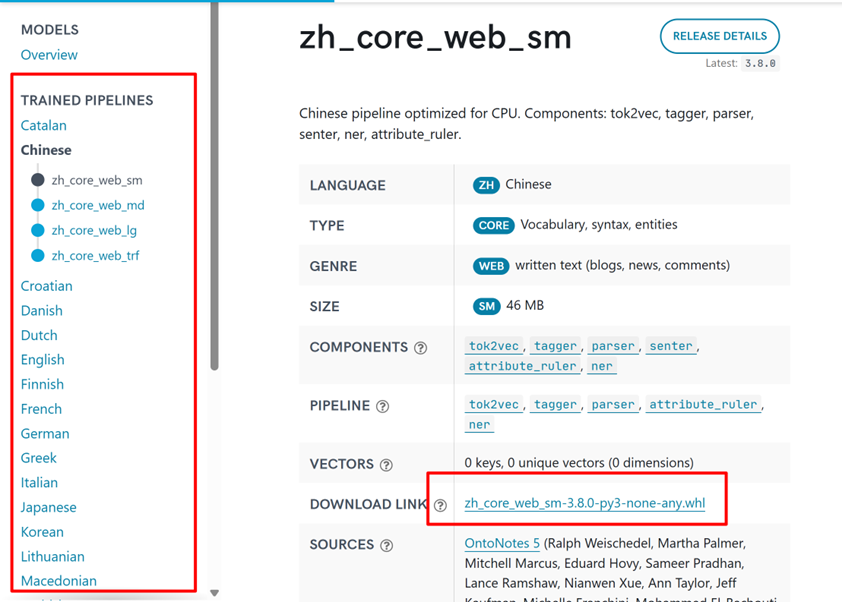
en_core_web_sm-3.8.0文件下载地址
基本使用
import spacy

nlp = spacy.load("en_core_web_sm")
doc = nlp("Apple is looking at buying U.K. startup for $1 billion")

# token.text: 单词的原始形式。
# token.lemma_: 单词的基本形式(或词干)。例如,“running”的词干是“run”。
# token.pos_: 单词的粗粒度的词性标注,如名词、动词、形容词等。
# token.tag_: 单词的细粒度的词性标注,提供更多的语法信息。
# token.dep_: 单词在句子中的依存关系角色,例如主语、宾语等。
# token.shape_: 单词的形状信息,例如,单词的大小写,是否有标点符号等。
# token.is_alpha: 这是一个布尔值,用于检查token是否全部由字母组成。
# token.is_stop: 这是一个布尔值,用于检查token是否为停用词(如“the”、“is”等在英语中非常常见但通常不包含太多信息的词)。
for token in doc:
    print(token.text, token.lemma_, token.pos_, token.tag_, token.dep_,
            token.shape_, token.is_alpha, token.is_stop)
    print(f"单词:{token.text} 粗粒度词性:{token.pos_} 细粒度词性:{token.tag_} 依存关系:{token.dep_} 单词词干:{token.lemma_} 是否为字母:{token.is_alpha} 是否为停用词:{token.is_stop}")
分词
import spacy
nlp = spacy.load("zh_core_web_sm")
# 获取停用词集合
# stop_words = nlp.Defaults.stop_words
# 添加自定义词汇
# nlp.tokenizer.pkuseg_update_user_dict(["南京长江大桥","金陵四十景"])

doc = nlp("南京长江大桥是金陵四十景之一!")
for token in doc:
    print(token.text)
分句子
import spacy

nlp = spacy.load("en_core_web_sm")
doc = nlp("This is the first sentence. And this is the second. Here's the third one!")

for sent in doc.sents:
    print(sent.text)
词性标注
import spacy

# 加载英文模型
nlp = spacy.load("en_core_web_sm")

# 处理文本
doc = nlp("Apple is looking at buying U.K. startup for $1 billion")

# 输出词性标注
for token in doc:
    print(f"{token.text:<12} {token.pos_:<8} {token.tag_:<6} {spacy.explain(token.tag_)}")
#explain()作用是返回tag的详细解释
主要词性类别 (token.pos_)
| 标签 |
描述 |
示例 |
| ADJ |
形容词 |
"happy", "blue" |
| ADP |
介词 |
"in", "to" |
| ADV |
副词 |
"very", "well" |
| AUX |
助动词 |
"is", "will" |
| CONJ |
连词 |
"and", "or" |
| DET |
限定词 |
"a", "the" |
| INTJ |
感叹词 |
"oh", "wow" |
| NOUN |
名词 |
"cat", "apple" |
| NUM |
数词 |
"1", "one" |
| PART |
小品词 |
"'s", "not" |
| PRON |
代词 |
"I", "you" |
| PROPN |
专有名词 |
"John", "London" |
| PUNCT |
标点符号 |
".", "," |
| VERB |
动词 |
"run", "eat" |
| X |
其他 |
"etc" |
常见细粒度标签 (token.tag_)
| 标签 |
描述 |
示例 |
| CC |
并列连词 |
"and", "but" |
| CD |
基数词 |
"1", "two" |
| DT |
限定词 |
"the", "a" |
| IN |
介词/从属连词 |
"in", "that" |
| JJ |
形容词 |
"good", "big" |
| NN |
单数名词 |
"dog", "idea" |
| NNS |
复数名词 |
"dogs", "ideas" |
| NNP |
单数专有名词 |
"John", "London" |
| PRP |
人称代词 |
"I", "he" |
| RB |
副词 |
"very", "well" |
| VB |
动词原形 |
"run", "eat" |
| VBD |
过去式动词 |
"ran", "ate" |
| VBG |
动名词/现在分词 |
"running", "eating" |
| VBN |
过去分词 |
"eaten", "seen" |
| VBP |
非第三人称单数现在时 |
"run", "eat" |
| VBZ |
第三人称单数现在时 |
"runs", "eats" |
依存关系
import spacy
# 加载模型
nlp = spacy.load("en_core_web_sm")
# 分析句子
doc = nlp("Apple is looking at buying U.K. startup for $1 billion")
# 输出依存关系信息
for token in doc:
    print(f"{token.text:<12} {token.dep_:<10} {token.head.text:<10} {spacy.explain(token.dep_)}")
from spacy import displacy
#可视化依存关系
displacy.render(doc, style="dep")
# 生成HTML文件
html = displacy.render(doc, style="dep")
with open("dep_graph.html", "w", encoding="utf-8") as f:
    f.write(html)
主要依存关系标签
| 标签 |
全称 |
说明 |
示例 |
| ROOT |
根节点 |
句子的核心词,通常是主要动词 |
"looking"是例句的ROOT |
| nsubj |
名词性主语 |
执行动作的主语 |
"Apple"是"looking"的主语 |
| dobj |
直接宾语 |
动作的直接接受者 |
"startup"是"buying"的宾语 |
| aux |
助动词 |
辅助主要动词 |
"is"辅助"looking" |
| prep |
介词修饰 |
介词短语修饰 |
"at"修饰"looking" |
| pcomp |
介词补足语 |
介词的补语(通常是动词) |
"buying"是"at"的补语 |
| compound |
复合词 |
组成复合名词 |
"U.K."和"startup"组成复合名词 |
| pobj |
介词宾语 |
介词的宾语 |
"billion"是"for"的宾语 |
基本依存树遍历属性
| 属性 |
返回类型 |
说明 |
示例 |
| token.lefts |
generator |
当前词元的左侧直接子节点(按文本顺序) |
[child for child in token.lefts] |
| token.rights |
generator |
当前词元的右侧直接子节点(按文本顺序) |
[child for child in token.rights] |
| token.children |
generator |
当前词元的所有直接子节点(= lefts + rights) |
list(token.children) |
| token.head |
Token |
当前词元的父节点(支配词) |
token.head.text |
| token.subtree |
generator |
当前词元及其所有子节点(递归整个子树) |
[t.text for t in token.subtr |
命名实体识别
import spacy

# 加载模型
nlp = spacy.load("zh_core_web_sm")

# 处理文本
doc = nlp("姚明现在在中国男篮,担任男篮主席")

# 提取命名实体
for ent in doc.ents:
    print(ent.text)
    print(ent.label_)
    print(ent.start_char, ent.end_char)
    print(spacy.explain(ent.label_))

#结果显示
out=displacy.render(doc,style="ent")
with open("test.html","w",encoding="utf-8") as f:
    f.write(out)
实体类型说明
| 标签 |
描述 |
示例 |
| PERSON |
人名 |
"John Smith" |
| NORP |
民族/宗教/政治团体 |
"Republicans", "Chinese" |
| FAC |
建筑/机场/公路等 |
"Golden Gate Bridge" |
| ORG |
组织机构 |
"Google", "NASA" |
| GPE |
国家/城市/地区 |
"London", "China" |
| LOC |
非GPE地点 |
"Mount Everest" |
| PRODUCT |
产品 |
"iPhone" |
| EVENT |
事件 |
"Olympic Games" |
| WORK_OF_ART |
艺术作品 |
"Mona Lisa" |
| LAW |
法律条款 |
"First Amendment" |
| LANGUAGE |
语言 |
"English" |
| DATE |
日期 |
"July 4th" |
| TIME |
时间 |
"2:30 PM" |
| PERCENT |
百分比 |
"50%" |
| MONEY |
金额 |
"$1 billion" |
| QUANTITY |
数量 |
"10 miles" |
| ORDINAL |
序数词 |
"first" |
| CARDINAL |
基数词 |
"one" |
SpaCy计算和显示词向量及相似性
注意:小模型(en_core_web_sm)不包含词向量,这里使用lg模型
模型词向量加载
import spacy

# 加载模型(必须使用包含词向量的中大型模型)
nlp = spacy.load("zh_core_web_lg")

#打印模型词向量维度
print(nlp.vocab.vectors_length)
#打印模型词向量矩阵维度
print(nlp.vocab.vectors.shape)
#获取词向量
print(nlp.vocab.get_vector('中国'))
#查看词汇是否在词汇表中
print(nlp.vocab.has_vector('中国'))
#获取所有词汇
vocab=list(nlp.vocab.strings)
print(vocab)

print('end')
相似度计算
import spacy

nlp = spacy.load("zh_core_web_lg")  # 必须使用包含词向量的模型

word1 = nlp("国王")[0]
word2 = nlp("女王")[0]
word3 = nlp("车")[0]

# 计算余弦相似度 (范围0-1)
print(f"king ↔ queen 相似度: {word1.similarity(word2):.4f}")
print(f"king ↔ car 相似度: {word1.similarity(word3):.4f}")
import spacy

# 加载中文模型
nlp = spacy.load("zh_core_web_lg")

# 词语相似度计算
words = ["国王", "王后", "男人", "女人", "苹果", "香蕉", "电脑"]

print("词语相似度矩阵:")
print("\t" + "".join([f"{w:^8}" for w in words]))
for word1 in words:
    row = [f"{word1:^6}"]
    for word2 in words:
        similarity = nlp(word1)[0].similarity(nlp(word2)[0])
        row.append(f"{similarity:.4f}")
    print(" ".join(row))


 浙公网安备 33010602011771号