
爬取Microsoft Bing网站图片
说明:
这个小案例主要是访问Microsoft Bing网站去爬取“车牌”图片,代码写的时候不规范,但是效果还行,更快速的异步爬虫看这个链接:使用python协程爬取图片
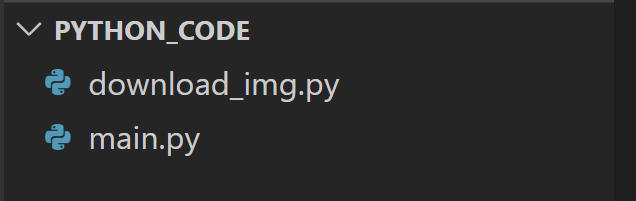
- 代码文件结构为下图:
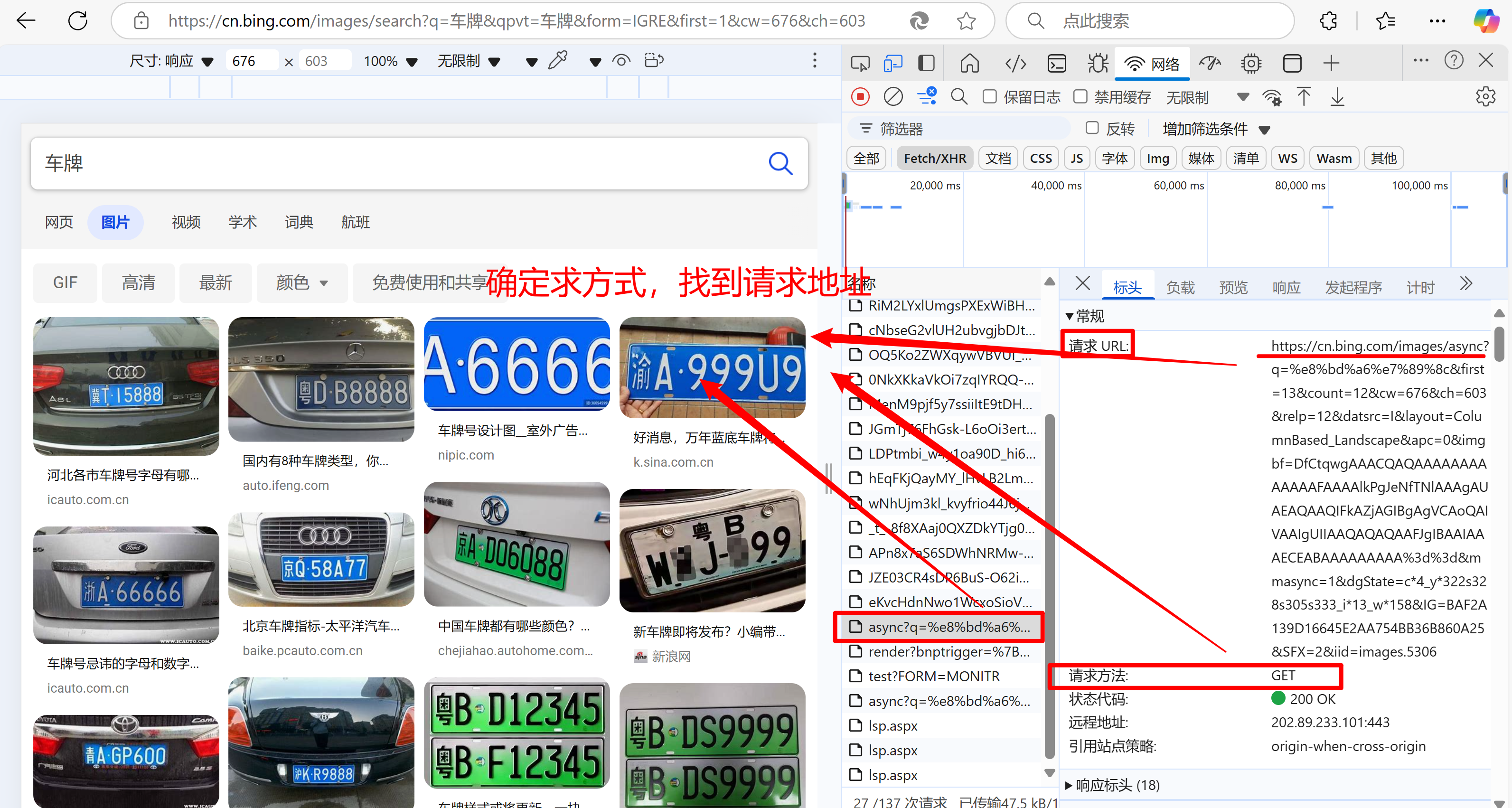
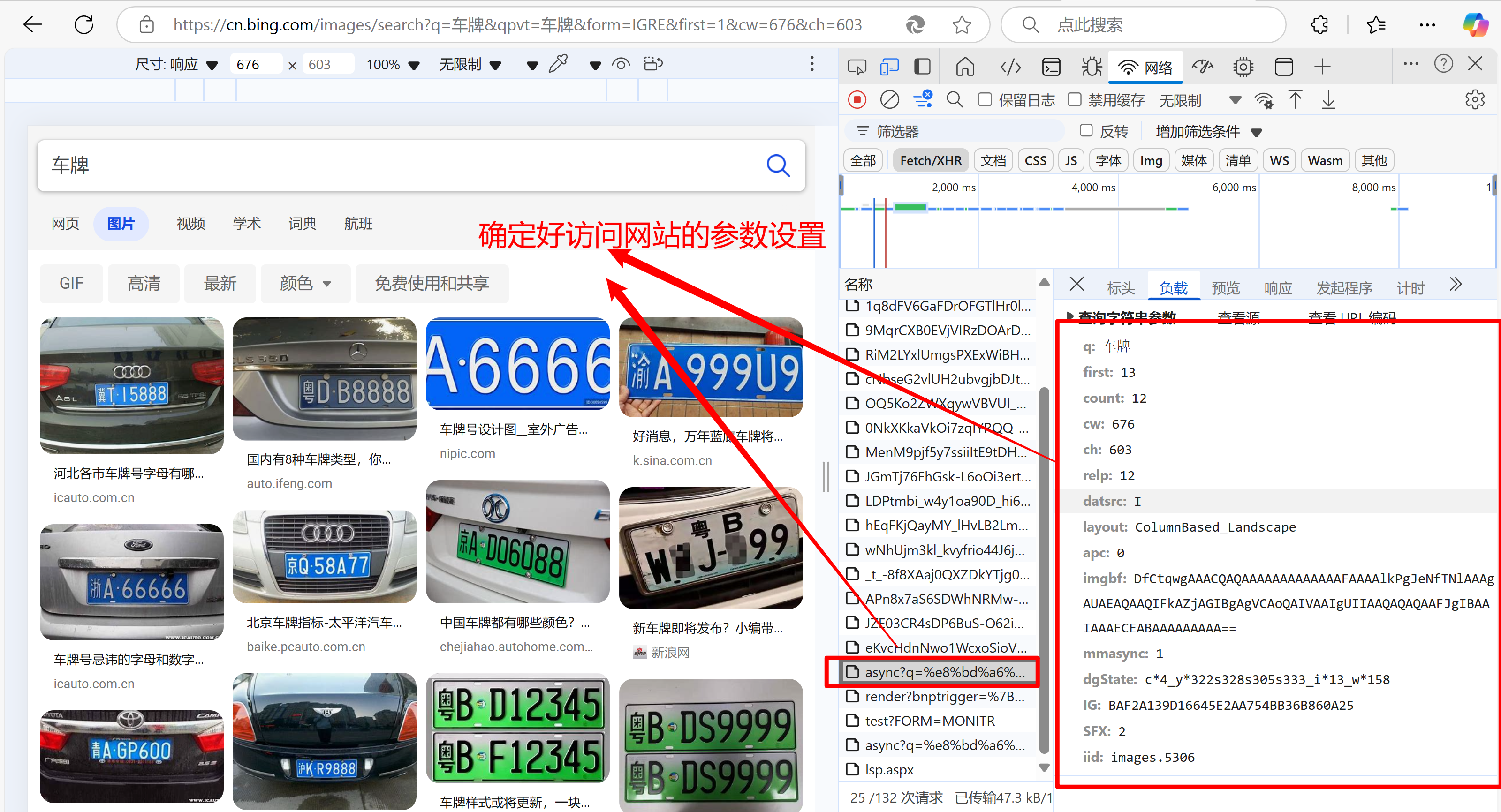
- 具体思路
#main.py
#运行函数的入口
from requests import get
# import time
# from tqdm import tqdm
import os
from download_img import download
def download_html(search_len,search_name,url,headers,params):
    for i in range(int(search_len)):
        response=get(url,headers=headers,params=params)
        image_html=response.text
        with open(f'./{search_name}_html/{search_name}'+f'_{i}'+'.html','w',encoding='utf-8') as fp:
            fp.write(image_html)
        params['first']+=params['count']
        params['SFX']+=1
        params['count']=35
def main(search_name=None,search_len=None):
    url='https://cn.bing.com/images/async'
    headers={
    'User-Agent':'Mozilla/5.0 (Linux; Android 6.0; Nexus 5 Build/MRA58N) AppleWebKit/537.36 (KHTML, like Gecko) Chrome/134.0.0.0 Mobile Safari/537.36 Edg/134.0.0.0'


            }
    params={
    'q':search_name,
    'first': 13,
    'count': 12,#爬取图片的数量
    'cw': 437,
    'ch': 603,
    'relp': 12,
    'datsrc': 'I',
    'layout': 'ColumnBased_Landscape',
    'apc': 0,
    'imgbf': 'DfCtqwgAAACQAQAAAAAAAAAAAAAFAAAAsUuBIONfTNlAgBAASAEAQgAQIFEABiAGIBgAgNDAoQAIUAAIgUYIAAiAQCAAABIiIBgIIAAAACkCAAAAAAAAAA==',
    'mmasync': 2,
    'dgState': 'c*2_y*725s715_i*13_w*204',
    'IG': '32F3E4B3953D4FFCB5B4E5EDB527C8EC',
    'SFX': 2,#页数
    'iid': 'images.5306',
            }

    if not os.path.exists(f'./{search_name}_html'):
        os.mkdir(f'./{search_name}_html')
    download_html(search_len,search_name,url,headers,params)
    for html in os.listdir(f'./{search_name}_html'):
        download(html,search_name)

if __name__ == '__main__':
    search_name=input('请输入搜索内容:')
    search_len=input('请输入要爬取图片页数:')
    main(search_name,search_len)
#download_img.py
from lxml import etree
from requests import get
# import os
from os.path import exists
from os import mkdir
import re
from re import compile
# from tqdm import tqdm
# from 爬取html import dir_name
def download(html_name,dir_name):
    headers={
        'User-Agent':'Mozilla/5.0 (Linux; Android 6.0; Nexus 5 Build/MRA58N) AppleWebKit/537.36 (KHTML, like Gecko) Chrome/134.0.0.0 Mobile Safari/537.36 Edg/134.0.0.0',

    }
    with open(f'./{dir_name}_html/{html_name}',encoding='utf-8') as f:
        text=f.read()

    tree=etree.HTML(text)
    img_src_list=tree.xpath('//img/@data-src')
    p=re.compile(r'https.*/OIP-C\.(?P<name>.*)\?.*')
    if not exists(f'./{dir_name}_image_dir'):
        mkdir(f'./{dir_name}_image_dir')
    for url in img_src_list:
        response=get(url,headers=headers).content

        with open(f'./{dir_name}_image_dir/'+p.search(url).group('name')+'.jpg','wb') as f:
            f.write(response)
使用多线程改写上述代码
import threading
import time
import os
import queue
import requests
from lxml import etree
import re
def download_img():
    response=requests.get(q_url.get(),headers=headers)
    if not os.path.exists(f"./{search_name}_img"):
        os.mkdir(f"./{search_name}_img")
    with open(f"./{search_name}_img/"+q_name.get(),'wb') as fp:
        fp.write(response.content)
        q_name.task_done()

def download_url(i):
    # global url_list

    with condition:
        response=requests.get(url,headers=headers,params=params)

        image_html=response.text
        # if not os.path.exists(f"./{search_name}_html"):
        #     os.mkdir(f"./{search_name}_html")
        # with open(f"{search_name}_html/{i}.html",mode="w",encoding='utf-8') as f:
        #     f.write(image_html)
        tree=etree.HTML(image_html)
        # 获取图片链接
        img_src_list=tree.xpath('//img/@data-src')
        # 正则匹配图片名称
        p=re.compile(r'https.*/OIP-C\.(?P<name>.*)\?.*')
        for i in img_src_list:
            q_url.put(i)
            q_name.put(p.search(i).group('name')+'.jpg')
        params['first']+=params['count']
        params['SFX']+=1
        params['count']=35
        # condtion.wait()
    print(f'{threading.currentThread().name}已经完成,现在q_url的长度为{q_url.qsize()}')

def main():

    download_url_list=[threading.Thread(target=download_url,args=(i,)) for i in range(int(search_len))]
    for i in download_url_list:
        i.start()
    for i in download_url_list:
        i.join()
    download_img_list=[threading.Thread(target=download_img) for i in range(q_url.qsize())]
    for i in download_img_list:
        i.start()
    for i in download_img_list:
        i.join()

    # q_url.join()
    # q_name.join()

if __name__ == '__main__':
    s=time.time()
    #该队列主要是存放图片的下载地址
    q_url=queue.Queue()
    q_name=queue.Queue()
    # condtion=threading.Condition()
    condition=threading.RLock()
    # condition1=threading.RLock()
    url_list=[]
    headers={
        'User-Agent':'Mozilla/5.0 (Linux; Android 6.0; Nexus 5 Build/MRA58N) AppleWebKit/537.36 (KHTML, like Gecko) Chrome/134.0.0.0 Mobile Safari/537.36 Edg/134.0.0.0',
    }
    url='https://cn.bing.com/images/async'
    search_name=input('请输入搜索内容:')
    search_len=input('请输入要爬取图片页数:')

    params={
    'q':search_name,
    'first': 13,
    'count': 12,#爬取图片的数量
    'cw': 437,
    'ch': 603,
    'relp': 12,
    'datsrc': 'I',
    'layout': 'ColumnBased_Landscape',
    'apc': 0,
    'imgbf': 'DfCtqwgAAACQAQAAAAAAAAAAAAAFAAAAsUuBIONfTNlAgBAASAEAQgAQIFEABiAGIBgAgNDAoQAIUAAIgUYIAAiAQCAAABIiIBgIIAAAACkCAAAAAAAAAA==',
    'mmasync': 2,
    'dgState': 'c*2_y*725s715_i*13_w*204',
    'IG': '32F3E4B3953D4FFCB5B4E5EDB527C8EC',
    'SFX': 2,#页数
    'iid': 'images.5306',
            }
    main()
    e=time.time()
    print(f'耗费时间{e-s:.2f}s')

 浙公网安备 33010602011771号