会员
周边
新闻
博问
闪存
众包
赞助商
Chat2DB
所有博客
当前博客
我的博客
我的园子
账号设置
会员中心
简洁模式
...
退出登录
注册
登录
Arborblog
博客园
首页
新随笔
联系
订阅
管理
上一页
1
2
3
4
5
6
7
8
···
25
下一页
2024年2月22日
windows杀死端口号
摘要: windows杀死端口号 在Windows操作系统中,如果你想要杀死一个占用特定端口号的进程,你可以按照以下步骤操作: 1.打开命令提示符(Command Prompt) 你可以通过按下Win + R快捷键,输入cmd并按下回车键来打开它。 2.使用netstat命令查找占用端口的进程ID(PID)
阅读全文
posted @ 2024-02-22 15:33 Arborblog
阅读(5794)
评论(0)
推荐(0)
2024年1月29日
清理linux命令记录
摘要: Linux清理痕迹的一些方法 1,暴力省事直接删除 首先是比较暴力省事的操作,直接清除当前用户bash历史记录,可以直接echo空进去。 echo "" > ~/.bash_history 然后history的话,可以通过c参数直接删除。 linux查看历史命令 在Linux中,可以使用以下命令来查
阅读全文
posted @ 2024-01-29 18:01 Arborblog
阅读(1459)
评论(0)
推荐(0)
2024年1月11日
mybatis-plus实体类基类
摘要: package com.camp; import com.baomidou.mybatisplus.annotation.*; import lombok.Data; import java.time.LocalDateTime; /** * @Author Arbor * @Description
阅读全文
posted @ 2024-01-11 15:28 Arborblog
阅读(141)
评论(0)
推荐(0)
2023年12月21日
IDEA快速修改所有调用地方的方法名称
摘要: 双击方法名,然后shift+F6或者 右键 ok之后所有的方法名称都修改了
阅读全文
posted @ 2023-12-21 15:05 Arborblog
阅读(1097)
评论(0)
推荐(0)
2023年12月14日
linux下,需要删除windows中^M
摘要: linux下,如果需要在vim中查看^M,需要使用如下命令: 在 Vim 的命令模式中输入 : e ++ff=unix % 有时候,我们在 Linux 中打开曾在 Win 中编辑过的文件时,会在行尾看到 ^M 字符。虽然,这并不影响什么,但心里面还是有点不痛快。如果想要删除这些 ^M 字符,可以使用
阅读全文
posted @ 2023-12-14 13:43 Arborblog
阅读(55)
评论(0)
推荐(0)
2023年12月13日
Ollydbg和x64dbg工具
摘要: http://www.ollydbg.de/ https://x64dbg.com/
阅读全文
posted @ 2023-12-13 18:06 Arborblog
阅读(184)
评论(0)
推荐(0)
2023年12月11日
8个二进制位为一个字节(B)
摘要: 1TB=1024GB 1GB=1024MB 1MB=1024KB 1KB=1024B 1B=8b 计算机存储单位一般用bit、B、KB、MB、GB、TB、PB、EB、ZB、YB、BB、NB、DB……来表示,它们之间的关系是: 位 bit (比特)(Binary Digits):存放一位二进制数,即
阅读全文
posted @ 2023-12-11 11:24 Arborblog
阅读(451)
评论(0)
推荐(0)
2023年12月10日
Net类型
摘要: 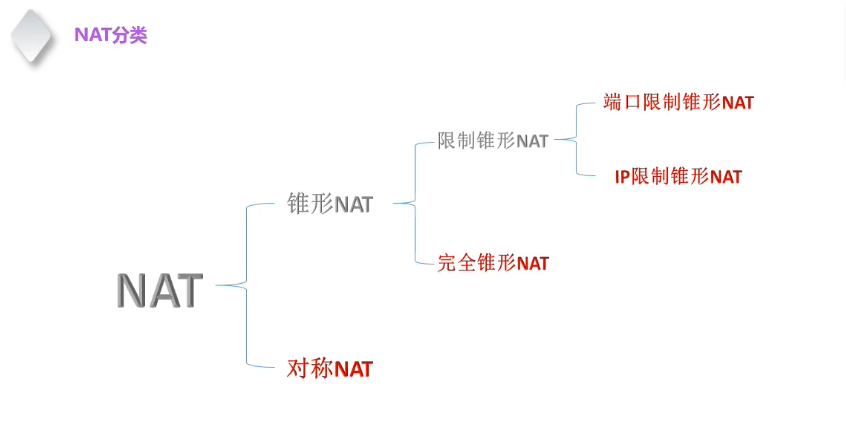
阅读全文
posted @ 2023-12-10 02:01 Arborblog
阅读(26)
评论(0)
推荐(0)
2023年12月8日
Win32FrisrtApp
摘要: #include <windows.h> #include <tchar.h> int WINAPI WinMain( _In_ HINSTANCE hInstance, _In_opt_ HINSTANCE hPrevInstance, _In_ LPSTR lpCmdLine, _In_ int
阅读全文
posted @ 2023-12-08 21:41 Arborblog
阅读(22)
评论(0)
推荐(0)
2023年12月5日
vs2022命令窗口命令查看类大小
摘要: cl /d1 reportSingleClassLayoutSon "08_04Class多继承.cpp"
阅读全文
posted @ 2023-12-05 18:38 Arborblog
阅读(21)
评论(0)
推荐(0)
上一页
1
2
3
4
5
6
7
8
···
25
下一页
公告

 浙公网安备 33010602011771号