
虚拟滚动的方案
1. 为什么需要使用虚拟滚动技术?
在前端开发中,会碰到一些不能使用分页方式来加载列表数据的业务形态,我们称这种列表叫做长列表。比如ant-design下拉框的数据项,如果直接将所有的数据都生成dom,页面会非常卡顿。
因此,虚拟滚动的核心思想就是只加载可视区域内需要的列表项,当滚动发生时,动态通过计算获得可视区域内的列表项,并将非可视区域内存在的列表项删除。
2. 关键技术点?
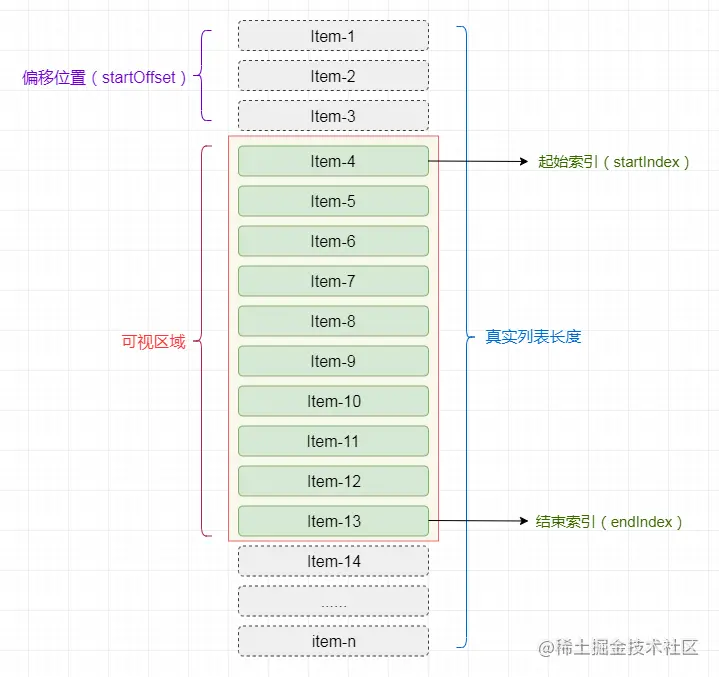
虚拟滚动的核心是只在视口中显示有限数量的元素,其他不在视口中的元素并不渲染在 DOM 中。随着用户滚动,动态更新显示的内容。
- 计算可见区域的元素数量:数据视口、每个数据项都得有高度,根据视口高度和每个元素的高度,计算出视口中能显示的最大元素数量(visibleItemsCount)
- 取出可见区域数据的开始和结束下标: 根据滚动位置,只渲染可见元素
startIndex = Math.floor(container.scrollTop / itemHeight);
endIndex = startIndex + visibleItemsCount; - 产生滚动条:使用一个内容容器来产生高度,以便能让最外层的容器出现滚动条,内容容器的高度为每个数据项高度*数据条数
- 动态渲染:根据滚动位置,只渲染可见元素
- 可见数据项与滚动条的位置同步: 需要设置可视区域内每个元素项相对于内容容器的偏移量,以实现跟滚动条位置同步
itemDomOffset = (startIndex + itemIndex) * itemHeight; ![]()
dom结构:
<div id="scroll-container" style="height: 300px; overflow-y: auto; position: relative;">
    <div id="scroll-content" style="position: relative; width: 100%;"></div>
</div>
scroll-container是用于滚动的容器,设置height和overflow-y: auto,保证出现滚动条。scroll-content是内容容器,用来设置整体高度以支持滚动效果。
javascript代码:
const container = document.getElementById("scroll-container");
const content = document.getElementById("scroll-content");
const data = Array.from({length:100}).map((v,i)=>`第${i+1}项`);
const itemHeight = 30; // 每个项的高度
const totalItems = data.length; // 列表中的总项数
const visibleItemsCount = Math.ceil(container.clientHeight / itemHeight) + 1; // 可视区域最多能显示的项数,+1是为了预防最后一个项可能只有部分可见(即一部分处于容器内,另一部分被滚动条挡住)
// 设置内容容器的总高度,使container能出现滚动条
content.style.height = `${totalItems * itemHeight}px`;
function updateVisibleItems(){
    const startIndex = Math.floor(container.scrollTop / itemHeight);
    const endIndex = startIndex + visibleItemsCount;
    if(endIndex > totalItems) return;
    const items = data.slice(startIndex,endIndex);
    const dataDom = document.createDocumentFragment();
    items.forEach((item,itemIndex) => {
        const itemDom = document.createElement("div");
        //每个数据项的偏移量.
        const itemDomOffset = (startIndex + itemIndex) * itemHeight;
        itemDom.style.cssText = `
            height:${itemHeight}px;
            position:absolute;
            top:0;
            left:0;
            transform:translateY(${itemDomOffset}px)
        `;
        itemDom.textContent = `${item}`;
        dataDom.appendChild(itemDom);
    })
    //清除上一次的内容
    content.innerHTML = ``;
    content.appendChild(dataDom);
}
// 监听滚动事件
container.addEventListener("scroll", updateVisibleItems);
// 初始化可视区域内容
updateVisibleItems();
高度不固定的虚拟滚动
1. 假设每条数据的高度一致
算出视窗的高度和每个元素的高度,然后就能得出可渲染的条数。
2. 缓存每条数据的 top、bottom 和 height
height 是元素的高度。topbottom 表示元素底部的位置,bottom = top + height
在虚拟滚动中,我们需要缓存这些信息,以便在滚动时能够快速判断哪些元素是可见的。
3. 开始下标和结束下标的计算
-
开始下标:通过与当前
scrollTop对比,计算出哪些元素处于可见区域。通常,开始下标是从scrollTop所在位置开始,根据元素的top和bottom来判断。可以通过二分查找或者简单的线性查找来得到开始下标。-
条件:
top <= scrollTop <= bottom,这意味着元素的top在当前视口内,或者scrollTop在元素的top和bottom之间。
-
-
结束下标:结束下标一般是
开始下标 + 可见条数,即从开始下标开始加载一定数量的元素。
4. 动态更新每条数据的实际布局
-
在首次渲染后滚动完成渲染后,计算并更新每个元素的
top、bottom和height。
5. 添加上下内边距(padding)
为了模拟滚动条滚动后的效果,我们需要给容器添加上下内边距,以便给容器的高度和滚动行为创建“虚拟的”空间。这样做的目的是避免直接渲染所有的数据,而是根据当前可见区域来动态渲染和更新元素,提升性能。
-
上内边距:设置为从容器顶部到第一个可见元素
top的距离。 -
下内边距:设置为容器底部到最后一个可见元素
bottom的距离。
6. 示例说明:
-
假设每个元素的高度是 30px,容器高度是 300px。
-
当前滚动位置
scrollTop为 100px。 -
容器内最多可以展示 10 个元素(300px / 30px)。
-
通过对比
top和bottom的值,可以判断哪些元素是当前可见的,并且可以计算出开始和结束的下标。
假设第 4 个元素的 top = 120px,bottom = 150px,height = 30px,在 scrollTop = 100px 时,这个元素就会出现在可视区域。
<!DOCTYPE html>
<html lang="en">
  <head>
    <meta charset="UTF-8" />
    <meta http-equiv="X-UA-Compatible" content="IE=edge" />
    <meta name="viewport" content="width=device-width, initial-scale=1.0" />
    <title>虚拟滚动加载不等高列表</title>
    <style>
      * {
        margin: 0;
        padding: 0;
      }
      button {
        width: 100px;
        margin: 20px 0 0 50px;
      }
      #masks {
        position: relative;
        width: 500px;
        height: 750px;
        margin: 20px 50px;
        overflow: auto;
        border: 1px solid #666;
      }
      .ulBox {
        height: 100%;
      }
      .listInner li {
        list-style: none;
        border-bottom: 1px solid #ccc;
        padding: 5px 10px;
        word-wrap: break-word;
      }
    </style>
  </head>

  <body>
    <button id="jump">跳转第666行</button>
    <div class="pdf-main" id="masks">
      <div class="ulBox">
        <ul class="listInner">
          <!-- 加载数据 -->
        </ul>
      </div>
    </div>
    <script>
      function generateRandomString(x, y) {
        // 生成随机长度
        const length = getRandomNumber(x, y);
        const characters =
          "ABCDEFGHIJKLMNOPQRSTUVWXYZabcdefghijklmnopqrstuvwxyz0123456789";
        let result = "";
        const charactersLength = characters.length;
        // 生成随机字符串
        for (let i = 0; i < length; i++) {
          result += characters.charAt(
            Math.floor(Math.random() * charactersLength)
          );
        }
        return result;
      }

      function getRandomNumber(x, y) {
        return Math.floor(Math.random() * (y - x + 1)) + x;
      }

      class VirtualScroll {
        constructor(containerSelector, maskSelector, data) {
          // 初始化参数
          this.tableData = data || [];
          this.rowPosList = [];
          this.minSize = 25;
          this.viewCount = 0;
          this.bufferSize = 6;
          this.bufferSizeViewCount = 0;
          this.maskDom = document.getElementById(maskSelector);
          this.listInnerDom = document.querySelector(containerSelector);
          this.domScrollTop = 0;
          this.requestId = null;
          this.startBufferIndex = -1;
          this.endBufferIndex = -1;
          this.oldFirstIndex = 0;
          this.showTableDataList = [];

          // 生成每行的位置信息
          this.generateRowPosList();

          // 设置视图的显示条数
          this.viewCount = Math.ceil(this.maskDom.clientHeight / this.minSize);
          this.bufferSizeViewCount = this.viewCount + this.bufferSize * 2;

          // 初始渲染
          this.autoSizeVirtualList(0);
        }

        // 随机生成位置缓存
        generateRowPosList() {
          let topNum = 0;
          let bottomNum = 0;
          const height = this.minSize;

          this.tableData.forEach((_, index) => {
            topNum = index === 0 ? 0 : topNum + height;
            bottomNum = topNum + height;
            this.rowPosList.push({
              index,
              height,
              top: topNum,
              bottom: bottomNum,
              isUpdate: false,
            });
          });
        }

        // 更新渲染的数据
        autoSizeVirtualList(scrollTop, jumpRow_no) {
          const startIndex =
            jumpRow_no !== undefined
              ? jumpRow_no
              : this.findItemIndex(scrollTop);
          const endIndex = Math.min(
            this.tableData.length - 1,
            startIndex + this.viewCount
          );
          let dataChange = false;

          if (
            endIndex > 0 &&
            (startIndex < this.startBufferIndex ||
              endIndex > this.endBufferIndex)
          ) {
            this.startBufferIndex = Math.max(0, startIndex - this.bufferSize);
            this.endBufferIndex = Math.min(
              this.tableData.length - 1,
              endIndex + this.bufferSize
            );

            this.showTableDataList = [];
            const documentFragment = document.createDocumentFragment();

            for (let i = this.startBufferIndex; i <= this.endBufferIndex; i++) {
              const item = this.tableData[i];
              const rectBox = this.rowPosList[i];
              this.showTableDataList.push({ item, rectBox });

              const htmlText = `<li class='liText' rowindex='${item.index}'>序号:${item.index},内容:${item.text}</li>`;
              const tempElement = document.createElement("template");
              tempElement.innerHTML = htmlText;
              [...tempElement.content.children].forEach((el) =>
                documentFragment.appendChild(el)
              );
            }

            this.listInnerDom.innerHTML = "";
            this.listInnerDom.appendChild(documentFragment);
            dataChange = true;
          }

          if (dataChange) {
            this.upCellMeasure();
          }

          if (jumpRow_no !== undefined) {
            this.maskDom.scrollTop = this.rowPosList[jumpRow_no].top;
          }

          this.domScrollTop = this.maskDom.scrollTop;
          this.requestId = null;
        }

        // 二分查找当前元素
        findItemIndex(scrollTop) {
          let low = 0;
          let high = this.rowPosList.length - 1;
          while (low <= high) {
            const mid = Math.floor((low + high) / 2);
            const { top, bottom } = this.rowPosList[mid];

            if (scrollTop >= top && scrollTop <= bottom) {
              high = mid;
              break;
            } else if (scrollTop > bottom) {
              low = mid + 1;
            } else if (scrollTop < top) {
              high = mid - 1;
            }
          }
          return high;
        }

        // 更新每个行的位置信息
        upCellMeasure() {
          const rowList = this.listInnerDom.querySelectorAll(".liText");
          if (rowList.length === 0) return;

          const firstIndex = this.startBufferIndex;
          const lastIndex = this.endBufferIndex;
          let hasChange = false;
          let dHeight = 0;

          rowList.forEach((rowItem, index) => {
            const rowIndex = rowItem.getAttribute("rowindex");
            const rowPosItem = this.rowPosList[rowIndex];
            const prevRowPosItem = this.rowPosList[rowIndex - 1];

            if (
              rowPosItem &&
              (!rowPosItem.isUpdate ||
                (prevRowPosItem &&
                  prevRowPosItem.top + prevRowPosItem.height !==
                    rowPosItem.top))
            ) {
              const rectBox = rowItem.getBoundingClientRect();
              const top = prevRowPosItem ? prevRowPosItem.bottom : 0;
              const height = rectBox.height;
              dHeight += height - rowPosItem.height;

              Object.assign(this.rowPosList[rowIndex], {
                height,
                top,
                bottom: top + height,
                isUpdate: true,
              });

              hasChange = true;
            }
          });

          if (hasChange) {
            for (let i = lastIndex + 1; i < this.rowPosList.length; i++) {
              const prevRowPosItem = this.rowPosList[i - 1];
              const top = prevRowPosItem ? prevRowPosItem.bottom : 0;

              Object.assign(this.rowPosList[i], {
                top,
                bottom: top + this.rowPosList[i].height,
              });
            }
          }

          const startOffset = this.rowPosList[this.startBufferIndex].top;
          const endOffset =
            this.rowPosList[this.rowPosList.length - 1].bottom -
            this.rowPosList[this.endBufferIndex].bottom;
          this.listInnerDom.style.setProperty(
            "padding",
            `${startOffset}px 0 ${endOffset}px 0`
          );

          this.oldFirstIndex = firstIndex;
        }

        // 滚动加载数据
        myScroll() {
          if (this.requestId) return;

          this.requestId = requestAnimationFrame(() => {
            const scrollTop = this.maskDom.scrollTop;
            const lastItem = this.tableData[this.tableData.length - 1];
            const lastShowItem =
              this.showTableDataList[this.showTableDataList.length - 1].item;

            if (
              lastItem.index === lastShowItem.index &&
              scrollTop >= this.domScrollTop
            ) {
              this.requestId = null;
              return;
            }

            this.domScrollTop = scrollTop;
            this.autoSizeVirtualList(scrollTop);
          });
        }

        // 跳转到指定行
        jumpRow(jumpRow_no) {
          this.autoSizeVirtualList(undefined, jumpRow_no);
        }
      }

      // 使用示例:
      const tableData = Array.from({ length: 1000 }, (_, index) => ({
        index,
        text: generateRandomString(20, 300),
      }));
      const virtualScroll = new VirtualScroll(".listInner", "masks", tableData);

      document.getElementById("masks").addEventListener("scroll", () => virtualScroll.myScroll());
      document.getElementById('jump').addEventListener('click',()=>virtualScroll.jumpRow(666));
    </script>
  </body>
</html>

 浙公网安备 33010602011771号