Spring
Spring

一、Spring Framework简介
Spring Framework是一个开源的Java/Java EE全功能栈(full-stack)的应用程序框架,以Apache License 2.0开源许可协议的形式发布,也有.NET平台上的移植版本。该框架基于 Expert One-on-One Java EE Design and Development(ISBN 0-7645-4385-7)一书中的代码,最初由Rod Johnson和Juergen Hoeller等开发。Spring Framework提供了一个简易的开发方式,这种开发方式,将避免那些可能致使底层代码变得繁杂混乱的大量的属性文件和帮助类。
1.Spring中包含的关键特性:
- 强大的基于JavaBeans的采用控制反转(Inversion of Control,IoC)原则的配置管理,使得应用程序的组建更加快捷简易。
- 一个可用于Java EE等运行环境的核心Bean工厂
- 数据库事务的一般化抽象层,允许声明式(Declarative)事务管理器,简化事务的划分使之与底层无关
- 内建的针对JTA和单个JDBC数据源的一般化策略,使Spring的事务支持不要求Java EE环境,这与一般的JTA或者EJB CMT相反
- JDBC 抽象层提供了有针对性的异常等级(不再从SQL异常中提取原始代码),简化了错误处理,大大减少了程序员的编码量。再次利用JDBC时,你无需再写出另一个'终止'(finally)模块。并且面向JDBC的异常与Spring通用数据访问对象(Data Access Object)异常等级相一致
- 以资源容器,DAO实现和事务策略等形式与Hibernate,JDO和MyBatis、SQL Maps集成。利用众多的翻转控制方便特性来全面支持,解决了许多典型的Hibernate集成问题。所有这些全部遵从 Spring 通用事务处理和通用数据访问对象异常等级规范
- 灵活的基于核心 Spring 功能的MVC网页应用程序框架。开发者通过策略接口将拥有对该框架的高度控制,因而该框架将适应于多种呈现(View)技术,例如JSP、FreeMarker、Velocity、Thymeleaf 等。值得注意的是,Spring 中间层可以轻易地结合于任何基于MVC框架的网页层,例如Struts、WebWork或Tapestry
- 提供诸如事务管理等服务的AOP框架
- 在设计应用程序 Model 时,MVC模式(例如Struts)通常难于给出一个简洁明了的框架结构。Spring 却具有能够让这部分工作变得简单的能力。程序开发员们可以使用Spring的JDBC抽象层重新设计那些复杂的框架结构
2.Spring的优势
- 方便解耦,简化开发:通过Spring提供的IoC容器,我们可以将对象之间的依赖关系交由Spring进行控制,避免硬编码所造成的过度程序耦合。有了Spring,用户不必再为单实例模式类、属性文件解析等这些很底层的需求编写代码,可以更专注于上层的应用。
- AOP编程的支持:通过Spring提供的AOP功能,方便进行面向切面的编程,许多不容易用传统OOP实现的功能可以通过AOP轻松应付。
- 声明式事务的支持:在Spring中,我们可以从单调烦闷的事务管理代码中解脱出来,通过声明式方式灵活地进行事务的管理,提高开发效率和质量。
- 方便程序的测试:可以用非容器依赖的编程方式进行几乎所有的测试工作,在Spring里,测试不再是昂贵的操作,而是随手可做的事情。例如:Spring对Junit4支持,可以通过注解方便的测试Spring程序。
- 方便集成各种优秀框架:Spring不排斥各种优秀的开源框架,相反,Spring可以降低各种框架的使用难度,Spring提供了对各种优秀框架(如Struts,Hibernate、Hessian、Quartz)等的直接支持。
- 降低Java EE API的使用难度:Spring对很多难用的Java EE API(如JDBC,JavaMail,远程调用等)提供了一个薄薄的封装层,通过Spring的简易封装,这些Java EE API的使用难度大为降低。
- 源码是经典学习范例:Spring的源码设计精妙、结构清晰、匠心独运,处处体现着大师对Java设计模式灵活运用以及对Java技术的高深造诣。Spring框架源码无疑是Java技术的最佳实践范例。如果想在短时间内迅速提高自己的Java技术水平和应用开发水平,学习和研究Spring源码将会使你收到意想不到的效果。
二、Spring项目环境的搭建
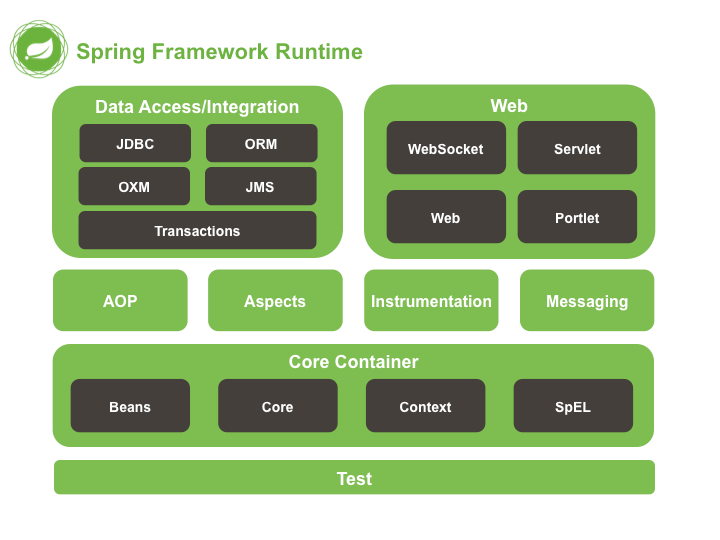
1.搭建最基础的Spring环境
(1)导包
导入上图中Core Container中的四个分类对应的jar包

另外还有日志jar包
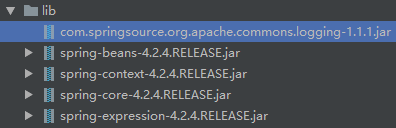
若在web应用下使用Spring,还需要导入如下这个包(具体见文末)

(2)准备测试的实体类
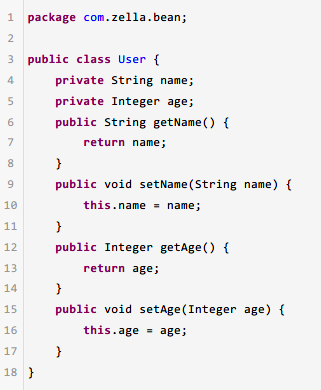
(3)创建并配置applicationContext.xml文件
Spring的配置文件是可以在任意路径下以任意方式命名的,但一般创建在src下用applicationContext.xml这个命名方式。
注意要引入约束,具体方法自查
下面是配置文件的内容
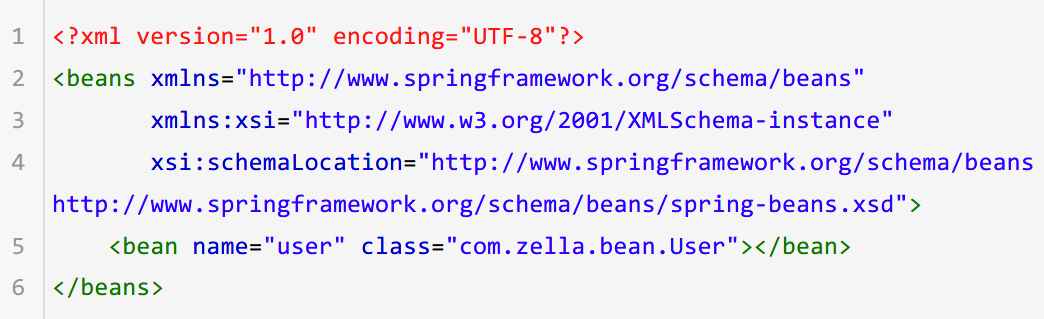
(4)测试
测试代码如下

控制台显示

三、Spring框架涉及到的概念
1.IoC(Inversion of Control控制反转)
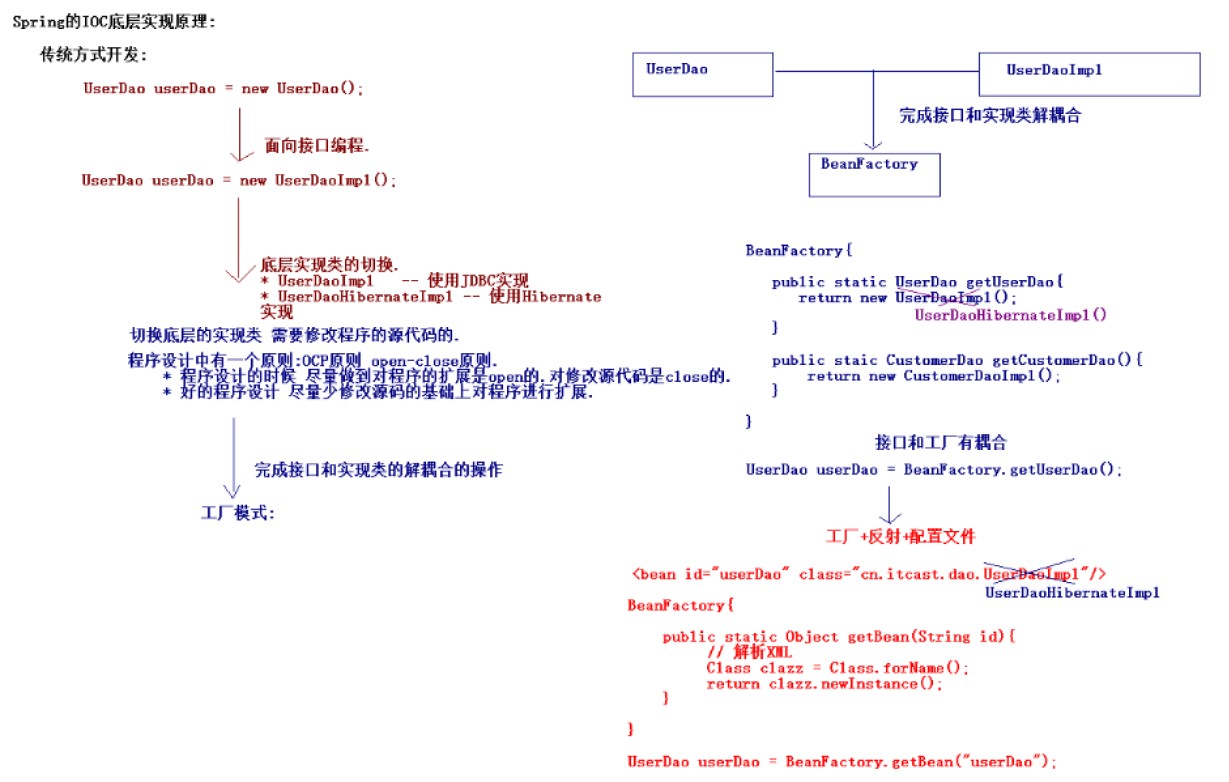
*更详细的内容参考附件图IoC.png或自查
1.1 IoC是什么
Ioc—Inversion of Control,即“控制反转”,不是什么技术,而是一种设计思想。在Java开发中,Ioc意味着将你设计好的对象交给容器控制,而不是传统的在你的对象内部直接控制。如何理解好Ioc呢?理解好Ioc的关键是要明确“谁控制谁,控制什么,为何是反转(有反转就应该有正转了),哪些方面反转了”,那我们来深入分析一下:
- 谁控制谁,控制什么:传统Java SE程序设计,我们直接在对象内部通过new进行创建对象,是程序主动去创建依赖对象;而IoC是有专门一个容器来创建这些对象,即由IoC容器来控制对象的创建;谁控制谁?当然是IoC容器控制了对象;控制什么?那就是主要控制了外部资源获取(不只是对象包括比如文件等)。
- 为何是反转,哪些方面反转了:有反转就有正转,传统应用程序是由我们自己在对象中主动控制去直接获取依赖对象,也就是正转;而反转则是由容器来帮忙创建及注入依赖对象;为何是反转?因为由容器帮我们查找及注入依赖对象,对象只是被动的接受依赖对象(被注入),所以是反转;哪些方面反转了?依赖对象的获取被反转了。
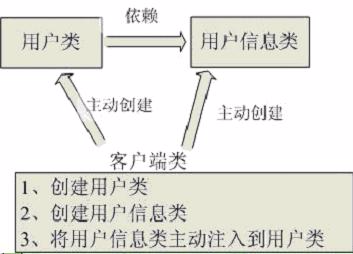

上图左边是控制“正转”,右边是控制反转
1.2 IoC能做什么
IoC 不是一种技术,只是一种思想,一个重要的面向对象编程的法则,它能指导我们如何设计出松耦合、更优良的程序。传统应用程序都是由我们在类内部主动创建依赖对象,从而导致类与类之间高耦合,难于测试;有了IoC容器后,把创建和查找依赖对象的控制权交给了容器,由容器进行注入组合对象,所以对象与对象之间是 松散耦合,这样也方便测试,利于功能复用,更重要的是使得程序的整个体系结构变得非常灵活。
其实IoC对编程带来的最大改变不是从代码上,而是从思想上,发生了“主从换位”的变化。应用程序原本是老大,要获取什么资源都是主动出击,但是在IoC/DI思想中,应用程序就变成被动的了,被动的等待IoC容器来创建并注入它所需要的资源了。
IoC很好的体现了面向对象设计法则之一—— 好莱坞法则:“别找我们,我们找你”;即由IoC容器帮对象找相应的依赖对象并注入,而不是由对象主动去找。
2.DI(Dependency Injection依赖注入)
2.1 DI与IoC
DI—Dependency Injection,即“依赖注入”:组件之间依赖关系由容器在运行期决定,形象的说,即由容器动态的将某个依赖关系注入到组件之中。依赖注入的目的并非为软件系统带来更多功能,而是为了提升组件重用的频率,并为系统搭建一个灵活、可扩展的平台。通过依赖注入机制,我们只需要通过简单的配置,而无需任何代码就可指定目标需要的资源,完成自身的业务逻辑,而不需要关心具体的资源来自何处,由谁实现。
理解DI的关键是:“谁依赖谁,为什么需要依赖,谁注入谁,注入了什么”,那我们来深入分析一下:
- 谁依赖于谁:当然是应用程序依赖于IoC容器;
- 为什么需要依赖:应用程序需要IoC容器来提供对象需要的外部资源;
- 谁注入谁:很明显是IoC容器注入应用程序某个对象,应用程序依赖的对象;
- 注入了什么:就是注入某个对象所需要的外部资源(包括对象、资源、常量数据)。
IoC和DI由什么关系呢?其实它们是同一个概念的不同角度描述,由于控制反转概念比较含糊(可能只是理解为容器控制对象这一个层面,很难让人想到谁来维护对象关系),所以2004年大师级人物Martin Fowler又给出了一个新的名字:“依赖注入”,相对IoC 而言,“依赖注入”明确描述了“被注入对象依赖IoC容器配置依赖对象”。
简单来说就是IoC思想需要用DI技术来支持。
比如对象A需要操作数据库,以前我们总是要在A中自己编写代码来获得一个Connection对象,有了 spring我们就只需要告诉spring,A中需要一个Connection,至于这个Connection怎么构造,何时构造,A不需要知道。在系统运行时,spring会在适当的时候制造一个Connection,然后像打针一样,注射到A当中,这样就完成了对各个对象之间关系的控制。A需要依赖 Connection才能正常运行,而这个Connection是由spring注入到A中的,依赖注入的名字就这么来的。
那么DI是如何实现的呢? Java 1.3之后一个重要特征是反射(reflection),它允许程序在运行的时候动态的生成对象、执行对象的方法、改变对象的属性,spring就是通过反射来实现注入的。
2.2 具体到Spring的依赖注入
(1)注入方式
- set方法注入
- 构造方法注入
- 字段注入
(2)注入类型
- 值类型注入(八大基本数据类型)
- 引用类型注入(依赖对象的注入)
2.ApplicationContext与BeanFactory
ApplicationContext和BeanFactory都是Spring中的工厂(容器)
其具体实现树如下
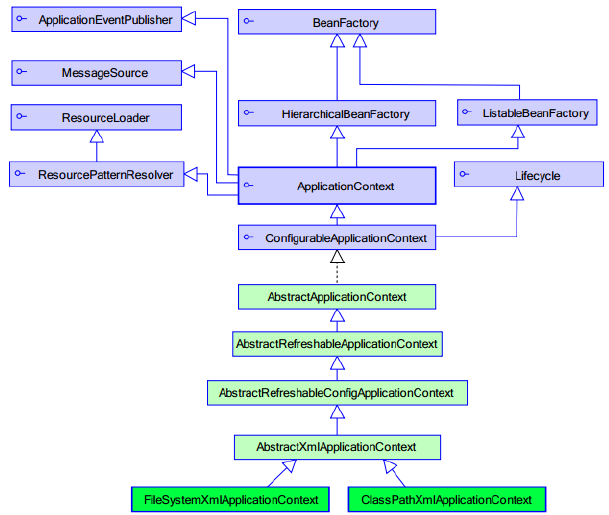
BeanFactory接口是Spring的最原始(顶级)接口,针对原始接口的实现类功能较为单一。实现这个接口的容器类的特点是在每次获得对象时才会创建对象,而ApplicationContext的特点是在容器启动时就会创建容器中配置的所有对象,并提供比BeanFactory容器更多的功能。
在资源匮乏的环境下可以使用BeanFactory容器,但Web开发中主要还是使用ApplicationContext容器。
关于ApplicationContext,主要有两个实用实现类,如下图:

四、Spring的配置详解
1.Bean元素
使用该属性描述需要交由Spring容器管理的对象,有以下几个属性:
- class属性:被管理对象的完整类名
- name属性:被管理的对象的标识名字,具体为向Spring获取对象时需要提供的字符串
- 可以重复,可以使用特殊字符,但不建议使用重复的name
- 可以设置多个name获取内部封装不同属性的同类对象(如定义name为user1的User对象其属性name属性配置注入为'zhangsan',定义name为user2的User对象其name属性配置注入为'lisi')
- id属性:与name属性基本一样
- 不可以重复,不可使用特殊字符
- scope属性:(部分值如下)(进阶)
- singleton(默认值):单例对象,被标识为单例的对象在Spring容器中仅存在一个实例,大多数对象交由Spring管理使用默认值即可
- prototype(单词本义是“原型;蓝本”):多例对象,每次再获取时才创建,创建的都是新的对象,对于Struts中的action对象,应该配置scope为prototype
- request:web环境下对象与request生命周期一致
- session:web环境下对象与session生命周期一致
- 生命周期属性:可以用于配置初始化方法或销毁方法(这两个方法在实体类中定义)
- init-metod属性:Spring会在创建对象之后立即调用初始化方法
- destory-method属性:在关闭容器并销毁所有容器中的对象前会调用销毁方法
- 注意:生命周期属性仅对单例(singleton)作用域(即scope属性)有效(未完全确认是这样)
结论是一般使用name属性配置标识名
2.对象被创建方式的配置(Spring生成Bean的三种方式)
Spring为我们创建对象的方式有以下几种:
(1)空参构造方法创建对象方式

这个方式最常用
(2)静态工厂创建方式
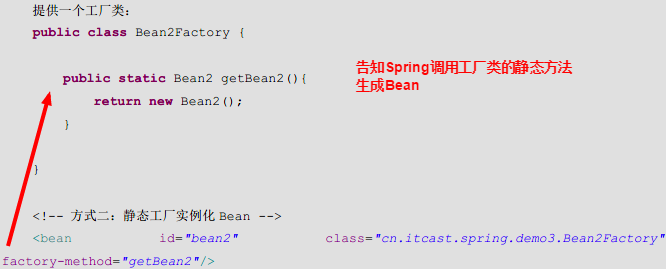
调用的是静态方法,所以不需要将工厂类配置为Bean
(3)实例工厂实例化的方式


配置上需要将工厂类作为Bean配置到配置文件里
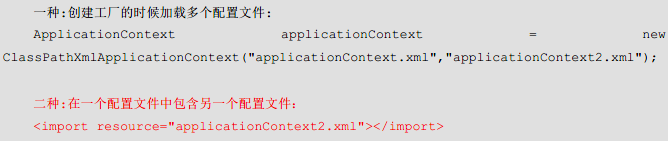
3.模块化配置
若对象数目非常多时,将所有Bean配置在一个配置文件里会使配置文件非常臃肿
为解决这个问题,可以使用分模块配置,在一个主配置文件中引入其他配置文件
使用import元素导入其他Spring配置文件,如下![]()
![]()

4.属性注入配置
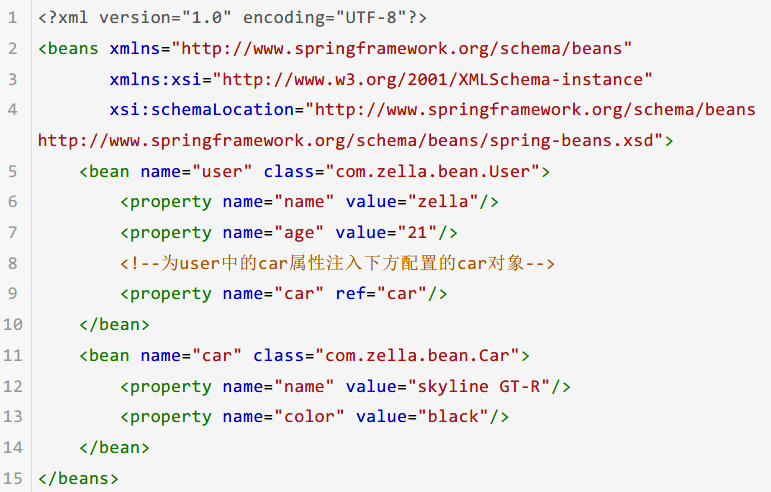
(1)set方法注入
配置文件如下
src/ApplicationContext.xml
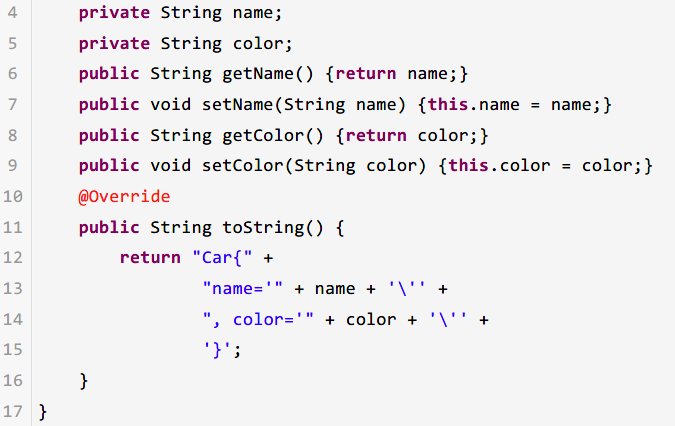
实体类如下

控制台输出如下

结论:值注入用value属性,对象注入用ref
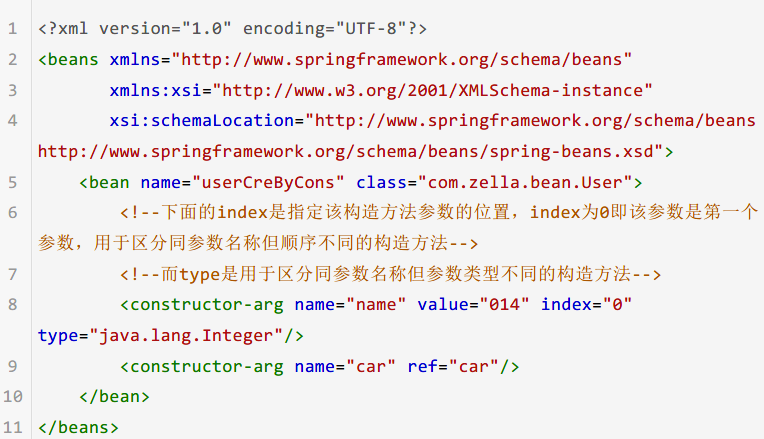
(2)构造函数注入
com/zella/c_injection/applicationContext.xml
实体类如下
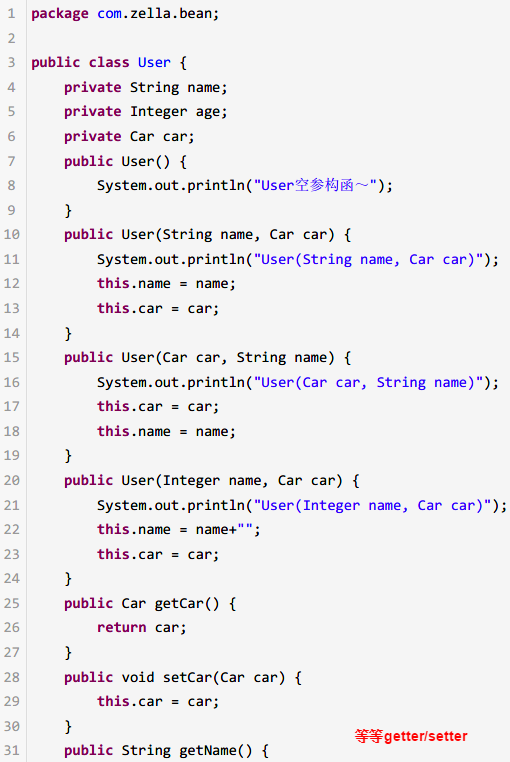
Car实体代码一样,见前文
测试代码如下
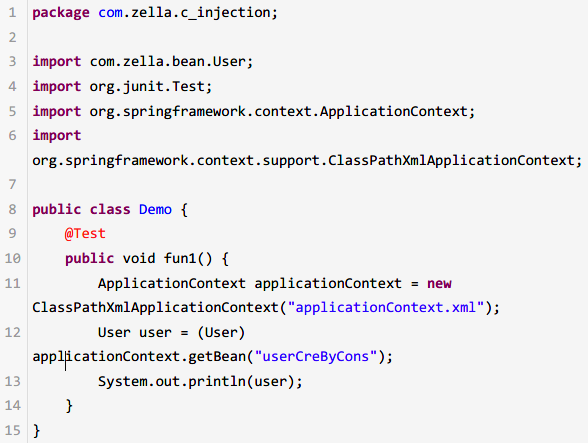
其中要注意index属性(参数索引)、type属性(参数类型)加上name属性(参数变量名)及其个数,就有定位到唯一的构造方法
(3)p名称空间注入
(4)spel注入
(5)复杂类型注入
array数组注入

list列表注入

map映射注入
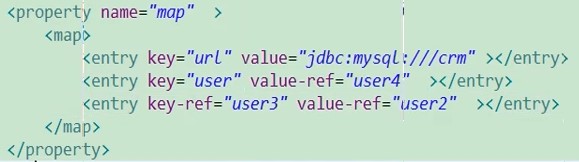
property类型
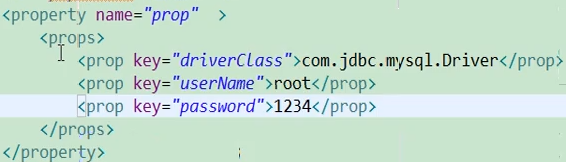
余下几种注入方式仅作了解,具体见附件pdf
五、使用注解配置Spring
实际上Struts、Hibernate都可以使用注解来配置(jdk5的特性),但实际开发中不常用,而Spring则是使用注解最多的一个框架,可以在在类中用注解配置这个类作为Spring的Component被Spring管理。
1.步骤
(1)导入Spring的aop包并为配置文件引入名称空间
需要导入Spring的aop包,如下

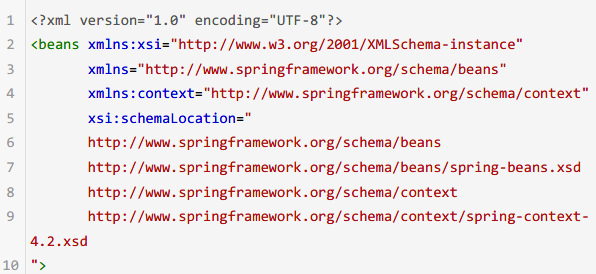
使用注解来配置Spring需要为主配置文件引入额外的命名空间(即约束)
*idea引入dtd约束的方法自查
引入后配置文件头部如下
src/applicationContext.xml
(2)配置开启注解代替配置文件——“打开注解代替配置的功能开关”

(3)在需要被Spring管理的类中使用注解完成配置
在这个类的类名前加@Component("name")注解
(4)完成
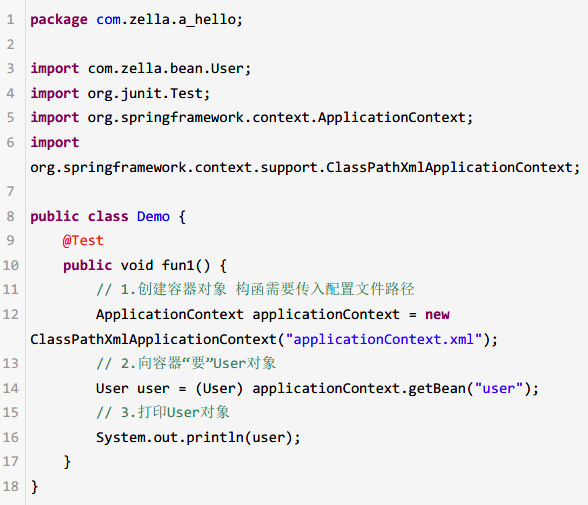
此时可以使用同样的方法获取对象,例如:
2.Service、Controller和Repository注解

为了区分不同功能的对象的注解配置,Spring提供名称不同的注解,实际上功能完全一致
推荐使用下面三个,使项目分层逻辑更明晰
3.Spring的常用注解
- @Configuration把一个类作为一个IoC容器,它的某个方法头上如果注册了@Bean,就会作为这个Spring容器中的Bean。
- @Scope:作用域
- @Lazy(true) 表示延迟初始化
- @Service用于标注业务层组件
- @Controller用于标注控制层组件(如struts中的action)
- @Repository用于标注数据访问组件,即DAO组件
- @Component泛指组件,当组件不好归类的时候,我们可以使用这个注解进行标注
- @Scope用于指定scope作用域的(用在类上)
- @PostConstruct用于指定初始化方法(用在方法上)
- @PreDestory用于指定销毁方法(用在方法上)
- @DependsOn:定义Bean初始化及销毁时的顺序
- @Primary:自动装配时当出现多个Bean候选者时,被注解为@Primary的Bean将作为首选者,否则将抛出异常
- @Autowired 默认按类型装配,如果我们想使用按名称装配,可以结合@Qualifier注解一起使用。如下:
- @Autowired @Qualifier("personDaoBean") 存在多个实例配合使用
- 使用@Autowired注解可以不提供set方法直接注入属性
- @Resource默认按名称装配,当找不到与名称匹配的bean才会按类型装配
- @PostConstruct 初始化注解
- @PreDestroy 摧毁注解 默认 单例 启动就加载
- @Async异步方法调用
具体使用方法自查
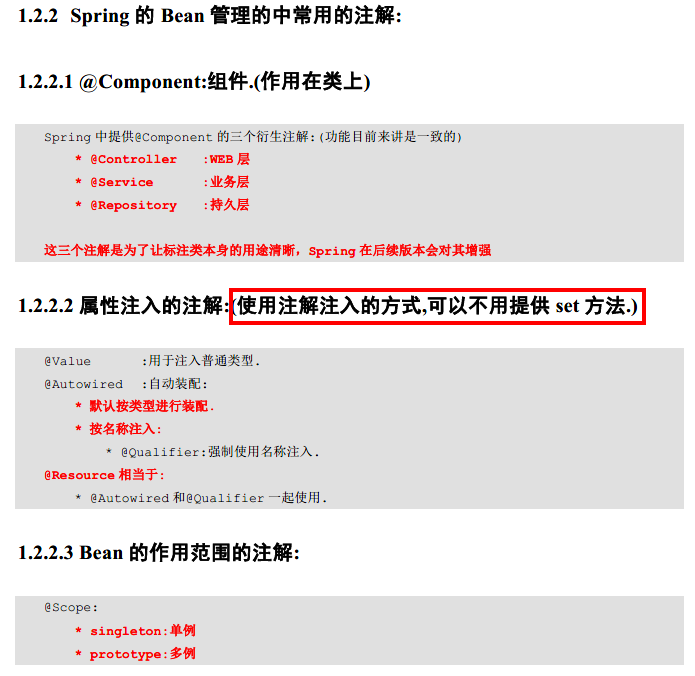

 在写注解时若只有一个值,可以省略key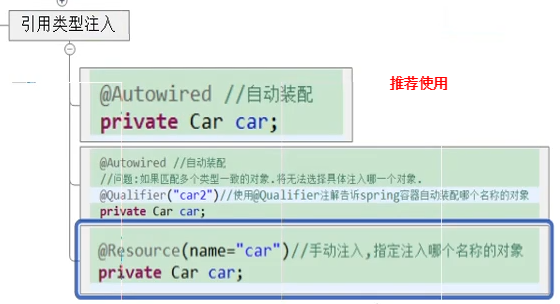

至此,可以在所有想要用Spring来为你注入属性/对象的位置使用注解来告知Spring需要注入的内容(不仅是Bean实体类,在分层开发中的所有地方都可以使用Spring的注解注入)
六、Spring中的AOP(Aspect Oriented Programming面向切面编程)
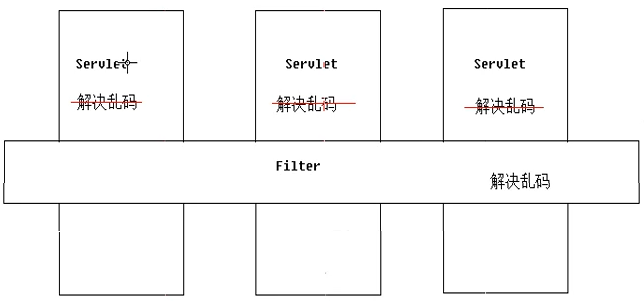
AOP思想提炼:“横向重复,纵向抽取”
典型例子如下


!动态代理的本质我个人理解就是让JDK或其他库帮你写你静态代理本应写入的代码(每个方法都增强的话需要往每个方法中都写入增强功能,若功能重复,则浪费代码量),其实相当于写一个for循环把每个方法都增强一次,当然编程语言没有这样的修改源码的特性,所以编写看似不那么直接的代理的代码实际上就是在编写这个“for循环”(曲线救国),使jvm在运行时获取这个类的内容并动态创建一个代理类来完成,这个动态创建的过程就是“for循环遍历”增强各个方法的过程,JDK的动态代理是创建一个实现相同接口的对象来提供/生成代理对象(即包装被代理对象之后生成的代理对象),而CGLIB的动态代理是创建一个被代理类的子类来提供/生成代理对象,只是实现方式和效率有所不同,思想是完全相同的。两种实现方式在本质上并没有高下之分,是两个不同团队实现一个方案的不同实现而已。补充:CGLIB创建子类来生成代理对象能做一些JDK动态代理做不到的事情,具体此处不表。
1.Spring中AOP的概念
Spring可以为容器中被管理的对象生成动态代理对象,以往需要调用Proxy.newProxyInstance(p1,p2,p3)来生成代理对象,使用Spring可以直接配置/使用注解来生成动态代理对象。
简单来说Spring对我们使用动态代理技术提供了支持,使开发更简便。
2.Spring实现AOP的原理
Spring使用的动态代理方式是混合的,若目标类有实现接口,则使用JDK的动态代理,否则使用CGLIB动态代理
(1)动态代理(JDK)
要求目标对象/被代理对象必须实现某个接口才可以产生代理对象
代码自查
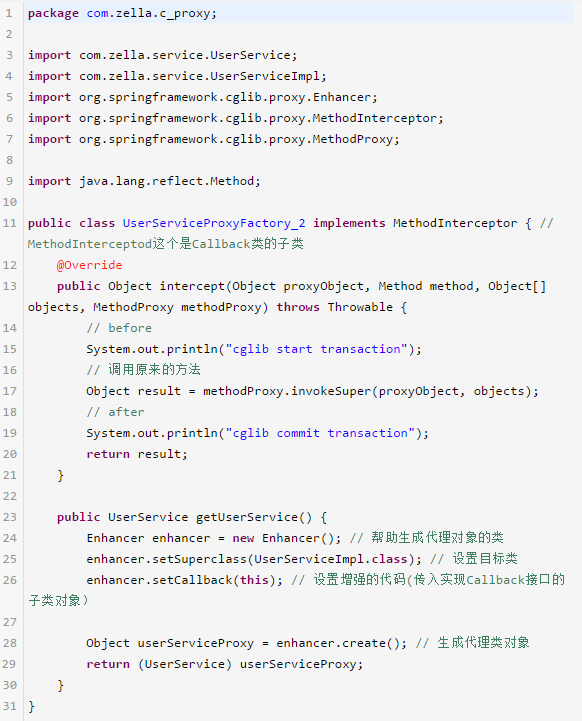
(2)CGLIB(Code Generation Library)动态代理
是第三方的代理技术,可以对任何类(除被final修饰的类)生成代理对象(不要求目标对象实现某个接口),原理是继承目标对象动态创建子类对象。
示例代码如下
3.AOP相关术语
- Joinpoint(连接点):所谓连接点是指那些被拦截到的点。在spring中,这些点指的是方法,因为spring只支持方法类型的连接点.简单说就是目标类中所有可以被增强的方法
- Pointcut(切入点):所谓切入点是指我们要对哪些Joinpoint进行拦截的定义.简单说就是需要被代理增强的方法(与之相对应的是不需要被增强的方法)
- Advice(通知/增强):所谓通知是指拦截到Joinpoint之后所要做的事情就是通知.通知分为前置通知,后置通知,异常通知,最终通知,环绕通知(切面要完成的功能).简单说就是我们写入的增强代码
- Introduction(引介):引介是一种特殊的通知在不修改类代码的前提下, Introduction可以在运行期为类动态地添加一些方法或Field
- Target(目标对象):代理的目标对象,即被代理对象
- Weaving(织入):是指把增强应用到目标对象来创建新的代理对象的过程.spring采用动态代理织入,而AspectJ采用编译期织入和类装载期织入
- Proxy(代理):一个类被AOP织入增强后,就产生一个结果代理类
- Aspect(切面): 是切入点和通知(引介)的结合

4.配置并使用Spring中的AOP
4.1 准备工作
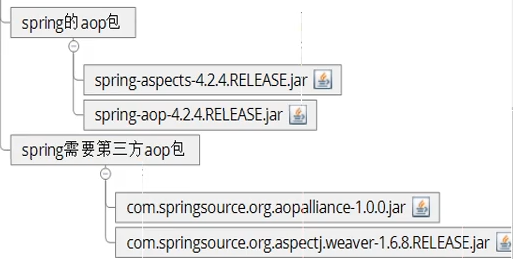
(1)一共需要导入6个包(Spring基础4个包+以下4个包)
(2)准备目标对象
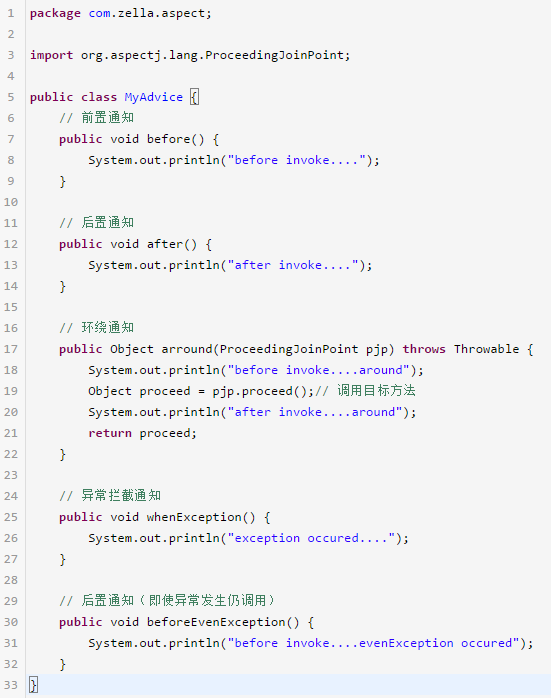
(3)准备advice(通知)
(4)配置进行织入,将通知织入目标对象中
Spring将通知分为了以下五种:
- 前置通知(before):目标方法执行之前调用
- 后置通知(出现异常不调用)(after-returning):在目标方法执行之后调用
- 环绕通知(around):目标方式执行之前和之后都调用,这种通知需要接收一个ProceedingJoinPoint对象来手动调用目标方法
- 异常拦截通知(after-throwing):如果出现异常,则调用
- 后置通知(出现异常仍然调用)(after):在目标方法执行之后调用
实际上这个知识点需要深入理解,自查网络博客
示例代码:(方法名实际上不做要求)
4.2 将写好的通知配置到Spring的配置文件中
完成通知的编写后,就可以将这些同志配置到Spring的配置文件中,Spring会使用动态代理帮我们将通知织入到目标对象
注意,配置文件需要导入新的dtd名称空间:xmlns:aop="http://www.springframework.org/schema/aop"

com/zella/springaop/applicationContext.xml
<?xml version="1.0" encoding="UTF-8"?>
<beans xmlns:xsi="http://www.w3.org/2001/XMLSchema-instance"
       xmlns="http://www.springframework.org/schema/beans"
       xmlns:context="http://www.springframework.org/schema/context"
       xmlns:aop="http://www.springframework.org/schema/aop"
       xsi:schemaLocation="
       http://www.springframework.org/schema/beans
       http://www.springframework.org/schema/beans/spring-beans.xsd
       http://www.springframework.org/schema/context
       http://www.springframework.org/schema/context/spring-context-4.2.xsd
       http://www.springframework.org/schema/aop
       http://www.springframework.org/schema/aop/spring-aop.xsd
">
    <!--配置目标对象-->
    <bean name="userService" class="com.zella.service.UserServiceImpl"></bean>
    <!--配置通知对象-->
    <bean name="myAdvice" class="com.zella.springaop.MyAdvice"></bean>
    <!--配置将通知织入-->
    <aop:config>
        <!--配置切入点
            表达式:execution(public void com.zella.service.UserServiceImpl.add())
            表达式简化1: void com.zella.service.UserServiceImpl.add() 省略public
            表达式简化2:* com.zella.service.UserServiceImpl.add() 用*代替void表示所有类型返回值
            表达式简化3:* com.zella.service.UserServiceImpl.*() 用*代替方法名表示该类下所有方法
            表达式简化4:* com.zella.service.UserServiceImpl.*(..) 用..代替方法的参数,表示对方法参数不作要求
            表达式简化5:* com.zella.service.*ServiceImpl.*(..) 用*缺省表示后缀为ServiceImpl的所有类
            表达式简化6:* com.zella.service..*ServiceImpl.*(..) 用..表示service包下的所有子包中后缀名为ServiceImpl的所有类
        -->
        <aop:pointcut id="pointcut_01" expression="execution(* com.zella.service.*ServiceImpl.*(..))"/>
        <aop:aspect ref="myAdvice">
            <!--指定名为before的方法作为前置通知,切入到pointcut_01这个切入点中-->
            <aop:before method="before" pointcut-ref="pointcut_01"/>
            <aop:around method="arround" pointcut-ref="pointcut_01"/>
        </aop:aspect>
    </aop:config>
</beans>
1
2
<beans xmlns:xsi="http://www.w3.org/2001/XMLSchema-instance"3
xmlns="http://www.springframework.org/schema/beans"4
xmlns:context="http://www.springframework.org/schema/context"5
xmlns:aop="http://www.springframework.org/schema/aop"6
xsi:schemaLocation="7
http://www.springframework.org/schema/beans8
http://www.springframework.org/schema/beans/spring-beans.xsd9
http://www.springframework.org/schema/context10
http://www.springframework.org/schema/context/spring-context-4.2.xsd11
http://www.springframework.org/schema/aop12
http://www.springframework.org/schema/aop/spring-aop.xsd13
">14
<!--配置目标对象-->15
<bean name="userService" class="com.zella.service.UserServiceImpl"></bean>16
<!--配置通知对象-->17
<bean name="myAdvice" class="com.zella.springaop.MyAdvice"></bean>18
<!--配置将通知织入-->19
<aop:config>20
<!--配置切入点21
表达式:execution(public void com.zella.service.UserServiceImpl.add())22
表达式简化1: void com.zella.service.UserServiceImpl.add() 省略public23
表达式简化2:* com.zella.service.UserServiceImpl.add() 用*代替void表示所有类型返回值24
表达式简化3:* com.zella.service.UserServiceImpl.*() 用*代替方法名表示该类下所有方法25
表达式简化4:* com.zella.service.UserServiceImpl.*(..) 用..代替方法的参数,表示对方法参数不作要求26
表达式简化5:* com.zella.service.*ServiceImpl.*(..) 用*缺省表示后缀为ServiceImpl的所有类27
表达式简化6:* com.zella.service..*ServiceImpl.*(..) 用..表示service包下的所有子包中后缀名为ServiceImpl的所有类28
-->29
<aop:pointcut id="pointcut_01" expression="execution(* com.zella.service.*ServiceImpl.*(..))"/>30
<aop:aspect ref="myAdvice">31
<!--指定名为before的方法作为前置通知,切入到pointcut_01这个切入点中-->32
<aop:before method="before" pointcut-ref="pointcut_01"/>33
<aop:around method="arround" pointcut-ref="pointcut_01"/>34
</aop:aspect>35
</aop:config>36
</beans>测试代码如下
package com.zella.springaop;

import com.zella.service.UserService;
import org.junit.Test;
import org.junit.runner.RunWith;
import org.springframework.test.context.ContextConfiguration;
import org.springframework.test.context.junit4.SpringJUnit4ClassRunner;

import javax.annotation.Resource;

@RunWith(SpringJUnit4ClassRunner.class) //这个注解可以帮我们创建Spring容器
@ContextConfiguration("classpath:applicationContext.xml") // 指定创建容器使用的配置文件路径
public class TestMyAdvice {
    @Resource(name="userService")
    private UserService userService;

    @Test
    public void test1() {
        userService.add();
        userService.delete();
        userService.find();
        userService.save();
    }
}
1
package com.zella.springaop;2
3
import com.zella.service.UserService;4
import org.junit.Test;5
import org.junit.runner.RunWith;6
import org.springframework.test.context.ContextConfiguration;7
import org.springframework.test.context.junit4.SpringJUnit4ClassRunner;8
9
import javax.annotation.Resource;10
11
(SpringJUnit4ClassRunner.class) //这个注解可以帮我们创建Spring容器12
("classpath:applicationContext.xml") // 指定创建容器使用的配置文件路径13
public class TestMyAdvice {14
(name="userService")15
private UserService userService;16
17
18
public void test1() {19
userService.add();20
userService.delete();21
userService.find();22
userService.save();23
}24
}4.3 使用注解配置AOP(了解)
关于AfterReturning
一个简单的示例如下:使用@AfterReturning注解可指定如下两个常用属性。
1)pointcut/value:这两个属性的作用是一样的,它们都属于指定切入点对应的切入表达式。一样既可以是已有的切入点,也可直接定义切入点表达式。当指定了pointcut属性值后,value属性值将会被覆盖。
2)returning:该属性指定一个形参名,用于表示Advice方法中可定义与此同名的形参,该形参可用于访问目标方法的返回值。除此之外,在Advice方法中定义该形参(代表目标方法的返回值)时指定的类型,会限制目标方法必须返回指定类型的值或没有返回值。
package com.zella.annotationaop;

import org.aspectj.lang.ProceedingJoinPoint;
import org.aspectj.lang.annotation.*;
import org.springframework.stereotype.Component;

@Component("myAdvice")
@Aspect // 用Aspect注解表示这个类是一个通知类
public class MyAdvice {
    // 前置通知
    @Before("execution(* com.zella.service.*ServiceImpl.*(..))") // 告知Spring这个通知是什么类型,要织入哪一个方法中
    public void before() {
        System.out.println("...before invoke....");
    }

    // 后置通知
    @AfterReturning("execution(* com.zella.service.*ServiceImpl.*(..))") // 同上,以此类推
    public void after() {
        System.out.println("...after invoke....");
    }

    // 环绕通知
    @Around("execution(* com.zella.service.*ServiceImpl.*(..))")
    public Object arround(ProceedingJoinPoint pjp) throws Throwable {
        System.out.println("before invoke....around");
        Object proceed = pjp.proceed();// 调用目标方法
        System.out.println("after invoke....around");
        return proceed;
    }

    // 异常拦截通知
    @AfterThrowing("execution(* com.zella.service.*ServiceImpl.*(..))")
    public void whenException() {
        System.out.println("...exception occured....");
    }

    // 后置通知(即使异常发生仍调用)
    @After("execution(* com.zella.service.*ServiceImpl.*(..))")
    public void beforeEvenException() {
        System.out.println("...before invoke....evenException occured");
    }
}
43
43
1
package com.zella.annotationaop;2
3
import org.aspectj.lang.ProceedingJoinPoint;4
import org.aspectj.lang.annotation.*;5
import org.springframework.stereotype.Component;6
7
("myAdvice")8
// 用Aspect注解表示这个类是一个通知类9
public class MyAdvice {10
// 前置通知11
("execution(* com.zella.service.*ServiceImpl.*(..))") // 告知Spring这个通知是什么类型,要织入哪一个方法中12
public void before() {13
System.out.println("...before invoke....");14
}15
16
// 后置通知17
("execution(* com.zella.service.*ServiceImpl.*(..))") // 同上,以此类推18
public void after() {19
System.out.println("...after invoke....");20
}21
22
// 环绕通知23
("execution(* com.zella.service.*ServiceImpl.*(..))")24
public Object arround(ProceedingJoinPoint pjp) throws Throwable {25
System.out.println("before invoke....around");26
Object proceed = pjp.proceed();// 调用目标方法27
System.out.println("after invoke....around");28
return proceed;29
}30
31
// 异常拦截通知32
("execution(* com.zella.service.*ServiceImpl.*(..))")33
public void whenException() {34
System.out.println("...exception occured....");35
}36
37
// 后置通知(即使异常发生仍调用)38
("execution(* com.zella.service.*ServiceImpl.*(..))")39
public void beforeEvenException() {40
System.out.println("...before invoke....evenException occured");41
}42
}43
显然每个方法配置一个切入方法位置过于繁琐,可以抽取配置一个切入点,配置这个切入点即可
方法如下
package com.zella.annotationaop;

import org.aspectj.lang.ProceedingJoinPoint;
import org.aspectj.lang.annotation.*;
import org.springframework.stereotype.Component;

@Component("myAdvice")
@Aspect // 用Aspect注解表示这个类是一个通知类
public class MyAdvice {
    @Pointcut("execution(* com.zella.service.*ServiceImpl.*(..))") // 用于抽取出切点配置,方法无具体意义
    public void pointcut() {}

    // 前置通知
    @Before("MyAdvice.pointcut()") // 告知Spring这个通知是什么类型,要织入哪一个方法中
    public void before() {
        System.out.println("...before invoke....");
    }

    // 后置通知
    @AfterReturning("MyAdvice.pointcut()") // 同上,以此类推
    public void after() {
        System.out.println("...after invoke....");
    }

    // 环绕通知
    @Around("MyAdvice.pointcut()")
    public Object arround(ProceedingJoinPoint pjp) throws Throwable {
        System.out.println("before invoke....around");
        Object proceed = pjp.proceed();// 调用目标方法
        System.out.println("after invoke....around");
        return proceed;
    }

    // 异常拦截通知
    @AfterThrowing("MyAdvice.pointcut()")
    public void whenException() {
        System.out.println("...exception occured....");
    }

    // 后置通知(即使异常发生仍调用)
    @After("MyAdvice.pointcut()")
    public void beforeEvenException() {
        System.out.println("...before invoke....evenException occured");
    }
}
46
46
1
package com.zella.annotationaop;2
3
import org.aspectj.lang.ProceedingJoinPoint;4
import org.aspectj.lang.annotation.*;5
import org.springframework.stereotype.Component;6
7
("myAdvice")8
// 用Aspect注解表示这个类是一个通知类9
public class MyAdvice {10
("execution(* com.zella.service.*ServiceImpl.*(..))") // 用于抽取出切点配置,方法无具体意义11
public void pointcut() {}12
13
// 前置通知14
("MyAdvice.pointcut()") // 告知Spring这个通知是什么类型,要织入哪一个方法中15
public void before() {16
System.out.println("...before invoke....");17
}18
19
// 后置通知20
("MyAdvice.pointcut()") // 同上,以此类推21
public void after() {22
System.out.println("...after invoke....");23
}24
25
// 环绕通知26
("MyAdvice.pointcut()")27
public Object arround(ProceedingJoinPoint pjp) throws Throwable {28
System.out.println("before invoke....around");29
Object proceed = pjp.proceed();// 调用目标方法30
System.out.println("after invoke....around");31
return proceed;32
}33
34
// 异常拦截通知35
("MyAdvice.pointcut()")36
public void whenException() {37
System.out.println("...exception occured....");38
}39
40
// 后置通知(即使异常发生仍调用)41
("MyAdvice.pointcut()")42
public void beforeEvenException() {43
System.out.println("...before invoke....evenException occured");44
}45
}46
更多关于Spring的注解配置AOP,自查网络博客,需要深入理解
七、Spring中基本数据库操作
1.Spring与JDBC整合
Spring提供了一个可以操作数据库的对象——JDBCTemplate(JDBC模板对象),这个对象封装了JDBC技术
这个技术与DBUtils中的QueryRunner非常类似
1.1准备工作
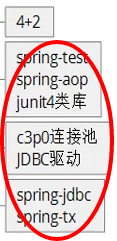
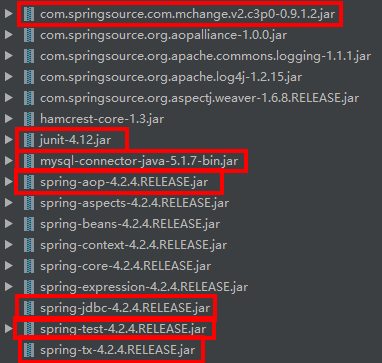
(1)导包
(2)准备数据库

(3)编写测试代码
package com.zella.a_jdbctemplate;

import com.mchange.v2.c3p0.ComboPooledDataSource;
import org.junit.Test;
import org.springframework.jdbc.core.JdbcTemplate;

import java.beans.PropertyVetoException;

// JDBC模板示例
public class Demo {
    @Test
    public void fun1() throws PropertyVetoException {
        // 准备连接池
        ComboPooledDataSource dataSource = new ComboPooledDataSource();
        dataSource.setDriverClass("com.mysql.jdbc.Driver");
        dataSource.setJdbcUrl("jdbc:mysql:///hibernate");
        dataSource.setUser("root");
        dataSource.setPassword("root");
        // 创建JDBC模板对象
        JdbcTemplate jt = new JdbcTemplate(dataSource); // 也可以在构造时不传入连接池,在创建之后再set

        // 书写sql语句并执行
        String sql = "insert into t_user values(null,'zhangsan')";
        int update = jt.update(sql);
        System.out.println(update);
    }
}
27
27
1
package com.zella.a_jdbctemplate;2
3
import com.mchange.v2.c3p0.ComboPooledDataSource;4
import org.junit.Test;5
import org.springframework.jdbc.core.JdbcTemplate;6
7
import java.beans.PropertyVetoException;8
9
// JDBC模板示例10
public class Demo {11
12
public void fun1() throws PropertyVetoException {13
// 准备连接池14
ComboPooledDataSource dataSource = new ComboPooledDataSource();15
dataSource.setDriverClass("com.mysql.jdbc.Driver");16
dataSource.setJdbcUrl("jdbc:mysql:///hibernate");17
dataSource.setUser("root");18
dataSource.setPassword("root");19
// 创建JDBC模板对象20
JdbcTemplate jt = new JdbcTemplate(dataSource); // 也可以在构造时不传入连接池,在创建之后再set21
22
// 书写sql语句并执行23
String sql = "insert into t_user values(null,'zhangsan')";24
int update = jt.update(sql);25
System.out.println(update);26
}27
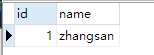
}结果

2.Spring中JDBC模板的api详解
示例代码如下,更多内容详见附件pdf
package com.zella.a_jdbctemplate;

import com.sun.rowset.internal.Row;
import com.zella.bean.User;
import org.springframework.jdbc.core.JdbcTemplate;
import org.springframework.jdbc.core.RowMapper;
import org.springframework.jdbc.core.SingleColumnRowMapper;

import java.sql.ResultSet;
import java.sql.SQLException;
import java.util.ArrayList;
import java.util.List;

// 使用JDBC模板对象实现增删改查操作
public class UserDaoImpl implements UserDao {
    private JdbcTemplate jt;

    public void setJt(JdbcTemplate jt) {
        this.jt = jt;
    }

    @Override
    public void save(User user) {
        String sql = "insert into t_user values(null,?)";
        jt.update(sql, user.getName());
    }

    @Override
    public void delete(Integer id) {
        String sql = "delete from t_user where id = ?";
        jt.update(sql, id);
    }

    @Override
    public void update(User user) {
        String sql = "update t_user set name = ? where id=?";
        jt.update(sql, user.getName(), user.getId());
    }

    @Override
    public User getById(Integer id) {
        String sql = "select * from t_user where id = ?";
        // User user = jt.queryForObject(sql, new SingleColumnRowMapper<User>(), id);
        User user = jt.queryForObject(sql, new RowMapper<User>() { // 匿名内部类
            @Override
            // 这个方法是Spring每次遍历resultSet都会调用的方法,在这个方法内封装成对象返回即可
            public User mapRow(ResultSet resultSet, int i) throws SQLException {
                User user = new User();
                user.setId(resultSet.getInt("id"));
                user.setName(resultSet.getString("name"));
                return user;
            }
        }, id);
        return user;
    }

    @Override
    public int getTotal() {
        String sql = "select count(*) t_user";
        Integer total = jt.queryForObject(sql, Integer.class);
        return total;
    }

    @Override
    public List<User> getAll() {
        String sql = "select * from t_user";
        List<User> list = jt.query(sql, new RowMapper<User>() {
            @Override
            public User mapRow(ResultSet resultSet, int i) throws SQLException {
                User user = new User();
                user.setId(resultSet.getInt("id"));
                user.setName(resultSet.getString("name"));
                return user;
            }
        });
        return list;
    }
}
79
79
1
package com.zella.a_jdbctemplate;2
3
import com.sun.rowset.internal.Row;4
import com.zella.bean.User;5
import org.springframework.jdbc.core.JdbcTemplate;6
import org.springframework.jdbc.core.RowMapper;7
import org.springframework.jdbc.core.SingleColumnRowMapper;8
9
import java.sql.ResultSet;10
import java.sql.SQLException;11
import java.util.ArrayList;12
import java.util.List;13
14
// 使用JDBC模板对象实现增删改查操作15
public class UserDaoImpl implements UserDao {16
private JdbcTemplate jt;17
18
public void setJt(JdbcTemplate jt) {19
this.jt = jt;20
}21
22
23
public void save(User user) {24
String sql = "insert into t_user values(null,?)";25
jt.update(sql, user.getName());26
}27
28
29
public void delete(Integer id) {30
String sql = "delete from t_user where id = ?";31
jt.update(sql, id);32
}33
34
35
public void update(User user) {36
String sql = "update t_user set name = ? where id=?";37
jt.update(sql, user.getName(), user.getId());38
}39
40
41
public User getById(Integer id) {42
String sql = "select * from t_user where id = ?";43
// User user = jt.queryForObject(sql, new SingleColumnRowMapper<User>(), id);44
User user = jt.queryForObject(sql, new RowMapper<User>() { // 匿名内部类45
46
// 这个方法是Spring每次遍历resultSet都会调用的方法,在这个方法内封装成对象返回即可47
public User mapRow(ResultSet resultSet, int i) throws SQLException {48
User user = new User();49
user.setId(resultSet.getInt("id"));50
user.setName(resultSet.getString("name"));51
return user;52
}53
}, id);54
return user;55
}56
57
58
public int getTotal() {59
String sql = "select count(*) t_user";60
Integer total = jt.queryForObject(sql, Integer.class);61
return total;62
}63
64
65
public List<User> getAll() {66
String sql = "select * from t_user";67
List<User> list = jt.query(sql, new RowMapper<User>() {68
69
public User mapRow(ResultSet resultSet, int i) throws SQLException {70
User user = new User();71
user.setId(resultSet.getInt("id"));72
user.setName(resultSet.getString("name"));73
return user;74
}75
});76
return list;77
}78
}79
3.将操作数据库相关的对象(JDBC模板、连接池和Dao对象)配置到Spring容器中
3.1 将对象配置到Spring中

具体配置如下
src/applicationContext.xml
<?xml version="1.0" encoding="UTF-8"?>
<beans xmlns:xsi="http://www.w3.org/2001/XMLSchema-instance"
       xmlns="http://www.springframework.org/schema/beans"
       xmlns:context="http://www.springframework.org/schema/context"
       xsi:schemaLocation="
       http://www.springframework.org/schema/beans
       http://www.springframework.org/schema/beans/spring-beans.xsd
       http://www.springframework.org/schema/context
       http://www.springframework.org/schema/context/spring-context-4.2.xsd
">
    <!--配置连接池到Spring容器中-->
    <bean name="dataSource" class="com.mchange.v2.c3p0.ComboPooledDataSource">
        <property name="driverClass" value="com.mysql.jdbc.Driver"/>
        <property name="jdbcUrl" value="jdbc:mysql:///hibernate"/>
        <property name="user" value="root"/>
        <property name="password" value="root"/>
    </bean>
    <!--配置JDBC模板对象到Spring容器中-->
    <bean name="jdbcTemplate" class="org.springframework.jdbc.core.JdbcTemplate">
        <property name="dataSource" ref="dataSource"/>
    </bean>
    <!--配置Dao对象到Spring容器中-->
    <bean name="userDao" class="com.zella.a_jdbctemplate.UserDaoImpl">
        <property name="jt" ref="jdbcTemplate"/>
    </bean>
</beans>
26
26
1
2
<beans xmlns:xsi="http://www.w3.org/2001/XMLSchema-instance"3
xmlns="http://www.springframework.org/schema/beans"4
xmlns:context="http://www.springframework.org/schema/context"5
xsi:schemaLocation="6
http://www.springframework.org/schema/beans7
http://www.springframework.org/schema/beans/spring-beans.xsd8
http://www.springframework.org/schema/context9
http://www.springframework.org/schema/context/spring-context-4.2.xsd10
">11
<!--配置连接池到Spring容器中-->12
<bean name="dataSource" class="com.mchange.v2.c3p0.ComboPooledDataSource">13
<property name="driverClass" value="com.mysql.jdbc.Driver"/>14
<property name="jdbcUrl" value="jdbc:mysql:///hibernate"/>15
<property name="user" value="root"/>16
<property name="password" value="root"/>17
</bean>18
<!--配置JDBC模板对象到Spring容器中-->19
<bean name="jdbcTemplate" class="org.springframework.jdbc.core.JdbcTemplate">20
<property name="dataSource" ref="dataSource"/>21
</bean>22
<!--配置Dao对象到Spring容器中-->23
<bean name="userDao" class="com.zella.a_jdbctemplate.UserDaoImpl">24
<property name="jt" ref="jdbcTemplate"/>25
</bean>26
</beans>测试代码如下:
package com.zella.a_jdbctemplate;

import com.mchange.v2.c3p0.ComboPooledDataSource;
import com.zella.bean.User;
import org.junit.Test;
import org.junit.runner.RunWith;
import org.springframework.jdbc.core.JdbcTemplate;
import org.springframework.test.context.ContextConfiguration;
import org.springframework.test.context.junit4.SpringJUnit4ClassRunner;

import javax.annotation.Resource;
import java.beans.PropertyVetoException;
import java.util.List;

// JDBC模板示例
@RunWith(SpringJUnit4ClassRunner.class)
@ContextConfiguration("classpath:applicationContext.xml")
public class Demo {
    @Resource(name = "userDao")
    UserDao dao;

    public void setDao(UserDao dao) {
        this.dao = dao;
    }

    // 测试增加user
    @Test
    public void fun2() {
        User user = new User();
        user.setName("zellaLan");
        dao.save(user);
    }

    // 测试修改user
    @Test
    public void fun3() {
        User user = new User();
        user.setName("lisi");
        user.setId(1);
        dao.update(user);
    }

    // 测试查询user
    @Test
    public void fun4() {
        User user1 = dao.getById(1);
        List<User> userList = dao.getAll();
        int total = dao.getTotal();

        System.out.println("user1: "+user1.toString());
        for (User user : userList) {
            System.out.println("userList:"+user.toString());
        }
        System.out.println("total:"+total);
    }

    // 测试删除user
    @Test
    public void fun5() {
        dao.delete(1);
    }
}
63
63
1
package com.zella.a_jdbctemplate;2
3
import com.mchange.v2.c3p0.ComboPooledDataSource;4
import com.zella.bean.User;5
import org.junit.Test;6
import org.junit.runner.RunWith;7
import org.springframework.jdbc.core.JdbcTemplate;8
import org.springframework.test.context.ContextConfiguration;9
import org.springframework.test.context.junit4.SpringJUnit4ClassRunner;10
11
import javax.annotation.Resource;12
import java.beans.PropertyVetoException;13
import java.util.List;14
15
// JDBC模板示例16
(SpringJUnit4ClassRunner.class)17
("classpath:applicationContext.xml")18
public class Demo {19
(name = "userDao")20
UserDao dao;21
22
public void setDao(UserDao dao) {23
this.dao = dao;24
}25
26
// 测试增加user27
28
public void fun2() {29
User user = new User();30
user.setName("zellaLan");31
dao.save(user);32
}33
34
// 测试修改user35
36
public void fun3() {37
User user = new User();38
user.setName("lisi");39
user.setId(1);40
dao.update(user);41
}42
43
// 测试查询user44
45
public void fun4() {46
User user1 = dao.getById(1);47
List<User> userList = dao.getAll();48
int total = dao.getTotal();49
50
System.out.println("user1: "+user1.toString());51
for (User user : userList) {52
System.out.println("userList:"+user.toString());53
}54
System.out.println("total:"+total);55
}56
57
// 测试删除user58
59
public void fun5() {60
dao.delete(1);61
}62
}63
3.2 通过继承JDBCDaoSupport类来简化配置(扩展)
Dao类继承JDBCDaoSupport类可以根据连接池直接创建JDBC模板对象,使Dao类无须手动准备JDBC模板对象,直接从父类获取即可(super.getJdbcTemplate()方法),此时依赖关系如图

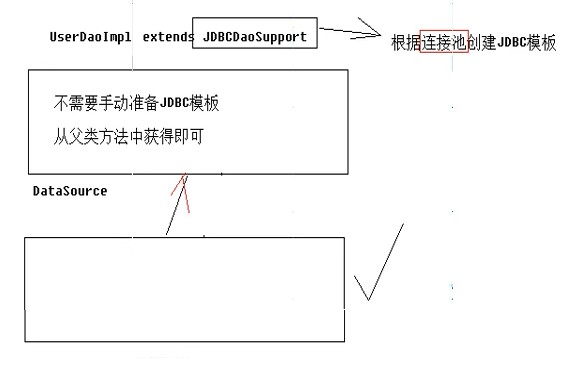
而配置文件中也可以省略配置JdbcTemplate对象的注入了
依赖关系变得简单了,配置文件应该在dao对象注入连接池的依赖就可以了
配置文件如下
src/applicationContext.xml
<?xml version="1.0" encoding="UTF-8"?>
<beans xmlns:xsi="http://www.w3.org/2001/XMLSchema-instance"
       xmlns="http://www.springframework.org/schema/beans"
       xmlns:context="http://www.springframework.org/schema/context"
       xsi:schemaLocation="
       http://www.springframework.org/schema/beans
       http://www.springframework.org/schema/beans/spring-beans.xsd
       http://www.springframework.org/schema/context
       http://www.springframework.org/schema/context/spring-context-4.2.xsd
">
    <!--指定Spring读取db.properties文件 注意:这个功能使用到了context命名空间和对应的jar包-->
    <context:property-placeholder location="classpath:db.properties"/>
    <!--配置连接池到Spring容器中 从db.properties文件中获取配置信息-->
    <bean name="dataSource" class="com.mchange.v2.c3p0.ComboPooledDataSource">
        <property name="driverClass" value="${jdbc.driverClass}"/>
        <property name="jdbcUrl" value="${jdbc.jdbcUrl}"/>
        <property name="user" value="${jdbc.user}"/>
        <property name="password" value="${jdbc.password}"/>
    </bean>
    <!--配置JDBC模板对象到Spring容器中-->
    <!--<bean name="jdbcTemplate" class="org.springframework.jdbc.core.JdbcTemplate">
        <property name="dataSource" ref="dataSource"/>
    </bean>-->
    <!--配置Dao对象到Spring容器中-->
    <bean name="userDao" class="com.zella.a_jdbctemplate.UserDaoImpl">
        <property name="dataSource" ref="dataSource"/>
        <!--<property name="jt" ref="jdbcTemplate"/>-->
    </bean>
</beans>
29
29
1
2
<beans xmlns:xsi="http://www.w3.org/2001/XMLSchema-instance"3
xmlns="http://www.springframework.org/schema/beans"4
xmlns:context="http://www.springframework.org/schema/context"5
xsi:schemaLocation="6
http://www.springframework.org/schema/beans7
http://www.springframework.org/schema/beans/spring-beans.xsd8
http://www.springframework.org/schema/context9
http://www.springframework.org/schema/context/spring-context-4.2.xsd10
">11
<!--指定Spring读取db.properties文件 注意:这个功能使用到了context命名空间和对应的jar包-->12
<context:property-placeholder location="classpath:db.properties"/>13
<!--配置连接池到Spring容器中 从db.properties文件中获取配置信息-->14
<bean name="dataSource" class="com.mchange.v2.c3p0.ComboPooledDataSource">15
<property name="driverClass" value="${jdbc.driverClass}"/>16
<property name="jdbcUrl" value="${jdbc.jdbcUrl}"/>17
<property name="user" value="${jdbc.user}"/>18
<property name="password" value="${jdbc.password}"/>19
</bean>20
<!--配置JDBC模板对象到Spring容器中-->21
<!--<bean name="jdbcTemplate" class="org.springframework.jdbc.core.JdbcTemplate">22
<property name="dataSource" ref="dataSource"/>23
</bean>-->24
<!--配置Dao对象到Spring容器中-->25
<bean name="userDao" class="com.zella.a_jdbctemplate.UserDaoImpl">26
<property name="dataSource" ref="dataSource"/>27
<!--<property name="jt" ref="jdbcTemplate"/>-->28
</bean>29
</beans>3.3 使用properties文件配置连接池的连接信息
上述方法设置连接信息(driverClass、url等)是直接将信息硬编码到Spring的配置文件中,实际上通常将这些信息配置在另外的properties文件内
配置文件中的键名建议加上前缀"jdbc."防止与其他配置文件的键名重复,如下
src/db.properties
jdbc.driverClass=com.mysql.jdbc.Driver
jdbc.jdbcUrl=jdbc:mysql:///hibernate
jdbc.user=root
jdbc.password=root
4
4
1
jdbc.driverClass=com.mysql.jdbc.Driver2
jdbc.jdbcUrl=jdbc:mysql:///hibernate3
jdbc.user=root4
jdbc.password=root然后我们需要告知Spring读取这个配置文件来配置连接信息即可
注意:这个功能需要用到context名称空间及对应jar包
配置文件如下
src/applicationContext.xml
<?xml version="1.0" encoding="UTF-8"?>
<beans xmlns:xsi="http://www.w3.org/2001/XMLSchema-instance"
       xmlns="http://www.springframework.org/schema/beans"
       xmlns:context="http://www.springframework.org/schema/context"
       xsi:schemaLocation="
       http://www.springframework.org/schema/beans
       http://www.springframework.org/schema/beans/spring-beans.xsd
       http://www.springframework.org/schema/context
       http://www.springframework.org/schema/context/spring-context-4.2.xsd
">
    <!--指定Spring读取db.properties文件 注意:这个功能使用到了context命名空间和对应的jar包-->
    <context:property-placeholder location="classpath:db.properties"/>
    <!--配置连接池到Spring容器中 从db.properties文件中获取配置信息-->
    <bean name="dataSource" class="com.mchange.v2.c3p0.ComboPooledDataSource">
        <property name="driverClass" value="${jdbc.driverClass}"/>
        <property name="jdbcUrl" value="${jdbc.jdbcUrl}"/>
        <property name="user" value="${jdbc.user}"/>
        <property name="password" value="${jdbc.user}"/>
    </bean>
    <!--配置JDBC模板对象到Spring容器中-->
    <bean name="jdbcTemplate" class="org.springframework.jdbc.core.JdbcTemplate">
        <property name="dataSource" ref="dataSource"/>
    </bean>
    <!--配置Dao对象到Spring容器中-->
    <bean name="userDao" class="com.zella.a_jdbctemplate.UserDaoImpl">
        <property name="jt" ref="jdbcTemplate"/>
    </bean>
</beans>
28
28
1
2
<beans xmlns:xsi="http://www.w3.org/2001/XMLSchema-instance"3
xmlns="http://www.springframework.org/schema/beans"4
xmlns:context="http://www.springframework.org/schema/context"5
xsi:schemaLocation="6
http://www.springframework.org/schema/beans7
http://www.springframework.org/schema/beans/spring-beans.xsd8
http://www.springframework.org/schema/context9
http://www.springframework.org/schema/context/spring-context-4.2.xsd10
">11
<!--指定Spring读取db.properties文件 注意:这个功能使用到了context命名空间和对应的jar包-->12
<context:property-placeholder location="classpath:db.properties"/>13
<!--配置连接池到Spring容器中 从db.properties文件中获取配置信息-->14
<bean name="dataSource" class="com.mchange.v2.c3p0.ComboPooledDataSource">15
<property name="driverClass" value="${jdbc.driverClass}"/>16
<property name="jdbcUrl" value="${jdbc.jdbcUrl}"/>17
<property name="user" value="${jdbc.user}"/>18
<property name="password" value="${jdbc.user}"/>19
</bean>20
<!--配置JDBC模板对象到Spring容器中-->21
<bean name="jdbcTemplate" class="org.springframework.jdbc.core.JdbcTemplate">22
<property name="dataSource" ref="dataSource"/>23
</bean>24
<!--配置Dao对象到Spring容器中-->25
<bean name="userDao" class="com.zella.a_jdbctemplate.UserDaoImpl">26
<property name="jt" ref="jdbcTemplate"/>27
</bean>28
</beans>八、Spring中事务操作
1.复习事务相关知识
- 事务特性:acid
- 事务并发问题:
- 脏读
- 不可重复读
- 幻读
- 隔离级别:
- 1 读未提交
- 2 读已提交
- 4 可重复读
- 8 串行化
2.Spring中操作事务的方式(使用的对象)
Spring封装了管理事务的代码,有以下这些基本功能:
- 打开事务
- 提交事务
- 回滚事务
但使用不同的框架或平台时,操作事务的代码不尽相同,Spring提供了一个接口PlatformTransactionManager(平台事务管理器)来声明了事务操作的标准操作
对于不同的框架/平台,提供不同的实现类:
- DataSourceTransactionManager——JDBC平台
- HibernateTransitionManager——Hibernate框架
- 等等
因此,在Spring中操作事务,最核心的对象就是TransactionManager对象
3.Spring管理事务的属性
在Spring中可以配置事务的各项属性:
- 隔离级别
- 1 读未提交
- 2 读已提交
- 4 可重复读
- 8 串行化
- 是否只读:取值为true是/false否
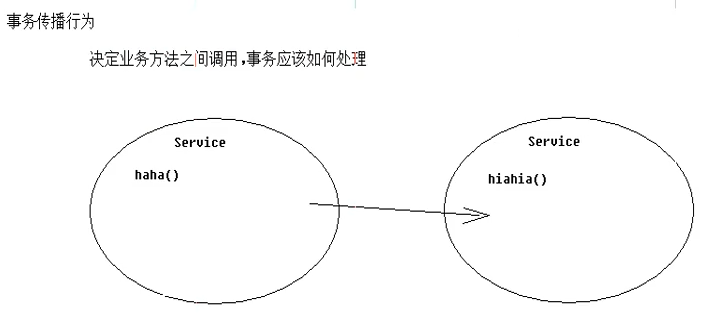
- 事务的传播行为:决定业务层方法之间(互相)调用时,事务应该如何处理
- 保证同一个事务中
- PROPAGATION_REQUIRED 支持当前事务,如果不存在就新建一个(默认)
- PROPAGATION_SUPPORTS 支持当前事务,如果不存在,就不使用事务
- PROPAGATION_MANDATORY 支持当前事务,如果不存在,抛出异常
- 保证没有在同一个事务中
- PROPAGATION_REQUIRES_NEW 如果有事务存在,挂起当前事务,创建一个新的事务
- PROPAGATION_NOT_SUPPORTED 以非事务方式运行,如果有事务存在,挂起当前事务
- PROPAGATION_NEVER 以非事务方式运行,如果有事务存在,抛出异常
- 超时信息
关于业务层方法之间调用:
4.Spring中操作事务的具体方式
Spring管理事务有三种方式,分别是(硬)编码式、使用xml配置AOP管理事务和使用注解配置AOP管理事务
(1)硬编码方式
这种方式顾名思义,就是在需要管理事务的方法中直接手动调用事务管理对象操作事务,不建议使用
步骤:
将核心事务管理对象配置到Spring容器中
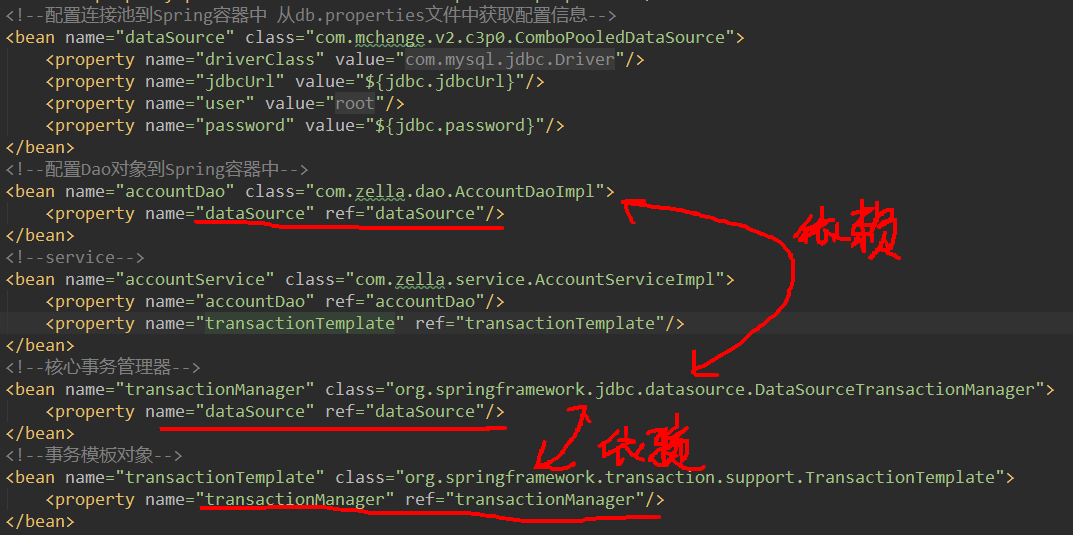
模板类内部封装了下面的功能,我们只需要编写doInTransactionWithoutResult方法内部的代码即可
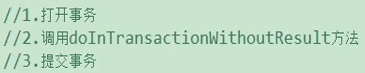
模板类内部也编写好了try&catch异常并回滚的代码
示例代码如下
package com.zella.service;

import com.zella.dao.AccountDao;
import org.springframework.transaction.PlatformTransactionManager;
import org.springframework.transaction.TransactionStatus;
import org.springframework.transaction.support.TransactionCallbackWithoutResult;
import org.springframework.transaction.support.TransactionTemplate;

public class AccountServiceImpl implements AccountService {

    private TransactionTemplate transactionTemplate;
    public void setTransactionTemplate(TransactionTemplate transactionTemplate) {
        this.transactionTemplate = transactionTemplate;
    }

    private AccountDao accountDao;
    public void setAccountDao(AccountDao accountDao) {
        this.accountDao = accountDao;
    }

    @Override
    public void transfer(final Integer from, final Integer to, final Double money) {
        // 匿名内部类内部调用操作数据库的dao方法
        transactionTemplate.execute(new TransactionCallbackWithoutResult() {
            @Override
            protected void doInTransactionWithoutResult(TransactionStatus transactionStatus) {
                // from -money
                accountDao.reduceMoney(from, money);
                // to +money
                accountDao.increaseMoney(to, money);
            }
        });
    }
}
34
34
1
package com.zella.service;2
3
import com.zella.dao.AccountDao;4
import org.springframework.transaction.PlatformTransactionManager;5
import org.springframework.transaction.TransactionStatus;6
import org.springframework.transaction.support.TransactionCallbackWithoutResult;7
import org.springframework.transaction.support.TransactionTemplate;8
9
public class AccountServiceImpl implements AccountService {10
11
private TransactionTemplate transactionTemplate;12
public void setTransactionTemplate(TransactionTemplate transactionTemplate) {13
this.transactionTemplate = transactionTemplate;14
}15
16
private AccountDao accountDao;17
public void setAccountDao(AccountDao accountDao) {18
this.accountDao = accountDao;19
}20
21
22
public void transfer(final Integer from, final Integer to, final Double money) {23
// 匿名内部类内部调用操作数据库的dao方法24
transactionTemplate.execute(new TransactionCallbackWithoutResult() {25
26
protected void doInTransactionWithoutResult(TransactionStatus transactionStatus) {27
// from -money28
accountDao.reduceMoney(from, money);29
// to +money30
accountDao.increaseMoney(to, money);31
}32
});33
}34
}可以看出,使用这种方式来控制事务并没有减少代码量,更重要的是我们仍然要在代码逻辑中手动处理事务,故不推荐使用
(2)xml配置AOP
Spring提供了事务通知方便我们使用AOP来操作事务,仅需要提供操作数据库的目标对象及配置Spring的AOP往目标对象织入通知即可
前提:导入必须的jar包和在配置文件中导入必须的名称空间以及新的名称空间tx约束
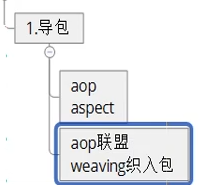
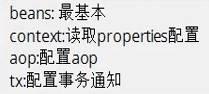
配置Spring的配置文件如下:
src/applicationContext.xml
<?xml version="1.0" encoding="UTF-8"?>
<beans xmlns:xsi="http://www.w3.org/2001/XMLSchema-instance"
       xmlns="http://www.springframework.org/schema/beans"
       xmlns:context="http://www.springframework.org/schema/context"
       xmlns:tx="http://www.springframework.org/schema/tx"
       xmlns:aop="http://www.springframework.org/schema/aop"
       xsi:schemaLocation="
       http://www.springframework.org/schema/beans
       http://www.springframework.org/schema/beans/spring-beans.xsd
       http://www.springframework.org/schema/context
       http://www.springframework.org/schema/context/spring-context.xsd
       http://www.springframework.org/schema/tx
       http://www.springframeword.ory/schema/tx/spring-tx.xsd
       http://www.springframework.org/schema/aop
       http://www.springframework.org/schema/aop/spring-aop.xsd
">

    <!--指定Spring读取db.properties文件 注意:这个功能使用到了context命名空间和对应的jar包-->
    <context:property-placeholder location="classpath:db.properties"/>

    <!--配置连接池到Spring容器中 从db.properties文件中获取配置信息-->
    <bean name="dataSource" class="com.mchange.v2.c3p0.ComboPooledDataSource">
        <property name="driverClass" value="${jdbc.driverClass}"/>
        <property name="jdbcUrl" value="${jdbc.jdbcUrl}"/>
        <property name="user" value="${jdbc.user}"/>
        <property name="password" value="${jdbc.password}"/>
    </bean>

    <!--配置Dao对象到Spring容器中-->
    <bean name="accountDao" class="com.zella.dao.AccountDaoImpl">
        <property name="dataSource" ref="dataSource"/>
    </bean>

    <!--service-->
    <bean name="accountService" class="com.zella.service.AccountServiceImpl">
        <property name="accountDao" ref="accountDao"/>
        <property name="transactionTemplate" ref="transactionTemplate"/>
    </bean>

    <!--核心事务管理器-->
    <bean name="transactionManager" class="org.springframework.jdbc.datasource.DataSourceTransactionManager">
        <property name="dataSource" ref="dataSource"/>
    </bean>

    <!--事务模板对象-->
    <bean name="transactionTemplate" class="org.springframework.transaction.support.TransactionTemplate">
        <property name="transactionManager" ref="transactionManager"/>
    </bean>

    <!--配置事务通知-->
    <tx:advice id="txAdvice" transaction-manager="transactionManager">
        <tx:attributes>
            <tx:method name="transfer" isolation="DEFAULT" propagation="REQUIRED" read-only="false"/>
            <!--
                企业中使用批量配置方法的通配符配置方式 以下顺序为增2改2删2查2
                其中get/find方法只读属性应该为true,防止在查找的时候修改数据库
                所以我们命名service的业务方法时应该按照以下的命名规则
                这种方式是以方法为单位来配置不同的事务操作属性
            -->
            <tx:method name="save*" isolation="DEFAULT" propagation="REQUIRED" read-only="false"/>
            <tx:method name="persist*" isolation="DEFAULT" propagation="REQUIRED" read-only="false"/>
            <tx:method name="update*" isolation="DEFAULT" propagation="REQUIRED" read-only="false"/>
            <tx:method name="modify*" isolation="DEFAULT" propagation="REQUIRED" read-only="false"/>
            <tx:method name="delete*" isolation="DEFAULT" propagation="REQUIRED" read-only="false"/>
            <tx:method name="remove*" isolation="DEFAULT" propagation="REQUIRED" read-only="false"/>
            <tx:method name="get*" isolation="DEFAULT" propagation="REQUIRED" read-only="true"/>
            <tx:method name="find*" isolation="DEFAULT" propagation="REQUIRED" read-only="true"/>
        </tx:attributes>
    </tx:advice>

    <!--
        配置好上述的通知之后 接下来应该配置织入通知
        此处与我们自己编写通知代码配置有所不同 使用了Spring提供的tx通知
        可以直接用advisor元素配置
    -->
    <aop:config>
        <aop:pointcut id="txPc" expression="execution(* com.zella.service.*ServiceImpl.*(..))"/>
        <aop:advisor advice-ref="txAdvice" pointcut-ref="txPc"/>
    </aop:config>

</beans>
81
1
2
<beans xmlns:xsi="http://www.w3.org/2001/XMLSchema-instance"3
xmlns="http://www.springframework.org/schema/beans"4
xmlns:context="http://www.springframework.org/schema/context"5
xmlns:tx="http://www.springframework.org/schema/tx"6
xmlns:aop="http://www.springframework.org/schema/aop"7
xsi:schemaLocation="8
http://www.springframework.org/schema/beans9
http://www.springframework.org/schema/beans/spring-beans.xsd10
http://www.springframework.org/schema/context11
http://www.springframework.org/schema/context/spring-context.xsd12
http://www.springframework.org/schema/tx13
http://www.springframeword.ory/schema/tx/spring-tx.xsd14
http://www.springframework.org/schema/aop15
http://www.springframework.org/schema/aop/spring-aop.xsd16
">17
18
<!--指定Spring读取db.properties文件 注意:这个功能使用到了context命名空间和对应的jar包-->19
<context:property-placeholder location="classpath:db.properties"/>20
21
<!--配置连接池到Spring容器中 从db.properties文件中获取配置信息-->22
<bean name="dataSource" class="com.mchange.v2.c3p0.ComboPooledDataSource">23
<property name="driverClass" value="${jdbc.driverClass}"/>24
<property name="jdbcUrl" value="${jdbc.jdbcUrl}"/>25
<property name="user" value="${jdbc.user}"/>26
<property name="password" value="${jdbc.password}"/>27
</bean>28
29
<!--配置Dao对象到Spring容器中-->30
<bean name="accountDao" class="com.zella.dao.AccountDaoImpl">31
<property name="dataSource" ref="dataSource"/>32
</bean>33
34
<!--service-->35
<bean name="accountService" class="com.zella.service.AccountServiceImpl">36
<property name="accountDao" ref="accountDao"/>37
<property name="transactionTemplate" ref="transactionTemplate"/>38
</bean>39
40
<!--核心事务管理器-->41
<bean name="transactionManager" class="org.springframework.jdbc.datasource.DataSourceTransactionManager">42
<property name="dataSource" ref="dataSource"/>43
</bean>44
45
<!--事务模板对象-->46
<bean name="transactionTemplate" class="org.springframework.transaction.support.TransactionTemplate">47
<property name="transactionManager" ref="transactionManager"/>48
</bean>49
50
<!--配置事务通知-->51
<tx:advice id="txAdvice" transaction-manager="transactionManager">52
<tx:attributes>53
<tx:method name="transfer" isolation="DEFAULT" propagation="REQUIRED" read-only="false"/>54
<!--55
企业中使用批量配置方法的通配符配置方式 以下顺序为增2改2删2查256
其中get/find方法只读属性应该为true,防止在查找的时候修改数据库57
所以我们命名service的业务方法时应该按照以下的命名规则58
这种方式是以方法为单位来配置不同的事务操作属性59
-->60
<tx:method name="save*" isolation="DEFAULT" propagation="REQUIRED" read-only="false"/>61
<tx:method name="persist*" isolation="DEFAULT" propagation="REQUIRED" read-only="false"/>62
<tx:method name="update*" isolation="DEFAULT" propagation="REQUIRED" read-only="false"/>63
<tx:method name="modify*" isolation="DEFAULT" propagation="REQUIRED" read-only="false"/>64
<tx:method name="delete*" isolation="DEFAULT" propagation="REQUIRED" read-only="false"/>65
<tx:method name="remove*" isolation="DEFAULT" propagation="REQUIRED" read-only="false"/>66
<tx:method name="get*" isolation="DEFAULT" propagation="REQUIRED" read-only="true"/>67
<tx:method name="find*" isolation="DEFAULT" propagation="REQUIRED" read-only="true"/>68
</tx:attributes>69
</tx:advice>70
71
<!--72
配置好上述的通知之后 接下来应该配置织入通知73
此处与我们自己编写通知代码配置有所不同 使用了Spring提供的tx通知74
可以直接用advisor元素配置75
-->76
<aop:config>77
<aop:pointcut id="txPc" expression="execution(* com.zella.service.*ServiceImpl.*(..))"/>78
<aop:advisor advice-ref="txAdvice" pointcut-ref="txPc"/>79
</aop:config>80
81
</beans>配置Spring的tx通知的方式与前文配置自己编写的通知代码的配置方式对比
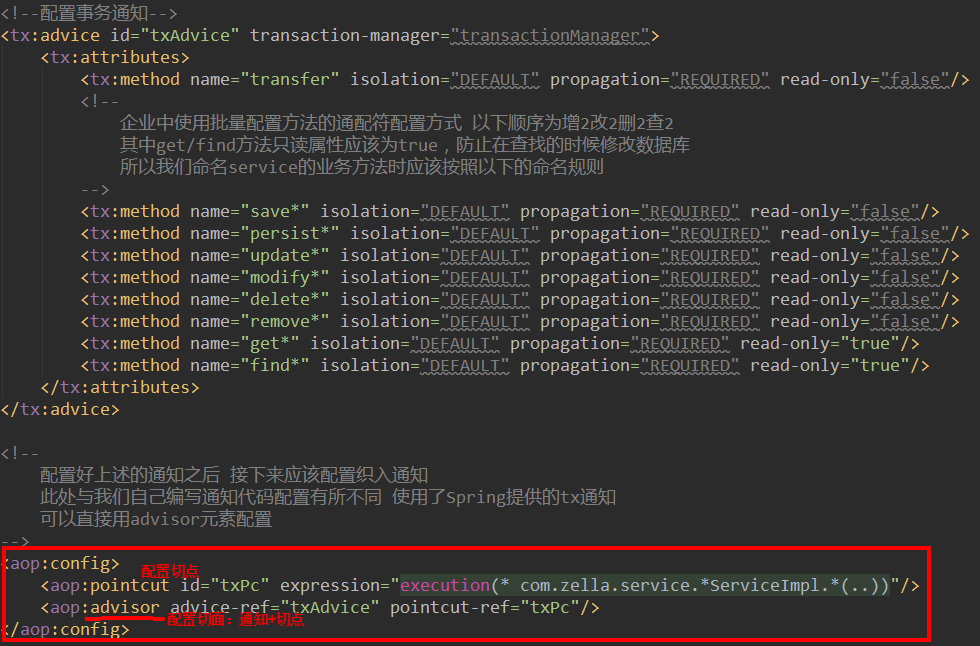

(3)注解配置AOP
使用注解配置前提也是:导入必须的jar包和在配置文件中导入必须的名称空间以及新的名称空间tx约束
然后就可以开启配置注解来管理事务的开关

仅配置这一行即可
至此就可以在代码中使用注解配置AOP管理事务了,如下

若@Transactional注解加到类名上,则这个类所有方法都会被织入tx通知,若想在局部更改属性,则在方法前再加上这个注解,将会局部修改这个方法的事务属性
*、在web环境下使用Spring容器
1.使用监听器技术创建ApplicationContext对象
注意:在web开发中,一般一个web应用的整个生命周期中应该只存在一个ApplicationContext类的对象。故一般将其放在web应用的context域(即application域)中,具体是使用监听器技术在初始化context域时创建ApplicationContext对象,在context销毁方法中销毁ApplicationContext对象,使其生命周期随这个域创建和销毁,获取时不再重新new,而是从context域中获取。但其实这个过程Spring已经帮我们完成了,我们只需要导入Spring提供的web类库,使用Spring提供的监听器(具体为即可(在web.xml配置该监听器)。
配置文件如下:
WEB-INF/web.xml
<?xml version="1.0" encoding="UTF-8"?>
<web-app xmlns="http://xmlns.jcp.org/xml/ns/javaee"
         xmlns:xsi="http://www.w3.org/2001/XMLSchema-instance"
         xsi:schemaLocation="http://xmlns.jcp.org/xml/ns/javaee http://xmlns.jcp.org/xml/ns/javaee/web-app_4_0.xsd"
         version="4.0">
    <!--使Spring容器随项目的启动而创建,随项目的关闭而销毁-->
    <listener>
        <listener-class>org.springframework.web.context.ContextLoaderListener</listener-class>
    </listener>
    <!--通过context参数来告知Spring配置文件的位置-->
    <context-param>
        <param-name>contextConfigLocation</param-name>
        <param-value>classpath:applicationContext.xml</param-value>
    </context-param>
    <filter>
        <filter-name>struts2</filter-name>
        <filter-class>org.apache.struts2.dispatcher.ng.filter.StrutsPrepareAndExecuteFilter</filter-class>
    </filter>
    <filter-mapping>
        <filter-name>struts2</filter-name>
        <url-pattern>/*</url-pattern>
    </filter-mapping>
</web-app>
23
1
2
<web-app xmlns="http://xmlns.jcp.org/xml/ns/javaee"3
xmlns:xsi="http://www.w3.org/2001/XMLSchema-instance"4
xsi:schemaLocation="http://xmlns.jcp.org/xml/ns/javaee http://xmlns.jcp.org/xml/ns/javaee/web-app_4_0.xsd"5
version="4.0">6
<!--使Spring容器随项目的启动而创建,随项目的关闭而销毁-->7
<listener>8
<listener-class>org.springframework.web.context.ContextLoaderListener</listener-class>9
</listener>10
<!--通过context参数来告知Spring配置文件的位置-->11
<context-param>12
<param-name>contextConfigLocation</param-name>13
<param-value>classpath:applicationContext.xml</param-value>14
</context-param>15
<filter>16
<filter-name>struts2</filter-name>17
<filter-class>org.apache.struts2.dispatcher.ng.filter.StrutsPrepareAndExecuteFilter</filter-class>18
</filter>19
<filter-mapping>20
<filter-name>struts2</filter-name>21
<url-pattern>/*</url-pattern>22
</filter-mapping>23
</web-app> 至此,我们就可以从application域中通过键获取Spring容器了(application域和context域基本是一个东西),为了方便获取,Spring还提供了WebApplicationContextUtils工具类中的getWebApplicationContext(servletContext)来获取容器对象。
例:使用下列代码来获取被管理的对象:
ServletContext servletContext = ServletActionContext.getServletContext();
WebApplicationContext webApplicationContext = WebApplicationContextUtils.getWebApplicationContext(servletContext);
CustomerService customerService = (CustomerService) webApplicationContext.getBean("customerService");
3
3
1
ServletContext servletContext = ServletActionContext.getServletContext();2
WebApplicationContext webApplicationContext = WebApplicationContextUtils.getWebApplicationContext(servletContext);3
CustomerService customerService = (CustomerService) webApplicationContext.getBean("customerService");2.Spring与JUnit进行整合
为方便测试,Spring可以与JUnit进行整合,减少重复书写相同代码
需要导入Spring的test包

使用方法如下
package com.zella.a_hello;

import com.zella.bean.User;
import org.junit.Test;
import org.junit.runner.RunWith;
import org.springframework.context.ApplicationContext;
import org.springframework.context.support.ClassPathXmlApplicationContext;
import org.springframework.test.context.ContextConfiguration;
import org.springframework.test.context.junit4.SpringJUnit4ClassRunner;

import javax.annotation.Resource;

@RunWith(SpringJUnit4ClassRunner.class) //这个注解可以帮我们创建Spring容器
@ContextConfiguration(value = "classpath:applicationContext.xml") // 指定创建容器使用的配置文件路径
public class Demo {
    @Test
    public void fun1() {
        // 1.创建容器对象 构函需要传入配置文件路径
        ApplicationContext applicationContext = new ClassPathXmlApplicationContext("applicationContext.xml");
        // 2.向容器“要”User对象
        User user = (User) applicationContext.getBean("user");
        // 3.打印User对象
        System.out.println(user);
    }

    // 上面是没有整合时进行测试的代码,下面是使用Spring与JUnit整合后的测试方法
    @Resource(name = "user") // 直接使用注解来注入对象
    private User aUser;

    @Test
    public void fun2() {
        System.out.println(aUser);
    }
}
34
34
1
package com.zella.a_hello;2
3
import com.zella.bean.User;4
import org.junit.Test;5
import org.junit.runner.RunWith;6
import org.springframework.context.ApplicationContext;7
import org.springframework.context.support.ClassPathXmlApplicationContext;8
import org.springframework.test.context.ContextConfiguration;9
import org.springframework.test.context.junit4.SpringJUnit4ClassRunner;10
11
import javax.annotation.Resource;12
13
(SpringJUnit4ClassRunner.class) //这个注解可以帮我们创建Spring容器14
(value = "classpath:applicationContext.xml") // 指定创建容器使用的配置文件路径15
public class Demo {16
17
public void fun1() {18
// 1.创建容器对象 构函需要传入配置文件路径19
ApplicationContext applicationContext = new ClassPathXmlApplicationContext("applicationContext.xml");20
// 2.向容器“要”User对象21
User user = (User) applicationContext.getBean("user");22
// 3.打印User对象23
System.out.println(user);24
}25
26
// 上面是没有整合时进行测试的代码,下面是使用Spring与JUnit整合后的测试方法27
(name = "user") // 直接使用注解来注入对象28
private User aUser;29
30
31
public void fun2() {32
System.out.println(aUser);33
}34
}附件列表

 浙公网安备 33010602011771号