


第一节:ExtJS调用WCF系列-----实现JSON传递
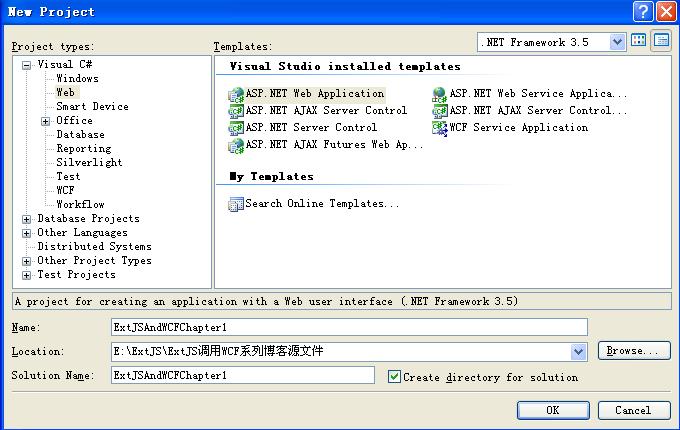
首先我们打开我们的VS 新建一个Asp.Net WebApplication Project,(不要给我说新建网站,我讨厌那个东东) 命名为ExtJSAndWCFChapter1 如图:
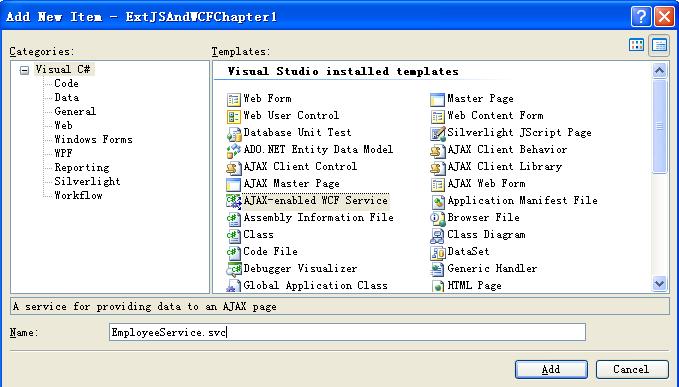
接下来我们在该项目中新建一个实体类文件和一个AJAX—Enabled WCF SERVICE,分别命名为Employee.cs 和EmployeeService.svc
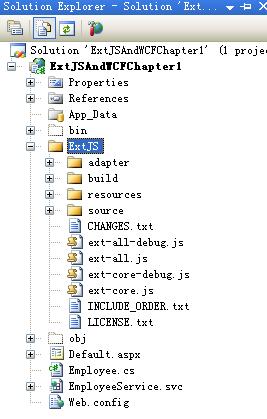
下面去ExtJS.Com网站下载一个ExtJS 2.0 ,解压缩后拷贝至Default.aspx相同目录下,并包括在项目中。如图:
下面开始编写代码:先编写Employee.cs的代码,代码如下:
 using System;
using System.Data;
using System.Configuration;
using System.Linq;
using System.Web;
using System.Web.Security;
using System.Web.UI;
using System.Web.UI.HtmlControls;
using System.Web.UI.WebControls;
using System.Web.UI.WebControls.WebParts;
using System.Xml.Linq;
using System.Runtime.Serialization;
namespace ExtJSAndWCFChapter1
 {
{
 [DataContract]
public class Employee
 {
{
[DataMember]
public Guid EmployeeID { set; get; }
[DataMember]
public string CnName { set; get; }
[DataMember]
public bool Sex { set; get; }
[DataMember]
public int Age { set; get; }
[DataMember]
public DateTime Birthday { set; get; }
[DataMember]
public string Email { set; get; }
 }
}
 }
}
接下来编写EmployeeService.cs的代码,代码如下:
using System;
using System.Linq;
using System.Runtime.Serialization;
using System.ServiceModel;
using System.ServiceModel.Activation;
using System.ServiceModel.Web;
using System.Collections.Generic;
namespace ExtJSAndWCFChapter1
{
[ServiceContract(Namespace = "")]
[AspNetCompatibilityRequirements(RequirementsMode = AspNetCompatibilityRequirementsMode.Allowed)]
public class EmployeeService
{
// Add [WebGet] attribute to use HTTP GET
[OperationContract]
public void DoWork()
{
// Add your operation implementation here
return;
}
// Add more operations here and mark them with [OperationContract]
/// <summary>
/// 创建一个实体,实体由客户端传递
/// </summary>
/// <param name="emp"></param>
/// <returns></returns>
[OperationContract]
[WebInvoke(BodyStyle = WebMessageBodyStyle.Wrapped, RequestFormat = WebMessageFormat.Json, ResponseFormat = WebMessageFormat.Json, UriTemplate = "/Create")]
public Guid Create(Employee emp)
{
NotNull(emp.CnName, "CnName");
return Guid.NewGuid();
}
/// <summary>
/// 获取一个实体
/// </summary>
/// <param name="id"></param>
/// <returns></returns>
[OperationContract]
[WebInvoke(BodyStyle = WebMessageBodyStyle.Bare, RequestFormat = WebMessageFormat.Json, ResponseFormat = WebMessageFormat.Json, UriTemplate = "/Get")]
public Employee Get(int id)
{
if (id != 1) throw new ArgumentException("Expected 1 for ID");
return new Employee() { EmployeeID = Guid.NewGuid(), CnName = "Xiaozhuang", Sex = true, Age = 28, Email = "iamxiaozhuang@163.com", Birthday = new DateTime(1979, 02, 02) };
}
/// <summary>
/// 获取所有实体
/// </summary>
/// <returns></returns>
[OperationContract]
[WebInvoke(BodyStyle = WebMessageBodyStyle.Wrapped, RequestFormat = WebMessageFormat.Json, ResponseFormat = WebMessageFormat.Json, UriTemplate = "/GetAll")]
public List<Employee> GetAll()
{
return new List<Employee>
{
new Employee(){EmployeeID = Guid.NewGuid(),CnName="CnName",Sex=true,Age=28,Email="email@saf.com",Birthday=new DateTime(1979,02,02)},
new Employee(){EmployeeID = Guid.NewGuid(),CnName="CnName1",Sex=false,Age=28,Email="email1@saf.com",Birthday=new DateTime(1979,02,02)}
};
}
/// <summary>
/// 获取num个实体
/// </summary>
/// <param name="num"></param>
/// <returns></returns>
[OperationContract]
[WebInvoke(BodyStyle = WebMessageBodyStyle.Bare, RequestFormat = WebMessageFormat.Json, ResponseFormat = WebMessageFormat.Json, UriTemplate = "/GetByNum")]
public List<Employee> GetByNum(int num)
{
if (num.ToString() == "") throw new ArgumentException("参数错误!");
List<Employee> emplist = new List<Employee>();
for (int i = 1; i <= num; i++)
{
Employee emp = new Employee() { EmployeeID = Guid.NewGuid(), CnName = i + "CnName", Sex = true, Age = i * 10, Email = i + "email@163.com", Birthday = new DateTime(1979, 02, 02) };
emplist.Add(emp);
}
return emplist;
}
private static void NotNull<T>(T o, string paramName) where T : class
{
if (o == null) throw new ArgumentNullException(paramName);
}
}
}
<system.serviceModel>
<behaviors>
<endpointBehaviors>
<behavior name="ExtJSAndWCFChapter1.EmployeeServiceAspNetAjaxBehavior">
<!--<enableWebScript />-->
<webHttp/>
</behavior>
</endpointBehaviors>
</behaviors>
<serviceHostingEnvironment aspNetCompatibilityEnabled="true"/>
<services>
<service name="ExtJSAndWCFChapter1.EmployeeService">
<endpoint address="" behaviorConfiguration="ExtJSAndWCFChapter1.EmployeeServiceAspNetAjaxBehavior" binding="webHttpBinding" contract="ExtJSAndWCFChapter1.EmployeeService"/>
</service>
</services>
</system.serviceModel>
现在可以编译并访问那个EmployeeService.svc文件,后面加上UriTemplate的值:例如http://localhost:1481/EmployeeService.svc/get。会得到“Method not allowed”的提示。如果访问出现错误,请确认修改的Web.Config是否正确。
接下来编写Default.aspx的代码:代码如下
<%@ Page Language="C#" AutoEventWireup="true" CodeBehind="Default.aspx.cs" Inherits="ExtJSAndWCFChapter1._Default" %>
<!DOCTYPE html PUBLIC "-//W3C//DTD XHTML 1.0 Transitional//EN" "http://www.w3.org/TR/xhtml1/DTD/xhtml1-transitional.dtd">
<html xmlns="http://www.w3.org/1999/xhtml" >
<head runat="server">
<title>Untitled Page</title>
<link rel="stylesheet" type="text/css" href="ExtJS/resources/css/ext-all.css" />
<!-- GC -->
<!-- LIBS -->
<script type="text/javascript" src="ExtJS/adapter/ext/ext-base.js"></script>
<script type="text/javascript" src="ExtJS/ext-all-debug.js"></script>
<script type="text/javascript" src="ExtJS/ext-all.js"></script>
<!-- ENDLIBS -->
<script type="text/javascript" language="javascript">
Ext.onReady(function() {
//设置Content-Type为application/json形式
Ext.lib.Ajax.defaultPostHeader = 'application/json';
//访问失败的统一回调函数
var onFailure = function(r, opts)
{
Ext.get("errors").insertHtml('afterend', '<br/><br/>' + r.responseText, false);
}
//客户端创建一个实体
var request={
emp:{ CnName:'xiaozhuang',
Sex:1,
Age:28,
Birthday:'/Date(62831853071)/',
Email:'Iamxiaozhuang@hotmail.com'
}
}
Ext.Ajax.request({
url: '/EmployeeService.svc/Create',//要访问的方法地址
method: 'POST',
params: Ext.util.JSON.encode(request), //把输入参数进行JSON编码
success: function(response, options) { Ext.get('create-p').update(response.responseText); }, //输出方法返回结果
failure: onFailure
});
Ext.Ajax.request({
url: '/EmployeeService.svc/Get',
method: 'POST',
params: Ext.util.JSON.encode(1),
success: function(response, options) { Ext.get('get-p').update(response.responseText); },
failure: onFailure
});
Ext.Ajax.request({
url: 'EmployeeService.svc/GetAll',
method: 'POST',
success: function(response, options) { Ext.get('getall-p').update(response.responseText);},
failure: onFailure
});
Ext.Ajax.request({
url: 'EmployeeService.svc/GetByNum',
method: 'POST',
params: Ext.util.JSON.encode(8),
success: function(response, options) { Ext.get('GetByNum-p').update(response.responseText);},
failure: onFailure
});
});
</script>
</head>
<body>
<form id="form1" runat="server">
<div>
<h3>
Create:</h3>
<p id="create-p">
</p>
<h3>
Get:</h3>
<p id="get-p">
</p>
<h3>
GetAll:</h3>
<p id="getall-p">
</p>
<h3>
GetByNum:</h3>
<p id="GetByNum-p">
</p>
<p id="errors">
</p>
</div>
</form>
</body>
</html>
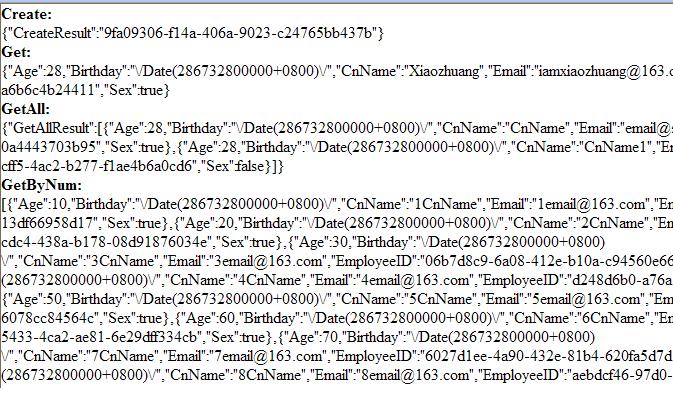
最终的运行效果:
源代码下载在这里
接下来我们在该项目中新建一个实体类文件和一个AJAX—Enabled WCF SERVICE,分别命名为Employee.cs 和EmployeeService.svc
下面去ExtJS.Com网站下载一个ExtJS 2.0 ,解压缩后拷贝至Default.aspx相同目录下,并包括在项目中。如图:
下面开始编写代码:先编写Employee.cs的代码,代码如下:
using System;using System.Data;using System.Configuration;using System.Linq;using System.Web;using System.Web.Security;using System.Web.UI;using System.Web.UI.HtmlControls;using System.Web.UI.WebControls;using System.Web.UI.WebControls.WebParts;using System.Xml.Linq;using System.Runtime.Serialization;namespace ExtJSAndWCFChapter1{
 [DataContract] public class Employee {
 [DataMember] public Guid EmployeeID { set; get; } [DataMember] public string CnName { set; get; } [DataMember] public bool Sex { set; get; } [DataMember] public int Age { set; get; } [DataMember] public DateTime Birthday { set; get; } [DataMember] public string Email { set; get; } }}
接下来编写EmployeeService.cs的代码,代码如下:
using System;using System.Linq;using System.Runtime.Serialization;using System.ServiceModel;using System.ServiceModel.Activation;using System.ServiceModel.Web;using System.Collections.Generic;namespace ExtJSAndWCFChapter1{ [ServiceContract(Namespace = "")] [AspNetCompatibilityRequirements(RequirementsMode = AspNetCompatibilityRequirementsMode.Allowed)] public class EmployeeService { // Add [WebGet] attribute to use HTTP GET [OperationContract] public void DoWork() { // Add your operation implementation here return; } // Add more operations here and mark them with [OperationContract] /// <summary> /// 创建一个实体,实体由客户端传递 /// </summary> /// <param name="emp"></param> /// <returns></returns> [OperationContract] [WebInvoke(BodyStyle = WebMessageBodyStyle.Wrapped, RequestFormat = WebMessageFormat.Json, ResponseFormat = WebMessageFormat.Json, UriTemplate = "/Create")] public Guid Create(Employee emp) { NotNull(emp.CnName, "CnName"); return Guid.NewGuid(); } /// <summary> /// 获取一个实体 /// </summary> /// <param name="id"></param> /// <returns></returns> [OperationContract] [WebInvoke(BodyStyle = WebMessageBodyStyle.Bare, RequestFormat = WebMessageFormat.Json, ResponseFormat = WebMessageFormat.Json, UriTemplate = "/Get")] public Employee Get(int id) { if (id != 1) throw new ArgumentException("Expected 1 for ID"); return new Employee() { EmployeeID = Guid.NewGuid(), CnName = "Xiaozhuang", Sex = true, Age = 28, Email = "iamxiaozhuang@163.com", Birthday = new DateTime(1979, 02, 02) }; } /// <summary> /// 获取所有实体 /// </summary> /// <returns></returns> [OperationContract] [WebInvoke(BodyStyle = WebMessageBodyStyle.Wrapped, RequestFormat = WebMessageFormat.Json, ResponseFormat = WebMessageFormat.Json, UriTemplate = "/GetAll")] public List<Employee> GetAll() { return new List<Employee> { new Employee(){EmployeeID = Guid.NewGuid(),CnName="CnName",Sex=true,Age=28,Email="email@saf.com",Birthday=new DateTime(1979,02,02)}, new Employee(){EmployeeID = Guid.NewGuid(),CnName="CnName1",Sex=false,Age=28,Email="email1@saf.com",Birthday=new DateTime(1979,02,02)} }; } /// <summary> /// 获取num个实体 /// </summary> /// <param name="num"></param> /// <returns></returns> [OperationContract] [WebInvoke(BodyStyle = WebMessageBodyStyle.Bare, RequestFormat = WebMessageFormat.Json, ResponseFormat = WebMessageFormat.Json, UriTemplate = "/GetByNum")] public List<Employee> GetByNum(int num) { if (num.ToString() == "") throw new ArgumentException("参数错误!"); List<Employee> emplist = new List<Employee>(); for (int i = 1; i <= num; i++) { Employee emp = new Employee() { EmployeeID = Guid.NewGuid(), CnName = i + "CnName", Sex = true, Age = i * 10, Email = i + "email@163.com", Birthday = new DateTime(1979, 02, 02) }; emplist.Add(emp); } return emplist; } private static void NotNull<T>(T o, string paramName) where T : class { if (o == null) throw new ArgumentNullException(paramName); } }}主要就是这一句 [WebInvoke(BodyStyle = WebMessageBodyStyle.Wrapped, RequestFormat = WebMessageFormat.Json, ResponseFormat = WebMessageFormat.Json, UriTemplate = "/Create")]
意思就是说这个方法传递输入和输出参数都是Json形式,并且可以用后面加Create的形式来访问该方法,至于前面那个BodyStyle = WebMessageBodyStyle.Wrapped是什么意思留着下节详细说明
接下来修改Web.Config文件,其实只是是把<enableWebScript /> 替换为<webHttp/>代码如下(一部分)
<system.serviceModel> <behaviors> <endpointBehaviors> <behavior name="ExtJSAndWCFChapter1.EmployeeServiceAspNetAjaxBehavior"> <!--<enableWebScript />--> <webHttp/> </behavior> </endpointBehaviors> </behaviors> <serviceHostingEnvironment aspNetCompatibilityEnabled="true"/> <services> <service name="ExtJSAndWCFChapter1.EmployeeService"> <endpoint address="" behaviorConfiguration="ExtJSAndWCFChapter1.EmployeeServiceAspNetAjaxBehavior" binding="webHttpBinding" contract="ExtJSAndWCFChapter1.EmployeeService"/> </service> </services> </system.serviceModel>现在可以编译并访问那个EmployeeService.svc文件,后面加上UriTemplate的值:例如http://localhost:1481/EmployeeService.svc/get。会得到“Method not allowed”的提示。如果访问出现错误,请确认修改的Web.Config是否正确。
接下来编写Default.aspx的代码:代码如下
<%@ Page Language="C#" AutoEventWireup="true" CodeBehind="Default.aspx.cs" Inherits="ExtJSAndWCFChapter1._Default" %><!DOCTYPE html PUBLIC "-//W3C//DTD XHTML 1.0 Transitional//EN" "http://www.w3.org/TR/xhtml1/DTD/xhtml1-transitional.dtd"><html xmlns="http://www.w3.org/1999/xhtml" ><head runat="server"> <title>Untitled Page</title> <link rel="stylesheet" type="text/css" href="ExtJS/resources/css/ext-all.css" /> <!-- GC --> <!-- LIBS --> <script type="text/javascript" src="ExtJS/adapter/ext/ext-base.js"></script> <script type="text/javascript" src="ExtJS/ext-all-debug.js"></script> <script type="text/javascript" src="ExtJS/ext-all.js"></script> <!-- ENDLIBS --> <script type="text/javascript" language="javascript"> Ext.onReady(function() { //设置Content-Type为application/json形式 Ext.lib.Ajax.defaultPostHeader = 'application/json'; //访问失败的统一回调函数 var onFailure = function(r, opts) { Ext.get("errors").insertHtml('afterend', '<br/><br/>' + r.responseText, false); } //客户端创建一个实体 var request={ emp:{ CnName:'xiaozhuang', Sex:1, Age:28, Birthday:'/Date(62831853071)/', Email:'Iamxiaozhuang@hotmail.com' } } Ext.Ajax.request({ url: '/EmployeeService.svc/Create',//要访问的方法地址 method: 'POST', params: Ext.util.JSON.encode(request), //把输入参数进行JSON编码 success: function(response, options) { Ext.get('create-p').update(response.responseText); }, //输出方法返回结果 failure: onFailure }); Ext.Ajax.request({ url: '/EmployeeService.svc/Get', method: 'POST', params: Ext.util.JSON.encode(1), success: function(response, options) { Ext.get('get-p').update(response.responseText); }, failure: onFailure }); Ext.Ajax.request({ url: 'EmployeeService.svc/GetAll', method: 'POST', success: function(response, options) { Ext.get('getall-p').update(response.responseText);}, failure: onFailure }); Ext.Ajax.request({ url: 'EmployeeService.svc/GetByNum', method: 'POST', params: Ext.util.JSON.encode(8), success: function(response, options) { Ext.get('GetByNum-p').update(response.responseText);}, failure: onFailure }); }); </script></head><body> <form id="form1" runat="server"> <div> <h3> Create:</h3> <p id="create-p"> </p> <h3> Get:</h3> <p id="get-p"> </p> <h3> GetAll:</h3> <p id="getall-p"> </p> <h3> GetByNum:</h3> <p id="GetByNum-p"> </p> <p id="errors"> </p> </div> </form></body></html>最终的运行效果:
源代码下载在这里

 浙公网安备 33010602011771号