


由于项目的需求图表显示数据,今天在网上找了一天,终于找到一个不错的控件----ZedGraph,它支持asp,asp.net,vc.
现在最新的版本是5.0,些版本支持 .NET 2.0.5.0版本以下的支持.NET 1.1
我们现在的项目是.NET1.1开发的.我在网上找了一天也没有发现一个例子,下面我将介绍下其在ASP.NET下的用做WEB控件的用法
1.先将它提供的两个DLL文件添加引用
2.新建一个ASPX页面ZedGraph.aspx,引用ZedGraph用户控件
ZedGraph.aspx页面代码

ZedGraph.aspx.cs代码
1 using System;
2 using System.Collections;
3 using System.ComponentModel;
4 using System.Data;
5 using System.Drawing;
6 using System.Web;
7 using System.Web.SessionState;
8 using System.Web.UI;
9 using System.Web.UI.WebControls;
10 using System.Web.UI.HtmlControls;
11 using ZedGraph;
12 using ZedGraph.Web;
13
14 namespace ZedGraph
15 {
16 /// <summary>
17 /// ZedGraph 的摘要说明。
18 /// </summary>
19 public class ZedGraph : System.Web.UI.Page
20 {
21 protected ZedGraphWeb ZedGraphWeb1;
22 private void Page_Load(object sender, System.EventArgs e)
23 {
24 }
25
26 #region Web 窗体设计器生成的代码
27 override protected void OnInit(EventArgs e)
28 {
29 //
30 // CODEGEN: 该调用是 ASP.NET Web 窗体设计器所必需的。
31 //
32 InitializeComponent();
33 base.OnInit(e);
34 }
35
36 /// <summary>
37 /// 设计器支持所需的方法 - 不要使用代码编辑器修改
38 /// 此方法的内容。
39 /// </summary>
40 private void InitializeComponent()
41 {
42 this.Load += new System.EventHandler(this.Page_Load);
43 this.ZedGraphWeb1.RenderGraph +=new ZedGraphWebControlEventHandler(this.OnRenderGraph);
44
45 }
46 #endregion
47 private void OnRenderGraph(ZedGraphWeb zgw, Graphics g, MasterPane masterPane)
48 {
49 // Get the GraphPane so we can work with it
50 GraphPane myPane = masterPane[0];
51
52 myPane.Title.Text = "销售统计";
53 myPane.XAxis.Title.Text = "区域";
54 myPane.YAxis.Title.Text = "销售总额: 元";
55
56 PointPairList list = new PointPairList();
57 PointPairList list2 = new PointPairList();
58 PointPairList list3 = new PointPairList();
59 Random rand = new Random();
60
61 for (double x = 0; x < 5; x += 1.0)
62 {
63 double y = rand.NextDouble() * 100;
64 double y2 = rand.NextDouble() * 100;
65 double y3 = rand.NextDouble() * 100;
66 list.Add(x, y);
67 list2.Add(x, y2);
68 list3.Add(x, y3);
69 }
70
71 BarItem myCurve = myPane.AddBar("购买", list, Color.Blue);
72 myCurve.Bar.Fill = new Fill(Color.Blue, Color.White, Color.Blue);
73 BarItem myCurve2 = myPane.AddBar("续费", list2, Color.Red);
74 myCurve2.Bar.Fill = new Fill(Color.Red, Color.White, Color.Red);
75 BarItem myCurve3 = myPane.AddBar("升级", list3, Color.Green);
76 myCurve3.Bar.Fill = new Fill(Color.Green, Color.White, Color.Green);
77
78 myPane.XAxis.MajorTic.IsBetweenLabels = true;
79 string[] labels = { "域名", "主机", "数据库", "邮局", "套餐" };
80 myPane.XAxis.Scale.TextLabels = labels;
81 myPane.XAxis.Type = AxisType.Text;
82 myPane.Fill = new Fill(Color.White, Color.FromArgb(200, 200, 255), 45.0f);
83 myPane.Chart.Fill = new Fill(Color.White, Color.LightGoldenrodYellow, 45.0f);
84
85 masterPane.AxisChange(g);
86 }
87 }
88 }
89
3.新一个测试页面test.aspx2 using System.Collections;
3 using System.ComponentModel;
4 using System.Data;
5 using System.Drawing;
6 using System.Web;
7 using System.Web.SessionState;
8 using System.Web.UI;
9 using System.Web.UI.WebControls;
10 using System.Web.UI.HtmlControls;
11 using ZedGraph;
12 using ZedGraph.Web;
13
14 namespace ZedGraph
15 {
16 /// <summary>
17 /// ZedGraph 的摘要说明。
18 /// </summary>
19 public class ZedGraph : System.Web.UI.Page
20 {
21 protected ZedGraphWeb ZedGraphWeb1;
22 private void Page_Load(object sender, System.EventArgs e)
23 {
24 }
25
26 #region Web 窗体设计器生成的代码
27 override protected void OnInit(EventArgs e)
28 {
29 //
30 // CODEGEN: 该调用是 ASP.NET Web 窗体设计器所必需的。
31 //
32 InitializeComponent();
33 base.OnInit(e);
34 }
35
36 /// <summary>
37 /// 设计器支持所需的方法 - 不要使用代码编辑器修改
38 /// 此方法的内容。
39 /// </summary>
40 private void InitializeComponent()
41 {
42 this.Load += new System.EventHandler(this.Page_Load);
43 this.ZedGraphWeb1.RenderGraph +=new ZedGraphWebControlEventHandler(this.OnRenderGraph);
44
45 }
46 #endregion
47 private void OnRenderGraph(ZedGraphWeb zgw, Graphics g, MasterPane masterPane)
48 {
49 // Get the GraphPane so we can work with it
50 GraphPane myPane = masterPane[0];
51
52 myPane.Title.Text = "销售统计";
53 myPane.XAxis.Title.Text = "区域";
54 myPane.YAxis.Title.Text = "销售总额: 元";
55
56 PointPairList list = new PointPairList();
57 PointPairList list2 = new PointPairList();
58 PointPairList list3 = new PointPairList();
59 Random rand = new Random();
60
61 for (double x = 0; x < 5; x += 1.0)
62 {
63 double y = rand.NextDouble() * 100;
64 double y2 = rand.NextDouble() * 100;
65 double y3 = rand.NextDouble() * 100;
66 list.Add(x, y);
67 list2.Add(x, y2);
68 list3.Add(x, y3);
69 }
70
71 BarItem myCurve = myPane.AddBar("购买", list, Color.Blue);
72 myCurve.Bar.Fill = new Fill(Color.Blue, Color.White, Color.Blue);
73 BarItem myCurve2 = myPane.AddBar("续费", list2, Color.Red);
74 myCurve2.Bar.Fill = new Fill(Color.Red, Color.White, Color.Red);
75 BarItem myCurve3 = myPane.AddBar("升级", list3, Color.Green);
76 myCurve3.Bar.Fill = new Fill(Color.Green, Color.White, Color.Green);
77
78 myPane.XAxis.MajorTic.IsBetweenLabels = true;
79 string[] labels = { "域名", "主机", "数据库", "邮局", "套餐" };
80 myPane.XAxis.Scale.TextLabels = labels;
81 myPane.XAxis.Type = AxisType.Text;
82 myPane.Fill = new Fill(Color.White, Color.FromArgb(200, 200, 255), 45.0f);
83 myPane.Chart.Fill = new Fill(Color.White, Color.LightGoldenrodYellow, 45.0f);
84
85 masterPane.AxisChange(g);
86 }
87 }
88 }
89
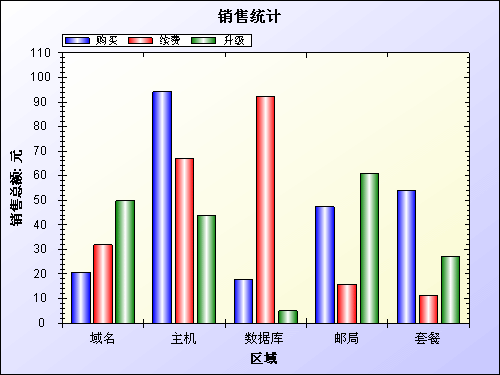
在这个页面中插入一个图片,其URL为ZedGraph.aspx
4
 posted on

 浙公网安备 33010602011771号