
java测试框架junit5
常用注解
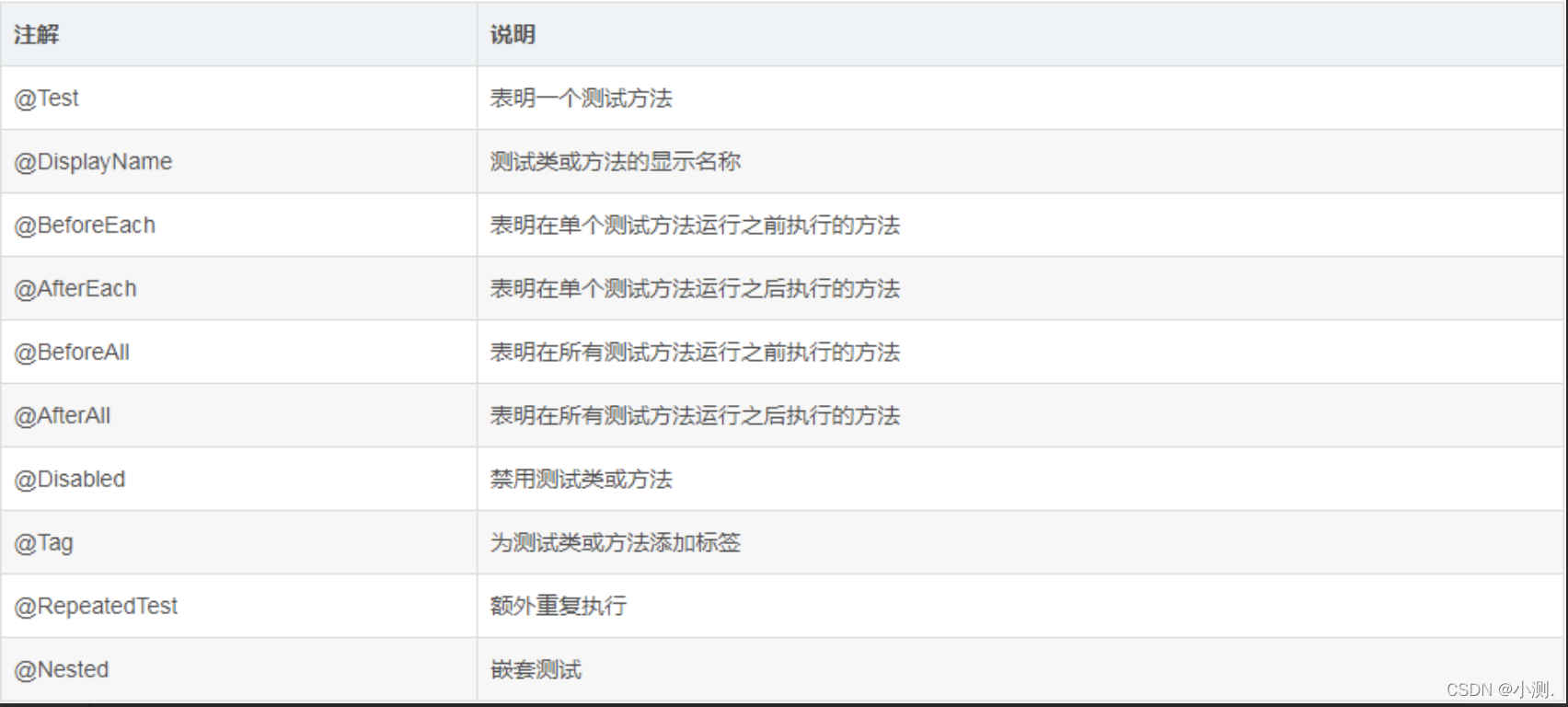
执行顺序:
BeforeAll  BeforEach > 测试用例 > AfterEach   BeforEach > 测试用例 > AfterEach  BeAfterAll
代码演示
public class DemoTest {
    @BeforeAll
    static void beforeAll(){
        System.out.println("开始测试。。。");
    }
    @AfterAll
    static void afterAll(){
        System.out.println("测试结束。。。");
    }
    @BeforeEach
    void setup(){
        System.out.println("打开浏览器");
    }
    @AfterEach
    void teardown(){
        System.out.println("关闭浏览器");
    }
    @Test
    void queryCaseTest(){
        System.out.println("query dates to ...");
        assertEquals(2,1+1);
    }
    @Test
    @DisplayName("登录测试")
    void loginCaseTest(){
        System.out.println("login to website");
        assertEquals(1,1);
    }
}
断言
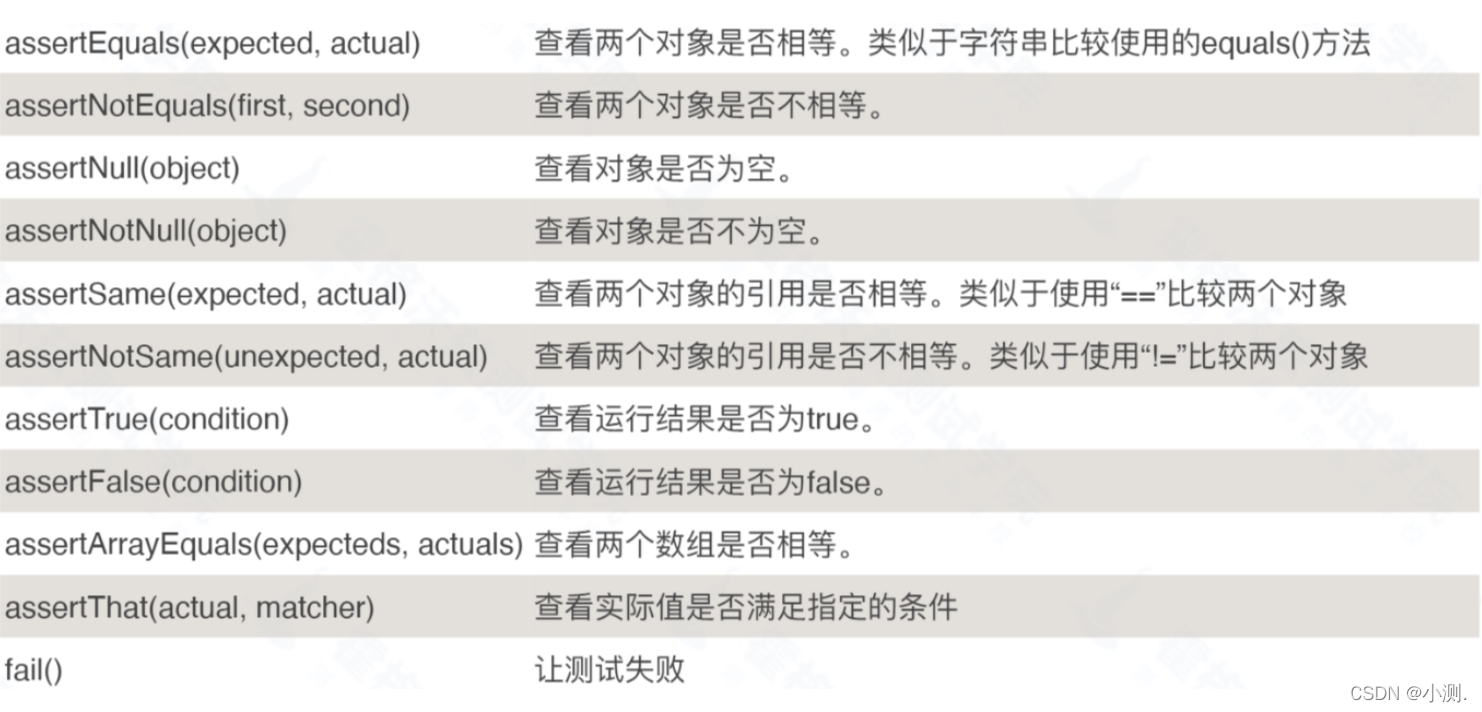
代码演示:
public class JunitLearnTest {
    @Test
    void assertEqualsDemo1(){
        assertEquals("hello","hello");
    }
    @Test
    void assertAllDemo1(){
        assertAll("响应断言",
                ()->assertEquals(2,1),
                ()->assertEquals(2,2),
                ()->assertEquals(3,3)
        );

    }
    @Test
    void assertAllDemo2() throws InterruptedException{
        ArrayList<Executable> executables = new ArrayList<>();

        executables.add(()->assertEquals(2,2));
        executables.add(()->assertEquals(2,2));

        assertAll("执行流错误信息",executables.stream());
    }
参数化
public class JunitLearnTest {

    @ParameterizedTest
//    数据参数化
//    @CsvSource({"张三,14","李四,23","王五,34"})
    // 文件参数化
    @CsvFileSource(resources="/testData.csv",delimiterString = ",")
    void paramDemo(String name , Integer age){
        System.out.println(name+"的年龄是"+age+"岁");
    }
junit5依赖
<dependency>
            <!--junit5-->
            <groupId>org.junit.jupiter</groupId>
            <artifactId>junit-jupiter</artifactId>
            <version>5.8.2</version>
            <scope>test</scope>
        </dependency>
        <dependency>
            <!--参数化-->
            <groupId>org.junit.jupiter</groupId>
            <artifactId>junit-jupiter-params</artifactId>
            <version>5.8.2</version>
            <scope>test</scope>
        </dependency>
        <dependency>
            <groupId>junit</groupId>
            <artifactId>junit</artifactId>
            <version>4.12</version>
            <scope>test</scope>
        </dependency>
嵌套
通过Nested装饰器,使测试用例归类。
package com.wangning.junit5;

import org.junit.jupiter.api.*;
//根据数字大小排序
@TestClassOrder(ClassOrderer.DisplayName.class)
public class NestLearnTest {
    //Nested可以嵌套一层class达到分组效果
    @Nested
    @DisplayName("1权限模块")
    @TestMethodOrder(MethodOrderer.OrderAnnotation.class)
    class AuthorityModel{
        @Test
        @Order(1)
        void manageAuthority(){
            System.out.println("管理员权限测试");
        }
        @Test
        @Order(2)
        void userAuthority(){
            System.out.println("用户权限测试");
        }
    }
    @Nested
    @DisplayName("2行动模块")
    @TestMethodOrder(MethodOrderer.OrderAnnotation.class)
    class ActionModel{
        @Test
        @Order(5)
        void login(){
            System.out.println("登录测试");
        }
        @Test
        @Order(6)
        void search(){
            System.out.println("查询测试");
        }
    }
    @Test
    void getHome(){
        System.out.println("首页测试");
    }
}
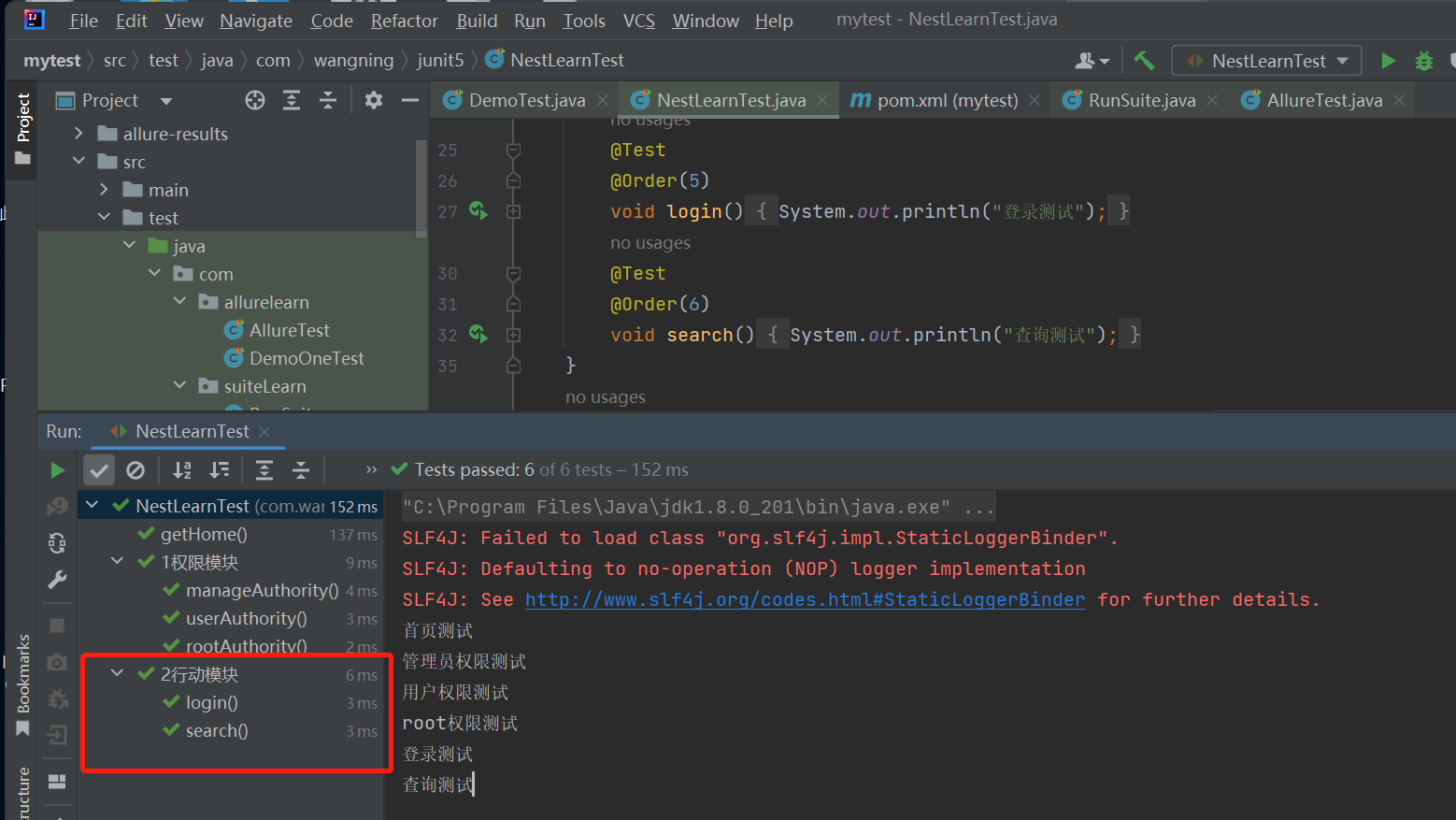
测试套件
指定类名,或者指定包名进行执行测试用例
import org.junit.platform.suite.api.SelectPackages;
import org.junit.platform.suite.api.Suite;

@Suite
//@SelectClasses({DemoTest.class, NestLearnTest.class})
@SelectPackages({"com.wangning.junit5","com.wangning.junitLearn"})
public class RunSuite {
}
<!--suite套件执行,依赖junit-platform-suite-api和junit-platform-suite-engine-->
        <dependency>
            <groupId>org.junit.platform</groupId>
            <artifactId>junit-platform-suite-api</artifactId>
            <version>1.8.2</version>
        </dependency>
        <dependency>
            <groupId>org.junit.platform</groupId>
            <artifactId>junit-platform-suite-engine</artifactId>
            <version>1.8.2</version>
        </dependency>
<!--            需要执行的测试套件-->
            <plugin>
                <groupId>org.apache.maven.plugins</groupId>
                <artifactId>maven-surefire-plugin</artifactId>
                <configuration>
                    <includes>
                        <include>com.suiteLearn.RunSuite</include>
                    </includes>
                </configuration>
            </plugin>
高级断言hamcrest
支持泛型,支持多个断言,涉及 is,not,equalTo,hasItem,hasItems,allOf,anyOf等,具体用法看代码
package com.wangning.junitLearn;

import org.hamcrest.core.AllOf;
import org.junit.jupiter.api.Test;

import java.util.ArrayList;
import java.util.Arrays;
import java.util.List;

import static org.hamcrest.CoreMatchers.*;
import static org.hamcrest.MatcherAssert.assertThat;


public class HamcrestTest {
    @Test
    void TestCase01(){
        //is里面可以传入泛型
        String info = "hamcrest testcase01";

        assertThat(info,is("hamcrest testcase01"));
        assertThat(info,is(equalTo("hamcrest testcase01")));
    }
    @Test
    void TestCase02(){
        //is里面可以传入泛型
        List<String> list = new ArrayList<>();
        list.add("my");
        list.add("test");
        List<String> expectList = Arrays.asList("my","test");

        Object num=100;
        Object expectNum=100;

        assertThat(list,is(equalTo(expectList)));
        assertThat(num,is(equalTo(expectNum)));
    }
    @Test
    void TestCase03(){
        //is表示是,not表示不是
        String info="my test";

        assertThat(info,not(equalTo("my case")));
        assertThat(info,not(instanceOf(Integer.class)));

    }
    @Test
    void TestCase04(){
        //hasItem断言一个
        //hasItems断言多个
        List<String> list=Arrays.asList("hello","world","junit");

        assertThat(list,hasItem("world"));
        assertThat(list,hasItems("world","hello"));
        assertThat(list,hasItems(instanceOf(String.class),containsString("wo"),
                endsWith("junit"),startsWith("he")));
    }
    @Test
    void TestCase05(){
        // allOf()全部满足
        // anyOf()其一满足

        // both()满足多个
        //either()满足其一
        String info="test";

        assertThat(info, allOf(startsWith("t"),containsString("st")));
        assertThat(info, anyOf(startsWith("t"),containsString("AA")));

        assertThat(info, both(startsWith("t")).and(endsWith("t")));
        assertThat(info, either(startsWith("t")).or(endsWith("t")));
    }
}
<!--hamcrest高级断言-->
        <dependency>
            <groupId>org.hamcrest</groupId>
            <artifactId>hamcrest-core</artifactId>
            <version>1.3</version>
            <scope>test</scope>
        </dependency>
        <dependency>
            <groupId>org.junit.vintage</groupId>
            <artifactId>junit-vintage-engine</artifactId>
            <version>5.8.2</version>
            <scope>test</scope>
        </dependency>
接入allure报告
下载allure
allure下载地址:https://repo1.maven.org/maven2/io/qameta/allure/allure-commandline/2.13.3/
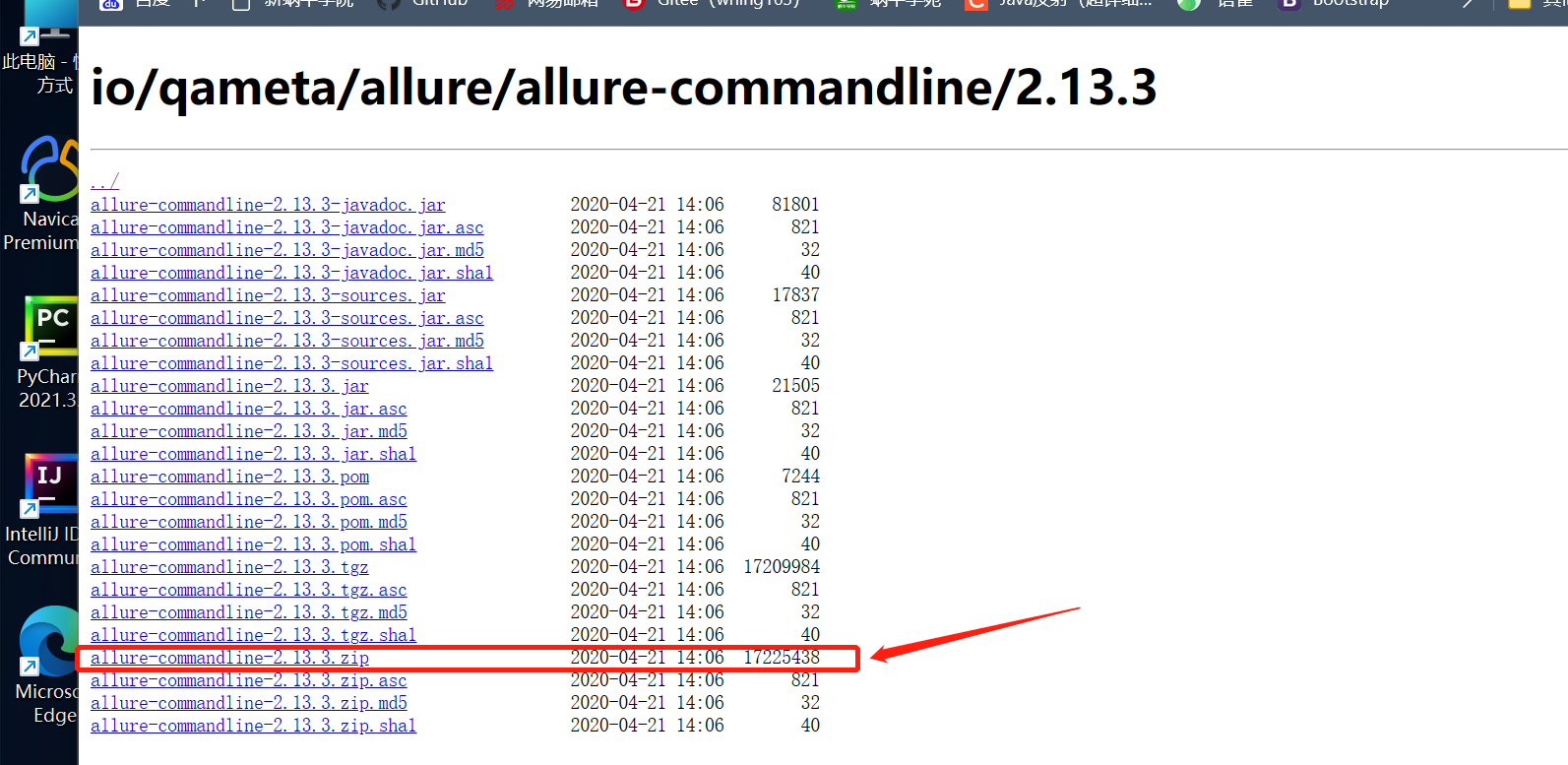
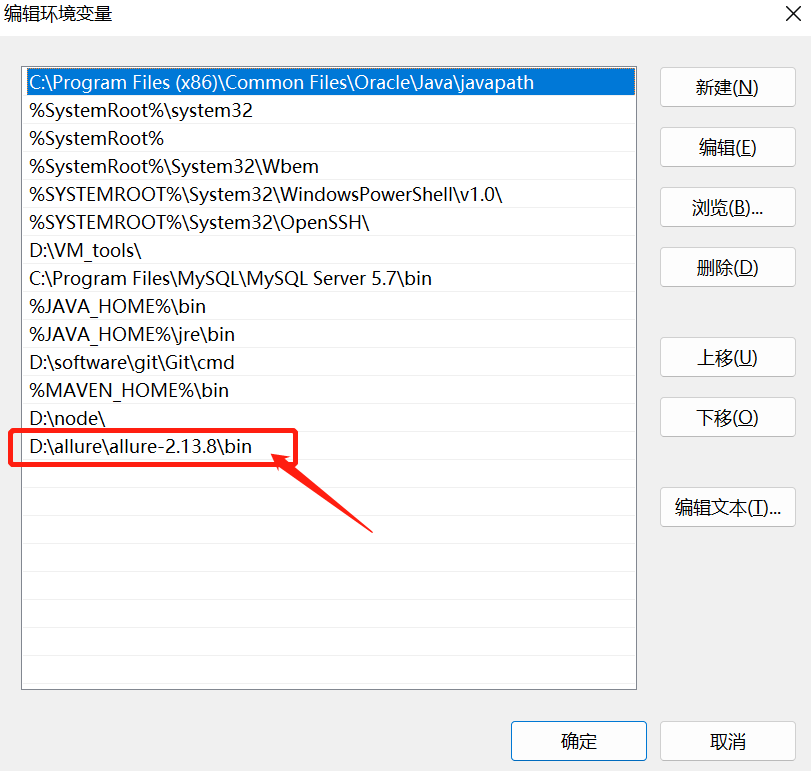
配置环境变量
环境变量配置好后,cmd中输入allure --version有版本信息,代表配置成功。
maven项目中加入依赖
<!--        allure报告-->
        <dependency>
            <groupId>io.qameta.allure</groupId>
            <artifactId>allure-junit5</artifactId>
            <version>2.13.6</version>
            <scope>test</scope>
        </dependency>
 <!-- maven 运行的依赖插件 -->
            <plugin>
                <groupId>org.apache.maven.plugins</groupId>
                <artifactId>maven-surefire-plugin</artifactId>
                <version>2.22.2</version>
                <configuration>
                <systemProperties>
                    <property>
                        <name>allure.results.directory</name>
<!--                        自定义报告存储位置  -->
<!--                        <value>${project.build.directory}/allure-results</value> target目录 -->
                        <value>./allure-results</value>
                    </property>
                </systemProperties>
                </configuration>
            </plugin>
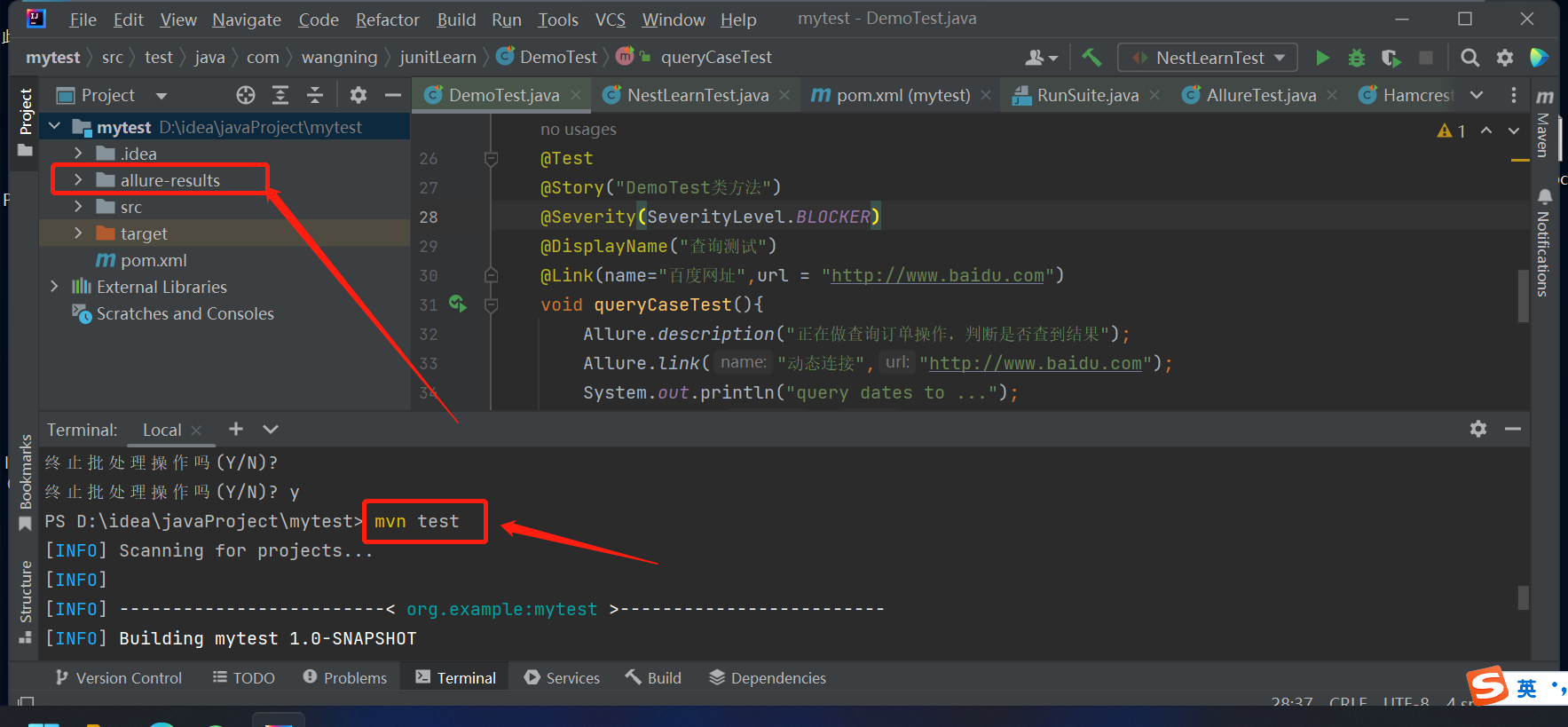
运行junit5,报告文件会存于allure-results中
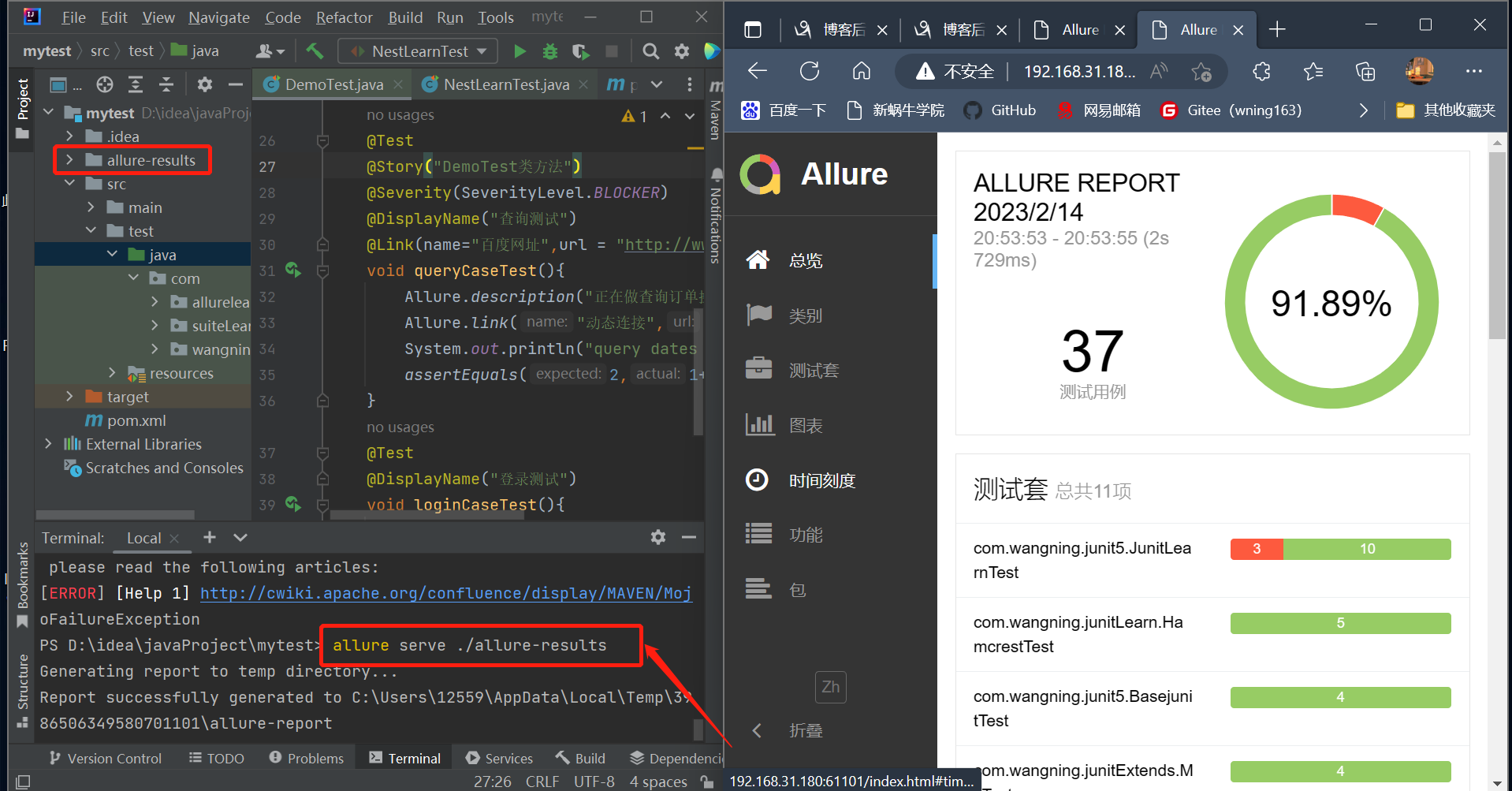
allure打开报告
allure相关配置
| 装饰器 | 参数值 | 参数说明 |
|---|---|---|
| @Feature | 模块名称 | 用例按照模块区分 |
| @Story | 用例名称 | 用例的描述 |
| @DisplayName | 用例标题 | 用例标题 |
| @Description | 用例描述 | 对测试用例的详细描述 |
| 装饰器 | 参数值 | 参数说明 |
|---|---|---|
| @Severity | 用例等级 | blocker、critical、normal、minor、trivial |
| @Link | 定义连接 | 定义一个需要在测试报告中展示的链接 |
| @Issue | 缺陷地址 | 对应缺陷管理系统里边的缺陷地址 |
| @Step | 操作步骤 | 测试用例的操作步骤 |
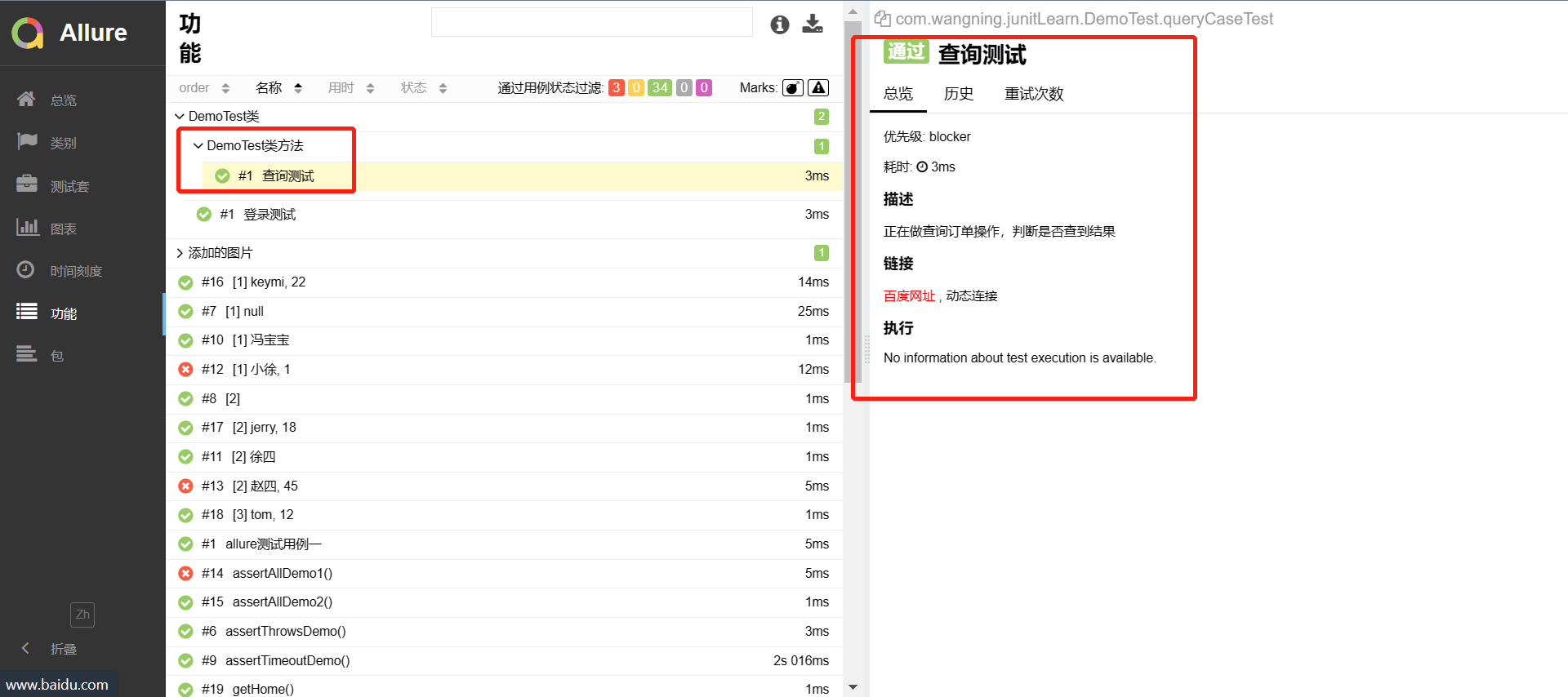
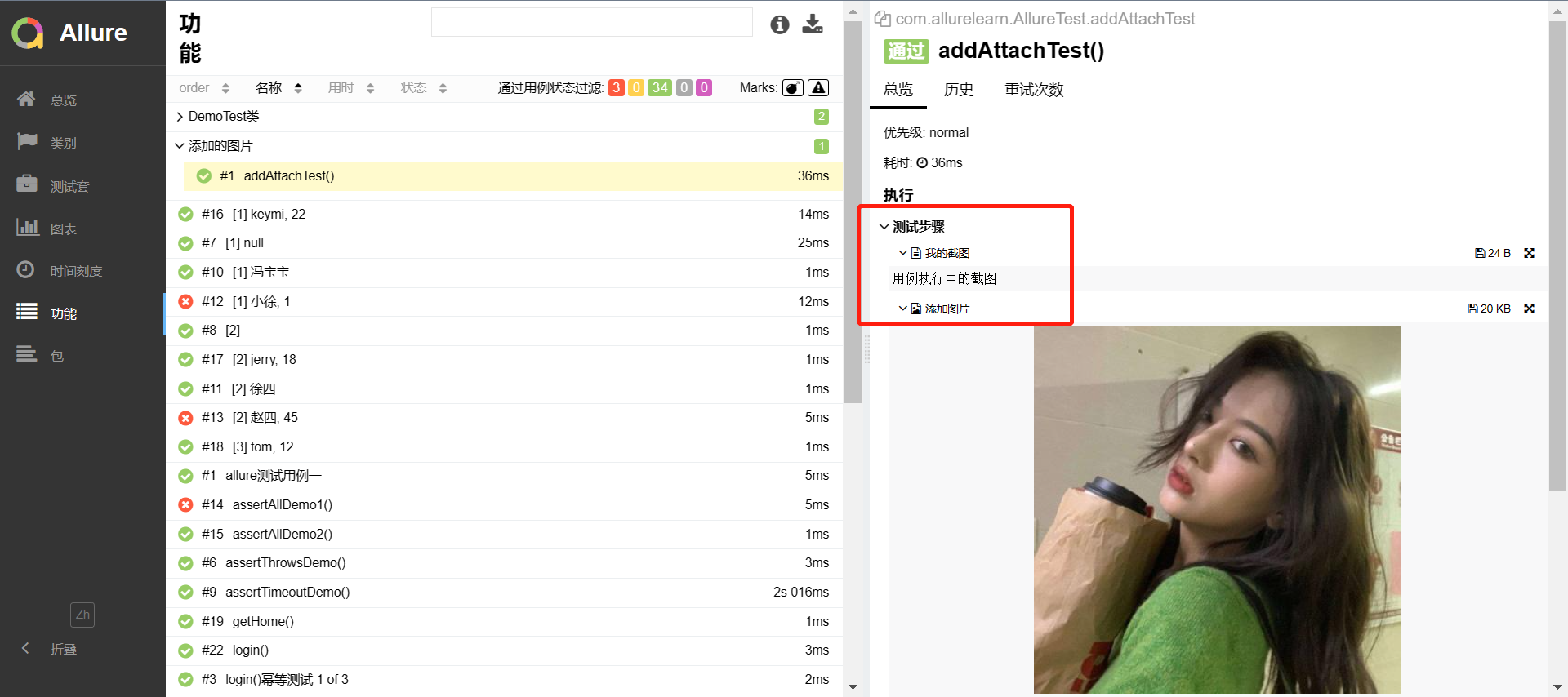
Allure.addAttachment 附件 添加测试报告附件(文本、图片、视频等)
// 模块用例分类,描述
@Feature("模块名称")
public class TestDemo1{

    @Test
    @Story("用例名称")
    @DisplayName("用例标题")
    @Description("用例描述")
    public void queryCaseTest(){
        Allure.description("正在做查询订单操作,判断是否查到结果");
        assertEquals(2,1+1);
    }
}


public class DemoTest2 {
  //用例等级,静态链接,动态链接
    @Test
    @Severity(SeverityLevel.BLOCKER)
    @Link(name="百度网址",url = "http://www.baidu.com")
    void queryCaseTest(){
        Allure.link("动态连接","http://www.baidu.com");
        System.out.println("query dates to ...");
        assertEquals(2,1+1);
    }
public class DemoTest3 {
  //用例等级,静态链接,动态链接
    @Test
    @Severity(SeverityLevel.BLOCKER)
    @Link(name="百度网址",url = "http://www.baidu.com")
    void queryCaseTest(){
        Allure.link("动态连接","http://www.baidu.com");
        System.out.println("query dates to ...");
        assertEquals(2,1+1);
    }

public class AllureTest {
 //添加图片到allure报告中
    @Test
    @Story("添加的图片")
    void addAttachTest(){
        //添加文本
        Allure.addAttachment("我的截图","用例执行中的截图");
        //截图展示
        try{
            Allure.addAttachment("添加图片","image/png",
                    new FileInputStream("D:/wangning/log/image.jpg"),".jpg");
        }catch(FileNotFoundException  e){
            e.printStackTrace();
        }
    }
}
完整的依赖
<?xml version="1.0" encoding="UTF-8"?>
<project xmlns="http://maven.apache.org/POM/4.0.0"
xmlns:xsi="http://www.w3.org/2001/XMLSchema-instance"
xsi:schemaLocation="http://maven.apache.org/POM/4.0.0 http://maven.apache.org/xsd/maven-4.0.0.xsd">
<modelVersion>4.0.0</modelVersion>
<groupId>org.example</groupId>
<artifactId>mytest</artifactId>
<version>1.0-SNAPSHOT</version>
<properties>
<maven.compiler.source>8</maven.compiler.source>
<maven.compiler.target>8</maven.compiler.target>
<project.build.sourceEncoding>UTF-8</project.build.sourceEncoding>
</properties>
<dependencies>
<dependency>
<!--junit5-->
<groupId>org.junit.jupiter</groupId>
<artifactId>junit-jupiter</artifactId>
<version>5.8.2</version>
<scope>test</scope>
</dependency>
<dependency>
<!--参数化-->
<groupId>org.junit.jupiter</groupId>
<artifactId>junit-jupiter-params</artifactId>
<version>5.8.2</version>
<scope>test</scope>
</dependency>
<dependency>
<groupId>junit</groupId>
<artifactId>junit</artifactId>
<version>4.12</version>
<scope>test</scope>
</dependency>
<!--suite套件执行,依赖junit-platform-suite-api和junit-platform-suite-engine-->
<!-- <dependency>-->
<!-- <groupId>org.junit.platform</groupId>-->
<!-- <artifactId>junit-platform-suite-api</artifactId>-->
<!-- <version>1.8.2</version>-->
<!-- </dependency>-->
<!-- <dependency>-->
<!-- <groupId>org.junit.platform</groupId>-->
<!-- <artifactId>junit-platform-suite-engine</artifactId>-->
<!-- <version>1.8.2</version>-->
<!-- </dependency>-->
<!-- allure报告-->
<dependency>
<groupId>io.qameta.allure</groupId>
<artifactId>allure-junit5</artifactId>
<version>2.13.6</version>
<scope>test</scope>
</dependency>
<!--hamcrest高级断言-->
<dependency>
<groupId>org.hamcrest</groupId>
<artifactId>hamcrest-core</artifactId>
<version>1.3</version>
<scope>test</scope>
</dependency>
<dependency>
<groupId>org.junit.vintage</groupId>
<artifactId>junit-vintage-engine</artifactId>
<version>5.8.2</version>
<scope>test</scope>
</dependency>
</dependencies>
<build>
<plugins>
<!-- maven (配合allure使用)运行的依赖插件 -->
<plugin>
<groupId>org.apache.maven.plugins</groupId>
<artifactId>maven-surefire-plugin</artifactId>
<version>2.22.2</version>
<configuration>
<systemProperties>
<property>
<name>allure.results.directory</name>
<!-- <value>${project.build.directory}/allure-results</value> target目录 -->
<value>./allure-results</value>
</property>
</systemProperties>
</configuration>
</plugin>
<!-- 需要执行的测试标签-->
<!-- <plugin>-->
<!-- <artifactId>maven-surefire-plugin</artifactId>-->
<!-- <version>2.22.2</version>-->
<!-- <configuration>-->
<!--<!– 要执行的标签–>-->
<!-- <groups>dev,pre</groups>-->
<!--<!– 不执行的标签–>-->
<!-- <excludedGroups>dev</excludedGroups>-->
<!-- </configuration>-->
<!-- </plugin>-->
<!-- 需要执行的测试套件-->
<!-- <plugin>-->
<!-- <groupId>org.apache.maven.plugins</groupId>-->
<!-- <artifactId>maven-surefire-plugin</artifactId>-->
<!-- <configuration>-->
<!-- <includes>-->
<!-- <include>com.suiteLearn.RunSuite</include>-->
<!-- </includes>-->
<!-- </configuration>-->
<!-- </plugin>-->
<plugin>
<artifactId>maven-failsafe-plugin</artifactId>
<version>2.22.2</version>
</plugin>
</plugins>
</build>
</project>

 浙公网安备 33010602011771号