

springboot整合thymeleaf模板引擎和bootstrap实现增删改查和文件上传
springboot整合thymeleaf模板引擎和bootstrap实现增删改查和文件上传
一、参照第八天任务中的栏目表,使用thymeleaf做为前端展现,完成CRUD及分页操作
二、使用springboot+mybatis-plus+redis完成用户登录系统,
数据库表 users
|
字段名称 |
中文 |
类型 |
长度 |
主键 |
外键 |
自增 |
约束 |
|
uid |
用户id |
Int |
|
Y |
|
Y |
|
|
User_name |
用户名 |
varchar |
255 |
|
|
|
|
|
password |
用户密码 |
varchar |
255 |
|
|
|
|
如果3分钟内,失败三次,则要求30分钟后才可以再次登录
新建一个Spring Initializr项目
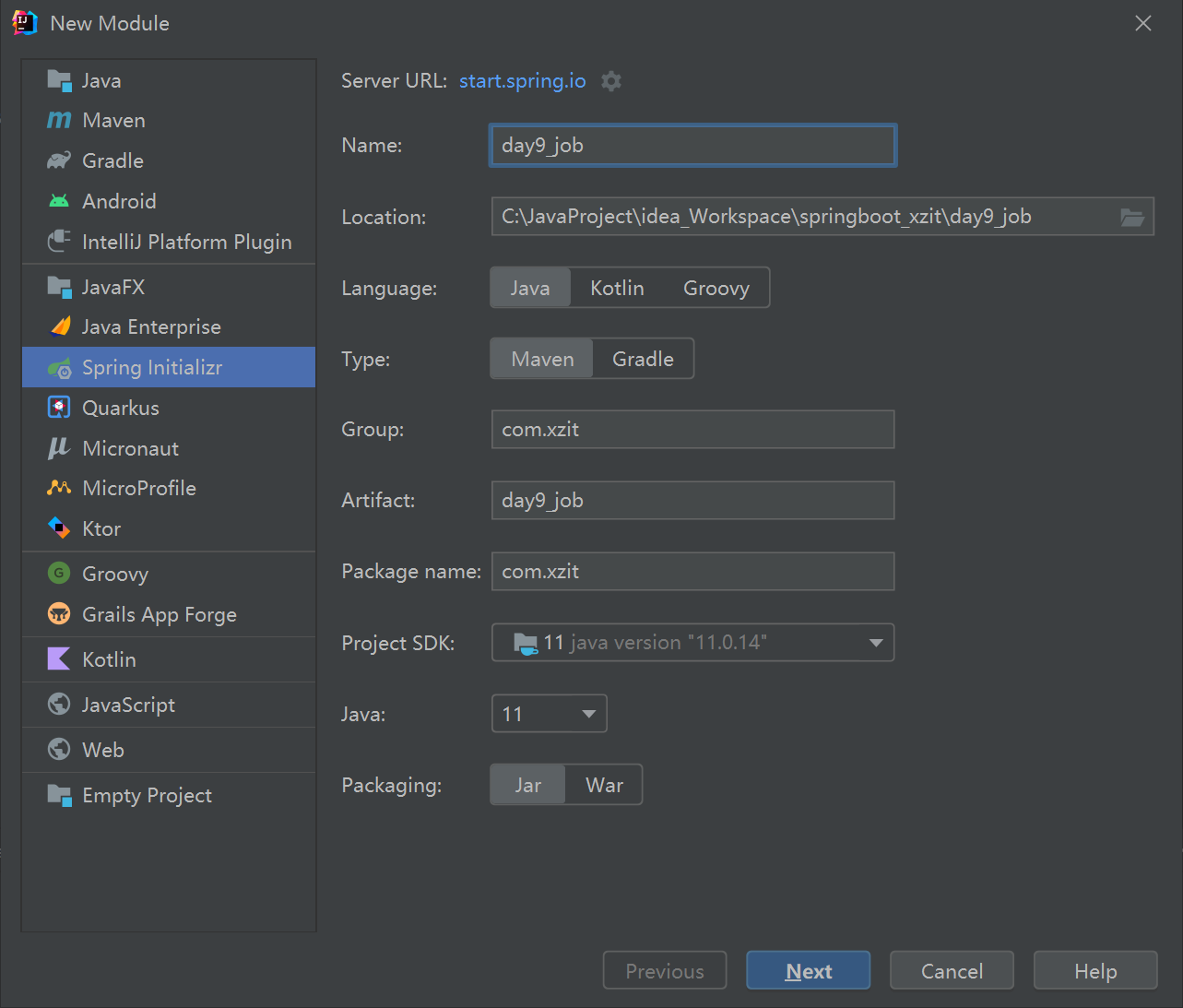
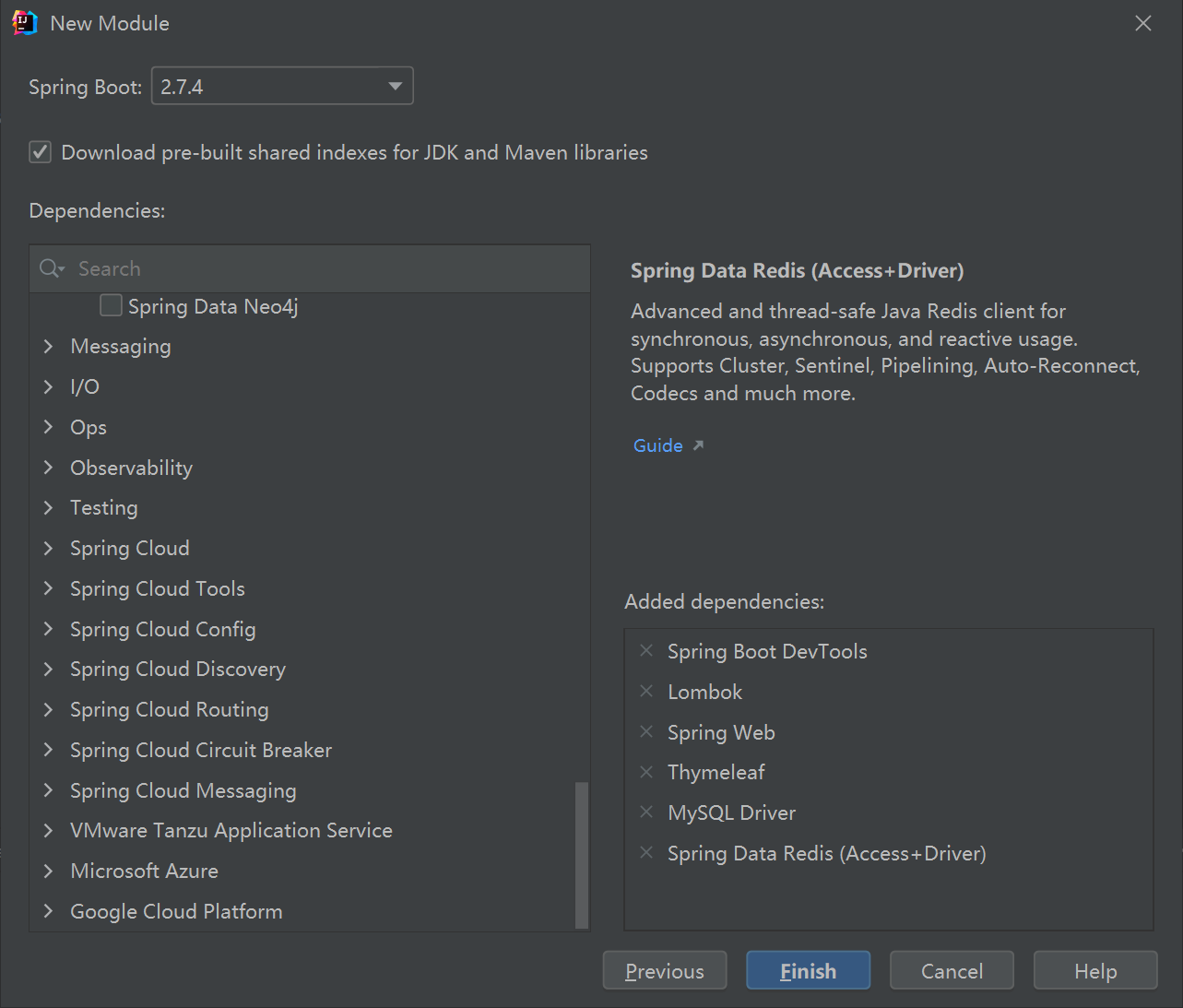
选择如下依赖,比此前的项目多选了Thymeleaf依赖和非关系型数据库redis驱动:
配置pom.xml,主要是新增mybatis-plus依赖和德鲁伊数据源

<?xml version="1.0" encoding="UTF-8"?>
<project xmlns="http://maven.apache.org/POM/4.0.0" xmlns:xsi="http://www.w3.org/2001/XMLSchema-instance"
         xsi:schemaLocation="http://maven.apache.org/POM/4.0.0 https://maven.apache.org/xsd/maven-4.0.0.xsd">
    <modelVersion>4.0.0</modelVersion>
    <parent>
        <groupId>org.springframework.boot</groupId>
        <artifactId>spring-boot-starter-parent</artifactId>
        <version>2.7.4</version>
        <relativePath/> <!-- lookup parent from repository -->
    </parent>
    <groupId>com.xzit</groupId>
    <artifactId>day9_job</artifactId>
    <version>0.0.1-SNAPSHOT</version>
    <name>day9_job</name>
    <description>day9_job</description>
    <properties>
        <java.version>11</java.version>
    </properties>
    <dependencies>
       <!--redis驱动-->
        <dependency>
            <groupId>org.springframework.boot</groupId>
            <artifactId>spring-boot-starter-data-redis</artifactId>
        </dependency>
        <!--thymleaf模板-->
        <dependency>
            <groupId>org.springframework.boot</groupId>
            <artifactId>spring-boot-starter-thymeleaf</artifactId>
        </dependency>
        <!--spring web-->
        <dependency>
            <groupId>org.springframework.boot</groupId>
            <artifactId>spring-boot-starter-web</artifactId>
        </dependency>
        <!--mybatis-plus依赖-->
        <dependency>
            <groupId>com.baomidou</groupId>
            <artifactId>mybatis-plus-boot-starter</artifactId>
            <version>3.5.1</version>
        </dependency>
        <!--德鲁伊数据源-->
        <dependency>
            <groupId>com.alibaba</groupId>
            <artifactId>druid-spring-boot-starter</artifactId>
            <version>1.2.8</version>
        </dependency>
        <!--热部署工具-->
        <dependency>
            <groupId>org.springframework.boot</groupId>
            <artifactId>spring-boot-devtools</artifactId>
            <scope>runtime</scope>
            <optional>true</optional>
        </dependency>
        <!--mysql驱动-->
        <dependency>
            <groupId>mysql</groupId>
            <artifactId>mysql-connector-java</artifactId>
            <scope>runtime</scope>
        </dependency>
        <!--lombok驱动-->
        <dependency>
            <groupId>org.projectlombok</groupId>
            <artifactId>lombok</artifactId>
            <optional>true</optional>
        </dependency>
        <!--SpringbootTest-->
        <dependency>
            <groupId>org.springframework.boot</groupId>
            <artifactId>spring-boot-starter-test</artifactId>
            <scope>test</scope>
        </dependency>
    </dependencies>

    <build>
        <plugins>
            <plugin>
                <groupId>org.springframework.boot</groupId>
                <artifactId>spring-boot-maven-plugin</artifactId>
                <configuration>
                    <excludes>
                        <exclude>
                            <groupId>org.projectlombok</groupId>
                            <artifactId>lombok</artifactId>
                        </exclude>
                    </excludes>
                </configuration>
            </plugin>
        </plugins>
    </build>

</project>
配置application.yml,注意不能用tab缩进,只能用空格键,如果报expected <block end>, but found '<block mapping start>'错误,可能是因为yml文件没缩进好,用ctrl+shift+F自动整理下格式
#配置druid数据源
spring:
  datasource:
    druid:
      url: jdbc:mysql://localhost:3306/mybatis?serverTimezone=GMT%2B8
      username: root
      password: zengyu1234

  #并发环境下,关闭缓存,生产环境下,打开缓存
  thymeleaf:
    cache: false
  #静态资源路径
  web:
    resources:
      static-locations: classpath:/static
  #排除自动重启资源
  devtools:
    restart:
      exclude: static/**,public/**,templates/**
    #配置文件上传大小
    servlet:
      multipart:
        max-file-size: 104857600
#配置mybatis-plus
#打印输出日志
mybatis-plus:
  configuration:
    log-impl: org.apache.ibatis.logging.stdout.StdOutImpl
  #配置数据库删除字段
  global-config:
    db-config:
      logic-delete-field: deleted
#配置文件上传路径
savePath: c:/uploadtest
配置一个thymeleaf的html模板,因为想要前端的样式好看一些,就在头文件里直接引入bootstrap
<!DOCTYPE html>
<html lang="zh" xmlns:th="http://www.thymeleaf.org">
<head>
    <meta charset="UTF-8">
    <title>Title</title>
    <link rel="stylesheet" type="text/css" th:href="@{/bootstrap.min.css}">
</head>
<body>

</body>
</html>
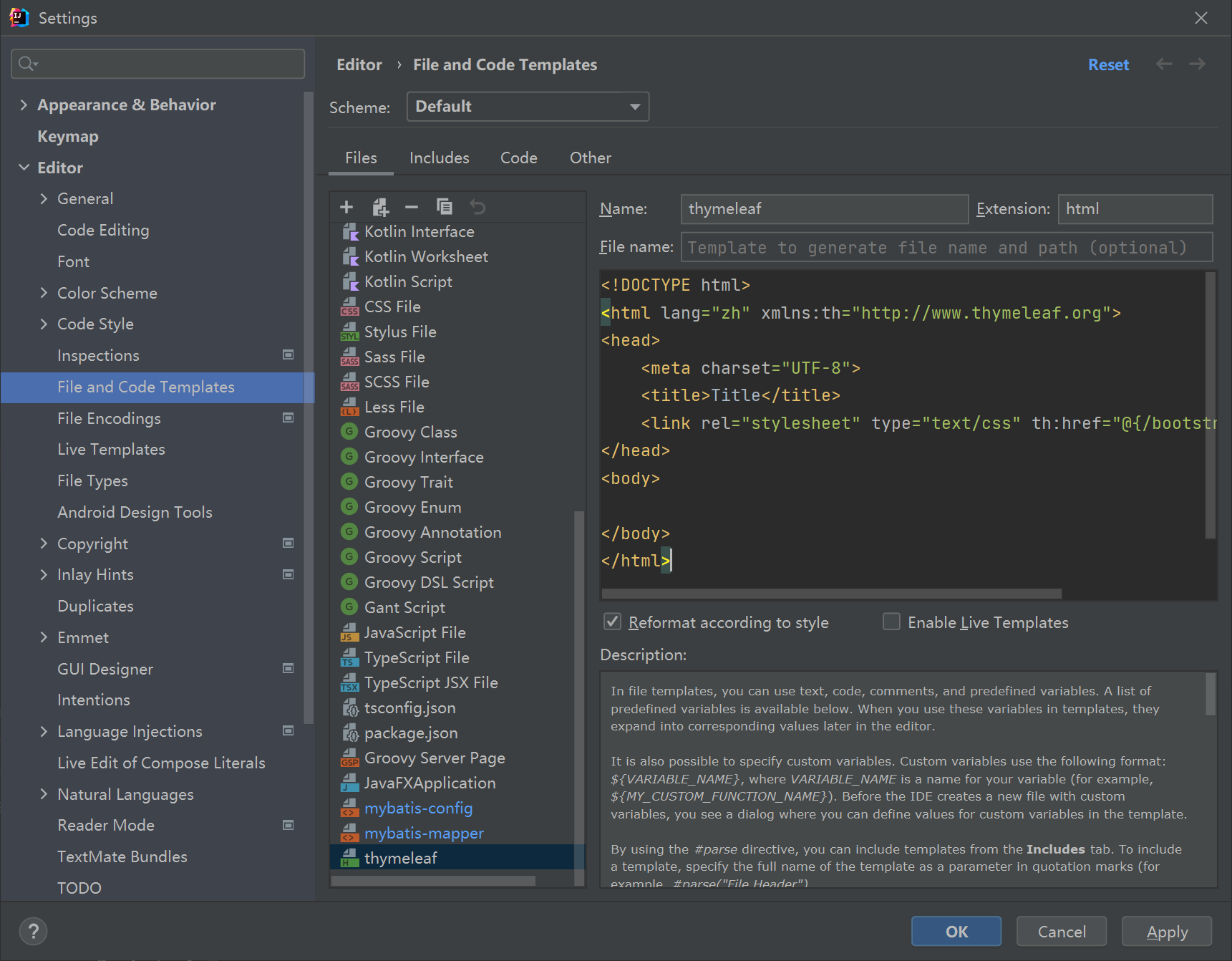
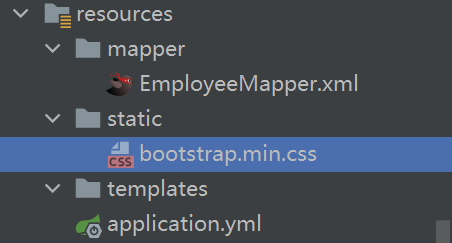
想要bootstrap生效,需要上官网下载bootstrap.min.css文件放入templates里,放入static也行,后面在html文件中要声明路径
bootstrap下载地址
https://v3.bootcss.com/getting-started/#download
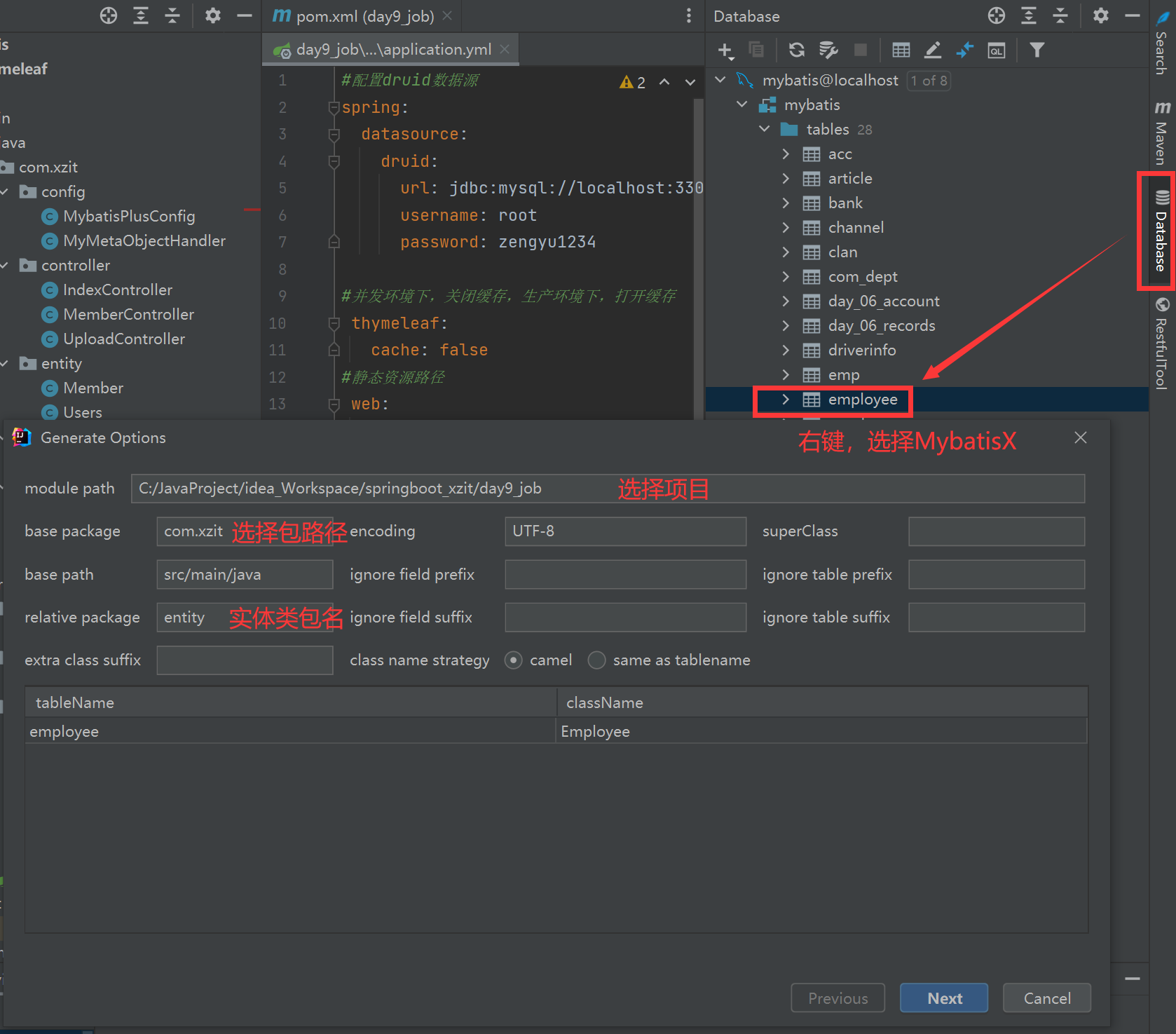
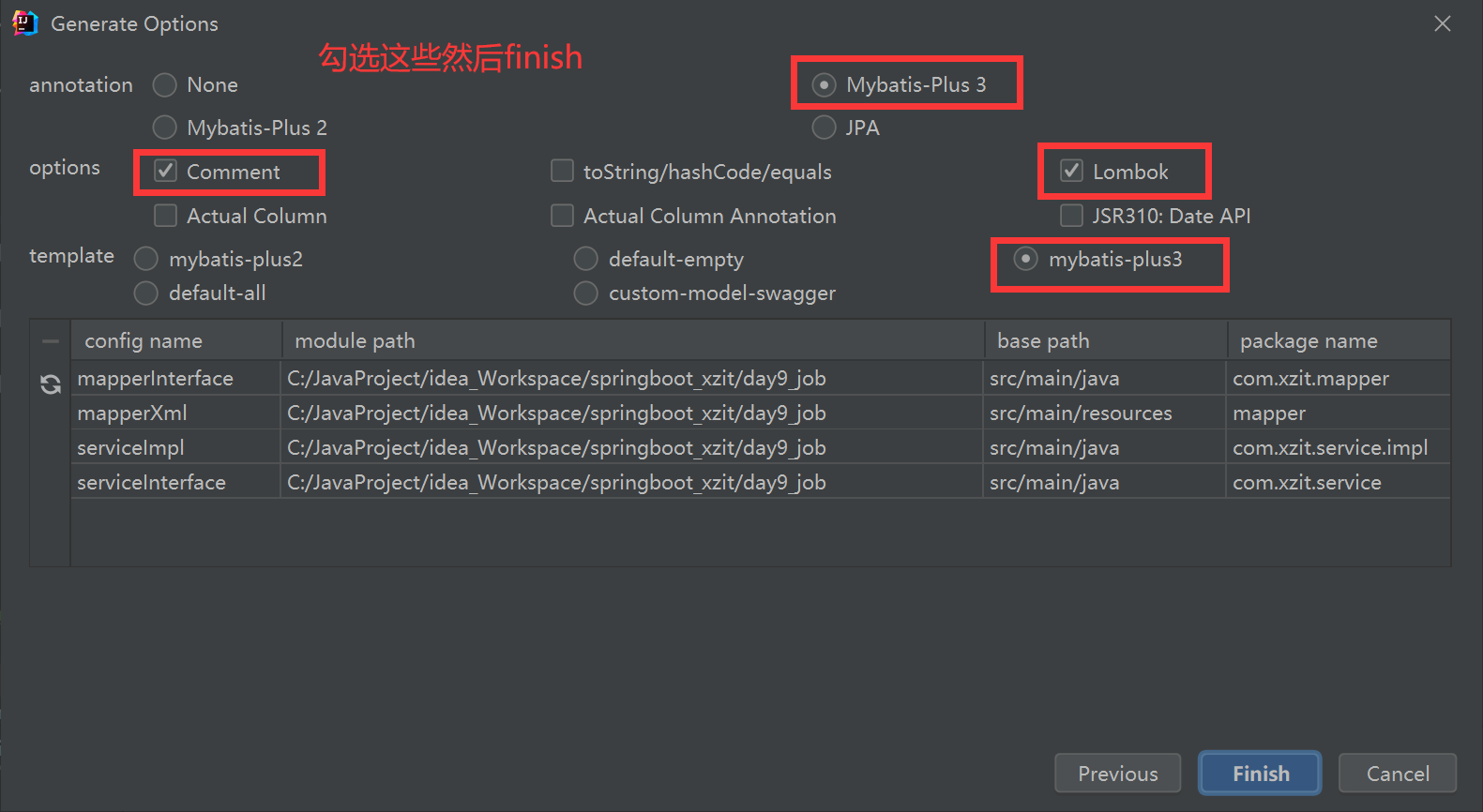
对以前创建的Employee表使用MybatisX进行逆向自动生成
新建一个MybatisPlusConfig文件,配置分页插件
package com.xzit.config;

import com.baomidou.mybatisplus.annotation.DbType;
import com.baomidou.mybatisplus.extension.plugins.MybatisPlusInterceptor;
import com.baomidou.mybatisplus.extension.plugins.inner.PaginationInnerInterceptor;
import org.springframework.context.annotation.Bean;
import org.springframework.context.annotation.Configuration;

@Configuration

public class MybatisPlusConfig {
    /**
     * 新的分页插件,一缓和二缓遵循mybatis的规则,需要设置 MybatisConfiguration#useDeprecatedExecutor = false 避免缓存出现问题(该属性会在旧插件移除后一同移除)
     */
    @Bean
    public MybatisPlusInterceptor mybatisPlusInterceptor() {
        MybatisPlusInterceptor interceptor = new MybatisPlusInterceptor();
        interceptor.addInnerInterceptor(new PaginationInnerInterceptor(DbType.MYSQL));
        return interceptor;
    }
}
记得在主类里加上MapperScan注解
package com.xzit;

import org.mybatis.spring.annotation.MapperScan;
import org.springframework.boot.SpringApplication;
import org.springframework.boot.autoconfigure.SpringBootApplication;

@SpringBootApplication
@MapperScan("com.xzit.mapper")
public class Day9JobApplication {

    public static void main(String[] args) {
        SpringApplication.run(Day9JobApplication.class, args);
    }

}
新增一个EmployeeController,使用分页插件封装一个page对象传输给前端html页面
package com.xzit.controller;

import com.baomidou.mybatisplus.extension.plugins.pagination.Page;
import com.xzit.entity.Employee;
import com.xzit.service.EmployeeService;
import org.springframework.stereotype.Controller;
import org.springframework.ui.Model;
import org.springframework.web.bind.annotation.GetMapping;
import org.springframework.web.bind.annotation.RequestMapping;
import org.springframework.web.bind.annotation.RequestParam;

import javax.annotation.Resource;

@Controller
@RequestMapping("/employee")
public class EmployeeController {

    @Resource
    private EmployeeService service;

    @GetMapping("/list")
    public String list(@RequestParam(required = false,defaultValue = "1",
            value = "current") Integer current, Model model){
        Page<Employee> page = new Page<>(current,5);
        service.page(page);
        model.addAttribute("path","/employee/list?current=");
        model.addAttribute("page",page);
        return "/list";
    }
}
新增一个list.html页面,前端页面循环接收page对象并展示值
<!DOCTYPE html>
<html lang="zh" xmlns:th="http://www.thymeleaf.org">
<head>
    <meta charset="UTF-8">
    <title>Title</title>
    <link rel="stylesheet" type="text/css" th:href="@{/bootstrap.min.css}">
</head>
<body>
<div class="container" style="margin-top: 30px">
    <div>员工管理</div>
    <table class="table table-bordered table-hover table-striped">
        <tr>
            <td>
                序号
            </td>
            <td>
                员工姓名
            </td>
            <td>
                登录名称
            </td>
            <td>
                登录密码
            </td>
            <td>
                年龄
            </td>
            <td>
                性别
            </td>
            <td>
                地址
            </td>
            <td>
                部门名称
            </td>
            <td>
                是否在职
            </td>
        </tr>
        <!--<tr th:each="临时变量名,循环状态变量:${集合数据}">-->
        <tr th:each="employee,status:${page.records}">
            <td th:text="${status.count}"></td>
            <td th:text="${employee.empName}"></td>
            <td th:text="${employee.loginName}"></td>
            <td th:text="${employee.loginPassword}"></td>
            <td th:text="${employee.age}"></td>
            <td th:text="${employee.gender}"></td>
            <td th:text="${employee.addr}"></td>
            <td th:text="${employee.deptName}"></td>
            <td th:text="${employee.status}"></td>
        </tr>
    </table>
</div>
</body>
</html>
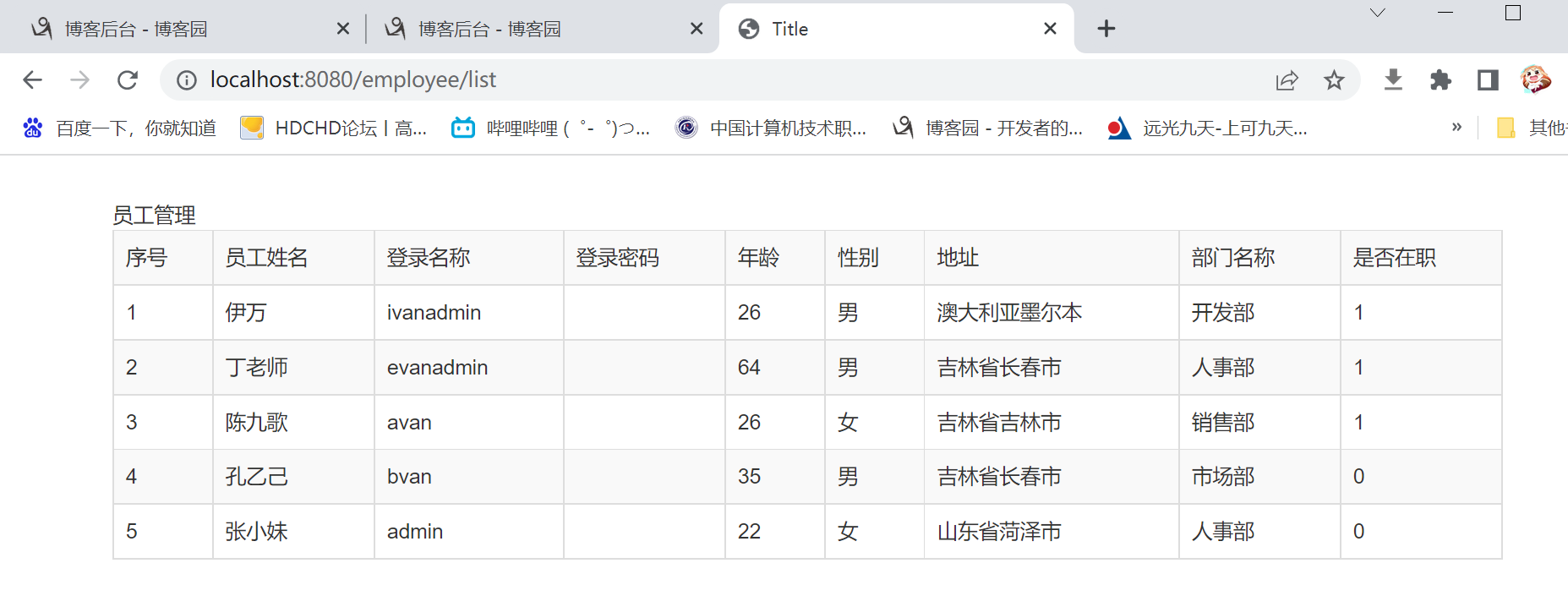
运行效果如图,其中密码字段在实体类里加了注解,查询不返回值
/*声明该密码字段查询不返回值*/
@TableField(select = false)
private String loginPassword;
新建一个page.html,这个页面是分页控件页面,通过insert到list.html的一个div里插入到主页
<!DOCTYPE html>
<!--suppress ALL-->
<html lang="zh" xmlns:th="http://www.thymeleaf.org">
<div th:fragment="page"><!--定义用于被显示列表页包含-->
    <style>
    </style>
    <div th:if="${page.pages>0}">
        <div style="float: left">
            当前第<span th:text="${page.current}"></span>页,
            共<span th:text="${page.pages}"></span>页,
            总记录数<span th:text="${page.total}"></span>
        </div>
        <div style="float: right">
            <!--此处的path是后台EmployController封装的路径-->
            <!--model.addAttribute("path","/employee/list?current=");-->
            <a th:text="首页" th:if="${page.current>1}" th:href="@{${path}}"></a>
            <a th:text="上一页" th:if="${page.current>1}" th:href="@{${path}+${page.current-1}}"></a>
            <a th:href="@{${path}+${i}}" th:each="i:${#numbers.sequence(1,page.pages)}"
               th:text="${i}" th:class="${page.current==i}?'page active':'page'"></a>
            <a th:text="下一页" th:if="${page.current<page.pages}" th:href="@{${path}+${page.current+1}}"></a>
            <a th:text="尾页" th:if="${page.current<page.pages}" th:href="@{${path}+${page.pages}}"></a>
        </div>
    </div>
</div>
</html>
主页下方插入
<!DOCTYPE html>
<html lang="zh" xmlns:th="http://www.thymeleaf.org">
<head>
    <meta charset="UTF-8">
    <title>Title</title>
    <link rel="stylesheet" type="text/css" th:href="@{/bootstrap.min.css}">
</head>
<body>
<div class="container" style="margin-top: 30px">
    <div>员工管理</div>
    <table class="table table-bordered table-hover table-striped">
        <tr>
            <td>
                序号
            </td>
            <td>
                员工姓名
            </td>
            <td>
                登录名称
            </td>
            <td>
                登录密码
            </td>
            <td>
                年龄
            </td>
            <td>
                性别
            </td>
            <td>
                地址
            </td>
            <td>
                部门名称
            </td>
            <td>
                是否在职
            </td>
        </tr>
        <!--<tr th:each="临时变量名,循环状态变量:${集合数据}">-->
        <tr th:each="employee,status:${page.records}">
            <td th:text="${status.count}"></td>
            <td th:text="${employee.empName}"></td>
            <td th:text="${employee.loginName}"></td>
            <td th:text="${employee.loginPassword}"></td>
            <td th:text="${employee.age}"></td>
            <td th:text="${employee.gender}"></td>
            <td th:text="${employee.addr}"></td>
            <td th:text="${employee.deptName}"></td>
            <td th:text="${employee.status}"></td>
        </tr>
    </table>
    <div th:insert="page :: page"></div>
</div>
</body>
</html>
显示效果:
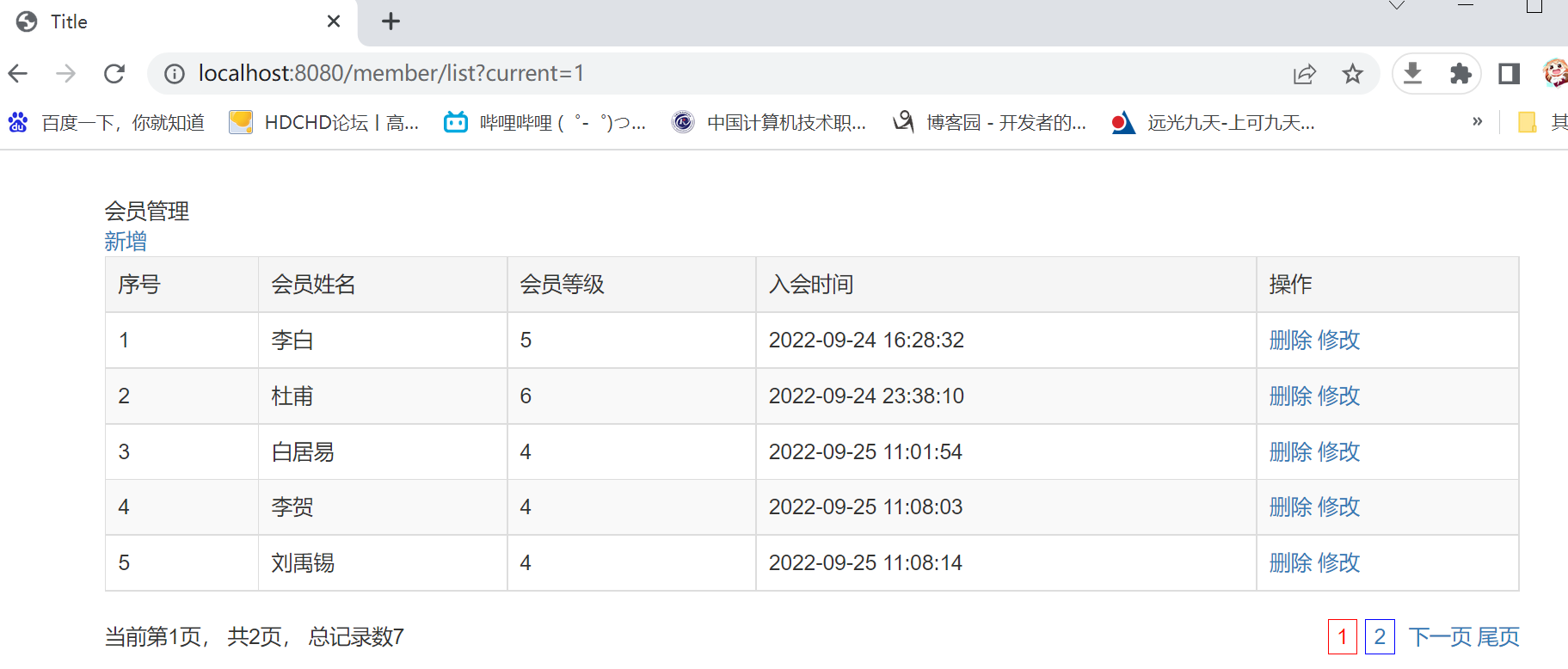
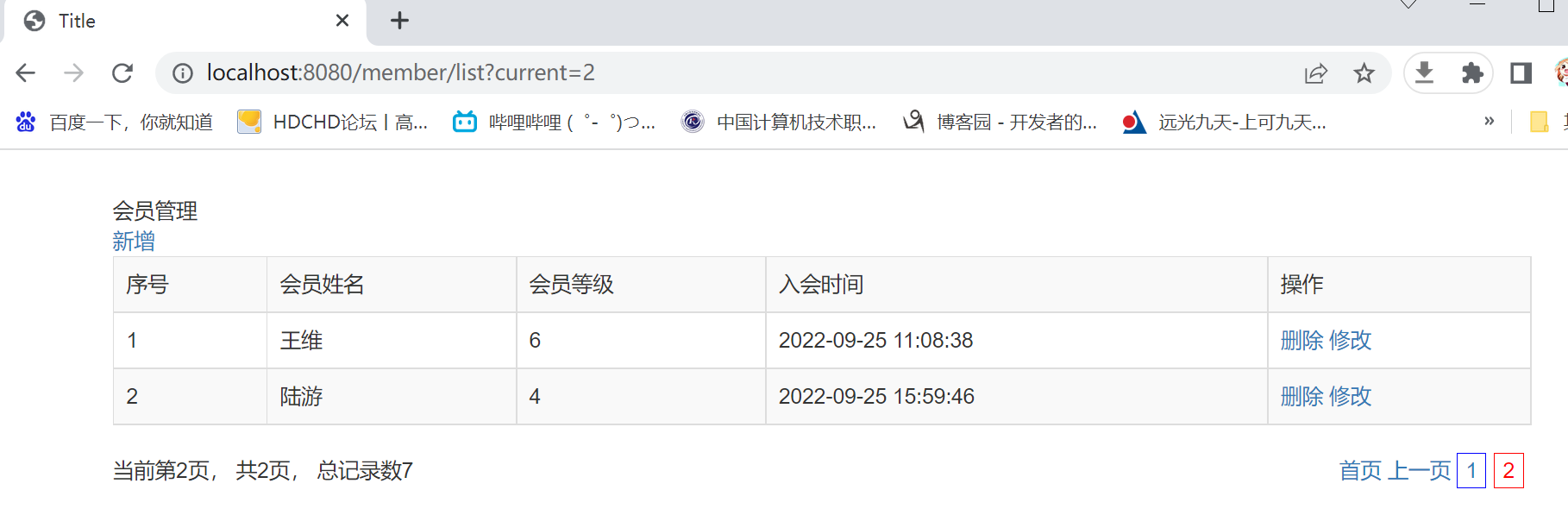
至此查询功能完成
新增保存功能
在EmployeeController里写好对应的方法
package com.xzit.controller;

import com.baomidou.mybatisplus.extension.plugins.pagination.Page;
import com.xzit.entity.Employee;
import com.xzit.service.EmployeeService;
import org.springframework.stereotype.Controller;
import org.springframework.ui.Model;
import org.springframework.web.bind.annotation.GetMapping;
import org.springframework.web.bind.annotation.PostMapping;
import org.springframework.web.bind.annotation.RequestMapping;
import org.springframework.web.bind.annotation.RequestParam;

import javax.annotation.Resource;

@Controller
@RequestMapping("/employee")
public class EmployeeController {

    @Resource
    private EmployeeService service;

    /* 进入到保存页 */
    @GetMapping("/save")
    public String save(){
        return "/save";
    }

    /* 保存后跳转回主页 */
    @PostMapping("/save_commit")
    public String save_commit(Employee employee){
        service.save(employee);
        return "redirect:/employee/list";//返回列表页的处理
    }

    /* 主页列表展示 */
    @GetMapping("/list")
    public String list(@RequestParam(required = false,defaultValue = "1",
            value = "current") Integer current, Model model){
        Page<Employee> page = new Page<>(current,5);
        service.page(page);
        model.addAttribute("path","/employee/list?current=");
        model.addAttribute("page",page);
        return "/list";
    }
}
新建一个save.html页面用来做保存页
<!DOCTYPE html>
<html lang="zh" xmlns:th="http://www.thymeleaf.org">
<head>
    <meta charset="UTF-8">
    <title>Title</title>
    <link rel="stylesheet" type="text/css" th:href="@{/bootstrap.min.css}">
</head>
<body>
<div class="container" style="margin-top: 30px">
    <div>会员管理</div>
    <form method="post" action="/employee/save_commit">
        <div class="form-group">
            <label for="empName">员工姓名</label>
            <input type="text" name="empName" class="form-control" id="empName" placeholder="请输入员工姓名">
        </div>
        <div class="form-group">
            <label for="loginName">登录名称</label>
            <input type="text" name="loginName" class="form-control" id="loginName" placeholder="请输入登录名称">
        </div>
        <div class="form-group">
            <label for="loginPassword">登录密码</label>
            <input type="text" name="loginPassword" class="form-control" id="loginPassword" placeholder="请输入登录密码">
        </div>
        <div class="form-group">
            <label for="age">年龄</label>
            <input type="text" name="age" class="form-control" id="age" placeholder="请输入年龄">
        </div>
        <div class="radio">性别:<br/>
            <label for="gender">
                <input type="radio" name="gender" id="gender" value="男" checked>男
            </label>
        </div>
        <div class="radio">
            <label for="gender">
                <input type="radio" name="gender" id="gender2" value="女" >女
            </label>
        </div>
        <div class="form-group">
            <label for="addr">地址</label>
            <input type="text" name="addr" class="form-control" id="addr" placeholder="请输入地址">
        </div>
        <div class="form-group">
            <label for="deptName">部门名称</label>
            <input type="text" name="deptName" class="form-control" id="deptName" placeholder="请输入部门名称">
        </div>
        <div class="radio">工作状态:<br/>
            <label>
                <input type="radio" name="status"  value="0" checked>在职
            </label>
        </div>
        <div class="radio">
            <label>
                <input type="radio" name="status"  value="1" >休息
            </label>
        </div>
        <div class="radio">
            <label>
                <input type="radio" name="status"  value="2" >离职
            </label>
        </div>
        <button type="submit" class="btn btn-primary">提交</button>
    </form>
</div>
</body>
</html>
运行效果:
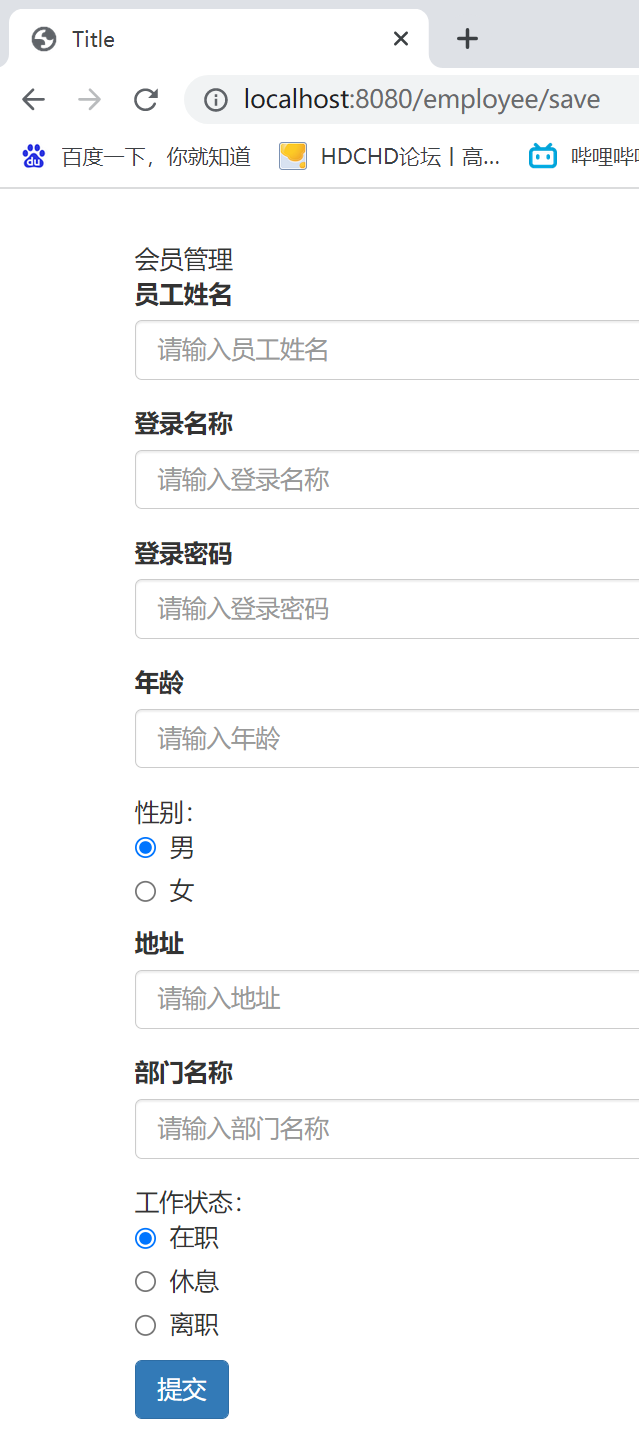
至此增加功能完成
新增删除功能
先在EmployeeController里写好删除方法,删除完后跳转回主页
package com.xzit.controller;

import com.baomidou.mybatisplus.extension.plugins.pagination.Page;
import com.xzit.entity.Employee;
import com.xzit.service.EmployeeService;
import org.springframework.stereotype.Controller;
import org.springframework.ui.Model;
import org.springframework.web.bind.annotation.*;

import javax.annotation.Resource;

@Controller
@RequestMapping("/employee")
public class EmployeeController {

    @Resource
    private EmployeeService service;

    /* 进入到保存页 */
    @GetMapping("/save")
    public String save(){
        return "/save";
    }

    /* 保存后跳转回主页 */
    @PostMapping("/save_commit")
    public String save_commit(Employee employee){
        service.save(employee);
        return "redirect:/employee/list";//返回列表页的处理
    }

    /* 主页列表展示 */
    @GetMapping("/list")
    public String list(@RequestParam(required = false,defaultValue = "1",
            value = "current") Integer current, Model model){
        Page<Employee> page = new Page<>(current,5);
        service.page(page);
        model.addAttribute("path","/employee/list?current=");
        model.addAttribute("page",page);
        return "/list";
    }


    /*执行删除后跳转回列表页*/
    @GetMapping("/delete/{id}")
    public String delete(@PathVariable int id){
        service.removeById(id);
        return "redirect:/employee/list";
    }
}
在主页新增操作列和删除按钮,绑定一个js方法传输员工id并跳转到controller执行删除操作
<!DOCTYPE html>
<html lang="zh" xmlns:th="http://www.thymeleaf.org">
<head>
    <meta charset="UTF-8">
    <title>Title</title>
    <link rel="stylesheet" type="text/css" th:href="@{/bootstrap.min.css}">
</head>
<body>
<div class="container" style="margin-top: 30px">
    <div>员工管理</div>
    <div>
        <a th:href="@{/employee/save}" th:text="新增"></a>
    </div>
    <table class="table table-bordered table-hover table-striped">
        <tr>
            <td>
                序号
            </td>
            <td>
                员工姓名
            </td>
            <td>
                登录名称
            </td>
            <td>
                登录密码
            </td>
            <td>
                年龄
            </td>
            <td>
                性别
            </td>
            <td>
                地址
            </td>
            <td>
                部门名称
            </td>
            <td>
                是否在职
            </td>
            <td>
                操作
            </td>
        </tr>
        <!--<tr th:each="临时变量名,循环状态变量:${集合数据}">-->
        <tr th:each="employee,status:${page.records}">
            <td th:text="${status.count}"></td>
            <td th:text="${employee.empName}"></td>
            <td th:text="${employee.loginName}"></td>
            <td th:text="${employee.loginPassword}"></td>
            <td th:text="${employee.age}"></td>
            <td th:text="${employee.gender}"></td>
            <td th:text="${employee.addr}"></td>
            <td th:text="${employee.deptName}"></td>
            <td th:text="${employee.status}"></td>
            <td>
                <a href="javascript:;" th:text="删除" th:onclick="doDel([[${employee.id}]])"></a>
            </td>
        </tr>
    </table>
    <div th:insert="page :: page"></div>
</div>
    <script>
        function doDel(id){
            if (confirm("确认删除吗?"))
                location.href="/employee/delete/"+id
        }
    </script>
</body>
</html>
执行效果
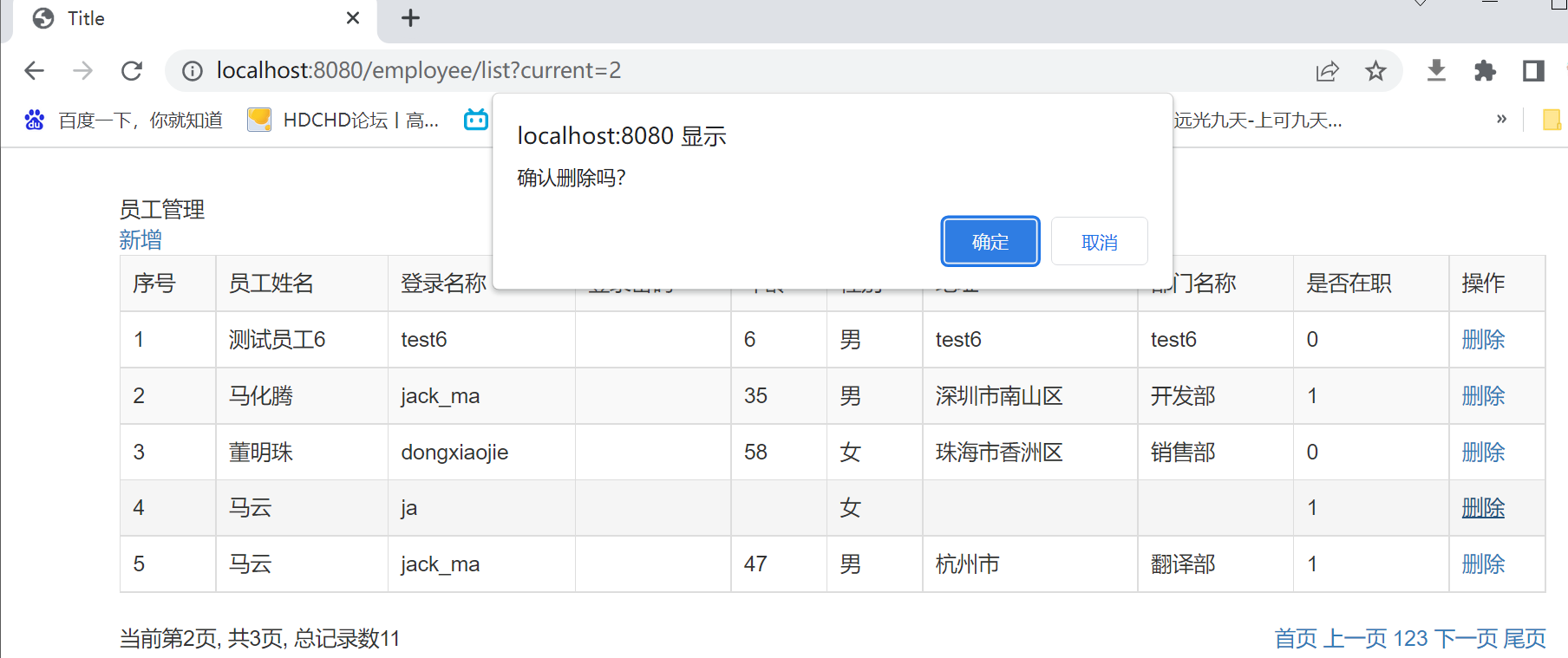
删除功能至此完成
新增修改的功能
先在EmpController里写好修改的方法和跳转到修改页面的方法
package com.xzit.controller;

import com.baomidou.mybatisplus.extension.plugins.pagination.Page;
import com.xzit.entity.Employee;
import com.xzit.service.EmployeeService;
import org.springframework.stereotype.Controller;
import org.springframework.ui.Model;
import org.springframework.web.bind.annotation.*;

import javax.annotation.Resource;

@Controller
@RequestMapping("/employee")
public class EmployeeController {

    @Resource
    private EmployeeService service;

    /* 进入到保存页 */
    @GetMapping("/save")
    public String save(){
        return "/save";
    }

    /* 保存后跳转回主页 */
    @PostMapping("/save_commit")
    public String save_commit(Employee employee){
        service.save(employee);
        return "redirect:/employee/list";//返回列表页的处理
    }

    /* 进入到修改页 */
    @GetMapping("/update/{id}")
    public String update(@PathVariable int id,Model model){
        Employee employee=service.getById(id);
        model.addAttribute("employee",employee);
        return "/update";
    }

    /* 修改完成后跳回主页 */
    @PostMapping("/update_commit")
    public String update_commit(Employee employee){
        service.updateById(employee);
        return "redirect:/employee/list";
    }

    /* 主页列表展示 */
    @GetMapping("/list")
    public String list(@RequestParam(required = false,defaultValue = "1",
            value = "current") Integer current, Model model){
        Page<Employee> page = new Page<>(current,5);
        service.page(page);
        model.addAttribute("path","/employee/list?current=");
        model.addAttribute("page",page);
        return "/list";
    }


    /*执行删除后跳转回列表页*/
    @GetMapping("/delete/{id}")
    public String delete(@PathVariable int id){
        service.removeById(id);
        return "redirect:/employee/list";
    }
}
新增一个修改页面update.html
<!DOCTYPE html>
<html lang="zh" xmlns:th="http://www.thymeleaf.org">
<head>
    <meta charset="UTF-8">
    <title>Title</title>
    <link rel="stylesheet" type="text/css" th:href="@{/bootstrap.min.css}">
</head>
<body>
<div class="container" style="margin-top: 30px">
    <div>会员管理</div>
    <form method="post" action="/employee/update_commit">
        <div class="form-group">
            <label for="empName">员工姓名</label>
            <input type="text" name="empName" th:value="${employee.empName}" class="form-control" id="empName" placeholder="请输入员工姓名">
        </div>
        <div class="form-group">
            <label for="loginName">登录名称</label>
            <input type="text" name="loginName" th:value="${employee.loginName}" class="form-control" id="loginName" placeholder="请输入登录名称">
        </div>
        <div class="form-group">
            <label for="loginPassword">登录密码</label>
            <input type="text" name="loginPassword" th:value="${employee.loginPassword}" class="form-control" id="loginPassword" placeholder="请输入登录密码">
        </div>
        <div class="form-group">
            <label for="age">年龄</label>
            <input type="text" name="age" th:value="${employee.age}" class="form-control" id="age" placeholder="请输入年龄">
        </div>
        <div class="form-group">
            <label for="gender">性别</label>
            <input type="text" name="gender" th:value="${employee.gender}" class="form-control" id="gender" placeholder="请输入性别">
        </div><br/>
        <div class="form-group">
            <label for="addr">地址</label>
            <input type="text" name="addr" th:value="${employee.addr}" class="form-control" id="addr" placeholder="请输入地址">
        </div>
        <div class="form-group">
            <label for="deptName">部门名称</label>
            <input type="text" name="deptName" th:value="${employee.deptName}" class="form-control" id="deptName" placeholder="请输入部门名称">
        </div>
        <div class="form-group">
            <label for="status">工作状态:</label>
            <input type="text" name="status" th:value="${employee.status}" class="form-control" id="status" placeholder="请输入工作状态">
        </div><br/>
        <input type="hidden" name="id" th:value="${employee.id}">
        <button type="submit" class="btn btn-primary">提交</button>
    </form>
</div>
</body>
</html>
运行效果:
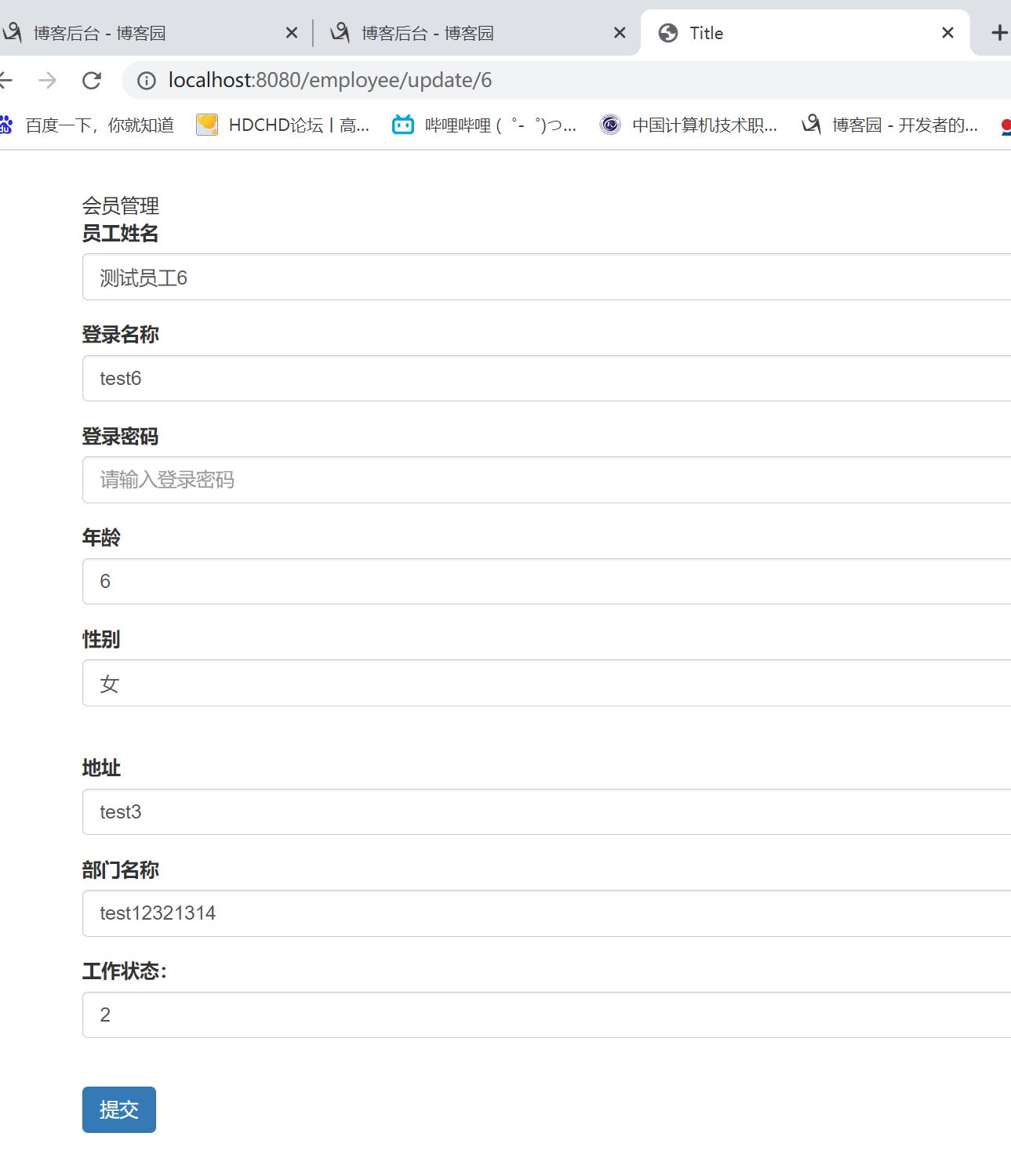
增删改查功能至此完成
文件上传功能
此前已在application.yml配置了文件上传路径
#配置文件上传路径
savePath: c:/uploadtest
先新增一个UploadControllar写好文件上传方法
package com.xzit.controller;

import org.springframework.beans.factory.annotation.Value;
import org.springframework.stereotype.Controller;
import org.springframework.util.FileCopyUtils;
import org.springframework.web.bind.annotation.GetMapping;
import org.springframework.web.bind.annotation.PostMapping;
import org.springframework.web.bind.annotation.ResponseBody;
import org.springframework.web.multipart.MultipartFile;

import java.io.File;
import java.io.FileOutputStream;
import java.io.IOException;

@Controller
public class UploadControllar {
    @Value("${savePath}")
    private String savePath;

    @GetMapping("up")
    public String goUpload(){
        return "upload";
    }

    @PostMapping("upload")
    @ResponseBody
    public Object upload(String name, MultipartFile file) throws IOException {
        String srcName = file.getOriginalFilename();//获取文件原始名
        String extName = srcName.substring(srcName.lastIndexOf("."));//获取文件的后缀名,如.jpg
        String fileName = System.currentTimeMillis() +extName;//将新文件名字命名为1970年以来的毫秒时间加后缀名
        File dir = new File(savePath);
        dir.mkdirs();//创建保存路径
        FileCopyUtils.copy(file.getInputStream(),new FileOutputStream(new File(dir,fileName)));//复制文件到新路径
        System.out.println(name);
        return "ok";
    }
}
新增一个上传文件的页面
<!DOCTYPE html>
<html lang="zh" xmlns:th="http://www.thymeleaf.org">
<head>
    <meta charset="UTF-8">
    <title>Title</title>
    <link rel="stylesheet" type="text/css" th:href="@{/bootstrap.min.css}">
</head>
<body>
    <form method="post" action="/upload" enctype="multipart/form-data">
        <div>姓名:<input type="text" name="name"></div>
        <div>头像:<input type="file" name="file"></div>
        <div>
            <button type="submit">上传</button>
        </div>
    </form>
</body>
</html>
执行效果:
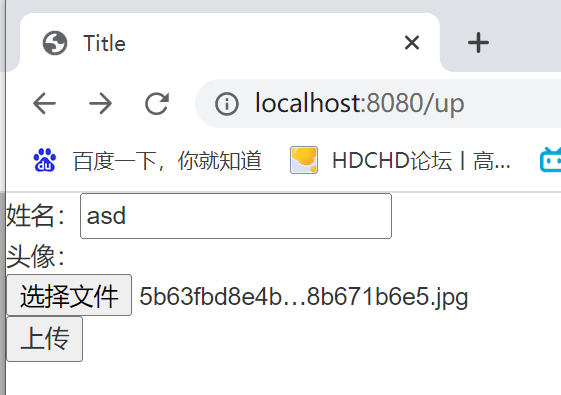

这个文件上传功能缺少一个读取的功能,以后再研究下
转贴自:https://www.cnblogs.com/zengyu1234/p/16735708.html#!comments

 浙公网安备 33010602011771号