Enterprise Library 2.0 -- Logging Application Block (补充)

        在前面的文章中,有朋友提到我们在实际项目中往往是把一些事件的日志(比如异常)写入到数据库中,这样更方便查看和管理,而在前面的文章中我都是以写入到文本文件为例的,今天这篇文章就算是对前两篇的一个补充,主要来介绍如何将日志信息写入到数据库中,同时也很感谢那位朋友的建议,下面我们进入正题,分为以下几个步骤:
       一、 根据Enterprise Library 2.0中将日志写入到数据库中的需要,我们在数据库中添加一张记录日志的表(RX_Log):

--日志信息表
create table RX_Log
(
    id                        
int identity         not null,        --流水号
    EventId                    int                 null,            --事件ID
    Priority                int                    null,            --优先级
    Category                varchar(1000)        null,            --类别
    Title                    varchar(500)        null,            --日志标题
    Message                    varchar(1000)        null,            --日志信息
    Machine                    varchar(100)        null,            --主机名
    Timestamps                smalldatetime        null,            --记录时间
    Severity                varchar(100)        null,            --严重级别
    ApplicationDomain        varchar(1000)        null,            --应用程序名
    ProcessId                int                    null,            --进程ID
    ProcessName                varchar(500)        null,            --进程名
    Win32ThreadId            int                    null,            --线程ID
    ThreadName                varchar(500)        null,            --线程名
    ExtendedProperties        varchar(1000)        null,            --扩展信息

    
primary key(id)
)

 Logging Application Block 在写日志到数据库的过程中,还需要两个存储过程(注意:这也是和1.0的一点小区别,上一个版本只需要一个存储过程),分别为:

--建立存储过程
--
写日志
create procedure usp_writelogtodatabase
(
    
@EventId                int,
    
@Priority                int,
    
@Title                    varchar(500),
    
@Message                varchar(4000),
    
@machineName            varchar(100),
    
@Timestamp                smalldatetime,
    
@Severity                varchar(100),
    
@AppDomainName            varchar(1000),
    
@ProcessId                int,
    
@ProcessName            varchar(500),
    
@Win32ThreadId            int,
    
@ThreadName                varchar(500),
    
@formattedmessage        varchar(4000),
    
@LogId                    int    out
)
as
begin

    
insert into RX_Log 
    (
        EventId,
        Priority,
        Title,
        Message,
        Machine,
        Timestamps,
        Severity,
        ApplicationDomain,
        ProcessId,
        ProcessName,
        Win32ThreadId,
        ThreadName,
        ExtendedProperties
    )
    
values
    (
        
@EventId,
        
@Priority,
        
@Title,
        
@Message,
        
@machineName,
        
@Timestamp,
        
@Severity,
        
@AppDomainName,
        
@ProcessId,
        
@ProcessName,
        
@Win32ThreadId,
        
@ThreadName,
        
@formattedmessage
    )

    
set @LogId=@@identity
    
    
end

--设置日志类别
create procedure usp_addcategory
(
    
@categoryName        varchar(1000),
    
@logID                int
)
as 
begin
    
UPDATE RX_Log SET Category=@categoryName WHERE ID=@logID
end

上面的工作做好之后,我们在来配置我们的配置文件,首先我们需要添加一个DataBase的Trace Listener,如下图:


然后指定一些该Trace Listener的属性,包括AddCategoryStoreProcedure,DataBaseInstance,Formatter,Name,TraceOutputOptions以及WriteLogStoreProcedure。
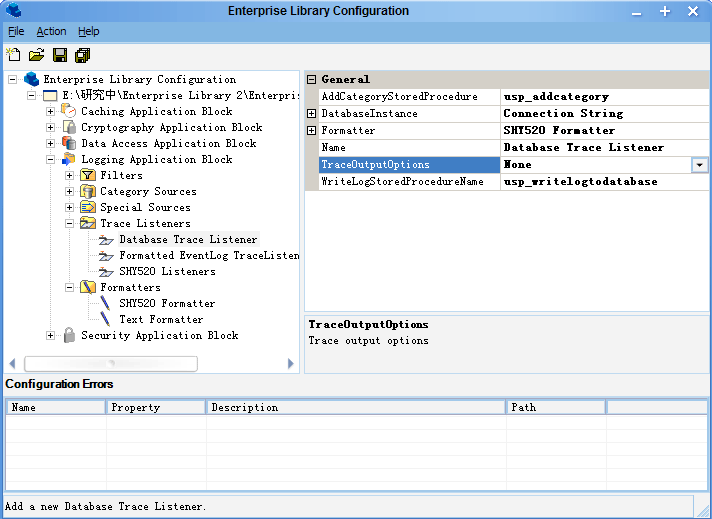


其中AddCategoryStoredProcedure和WriteLogStoredProcedureName就是我们刚刚在数据库中建的存储过程,前者是设置日志类别,后者为向数据库中插入日志的存储过程。DataBaseInstance是我们在Data Access Application Block中建立的一个数据库实例,具体方法可以参考: 
Enterprise Library 2.0 -- Data Access Application Block,Formatter则是我们选择上篇文章中设置的SHY520 Formatter,具体的配置方法请参考:
Enterprise Library 2.0 -- Logging Application Block (上)
Enterprise Library 2.0 -- Logging Application Block (下)
其他选项我们先保持默认,接着我们需要添加一个Category,命名为DataBase


然后为这个Category添加一个Trace Listener,并设置其RefrencedTraceListener为我们刚刚建的Database Trace Listener,


这样就完成了我们的配置工作,此时你的配置文件中(Web.Config或App.Config)应该会包含下面的信息:

<?xml version="1.0" encoding="utf-8"?>
<configuration>
  
<configSections>
    
<section name="loggingConfiguration" type="Microsoft.Practices.EnterpriseLibrary.Logging.Configuration.LoggingSettings, Microsoft.Practices.EnterpriseLibrary.Logging, Version=2.0.0.0, Culture=neutral, PublicKeyToken=null" />
    
<section name="dataConfiguration" type="Microsoft.Practices.EnterpriseLibrary.Data.Configuration.DatabaseSettings, Microsoft.Practices.EnterpriseLibrary.Data, Version=2.0.0.0, Culture=neutral, PublicKeyToken=null" />
  
</configSections>
  
<loggingConfiguration name="Logging Application Block" tracingEnabled="true"
    defaultCategory
="General" logWarningsWhenNoCategoriesMatch="true">
    
<listeners>
      
<add databaseInstanceName="Connection String" writeLogStoredProcName="usp_writelogtodatabase"
        addCategoryStoredProcName
="usp_addcategory" formatter="SHY520 Formatter"
        listenerDataType
="Microsoft.Practices.EnterpriseLibrary.Logging.Database.Configuration.FormattedDatabaseTraceListenerData, Microsoft.Practices.EnterpriseLibrary.Logging.Database, Version=2.0.0.0, Culture=neutral, PublicKeyToken=null"
        traceOutputOptions
="None" type="Microsoft.Practices.EnterpriseLibrary.Logging.Database.FormattedDatabaseTraceListener, Microsoft.Practices.EnterpriseLibrary.Logging.Database, Version=2.0.0.0, Culture=neutral, PublicKeyToken=null"
        name
="Database Trace Listener" />
    
</listeners>
    
<formatters>
      
<add template="Timestamp: {timestamp} Message: {message} Category: {category} Priority: {priority} EventId: {eventid} Severity: {severity} Title:{title} Machine: {machine} Application Domain: {appDomain} Process Id: {processId} Process Name: {processName} Win32 Thread Id: {win32ThreadId} Thread Name: {threadName} Extended Properties: {dictionary({key} - {value} )}"
        type
="Microsoft.Practices.EnterpriseLibrary.Logging.Formatters.TextFormatter, Microsoft.Practices.EnterpriseLibrary.Logging, Version=2.0.0.0, Culture=neutral, PublicKeyToken=null"
        name
="SHY520 Formatter" />
    
</formatters>
    
<logFilters>
      
<add categoryFilterMode="AllowAllExceptDenied" type="Microsoft.Practices.EnterpriseLibrary.Logging.Filters.CategoryFilter, Microsoft.Practices.EnterpriseLibrary.Logging, Version=2.0.0.0, Culture=neutral, PublicKeyToken=null"
        name
="Category Filter" />
    
</logFilters>
    
<categorySources>
      
<add switchValue="All" name="DataBase">
        
<listeners>
          
<add name="Database Trace Listener" />
        
</listeners>
      
</add>
      
<add switchValue="All" name="General">
        
<listeners>
          
<add name="SHY520 Listeners" />
        
</listeners>
      
</add>
    
</categorySources>
    
<specialSources>
      
<allEvents switchValue="All" name="All Events" />
      
<notProcessed switchValue="All" name="Unprocessed Category" />
      
<errors switchValue="All" name="Logging Errors &amp; Warnings">
        
<listeners>
          
<add name="Formatted EventLog TraceListener" />
        
</listeners>
      
</errors>
    
</specialSources>
  
</loggingConfiguration>
  
<dataConfiguration defaultDatabase="Connection String" />
  
<connectionStrings>
    
<add name="Connection String" connectionString="Database=EnterpriseLibrary;Server=shy;Integrated Security=SSPI;uid=sa;pwd=;"
      providerName
="System.Data.SqlClient" />
  
</connectionStrings>
</configuration>

上面的工作做完之后,我们就可以在应用程序中添加代码,用于将日志写入数据库了,如下:

        [TestMethod]
        
public void LogToDataBase()
        
{
            LogEntry log 
= new LogEntry();
            
//事件ID
            log.EventId = 2000;
            
//日志优先级
            log.Priority = 2;
            log.Message 
= "Test Log Information To DataBase";

            
//日志类别
            ICollection<string> coll = new List<string>();
            
//设置类别为DataBase,这就确定了你的日志是写入到数据库的
            
//因为DataBase这个类别中包含一个DataBase Trace Listener
            coll.Add("DataBase");
            
            log.Categories 
= coll;

            
//添加额外信息
            Dictionary<stringobject> dic = new Dictionary<stringobject>();
            dic.Add(
"name""SHY520");
            dic.Add(
"sex","");
            dic.Add(
"age""22");

            log.ExtendedProperties 
= dic;
            
//写入日志
            Logger.Write(log);
        }


运行这个测试方法,然后到数据库中看一下,此时上面的一条日志信息已经写入到数据库中了,关于利用Logging Application Block写日志到数据库中的方法就说到这里,如有遗漏,错误的地方,欢迎您指正!

Email:pwei013@163.com

posted on 2006-06-11 17:48 Daniel Pang 阅读(3558) 评论(22)  编辑 收藏 网摘 所属分类: Enterprise LibraryASP.NET2.0

评论

#1楼 2006-06-12 10:23 kingwkb[未注册用户]

谢谢,我是经常来你的blog的
我前天给你发了email是关于data application block的问题,今天看你还没回复我,你是否收到了,收到了回我一下好嘛?
  回复  引用    

#2楼[楼主] 2006-06-12 10:26 SHY520      

@kingwkb
啊,不好意思,我这几天没看邮件,我马上看看
  回复  引用  查看    

#3楼 2006-06-21 13:20 samsumg[未注册用户]

http://my.opera.com/mp3_phone/homes/samsung/三星cdma手机图片.htm
http://my.opera.com/mp3_phone/homes/samsung/三星mp3铃声下载.htm
http://my.opera.com/mp3_phone/homes/samsung/三星彩信图片下载.htm
http://my.opera.com/mp3_phone/homes/samsung/三星彩信下载.htm
http://my.opera.com/mp3_phone/homes/samsung/三星待机图片.htm
http://my.opera.com/mp3_phone/homes/samsung/三星单音铃声下载.htm
http://my.opera.com/mp3_phone/homes/samsung/三星短信铃声下载.htm
http://my.opera.com/mp3_phone/homes/samsung/三星和弦铃声下载.htm
http://my.opera.com/mp3_phone/homes/samsung/三星经典铃声下载.htm
http://my.opera.com/mp3_phone/homes/samsung/三星玲声下载.htm
http://my.opera.com/mp3_phone/homes/samsung/三星内置铃声下载.htm
http://my.opera.com/mp3_phone/homes/samsung/三星普通铃声下载.htm
http://my.opera.com/mp3_phone/homes/samsung/三星手机mp3铃声.htm
http://my.opera.com/mp3_phone/homes/samsung/三星手机铃声格式.htm
http://my.opera.com/mp3_phone/homes/samsung/三星小提琴铃声下载.htm
http://my.opera.com/mp3_phone/homes/samsung/三星原机铃声下载.htm
http://my.opera.com/mp3_phone/homes/samsung/三星真人真唱铃声下载.htm
http://my.opera.com/mp3_phone/homes/samsung/三星自编铃声下载.htm
http://my.opera.com/mp3_phone/homes/samsung/三星专用铃声下载.htm
http://my.opera.com/mp3_phone/homes/samsung/三星自带铃声下载.htm
http://my.opera.com/mp3_phone/homes/samsung/三星自谱铃声下载.htm
  回复  引用    

#4楼 2006-07-04 15:40 yiyioo[未注册用户]

按照上面提示的操作,我这边出现:listenerDataType为空,结果抛出异常,
我把Microsoft........logging.DataBase这个名称空间也引入后,没有异常,但是没有效果,用sql profiler跟踪,发现程序也没去连接数据库,
单步调试老是出现源程序和生成的模块不一样的询问~
  回复  引用    

#5楼[楼主] 2006-07-04 15:52 SHY520      

@yiyioo
你把你配置后的Config文件和我上面的比较一下,看看是否是什么地方忘了配置?
  回复  引用  查看    

#6楼 2006-07-04 17:43 yiyioo[未注册用户]

谢谢回答,检查了一下,
好象差不多,我没定义过滤器,如果您有空能不能帮我看看,如下
<configuration>
<configSections>
<section name="loggingConfiguration" type="Microsoft.Practices.EnterpriseLibrary.Logging.Configuration.LoggingSettings, Microsoft.Practices.EnterpriseLibrary.Logging, Version=2.0.0.0, Culture=neutral, PublicKeyToken=null" />
<section name="dataConfiguration" type="Microsoft.Practices.EnterpriseLibrary.Data.Configuration.DatabaseSettings, Microsoft.Practices.EnterpriseLibrary.Data, Version=2.0.0.0, Culture=neutral, PublicKeyToken=null" />
</configSections>
<loggingConfiguration
name="Logging Application Block"
tracingEnabled="true"
defaultCategory="Logging"
logWarningsWhenNoCategoriesMatch="true">
<listeners>
<add databaseInstanceName="Connection String"
writeLogStoredProcName="WriteLog"
addCategoryStoredProcName="AddCategory"
formatter="Text Formatter"
listenerDataType="Microsoft.Practices.EnterpriseLibrary.Logging.Database.Configuration.FormattedDatabaseTraceListenerData, Microsoft.Practices.EnterpriseLibrary.Logging.Database, Version=2.0.0.0, Culture=neutral, PublicKeyToken=null"
traceOutputOptions="None"
type="Microsoft.Practices.EnterpriseLibrary.Logging.Database.FormattedDatabaseTraceListener, Microsoft.Practices.EnterpriseLibrary.Logging.Database, Version=2.0.0.0, Culture=neutral, PublicKeyToken=null"
name="Database Trace Listener" />
</listeners>
<formatters>
<add template="Timestamp: {timestamp}&#xD;&#xA;Message: {message}&#xD;&#xA;Category: {category}&#xD;&#xA;Priority: {priority}&#xD;&#xA;EventId: {eventid}&#xD;&#xA;Severity: {severity}&#xD;&#xA;Title:{title}&#xD;&#xA;Machine: {machine}&#xD;&#xA;Application Domain: {appDomain}&#xD;&#xA;Process Id: {processId}&#xD;&#xA;Process Name: {processName}&#xD;&#xA;Win32 Thread Id: {win32ThreadId}&#xD;&#xA;Thread Name: {threadName}&#xD;&#xA;Extended Properties: {dictionary({key} - {value}&#xD;&#xA;)}"
type="Microsoft.Practices.EnterpriseLibrary.Logging.Formatters.TextFormatter, Microsoft.Practices.EnterpriseLibrary.Logging, Version=2.0.0.0, Culture=neutral, PublicKeyToken=null"
name="Text Formatter" />
</formatters>
<categorySources>
<add switchValue="All" name="Logging">
<listeners>
<add name="Database Trace Listener" />
</listeners>
</add>
</categorySources>
<specialSources>
<allEvents switchValue="All" name="All Events">
<listeners>
<add name="Database Trace Listener" />
</listeners>
</allEvents>
<notProcessed switchValue="All" name="Unprocessed Category" />
<errors switchValue="All" name="Logging Errors &amp; Warnings" />
</specialSources>
</loggingConfiguration>
<dataConfiguration defaultDatabase="Connection String" />
<connectionStrings>
<add name="Connection String" connectionString="Database=Logging;Server=wxm;Integrated Security=SSPI;UserID=sa;Password=123456;"
providerName="System.Data.SqlClient" />
</connectionStrings>
</configuration>


是不是需要引用别的命名空间/?//??
  回复  引用    

#7楼[楼主] 2006-07-05 11:23 SHY520      

可能是数据库连接字符串的问题,你看看你的Connection String可能连接到Sql,我这几天比较忙,没时间来帮你调试,不好意思!   回复  引用  查看    

#8楼 2006-07-05 14:16 yiyioo[未注册用户]

谢谢回答先`,应该是我不好意思,在你忙的时候还打扰你~
Connection String应该没有问题
我想问题就在那个listenerDataType节点的Microsoft.Practices.EnterpriseLibrary.Logging.Database这个命名空间
如果程序中直接写
using Microsoft.Practices.EnterpriseLibrary.Logging.Database;
提示不存在,
是否需要把Microsoft.Practices.EnterpriseLibrary.Logging.Database这个包括到项目中来,可是包括进来后,又会缺很多引用,......
迷糊中~
在写您说的那个测试方法时,
除了引用
using Microsoft.Practices.EnterpriseLibrary.Logging;
using Microsoft.Practices.EnterpriseLibrary.Logging.Filters;
using Microsoft.Practices.EnterpriseLibrary.Logging.Configuration;

这三个外,还需要做什么其他的事情吗?
  回复  引用    

#9楼[楼主] 2006-07-05 14:40 SHY520      

using Microsoft.Practices.EnterpriseLibrary.Logging;
using Microsoft.Practices.EnterpriseLibrary.Logging.Filters;
using Microsoft.Practices.EnterpriseLibrary.Logging.Configuration;

应该只需要引用第一个命名空间就可以了,下面两个是在做自定义Filters用的
  回复  引用  查看    

#10楼 2006-07-05 14:50 yiyioo[未注册用户]

刚才,我把Microsoft.Practices.EnterpriseLibrary.Logging.Database这个dll引用进来后,可以了
奇怪我昨天这样做怎么不行~~

可能太粗心,浪费时间 ~

感谢您的这篇文章~3ks~
  回复  引用    

#11楼[楼主] 2006-07-05 15:37 SHY520      

@yiyioo
呵呵,不客气,也没能给你太多的帮助,以后多交流
  回复  引用  查看    

#12楼 2006-08-10 17:19 川仔      

写入数据库能不用Data Access Application Block吗?用自己写的?   回复  引用  查看    

#13楼[楼主] 2006-08-11 09:13 SHY520      

@川仔
如果你使用DataBase Trace Listener来记录日志,应该只能使用DAAB
  回复  引用  查看    

#14楼 2006-10-23 09:30 GOO3721[未注册用户]

这篇文章有误:
Logging Application Block 2.0 应该是三张表和四个存储过程。
表:Category、CategoryLog、Log。
存储过程:AddCategory、ClearLogs、InsertCategoryLog、WriteLog。
  回复  引用    

#15楼 2006-10-30 10:05 游客[未注册用户]

是的,这篇文章有误:
Logging Application Block 2.0 应该是三张表和四个存储过程


请回复!
  回复  引用    

#16楼[楼主] 2006-11-03 09:03 SHY520      

@游客
@GOO3721
这篇文章只针对将日志保存到数据库,根据上面的方法已经可以达到目的了。至于要建几张表,几个存储过程只是根据自己的需要。
  回复  引用  查看    

#17楼 2007-03-09 10:06 abc[未注册用户]

错误倒是说不上,这篇文章指明了方向并给出了一个实例,还是很不错的。
至于几个表几个存储过程,我赞同楼上的观点,根据自己需要。
  回复  引用    

#18楼 2007-03-09 14:22 abc[未注册用户]

我查阅了那个目录,发现创建数据库、表、存储过程的文件就在这个目录下:
D:\Program Files\Microsoft Enterprise Library January 2006\src\Logging\TraceListeners\Database\Scripts\LoggingDatabase.sql

  回复  引用    

#19楼 2007-05-24 19:42 mextb1860[未注册用户]

我 Logger.Write(log);为什么数据库里的 message字段中文会是乱码。。
怎么解决啊
  回复  引用    

#20楼 2009-02-04 11:02 Eric Fu      

谢谢楼主的一系列Enterprise Library文章, 确定帮了我不少忙~~~   回复  引用  查看    


发表评论

昵称: [登录] [注册]

主页:

邮箱:(仅博主可见)

评论内容:

  登录  注册

[使用Ctrl+Enter键快速提交评论]

0 423290 nny6TiBV+WY=


相关文章:

相关链接:
<2006年6月>
28293031123
45678910
11121314151617
18192021222324
2526272829301
2345678

导航

统计

公告

技术交流平台,真诚的希望能和园子里的朋友交流技术,共同进步!
欢迎加入Castle+IBatisNet交流群:2923364(已满),37745404
特别提示:本站文章若无特别申明,均为原创,转载请注明出自'博客园'!
Emailpwei013#163.com
MSNshypw520#gmail.com

与我联系

搜索


常用链接

留言簿

我参与的团队

随笔分类(98)

随笔档案(74)

相册

收藏夹(19)

MY BLOG

公司主页

情侣BLOG

友情链接

积分与排名

最新随笔

最新评论

阅读排行榜

评论排行榜
