[Erlang 0002] Erlang IDE从我写的一系列Erlang文章阅读人数来看,这篇文章阅读人数最多.可以窥见一斑:好多人在看是否会对一种新语言投入精力的时候,IDE是一个重要的指标,甚至可能就是因为IDE不给力而放弃一种语言,不靠谱是吧,但这是事实;写这篇文章的时候erlide插件还比较差,我提到它的几个问题:无代码自动完成,偶尔提示一下也特别慢,最关键的一点:不支持中文,就因为这个无论它多么好直接被否定掉了; 但是作为少数几个还在持续改进的Erlang IDE插件,erlide现在的版本已经堪称是目前最好用的Erlang IDE.
虽然我一直使用UltraEdit,为了团队效率还是决定体验了一下,目前的版本:
- 完美支持中文,在代码中输入中文会提示你把文件编码更改到UTF-8
- 已经有了代码自动完成,包括自定义模块的自动完成
- 方法转到定义功能不错
- 打开大文件(约1MB)没有压力
- 保存即编译
几点注意事项:
安装
作为Eclipse插件 首先下载一个Eclipse Classic最新版本,我下载的是Eclipse Classic 3.7.1,安装完成之后按照,插件主页:http://erlide.org/上的说明即可:
Install Erlide by going to Help → Install new software... . In the dialog, enter http://erlide.org/update as URL. Follow the dialogs with the obvious choices and in the end you will be asked to restart.
An alternative way to install is from the Eclipse marketplace Help → Eclipse Marketplace... or if you are using Eclipse 3.7 simply by dragging and dropping the button below into a running Eclipse workspace
Restart. Go to Window → Preferences → Erlang → Installed runtimes and add an entry (or several) for your Erlang installation(s) of choice. The required parameters are the name and the path to the top level directory (i.e. $ERL_TOP). Now restart again.
An alternative way to install is from the Eclipse marketplace Help → Eclipse Marketplace... or if you are using Eclipse 3.7 simply by dragging and dropping the button below into a running Eclipse workspace
Restart. Go to Window → Preferences → Erlang → Installed runtimes and add an entry (or several) for your Erlang installation(s) of choice. The required parameters are the name and the path to the top level directory (i.e. $ERL_TOP). Now restart again.
版本
你可能担心支持最15B版本的Erlang么? 答案:支持,在Eclipse中打开Window → Preferences → Erlang,可以选择当前IDE使用哪个版本的Erlang .见下图

写的技术文章过时了不郁闷,郁闷的是可以更新自己的博客却更新不了被抓站程序抓走的
2013-3-20 17:58:34更新 用Sublim Text 的越来越多吧?
这应该得益于其漂亮的语法高亮,代码自动完成,以及项目视图的良好支持.
2014-8-25 15:24:18 intellij-erlang Erlang plugin for IntelliJ IDEA
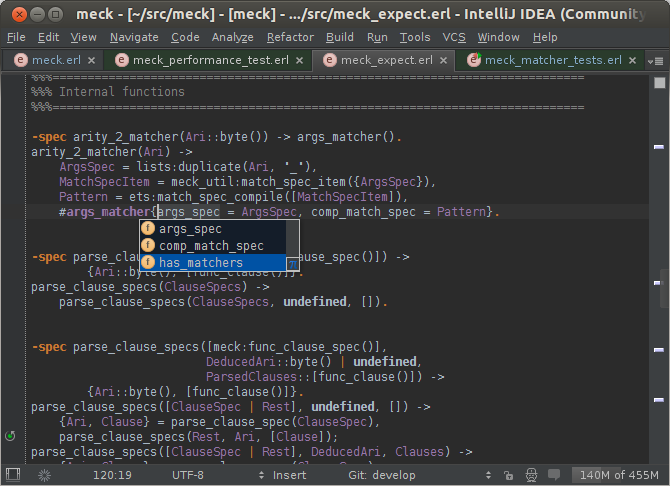
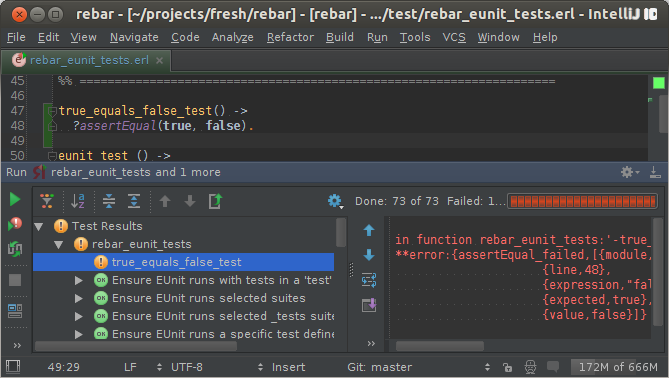
时间进行到2014年,之前的很多事情都发生了变化,其中就包括开发工具,intellij-erlang的Erlang插件很早就有,但是现在这个版本真的是超越了其它IDE
下面是两张官网的截图,详情参见这里: http://ignatov.github.io/intellij-erlang/
之前很多人其实是卡在IDE这里的,没有一个顺手的工具然后就选择放弃了,现在可选的IDE越来越多也越来越强大,客观上也降低了Erlang的入门难度.