

Vuex最基本样例
通过vue-cli建立基本脚手架(需要安装vuex),需要新建一个store.js文件。基本目录如下
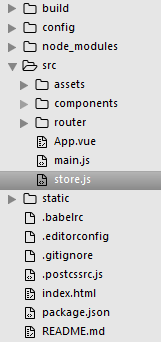
1,store.js文件代码:
import Vue from 'vue'
import Vuex from 'vuex'
Vue.use(Vuex)

const state = {
	count: 5
}

const mutations = {
	add(state){
		state.count += 1
	},
	reduce(state){
		state.count -= 1
	}
}
export default new Vuex.Store({
 	state,
 	mutations
})
2,App.vue代码:
<template>
  <div id="app">
    <p>hello vuex</p>
    <p>{{$store.state.count}}</p>
    <button @click = "$store.commit('add')">+</button>
    <button @click = "$store.commit('reduce')">-</button>
  </div>
</template>

<script>
export default {
  name: 'App'
}
</script>

<style>
#app {
  font-family: 'Avenir', Helvetica, Arial, sans-serif;
  -webkit-font-smoothing: antialiased;
  -moz-osx-font-smoothing: grayscale;
  text-align: center;
  color: #2c3e50;
  margin-top: 60px;
}
</style>
3,入口文件main.js代码:
import Vue from 'vue'
import App from './App.vue'
import store from './store'
new Vue({
  el: '#app',
  store,
  render: h => h(App)
})
运行结果为:
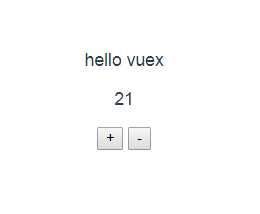
默认显示为数字5,点击+或者-,执行相应的加减操作。

 浙公网安备 33010602011771号