| Eclipse Corner Article |

Notes on the Eclipse Plug-in Architecture
Summary
Eclipse plug-ins embody an architectural pattern for building an application from constituent parts. This article presents an in-depth view of the participant roles and collaborations of this architectural pattern, as they exist in an instance of the Eclipse workbench. The goal is to provide an understanding of plug-ins, and of how plug-in extensions are defined and processed, independently of the mechanics of using the Eclipse workbench to produce plug-ins.Azad Bolour, Bolour Computing
July 3, 2003Table of Contents
1. Introduction
2. The Eclipse Plug-in Model
3. Extension Processing
4. Example: An Extensible Arithmetic Function Service
5. Listener Extensions and the Observer Pattern
6. Summary and Conclusions
1. Introduction
Eclipse is an extensible platform for building IDEs. It provides a core of services for controlling a set of tools working together to support programming tasks. Tool builders contribute to the Eclipse platform by wrapping their tools in pluggable components, called Eclipse plug-ins, which conform to Eclipse's plug-in contract. The basic mechanism of extensibility in Eclipse is that new plug-ins can add new processing elements to existing plug-ins. And Eclipse provides a set of core plug-ins to bootstrap this process. For a general introduction to Eclipse as an extensible IDE platform, see the literature available at this site.
Even though the Eclipse platform is specialized for building IDEs, the core of its concepts and facilities supports a general model for composing an application from constituent parts developed by multiple vendors. This general model of system composition in Eclipse will be described and placed in the context of other software patterns in this article. The article is intended for new plug-in developers who need to understand the overall model of how plug-ins work, either before, or in conjunction with, working through the mechanics of building plug-ins.
The article is structured as follows. Section 2 outlines the Eclipse plug-in model and the declarative specification of plug-ins and their relationships within this model. Section 3 explains what plug-in developers must do programmatically to allow their plug-ins to be extended. Section 4 provides a complete example of an extensible plug-in and its extensions by other plug-ins. Section 5 contrasts the Eclipse plug-in model with the much simpler observer pattern of [1]. Section 6 concludes the article by summarizing the main architectural concepts used in Eclipse plug-ins.
This article specifically avoids the mechanics of the required user interactions with the Eclipse plug-in development environment (PDE) to build and test plug-ins. See Beck and Gamma [2], Shavor, et. al. [3], the online help documentation, and other articles at this site for the required procedures to build and test plug-ins in the PDE.
The companion plug-ins zip file includes the plug-in samples appearing in this article. Installation instructions for the samples appear at the end of this article. Also accompanying this article is the samples API reference.
2. The Eclipse Plug-in Model
A plug-in in Eclipse is a component that provides a certain type of service within the context of the Eclipse workbench. By a component here I mean an object that may be configured into a system at system deployment time. The Eclipse runtime provides an infrastructure to support the activation and operation of a set of plug-ins working together to provide a seamless environment for development activities. Within a running Eclipse instance, a plug-in is embodied in an instance of some plug-in runtime class, or plug-in class, for short. The plug-in class provides configuration and management support for the plug-in instance. A plug-in class in Eclipse must extend org.eclipse.core.runtime.Plugin, which is an abstract class that provides generic facilities for managing plug-ins.
An Eclipse installation includes a plugins folder where individual plug-ins are deployed. Each plug-in is installed in its own folder under the plugins folder. A plug-in is described in an XML manifest file, called plugin.xml, residing in the plug-in's folder. The manifest file tells the Eclipse runtime what it needs to know to activate the plug-in.
The parsed contents of plug-in manifest files are made available programmatically through a plug-in registry API. And parsed plug-in specifications are cached in an in-memory repository called the plug-in registry. The Eclipse runtime instantiates an instance of each plug-in by using the plug-in registry API. The plug-in registry API is also used by provider-supplied plug-in code to obtain information about plug-ins.
Here is what a minimal plug-in manifest file looks like:
Listing 2.1. A Minimal Plug-in Manifest File. |
This manifest file describes a plug-in that provides the services of the JUnit testing infrastructure to the Eclipse workbench. (Note. To improve readability, the contents of Eclipse manifest files, such as this one, are reproduced in this article in their English localization.)
The Eclipse Platform Plug-in Manifest Specification documents the XML elements and attributes used in defining plug-ins. (This specification is also available in the Eclipse platform help documentation under Platform Plug-In Developer Guide/Other reference information/Plug-in manifest).
I am not going to focus on the contents of the plug-in manifest file at this time, except to note that each plug-in has a unique identifier (XML attribute id). The unique identifier is used to refer to a plug-in within the manifest files of other, related, plug-ins. The unique identifier may also be used within provider-supplied plug-in code to access the plug-in's running instance, as follows:
Plugin p = Platform.getPlugin(pluginID);
Plug-in instances are managed by the Eclipse runtime, and are accessed by using the Eclipse platform as shown above. Plug-in instances are not constructed by application programs.
2.1. Plug-in Deployment and Activation
Deploying a plug-in in an Eclipse installation involves copying the resources that constitute the plug-in (the manifest file, jar files, and other resources) into an individual folder for the plug-in, under the installation's plugins directory. Such a plug-in can then be activated by the Eclipse runtime when it is required to perform some function. Activating a plug-in means loading its runtime class and instantiating and initializing its instance.
The main function of a plug-in class is to do special processing during plug-in activation and deactivation, e.g., to allocate and release resources. For simple plug-ins, like the JUnit plug-in above, no specific activation or deactivation processing is required, and therefore no specific plug-in class need be provided by the plug-in designer. In that case, the Eclipse runtime automatically provides a default plug-in class for the plug-in instance.
When the plug-in needs to do something specific to activate or deactivate itself, the plug-in designer subclasses org.eclipse.core.runtime.Plugin, provides overrides for the activation and deactivation methods of the class, respectively called startup and shutdown, and includes the fully-qualified name of this specific plug-in subclass as the value of the attribute class in the corresponding plug-in manifest file.
Eclipse includes a plug-in management kernel, known as the Eclipse platform, or the Eclipse runtime, and certain core plug-ins that are present in every Eclipse deployment. The identities of these core plug-ins are hard-coded into the Eclipse platform, and the platform knows to activate these plug-ins in each running instance of Eclipse. Non-core plug-ins, on the other hand, are activated when required by other plug-ins, as described below.
In the Eclipse model, a plug-in may be related to another plug-in by one of two relationships:
- Dependency. The roles in this relationship are dependent plug-in and prerequisite plug-in. A prerequisite plug-in supports the functions of a dependent plug-in.
- Extension. The roles in this relationship are host plug-in and extender plug-in. An extender plug-in extends the functions of a host plug-in.
These relationships are specified declaratively in plug-in manifest files through the XML elements requires and extension (the details of which appear in later subsections).
A non-core plug-in that has been deployed in an Eclipse installation may be activated in a running instance of Eclipse if it is transitively related to a core Eclipse plug-in by the union of the dependency and the extension relations. Such a plug-in will be activated when its functions are required to support or to extend the functions of another plug-in. A plug-in that is deployed but unreachable from any core plug-in via the dependency and extension relations might as well not be deployed from the point of view of plug-in activation. Of course, even a reachable plug-in may remain unactivated in a running instance for some time (or for the lifetime of the instance), if no user action or other triggering event elicits its use.
2.2. Dependency
When a plug-in is dependent on other plug-ins for its functions, the dependency is specified via a requires element in the plug-in manifest file. Here is an example:
Listing 2.2. Specifying Plug-in Dependencies. |
In this example, the sample plug-in com.bolour.sample.eclipse.demo is declared to be dependent on (i.e., to make use of) the base Eclipse UI plug-in org.eclipse.ui.
Dependency as defined in the plug-in manifest file is both a runtime and a compile-time directive. At runtime, Eclipse has to make sure that a prerequisite plug-in can be made available to a dependent plug-in when the dependent plug-in is activated. At compile time, Eclipse can be directed to augment the classpath for compiling a dependent plug-in by the jar files of all of its prerequisite plug-ins.
2.3. Extension
When the facilities of a plug-in are to be made directly available to the user, one or more user interface elements have to be added to the base Eclipse workbench. For example, to make the workbench's help plug-in available to the user, help menu items must be added to the workbench user interface.
The process of adding some processing element or elements to a plug-in is known as an extension. This process is not restricted to UI elements, however. Any plug-in may allow other plug-ins to extend it by adding processing elements. An extension is defined by an extender plug-in and causes a host plug-in to modify its behavior. Typically, this modification of behavior includes the addition of processing elements to the host plug-in (e.g., the addition of new menu items to the Eclipse workbench), and the customization of the behavior of these additional elements by services provided by the extender plug-in (e.g., the customization of new menu items by specific menu event handlers).
In simple cases, a single act of extension adds a single callback object to the environment, through which the host and extender plug-ins communicate. The callback object is different from the host and extender plug-in objects. And unlike these objects, which are components that are automatically instantiated and managed by the Eclipse platform, a callback object is a plain old Java objects that is instantiated and managed specifically by provider-supplied code. A single act of extension can also add more than one callback object to the environment. For example, Eclipse allows a set of menus to be added to its user interface via a single extension.
Note, however, that the extension model, per se, is quite general, and does not necessarily require that an extender plug-in provide custom callback objects. It is possible, for example, that the kind of behavior modification required of a host plug-in can be provided entirely by objects whose classes are known to the host plug-in at compile-time, so that an extension declaration serves merely to parameterize instances of such built-in classes.
Similarly, the extension model, per se, does not require that the host plug-in directly expose aspects of each of its extensions in its interface. For example, an extension may merely ask that an extender plug-in be notified of certain events known to occur in the host plug-in independently of the extender plug-in, without any changes visible in the host plug-in's interface.
A plug-in may allow itself to be augmented by different kinds of extensions. For example, the workbench UI allows both its menus and its editors to be extended. In each case, the extension must conform to a unique set of configuration and behavioral requirements. Therefore, an extensible plug-in provides different types of slots that extensions can plug into. These slot types are called extension points. In the remainder of this article I will use the compound form extension-point to refer to these slots. An extension-point allows any number of extensions to be plugged into it.
Extension and extension-point are standard Eclipse plug-in terminology. Host plug-in, extender plug-in, and callback object are terms used in this article to describe the different roles of objects in an extension.
Figure 1 illustrates the relationships between the participants of an extension, in this case, the extension of the Eclipse workbench by the menu items of the Eclipse help system. In this extension, the host plug-in is the Eclipse workbench user interface, org.eclipse.ui, whose menus can be extended via an extension-point known as actionSets. The extender plug-in is the Eclipse help system's user interface, org.eclipse.help.ui. In order to make help functions available to the user, the help UI plug-in uses the actionSets extension-point to extend the workbench UI plug-in by specific help-related menu items, among them, Help->Help Contents and Search->Help. The extension is defined by the extender plug-in. And in this case, the single extension augments the workbench UI by multiple menu items.
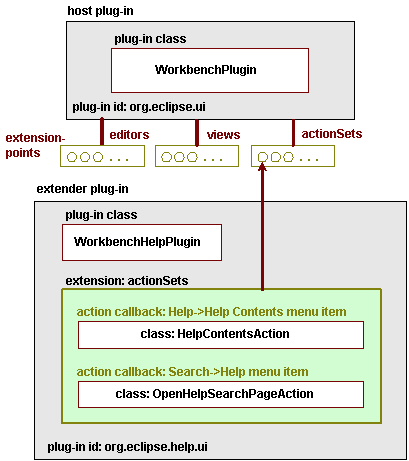
| Figure 1. Participants of a plug-in extension. The workbench UI plug-in is extended by the workbench help plug-in via an actionSets extension that defines specific help-related menu items. |
(The extension-point power-strip notation used in this article was devised by Don Estberg [5].)
Also shown in the figure are the classes of the extension's callback objects: that is, the classes of the help system's menu handlers. As we will see shortly, callback classes are typically identified by name in the declarative specification of each extension. Thus, this extension's Help->Help Contents menu specification declares its custom callback class (menu handler) to be HelpContentsAction. And the extension's Search->Help menu specification declares its custom callback class (menu handler) to be OpenHelpSearchPageAction (see blow for details).
Note that to reduce clutter, package prefixes are not shown in this and later figures. Here the workbench plug-in class belongs to the org.eclipse.ui.internal package; and the help plug-in and related classes belong to the org.eclipse.help.ui.internal package.
The remainder of this section provides a detailed account of how extension-points and extensions are defined.
2.3.1 Participants of an Extension
Let us now look more closely at the various roles played by the objects participating in an extension. There are two plug-in roles, host and extender, a generic role of a callback object, and specific callback roles defined by each extension-point.
2.3.1.1. The Host Plug-in Role
In the context of a particular extension, a plug-in that stands in the host role provides the extension-point and is extended. In addition to providing services in its own right, such a plug-in also acts as the coordinator and controller of a number of extensions.
Within the host plug-in's manifest file, an extension-point is declared in an extension-point XML element. Here is an example of such an element, culled from the base Eclipse workbench UI plug-in, org.eclipse.ui:
Listing 2.3. Declaring an Extension-Point. |
The documentation for this extension-point is provided in a reference page (and is also available in the Eclipse platform on-line help at Platform Plugin Developer Guide/Reference/Extension Points Reference/Workbench/org.eclipse.ui.actionSets). The documentation indicates, among other things, that this extension-point provides a plug-in slot for sets of menus, menu items, and buttons to be added to the base Eclipse workbench.
The extension-point specification  defines a unique identifier for the extension-point within this host plug-in. To identify an extension-point uniquely in global context, the extension-point identifier is prepended with the unique identifier of the host plug-in (as in
  ) to form a fully-qualified identifier for the extension-point. Thus, the fully-qualified identifier of the
 actionSets extension-point of the Eclipse UI plug-in is org.eclipse.ui.actionSets. Plug-ins that extend an extension-point refer to it by its fully-qualified identifier.
The extension-point specification () also declares an XML schema for the extensions of this extension-point, which provides the syntax for declaring menus, menu items, and buttons to be added to the workbench UI. We'll have more to say about the structure and contents of such a schema in section 2.3.3.
2.3.1.2. The Extender Plug-in Role
In the context of a particular extension, a plug-in that stands in the extender role defines the extension, typically making certain aspects of itself available to a host plug-in through the extension, and, in addition, causing the host plug-in to add certain processing elements to its environment. An extension is declared by using an extension XML element in the extender plug-in's manifest file. Here is an example of an extender plug-in, culled from the org.eclipse.help.ui plug-in manifest file, that extends the actionSets extension-point of Listing 2.3, by adding two menu items:
Listing 2.4. Declaring an Extension. |
Note that in this extender plug-in, the actionSets extension-point is referred to by its fully-qualified identifier ().
The portion of the actionSets extension shown in Listing 2.4 defines two actions (,  ). The actions shown are made available through the workbench menu items Help->Help Contents and Search->Help, respectively.
2.3.1.3. The Extension Callback Role
In the context of a particular extension, an object that stands in a callback role is a plain old Java object (not a plug-in) that is called by the host plug-in when certain events specified in the corresponding extension-point contract are recognized by the host plug-in. The interface for callback objects is provided by the host plug-in, and is documented in the documentation of the extension-point being extended. The implementation of callback objects is typically a custom class specific to the particular extension, and is furnished by the provider of the extender plug-in. Because the implementation of the callback object in the extender references the callback interface, which is typically packaged with the host, an extender plug-in typically also depends on the host plug-in.
2.3.1.3.1. Specific Callback Roles
Each callback object fills a certain specific role within an extension. I will refer to these specific roles simply as callback roles. In the XML definition of an extension, callback roles are defined by child or descendent XML elements. The actionSets extension-point, for example, defines a descendent callback role known as action. Multiple callback objects may stand in this role within an actionSets extension, each servicing a particular workbench menu item or button.
When a custom implementation of a callback object is required, the XML schema of the corresponding extension-point typically includes an attribute for specifying the fully-qualified name of the custom callback implementation class. For the help UI plug-in, the name of the XML attribute designating an action class is "class", as exemplified in Listing 2.4 ( ).
).
But while the extender plug-in defines the required specific callback objects, and declares their custom implementation classes, the callback objects only come into existence as a result of specific action by the host plug-in (and usually only when they are required for the first time to perform some action on behalf of the extension). For example, in Listing 2.4 , the action callback class for the workbench Search->Help menu is specified by the extender plug-in org.eclipse.help.ui to be OpenHelpSearchPageAction (package org.eclipse.help.ui.internal). But the associated callback instance is created by the host plug-in org.eclipse.ui. In this case, the callback instance is created the first time the Search->Help menu item is invoked.
As extension designers for an extender plug-in, we need to know about the callback roles of an extension, and supply concrete callback objects for these roles. The roles are defined as particular elements in the XML schema associated with the extension-point (see section 2.3.3), and are described in the documentation of the XML schema, which, among other things, must include the interfaces expected of callback objects filling each role.
For example, the actionSets reference page introduced earlier specifies the callback interface for menu item actions to be org.eclipse.ui.IWorkbenchWindowActionDelegate. So the menu action handlers of the help system implement this interface. In this interface, the method whose implementation actually performs the menu action is declared as:
public void run(org.eclipse.jface.action.IAction action);
Therefore, when a new service is to be made accessible through the main workbench menu, the service's plug-in provides an implementation of IWorkbenchWindowActionDelegate in which the run method invokes the service. And the fully-qualified name of the implementation class is added to the service's plug-in manifest file as the callback class of the service's menu.
2.3.1.4. Non-Specific Service Objects
Note that not all XML elements used in defining an extension correspond to custom callback roles. Some elements may be purely descriptive, supplying, for example, certain parameters to the host plug-in to shape corresponding UI elements, or to use in creating non-custom internal host objects representing parts of the extension. In our example, an actionSet element in and of itself (i.e., independently of its child elements) does not define a custom callback object. But such an element does cause an internal object to come into existence within the org.eclipse.ui plug-in to represent the action set.
Similarly, the actionSets extension-point allows the declaration of new top-level workbench menus through an actionSet menu element. But the action associated with a top-level menu is generic: "expose the list of lower-level menu items". Therefore, there is no need for an extender-specific callback object to be associated with a top-level workbench menu. And the workbench top-level menus are represented by internal workbench UI objects.
As users of extension-points, we need not be concerned with these non-specific internal objects supplied by the host plug-in. But as designers of host plug-ins, we see that we have the flexibility to design complex extension structures, parts of which may be exposed as callbacks to be provided by extensions, and other parts of which would be generic, built-in to the host plug-in code, and possibly parameterizable through corresponding XML attributes of extensions.
2.3.2. Relationships between Plug-ins and Extension Objects
The act of extension is quite a general concept in Eclipse, and to understand its full generality, it is useful to summarize the types of relationships that may exist between plug-in objects, extension-points, and callback objects.
- Multiple extension-points may exist in a host plug-in.
- A plug-in may act both as a host plug-in, exposing some extension-points, and as an extender plug-in, extending some plug-ins.
- Multiple plug-ins may extend a given extension-point.
- A given plug-in may extend a given extension-point multiple times.
- An extender plug-in may include different extensions of different host plug-ins.
- A single act of extension of an extension-point by a particular extension of a particular plug-in may create multiple callback objects.
- A plug-in can define extensions of its own extension-points.
Note. The idea of a plug-in extending itself may seem odd at first. A prominent example of a self-extending plug-in is the workbench UI itself. This plug-in adds various facilities, e.g., editors, to its own UI by extending its own extension-points.
2.3.3. Extension-Point Schemas
A particular extension is defined by an XML configuration element in an extender plug-in. The element provides the information required to instantiate and initialize the required callback objects for that extension, as well as the information required to customize the interface and behavior of the host plug-in. When a host plug-in designer creates an extension-point, in addition to declaring the extension-point in its manifest file, the designer is also responsible for defining the configuration syntax for extensions to that extension-point. This syntax is defined as an XML schema and stored in a file with a .exsd extension, e.g., actionSets.exsd. The schema definition then becomes part of the documentation of the host plug-in. (Eclipse includes an XML schema editor and a corresponding formatter for this purpose.)
The extension-point schema lets extender plug-in designers know how to parameterize their extensions. (Eclipse also provides an extension configuration editor that is driven by the XML schema of an extension-point being extended.)
To get an idea of the structure and contents of extension-point schemas, you can browse the extension-point schemas for the Eclipse platform plug-ins. These schemas are available in each Eclipse installation below the folder plugins/org.eclipse.platform.source_<ver>/src (where <ver> is the version of Eclipse). Under this folder, the extension-point schemas for a given platform plug-in may be found in the folder <plugin>_<plugin_ver>/schema, where <plugin> is the id of the plug-in, and <plugin_ver> is the version of the plug-in. For example, for Eclipse 2.1, the actionSets extension-point schema, actionSets.exsd, may be found in the folder org.eclipse.ui_2.1.0/schema below the platform.source folder.
Here is a considerably abbreviated version of actionSets.exsd:
Listing 2.5. Extension-Point Schema Definition (.exsd File). |
The schema defines an actionSets extension as an element that includes some attributes and a sequence of actionSet's, and an actionSet as an element that includes some attributes and a sequence of menus and actions.
In the full version of this file, each attribute is annotated with a human-readable documentation element. The documentation elements of extension-point schemas are used to generate HTML reference pages for extension-points (e.g., the actionSets reference page mentioned earlier in this article), similarly to the way in which Java API reference pages are generated via javadoc. Such a reference page is made available as part of the documentation of the host plug-in, and is integrated with the workbench's help system.
The reference page supports the two tasks that must be performed to plug new functionality into an extension-point, namely:
- Configuration of an extension in the extender plug-in's manifest file.
The reference page specifies the XML configuration syntax required for the extension.
- Provision of custom implementations for the extension-point's callback objects.
The reference page includes an API section for documenting the callback interfaces expected by the host plug-in for each callback role.
2.3.3.1. Extension Members
What goes into an extension-point schema definition is up to the designer of the host plug-in. And the extension XML in the Eclipse Platform Plug-in Manifest Specification is defined as an XML ANY, meaning that it is arbitrary. That designation is too general, however. In fact, an XML extension specification is always a (possibly degenerate) sequence of elements. I will refer to an item within this sequence of elements as an extension member. An actionSets extension, for example, is a sequence of actionSet members. Often the members of an extension have the same element type: that is, the sequence represents a homogeneous list of members.
In XML, the number of elements of each type within a sequence may be bounded by using the minOccurs and the maxOccurs element definition attributes. This usage is illustrated in the actionSets schema (Listing 2.5, ), where an actionSets extension is specified to contain at least one, but an otherwise unrestricted number of actionSet elements.
When an extension-point defines a homogeneous sequence of members and allows its extensions to have more than one member, the extension-point is assigned a plural name. Such extension-points and their extensions may be referred to as plural-form. The plural form is typically provided as a shorthand for representing multiple single-member extensions.
The notion of an extension member, that is, a top-level XML element of an extension's (top-level) sequence, may be contrasted with the Eclipse notion of a configuration element, an arbitrary element (either a top-level element or a lower-level descendent element) in the XML specification of an extension. Both terms will be used here for the XML element itself and for its parsed programmatic representation.
3. Extension Processing
In section 2, the extension model of Eclipse was presented at a high level, and the declarative specifications of extensions and their callback objects was introduced. In this section, we will see how such declarations are processed programmatically to support the obligations of a host plug-in under an extension-point contract. In other words, we will see the kind of code host plug-in designers must write for each extension-point they define.
Consider again the plug-in org.eclipse.ui and its actionsSets extension-point. When this plug-in is activated, the extension declarations in all plug-ins that extend it must be processed, so that the UI knows how to configure its menus and buttons, and what callback objects to call when corresponding menu and button events occur. This section presents the API calls provided by the Eclipse platform to aid in this type of extension processing, and exemplifies the idioms used by plug-in developers to process extensions by using these API calls.
3.1. Obtaining References to the Extensions of an Extension-Point
How are the extension declarations processed for a given extension-point? Well, in general, the configuration of an extension is quite arbitrary. And the part of the system that has the knowledge of this configuration is the host plug-in, whose design produced the extension-point schema definition. For example, the knowledge of how to process the actionsSets extension of the UI help plug-in, org.eclipse.help.ui, resides within the plug-in that defines the actionsSets extension-point, namely, the plug-in org.eclipse.ui.
In order for a host plug-in to process the extensions of one of its extension-points, it needs to be able to obtain a list of those extensions from the Eclipse runtime, and, for each extension, to get a parsed version of that extension's members.
Recall that the plug-in registry API provides programmatic access to the parsed representation of all available plug-in specifications. This API provides methods for traversing the information about plug-ins, their components, and their relationships. A configuration element in the registry API (interface IConfigurationElement) represents the parsed version of an extension element in an extender plug-in's manifest file. The following sample code shows how to use the plug-in registry API to iterate over all members of all extensions of an extension-point.
Listing 3.1. Iterating over the Extensions and the Members of an Extension-Point. |
The class ProcessExtensions provides an extension processing method process (), which uses the nested loop idiom for extension processing: loop over all extensions of the given extension-point (), and for each extension, loop over all members of that extension (). The process method is made generic by providing it with a member processing visitor: an instance of interface IProcessMember that is called back on for each member being processed ( ).
).
Suppose this extension processing method is called with the id of the actionSets extension-point, namely, org.eclipse.ui.actionSets, as the first argument. One of the extensions of the actionSets extension-point is the help extension of Listing 2.4, and that extension happens to have a single actionSet member. So when the help extension is reached in the outer loop, its actionSet member is supplied to the inner loop, and can be processed by the member processing visitor.
A similar processing loop occurs in the Eclipse workbench UI plug-in (the owner of the actionSets extension-point) when that plug-in is activated. And the UI plug-in can then pick apart the attributes and sub-elements of the actionSet member by using the methods of IConfigurationElement and related interfaces, and use them to configure the specified menu and button elements into the workbench user interface, and to instantiate the required callback objects, when required.
Within the member processing function called in the inner loop , of course, the host plug-in is free to do whatever is necessary to process each member, as directed by that member's XML configuration element.
3.1.1. Extension-Point Member Traversal Shorthand
Listing 3.1 exemplifies the use of the method IConfigurationElement[] getConfigurationElements() to obtain the configurations of all members of an extension (Listing 3.1 ). A method with an identical signature also exists for an extension-point as a whole, that is, for the interface IExtensionPoint, and returns the configurations of all members of all extensions of an extension-point. By using this shorthand method, the extension/member nested loop (Listing 3.1, , ) is reduced to a single loop spanning all members of all extensions of an extension-point. Often this simpler idiom is sufficient for processing an extension-point.
3.1.2. Extension Processing in Action
By supplying a concrete extension processing visitor to the process method of our generic extension processing class (Listing 3.1 ), we can get a taste of extension processing in action. For example, to output identifying information about all extension members for a given extension-point, the following implementation of the visitor interface IProcessMember may be used:
Listing 3.2. Printing Identification Data for Extension-Point Members. |
For actionSet members, there is a labeling attribute whose name is label. So to get a printout of the identifying information for all actionSets present in the current instance of the workbench, the following call may be used:
PrintMemberIdentity.test("org.eclipse.ui.actionSets", "label")
And the call produces output lines such as:
Java Development Tools UI/Java Element Creation
Java Development Tools UI/Java Navigation
Help System UI/Help
CVS Team Provider UI/CVS
Extension Processing Demo/Demo Menu Actions
Eclipse UI/Resource Navigation
...
This extension processing demo is included with the companion plug-ins of this article. To try it out, see the plug-in installation instructions at the end of this article.
3.2. Standardized Extension Processing
A principal function of extension processing is the instantiation of an extension's callback objects. As we shall see in section 3.3, for performance reasons, this function is normally performed in a lazy manner, as callback objects are required to do actual work. In this section, however, I will ignore this important performance optimization, and concentrate instead on the main functional aspects of callback instantiation.
Eclipse defines a standard for instantiating and initializing callback objects. As we have seen, a callback object is typically represented in a specific child-level or descendent XML element of an extension, and its fully-qualified class name is provided as the value of some attribute of this element. Also, the initial state of a callback object is usually completely parameterized by the corresponding element and its XML descendants. When these conditions hold, the callback object may be instantiated and initialized by using the standard callback object instantiation and initialization facilities of Eclipse.
Suppose that our extension processing code has traversed the parsed representation of an extension member to an element corresponding to a particular callback object (for example, an object standing in the action role within an actionSets extension). Suppose that this element is represented in a variable IConfigurationElement element, and that the name of this element's attribute designating the fully-qualified class name of the callback object is known to be class. Then, the method createExecutableExtension(String classPropertyName) of IConfigurationElement may be used to instantiate the callback object, as follows:
ICallback callback = (ICallback) element.createExecutableExtension("class")
where ICallback is the expected interface for the corresponding callback role.
The method createExecutableExtension does two things:
- Instantiate a member of the required class by using its 0-argument public constructor (one must exist).
The fully-qualified name of the required class is looked up in the configuration as the value of an attribute whose name is provided in the method's
classPropertyNameargument. - Initialize this instance if it is initializable in a standard manner.
To become initializable in a standard manner, an extension class implements Eclipse's standard extension initialization interface
IExecutableExtension:package org.eclipse.core.runtime; public interface IExecutableExtension { public void setInitializationData(IConfigurationElement config, String classPropertyName, Object data) throws CoreException; }So if the instantiated callback object is an instance of
IExecutableExtension, the methodcreateExecutableExtensionautomatically callssetInitializationDataon this extension object, giving it the configuration element of the callback object as a parameter (as well as its class attribute name, and a data parameter whose details are beyond the scope of this article, but can safely be ignored for now (see the Eclipse documentation for more details)).What this initialization method actually does, of course, is up to the callback object's designer. The configuration of the callback object provided to this method as a parameter would drive the initialization process and would be reflected in the callback object's state by the initialization method.
A complete example of the use of this machinery to instantiate and initialize callback objects appears in section 4.
Note. As mentioned earlier and as we shall see in the next section, this entire machinery is generally used in a lazy fashion only, i.e., when the callback object is actually required to do specific work. In the same spirit, a callback object's initialization method should, to the extent possible, defer time-consuming work to subsequent method calls on the object that would require or benefit from such work. For example, when a callback object manages access to a set of resources, it is often possible and preferable to open a managed resource only when it is actually required in a subsequent method call to the callback object.
3.3. Lazy Extension Processing
When a host plug-in is activated, an eager processing of its extensions would cause the activation of all of its extender plug-ins, and, recursively, their extender plug-ins, down the plug-in hierarchy (or, more accurately, through the plug-in extension network). Activating all plug-ins reachable from a given plug-in involves loading their classes. And processing all extension-points of these plug-ins means loading the custom callback classes of all extensions of these extension-points. As a result, an eager extension processing regime can considerably slow down plug-in activation, and therefore system startup.
Plug-in developers are therefore encouraged to attempt to delay the creation of extender-specific callback objects, until such objects are actually required to perform some action.
3.3.1. Using Virtual Proxies in Lazy Extension Processing
One way to implement a lazy activation regime is to use a virtual proxy for each callback object during the activation of a host plug-in. (See the virtual usage of the proxy pattern in [1].) Such a proxy stands in the role of a real callback object, and causes the real callback object to be instantiated only when some action is required of it. Often, it is possible to provide, within the proxy class, certain generic functions that are required of a callback object. These functions can then be furnished to the host plug-in without reference to particular custom extension classes, and without the need to activate particular extender plug-ins.
When using virtual proxies to initialize the extensions of a host plug-in, only a limited number of extension classes, one for each extension-point role, would be loaded in activating a host plug-in.
As an example, the internal package org.eclipse.ui.internal contains an abstract virtual proxy class called PluginAction for UI actions, and a number of concrete subclasses of this class. And initial extension processing for the actionSets extension point only instantiates such a proxy class for each UI action.
A generic constructor for an action proxy is defined in the abstract class PluginAction, and has the following signature:
    public PluginAction(IConfigurationElement actionElement,
String runAttribute, String definitionId, int style)
The parameter actionElement provides a reference to the parsed representation of an extension XML element representing an action. And the parameter runAttribute identifies the XML attribute that represents the name of the custom action class to be instantiated to perform the action. The PluginAction proxy class simply keeps track of these properties for later use in instantiating and initializing the real action object.
The proxy class fields action calls by implementing the workbench's action interface, called IAction. The first time a call is made on the run method of this interface, the proxy instantiates the custom action implementation class whose name is provided in runAttribute, The run method call is then dispatched to this custom action instance. The custom action instance is known as the action delegate.
3.3.1.1. Callback Proxies versus Callback Adapters
In a canonical proxy pattern, both the proxy class and the delegate implementation class implement the same functional interface. But it is not necessary to adhere to a strict interpretation of the proxy pattern in implementing the virtual proxies of callback objects. In fact, an implementation following the adapter pattern provides a more flexible mechanism for the purpose of lazy callback instantiation.
For example, the Eclipse UI action handler, PluginAction, is more precisely described as a virtual adapter. It implements a high-level interface IAction and adapts it to a lower-level interface, IActionDelegate, which is expected of implementers of custom action callbacks. And the two interfaces IAction and IActionDelegate are unrelated. The handler class PluginAction provides some basic services without reference to a particular custom action handler, and adapts the run method of of the workbench's IAction interface to the run method of the action callback interface IActionDelegate to actually perform a requested action.
(Note that the interface IWorkbenchWindowActionDelegate expected of custom workbench menu and buttons handlers, mentioned earlier in section 2.3.1.3.1, is derived from the action callback interface IActionDelegate.)
Even though Eclipse developers do not necessarily use a strict proxy regime to affect lazy callback instantiation, the term proxy is commonly used in Eclipse parlance as a generic designation for internal objects used to front custom callback objects for the purpose of delaying their instantiation.
4. Example: An Extensible Arithmetic Function Service
So far in this article, we have used only pre-existing extension-points. But with the machinery of extension processing in place, we are now ready to create an extension-point of our own. Our example extension-point is similar in its outline structure to the actionSets extension-point which we have been using so far.
- It provides a slot for augmenting the functions of a host plug-in by a custom set of services.
- It has a plural form, so that each of its extensions is free to add more than one service to the host plug-in.
- It requires each extension to provide concrete callback objects that embody the services provided by that extension.
- It obligates the host to add elements to its user interface for each extension (actually for each member of each extension), so that the user may interact with the services provided by the extension.
In addition, our example provides for the specific initialization of callback objects by using the standard callback initialization facilities of Eclipse.
The goal is to illustrate these salient features of extensions with as simple an extension-point as possible. Our major concern, of course, is to illustrate architectural issues, patterns of usage, and extension processing. User interface design issues are specifically excluded from this article. In fact, our example uses a very simple user interface, just sufficient to illustrate the types of interactions required between the user interface functions and extension processing functions.
4.1. The Example in Outline
The host plugin, which supplies the user interface for this example, will be referred to as the UI plug-in.
A single extension-point is defined in the UI plug-in, and supports the extension of the plug-in by a very simple type of service: a service that provides access to an integer arithmetic function of a single argument. The signature of the function is defined in the following callback interface:
package com.bolour.sample.eclipse.service.ui;
public interface IFunction {
public long compute(long x) throws ArithmeticException;
}
In our example, each member of each extension will provide an implementation of such a function through a callback object that implements the IFunction interface.
In order to illustrate the use of standard extension processing to initialize callback objects, we would like our functions to be configurable via configuration parameters (constants of the computation) supplied as XML attributes in extension declarations. Of course, we will have different classes of computations implemented by different callback classes, e.g., addition of a parameter, multiplication by a parameter, etc. And, in general, each type of computation would be parameterized differently.
But to keep our example simple, we stipulate that our computations may be parameterized by at most one integer parameter. For example, if the function doubles the value of its argument, then it is considered as a multiplication by a constant factor of 2. And in this case the value 2 is supplied as an XML configuration parameter in the extension declaration of the corresponding callback object.
The UI plug-in provides an input field to enter the argument of a service function, a result field to display the function's value, and a constant field to display the constant parameter (if any) used in the computation. Each function also requires a specific button for invoking it, and a specific label for giving information about it. Therefore, for each member of each extension, the UI plug-in adds a corresponding button and label to its user interface. And when the button is selected, the UI plug-in calls back to the associated service function.
Figure 2 shows the UI plug-in's user interface for a typical configuration of extender plug-ins.
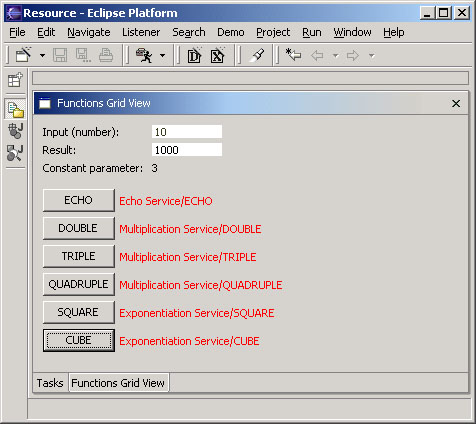
| Figure 2. Service UI plug-in's function invocation view. Extensions of this host plug-in declare arithmetic functions that are made accessible through this plug-in's function invocation view. |
The UI plug-in class is com.bolour.sample.eclipse.service.ui. The extension-point is called functions.
4.2. The Extension-Point
The functions extension-point is declared in the UI plug-in manifest file as follows:
    <extension-point id="functions" name="Functions"
schema="schema/functions.exsd"/>
Here is the reference page for this extension-point. (The source schema file for this extension, functions.exsd may be found in the companion plug-ins zip file.) As indicated in the reference page, a functions extension is a sequence of function members each of which has the following attributes:
- class: The member function's custom callback class.
- name: The member function's name. Used in labeling the function on the user interface.
- constant: An optional attribute used to parameterize the member's function by a constant.
Complete examples of extensions using these attributes appear in the next section. For now, here is an example extension member declaration for a multiplication function, compute(x) = constant * x, with a constant factor of 2:
<function
name="DOUBLE"
constant="2"
class="com.bolour.sample.eclipse.service.multiplication.Multiplication"/>
In this case, the Multiplication class implements the standard Eclipse callback initialization interface IExecutableExtension to allow its instances to be initialized with the supplied constant factor. The details are provided in section 4.3.2. Of course, the designer of a computation may decide not to parameterize it with a constant. The echo function, compute(x) = x (see section 4.3.1), provides an example of such a non-parameterized computation. In this case, no specific initialization is required for the corresponding callback object, and the associated callback class would not implement IExecutableExtension.
Figure 3 shows the relationship between the functions UI plug-in and its extensions.
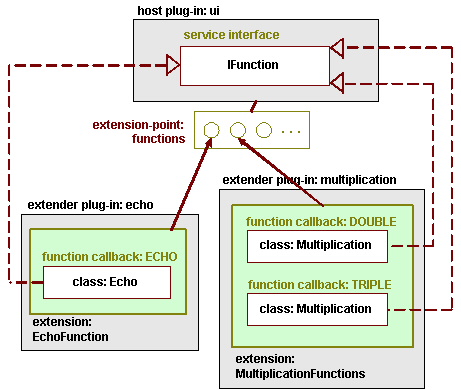
Figure 3. The functions extension-point and its extensions. Sets of arithmetic functions are added to the UI plug-in by extending that plug-in's functions extension-point. |
At this point, we have in place all the information we need to create sample extensions of the functions extension-point. So before getting into the implementation details of the UI plug-in, we will present sample extensions of this extension-point. Section 4.3 presents two such sample extensions. Then in section 4.4 we will return to the implementation of the UI plug-in by providing the details of extension processing in that plug-in.
4.3. Extension Examples
4.3.1. Echo: A Simple Extension
The echo service provides a function that echoes its input to its output. Its service class is defined as:
Listing 4.1. The Echo Callback Function Class. |
The echo plug-in makes itself available to the user by extending the functions extension-point. Here is the specification of an echo extension.
Listing 4.2. An Echo Extension Specification. |
This specification declares the service callback class, and specifies the name of the service operation to be ECHO.
Note that in this simple case, no specific state is required to initialize an Echo object. So the optional constant attribute is not used, and the Echo callback class does not implement the IExecutableExtension interface.
4.3.2. Multiplication: An Extension with Custom Initialization
Suppose now that the service function to be provided is the multiplication of the input argument by a constant value. Such a service is more useful if it can be configured at deployment time with the required multiplication factor. The function attribute constant is used for this purpose.
Here is a sample multiplication extension.
Listing 4.3. A Multiplication Extension Specification. |
When this extension is processed, the attribute constant is interpreted as a multiplication factor.
The multiplication callback class is reproduced below (minimally redacted for brevity).
Listing 4.3. The Multiplication Function Callback Class. |
Note that the compute method () of this class provides the implementation of the service interface IFunction, and that the setInitializationData method () of this class provides the implementation of the standard initialization interface IExecutableExtension.
We will see in the next section that extension processing for the functions extension-point uses the standard callback instantiation method createExecutableExtension. So because the Multiplication class implements the IExecutableExtension interface, the method createExecutableExtension automatically calls a callback instance's setInitializationData method, providing that instance's parsed XML element as a parameter. The initialization method can then extract the specified multiplication factor from the element's constant XML attribute, and keep track of it for future computations (, ).
4.4. Processing the "functions" Extension-Point
Now that we have examined some sample test cases for the functions extension-point, we are ready to dig deeper into the implementation of this extension-point and its defining UI plug-in. Our extension-processing class is called ProcessServiceMembers. This class embodies the standard idioms of extension processing in Eclipse, specialized to the functions extension-point. In particular, this class implements a standard and lazy extension processing regime for the functions extension-point. A separate UI class called FunctionsGrid encapsulates all UI processing for our UI plug-in.
As usual in lazy extension processing, processing is required in two distinct phases of the operation of the application.
In the host plug-in startup phase, there is an initial run through the members of all extensions of the functions extension-point for the purpose of obtaining the configurations of these members, creating generic callback proxies, and building the user interface of the host plug-in. In this phase, our extension processing code repeatedly calls a UI method called addFunction to augment the host plug-in's user interface with function invocation elements for each extension function (see Listing 4.4 )
Then, in the interactive phase of the application, the specific callback objects required to perform the computations of each configured function are created in a lazy fashion, as calls are received by proxy objects. During this phase, selecting the UI button for a function causes a callback to that function through a proxy callback object provided by the extension processing class. The call is delegated by the proxy to the real callback object. And the first time such a call is made to each proxy, the real callback object is instantiated and initialized via standard extension processing.
Section 4.4.1 outlines the extension processing class. Section 4.4.2 outlines the parts of the UI class that interact with extension processing. The bulk of the user interface code concerns UI details not directly related to extension processing and is therefore not presented in this article.
4.4.1. The Extension Processing Class
Here is a redacted version of our initial extension processing function:
Listing 4.4. Extension Member Processing for Service Functions. |
The extension processing loop () follows the shorthand idiom for getting the members of all extensions of an extension-point introduced in section 3.1.1. This run through the extension members of the functions extension-point creates a proxy callback object for each function (), and adds this proxy and its associated UI widgets to the UI by calling the addFunction method of the UI's function grid (). (The body of the addFunction method is presented later in Listing 4.6 .)
Note that certain configuration errors, such as an invalid constant in our example, can be detected in a generic manner, that is, without recourse to specific callback objects (whose instantiations we are deferring). Such errors should be handled during initial extension processing, so that, to the extent possible, the host plug-in is not polluted with invalid callback objects and associated widgets. Thus, when a non-integral constant is encountered in the initial extension processing of the functions extension-point, the corresponding misconfigured function is ignored ().
During the interactive phase of the application, when a function call is received by a callback proxy, it must be delegated to the custom implementation of the function. And that implementation is instantiated in a lazy fashion the first time a call is received by a proxy. The details appear in the following code fragment.
Listing 4.5. Extension Member Processing for Service Functions. |
This is a straightforward example of the use of the virtual proxy pattern, and other than error processing, which is discussed in the next section, requires no further comment.
4.4.1.1. Error Processing
In the previous section, we saw that certain configuration errors may be detected in a generic manner during initial extension processing, and can be handled at that time. Unfortunately, not all configuration errors are of this variety, since deferring the instantiation of callback objects in a lazy regime also defers the detection of errors related to instantiating and initializing callback objects. We will call configuration errors that are detected during the interactive phase of the application, interaction time configuration errors.
Interaction time configuration errors fall into two categories: interface mismatches: callback classes that do not implement their required callback interfaces, and creation/initialization errors, e.g., non-existent classes, or invalid specific configuration parameters (for example, 0 denominator for a division function). In Listing 4.5, interface mismatches are detected at , and creation/initialization errors are detected at . Note that an error detected anywhere within the execution of createExecutableExtension, including an error in the initialization of a callback object, is communicated back to the caller via a CoreException.
In our application, an interaction time configuration error causes an ArithmeticException to be thrown. The exception is handled in the UI trivially by displaying error in the result field of function invocations. However, our simple application does not disable the UI elements associated with such misconfigured functions once the configuration error is detected, and allows the user to repeat the failure. A more sophisticated application might dynamically disable or remove user interface elements associated with misconfigured members of extensions.
The companion plug-ins zip file includes a sample plug-in, errortest, that exemplifies configuration errors. By default the functions extension that includes these errors is commented out. To test the effect of configuration errors in this application, uncomment the functions.error extension in the errortest plug-in's manifest file, and restart Eclipse.
In summary, the late detection of configuration errors in lazy extension processing makes it more difficult to handle configuration errors gracefully. And in general, a tension exists between application startup performance, graceful error processing, and the customizability of callback objects standing in a given role.
4.4.2. The User Interface Class
This section outlines the user interface class of the UI plug-in insofar as it interacts with the extension processing class.
For each function specification included in an extension of the functions extension-point, initial extension processing adds a function invocation button and a corresponding label to the UI plug-in's user interface. Here is an abbreviated version of the UI code used for this purpose:
Listing 4.6. Adding a Function to the User Interface. |
Extension processing makes a call to the addFunction () method of the UI to build a grid row that includes the required button and label. This method takes four arguments:
IFunction function: provides the callback object to be called when the button is selected.String functionName: provides the display name of the function's button.String label: provides the text of the associated label.Integer constant: provides the constant parameter (if any) used in the computation. The constant is transmitted to the UI for display purposes only, and is displayed along with the result of a computation when the corresponding button is selected.
Each invocation of the addFunction method is delegated to a GridRow constructor with identical parameters. A GridRow encapsulates the representation of a function in the user interface. For each function, the GridRow constructor saves the reference to the callback object for future calls (). It also associates a button event handler handleButton () with the button. When the button is later selected by the user, the event handler obtains the user input from the UI input field, invokes the service function associated with the button on that input, and displays the resulting value of the function (). It also displays the constant parameter (if any) used in the computation.
This completes the description of our arithmetic function invocation service The function invocation UI plug-in and sample extender plug-ins are included in this article's companion samples. See the instructions at the end of this article for configuring the companion plug-ins.
5. Listener Extensions and the Observer Pattern
The previous section provided a simple example of what might be called the service extension pattern. Each member of a service extension defines a unique set of user interface widgets, and events on these widgets trigger callbacks to objects unique to the extension.
Other usage patterns of extensions are possible, of course. And in this section we briefly outline one such pattern that is akin to the observer design pattern of [1]. Our examination of this usage pattern leads naturally to a comparison of the extension model of Eclipse with the much simpler observer pattern.
In the language of Java APIs, observers are called listeners, and the pattern of extension usage discussed in this section may be called the listener extension pattern. In the listener extension pattern, multiple extension members may listen for the same event in a host plug-in. And the host plug-in notifies all these extension members, or rather their associated listener callbacks, when the event occurs.
The Eclipse JDT JUnit plug-in org.eclipse.jdt.junit uses such a pattern to allow multiple observers within the Eclipse workbench to get notification of testing events, such as the start or the completion of a JUnit test. This usage is covered in the Beck and Gamma manuscript [2], which is where I was first introduced to the listener extension pattern.
In the listener extension pattern, the host plug-in acts as the subject of the observation, and extender plug-ins act as the observers or listeners. The host plug-in therefore provides an extension-point that may be called listeners, and a corresponding interface that may be called IListener. Each extender plug-in then extends the listeners extension-point by supplying a specific listener that implements the IListener interface, or by supplying a sequence of such listeners.
Because the listeners are then specified declaratively through the plug-in extension mechanism, these listeners can be automatically registered for event notification by extension processing. The first time notification is required, the subject plug-in processes its listeners members, and for each member, instantiates a specific listener callback object and registers that listener for event notification.
The companion sample plug-ins include an example of the listener extension pattern, whose structure is shown in Figure 4.
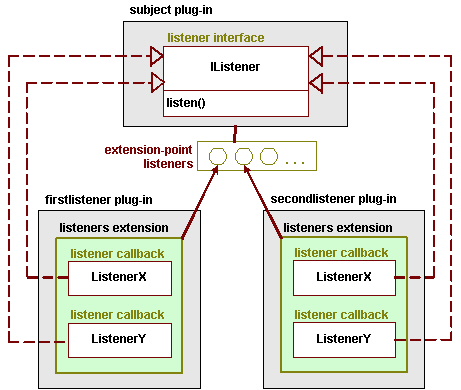
| Figure 4. Extension structure of the listener extension pattern. Each member of each listener extension provides a notification callback for subject events. |
In this example, an update of the subject causes notifications to be broadcast to all members of all extensions of the listeners extension-point.
Here is the reference page of the listeners extension-point.
As configured out of the box, the example includes two plug-ins that extend the listeners extension-point, and are called firstlistener and secondlistener. Each of these plug-ins has an extension with two listener members, ListenerX and ListenerY. Thus, the first listener plug-in's extension specification looks like:
Listing 5.1. A Listener Extension Specification. |
The host plug-in defines a menu item, which, when selected, causes the state of the subject to be updated. In turn, the state change in the subject causes listener notifications to be broadcast to each listener configured into the system.
The listener callbacks in this example are trivial and simply print an informational message to standard output, as shown in the following listener class:
Listing 5.2. A Listener Callback Implementation. |
So running this example out of the box results in the following console messages:
com.bolour.sample.eclipse.listener.secondlistener.ListenerX notified
com.bolour.sample.eclipse.listener.secondlistener.ListenerY notified
com.bolour.sample.eclipse.listener.firstlistener.ListenerX notified
com.bolour.sample.eclipse.listener.firstlistener.ListenerY notified
5.1. The Eclipse Extension Model versus the Observer Pattern
As we have seen, the listener extension pattern is analogous to the observer pattern, except for its static deployment-time registration of listeners. So ignoring the dynamic nature of observer registrations, the observer pattern may be thought of as a specialization of the Eclipse extension model. In fact, modulo dynamic registration, the extension model of Eclipse adds power to the observer pattern at a number of levels:
- Callback Bundle versus Single Callback. A single extension may provide multiple callback objects. A single observer provides a single callback object.
- Differentiation of Extenders versus Uniform Treatment of Observers. Depending on the parameters of an extension and the specifics of the extension-point contract, different extensions of a given extension-point can be treated differently. In contrast, the observer pattern treats all observers of a given subject uniformly, notifying every one of an observable event.
- Arbitrary Semantics in Host versus Fixed Notification Semantics in Subject. There can be arbitrary parameterized host semantics associated with an extension instance. Based on the configuration of the extension, the host can accept a variety of customizable responsibilities under the extension contract, e.g., the provision of user interface elements. There is no such parameterization and customizability in the observer design pattern.
But a closer comparison exists between the Eclipse extension model and the extension model of a microkernel by so-called internal servers, e.g., OS device drivers (see, for example, the microkernel pattern in [4]). Both models allow a core set of services to be extended by additional provider-supplied services. But the Eclipse extension model generalizes the internal extension model of the microkernel architecture in two ways. First, Eclipse plug-ins provide a packaging mechanism for sets of related extensions. Second, in Eclipse any plug-in may provide extension-points and make itself extensible by other plug-ins. In contrast, in the microkernel architecture, the microkernel core (e.g., an OS kernel) has unique standing as the sole extensible component in a system.
6. Summary and Conclusions
The plug-in extension model of Eclipse provides a powerful and general paradigm for architecting extensible systems based on loosely-coupled components. The principle use of this architecture, of course, is the Eclipse workbench. But the basic extension model is an abstract architectural pattern quite apart from its specific incarnation in the workbench.
The principle facilities of this abstract model are:
- Deployment-time pluggable components. Plug-ins are components that are assembled into a system at deployment time. A plug-in is implemented in a running system as an instance of a plug-in class. Characteristics of each plug-in are declaratively specified in a manifest file, which is interpreted at runtime to instantiate the plug-in and relate it to other plug-ins.
- Extension-points. A particular way in which a plug-in allows itself to be extended is embodied in an extension-point. An extension-point is defined by a plug-in that stands in a host role with respect to the extension-point, and may be extended by one or more plug-ins that stand in an extender role with respect the extension-point. There is a contract associated with each extension-point. The contract puts obligations on both the host and the extender plug-ins.
- Extensions as Parameterized Callback Bundles. An extension-point contract generally provides one or more callback interfaces, and requires extenders to provide custom implementations (callback objects) for these interfaces. Then the host is obligated to call back on these callback objects under certain conditions specified in the contract, and based on a particular extension's configuration parameters.
- Obligations of the Host. The host obligations under an extension-point contract may include additional requirements on the behavior of the host, such as a requirement on the host to augment its interface by additional processing elements.
- Obligations of the Extender. The extender describes the characteristics of an extension declaratively in its manifest file. The extension-point contract provides an XML schema for this description, and the extension specification in the extender's manifest file must conform to this schema. The schema includes slots for the concrete classes of the extension's callback objects, and for the parameters required to construct these objects. The concrete classes are furnished by the extender, and must conform to expected interfaces defined by the host. At runtime, the host instantiates the configured callback objects based on their configuration parameters.
In summary, Eclipse plug-ins offer a flexible model of extensibility, and their abstract architecture for composing systems out of loosely-coupled components provides a significant addition to the available repertoire of architectural patterns for software systems (see, e.g., [4]).
Sample Code Installation.
To run the samples appearing in this article and view their source code, extract the contents of the companion plug-ins zip file into your Eclipse installation.
In order to interact with the samples through the workbench, you will have to enable their user interface elements as follows:
- Extension Processing Demo. Bring up the Windows->Customize Perspective dialog, and under Other, enable Demo Menu Actions. Close the dialog. The Demo menu should now be available.
- Arithmetic Service. Bring up the Windows->Customize Perspective dialog, and under Window->Show View enable Functions Grid View, and close the dialog. In the workbench Window->Show View list, you should now see the list item Functions Grid View. Select that item to display the view for this sample.
- Listener Extensions. Bring up the Windows->Customize Perspective dialog, and under Other enable Listener Menu Actions. Close the dialog. The Listener menu should now be available.
Note that for simplicity, standard output and standard error are used to display messages in these samples. By default, on a win32 platform, Eclipse uses the javaw virtual machine, which does not have an associated console for standard IO. To bring up Eclipse on a win32 platform with an associated console, the Eclipse executable may be asked to use java, rather than javaw, by using the -vm option, e.g.,
eclipse -vm C:\jdk1.3.1_02\jre\bin\java.exe
The samples have been tested with Eclipse 2.1 and JDK 1.3.1_02 on Windows 2000.
References
- Gamma, Erich, Richard Helm, Ralph Johnson, John Vlissides, Design Patterns, Elements of Reusable Object-Oriented Software, Addition-Wesley, 1995.
- Beck, Kent, and Erich Gamma, Contributing to Eclipse (pre-publication draft) 2003.
- Shavor, S., Jim D'Anjou, et. al. The Java Developer's Guide to Eclipse, Addison-Wesley, 2003.
- Buschmann, Frank, et. al., Pattern-Oriented Software Architecture, A System of Patterns, Volume 1, John Wiley and Sons, 1996.
- Estberg, Don. How the Minimum Set of Platform Plugins Are Related, Wiki Page 2587, Eclipse Wiki.
Acknowledgments
This article originated in discussions within the Silicon Valley Patterns Group on Eclipse plug-ins. Thanks to the members of the group, and in particular to Tracy Bialik, Phil Goodwin, Jan Looney, Jerry Louis, Chris Lopez, Russ Rufer, Rich Smith, and Carol Thistlethwaite for the original conversations leading to these notes, and for many great suggestions for improving the content and presentation of the material. Special thanks to Russ Rufer and Tracy Bialik for blazing the Eclipse trail for the rest of the group. The group discussions were organized around a review of an early manuscript by Kent Beck and Erich Gamma: Contributing to Eclipse . These notes, therefore, owe much to Beck and Gamma for introducing us to the concepts and facilities of Eclipse plug-ins. Don Estberg devised the diagrammatic representation of extension-points used in this article, based on the power-strip metaphor. Thanks also to Don for his detailed comments. Finally, my thanks to Dennis Allard and Dan Conde for their generous offer of time in reviewing the final draft of this article, and to Jim des Rivières for his detailed review and numerous suggestions for enhancements.