


在WinForm应用程序中实现自动升级
这是本人第一次写比较复杂的文章,表达不清之处,请各位见谅。好,闲话少说,入正题。
最近单位开发一个项目,其中需要用到自动升级功能。因为自动升级是一个比较常用的功能,可能会在很多程序中用到,于是,我就想写一个自动升级的组件,在应用程序中,只需要引用这个自动升级组件,并添加少量代码,即可实现自动升级功能。因为我们的程序中可能包含多个exe或者dll文件,所以要支持多文件的更新。
首先,要确定程序应该去哪里下载需要升级的文件。我选择了到指定的网站上去下载,这样比较简单,也通用一些。在这个网站上,需要放置一个当前描述最新文件列表的文件,我们估且叫它服务器配置文件。这个文件保存了当前最新文件的版本号(lastver),大小(size),下载地址(url),本地文件的保存路径(path),还有当更新了这个文件后,程序是否需要重新启动(needRestart)。这个文件大致如下:
updateservice.xml
 <?xml version="1.0" encoding="utf-8"?><updateFiles> <file path="AutoUpdater.dll" url="http://update.iyond.com/CompanyClientApplication/AutoUpdater.zip" lastver="1.0.0.0" size="28672" needRestart="true" /> <file path="CompanyClient.exe" url="http://update.iyond.com/CompanyClientApplication/CompanyClient.zip" lastver="1.1.0.0" size="888832 " needRestart="true" /> <file path="HappyFenClient.dll" url="http://update.iyond.com/CompanyClientApplication/HappyFenClient.zip" lastver="1.0.0.0" size="24576" needRestart="true" /> <file path="NetworkProvider.dll" url="http://update.iyond.com/CompanyClientApplication/NetworkProvider.zip" lastver="1.0.0.0" size="32768" needRestart="true" /> <file path="Utility.dll" url="http://update.iyond.com/CompanyClientApplication/Utility.zip" lastver="1.0.0.0" size="20480" needRestart="true" /> <file path="Wizard.dll" url="http://update.iyond.com/CompanyClientApplication/Wizard.zip" lastver="1.0.0.0" size="24576" needRestart="true" /></updateFiles>
同时,客户端也保存了一个需要升级的本地文件的列表,形式和服务器配置文件差不多,我们叫它本地配置文件。其中,<Enable>节点表示是否启用自动升级功能,<ServerUrl>表示服务器配置文件的地址。
update.config
<?xml version="1.0" encoding="utf-8"?><Config xmlns:xsi="http://www.w3.org/2001/XMLSchema-instance" xmlns:xsd="http://www.w3.org/2001/XMLSchema"> <Enabled>true</Enabled> <ServerUrl>http://update.iyond.com/updateservice.xml</ServerUrl> <UpdateFileList> <LocalFile path="AutoUpdater.dll" lastver="1.0.0.0" size="28672" /> <LocalFile path="CompanyClient.exe" lastver="1.1.0.0" size="888832 " /> <LocalFile path="HappyFenClient.dll" lastver="1.0.0.0" size="24576" /> <LocalFile path="NetworkProvider.dll" lastver="1.0.0.0" size="32768" /> <LocalFile path="Utility.dll" lastver="1.0.0.0" size="20480" /> <LocalFile path="Wizard.dll" lastver="1.0.0.0" size="24576" /> </UpdateFileList> </Config>使用自动各级组件的程序在启动时,会去检查这个配置文件。如果发现有配置文件中的文件版本和本地配置文件中描述的文件版本不一致,则提示用户下载。同时,如果本地配置文件中某些文件在服务器配置文件的文件列表中不存在,则说明这个文件已经不需要了,需要删除。最后,当升级完成后,会更新本地配置文件。
我们先来看一下如何使用这个组件。
在程序的Program.cs的Main函数中:
[STAThread]
static void Main()
{
Application.EnableVisualStyles();
Application.SetCompatibleTextRenderingDefault(false);
AutoUpdater au = new AutoUpdater();
try
{
au.Update();
}
catch (WebException exp)
{
MessageBox.Show(String.Format("无法找到指定资源\n\n{0}", exp.Message), "自动升级", MessageBoxButtons.OK, MessageBoxIcon.Error);
}
catch (XmlException exp)
{
MessageBox.Show(String.Format("下载的升级文件有错误\n\n{0}", exp.Message), "自动升级", MessageBoxButtons.OK, MessageBoxIcon.Error);
}
catch (NotSupportedException exp)
{
MessageBox.Show(String.Format("升级地址配置错误\n\n{0}", exp.Message), "自动升级", MessageBoxButtons.OK, MessageBoxIcon.Error);
}
catch (ArgumentException exp)
{
MessageBox.Show(String.Format("下载的升级文件有错误\n\n{0}", exp.Message), "自动升级", MessageBoxButtons.OK, MessageBoxIcon.Error);
}
catch (Exception exp)
{
MessageBox.Show(String.Format("升级过程中发生错误\n\n{0}", exp.Message), "自动升级", MessageBoxButtons.OK, MessageBoxIcon.Error);
}
Application.Run(new MainUI());
}
static void Main()
{
Application.EnableVisualStyles();
Application.SetCompatibleTextRenderingDefault(false);
AutoUpdater au = new AutoUpdater();
try
{
au.Update();
}
catch (WebException exp)
{
MessageBox.Show(String.Format("无法找到指定资源\n\n{0}", exp.Message), "自动升级", MessageBoxButtons.OK, MessageBoxIcon.Error);
}
catch (XmlException exp)
{
MessageBox.Show(String.Format("下载的升级文件有错误\n\n{0}", exp.Message), "自动升级", MessageBoxButtons.OK, MessageBoxIcon.Error);
}
catch (NotSupportedException exp)
{
MessageBox.Show(String.Format("升级地址配置错误\n\n{0}", exp.Message), "自动升级", MessageBoxButtons.OK, MessageBoxIcon.Error);
}
catch (ArgumentException exp)
{
MessageBox.Show(String.Format("下载的升级文件有错误\n\n{0}", exp.Message), "自动升级", MessageBoxButtons.OK, MessageBoxIcon.Error);
}
catch (Exception exp)
{
MessageBox.Show(String.Format("升级过程中发生错误\n\n{0}", exp.Message), "自动升级", MessageBoxButtons.OK, MessageBoxIcon.Error);
}
Application.Run(new MainUI());
}
如上所示,只需要简单的几行代码,就可以实现自动升级功能了。
软件运行截图:


下面,我们来详细说一下这个自动升级组件的实现。
先看一下类图:

AutoUpdater:自动升级的管理类,负责整体的自动升级功能的实现。
Config:配置类,负责管理本地配置文件。
DownloadConfirm:一个对话框,向用户显示需要升级的文件的列表,并允许用户选择是否马上升级。
DownloadFileInfo:要下载的文件的信息
DownloadProgress:一个对话框,显示下载进度。
DownloadProgress.ExitCallBack,
DownloadProgress.SetProcessBarCallBack,
DownloadProgress.ShowCurrentDownloadFileNameCallBack:由于.NET2.0不允许在一个线程中访问另一个线程的对象,所以需要通过委托来实现。
LocalFile:表示本地配置文件中的一个文件
RemoteFile:表示服务器配置文件中的一个文件。
UpdateFileList:一个集合,从List<LocalFile>继承
我们先整体看一下AutoUpdater.cs:
 AutoUpdater.cs

在构造函数中,我们先要加载配置文件:
public AutoUpdater()
{
config = Config.LoadConfig(Path.Combine(AppDomain.CurrentDomain.BaseDirectory, FILENAME));
}
{
config = Config.LoadConfig(Path.Combine(AppDomain.CurrentDomain.BaseDirectory, FILENAME));
}
最主要的就是Update()这个函数了。当程序调用au.Update时,首先检查当前是否开户了自动更新:
if (!config.Enabled) return;如果启用了自动更新,就需要去下载服务器配置文件了:
WebClient client = new WebClient(); string strXml = client.DownloadString(config.ServerUrl);然后,解析服务器配置文件到一个Dictionary中:
Dictionary<string, RemoteFile> listRemotFile = ParseRemoteXml(strXml);接下来比较服务器配置文件和本地配置文件,找出需要下载的文件和本地需要删除的文件:
List<DownloadFileInfo> downloadList = new List<DownloadFileInfo>(); //某些文件不再需要了,删除 List<LocalFile> preDeleteFile = new List<LocalFile>(); foreach (LocalFile file in config.UpdateFileList) {
{ if (listRemotFile.ContainsKey(file.Path))
 { RemoteFile rf = listRemotFile[file.Path]; if (rf.LastVer != file.LastVer) { downloadList.Add(new DownloadFileInfo(rf.Url, file.Path, rf.LastVer, rf.Size)); file.LastVer = rf.LastVer; file.Size = rf.Size; if (rf.NeedRestart) bNeedRestart = true;
 } listRemotFile.Remove(file.Path); } else { preDeleteFile.Add(file); }
 } foreach (RemoteFile file in listRemotFile.Values) { downloadList.Add(new DownloadFileInfo(file.Url, file.Path, file.LastVer, file.Size)); config.UpdateFileList.Add(new LocalFile(file.Path, file.LastVer, file.Size)); if (file.NeedRestart) bNeedRestart = true; }
如果发现有需要下载的文件,则向用户显示这些文件,并提示其是否马上更新。如果用户选择了马上更新,则先删除本地不再需要的文件,然后开始下载更新文件。
if (downloadList.Count > 0) { DownloadConfirm dc = new DownloadConfirm(downloadList); if (this.OnShow != null) this.OnShow(); if (DialogResult.OK == dc.ShowDialog()) { foreach (LocalFile file in preDeleteFile) { string filePath = Path.Combine(AppDomain.CurrentDomain.BaseDirectory, file.Path); if (File.Exists(filePath)) File.Delete(filePath); config.UpdateFileList.Remove(file); } StartDownload(downloadList); } }我们再来看一下StartDownload函数
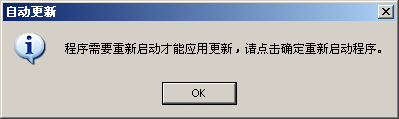
private void StartDownload(List<DownloadFileInfo> downloadList) { DownloadProgress dp = new DownloadProgress(downloadList); if (dp.ShowDialog() == DialogResult.OK) { //更新成功 config.SaveConfig(Path.Combine(AppDomain.CurrentDomain.BaseDirectory, FILENAME)); if (bNeedRestart) { MessageBox.Show("程序需要重新启动才能应用更新,请点击确定重新启动程序。", "自动更新", MessageBoxButtons.OK, MessageBoxIcon.Information); Process.Start(Application.ExecutablePath); Environment.Exit(0); } } }在这个函数中,先调用DownloadProgress下载所有需要下载的文件,然后更新本地配置文件,最后,如果发现某些更新文件需要重新启动应用程序的话,会提示用户重新启动程序。
至此,AutoUpdater这个类的使命就完成了,其实,整个的升级过程也就完成了。(废话)。
最后,我们来看一下这个组件是如何下载更新文件的
DownloadProgress.cs在构造函数中,将要下载的文件列表传进来
public DownloadProgress(List<DownloadFileInfo> downloadFileList) { InitializeComponent(); this.downloadFileList = downloadFileList; }在Form的Load事件中,启动下载线程,开始下载。
private void OnFormLoad(object sender, EventArgs e) { evtDownload = new ManualResetEvent(true); evtDownload.Reset(); Thread t = new Thread(new ThreadStart(ProcDownload)); t.Name = "download"; t.Start(); }下载线程没什么特殊的,使用了WebClient的异步下载文件函数DownloadFileAsync,并且注册了两个事件,分别负责下载进度显示和下载完成后的处理:
clientDownload.DownloadProgressChanged += new DownloadProgressChangedEventHandler(OnDownloadProgressChanged); clientDownload.DownloadFileCompleted += new AsyncCompletedEventHandler(OnDownloadFileCompleted);大家看一下就明白了。
private void ProcDownload() { evtPerDonwload = new ManualResetEvent(false); foreach (DownloadFileInfo file in this.downloadFileList) { total += file.Size; } while (!evtDownload.WaitOne(0, false)) { if (this.downloadFileList.Count == 0) break; DownloadFileInfo file = this.downloadFileList[0]; //Debug.WriteLine(String.Format("Start Download:{0}", file.FileName)); this.ShowCurrentDownloadFileName(file.FileName); //下载 clientDownload = new WebClient(); clientDownload.DownloadProgressChanged += new DownloadProgressChangedEventHandler(OnDownloadProgressChanged); clientDownload.DownloadFileCompleted += new AsyncCompletedEventHandler(OnDownloadFileCompleted); evtPerDonwload.Reset(); clientDownload.DownloadFileAsync(new Uri(file.DownloadUrl), Path.Combine(AppDomain.CurrentDomain.BaseDirectory, file.FileFullName + ".tmp"), file); //等待下载完成 evtPerDonwload.WaitOne(); clientDownload.Dispose(); clientDownload = null; //移除已下载的文件 this.downloadFileList.Remove(file); } //Debug.WriteLine("All Downloaded"); if (this.downloadFileList.Count == 0) Exit(true); else Exit(false); evtDownload.Set(); }最后,在OnDownloadFileCompleted函数中进行最后的处理。包括备份原文件,替换现有文件等。
void OnDownloadFileCompleted(object sender, AsyncCompletedEventArgs e) { DownloadFileInfo file = e.UserState as DownloadFileInfo; nDownloadedTotal += file.Size; this.SetProcessBar(0, (int)(nDownloadedTotal * 100 / total)); //Debug.WriteLine(String.Format("Finish Download:{0}", file.FileName)); //替换现有文件 string filePath = Path.Combine(AppDomain.CurrentDomain.BaseDirectory, file.FileFullName); if (File.Exists(filePath)) { if (File.Exists(filePath + ".old")) File.Delete(filePath + ".old"); File.Move(filePath, filePath + ".old"); } File.Move(filePath + ".tmp", filePath); //继续下载其它文件 evtPerDonwload.Set(); }其它的函数只是一些显示进度条和下载信息的,这里就不再详细介绍了。大家可以下载源码看一下。
最后说一下,由于个人能力和时间的问题,这个组件还有一些不完善的地方,比如配置文件比较复杂等,如果您对这个组件有什么改进的话,请务必发给我一份,我的邮件是:iyondkoo@gmail.com.谢谢。
再做个广告:VS2005专业教程站是小弟最近做的一个网站,主要是提供VS2005、ASP.NET相关教程,希望大家有什么问题可以去看一下,同时给我提些建议。谢谢大家啦。
源码下载

 浙公网安备 33010602011771号