

用.Net打造一个移动客户端(Android/IOS)的服务端框架NHM(四)——Android端Http访问类
本章目的
在上一章中,我们利用Hibernate Tools完成了Android Model层的建立,依赖Hibernate Tools的强大功能,自动生成了Model层。在本章,我们将继续我们的项目,在Android端完成Http一个访问类,并完成整个请求、处理Response、反序列化Json的工作。那么首先我们来看下Android的Http访问。
Http, POST or GET?
在开始正式设计Http访问类之前,我们必须先了解一些关于Http协议的必要知识。在Http1.1规范中,一共定义了8种方法,在这里与我们有关的是Get、post两种方法,对大多数程序员来说,大致的意思我们都明白,但能完整理解两种方法的区别和联系的,就不那么容易了。这里作者不去从协议本身去探讨二者区别,只从应用层来讲:
GET:向服务器的特定资源发出请求,这种方法要求所有传递的参数只能通过URL的QueryString,由于URL长度大小最大有2KB限制,所以一般只能传递简单的参数。
POST:向服务器发送数据,这种方法可以将参数包含在请求体中,可以用来传输大量数据,如上传文件等。
如果你想了解HTTP协议的更多细节,这篇文章写的很详细,值得参考:http://www.cnblogs.com/skynet/archive/2010/05/18/1738301.html
Android的Http访问类
http访问类类的部分代码参考了开源的 https://github.com/yusuke
首先我们来看下Android中进行httprequest的全过程
1、根据URL生成成java.net.HttpURLConnection对象
2、设置HttpURLConnection允许返回值
3、设置HttpURLConnection的Header数据(Header数据保存在 Hashmap<String,String> requestHeaders中,从Configration静态类取得)
4、根据不同类型的httpMethod设置HttpURLConnection 的 RequestMethod
-----------至此HttpURLConnection生成完毕----------------
5、通过调用HttpURLConnection.getInputStream()方法实现Http连接
6、将服务器发回来的数据生成为Response对象(此对象由我们封装,表示服务器返回的数据)
7、通过HttpURLConnection.getResponseCode()的值判断此次Http请求是否成功
8、如果成功,HttpURLConnection.getInputStream()即为服务器返回的http流
-----------至此Request请求完毕----------
通过上面的流程,我们可以设计我们的http访问类,最核心的是下面几个类
HttpClientP:处理Http请求,包括重要的httprequest()方法以及设置header等方法
Response:HttpRequest的返回值,包括asDocument(), asJsonArray(), asString()等与取结果流有关方法,以及 getStatusCode()等与取连接状态、头变量相关的方法
Configuration:保存Properties的静态类,设置连接超时时间、重试次数等
下面给出http访问类的主要方法。
public class HttpClientP implements java.io.Serializable {
	private static final int OK = 200;// OK: Success!

	public Response httpRequest(String url, PostParameter[] postParams,
			boolean authenticated, String httpMethod) throws NException {
		int retriedCount;
		int retry = retryCount + 1;
		Response res = null;
		for (retriedCount = 0; retriedCount < retry; retriedCount++) {
			int responseCode = -1;
			try {
				HttpURLConnection con = null;
				OutputStream osw = null;
				try {
					con = getConnection(url);
					con.setDoInput(true);
					setHeaders(url, postParams, con, false, httpMethod);
					if (null != postParams || "POST".equals(httpMethod)) {
						con.setRequestMethod("POST");
						con.setRequestProperty("Content-Type",
								"application/x-www-form-urlencoded");
						con.setDoOutput(true);
						String postParam = "";
						if (postParams != null) {
							postParam = encodeParameters(postParams);
						}
						log("Post Params: ", postParam);
						byte[] bytes = postParam.getBytes("UTF-8");

						con.setRequestProperty("Content-Length",
								Integer.toString(bytes.length));

						osw = con.getOutputStream();
						osw.write(bytes);
						osw.flush();
						osw.close();
					} else if ("DELETE".equals(httpMethod)) {
						con.setRequestMethod("DELETE");
					} else {
						con.setRequestMethod("GET");
					}


					res = new Response(con);
					responseCode = con.getResponseCode();

					if (DEBUG) {
						log("Response: ");
						Map<String, List<String>> responseHeaders = con
								.getHeaderFields();
						for (String key : responseHeaders.keySet()) {
							List<String> values = responseHeaders.get(key);
							for (String value : values) {
								if (null != key) {
									log(key + ": " + value);
								} else {
									log(value);
								}
							}
						}
					}
					if (responseCode != OK) {
						if (responseCode < INTERNAL_SERVER_ERROR
								|| retriedCount == retryCount) {
							throw new NException(getCause(responseCode)
									+ "\n" + res.asString(), responseCode);
						}
						// will retry if the status code is
						// INTERNAL_SERVER_ERROR
					} else {
						break;
					}
				} finally {
					try {
						osw.close();
					} catch (Exception ignore) {
					}
				}
			} catch (IOException ioe) {
				// connection timeout or read timeout
				if (retriedCount == retryCount) {
					throw new NException(ioe.getMessage(), ioe,
							responseCode);
				}
			}
			try {
				if (DEBUG && null != res) {
					res.asString();
				}
				log("Sleeping " + retryIntervalMillis
						+ " millisecs for next retry.");
				Thread.sleep(retryIntervalMillis);
			} catch (InterruptedException ignore) {
				// nothing to do
			}
		}
		return res;
	}


}
public class Response {

    private int statusCode;
    private Document responseAsDocument = null;
    private String responseAsString = null;
    private InputStream is;
    private HttpURLConnection con;
    private boolean streamConsumed = false;

   public Response()  {

    }
    public Response(HttpURLConnection con) throws IOException {
        this.con = con;
        this.statusCode = con.getResponseCode();
        if(null == (is = con.getErrorStream())){
            is = con.getInputStream();
        }
        if (null != is && "gzip".equals(con.getContentEncoding())) {
            // the response is gzipped
            is = new GZIPInputStream(is);
        }
    }
}
服务器端JSON序列化
前文已经说过,服务器采用Newtonsoft.JSON来序列化LINQ数据,这里,我们稍微将LinqToJson扩展一下,以适合Android端的GSON反序列化方法。先看代码:
 public static string LinqToJson(object o)
        {
            string rtn = "";
            //设置Json序列化格式
            JsonSerializer js = new JsonSerializer();
            //JSON中的Key名称采用驼峰命名法,且首字母小写
            js.ContractResolver = new CamelCasePropertyNamesContractResolver();

            //设置JSON Date类型转换格式
            Newtonsoft.Json.Converters.IsoDateTimeConverter timeConverter = new Newtonsoft.Json.Converters.IsoDateTimeConverter();
            timeConverter.DateTimeFormat = "yyyy'-'MM'-'dd' 'HH':'mm':'ss";
            js.Converters.Add(timeConverter);

            //转换为为Json Array
            rtn = JArray.FromObject(o, js).ToString();
            return rtn;
        }

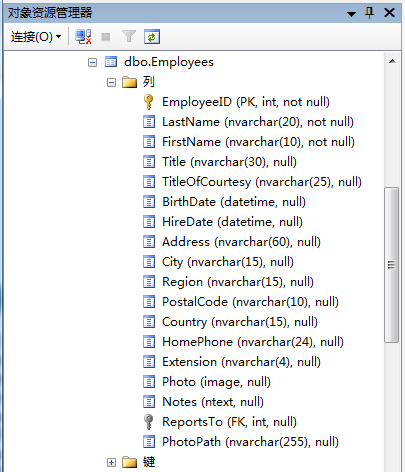
与之前的版本相比,我们主要设置了JSON序列化格式,由于hibernate Tools生成的JavaBean类均采用驼峰命名,且首字母小写,所以要在Newtonsoft.json中设置一个JsonSerializer来实现匹配。另外,Date类型是必须要重新处理的数据类型。
测试一下:
 public partial class Default : System.Web.UI.Page
    {
        protected void Page_Load(object sender, EventArgs e)
        {
            EmployeeEntity ee = new EmployeeEntity(1);
            lt_rtn.Text = ee.toJson();

        }
    }
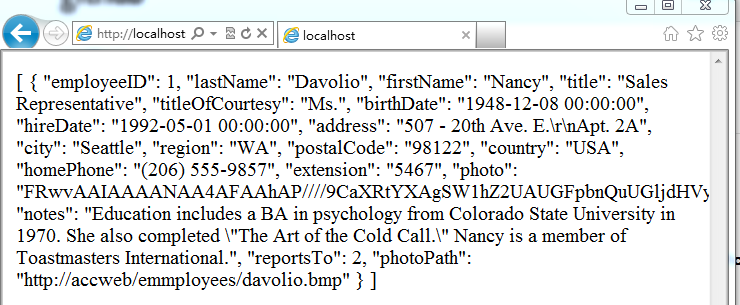 数据库中的字段,可以看到已经转换字段名为首字母小写了:
客户端Android采用GSON反序列化
有了客户端的Http访问类,我们就可以来访问服务器了,我们采用下面的步骤来进行:
1、新建一个HashMap,包含发送到服务器的QueryString参数。在将来的使用中,通过向HashMap添加K-V对来实现添加QueryString参数
2、将此HashMap转换为一个加密的字符串
3、使用http.get()方法与服务器连接
4、如果出现Exception则进入全局Exception对象处理
5、连接正常的话,反序列化结果为对应对象
6、连接至此完成
现在我们暂时先使用一个Activity来测试这个连接过程,将所有流程都写入OnCreate()中,暂不考虑其他有更有逻辑的封装。
public class MainActivity extends Activity {
    /** Called when the activity is first created. */
	private String baseURL = Configuration.getServer();
	protected HttpClientP http = new HttpClientP();

    @Override
    public void onCreate(Bundle savedInstanceState) {
        super.onCreate(savedInstanceState);
        setContentView(R.layout.main);
        TextView tvEmpName = (TextView) this.findViewById(R.id.empName);
        //设置QueryString参数的HashMap
        HashMap param = new HashMap();
		param.put("cmd", "test");

		//将此HashMap转换为加密字符串
		String parmstr = URLParamUtils.toURLParam(param);
		String paramstrall = baseURL+ "default.aspx?a=" + parmstr;

		try {
			//使用Http.get()连接 返回JsonArray
			JSONArray json = get(paramstrall,null, true).asJSONArray();
			String jsonfirst = json.get(0).toString();

			//新建Gson对象并设置与服务器发来相同格式的Date类型
			Gson gson = new GsonBuilder().setDateFormat("yyyy-MM-dd HH:mm:ss").create();

			//反序列化Json数据为 Employees类型
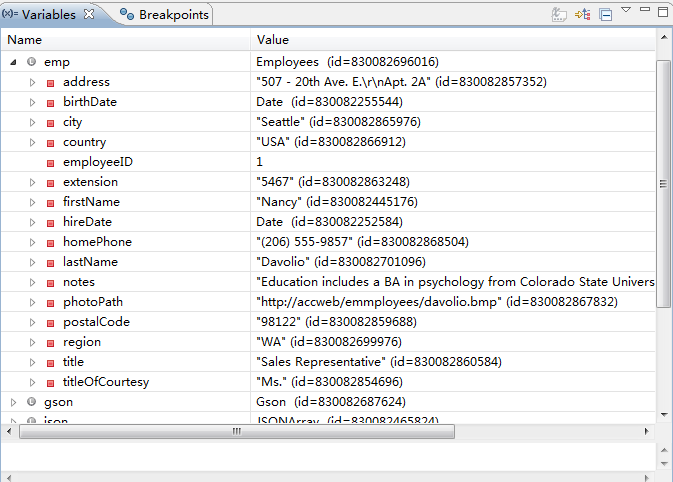
			Employees emp = gson.fromJson(jsonfirst, Employees.class);

			//测试Employees数据
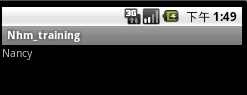
			tvEmpName.setText(emp.getFirstName());

		} catch (NException e) {
			// TODO Auto-generated catch block
			e.printStackTrace();
		} catch (JSONException e) {
			// TODO Auto-generated catch block
			e.printStackTrace();
		}
    }
	protected Response get(String url, PostParameter[] params,
			boolean authenticate) throws NException  {

		if (null != params && params.length > 0) {
			url += "&" + HttpClientP.encodeParameters(params);
		}
		return http.get(url, authenticate);
	}

}
结果如下
小结与扩展
这一章我们主要解决了移动客户端与服务器使用HTTP访问的问题,我们了解了http访问的整个过程,完成了客户端的HTTP访问类,在最后的例子中我们使用了http.get()方法来与服务器交互,当然我们的访问类也支持post方法。
在接下来的一章,我们将继续扩展HTTP访问的客户端与服务器端,主要解决传输加密、参数等问题。


 浙公网安备 33010602011771号