


在系统中经常需要进行时间日期选择(比如查询时间范围内的信息、填写日期等),使用时间日期选择控件不仅能提高效率,而且不会写错格式!现把自己在.net项目中经常使用的一款时间日期选择控件整理出来,希望对大家有所帮助!
在系统中经常需要进行时间日期选择(比如查询时间范围内的信息、填写日期等),使用时间日期选择控件不仅能提高效率,而且不会写错格式!
现把自己在.net项目中经常使用的一款时间日期选择控件整理出来,希望对大家有所帮助!
首先大家来看看效果图:
 (gif格式,用于选择图标)
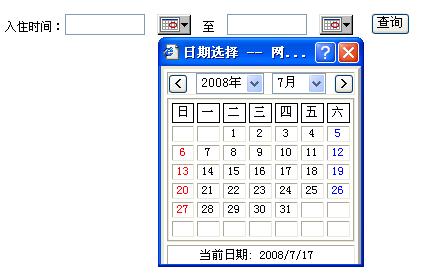
js脚本:

 calendar.js
 var gdCtrl = new Object();
var goSelectTag = new Array();
var gcGray = "#e8e8ea";
var gcToggle = "#ffff00";
var gcBG = "#FFFFFF";
var gcBorder ="#000000"
var gcFont ="#000000"
var BgColor = "#FFFFFF";
var previousObject = null;
var targert;
var noOtherMonth = 1;
var gdCurDate = new Date();
var giYear = gdCurDate.getFullYear();
var giMonth = gdCurDate.getMonth()+1;
var giDay = gdCurDate.getDate();
var gCalMode = "";
var gCalDefDate = "";
var CAL_MODE_NOBLANK = "2";
function fSetDate(iYear, iMonth, iDay) {
{
 //VicPopCal.style.visibility = "hidden";

 if ((iYear == 0) && (iMonth == 0) && (iDay == 0)){
gdCtrl.value = "";
}else{
iMonth = iMonth + 100 + "";
iMonth = iMonth.substring(1);
iDay = iDay + 100 + "";
iDay = iDay.substring(1);
gdCtrl.value = iYear+"-"+iMonth+"-"+iDay;
 }
}
for (i in goSelectTag)
goSelectTag[i].style.visibility = "visible";
goSelectTag.length = 0;
window.returnValue=gdCtrl.value;
target.value = gdCtrl.value;
window.close();
 }
}
function HiddenDiv()
{
var i;
VicPopCal.style.visibility = "hidden";
for (i in goSelectTag)
goSelectTag[i].style.visibility = "visible";
goSelectTag.length = 0;
}
function fSetSelected(aCell){
var iOffset = 0;
var iYear = parseInt(tbSelYear.value);
var iMonth = parseInt(tbSelMonth.value);
aCell.bgColor = gcBG;
with (aCell.children["cellText"]){
var iDay = parseInt(innerText);
if (color==gcGray) {
if (noOtherMonth != 1) {
iOffset = (Victor<10)?-1:1;
iOffset = (iDay < 15 )?1:-1;
} else {
return 1;
}
}
iMonth += iOffset;
if (iMonth<1) {
iYear--;
iMonth = 12;
}else if (iMonth>12){
iYear++;
iMonth = 1;
}
}
fSetDate(iYear, iMonth, iDay);
}
function Point(iX, iY){
this.x = iX;
this.y = iY;
}
function fBuildCal(iYear, iMonth) {
var aMonth=new Array();
for(i=1;i<7;i++)
aMonth[i]=new Array(i);
var dCalDate=new Date(iYear, iMonth-1, 1);
var iDayOfFirst=dCalDate.getDay();
var iDaysInMonth=new Date(iYear, iMonth, 0).getDate();
var iOffsetLast=new Date(iYear, iMonth-1, 0).getDate()-iDayOfFirst+1;
var iDate = 1;
var iNext = 1;
for (d = 0; d < 7; d++)
aMonth[1][d] = (d<iDayOfFirst)?-(iOffsetLast+d):iDate++;
for (w = 2; w < 7; w++)
for (d = 0; d < 7; d++)
aMonth[w][d] = (iDate<=iDaysInMonth)?iDate++:-(iNext++);
return aMonth;
}
function fDrawCal(iYear, iMonth, iCellHeight, sDateTextSize) {
var WeekDay = new Array("日","一","二","三","四","五","六");
var styleTD = " bgcolor='"+gcBG+"' bordercolor='"+gcBorder+"' valign='middle' align='center' height='20' style='font-size:12px; ";
var styleTD2 = "valign='middle' align='center' height='"+iCellHeight+"' style='font-size:12px; ";
with (document) {
write("<tr>");
for(i=0; i<7; i++)
write("<td "+styleTD+" color:#000000' >" + WeekDay[i] + "</td>");
write("</tr>");
for (w = 1; w < 7; w++) {
write("<tr>");
for (d = 0; d < 7; d++) {
write("<td id=calCell "+styleTD2+"cursor:hand;' onMouseOver='this.bgColor=gcToggle' onMouseOut='this.bgColor=gcBG' onclick='fSetSelected(this)'>");
write("<font id=cellText ><b> </b></font>");
write("</td>")
}
write("</tr>");
}
}
}
function fUpdateCal(iYear, iMonth) {
myMonth = fBuildCal(iYear, iMonth);
var i = 0;
for (w = 0; w < 6; w++)
for (d = 0; d < 7; d++)
with (cellText[(7*w)+d]) {
Victor = i++;
if (myMonth[w+1][d]<0) {
color = gcGray;
if (noOtherMonth!=1) innerText = -myMonth[w+1][d];
else innerText = " ";
}else{
// Modified by maxiang for we need
// Saturday displayed in blue font color.
//color = ((d==0)||(d==6))?"red":"black";
if( d == 0 ){
color = "red";
}else if( d == 6 ){
color = "blue";
}else{
color = "black";
}
// End of above maxiang
innerText = myMonth[w+1][d];
}
}
}
function fSetYearMon(iYear, iMon){
tbSelMonth.options[iMon-1].selected = true;
for (i = 0; i < tbSelYear.length; i++)
if (tbSelYear.options[i].value == iYear)
tbSelYear.options[i].selected = true;
fUpdateCal(iYear, iMon);
}
function fPrevMonth(){
var iMon = tbSelMonth.value;
var iYear = tbSelYear.value;
if (--iMon<1) {
iMon = 12;
iYear--;
}
fSetYearMon(iYear, iMon);
}
function fNextMonth(){
var iMon = tbSelMonth.value;
var iYear = tbSelYear.value;
if (++iMon>12) {
iMon = 1;
iYear++;
}
fSetYearMon(iYear, iMon);
}
function fToggleTags(){
with (document.all.tags("SELECT")){
for (i=0; i<length; i++)
if ((item(i).Victor!="Won")&&fTagInBound(item(i))){
item(i).style.visibility = "hidden";
goSelectTag[goSelectTag.length] = item(i);
}
}
}
function fTagInBound(aTag){
with (VicPopCal.style){
var l = parseInt(left);
var t = parseInt(top);
var r = l+parseInt(width);
var b = t+parseInt(height);
var ptLT = fGetXY(aTag);
return !((ptLT.x>r)||(ptLT.x+aTag.offsetWidth<l)||(ptLT.y>b)||(ptLT.y+aTag.offsetHeight<t));
}
}
function fGetXY(aTag){
var oTmp = aTag;
var pt = new Point(0,0);
do {
pt.x += oTmp.offsetLeft;
pt.y += oTmp.offsetTop;
oTmp = oTmp.offsetParent;
} while(oTmp.tagName!="BODY");
return pt;
}
// Main: popCtrl is the widget beyond which you want this calendar to appear;
// dateCtrl is the widget into which you want to put the selected date.
// i.e.: <input type="text" name="dc" style="text-align:center" readonly><INPUT type="button" value="V" onclick="fPopCalendar(dc,dc);return false">
function fPopCalendar(popCtrl, dateCtrl,Targetctrl,mode, defDate){
gCalMode = mode;
gCalDefDate = defDate;
target = Targetctrl;
if (popCtrl == previousObject){
if (VicPopCal.style.visibility == "visible"){
//HiddenDiv();
return true;
}
}
previousObject = popCtrl;
gdCtrl = dateCtrl;
fSetYearMon(giYear, giMonth);
var point = fGetXY(popCtrl);
if( gCalMode == CAL_MODE_NOBLANK ){
document.all.CAL_B_BLANK.style.visibility = "hidden";
}else{
document.all.CAL_B_BLANK.style.visibility = "visible";
}
with (VicPopCal.style) {
left = point.x;
top = point.y+popCtrl.offsetHeight;
width = VicPopCal.offsetWidth;
height = VicPopCal.offsetHeight;
fToggleTags(point);
visibility = 'visible';
}
}
var gMonths = new Array("1月","2月","3月","4月","5月","6月","7月","8月","9月","10月","11月","12月");
with (document) {
write("<Div id='VicPopCal' style='OVERFLOW:hidden;POSITION:absolute;VISIBILITY:hidden;border:0px ridge;width:100%;height:100%;top:0;left:0;z-index:100;overflow:hidden'>");
write("<table bgcolor='"+BgColor+"' BORDER=3 CELLSPACING=3 CELLPADDING=%3>");
write("<TR>");
write("<td valign='middle' align='center'><input type='button' name='PrevMonth' value='<' style='height:20;width:20;FONT:bold' onClick='fPrevMonth()'>");
write(" <SELECT name='tbSelYear' onChange='fUpdateCal(tbSelYear.value, tbSelMonth.value)' Victor='Won'>");
for(i=1949;i<2020;i++)
write("<OPTION value='"+i+"'>"+i+"年</OPTION>");
write("</SELECT>");
write(" <select name='tbSelMonth' onChange='fUpdateCal(tbSelYear.value, tbSelMonth.value)' Victor='Won'>");
for (i=0; i<12; i++)
write("<option value='"+(i+1)+"'>"+gMonths[i]+"</option>");
write("</SELECT>");
write(" <input type='button' name='PrevMonth' value='>' style='height:20;width:20;FONT:bold' onclick='fNextMonth()'>");
write("</td>");
write("</TR><TR>");
write("<td align='center'>");
write("<DIV'><table width='100%' border='1' CELLSPACING=3 CELLPADDING=%3>");
fDrawCal(giYear, giMonth, 8, '12');
write("</table></DIV>");
write("</td>");
write("</TR><TR><TD align='center'>");
write("<TABLE width='100%'><TR><TD align='center'>");
write("<font ID=\"CAL_B_BLANK\" style='color:"+gcFont+"; visibility:visible; cursor:hand; font-size:12px' onMouseOver='this.style.color=gcToggle' onMouseOut='this.style.color=gcFont'></font>");
write("</td><td algin='center'>");
write("<font style='color:"+gcFont+";cursor:hand; font-size:12px' onclick='fSetDate(giYear,giMonth,giDay)' onMouseOver='this.style.color=gcToggle' onMouseOut='this.style.color=gcFont'> 当前日期: "+giYear+"/"+giMonth+"/"+giDay+"</font>");
write("</td></tr></table>");
write("</TD></TR>");
write("</TABLE></Div>");
}
html文件:
Calendar.htm
<HTML>
<HEAD>
<title>日期选择</title>
<META http-equiv="Content-Type" content="text/html; charset=gb2312">
</HEAD>
<BODY onload="fload()">
<meta name="GENERATOR" content="Microsoft FrontPage 4.0">
<meta name="ProgId" content="FrontPage.Editor.Document">
<SCRIPT src="calendar.js"></SCRIPT>
<SCRIPT>
function fload()
{
var a = window.dialogArguments;
fPopCalendar(document.all.txt1, document.all.txt1,a);
}
function fkeydown()
{
if(event.keyCode==27){
event.returnValue = null;
window.returnValue = null;
window.close();
}
}
document.onkeydown=fkeydown;
</SCRIPT>
<INPUT id="txt1" style="DISPLAY: none">
</BODY>
</HTML>
使用实例:
Code
<script>
function PopCalendar(obj)
{
showx = event.screenX - event.offsetX - 4 - 10 ; // + deltaX;
showy = event.screenY - event.offsetY -168; // + deltaY;
newWINwidth = 210 + 4 + 18;
window.showModalDialog("calendar.htm",obj,"dialogWidth:206px; dialogHeight:230px; dialogLeft:"+showx+"px; dialogTop:"+showy+"px; status:no; directories:yes;scrollbars:no;Resizable=no; ");
}
</script>
<TR>
<TD align="left" colSpan="2"><FONT face="宋体">
<asp:label id="Label4" runat="server" Font-Size="12px">姓名:</asp:label>
<asp:textbox id="TxtName" runat="server"></asp:textbox>
<asp:label id="Label5" runat="server" Font-Size="12px">工作单位:</asp:label>
<asp:textbox id="TxtWorkCorp" runat="server"></asp:textbox>
<asp:label id="Label8" runat="server" Font-Size="12px">入住时间:</asp:label>
<asp:textbox id="StartTime" runat="server" Width="80" CssClass="textbox"></asp:textbox>
<INPUT id="CalendarStart" onclick="PopCalendar(StartTime);return false;" tabIndex="14" type="image" src="images/calendar.gif" align="absMiddle">
<asp:label id="Label1" runat="server" Font-Size="12px">至</asp:label>
<asp:textbox id="EndTime" tabIndex="15" runat="server" Width="80" CssClass="textbox"></asp:textbox>
<INPUT id="CalendarEnd" onclick="PopCalendar(EndTime);return false;" tabIndex="16" type="image" src="images/calendar.gif" align="absMiddle">
<asp:button id="BtnSearch" runat="server" Text="查询"></asp:button><FONT face="宋体"></FONT></FONT>
</TD>
</TR>
现把自己在.net项目中经常使用的一款时间日期选择控件整理出来,希望对大家有所帮助!
首先大家来看看效果图:
(gif格式,用于选择图标)js脚本:
calendar.jsvar gdCtrl = new Object();var goSelectTag = new Array();var gcGray = "#e8e8ea";var gcToggle = "#ffff00";var gcBG = "#FFFFFF";var gcBorder ="#000000"var gcFont ="#000000"var BgColor = "#FFFFFF";var previousObject = null;var targert;var noOtherMonth = 1;var gdCurDate = new Date();var giYear = gdCurDate.getFullYear();var giMonth = gdCurDate.getMonth()+1;var giDay = gdCurDate.getDate();var gCalMode = "";var gCalDefDate = "";var CAL_MODE_NOBLANK = "2";function fSetDate(iYear, iMonth, iDay){ //VicPopCal.style.visibility = "hidden"; if ((iYear == 0) && (iMonth == 0) && (iDay == 0)){ gdCtrl.value = ""; }else{ iMonth = iMonth + 100 + ""; iMonth = iMonth.substring(1); iDay = iDay + 100 + ""; iDay = iDay.substring(1); gdCtrl.value = iYear+"-"+iMonth+"-"+iDay; } for (i in goSelectTag) goSelectTag[i].style.visibility = "visible"; goSelectTag.length = 0; window.returnValue=gdCtrl.value; target.value = gdCtrl.value; window.close();}function HiddenDiv(){ var i; VicPopCal.style.visibility = "hidden"; for (i in goSelectTag) goSelectTag[i].style.visibility = "visible"; goSelectTag.length = 0;}function fSetSelected(aCell){ var iOffset = 0; var iYear = parseInt(tbSelYear.value); var iMonth = parseInt(tbSelMonth.value); aCell.bgColor = gcBG; with (aCell.children["cellText"]){ var iDay = parseInt(innerText); if (color==gcGray) { if (noOtherMonth != 1) { iOffset = (Victor<10)?-1:1; iOffset = (iDay < 15 )?1:-1; } else { return 1; } } iMonth += iOffset; if (iMonth<1) { iYear--; iMonth = 12; }else if (iMonth>12){ iYear++; iMonth = 1; } } fSetDate(iYear, iMonth, iDay);}function Point(iX, iY){ this.x = iX; this.y = iY;}function fBuildCal(iYear, iMonth) { var aMonth=new Array(); for(i=1;i<7;i++) aMonth[i]=new Array(i); var dCalDate=new Date(iYear, iMonth-1, 1); var iDayOfFirst=dCalDate.getDay(); var iDaysInMonth=new Date(iYear, iMonth, 0).getDate(); var iOffsetLast=new Date(iYear, iMonth-1, 0).getDate()-iDayOfFirst+1; var iDate = 1; var iNext = 1; for (d = 0; d < 7; d++) aMonth[1][d] = (d<iDayOfFirst)?-(iOffsetLast+d):iDate++; for (w = 2; w < 7; w++) for (d = 0; d < 7; d++) aMonth[w][d] = (iDate<=iDaysInMonth)?iDate++:-(iNext++); return aMonth;}function fDrawCal(iYear, iMonth, iCellHeight, sDateTextSize) { var WeekDay = new Array("日","一","二","三","四","五","六"); var styleTD = " bgcolor='"+gcBG+"' bordercolor='"+gcBorder+"' valign='middle' align='center' height='20' style='font-size:12px; "; var styleTD2 = "valign='middle' align='center' height='"+iCellHeight+"' style='font-size:12px; "; with (document) { write("<tr>"); for(i=0; i<7; i++) write("<td "+styleTD+" color:#000000' >" + WeekDay[i] + "</td>"); write("</tr>"); for (w = 1; w < 7; w++) { write("<tr>"); for (d = 0; d < 7; d++) { write("<td id=calCell "+styleTD2+"cursor:hand;' onMouseOver='this.bgColor=gcToggle' onMouseOut='this.bgColor=gcBG' onclick='fSetSelected(this)'>"); write("<font id=cellText ><b> </b></font>"); write("</td>") } write("</tr>"); } }}function fUpdateCal(iYear, iMonth) { myMonth = fBuildCal(iYear, iMonth); var i = 0; for (w = 0; w < 6; w++) for (d = 0; d < 7; d++) with (cellText[(7*w)+d]) { Victor = i++; if (myMonth[w+1][d]<0) { color = gcGray; if (noOtherMonth!=1) innerText = -myMonth[w+1][d]; else innerText = " "; }else{ // Modified by maxiang for we need // Saturday displayed in blue font color. //color = ((d==0)||(d==6))?"red":"black"; if( d == 0 ){ color = "red"; }else if( d == 6 ){ color = "blue"; }else{ color = "black"; } // End of above maxiang innerText = myMonth[w+1][d]; } }}function fSetYearMon(iYear, iMon){ tbSelMonth.options[iMon-1].selected = true; for (i = 0; i < tbSelYear.length; i++) if (tbSelYear.options[i].value == iYear) tbSelYear.options[i].selected = true; fUpdateCal(iYear, iMon);}function fPrevMonth(){ var iMon = tbSelMonth.value; var iYear = tbSelYear.value; if (--iMon<1) { iMon = 12; iYear--; } fSetYearMon(iYear, iMon);}function fNextMonth(){ var iMon = tbSelMonth.value; var iYear = tbSelYear.value; if (++iMon>12) { iMon = 1; iYear++; } fSetYearMon(iYear, iMon);}function fToggleTags(){ with (document.all.tags("SELECT")){ for (i=0; i<length; i++) if ((item(i).Victor!="Won")&&fTagInBound(item(i))){ item(i).style.visibility = "hidden"; goSelectTag[goSelectTag.length] = item(i); } }}function fTagInBound(aTag){ with (VicPopCal.style){ var l = parseInt(left); var t = parseInt(top); var r = l+parseInt(width); var b = t+parseInt(height); var ptLT = fGetXY(aTag); return !((ptLT.x>r)||(ptLT.x+aTag.offsetWidth<l)||(ptLT.y>b)||(ptLT.y+aTag.offsetHeight<t)); }}function fGetXY(aTag){ var oTmp = aTag; var pt = new Point(0,0); do { pt.x += oTmp.offsetLeft; pt.y += oTmp.offsetTop; oTmp = oTmp.offsetParent; } while(oTmp.tagName!="BODY"); return pt;}// Main: popCtrl is the widget beyond which you want this calendar to appear;// dateCtrl is the widget into which you want to put the selected date.// i.e.: <input type="text" name="dc" style="text-align:center" readonly><INPUT type="button" value="V" onclick="fPopCalendar(dc,dc);return false">function fPopCalendar(popCtrl, dateCtrl,Targetctrl,mode, defDate){ gCalMode = mode; gCalDefDate = defDate; target = Targetctrl; if (popCtrl == previousObject){ if (VicPopCal.style.visibility == "visible"){ //HiddenDiv(); return true; } } previousObject = popCtrl; gdCtrl = dateCtrl; fSetYearMon(giYear, giMonth); var point = fGetXY(popCtrl); if( gCalMode == CAL_MODE_NOBLANK ){ document.all.CAL_B_BLANK.style.visibility = "hidden"; }else{ document.all.CAL_B_BLANK.style.visibility = "visible"; } with (VicPopCal.style) { left = point.x; top = point.y+popCtrl.offsetHeight; width = VicPopCal.offsetWidth; height = VicPopCal.offsetHeight; fToggleTags(point); visibility = 'visible'; }}var gMonths = new Array("1月","2月","3月","4月","5月","6月","7月","8月","9月","10月","11月","12月");with (document) {write("<Div id='VicPopCal' style='OVERFLOW:hidden;POSITION:absolute;VISIBILITY:hidden;border:0px ridge;width:100%;height:100%;top:0;left:0;z-index:100;overflow:hidden'>");write("<table bgcolor='"+BgColor+"' BORDER=3 CELLSPACING=3 CELLPADDING=%3>");write("<TR>");write("<td valign='middle' align='center'><input type='button' name='PrevMonth' value='<' style='height:20;width:20;FONT:bold' onClick='fPrevMonth()'>");write(" <SELECT name='tbSelYear' onChange='fUpdateCal(tbSelYear.value, tbSelMonth.value)' Victor='Won'>");for(i=1949;i<2020;i++) write("<OPTION value='"+i+"'>"+i+"年</OPTION>");write("</SELECT>");write(" <select name='tbSelMonth' onChange='fUpdateCal(tbSelYear.value, tbSelMonth.value)' Victor='Won'>");for (i=0; i<12; i++) write("<option value='"+(i+1)+"'>"+gMonths[i]+"</option>");write("</SELECT>");write(" <input type='button' name='PrevMonth' value='>' style='height:20;width:20;FONT:bold' onclick='fNextMonth()'>");write("</td>");write("</TR><TR>");write("<td align='center'>");write("<DIV'><table width='100%' border='1' CELLSPACING=3 CELLPADDING=%3>");fDrawCal(giYear, giMonth, 8, '12');write("</table></DIV>");write("</td>");write("</TR><TR><TD align='center'>");write("<TABLE width='100%'><TR><TD align='center'>");write("<font ID=\"CAL_B_BLANK\" style='color:"+gcFont+"; visibility:visible; cursor:hand; font-size:12px' onMouseOver='this.style.color=gcToggle' onMouseOut='this.style.color=gcFont'></font>");write("</td><td algin='center'>");write("<font style='color:"+gcFont+";cursor:hand; font-size:12px' onclick='fSetDate(giYear,giMonth,giDay)' onMouseOver='this.style.color=gcToggle' onMouseOut='this.style.color=gcFont'> 当前日期: "+giYear+"/"+giMonth+"/"+giDay+"</font>");write("</td></tr></table>");write("</TD></TR>");write("</TABLE></Div>");}html文件:
Calendar.htm<HTML> <HEAD> <title>日期选择</title> <META http-equiv="Content-Type" content="text/html; charset=gb2312"> </HEAD> <BODY onload="fload()"> <meta name="GENERATOR" content="Microsoft FrontPage 4.0"> <meta name="ProgId" content="FrontPage.Editor.Document"> <SCRIPT src="calendar.js"></SCRIPT> <SCRIPT>function fload(){ var a = window.dialogArguments; fPopCalendar(document.all.txt1, document.all.txt1,a);}function fkeydown(){ if(event.keyCode==27){ event.returnValue = null; window.returnValue = null; window.close(); }}document.onkeydown=fkeydown; </SCRIPT> <INPUT id="txt1" style="DISPLAY: none"> </BODY></HTML>使用实例:
Code <script> function PopCalendar(obj) { showx = event.screenX - event.offsetX - 4 - 10 ; // + deltaX; showy = event.screenY - event.offsetY -168; // + deltaY; newWINwidth = 210 + 4 + 18; window.showModalDialog("calendar.htm",obj,"dialogWidth:206px; dialogHeight:230px; dialogLeft:"+showx+"px; dialogTop:"+showy+"px; status:no; directories:yes;scrollbars:no;Resizable=no; "); } </script> <TR> <TD align="left" colSpan="2"><FONT face="宋体"> <asp:label id="Label4" runat="server" Font-Size="12px">姓名:</asp:label> <asp:textbox id="TxtName" runat="server"></asp:textbox> <asp:label id="Label5" runat="server" Font-Size="12px">工作单位:</asp:label> <asp:textbox id="TxtWorkCorp" runat="server"></asp:textbox> <asp:label id="Label8" runat="server" Font-Size="12px">入住时间:</asp:label> <asp:textbox id="StartTime" runat="server" Width="80" CssClass="textbox"></asp:textbox> <INPUT id="CalendarStart" onclick="PopCalendar(StartTime);return false;" tabIndex="14" type="image" src="images/calendar.gif" align="absMiddle"> <asp:label id="Label1" runat="server" Font-Size="12px">至</asp:label> <asp:textbox id="EndTime" tabIndex="15" runat="server" Width="80" CssClass="textbox"></asp:textbox> <INPUT id="CalendarEnd" onclick="PopCalendar(EndTime);return false;" tabIndex="16" type="image" src="images/calendar.gif" align="absMiddle"> <asp:button id="BtnSearch" runat="server" Text="查询"></asp:button><FONT face="宋体"></FONT></FONT> </TD> </TR>
 浙公网安备 33010602011771号